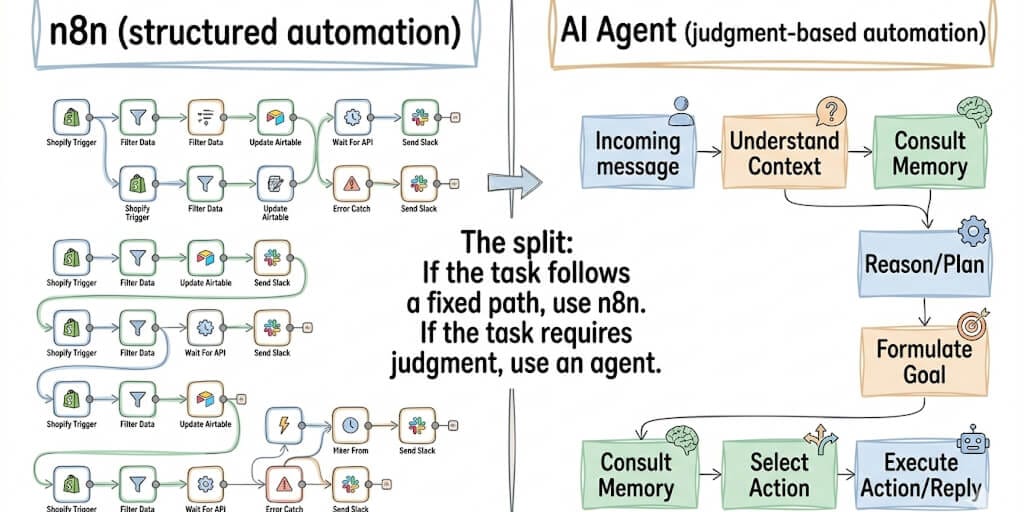
n8n is brilliant at structured, predictable automation. But 7 of these use cases need judgment, context, and natural language. Those belong to an AI agent, not a workflow builder. Here's the complete list.
I was 47 nodes deep in an n8n workflow when I realized something was wrong.
The workflow was supposed to triage customer support emails. Read the email. Classify the priority. Route to the right team. Auto-respond if it's a known question. Simple enough on paper.
But "classify the priority" required understanding context. Is "our system is down" a P1 or a P3? Depends on which system. Depends on the customer. Depends on whether it's actually down or the user forgot their password. That classification requires judgment. And judgment is exactly what n8n doesn't do.
That's when we drew the line. n8n is exceptional at structured, predictable, if-this-then-that automation. 9,652+ community workflow templates. Delivery Hero saved 200 hours/month. Vodafone saved 5,000 person-days per year. The platform works.
But some tasks need a brain, not a flowchart. Here are 25 n8n workflow ideas, split into the 18 that belong in n8n and the 7 that work better with an AI agent.
The 18 n8n workflow ideas that actually belong in n8n
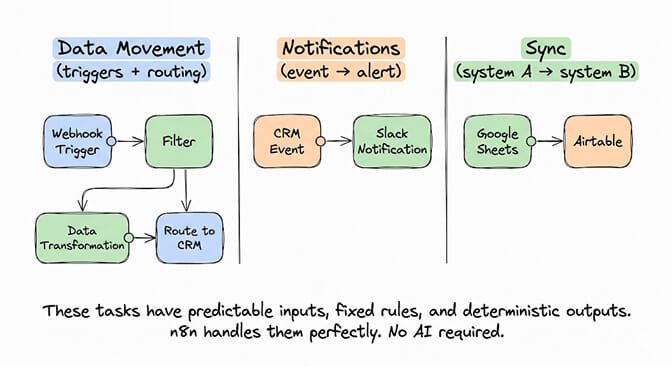
Data movement and sync
- New Stripe payment → Slack notification + Google Sheets row. Classic. Trigger on webhook. Format the data. Post to Slack. Append to sheet. 5 nodes. Done.
- GitHub PR merged → Deploy staging + notify team. Webhook trigger. Call deployment API. Post to Discord or Slack. Linear and predictable.
- Form submission → CRM record + welcome email. Typeform/Jotform submits. n8n creates HubSpot contact. Sends welcome email via SendGrid. No judgment needed.
- Inventory threshold → purchase order + supplier email. When stock drops below X, generate PO, email supplier. Rules-based. Perfect for n8n.
- New blog post published → social media cross-posting. RSS trigger. Format for Twitter, LinkedIn, Facebook. Post via APIs. Deterministic.
Notifications and monitoring
- Server health check → PagerDuty alert. Cron trigger. HTTP request to health endpoint. If non-200, trigger alert. Classic monitoring.
- New review on Google/Yelp → Slack notification. Poll review API. New review detected. Post to channel. Simple trigger-notify pattern.
- SSL certificate expiring → email warning 30 days before. Cron check. Parse certificate date. Compare to today. Send email if within threshold.
- Failed CI/CD pipeline → Slack message with error log. Webhook from GitHub Actions. Extract error. Post formatted message. No interpretation needed.
- Competitor pricing change → spreadsheet log. Scrape pricing page. Compare to last check. Log differences. Alert if threshold crossed.
Data processing
- CSV upload → cleaned data → database insert. Watch folder. Parse CSV. Validate fields. Transform. Insert to PostgreSQL. Batch processing.
- Daily report aggregation → PDF → email to stakeholders. Cron trigger. Query multiple data sources. Build report template. Generate PDF. Send email.
- Invoice processing → OCR → accounting system. Email arrives with PDF. Extract with OCR node. Map fields. Push to QuickBooks/Xero.
For the comparison between workflow automation tools and AI agent platforms, our comparison page covers when each approach makes sense. If you're choosing between visual builders, our n8n vs Make for AI agents guide weighs the two head-to-head.
Internal operations
- Employee onboarding → account creation + access provisioning. HR triggers workflow. Create accounts in 5 systems. Assign permissions. Send welcome packet.
- Meeting scheduled → Zoom link created → attendees notified. Calendar webhook. Create Zoom meeting. Update calendar invite. Send notification.
- Expense receipt → extract amount → categorize → Slack approval. Receipt uploaded. OCR extracts amount. Category assigned by rules. Manager approves via Slack button.
- Weekly backup → compress → upload to S3 → verify. Cron trigger. Dump database. Compress. Upload. Verify checksum. Notify on success/failure.
- Document approval workflow → route by department → track status. Submission triggers. Route based on department field. Track approvals. Notify on completion.
The pattern: These 18 workflows share three traits. Predictable inputs. Fixed rules. Deterministic outputs. They follow the same path every time. n8n is built for exactly this. If your workflow can be drawn as a flowchart with no "it depends" branches, n8n is the right tool.
The 7 ideas that work better with an AI agent
Here's where most people get it wrong.
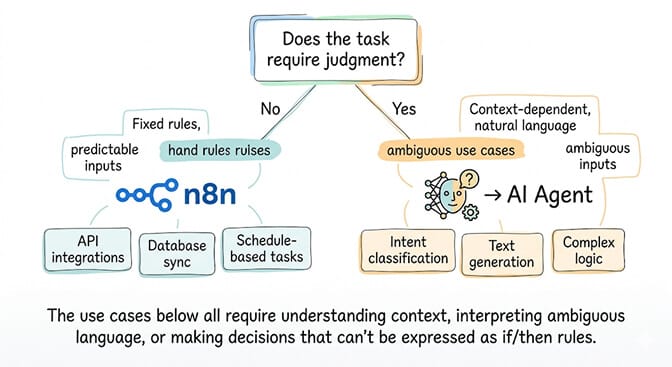
They try to build these in n8n with increasingly complex node chains, regex patterns, and nested conditionals. It works for a week. Then an edge case breaks everything.
- Customer support email triage (the one that broke my workflow). The email says "urgent." Is it? Depends on the customer tier, the issue history, and whether "urgent" means "my dashboard is slow" or "our production database is corrupted." An AI agent reads the email, checks customer context, and routes intelligently. n8n can route by keyword. It can't understand context.
- Meeting notes summarization + action item extraction. Zoom transcript arrives. An AI agent reads it, identifies decisions, extracts action items, and assigns them to the right people. n8n can receive the transcript. It can't understand what was said.
- Content moderation with nuance. User submits a review. Is "this product is killer" positive or violent? Is "I'm dying" a medical emergency or "I'm dying laughing"? An AI agent understands context and tone. n8n keyword filters would flag both.
- Personalized customer outreach based on behavior patterns. The customer browsed product pages 3 times but didn't buy. Opened your last email but didn't reply. Mentioned a competitor in a support ticket. An AI agent synthesizes these signals and drafts a personalized message. n8n can trigger on events. It can't write a message that feels human.
- Conversational Q&A from your knowledge base. Customer asks a question on WhatsApp. The answer requires searching your docs, understanding the question, and composing a natural response. An AI agent does this naturally. n8n would need a pre-built FAQ lookup that breaks on any question not in the database.
If the AI-agent-dependent workflows are the ones you need, BetterClaw handles the agent deployment so you can focus on the workflows. Deploy an AI agent on 15+ messaging channels. Persistent memory across conversations. Smart context management that doesn't burn tokens on overhead. Free tier with 1 agent and BYOK. $49/month for Pro.
- Sales call analysis and CRM updates. Call recording processed. The AI agent listens for buying signals, objections, competitor mentions, and next steps. It updates your CRM fields, logs the insights, and flags follow-up actions. n8n can move the recording. It can't understand what was said.
- Email drafting based on context and conversation history. Your agent reads the incoming email, checks the conversation history (last 5 messages), understands the relationship context, and drafts a response that matches your tone. n8n can trigger on emails. It can't write them.
The decision framework (when to use which)
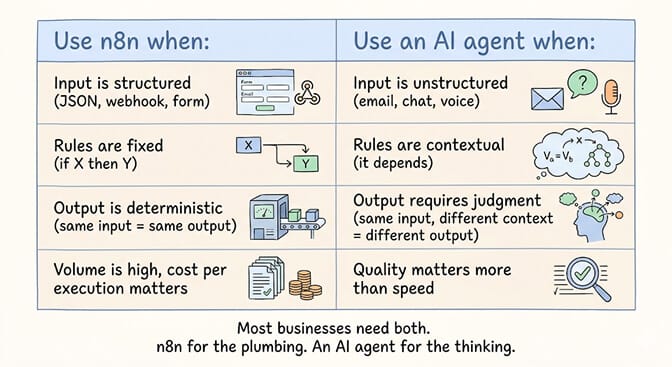
The rule: If you can draw the workflow as a flowchart with no "it depends" branches, use n8n. If the workflow has branches that depend on understanding context, tone, or intent, use an AI agent. If it needs both, use n8n for the trigger and data movement, and hand off the judgment step to an agent.
The hybrid pattern (what power users actually do): n8n triggers the workflow. When a step requires judgment (classify this email, draft this response, analyze this call), n8n calls the AI agent via API. The agent does the thinking. n8n does the plumbing. The agent half of that split is the part you can stand up without code in about a minute. Both tools do what they're best at. If you want the direct platform comparison, our BetterClaw vs n8n breakdown covers the feature-by-feature differences.
For the detailed n8n vs AI agent comparison, our guide covers the architectural differences in depth.
The honest take
Here's the perspective.
n8n is not competing with AI agents. They're different tools for different problems. n8n automates predictable work. AI agents automate judgment-dependent work. The question isn't "which one should I use?" It's "which tasks need which tool?" If you're ready to build the agent side, our overview of AI agent frameworks maps out the code-first and no-code options.
The 18 n8n workflows above will save you hours. Build them. They work. The 7 agent workflows above will fail in n8n because they need understanding, not rules. Build those with an AI agent.
If you want the AI agent side of the equation, give BetterClaw a try. Free tier with 1 agent and BYOK. $49/month for Pro. 15+ messaging channels. Persistent memory. Smart context management. The agent handles the judgment calls. n8n handles the plumbing. Together, they cover everything.
Frequently Asked Questions
What are the best n8n workflow ideas for 2026?
The highest-impact n8n workflows are payment notification pipelines (Stripe → Slack → Sheets), employee onboarding automation (HR trigger → 5 system account creation), data processing chains (CSV → clean → database), and monitoring alerts (health check → PagerDuty). These share fixed rules and deterministic outputs. For tasks requiring judgment (email triage, content moderation, personalized outreach), use an AI agent instead.
Can n8n handle AI-powered workflows?
Yes, n8n has AI nodes (OpenAI, Claude, Hugging Face) and 6,658+ AI-specific workflow templates. But n8n treats AI as a node in a fixed pipeline. AI agents operate autonomously with persistent memory and context awareness. For simple AI tasks (summarize this text, translate this document), n8n works. For complex AI tasks (triage support emails, draft personalized responses), a dedicated agent is more reliable.
How does n8n compare to an AI agent like BetterClaw?
Different tools, different jobs. n8n automates structured, predictable workflows (trigger → process → output). BetterClaw deploys AI agents that handle judgment-dependent tasks on 15+ messaging channels with persistent memory. Use n8n for the plumbing (data movement, notifications, syncs). Use BetterClaw for the thinking (email triage, conversational support, personalized outreach). Many teams use both.
How much does n8n cost compared to BetterClaw?
n8n Cloud starts at ~$24/month (starter). Self-hosted n8n is free but requires a VPS ($5-10/month) and maintenance. BetterClaw: free plan (1 agent, 100 credits/month, BYOK) or $49/month for Pro. The costs aren't comparable because they solve different problems. Many teams spend $24/month on n8n for structured workflows AND $49/month on BetterClaw Pro for AI agent workflows. Total: $73/month for complete automation coverage.
Is it safe to automate business processes with AI agents?
With proper guardrails, yes. BetterClaw includes action approval workflows, spending limits, an instant kill switch, and secrets auto-purge (credentials erased from agent memory after 5 minutes). For sensitive automations (financial transactions, customer communications), keep human approval steps. The Meta email deletion incident (200+ emails deleted while ignoring stop commands) happened because the agent had no guardrails. BetterClaw is built specifically to prevent that.