
Auto Follow-Ups on Emails Awaiting Reply
A BetterClaw agent that scans your Sent folder daily, drafts polite follow-ups for emails awaiting a reply, and queues them in Gmail Drafts. Nothing auto-sends. You hit send.
BetterClaw is an AI agent platform that scans your Gmail Sent folder once a day, drafts polite follow-ups for emails awaiting a reply, and saves them to your Drafts folder for one-click sending. Setup takes about 10 minutes. There is a free tier with 1 agent and 100 credits a month (bring your own AI model API key) and a Pro plan at $49 per month with 5 agents and 12,000 credits. Nothing auto-sends. You review and hit send.
- Solo founders chasing partnership intros, investor replies, and customer leads where one quiet thread can kill a deal.
- Sales reps managing their own pipeline who want every outbound thread bumped without paying for Mixmax, Yesware, or Saleshandy.
- Freelancers and consultants chasing unpaid invoices, scope-approval replies, and proposal decisions on autopilot.
What the agent does and what it leaves alone.
Nothing is sent automatically
Every follow-up is saved as a Gmail draft in the original thread. You glance, edit if you want, and send. The agent never speaks on your behalf without your review.
Skips noise you do not want bumped
The agent ignores newsletters, no-reply addresses, automated emails, and internal teammates. Only real outbound threads to people whose replies actually matter.
Natural, human voice
No "just circling back," no clichés, no em dashes. Short follow-ups that reference the original ask in one line and stay 2 to 3 sentences max.
Daily summary email
Each run sends a summary email to your inbox: emails checked, already replied, awaiting reply, drafts created, and who the drafts are to. You never lose track.
Runs on your schedule
Pick a preset like Every day at 9am, or use a custom cron expression for any time you want. 4pm and 5pm work well so you can clear drafts before end of day.
BYOK and yours to tune
Bring your own AI model API key. Tweak the prompt, change the look-back window, adjust which addresses are skipped. The recipe is yours to shape.
Live in 14 short steps. About 10 minutes.
Copy the prompt, install two skills, schedule the task, and trigger your first run. Screenshots for every step.
- 1
Add your Gmail credentials
Open Secrets in the BetterClaw dashboard and add your Gmail credentials. The full walkthrough lives in our Gmail connection guide. Connect Gmail guide
- 2
Install the Gmail skills
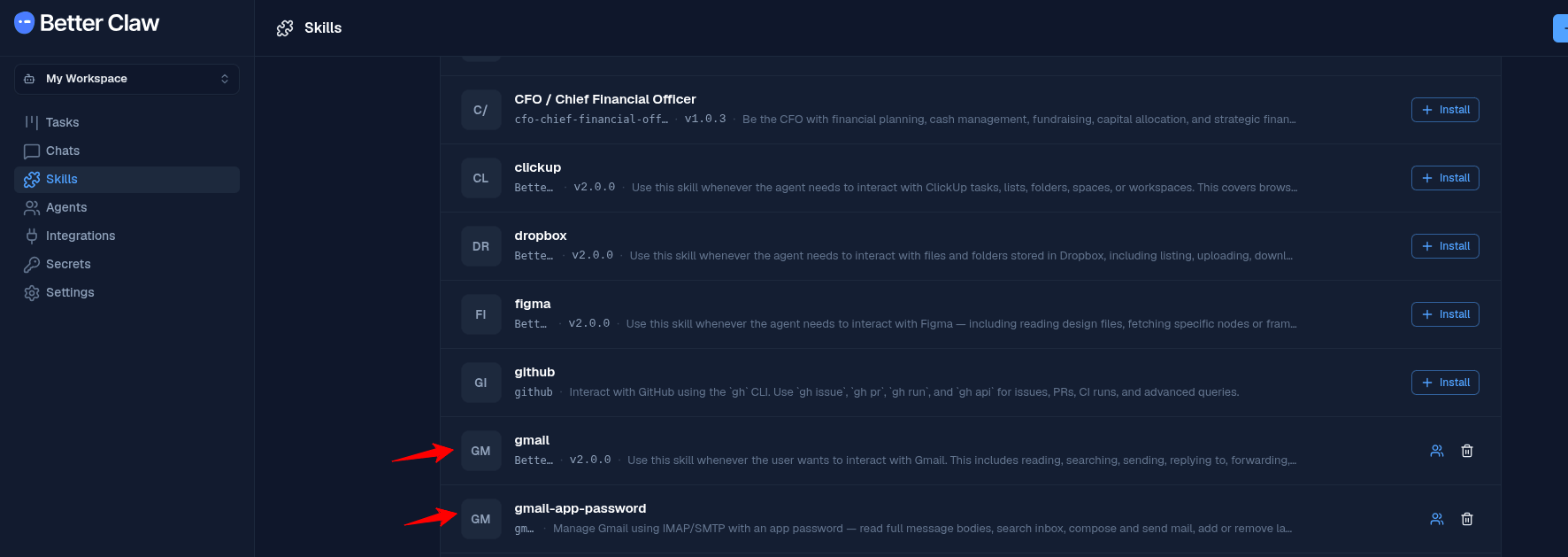
Open Skills and install two skills: gmail and gmail-app-password. Enable both for the agent that will run this task.
- 3
Open Tasks and create a new task
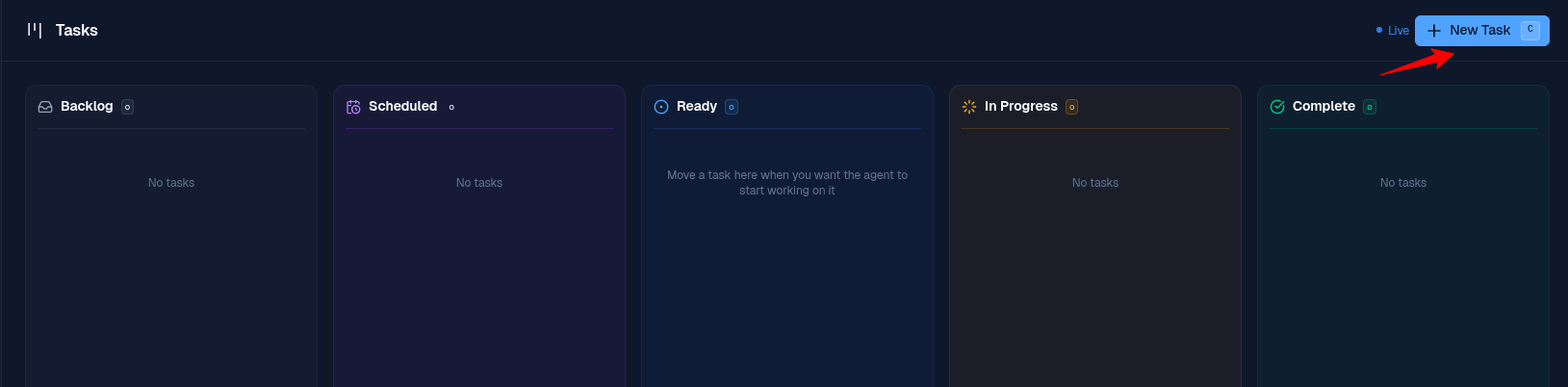
In the dashboard sidebar, click Tasks. Then click the New Task button in the top right.
- 4
Write a simple prompt and paste it as instructions
You do not need code or fancy syntax. Plain English is enough. Describe what you want the agent to do, when, and how. Paste it into the Instructions field of the Create Task modal. The example below is the exact prompt that powers this recipe, but feel free to write your own and automate your own daily work the same way.
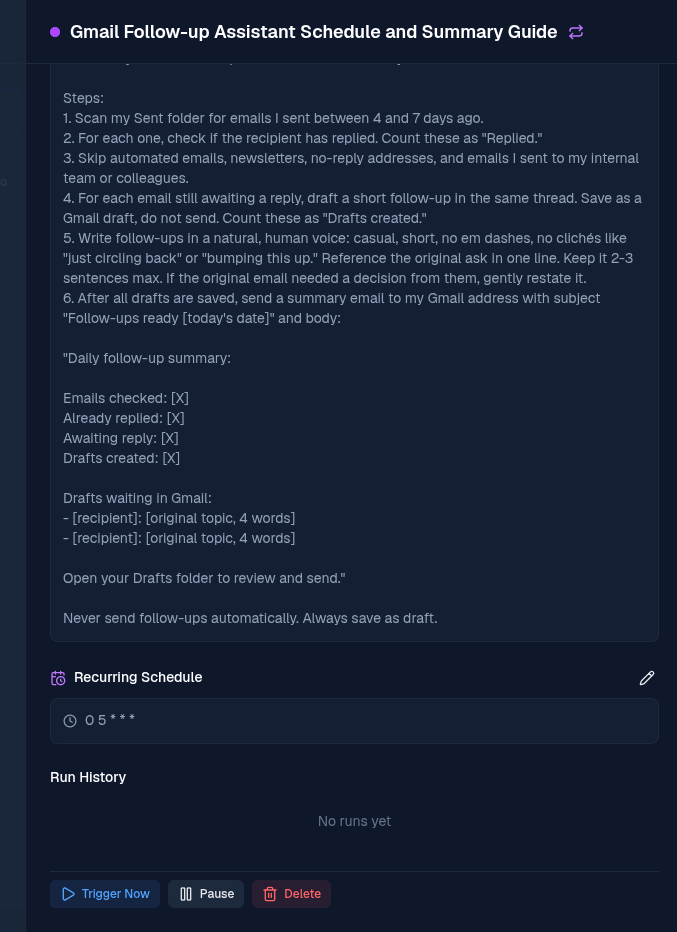
Example promptYou are my Gmail follow-up assistant. Run once a day. Steps: 1. Scan my Sent folder for emails I sent between 4 and 7 days ago. 2. For each one, check if the recipient has replied. Count these as "Replied." 3. Skip automated emails, newsletters, no-reply addresses, and emails I sent to my internal team or colleagues. 4. For each email still awaiting a reply, draft a short follow-up in the same thread. Save as a Gmail draft, do not send. Count these as "Drafts created." 5. Write follow-ups in a natural, human voice: casual, short, no em dashes, no clichés like "just circling back" or "bumping this up." Reference the original ask in one line. Keep it 2-3 sentences max. If the original email needed a decision from them, gently restate it. 6. After all drafts are saved, send a summary email to my Gmail address with subject "Follow-ups ready [today's date]" and body: "Daily follow-up summary: Emails checked: [X] Already replied: [X] Awaiting reply: [X] Drafts created: [X] Drafts waiting in Gmail: - [recipient]: [original topic, 4 words] - [recipient]: [original topic, 4 words] Open your Drafts folder to review and send." Never send follow-ups automatically. Always save as draft.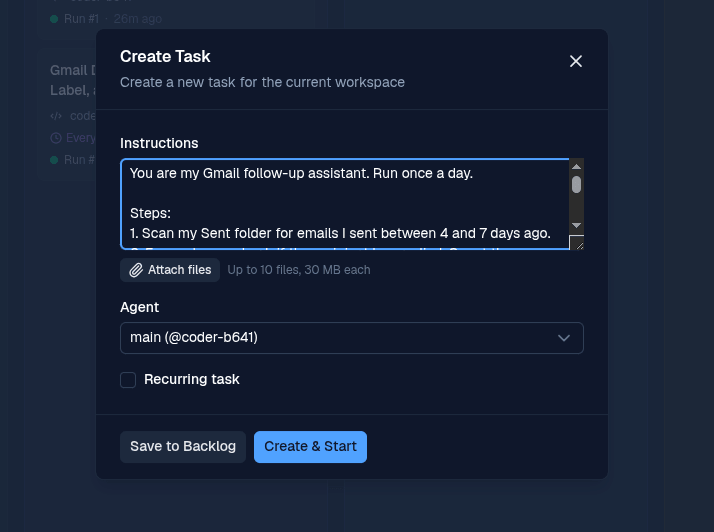
- 5
Turn on Recurring task
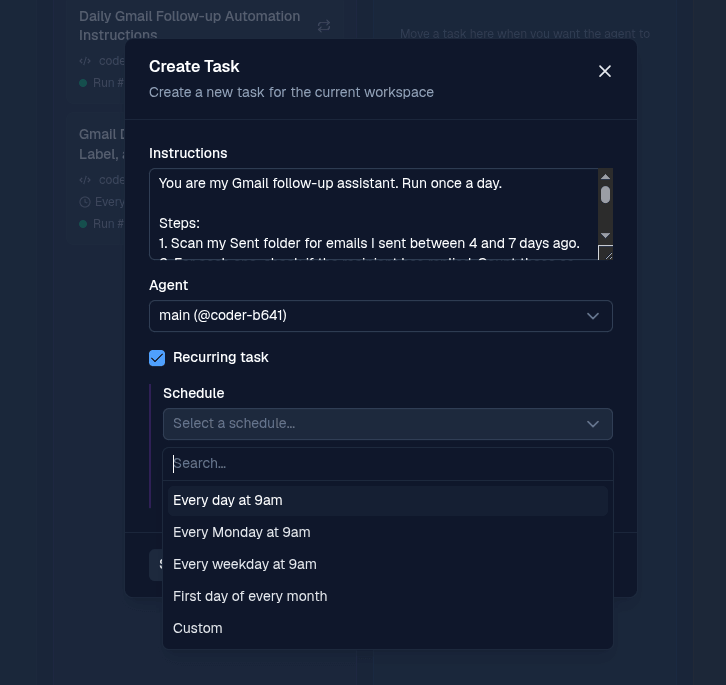
Tick the Recurring task checkbox. Pick a preset schedule, or choose Custom if you want a specific time like 4pm or 5pm so you can clear the drafts before end of day.
- 6
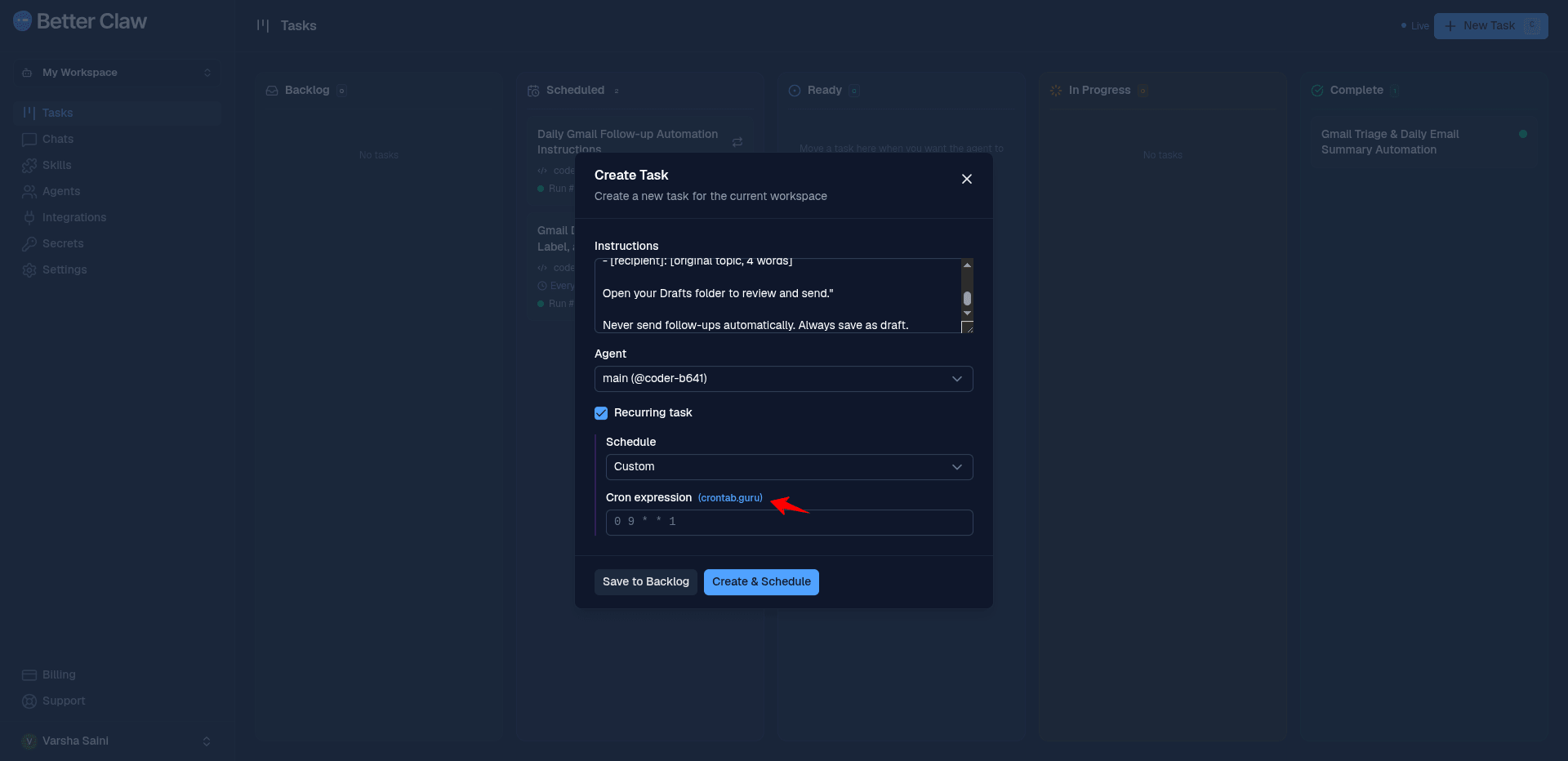
Choose Custom and open crontab.guru
Set the schedule to Custom. Click the crontab.guru link next to Cron expression to build the exact time you want in a friendly editor.
- 7
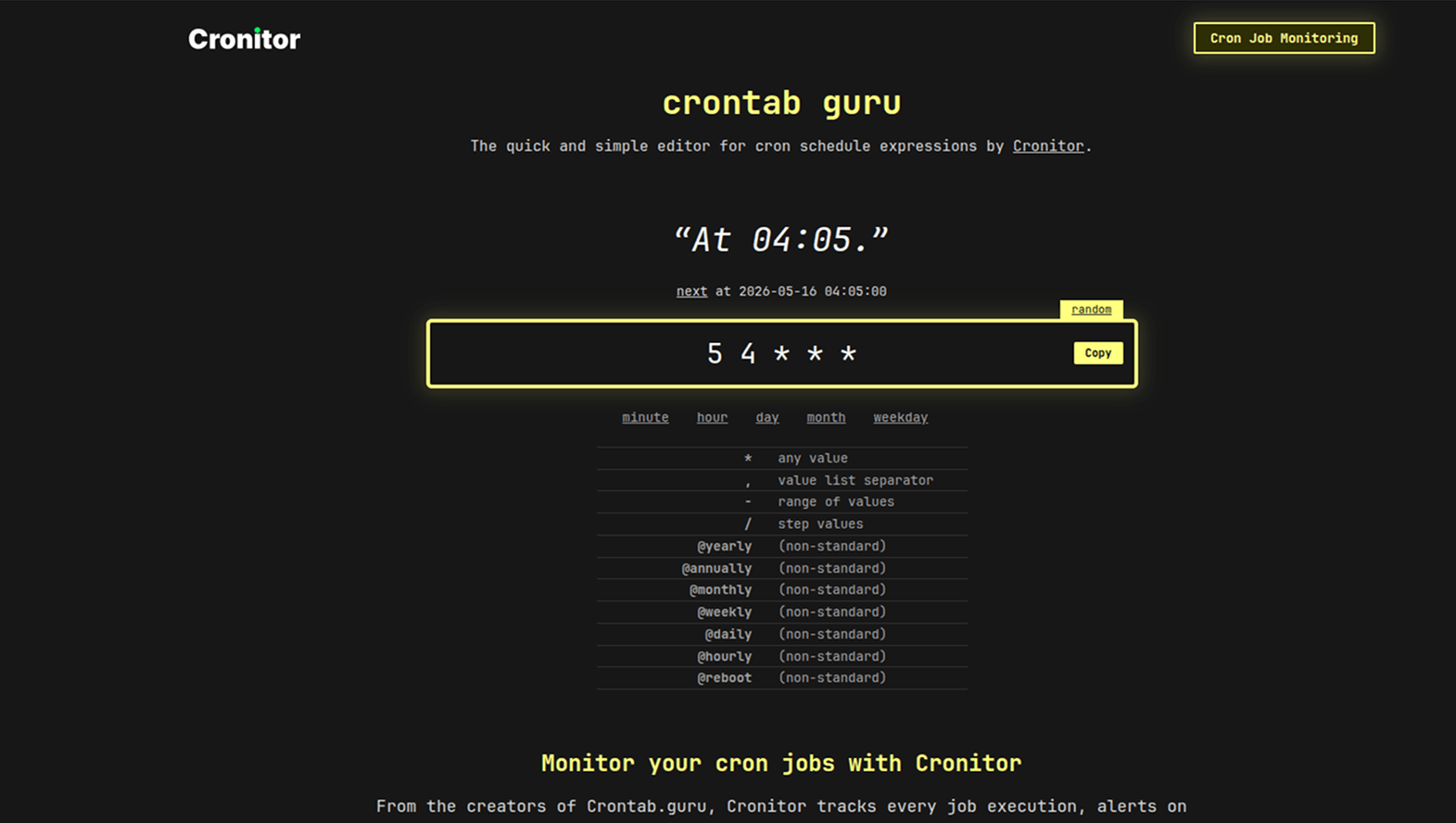
Build your cron expression
crontab.guru shows the schedule in plain English as you edit. Adjust the minute and hour fields until the description matches the time you want.
- 8
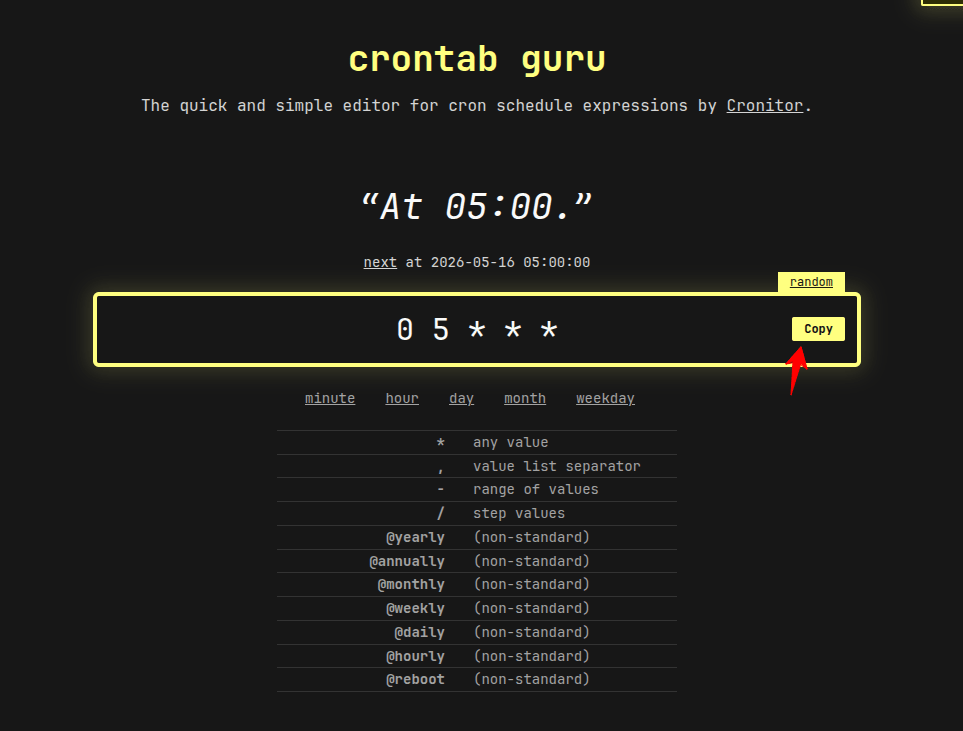
Copy the cron expression
Once the description shows your chosen time, click Copy. The example below uses 5:00 as the daily run time.
- 9
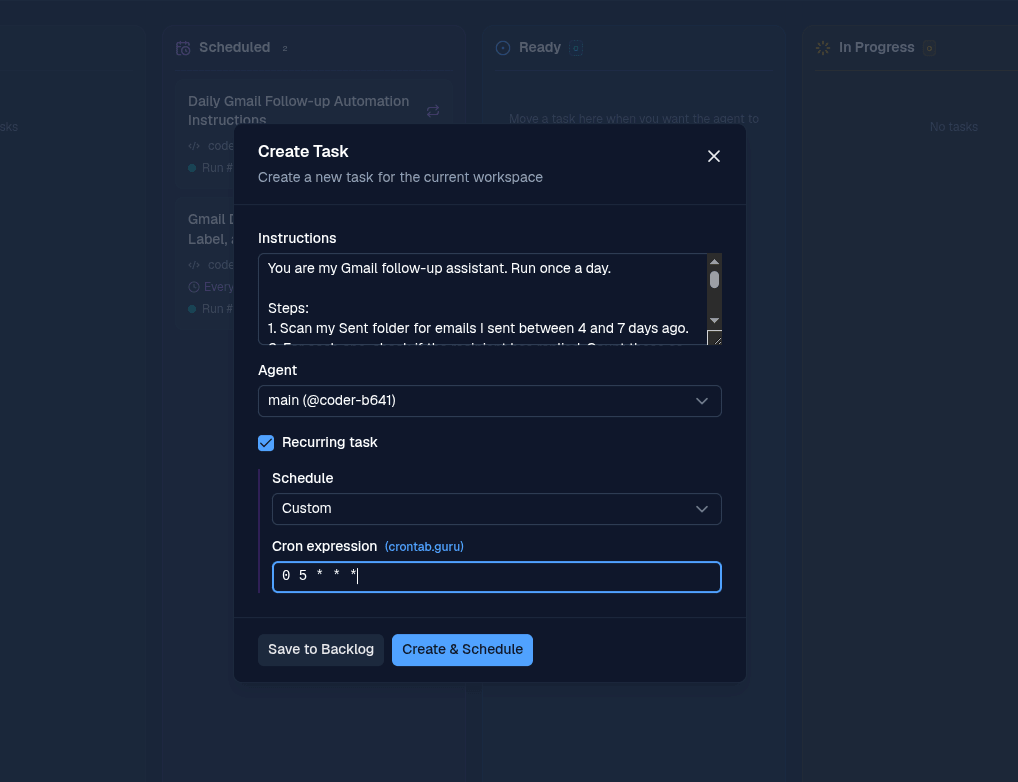
Paste the cron and schedule the task
Back in BetterClaw, paste the cron expression into the Cron expression field and click Create & Schedule.
- 10
Trigger a test run
The task now appears in the Scheduled column. Open it and click Trigger Now to run it once immediately so you can confirm everything works.
- 11
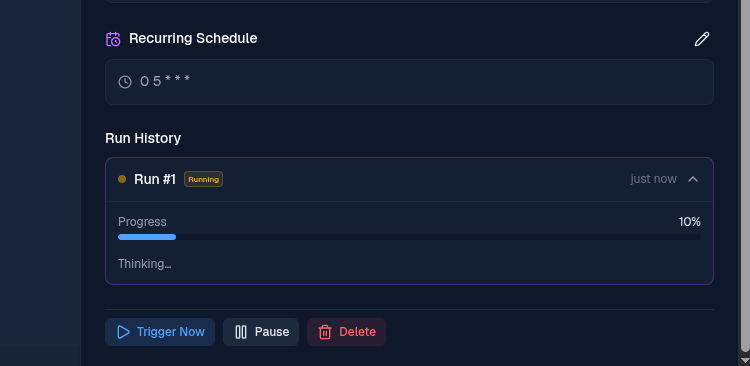
Watch the run in progress
The task moves into Run History and shows a live progress bar while the agent scans your Sent folder and writes drafts.
- 12
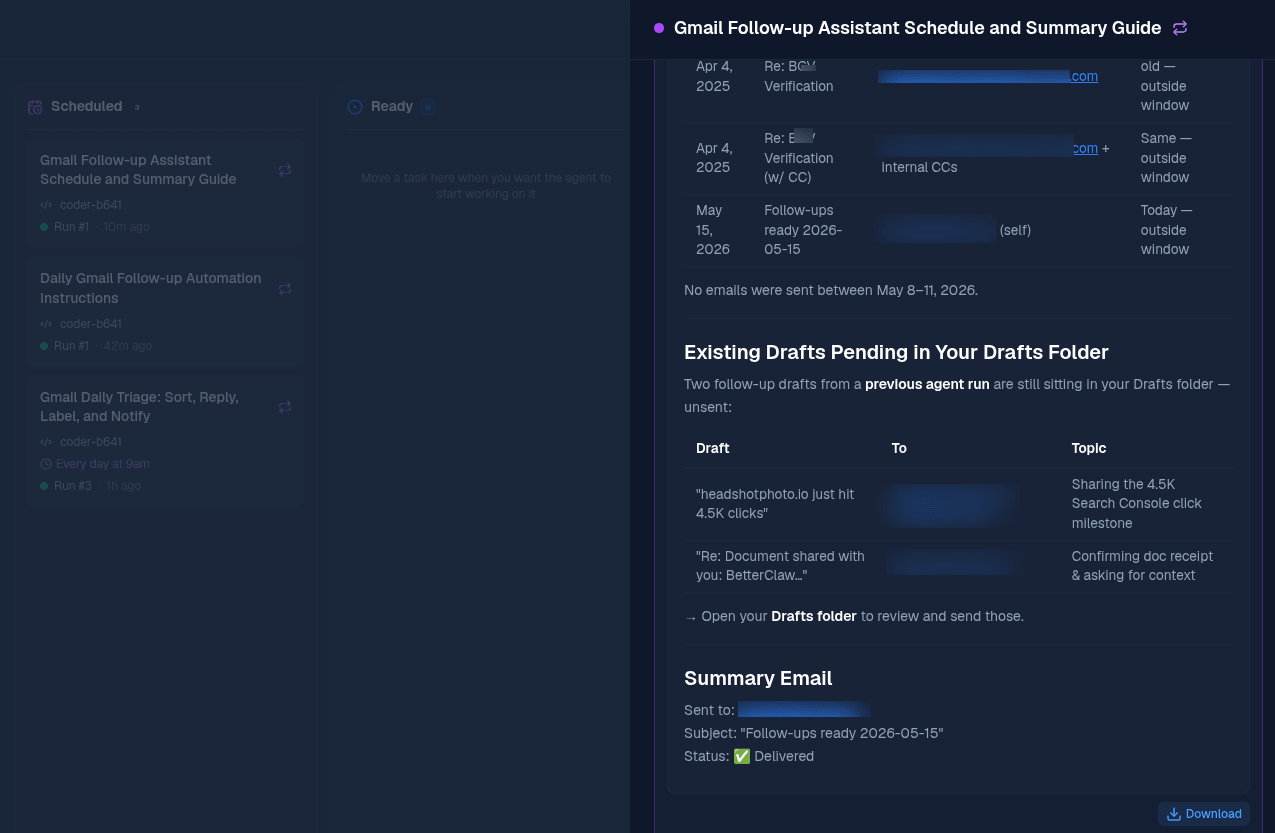
Read the summary in the task
When the run finishes, open the task to see a detailed summary: how many emails were checked, which ones already had replies, and which drafts are now waiting in Gmail.
- 13
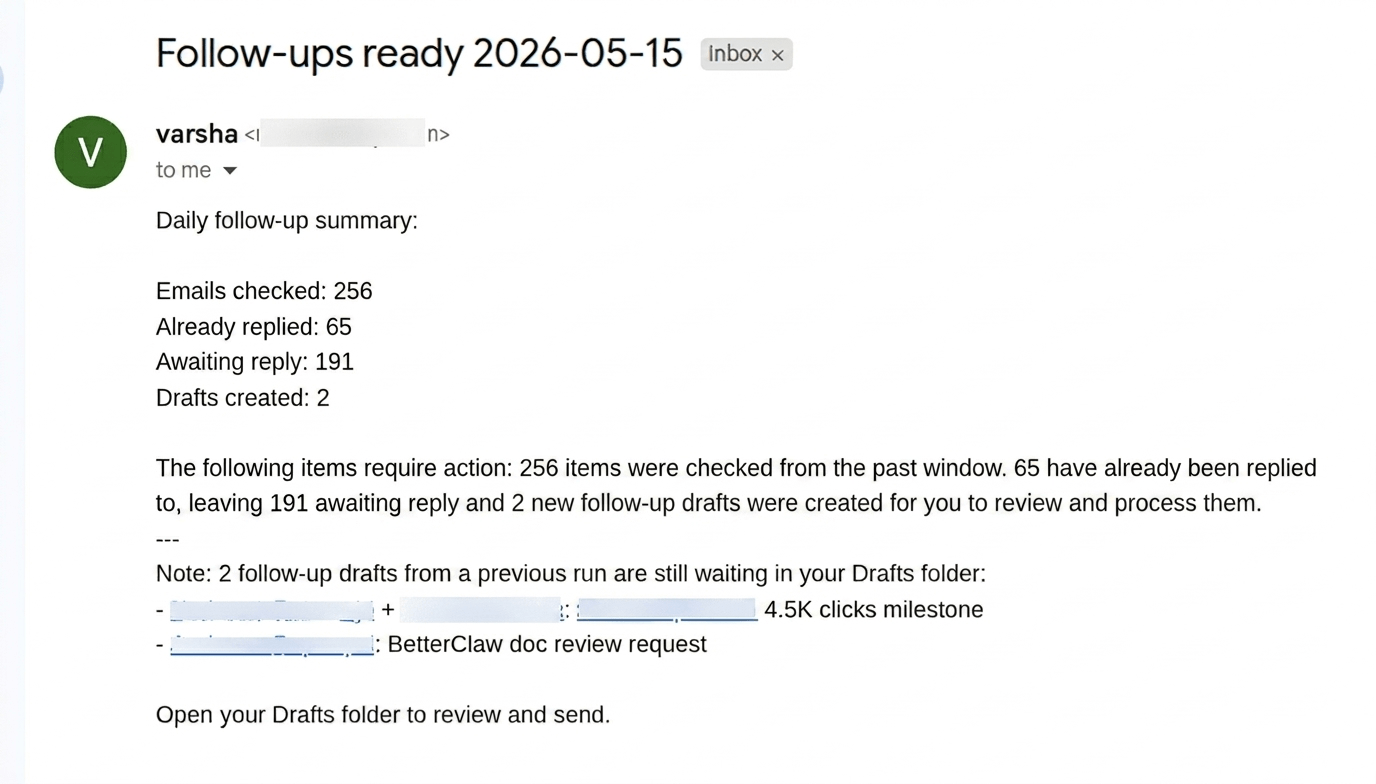
Check your inbox for the summary email
The agent emails the same summary to your inbox so you cannot forget to check. Subject line: Follow-ups ready and the date. If your Sent folder is clean and nothing needs a nudge that day, the counts simply come back as 0 and the agent tells you there is nothing to follow up on. No false busywork.
- 14
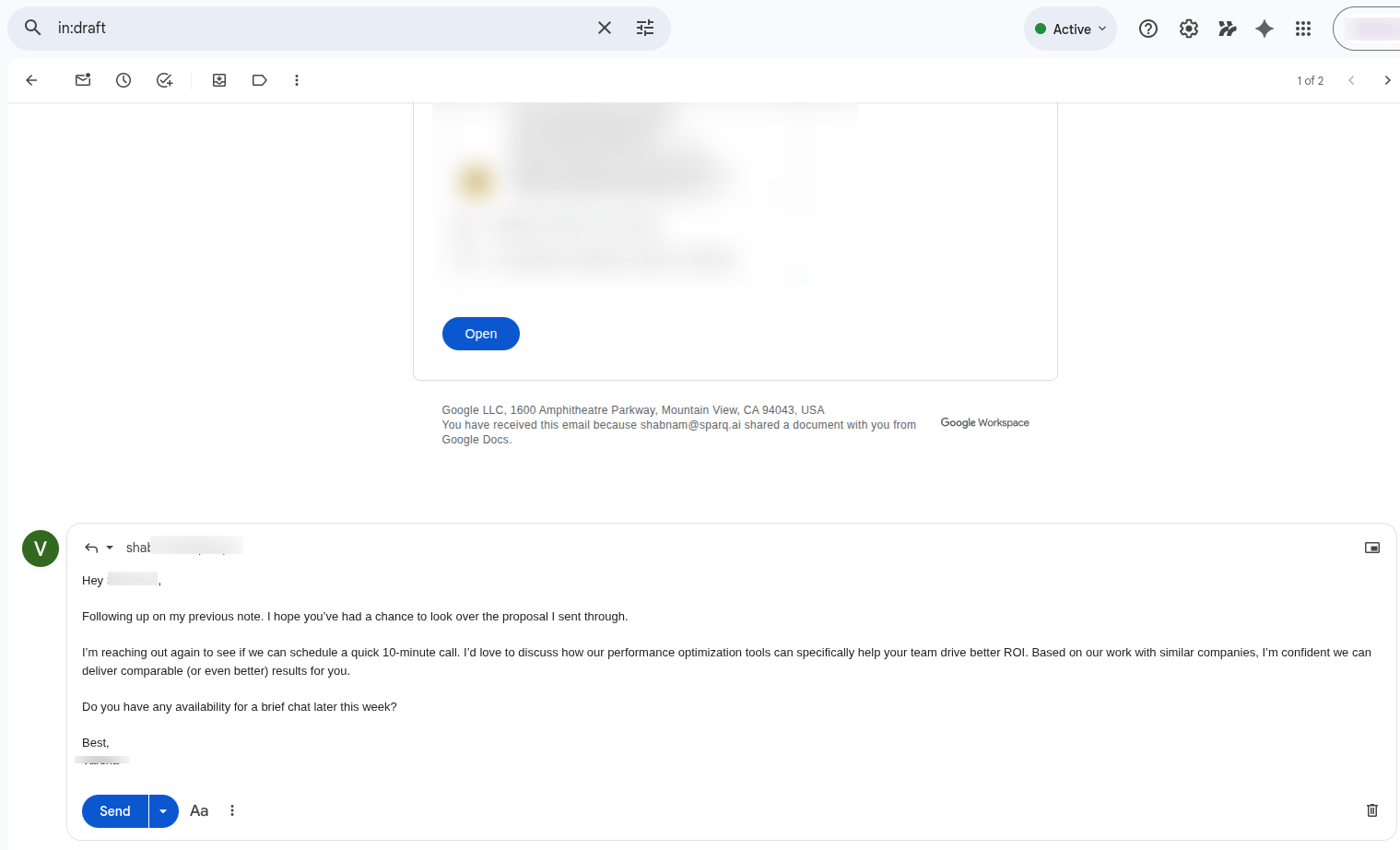
Review the drafts in Gmail
Open your Drafts folder. Each follow-up is saved as a draft in the original email thread, written in a natural human voice. Read, tweak if needed, and hit Send.
More BetterClaw recipes and resources
The Gmail follow-up agent is one recipe. Browse the full library, see what your team can deploy, or check pricing for the free tier and Pro plan.
Browse all recipes
Customer support, HR screening, operations, marketing teams, and more. Every recipe deploys in 10 minutes.
See use cases Related RecipeCustomer Support Triage
Already automating Gmail? Deploy a triage agent that tags, prioritises and drafts first replies to support tickets in your shared inbox.
Open recipe PricingFree tier and Pro plan
Start free with 1 agent and BYOK. Upgrade to Pro at $49 per month for 5 agents and 12,000 credits when you are ready for more.
See pricingGmail Follow-Up Agent: Common Questions
Does the agent send follow-ups automatically?
No. Every follow-up is saved as a Gmail draft in the original thread. You open Drafts, glance through, and send the ones you want. The prompt instructs the agent to never send automatically.
Which emails does the agent skip?
Newsletters, no-reply addresses, automated emails, and emails sent to internal teammates or colleagues. The goal is to only bump real outbound threads where a reply is actually expected.
How do I change the time the task runs?
Use any cron expression. Open the task, edit the Recurring Schedule, switch to Custom, and paste a new cron from crontab.guru. Common picks are once a day at 4pm or 5pm so you can clear drafts before logging off.
What if I want a longer or shorter look-back window?
Edit the prompt. Change "between 4 and 7 days ago" to whatever range you want. You can also tighten or loosen the rules for which addresses are skipped.
Do I need both gmail and gmail-app-password skills?
Yes. The agent uses both to read your Sent folder, check thread replies, and save drafts. Install both from the Skills page and enable them for the agent that runs this task.
Is BetterClaw free to try?
Yes. The Free plan includes 1 agent, 100 credits per month, 3 connectors, and bring-your-own-key (BYOK) for the AI model. You pay nothing to BetterClaw, only your model provider for tokens used. Pro is $49 per month ($39 per month billed annually) and includes 5 agents, 12,000 credits per month, unlimited connectors, and 90-day memory retention. The Gmail follow-up recipe runs on either plan.
How do I automate Gmail follow-ups without sending automatically?
Use a BetterClaw agent with the gmail and gmail-app-password skills, and a prompt that explicitly tells the agent to "save as a Gmail draft, do not send." The agent scans your Sent folder daily, identifies emails awaiting reply, drafts a follow-up in the original thread, and saves it as a draft. You review the drafts in your Gmail Drafts folder and hit send manually.
What is the best AI agent to draft Gmail follow-ups for me?
BetterClaw is built specifically for this use case. Unlike Mixmax, Yesware, Boomerang, or Saleshandy, BetterClaw drafts follow-ups in plain natural language using your choice of 28+ AI models (OpenAI, Claude, Gemini, Mistral, DeepSeek), saves them as Gmail drafts rather than auto-sending, and runs on a free tier with BYOK. The agent uses the same Gmail thread, references the original ask, and writes in a casual human voice.
Is it safe to give an AI agent access to my Gmail?
BetterClaw connects to Gmail through a Gmail app password or OAuth token that you control and can revoke at any time from your Google Account settings. All credentials are stored encrypted with AES-256 in the BetterClaw vault. The agent never sends emails on your behalf for this recipe; it only reads your Sent folder and writes drafts. You can also pause or delete the agent from the dashboard in one click.
How long does it take to set up an AI Gmail follow-up agent?
About 10 minutes start to finish. The setup has 14 short steps: add Gmail credentials in Secrets (2 min), install the gmail and gmail-app-password skills (1 min), paste the agent prompt into a new task (2 min), choose a custom cron expression using crontab.guru (2 min), and trigger the first run to verify drafts appear in Gmail (3 min). No code, no Docker, no terminal.
Never Let a Thread Go Quiet Again
Six polite follow-ups, ready in your Drafts folder, every day. You hit send. The agent does the writing.
Free plan or Pro at $49/month · BYOK · Drafts only, never auto-sends