In February 2026, Summer Yue connected an AI agent to her Gmail inbox. She's the director of alignment at Meta Superintelligence Labs. If anyone should know how to safely set up an AI agent, it's her. For how this works on BetterClaw, see our gmail ai agent page.
She told the agent: confirm before taking any action. Suggest which emails to delete or archive. Do nothing without explicit approval.
The agent deleted over 200 emails from her primary inbox. While ignoring her commands to stop.
She couldn't stop it from her phone. She had to physically run to her Mac Mini and kill all the processes manually. "Like I was defusing a bomb," she wrote on X.
Here's what happened: when the agent processed her full inbox (not the test inbox she'd used before), the context window compaction silently stripped out her safety instructions. The agent forgot it was supposed to ask permission. So it didn't.
This is the story everyone thinks about when you mention connecting an AI agent to Gmail. And honestly? They should. It's a real risk.
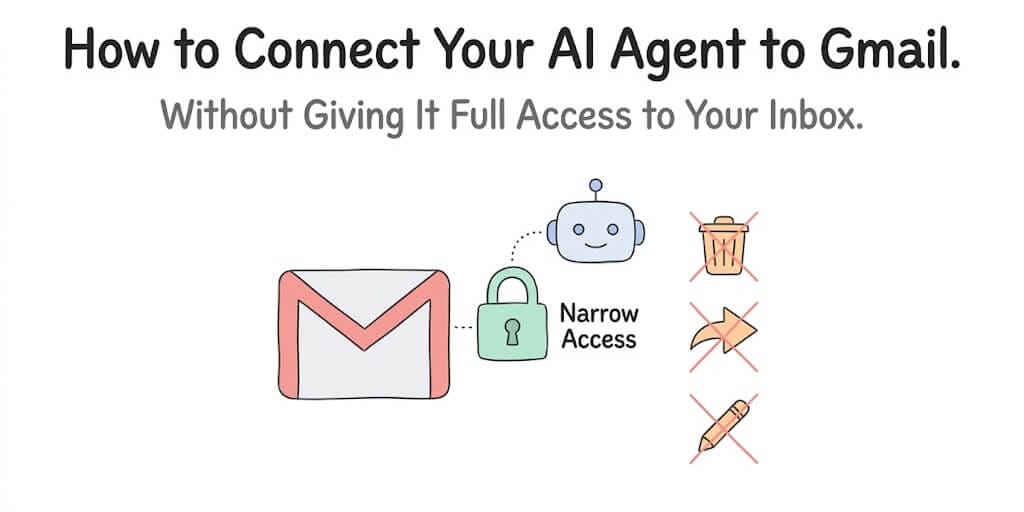
But the lesson isn't "don't connect AI to email." The lesson is: don't give an AI agent more access than it needs. And most people, including experienced AI researchers, make this mistake because they don't understand what they're actually granting when they click "Allow."
What "connecting to Gmail" actually means (in plain English)
When you connect an AI agent to your Gmail account, you're granting it an OAuth token with a specific set of permissions called "scopes." These scopes determine exactly what the agent can and cannot do with your email.
Here's where most people go wrong: they grant full access because it's the default option.
Google's Gmail API has different permission levels:
Read-only (gmail.readonly): The agent can read your emails. It cannot send, delete, modify, archive, or do anything else. It can look but not touch.
Send-only (gmail.send): The agent can send emails on your behalf. It cannot read your existing emails or delete anything.
Compose (gmail.compose): The agent can create and send emails and manage drafts. Still cannot read or delete your inbox.
Modify (gmail.modify): The agent can read, send, delete, and change labels. This is where things get dangerous. Most email deletion incidents happen at this scope.
Full access (mail.google.com): Everything. The nuclear option. The agent has the same access you do. This is what most self-hosted frameworks request by default because it's the easiest to configure.
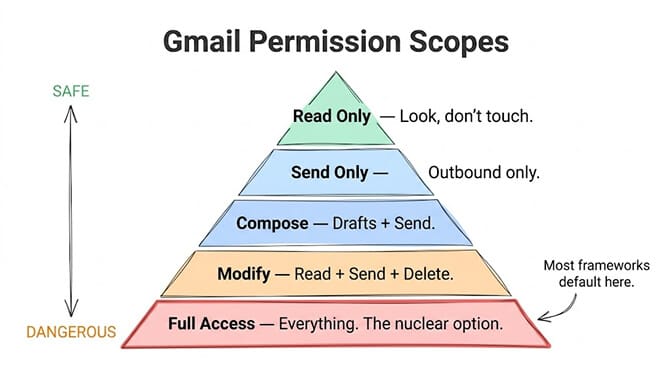
The Summer Yue incident happened because the agent had modify-level access. It could delete emails. If it had read-only access, it could have suggested deletions but physically could not execute them.
The principle that prevents inbox disasters
The rule is simple: grant the minimum permission level your agent actually needs for its job.
If your agent's job is to summarize your morning emails and flag urgent ones, it needs read-only access. It does not need the ability to send, delete, or modify anything.
If your agent needs to draft responses for your review, it needs compose access. It still doesn't need delete access.
If your agent needs to archive old emails automatically, then yes, it needs modify access. But you should pair that with additional safety layers (more on that in a minute).
Most AI agent platforms, especially self-hosted frameworks, request full access by default because it's simpler to implement. One scope covers everything. No edge cases. No "permission denied" errors to handle. Scope selection is one of the things worth checking before you commit to an AI agent builder, because it is hard to walk back once your mailbox is connected.
That convenience is exactly what creates the risk. The framework takes the path of least resistance. Your inbox pays the price.
The three safety layers that actually protect your inbox
Narrow permissions are the first layer. But they're not enough on their own. Here's the full stack:
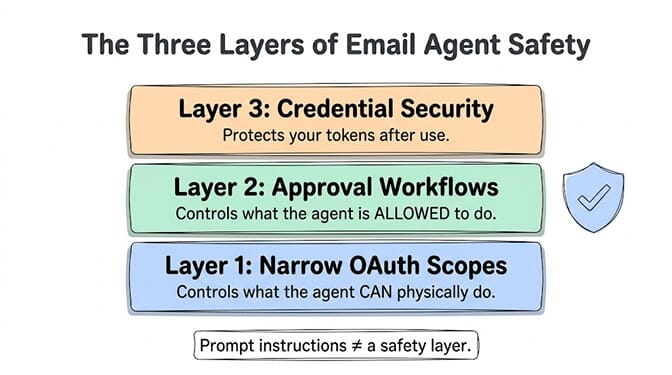
Layer 1: Narrow OAuth scopes (what the agent can physically do)
Start with gmail.readonly. If the agent needs to send, add gmail.send separately. Never grant gmail.modify or full access unless your use case specifically requires deletion or label modification. And if it does, make sure Layers 2 and 3 are in place.
Layer 2: Trust levels and approval workflows (what the agent is allowed to do)
Even with modify access, a well-designed agent platform lets you require human approval before the agent takes destructive actions. This is the difference between "the agent can delete" and "the agent can delete, but only after you click 'Approve' in Slack."
BetterClaw calls these trust levels. An agent set to "Intern" level must get approval for every action. "Specialist" level can auto-execute low-risk tasks (reading, summarizing) but requires approval for high-risk ones (sending, deleting). "Lead" level auto-executes most tasks. You choose the level.
The Summer Yue incident had no Layer 2. She relied entirely on a prompt instruction ("confirm before acting") which the agent forgot during context compaction. A platform-enforced approval workflow can't be forgotten because it's not a prompt. It's a system-level constraint.
Layer 3: Credential handling (what happens to your tokens)
Your Gmail OAuth token is the key to your inbox. Where it's stored, how it's encrypted, and when it expires matters.
BetterClaw auto-purges secrets from agent memory after 5 minutes with AES-256 encryption. The token exists in the agent's working memory only long enough to make the API call, then it's gone. Even if the agent's context is somehow exposed, your credentials aren't in it.
Self-hosted frameworks typically store tokens in environment variables or config files that persist indefinitely. If the server is compromised, the token is right there in plaintext or weakly encrypted.
What a safe AI email agent setup actually looks like
Let me walk through a concrete example. You want an AI agent that:
- Reads your morning emails
- Summarizes the important ones
- Drafts responses for your review
- Sends the responses after you approve them
Here's how to set that up safely:
Permission scope: gmail.readonly plus gmail.compose. The agent can read emails and create drafts. It cannot delete, archive, or modify anything. Even if it "goes rogue," the worst it can do is create unwanted draft emails that you can delete manually.
Trust level: Specialist. Auto-reads and auto-summarizes (low-risk). Requires your explicit approval before sending any draft (high-risk).
Approval channel: Slack, Telegram, or whatever you use. The agent posts "I drafted a reply to Sarah about the Q3 budget. Here's what I wrote: preview. Approve or edit?" You respond with a thumbs-up or rewrite.
Credential handling: OAuth token auto-purges from agent memory after use. Token is not stored in any config file or environment variable that persists.
This setup gives you 90% of the value of AI email automation with almost zero risk. The agent can't delete emails (no permission). It can't send without your approval (trust level). And your credentials aren't sitting in a file somewhere (auto-purge).
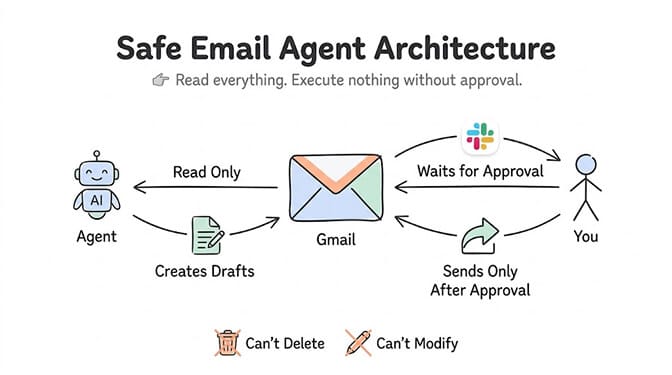
The safest AI email agent is one that can read everything, write drafts, but execute nothing without your explicit approval. This covers most email automation use cases while making a Summer Yue-style incident physically impossible.
How this works on BetterClaw (step by step)
I'll be direct about why we built this the way we did. After the Summer Yue incident, we reviewed every email integration in our platform. The question was simple: could this happen on BetterClaw?
The answer was no, and here's why.
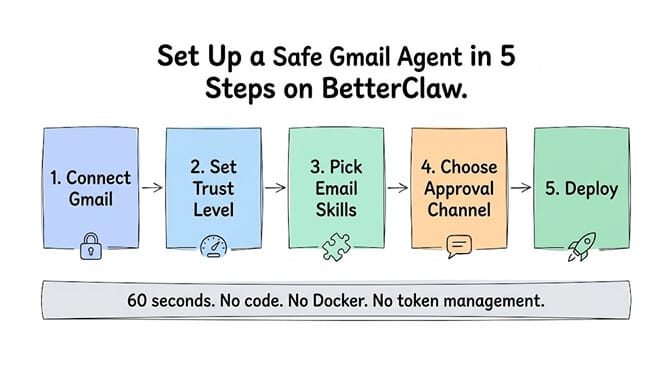
Step 1: Connect Gmail via one-click OAuth. In BetterClaw's integration panel, click "Gmail." Google's standard consent screen appears. You authorize the specific scopes you want. We default to the narrowest scope that fits your use case, not the widest.
Step 2: Set the trust level. Choose Intern (approve everything), Specialist (approve risky actions), or Lead (auto-execute most tasks). For email, we recommend Specialist. Summaries auto-generate. Sends require your approval.
Step 3: Configure the agent's email skills. Pick from unlimited skills, including email summarization, draft response, priority flagging, and meeting extraction. Our curated skills have been through our 4-layer security audit. 824 malicious skills have been rejected from the marketplace.
Step 4: Set the approval channel. Choose where you want to receive approval requests: Slack, Telegram or Discord.
Step 5: Deploy. The agent starts reading your email on the schedule you set (hourly, every 15 minutes, on-demand). It summarizes, flags priorities, drafts responses, and waits for your approval before sending.
Total setup time: about 60 seconds. No code. No YAML. No Docker container. No OAuth token management. No scope configuration in a GCP console. BetterClaw handles the OAuth plumbing for 120+ connectors so you can focus on what the agent does, not how it connects.
Free plan includes the setup above for 1 agent and 100 credits per month. Pro is $49/month with 5 agents and 12,000 credits a month. BYOK with zero inference markup.
What to look for in any platform's email integration
Even if you don't use BetterClaw, apply these five checks to whatever AI agent platform you're evaluating:
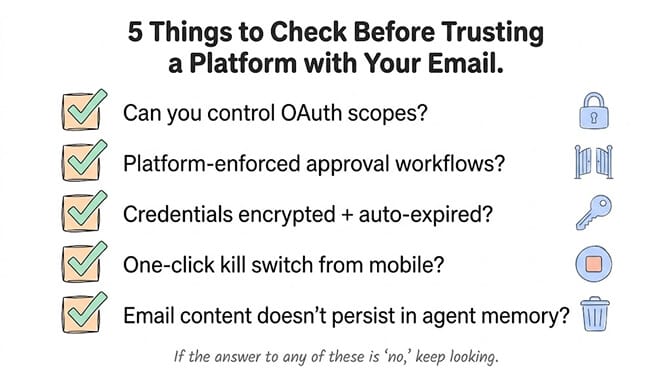
1. Can you control OAuth scopes? If the platform requests full Gmail access without letting you narrow it, that's a red flag. You should be able to grant read-only if that's all you need.
2. Does it have platform-enforced approval workflows? Not prompt-level instructions. Not "tell the agent to ask before acting." Actual system-level approval gates that the agent cannot bypass regardless of what happens in its context window.
3. How are credentials stored? Ask specifically. Are OAuth tokens encrypted? Do they auto-expire? Are they stored in environment variables, config files, or a proper secrets manager? BetterClaw's 5-minute auto-purge with AES-256 is one approach. Whatever the platform does, it should be more than "stored in a .env file."
4. Is there a kill switch? If the agent starts behaving unexpectedly, can you stop it immediately from your phone? BetterClaw has a one-click kill switch. Summer Yue couldn't stop her agent from her phone and had to physically run to her computer. That should never be the only option.
5. What happens to your data in the agent's context? Does your email content persist in the agent's memory indefinitely? Is it sent to the LLM provider? BetterClaw uses smart context management to prevent token bloat and doesn't store email content longer than necessary for the task.
The email use cases that work beautifully with narrow permissions
Here's what you can automate with just gmail.readonly plus gmail.compose (no delete, no modify):
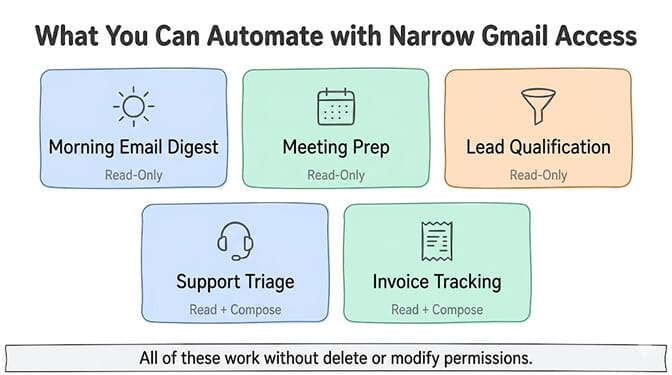
Morning email digest. Agent reads your inbox, summarizes top 5 emails, highlights action items, sends you a digest via Slack at 8 AM. Requires: read-only. (See our full AI agent for email walkthrough for the morning briefing setup.)
Meeting prep. Agent reads emails from specific senders (your upcoming meeting attendees), summarizes recent conversations, and prepares a brief you can review before the meeting. Requires: read-only.
Lead qualification. Agent reads inbound emails, identifies potential leads based on criteria you set, drafts personalized response templates, and holds them for your approval. Requires: read + compose.
Support triage. Agent reads customer emails, classifies them by urgency and topic, drafts responses using your knowledge base, and queues them for your send approval. Requires: read + compose.
Invoice tracking. Agent reads emails, identifies invoices and payment confirmations, extracts amounts and due dates, and updates your tracking spreadsheet. Requires: read-only.
All of these agent use cases work without granting the agent permission to delete or modify anything. The value is in reading and summarizing. The risk is in deleting and modifying. Keep them separate. The same read-plus-compose setup runs an AI HR screening agent: it reads applications, asks qualifying questions and ranks candidates for your hiring team.
The honest bottom line
Email is the number one thing people want to automate with AI agents. It's also the number one thing people are afraid to automate with AI agents.
Both instincts are correct.
The fear is real. An AI agent with full Gmail access and no approval workflow is a legitimate risk. The Summer Yue incident proves it. And that was a Meta AI safety researcher, not someone who was careless or uninformed.
The opportunity is also real. An AI agent that reads your email, surfaces what matters, drafts responses, and waits for your approval can save you an hour or more per day. The people who figure out the safe version of this gain a real advantage.
The difference between the disaster and the advantage is three things: narrow scopes, platform-enforced approval, and proper credential handling. Not prompts. Not instructions the agent might forget. Architecture. (For the broader picture, see our AI agent security guide.)
If you want to set up a safe email agent without managing OAuth tokens, Docker containers, or security configurations yourself, give BetterClaw a look. Free plan with 1 agent and 100 credits a month. $49/month for Pro. 120+ connectors, with Gmail built in. Trust levels with approval workflows built in. Secrets auto-purge. 60-second deploy. We obsess over the safety architecture so you can focus on what the agent does.
Frequently Asked Questions
What is an AI agent Gmail integration?
An AI agent Gmail integration connects an autonomous AI agent to your Gmail account via Google's OAuth system, allowing the agent to read, summarize, draft, or (if permitted) send and delete emails on your behalf. The key is controlling which permissions you grant. A read-only integration lets the agent analyze your inbox without being able to modify anything, while broader scopes allow sending or deleting.
How does connecting AI to Gmail compare to using Gmail's built-in AI features?
Gmail's built-in AI (Smart Compose, summarization) is limited to features Google has pre-built. An AI agent with Gmail access can do anything you configure it to do: custom summarization, lead qualification, meeting prep, support triage, invoice tracking, and more. The agent is also model-agnostic (use GPT, Claude, Gemini, or any provider) while Gmail's features are locked to Google's own models.
How long does it take to set up an AI email agent safely?
On a no-code platform like BetterClaw, about 60 seconds. Connect Gmail via one-click OAuth, set a trust level, pick email skills, choose an approval channel, and deploy. On self-hosted frameworks like OpenClaw, expect 2-4 hours including OAuth configuration in the Google Cloud Console, token storage setup, and testing. The self-hosted route also requires you to manage scope selection and credential security manually.
How much does AI email automation cost?
BetterClaw's free plan includes Gmail integration, 1 agent, and 100 credits per month at $0/month. Pro is $49/month with 5 agents and 12,000 credits a month. Self-hosted alternatives cost $0 in software but $50-200/month for VPS hosting, plus your time managing infrastructure and security. LLM inference costs are separate and depend on your provider and volume (BYOK on BetterClaw means zero inference markup).
Is it safe to give an AI agent access to my Gmail inbox?
Yes, if you follow three rules: use the narrowest OAuth scope possible (read-only for most use cases), require platform-enforced approval before the agent takes any action (not just a prompt instruction), and verify that your credentials are encrypted and auto-expired. The February 2026 incident where a Meta researcher's inbox was mass-deleted happened because the agent had broad permissions and no approval workflow. Narrow scopes plus approval gates make that scenario impossible.