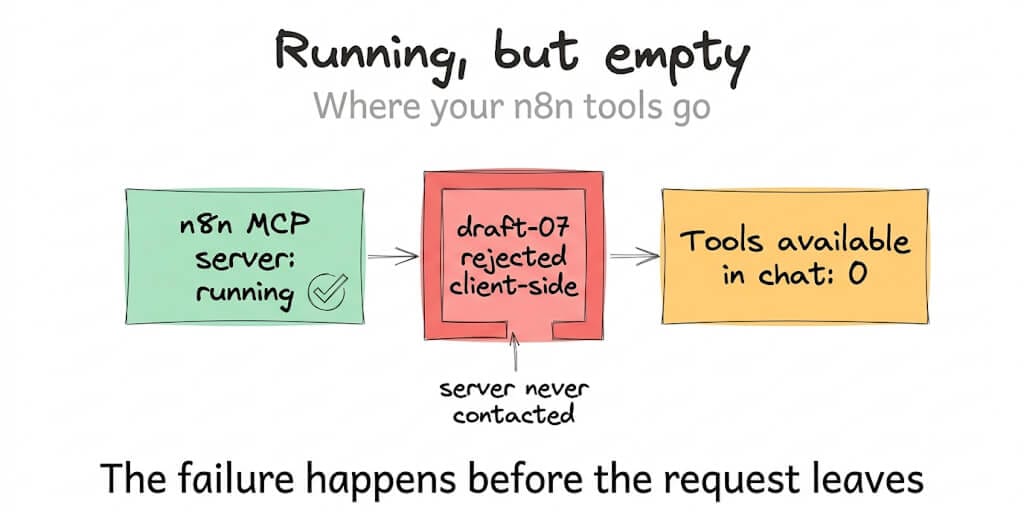
Your connector says "running" and zero tools appear. No error, no warning, nothing in the logs. Here is the one-line cause, verified against three open GitHub issues on August 20, 2026.
You wired up the n8n MCP Server Trigger, pointed Claude Desktop at it, and the connector shows green. Running. Connected. Then you open a chat and there are no tools. Not a broken tool, not a failing tool. Zero.
You check the n8n execution log and find nothing, because nothing ever arrived. The rejection happens inside Claude before a single request leaves your machine.
The cause is one line in your tool schema, and it is fixable today without waiting for anyone to ship a patch.
What actually broke, and when
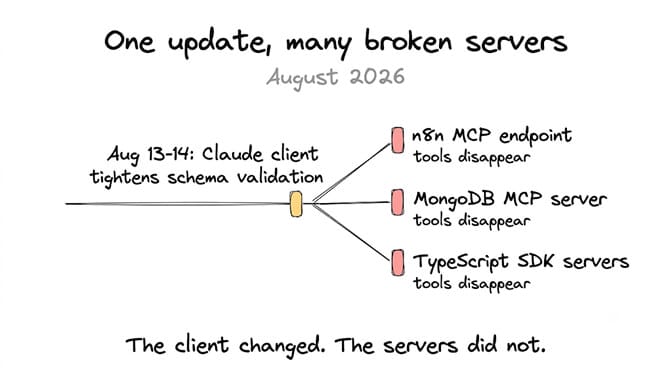
On August 13 and 14, 2026, a Claude Desktop and Claude Code update changed how the MCP client validates tool schemas. It now validates strictly against JSON Schema 2020-12 and rejects any tool whose outputSchema declares the draft-07 dialect.
n8n's instance-level MCP endpoint at /mcp-server/http emits schemas containing this:
"$schema": "http://json-schema.org/draft-07/schema#"
So every tool from that endpoint gets rejected. The error, when you can find it, reads:
Tool 'X' has an invalid outputSchema: JSON Schema declares an
unsupported dialect ("$schema": "http://json-schema.org/draft-07/schema#")
Here's the part that turns a twenty-minute fix into a lost afternoon. That error does not surface in the chat window. The connector keeps reporting itself as running in Claude's local MCP settings, the tool list is simply empty, and there is no visible failure anywhere the average user looks.
A green status light and an empty tool list is a worse failure mode than a red error, because nothing tells you where to start looking.
This is not an n8n-specific bug either. The n8n issue notes 20 or more reports across MCP server repositories within 48 hours of the Claude update.
The fix, in the order to try it
Drop the $schema line entirely. This is the cleanest fix and the one the n8n issue itself recommends. MCP treats an absent $schema as 2020-12 by default, so removing the declaration makes your tools valid without you having to rewrite anything. No stamp beats a wrong stamp.
Or change the value to 2020-12. If your generator insists on emitting a dialect, point it at https://json-schema.org/draft/2020-12/schema instead. Same result, one string different.
If you build servers with the MCP TypeScript SDK, this is upstream of you. The SDK calls zodToJsonSchema in src/server/mcp.ts, and the underlying zod-to-json-schema@3.24.5 defaults to draft-07. Every server built on it inherits the problem. The fix in the SDK issue is to move to Zod v4's native toJSONSchema({ target: "draft-2020-12" }), or to configure the existing generator for 2020-12 explicitly.
Update n8n and Claude before assuming the fix is yours to make. The n8n issue is triaged and assigned to their nodes team, so a release will likely carry this. Anthropic may also relax the validator. Emitting 2020-12 makes you correct either way, which is why it is worth doing now rather than waiting.
If you want to confirm the payload independently before changing anything, dump the tool list from your endpoint and grep it for draft-07. If it is there, you have found your bug. Our MCP tool call debugging guide covers how to inspect that traffic properly, and the provider rejected schema error breakdown covers the noisier cousin of this failure.
Two different failures, and people confuse them constantly
This is where reports get muddled, so it is worth separating clearly.
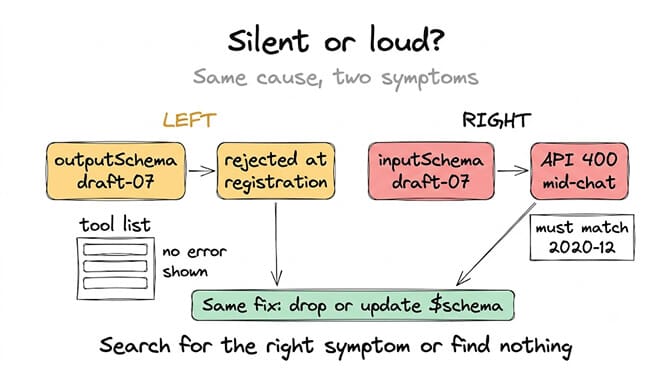
The silent one is outputSchema with draft-07. Claude's client rejects the tool at registration, before dispatch. The whole server goes dark, not one tool. Someone reported all four tools on the MongoDB MCP server failing identically, with the server logs showing no incoming request at all.
The loud one is inputSchema with draft-07, which produces a 400 from the API:
tools.74.custom.input_schema: JSON schema is invalid.
It must match JSON Schema draft 2020-12
Same root cause, completely different symptom. One kills your tools quietly at startup, the other throws an error mid-conversation with a tool index in it. If you are searching for the wrong one, nothing you find will help.
The fix for both is the same line of JSON, which is the small mercy here.
The uncomfortable part nobody is wrong about
Read the three issues together and you find something more interesting than a bug.
The MCP specification does not require outputSchema to use 2020-12. Declaring draft-07 is valid. MongoDB looked at a request to remove the field from their server and declined on August 6, 2026, describing it as an internal field documented in the JSON Schema spec and entirely standard. They are not being stubborn. They are right.
Claude's client is also not doing anything unreasonable by validating strictly against a modern dialect. Its default validator supports 2020-12 only.
So the server is correct, the client is correct, and your tools do not work. That is not a bug in either project. It is a gap between two specifications that each shipped on their own schedule, and it landed in your Tuesday.
This is the cost of assembling agents from independently versioned pieces, and it is a cost nobody quotes when they tell you self-hosted automation is free. The n8n instance is free. The MCP server is free. The afternoon you spent finding out that a validator changed dialect defaults is not, and it will happen again the next time any one of those pieces ships.
We built BetterClaw so that seam is somebody else's job. Managed runtime, 200+ verified skills, 25+ one-click OAuth integrations, and 28+ model providers, with schema compatibility handled before your agent runs rather than discovered when your tool list empties. Free plan, no credit card, and your own model keys with no markup on inference.
How to stop losing days to this class of bug
Three habits, and they generalise well beyond this specific error.
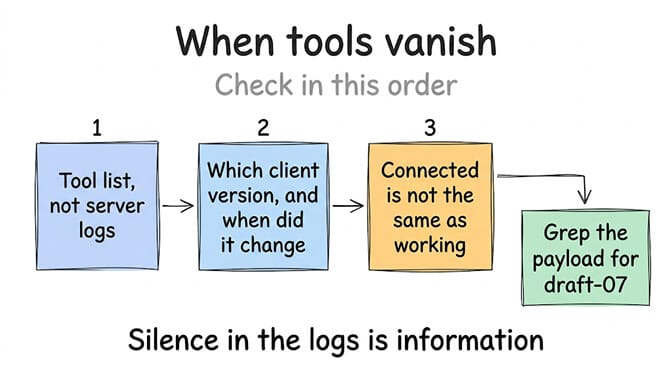
Check the tool list first, not the logs. When tools vanish, the failure is almost always client-side registration, and your server logs will be silent by definition. Silence in the logs is information.
Pin your client version in your notes. This bug is dated to a specific two-day window. Knowing which version you upgraded from, and when, turns an open-ended hunt into a bisect.
Treat "shows as connected" as unverified. Connection status and functional status are different claims, and MCP tooling conflates them freely. If you run agents against self-hosted MCP endpoints, our n8n alternatives comparison and the OpenClaw MCP setup guide both cover how the connection layer behaves in practice.
What this says about where MCP is going
MCP won adoption faster than almost any protocol I can think of, and this is the bill for that speed. Servers, SDKs, and clients are all iterating independently against a spec that is itself still moving, and the interfaces between them are held together by conventions that were never pinned down.
Draft-07 versus 2020-12 is a small disagreement about a URL in a JSON field. It disabled entire servers across the ecosystem in 48 hours.
Expect more of these, and expect them to keep looking like your fault when they are not. The teams shipping fastest will keep breaking each other at the seams, and the useful skill is not avoiding that. It is recognising the shape of it quickly, so the fix takes twenty minutes instead of a weekend.
If you would rather not own that skill, start free on BetterClaw. One agent, every feature, no credit card, and integrations that stay connected when an upstream client changes its mind about schema dialects. Pro is $49 per month for 5 agents, and full pricing fits on a single page.
Frequently Asked Questions
Why are my n8n MCP Server Trigger tools not loading in Claude?
Because Claude's MCP client now validates tool schemas strictly against JSON Schema 2020-12, and n8n's MCP endpoint emits "$schema": "http://json-schema.org/draft-07/schema#". Every tool declaring that dialect is rejected client-side at registration, so the connector still shows as running while zero tools appear in chat. The change landed with the Claude Desktop and Claude Code update on August 13 to 14, 2026.
How is this different from the "must match JSON Schema draft 2020-12" error?
They share a root cause but present oppositely. Draft-07 in outputSchema fails silently at registration and disables the whole server before any request is sent. Draft-07 in inputSchema throws a visible 400 from the API mid-conversation, naming a tool index. Fixing the $schema line resolves both.
How do I fix the draft-07 schema error?
Remove the $schema declaration entirely, since MCP treats an absent value as 2020-12, or change it to https://json-schema.org/draft/2020-12/schema. If you build servers with the MCP TypeScript SDK, the draft-07 default comes from zod-to-json-schema@3.24.5, so move to Zod v4's toJSONSchema({ target: "draft-2020-12" }) instead.
Is it worth self-hosting n8n for MCP if this keeps happening?
Self-hosted n8n costs nothing in licence terms, and the community edition genuinely covers a lot of ground. The cost is compatibility work like this, which arrives unscheduled and lands on whoever is nearest. A managed platform starting at $0 removes that work without changing what you pay for model tokens, so the honest comparison is your time rather than the sticker price.
Is a schema rejection a security problem?
Not in itself. Strict validation is a safety feature, and Claude refusing to register a tool it cannot validate is the conservative behaviour. The real risk is the silence: a system that disables capability without telling you trains people to ignore status indicators, and that habit does become a security problem when a genuine failure needs attention.