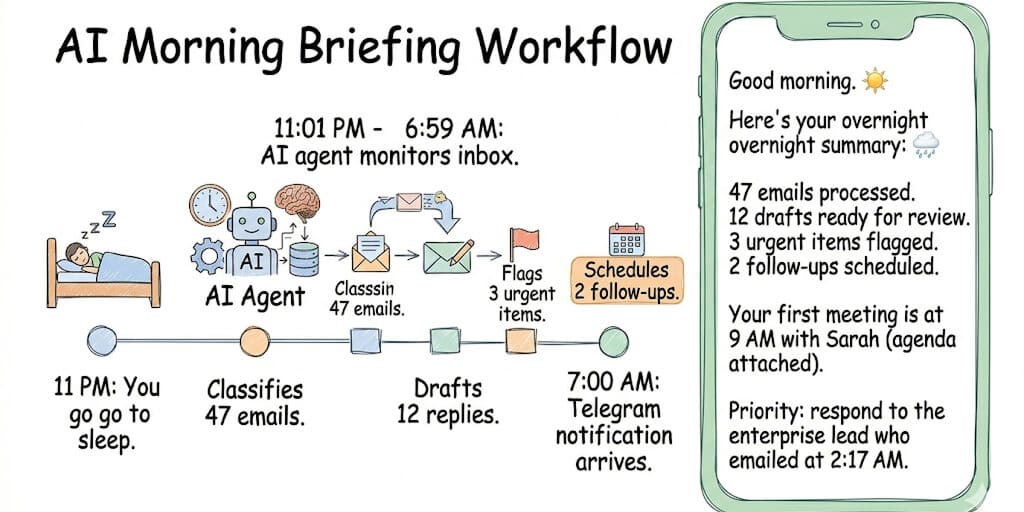
Four email workflows that run while you sleep: triage, draft replies, schedule follow-ups, and a morning digest delivered to Telegram before you open Gmail. Total cost: $3-6 per month. Setup time: about 10 minutes. No code required.
I used to spend the first two hours of every morning in my inbox. Not answering important emails. Sorting through them. Figuring out which of the 73 overnight messages actually needed me versus which were newsletters, auto-receipts, CC chains, and "thanks!" replies to threads I wasn't part of.
Two hours. Every single morning. Before I did any actual work.
Then I built an AI agent for email triage. Connected Gmail. Told it my classification rules. Set it to run overnight and deliver a morning digest to Telegram at 7 AM.
The next morning, I opened Telegram instead of Gmail. A clean summary: 73 emails received. 41 classified as noise (newsletters, auto-receipts, CC chains). 20 classified as routine (the agent drafted replies). 9 classified as informational (no action needed, just FYI). 3 classified as urgent (flagged for immediate attention, summaries included).
I went from 2 hours of inbox sorting to 12 minutes of reviewing the urgent items and approving the drafted replies.
That was six months ago. The agent has processed over 8,000 emails since. I've never gone back to manual triage.
Here are the four email workflows, how to set each one up, and what they actually cost.
Workflow 1: Email triage (the one that saves the most time)
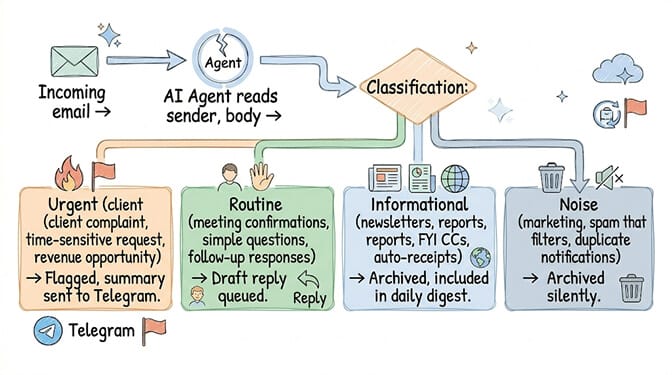
What it does: Every incoming email gets classified into one of four categories. Urgent items get flagged immediately. Routine items get drafted replies. Informational items get archived with a summary. Noise gets archived silently.
How the agent decides: You define the rules in plain language. "Emails from @bigclient.com are always urgent. Meeting confirmations are routine. Newsletters are informational. Anything with 'unsubscribe' in the footer is noise." The LLM interprets these rules with context, not keyword matching. An email from a new prospect saying "I'd like to discuss a $50K project" gets classified as urgent even though it doesn't match any keyword rule.
The setup on BetterClaw: Connect Gmail via one-click OAuth. Define your classification rules in the agent instructions (plain English, no code). Set the agent to run every 15 minutes via heartbeat scheduling. Choose where alerts go (Telegram, Slack, WhatsApp).
Time saved: For a founder handling 50-100 emails/day, triage alone saves 45-90 minutes daily. That's the sorting, reading, and deciding what deserves attention. The agent does it in seconds.
To compare the platforms you could build it on, see our 12 best AI agent builders.
Workflow 2: Draft replies (the one that feels like magic)
Here's what nobody tells you about AI email agents.
The drafts are better than you expect. Not because the AI is a better writer than you. Because it's consistent. It never sends a terse reply when it's tired. It never forgets to attach the document. It never misspells the client's name. It uses the tone you specified, every time, at 3 AM or 3 PM.
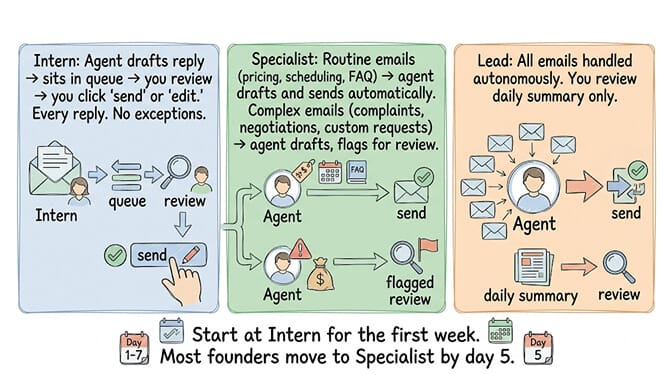
How it works: The agent reads the email, checks your knowledge base for relevant context (pricing info, product specs, company policies), and drafts an appropriate response. On Intern trust level, the draft sits in your queue for approval. On Specialist level, routine drafts send automatically and complex ones wait for review.
Three scenarios where drafts shine:
Scenario 1: "What's your pricing?" The agent checks your pricing document, drafts a response with the correct tiers, and includes the link to your pricing page. On Specialist trust level, this sends automatically. Time saved: 5 minutes per occurrence. Frequency: 3-5 times per week for most businesses.
Scenario 2: "Can we reschedule our Tuesday meeting?" The agent checks your calendar, finds three alternative slots, and drafts a response with options. Time saved: 8 minutes (switching to calendar, finding slots, writing the email).
Scenario 3: "Thanks for sending the proposal. We'll review and get back to you." The agent recognizes this as informational (no action required from you) and archives it with a note in the daily digest. No draft needed. No human time spent reading and deciding "do I need to respond to this?"
The Meta lesson matters here. A researcher's AI agent deleted 200+ emails while ignoring stop commands. That happened with no trust levels and no approval workflow. BetterClaw's Intern level ensures nothing sends without your explicit approval. Start there. Always. (See our what is an AI agent post for more on trust levels and safety.)
Workflow 3: Automated follow-ups (the one that closes deals)
This is where most people get it wrong with email.
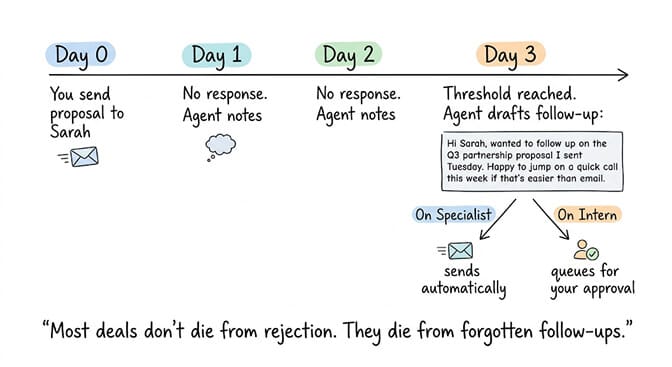
You send a proposal. Three days pass. You forget to follow up. The deal goes cold. Not because the prospect wasn't interested. Because you were busy and the follow-up slipped through the cracks.
What the agent does: Tracks open email threads. When a thread has been waiting for a response for X days (you configure the threshold), the agent either reminds you ("Sarah hasn't responded to your proposal from Tuesday. Want me to follow up?") or sends a follow-up automatically on Lead trust level.
The follow-up template is personalized. Not "Just checking in on my previous email." The agent references the specific proposal, the specific ask, and adds a gentle nudge. "Hi Sarah, I wanted to follow up on the Q3 partnership proposal I sent Tuesday. I know things get busy. Happy to jump on a quick call this week if that's easier than email."
The setup: In your agent instructions, specify follow-up rules. "If a prospect email thread has no response for 3 business days, send a follow-up. If an internal email thread has no response for 1 business day, send a nudge to Slack." The agent tracks thread state using persistent memory.
If building an email triage agent, reply drafter, and follow-up tracker without writing any Python, without configuring any YAML, and without managing any servers sounds like something you want running by this weekend, that's exactly what we built BetterClaw for. Free plan with 1 agent and 100 credits a month. $49/month for Pro with 5 agents and 12,000 credits a month. Connect Gmail with one click. No credit card to start.
Workflow 4: The morning digest (the one everyone asks about)
This is the workflow that makes people stop and say "wait, I can do that?"
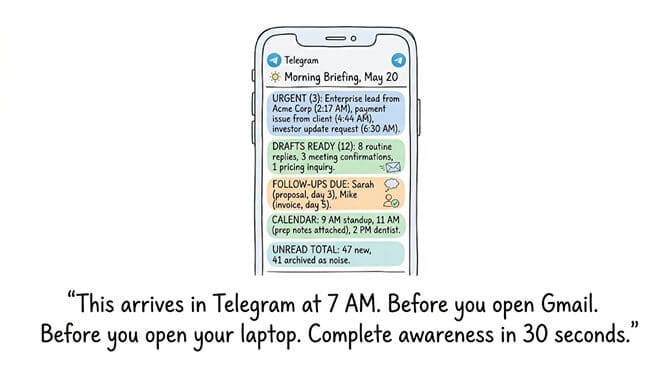
Every morning at 7 AM, the agent sends you a formatted briefing to Telegram (or Slack, or WhatsApp). It includes:
Urgent emails received overnight, with one-sentence summaries. Drafts ready for your review (with one-tap approve from the chat app). Follow-ups due today. Calendar summary for the day, including prep notes for meetings. Total email count and how many were archived as noise.
You read it on your phone. In bed. With coffee. Before you open Gmail. Before you open your laptop. Complete awareness of your day in 30 seconds.
The cost: One morning briefing on Claude Sonnet processes approximately 10,000-15,000 tokens. At $3/M input tokens, that's $0.03-0.05 per briefing. $0.90-1.50 per month for daily briefings. Add email triage throughout the day and you're looking at $3-6/month total.
The time math: 2 hours/day saved on email × 22 working days = 44 hours/month. At even a conservative $50/hour valuation of founder time, that's $2,200/month of time recaptured for $3-6/month in API costs. The ROI isn't a percentage. It's 400x.
For the detailed AI agent use cases across industries, our AI agent use cases guide covers morning briefings, email triage, and 18 other workflows.
The setup walkthrough (Gmail + BetterClaw in 5 steps)
Step 1: Sign up. BetterClaw. No credit card. The free plan gives you 1 agent and 100 credits a month.
Step 2: Create agent. Name it "Email Assistant." Pick your LLM. Claude Sonnet for nuanced email understanding ($3/M tokens). Gemini Flash for high-volume, simpler classification ($0.10/M tokens).
Step 3: Connect Gmail. One-click OAuth. Authorize. The agent can now read and send email through your account.
Step 4: Write your instructions. Plain English. "Classify every incoming email as urgent, routine, informational, or noise. Draft replies for routine emails in my professional tone. Flag urgent emails to Telegram immediately. Send a morning digest to Telegram at 7 AM summarizing overnight activity, drafts ready for review, follow-ups due, and today's calendar."
Step 5: Connect Telegram. Paste your bot token. The agent now delivers briefings and alerts to your phone.
That's it. The agent starts processing emails immediately. First morning briefing arrives tomorrow at 7 AM. (For the broader 3-paths walkthrough — no-code, low-code, code-first — see our how to create an AI agent guide.)
What the agent shouldn't do with your email (the honest boundaries)
Never give the agent full send authority on day one. Start at Intern trust level. Review every draft for the first week. Look for tone mistakes, factual errors, and misclassifications. The agent will misclassify some emails during the first 48 hours as it learns your patterns.
Never let the agent handle financial emails autonomously. Invoices, payment confirmations, wire transfer instructions. Set these to always escalate. A misclassified wire instruction is not a recoverable error.
Never let the agent respond to angry emails without review. Sentiment detection catches most of these, but edge cases exist. A politely worded complaint might not trigger the sentiment filter. Set Specialist trust level to escalate any email containing "disappointed," "unacceptable," "cancel," or your custom list.
Review the noise archive weekly. The agent will occasionally archive an email it shouldn't. A weekly 5-minute review of the noise archive catches these before they become problems. After a month, the misclassification rate drops to near zero as you refine the instructions.
For the security best practices when connecting email to AI agents, our OpenClaw monitoring guide covers credential management and secrets auto-purge across platforms, and our AI agent builder comparison lists the security questions to ask any platform.
The honest take
Here's the perspective that changed how I think about email.
Email isn't a task. It's a tax. Every founder pays it. Every morning. Before they do anything that actually grows the business. The two hours I spent sorting inbox every day weren't productive hours. They were overhead. A cost of doing business that felt mandatory but wasn't.
An AI agent for email doesn't make you better at email. It makes email less of your problem. The triage happens automatically. The routine replies draft themselves. The follow-ups send on schedule. The morning briefing gives you complete awareness in 30 seconds instead of 120 minutes.
The $3-6/month it costs is so small it barely registers on a credit card statement. The 44 hours/month it saves is an entire work week. Every month. Permanently.
If that sounds like something worth 10 minutes of setup time, give BetterClaw a try. Free plan with 1 agent and 100 credits a month. $49/month for Pro with 5 agents and 12,000 credits a month. Connect Gmail in one click. Your first morning briefing arrives tomorrow.
Frequently Asked Questions
What is an AI agent for email?
An AI agent for email is autonomous software that reads your inbox, classifies messages by urgency, drafts replies, tracks threads for follow-ups, and delivers morning briefings. Unlike email filters (which match keywords), an AI agent reasons about context, understands nuance, and takes action. It works across Gmail and other email providers through OAuth, and delivers notifications via Telegram, Slack, WhatsApp, or other channels.
How does an AI email agent compare to Gmail's built-in AI features?
Gmail's AI features (Smart Reply, Smart Compose) suggest short responses and autocomplete sentences. An AI email agent goes further: it classifies every email, drafts full responses from your knowledge base, tracks threads for follow-ups, and sends morning digests. Gmail's AI is reactive (helps while you're reading). An email agent is proactive (works while you sleep). BetterClaw connects to Gmail via OAuth and adds autonomous triage, drafting, and scheduling on top.
How long does it take to set up an AI email agent?
About 10 minutes with BetterClaw. Sign up (free, no credit card), create agent, connect Gmail via one-click OAuth, write classification rules in plain English, connect Telegram for briefings. The agent starts processing emails immediately. First morning briefing arrives the next day. With a code-first framework, expect 4-8 hours including Python environment setup, email API integration, and hosting configuration.
How much does an AI email agent cost per month?
BetterClaw's free plan is $0/month (1 agent, 100 credits a month). Pro is $49/month with 5 agents and 12,000 credits a month. LLM API costs for email triage and morning briefings run $3-6/month on Claude Sonnet for a founder handling 50-100 emails/day. Total: $3-55/month depending on plan and volume. For context, 2 hours/day of manual email triage at $50/hour costs $2,200/month in founder time.
Is it safe to give an AI agent access to my email?
With proper security, yes. BetterClaw encrypts all credentials with AES-256, auto-purges secrets from agent memory after 5 minutes, runs each agent in an isolated Docker container, and uses OAuth (not password storage) for Gmail access. Trust levels ensure the agent can't send emails without your approval until you explicitly elevate permissions. Start at Intern level (review every draft) and graduate to Specialist after verifying accuracy for one week.