
Chats & Tasks
Save a chat as a skill
Turn a productive conversation into a reusable skill your agents can repeat.
Save a chat as a skill
A productive chat can become a reusable skill, so your agents can repeat the workflow later without you re-explaining it every time.
Generate the skill
- Open the chat whose workflow you want to reuse.
- In the chat header, open the ⋯ menu and choose Save as a reusable skill.
- BetterClaw reads the conversation and generates a draft
SKILL.mdin the background — you'll see a Generating skill… indicator while it works. - When it's ready, the Save chat as skill editor opens with everything pre-filled.
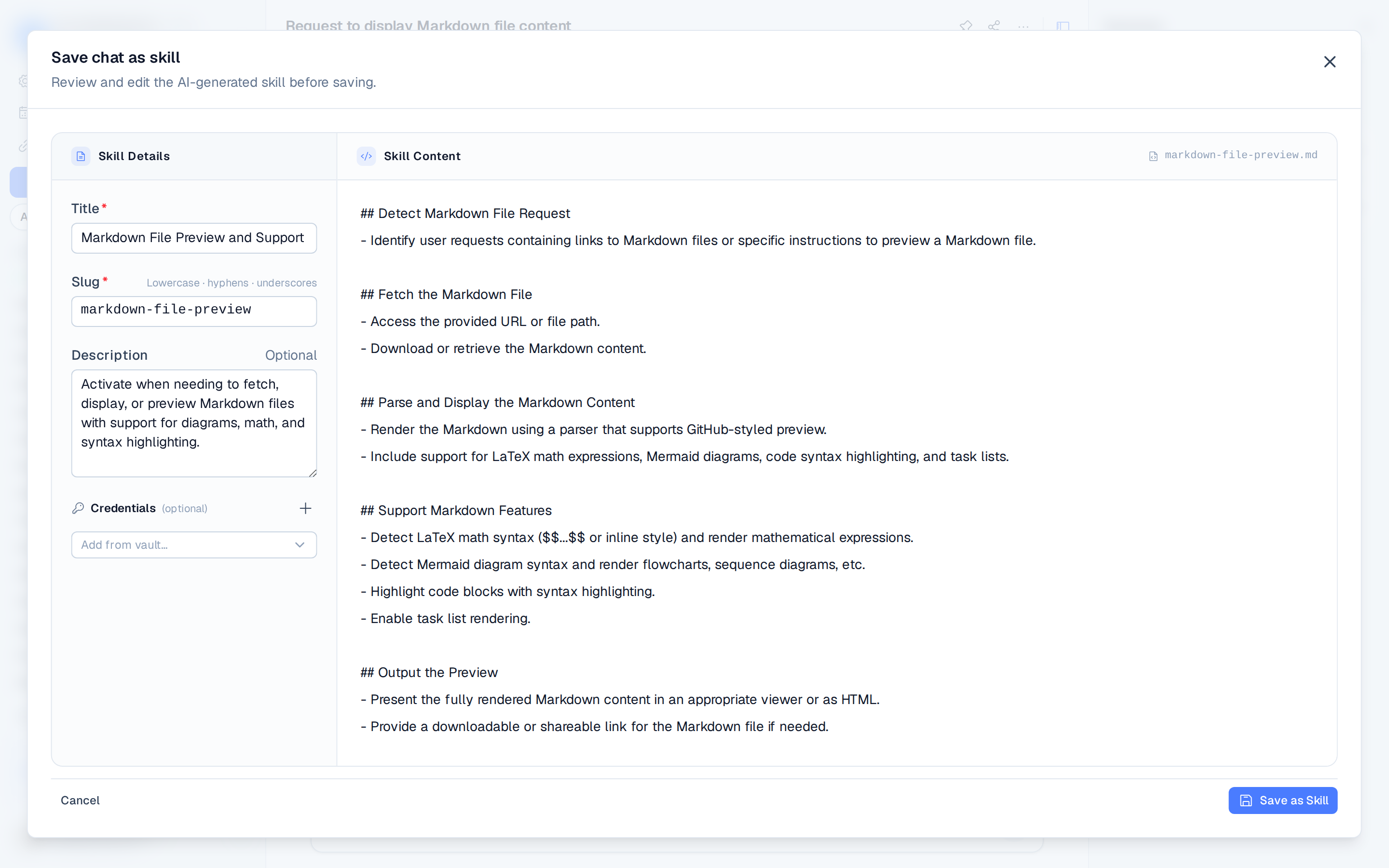
Review before saving
The editor has two panes:
- Skill Details (left) — the Title, a Slug (lowercase letters, numbers, hyphens, and underscores), an optional Description, and Credentials the skill should request from the agent's vault. Add credentials from your existing secrets, or define one manually — a SCREAMING_SNAKE_CASE key, a kind of API key / username-password / generic, and whether it's required.
- Skill Content (right) — the generated Markdown body of
SKILL.md, fully editable.
Adjust anything, then click Save as Skill. The skill is installed and enabled for all agents, and appears in the Installed section of the Skills directory.
This drafts a skill from the conversation. To edit that skill later, add credentials, or
export it as a ZIP, see Custom skills.