
Billing & upgrades
Billing & upgrades
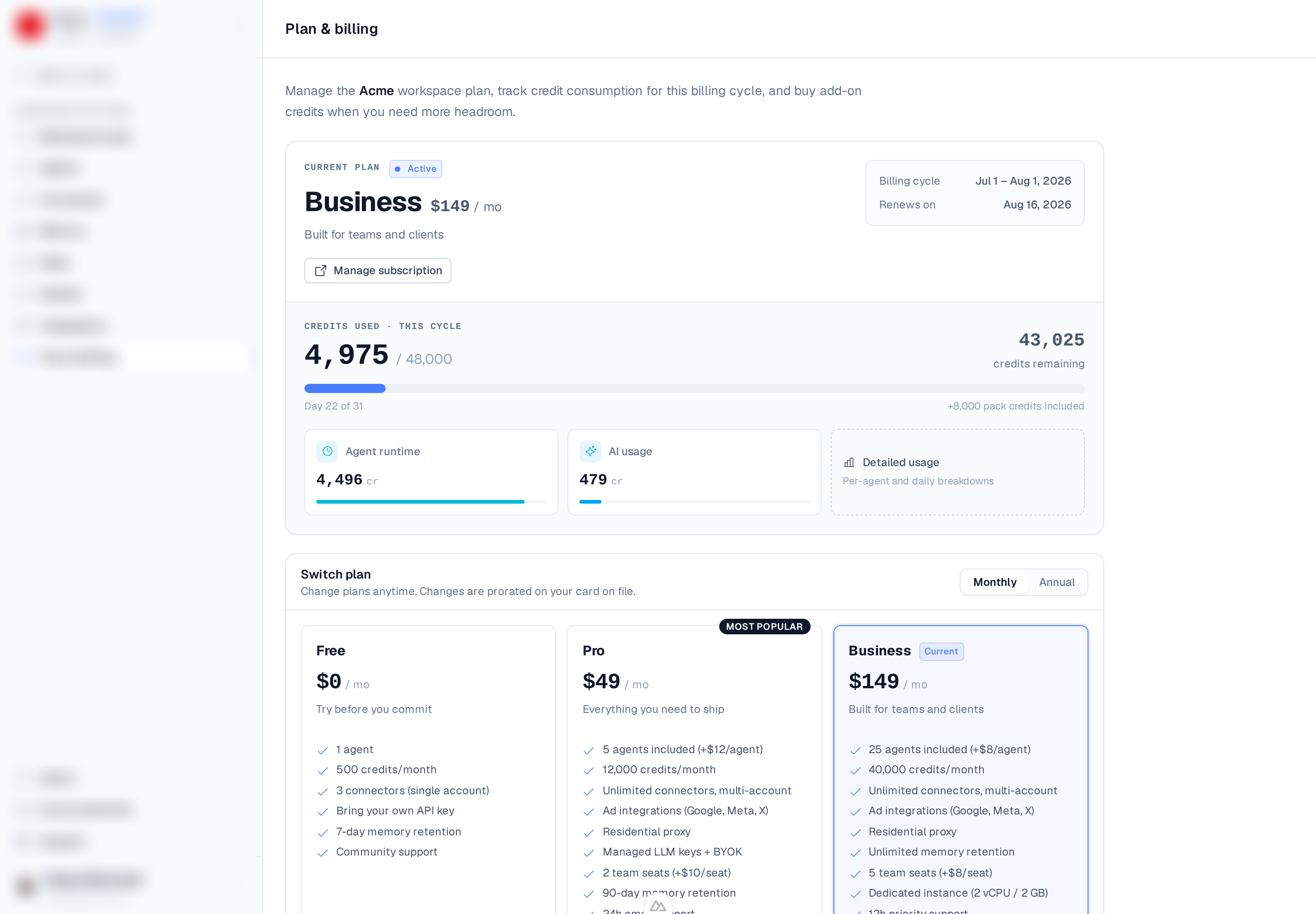
Manage your plan from the Plan & billing page (the /plans page, under Settings).
There you can see your current plan, track credit usage, upgrade or change tiers, add extras,
and open the billing portal.
Plans at a glance
| Plan | Price | Highlights |
|---|---|---|
| Free | $0 — closed to new signups | 1 agent, 500 credits/mo, 3 connectors, BYOK, 7-day memory. |
| Starter | $19/mo ($15/mo annual; $180/yr) | 1 agent, 2,000 credits/mo, and $5 of managed LLM usage included. |
| Pro | $49/mo ($39/mo annual) | 5 agents, 12,000 credits/mo, unlimited connectors, managed keys, 2 seats. |
| Business | $149/mo ($119/mo annual) | 25 agents, 40,000 credits/mo, unlimited memory, 5 seats, dedicated instance. |
| Enterprise | Custom | SSO, custom retention, on-prem agents, volume pricing. |
Paying annually saves 20%. See Plans for the full comparison.
Credit usage
Paid plans include a monthly pool of credits that meters agent runtime (1 credit per minute of machine uptime) and managed LLM usage (model spend converted to credits; your own BYOK usage doesn't draw credits). The Plan & billing page shows how many of your monthly credits you've used, warns you as you near the limit, and lets you top up.
Upgrade or change plan
- Open Plan & billing.
- Choose a plan (toggle monthly / annual to compare) and select Upgrade to
, Downgrade, or Switch to annual / monthly billing. - If the workspace has no paid plan yet, complete checkout in the embedded Stripe form. If it is already paid, confirm the change — it is charged prorated to the card on file, with no checkout step.
When the payment confirms, your plan activates automatically and its higher agent, credit, seat, and memory limits take effect.
Add-ons
Beyond the included allowances, paid plans can add:
- Extra agents — $12/mo each on Pro, $8/mo each on Business.
- Extra team seats — $10/mo each on Pro, $8/mo each on Business.
- Credit packs — 1,000 credits for $5 on Pro, $4 on Business, when you need more before the period resets.
Downgrade or cancel
From the Plan & billing page you can cancel in one click. Paid features stay active until the end of the current billing period, then the workspace is paused — its agents are stopped and its schedules unscheduled, and your data is kept; new Free workspaces are not created. If you change your mind before then, Resume restores the plan without checking out again.
Refunds
Paid plans are charged when you check out — there's no free trial. Instead, every new Starter, Pro, or Business subscription comes with a 7-day money-back guarantee. While it applies, the Plan & billing page shows the date it ends and a Request a refund link that opens a support ticket prefilled with a refund request. The team processes refunds manually and replies at your account email.
Manage payment & invoices
Open the billing portal (via Manage subscription on the Plan & billing page) to update your card, download invoices, or review past charges in Stripe.
Enterprise
Need SSO, custom retention, on-prem agents, or volume pricing? Enterprise plans are custom-quoted — reach out via Contact sales on the Plan & billing page.