
Account & Team
Deleting your account
Permanently delete your BetterClaw account, its workspaces, and its subscription.
Deleting your account
You can permanently delete your BetterClaw account from your profile. Deletion takes effect immediately and can't be undone.
What gets deleted
When you delete your account:
- Workspaces you own are torn down, along with every agent in them and their chats, memory, and files. Teammates in those workspaces lose access too.
- Your subscriptions are canceled. You won't be charged again.
- You're removed from workspaces you joined as a teammate. Those workspaces, and their agents, stay with their owners.
- Your login is removed, and you're signed out right away.
Workspaces can't be transferred to another owner. If teammates rely on a workspace you own,
let them know before you delete your account. Download anything you want to keep first, such
as deliverables from your chats.
Delete your account
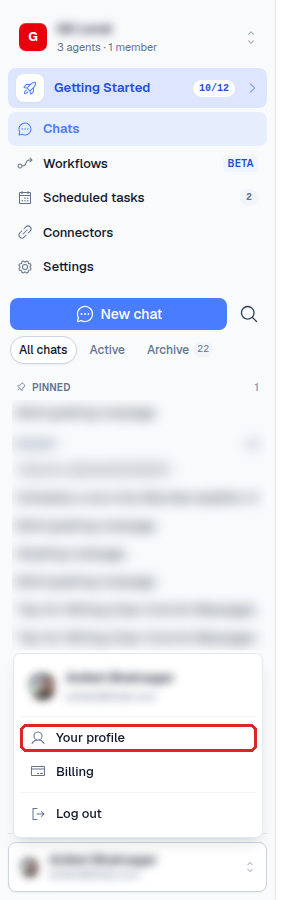
- Open the user menu at the bottom of the left rail and choose Your profile.
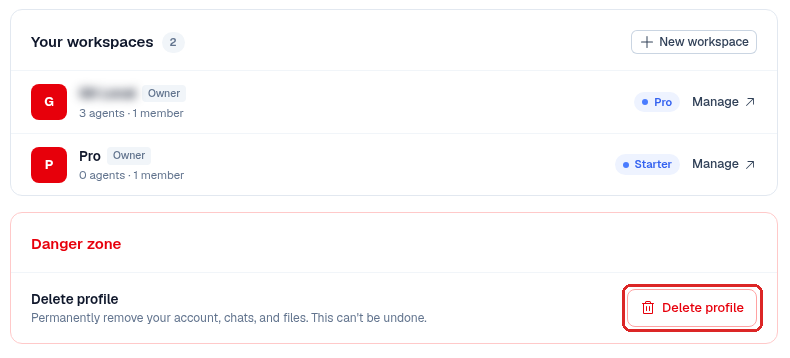
- Scroll to the Danger zone at the bottom of the page and click Delete profile.
- In the Delete account dialog, read the summary and type
deleteto confirm.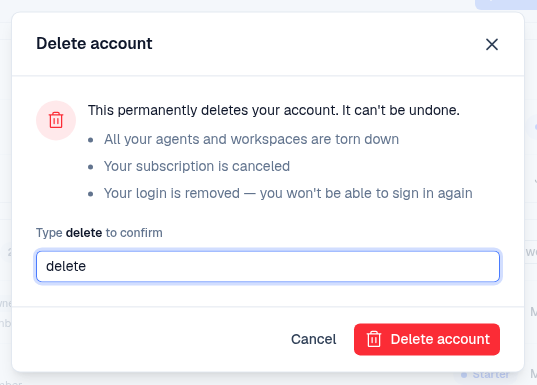
- Click Delete account.
You're signed out and taken back to the sign-in page. Changed your mind before step 4? Click Cancel and nothing is deleted.
If you see a Could not delete account message, try again. If it keeps happening,
contact support.