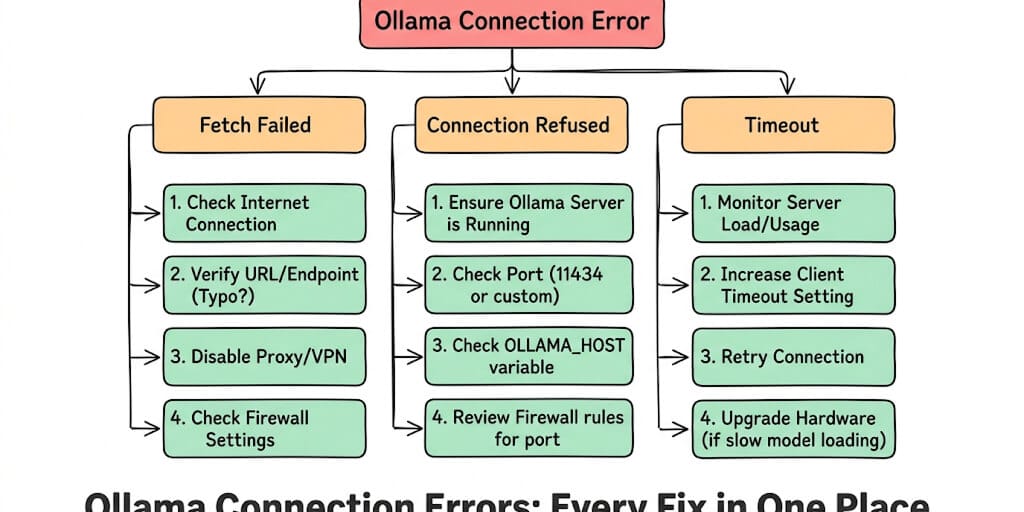
Your agent framework says it can't reach Ollama. The model was running five minutes ago. Now it's "connection refused." Below are 15 fixes, plus the Windows, browser and crash variants, each under the exact error message you're seeing, with a copy-paste fix for each.
It was 11 PM. The agent had been running fine all day. Qwen3.8 27B on Ollama, classifying emails, posting digests to Slack. Solid.
Then the Slack digest didn't arrive. I checked the agent logs. Error: fetch failed. Checked Ollama. curl localhost:11434 said connection refused. ollama ps said "could not connect to ollama app". The server had silently died because my laptop went to sleep for ten minutes and Ollama didn't recover on wake.
This is the most frustrating class of agent errors because everything looks right. The model is pulled. The config is correct. It was working an hour ago. And now... connection refused.
Here's every Ollama fetch failed and connection error variant, why it happens, and the copy-paste fix. Bookmark this page. You'll be back.
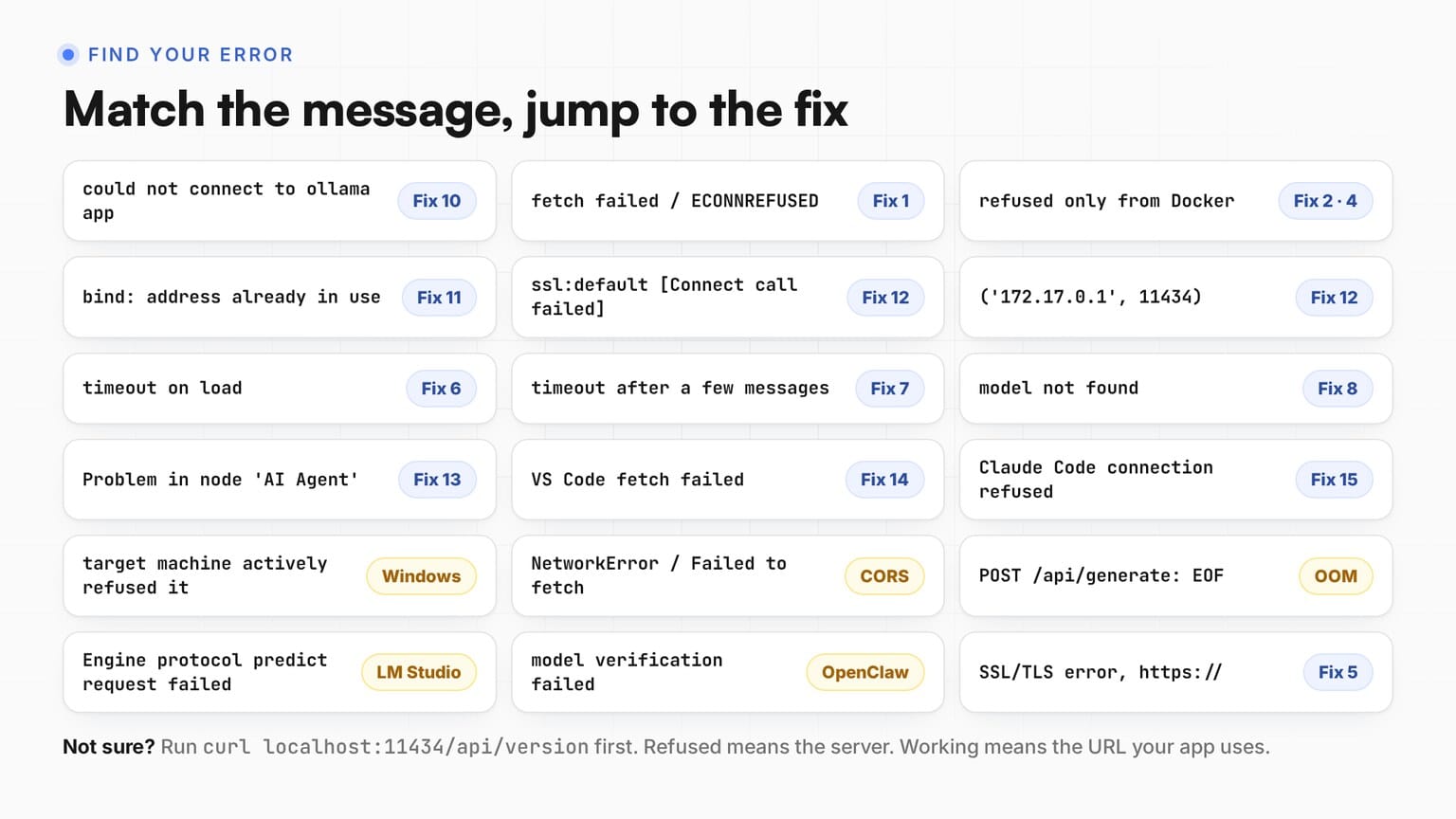
Find your error
Search this table for the message you're seeing (Ctrl+F works), then jump to its fix.
| Error you see | Cause, and where to fix it |
|---|---|
could not connect to ollama app / ollama server | Server not running. Fix 10: start the app or the service |
fetch failed / ECONNREFUSED | Ollama not running. Fix 1: restart the app or service |
connection refused from Docker, works in terminal | Ollama listens on 127.0.0.1 only. Fix 2: bind to 0.0.0.0 |
connection refused (Docker) | App uses localhost inside a container. Fix 4 |
('172.17.0.1', 11434) | Ollama listens on 127.0.0.1 only. Fix 12 |
Cannot connect to host ... ssl:default | Server down, or the container can't reach the host. Fix 12 |
bind: address already in use | Ollama is already running. Fix 11: use it |
| port blocked by firewall | Firewall on 11434. Fix 3 |
| SSL/TLS error | HTTPS instead of HTTP. Fix 5 |
| timeout on load | Model too large for memory. Fix 6 |
| timeout after a few messages | Context window overflow. Fix 7 |
model not found | Wrong tag or outdated Ollama. Fix 8 |
| Hermes/OpenClaw can't connect | Wrong base URL. Hermes needs /v1, OpenClaw must not have it. Fix 9 |
Problem in node 'AI Agent': fetch failed | n8n points at the wrong host. Fix 13 |
VS Code fetch failed | Extension runs remotely or uses the wrong endpoint. Fix 14 |
Claude Code Connection refused | Server down or wrong base URL. Fix 15 |
target machine actively refused it | Windows, server not running. Windows |
NetworkError / Failed to fetch (browser) | CORS. Browser apps |
POST .../api/generate: EOF | Runner crashed, usually out of memory. EOF |
Engine protocol predict request failed | That's LM Studio, not Ollama. Not Ollama? |
Verification failed: fetch failed (OpenClaw) | OpenClaw can't reach Ollama during setup. OpenClaw |
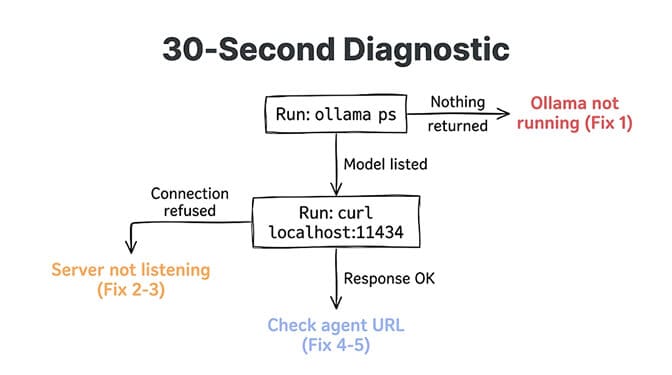
The 30-second diagnostic (run this first)
Before trying fifteen different fixes, run these three commands:
# 1. Is the server up? (the real test)
curl http://localhost:11434/api/version

# 2. Which models are downloaded?
ollama list

# 3. Which models are loaded in memory right now? (empty is fine)
ollama ps
- If
curlsays "connection refused": the server isn't running or isn't listening where you think. Go to Fix 1. - If
curlworks in your terminal but not in your app: the app is looking at a differentlocalhost. Go to Fix 4 (Docker) or the app sections (n8n, VS Code, Claude Code). - If
ollama psshows an empty table: nothing is wrong. It only lists models loaded in memory, and the model loads on the first request. - If
ollama psprintscould not connect to ollama app(orollama serveron newer versions): that's a down server, not a model problem. Go to Fix 10. - If everything connects but it's slow or timing out: go to Fix 6 or Fix 7.
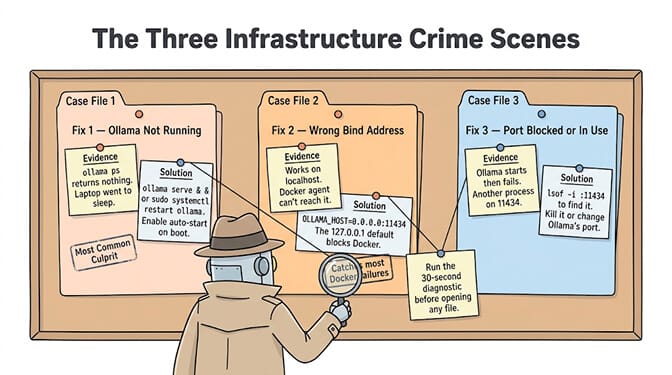
Fix 1: Ollama service isn't running (the #1 cause)
"fetch failed" / "ECONNREFUSED 127.0.0.1:11434"
Symptoms: curl localhost:11434 returns "connection refused." Your agent logs show "fetch failed" or "ECONNREFUSED." ollama ps prints "could not connect to ollama app."
Why it happens: Ollama crashed, was never started, or died after laptop sleep/restart. On macOS, the Ollama app might have quit. On Linux, the systemd service might have failed.
Copy-paste fix:
# macOS: Relaunch the Ollama app
# Or from terminal:
ollama serve &

# Linux: Restart the service
sudo systemctl restart ollama
sudo systemctl status ollama

# Verify it's running
curl http://localhost:11434/api/version
Make it permanent (Linux):
# Enable auto-start on boot
sudo systemctl enable ollama
On macOS, add Ollama to Login Items (System Settings → General → Login Items) so it starts automatically. On Windows, see the Windows section.
Fix 2: Ollama is running but bound to the wrong address
"connection refused" from Docker or another machine
Symptoms: curl localhost:11434 works on the machine itself, but your agent (running in Docker, WSL or on another machine) gets "connection refused."
Why it happens: By default, Ollama binds to 127.0.0.1:11434. This means only processes on the same machine can connect. If your agent runs in Docker, a VM, or a different machine, it can't reach 127.0.0.1.
Copy-paste fix:
# Linux: Set Ollama to listen on all interfaces
sudo systemctl edit ollama

# Add these lines:
[Service]
Environment="OLLAMA_HOST=0.0.0.0:11434"

# Restart
sudo systemctl daemon-reload
sudo systemctl restart ollama

# macOS: Set the environment variable
launchctl setenv OLLAMA_HOST "0.0.0.0:11434"
# Then quit and reopen the Ollama app
Security warning: 0.0.0.0 exposes Ollama's API, which has no authentication, to your whole network, and to the internet on a VPS with an open port. Only do this behind a firewall, or bind to the default Docker bridge IP (usually 172.17.0.1:11434) instead so only containers can reach it.
Verify from inside the container, because testing from the host proves nothing about Docker:
docker exec -it <container> curl http://host.docker.internal:11434/api/tags
If the container image has no curl, use wget instead:
docker exec -it <container> wget -qO- http://host.docker.internal:11434/api/tags
The single most common reason agents in Docker can't reach Ollama: the server is bound to 127.0.0.1 (localhost only). Agents in Docker need Ollama on 0.0.0.0 or the bridge IP.
Fix 3: Port 11434 is blocked or in use
Symptoms: Ollama starts but other machines can't reach it, or another process is sitting on port 11434.
Copy-paste fix:
# Check what's using port 11434
lsof -i :11434   # macOS/Linux
ss -tlnp | grep 11434   # Linux

# If a process that is NOT Ollama holds it, move Ollama to another port
OLLAMA_HOST=127.0.0.1:11435 ollama serve
If the process on 11434 is Ollama itself, nothing is wrong. See Fix 11.
If a firewall is blocking the port:
# Linux (ufw)
sudo ufw allow 11434/tcp

# macOS: System Settings → Network → Firewall
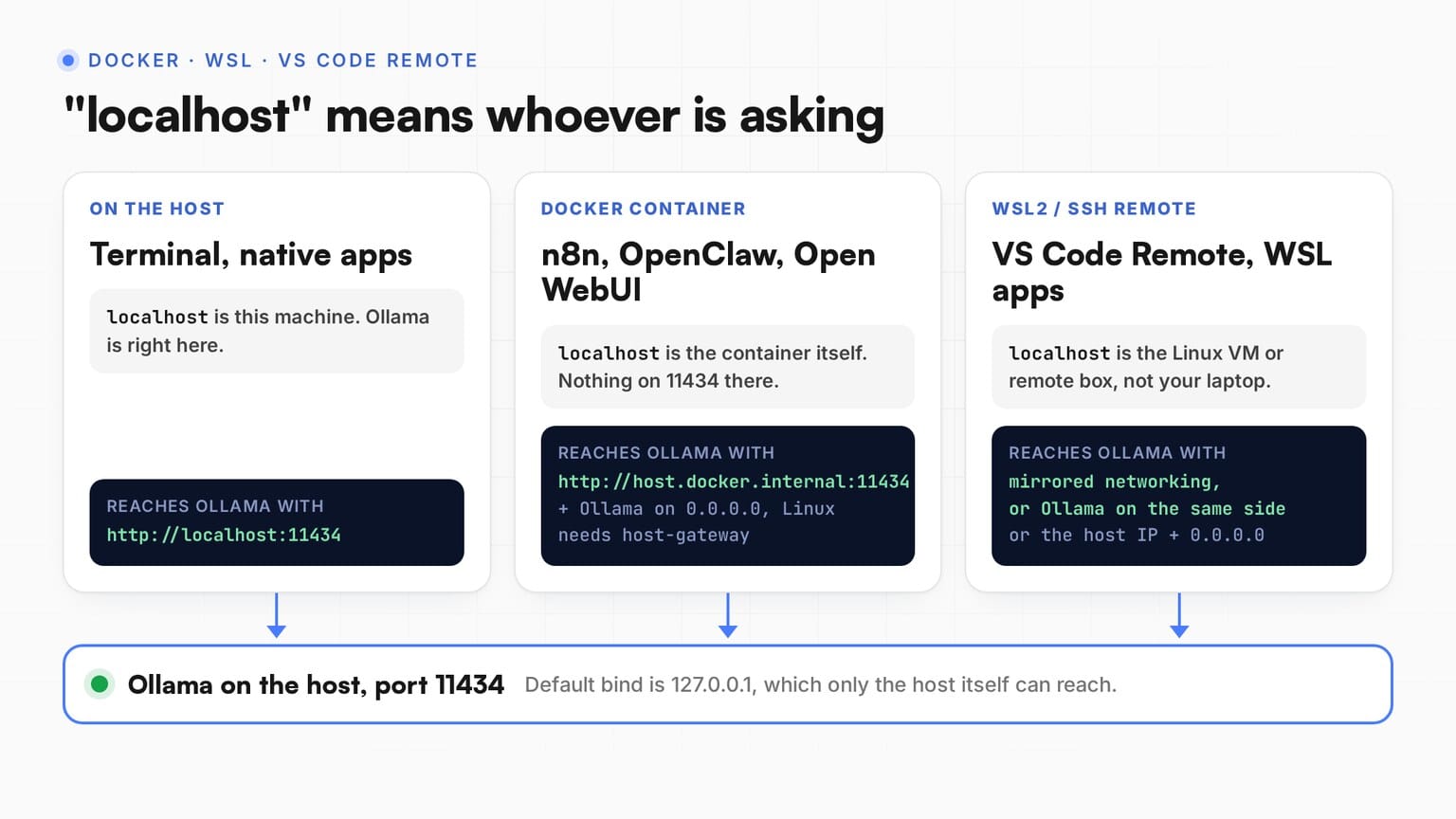
Fix 4: Agent is using the wrong URL (Docker networking)
"fetch failed" in the app, but ollama run works
Symptoms: Ollama works fine in terminal (ollama run qwen3.8:27b works). But your agent framework (OpenClaw, Hermes, n8n) returns "fetch failed" or "connection refused."
Why it happens: Your agent is pointing to http://localhost:11434 but it's running inside Docker. Inside Docker, localhost means the container itself, not your host machine.
Copy-paste fix by framework:
OpenAI-compatible clients (Hermes and most agent frameworks) running in Docker:
http://host.docker.internal:11434/v1
host.docker.internal resolves to the host machine from inside a Docker container. Works on macOS and Windows Docker Desktop. On Linux, add it yourself:
# docker run
docker run --add-host=host.docker.internal:host-gateway ...
# docker compose
extra_hosts:
  - "host.docker.internal:host-gateway"
On Linux, Ollama on the host also has to listen beyond 127.0.0.1, or the container reaches the host and still gets refused (Fix 2). Docker Desktop on macOS and Windows forwards host.docker.internal to the host's localhost, so the default bind works there.
n8n (running in Docker): see Fix 13.
Any framework (running natively, not Docker): use http://localhost:11434 or http://127.0.0.1:11434. Don't put 0.0.0.0 in a client URL. It's a bind address for servers, not an address to connect to.
Fix 5: HTTPS vs HTTP mismatch
Symptoms: "fetch failed" with an SSL/TLS error in the logs. Or the agent framework requires HTTPS but Ollama serves HTTP.
Why it happens: Ollama serves HTTP by default (no SSL). Some agent frameworks or reverse proxies expect HTTPS.
Copy-paste fix: Use http:// not https:// in your Ollama URL. If you need HTTPS (for remote access), put a reverse proxy (Nginx, Caddy) in front of Ollama:
# Caddy (simplest HTTPS reverse proxy)
# In Caddyfile:
ollama.yourdomain.com {
    reverse_proxy localhost:11434
}
A Python error that says ssl:default is not this problem. See Fix 12.
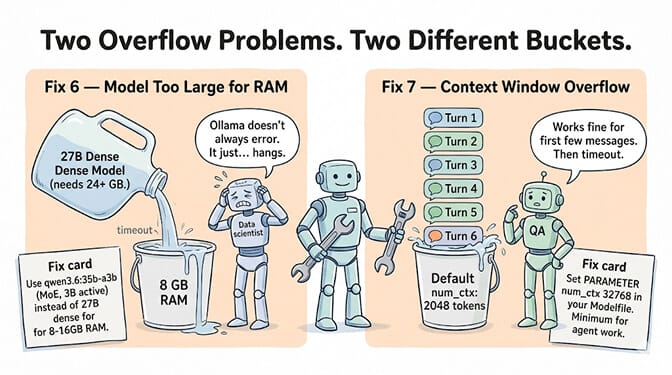
Fix 6: Model too large for available memory (silent OOM)
Symptoms: Ollama starts. The model begins loading. Then... silence. No response. Eventually: timeout. Or the model loads but inference is impossibly slow (under 1 tok/s). Or the connection drops with EOF.
Why it happens: The model's memory requirements exceed your available RAM or VRAM. Ollama doesn't always error clearly. It just hangs, spills onto the CPU, or the runner dies.
Copy-paste fix:
# Check what's loaded, its size, and whether it spilled to CPU
ollama ps

# If the model is too large, use a smaller quant
ollama pull qwen3.8:27b-q4_K_M    # about 18 GB
# Instead of:
# ollama pull qwen3.8:27b-q8_0    # about 30 GB
A mixture-of-experts model does not save memory here. qwen3.6:35b-a3b only activates 3B parameters per token, but all 23 GB of weights still have to fit. See our local LLM hardware guide for what fits at each RAM tier.
Fix 7: Context window overflow causes timeout
Symptoms: First few messages work fine. Then after 5-10 messages, responses stop or time out. No error. Just... waiting.
Why it happens: The conversation grew beyond the model's allocated context window. Ollama tries to process all tokens and runs out of memory or slows to a crawl.
Copy-paste fix:
# Set a context window in a Modelfile
# Don't use the maximum, use what you need

cat > agent.modelfile << 'EOF'
FROM qwen3.8:27b
PARAMETER num_ctx 32768
PARAMETER num_predict 2048
EOF

ollama create agent -f agent.modelfile
Then point your agent at the new agent model instead of the original tag, or the setting won't apply.
32768 is the floor for simple agents. Hermes Agent needs at least 64K for tool use, so set PARAMETER num_ctx 64000 for Hermes, and give Claude Code at least as much. Every extra token of context costs memory, so if raising num_ctx tips you into Fix 6, step down a model size.
Our context window management guide covers how to prevent context overflow, and our guide to Ollama's default context window explains why the defaults are too small for agent tasks.
Fix 8: Ollama version mismatch (model not found)
"Error: pull model manifest: file does not exist" / "model not found"
Symptoms: ollama run modelname returns "model not found" even though you pulled it. Or the model exists in ollama list but won't load. Or a brand new model refuses to pull.
Why it happens: New models often use new architectures, and an older Ollama can't load them. The tag in your agent config also has to match ollama list exactly.
Copy-paste fix:
# Check your version
ollama --version

# Update Ollama
# macOS / Windows: the app auto-updates, or reinstall from ollama.com
# Linux:
curl -fsSL https://ollama.com/install.sh | sh

# Re-pull the model after updating
ollama pull qwen3.8:27b
If a pull was interrupted, the partial download can leave a broken model behind. Remove it and pull again:
ollama rm qwen3.8:27b
ollama pull qwen3.8:27b
Fix 9: Hermes/OpenClaw specific connection issues
Symptoms: Hermes or OpenClaw can't connect to Ollama, even though curl and ollama run work fine from the terminal.
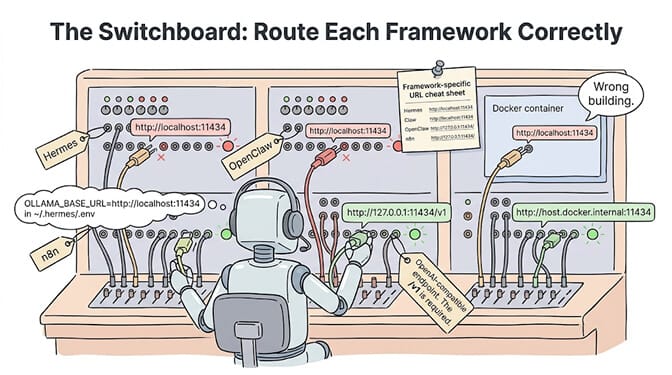
Why it happens: Each framework wants the base URL in a specific format, and the two don't agree on /v1.
Hermes Agent: "Connection error" or "fetch failed"
Hermes uses Ollama's OpenAI-compatible endpoint, so its base URL ends in /v1. Hermes is configured in ~/.hermes/config.yaml:
model:
  default: "qwen3.8:27b"
  provider: "custom"
  base_url: "http://localhost:11434/v1"
Leave the API key empty or set it to no-key. If Hermes runs in Docker, swap localhost for host.docker.internal and keep the /v1. Hermes needs at least 64K of context for tool use (Fix 7).
If tool calls hang with Qwen3.8 on /v1, update Ollama first, then see our Qwen3.8 27B tool calling fix. qwen3.6:27b is the fallback that works on the same endpoint. For other Hermes errors, see our error 400 diagnostic guide, and if Ollama connects but local models hang on tool calls, our guide to Hermes Agent not working covers the failures specific to local backends.
OpenClaw: "TypeError: fetch failed"
OpenClaw is the opposite. Its Ollama provider talks to Ollama's native API, so the base URL has no /v1. OpenClaw's docs warn that /v1 breaks tool calling:
{
  "models": {
    "providers": {
      "ollama": {
        "baseUrl": "http://127.0.0.1:11434",
        "api": "ollama",
        "apiKey": "ollama-local"
      }
    }
  }
}
The easiest route is ollama launch openclaw --model qwen3.8:27b, which writes this config for you. For every OpenClaw variant (model discovery timeouts, TUI errors, WSL2), see our OpenClaw Ollama fetch failed guide, and for tool-calling and "no response" problems, our OpenClaw local model not working guide.
Fix 10: "could not connect to ollama app"
"Error: could not connect to ollama app, is it running?"
Newer Ollama versions word it as Error: could not connect to ollama server, run 'ollama serve' to start it. Same meaning: the Ollama CLI is telling you the server isn't up. The CLI (ollama run, ollama ps, ollama pull) is only a client. It needs the background server on port 11434.
Windows: check the system tray for the llama icon. If it's missing, open Ollama from the Start menu. Still failing? Quit it from the tray, open a new terminal and run ollama serve to see the actual error.
macOS: open the Ollama app from Applications. The menu bar icon means the server is running. (On macOS and Windows, ollama ps and ollama list try to start the app for you, so if you still see this error, the app is failing to start. Check the log in the EOF section.)
Linux:
sudo systemctl start ollama
sudo systemctl enable ollama
journalctl -u ollama -n 50 --no-pager   # see why it died
If you set OLLAMA_HOST to a custom port, the CLI needs the same variable, or it'll look on 11434 and fail.
Fix 11: "bind: address already in use" on 11434
"Error: listen tcp 127.0.0.1:11434: bind: address already in use"
This almost always means Ollama is already running. The desktop app or the systemd service started it, and you ran ollama serve a second time.
You don't need to fix anything. Just use it:
curl http://localhost:11434/api/version
If you really want to run ollama serve by hand (for example, to set env vars), stop the other one first:
# Linux
sudo systemctl stop ollama
# macOS / Windows: quit Ollama from the menu bar or system tray
Only if lsof -i :11434 (macOS/Linux) or netstat -ano | findstr 11434 (Windows) shows a process that isn't Ollama, move Ollama to another port (Fix 3).
Fix 12: Python "Cannot connect to host localhost:11434 ssl:default"
"Cannot connect to host localhost:11434 ssl:default [Connect call failed ('127.0.0.1', 11434)]"
This is aiohttp (used by Open WebUI, LiteLLM and many async Python agents) saying the TCP connection was refused. The ssl:default part is just aiohttp's label. It does not mean an SSL problem.
('127.0.0.1', 11434): the server isn't running (Fix 1 / Fix 10), or your Python code is in a container where localhost is the container.host.docker.internal:11434 ... ('172.17.0.1', 11434): your container found the host fine, but Ollama on the host is only listening on 127.0.0.1. SetOLLAMA_HOST=0.0.0.0:11434(Fix 2) and restart Ollama.host.docker.internal ... [Domain name not found]: Linux Docker doesn't create that name by default. Add--add-host=host.docker.internal:host-gatewayor, in compose:
extra_hosts:
  - "host.docker.internal:host-gateway"
Fix 13: n8n "fetch failed" / "ECONNREFUSED"
"Problem in node 'AI Agent': fetch failed" / "Couldn't connect with these settings ECONNREFUSED"
The n8n Ollama credential test runs from where n8n runs, not from your browser.
Set the Base URL in the Ollama credential to match your setup:
# n8n and Ollama both installed natively
http://localhost:11434

# n8n in Docker, Ollama on the host
http://host.docker.internal:11434

# Both in the same docker compose (use the service name)
http://ollama:11434
On Linux, the Docker case also needs the extra_hosts line from Fix 12 and Ollama bound beyond 127.0.0.1 (Fix 2). No /v1 here. The n8n Ollama node uses Ollama's native API. If the credential saves but the AI Agent node fails mid-run, it's usually a timeout on a slow model. Use a smaller model or raise the n8n execution timeout. Our n8n vs Make comparison covers the full agent setup.
Fix 14: VS Code "Ollama fetch failed"
"fetch failed" in a VS Code extension
VS Code extensions (Continue, Copilot's bring-your-own-model, Cline and others) connect from the machine the extension runs on.
- Remote SSH, WSL or Dev Containers:
localhostnow means the remote machine or container, not your laptop. Either run Ollama on that remote, or point the extension at your host's IP with Ollama bound to0.0.0.0(Fix 2, and read its security warning). - Check the endpoint field. Most want
http://localhost:11434(no/v1). Extensions that use the OpenAI format wanthttp://localhost:11434/v1. - Test from VS Code's own terminal. If the command below fails there, it's a network location issue, not the extension.
curl http://localhost:11434/api/version
Fix 15: Claude Code "Connection refused"
"Connection refused, a firewall or proxy may be blocking it"
If you're running Claude Code on Ollama models, the easiest path is Ollama's own launcher, which sets everything up:
ollama launch claude --model qwen3.8:27b
Setting it up by hand? Claude Code speaks the Anthropic API, which Ollama serves natively, so the base URL takes no /v1:
export ANTHROPIC_BASE_URL=http://localhost:11434
export ANTHROPIC_AUTH_TOKEN=ollama
export ANTHROPIC_API_KEY=""
Connection refused here is the same root cause as everywhere else: the server isn't up, or Claude Code runs somewhere (container, WSL) where localhost isn't your Ollama. Give it at least 64K of context for real repos (Fix 7).
Windows: "target machine actively refused it"
"No connection could be made because the target machine actively refused it"
That's Windows for "connection refused". Checks:
- Is Ollama in the system tray? If not, start it (Fix 10).
- Test with
curl.exe, notcurl. In PowerShell,curlalone is an alias forInvoke-WebRequest. Runcurl.exeagainst127.0.0.1:11434/api/version, as shown below. - To set
OLLAMA_HOSTon Windows: quit Ollama from the system tray first. Open Settings (Windows 11) or Control Panel (Windows 10), search for "environment variables", choose "Edit environment variables for your account", addOLLAMA_HOST, then start Ollama again from the Start menu. - WSL2: an app inside WSL can't reach Windows Ollama on localhost by default. Either install Ollama inside WSL, or turn on mirrored networking (
networkingMode=mirroredunder[wsl2]in.wslconfig) and runwsl --shutdownto restart WSL. Mirrored mode needs Windows 11 22H2 or later.
curl.exe http://127.0.0.1:11434/api/version
For firewall, antivirus and PowerShell-specific fixes, see our Ollama connection refused on Windows guide.
Browser apps and extensions: "NetworkError" / "Failed to fetch"
"NetworkError when attempting to fetch resource" / "TypeError: Failed to fetch"
Ollama is running, but it's rejecting requests from a browser origin it doesn't trust (CORS). Pages on localhost and 127.0.0.1 are allowed by default. Browser extensions and web apps on any other domain are not, so allow them explicitly:
# Linux (sudo systemctl edit ollama)
Environment="OLLAMA_ORIGINS=chrome-extension://*,moz-extension://*,safari-web-extension://*,https://your-app.com"

# macOS
launchctl setenv OLLAMA_ORIGINS "chrome-extension://*,moz-extension://*,safari-web-extension://*"
Restart Ollama after. On Windows, add OLLAMA_ORIGINS as a User environment variable the same way as OLLAMA_HOST above.
Runner crashed: "POST .../api/generate: EOF" or "server disconnected"
"Error: POST .../api/generate: EOF" / "Server disconnected without sending a response"
The connection opened, then the model runner died mid-response. Nine times out of ten it's memory: the model plus its context doesn't fit. See Fix 6 and Fix 7. Check the log for "out of memory":
# Linux
journalctl -u ollama --no-pager | grep -i "out of memory"
# macOS
grep -i "out of memory" ~/.ollama/logs/server.log
# Windows (PowerShell)
Select-String -Path "$env:LOCALAPPDATA\Ollama\server.log" -Pattern "out of memory"
Not actually Ollama?
OpenClaw: "Verification failed: fetch failed"
"Verification failed: fetch failed" / "model verification failed"
OpenClaw checks the model during setup by calling your endpoint. "Fetch failed" at this step means it couldn't reach Ollama at all, not that the model is bad (people often search it as "qwen3.8-27b model verification failed").
- Confirm
curl http://127.0.0.1:11434/api/tagslists the exact model tag you typed.qwen3.8:27b(colon) is notqwen3.8-27b(hyphen). - Make sure the base URL has no
/v1(Fix 9). - Or skip the manual setup:
ollama launch openclaw --model qwen3.8:27blets Ollama write the config for you.
For every other OpenClaw variant, see our full OpenClaw Ollama fetch failed guide.
The honest truth about local agent backends
The honest truth about running local models as agent backends: connection errors are part of the deal. Ollama is excellent software. But it runs on your machine, depends on your network configuration, and interacts with your Docker setup, your firewall, your sleep settings, and your memory limits. Every one of these is a potential failure point.
For agents that need to run reliably 24/7, the question isn't "can I fix this error?" It's "do I want to keep fixing these errors?"
Give BetterClaw a look if you'd rather build agents than debug connection strings. Free plan with 1 agent and 100 credits a month. Pro is $49/month for 5 agents. 200+ verified skills. 28+ model providers via BYOK with zero markup. We handle the connections. You handle the agent logic.
Frequently Asked Questions
Why does Ollama say "fetch failed"?
"Fetch failed" means the client (your agent framework, browser, or CLI tool) couldn't establish a connection to Ollama's HTTP server. The three most common causes: the Ollama service isn't running (Fix 1), the server is bound to localhost but the client is in Docker (Fix 4), or the port is blocked by a firewall (Fix 3). Run curl http://localhost:11434/api/version to check if the server is responding.
What does "could not connect to ollama app, is it running?" mean?
The Ollama CLI can't reach the background server on port 11434. Newer versions say "could not connect to ollama server" instead. Start the Ollama app (Windows, macOS) or run sudo systemctl start ollama (Linux), then retry.
Why does "ollama ps" show nothing?
ollama ps only lists models loaded in memory. An empty list is normal when nothing has been used recently. Models load on the first request. To check the server itself, run curl http://localhost:11434/api/version.
What does "bind: address already in use" mean in Ollama?
Ollama is already running, usually started by the desktop app or systemd. You don't need a second ollama serve. Use the running one, or stop it first.
How do I fix Ollama connection refused in Docker?
Docker containers can't reach localhost on the host machine. Replace http://localhost:11434 with http://host.docker.internal:11434 in your agent framework's config. On Linux Docker, add --add-host=host.docker.internal:host-gateway to your Docker run command, and make Ollama accept connections from the container by setting OLLAMA_HOST=0.0.0.0:11434 behind a firewall. Docker Desktop on macOS and Windows works with the default bind.
Does Ollama need /v1 at the end of the URL?
Only for clients that use the OpenAI-compatible format, such as Hermes Agent and most agent frameworks: http://localhost:11434/v1. Clients that use Ollama's native API take the base URL with no /v1: OpenClaw's Ollama provider, the n8n Ollama node, Claude Code via ANTHROPIC_BASE_URL, and the Ollama Python library. Adding /v1 to OpenClaw breaks tool calling.
Why does Ollama time out after a few messages?
Conversation context grows with each message. By message 10-15, the accumulated tokens may exceed Ollama's allocated context window, causing it to hang or become extremely slow. Fix: set PARAMETER num_ctx 32768 in your Modelfile as a floor, or 64000 for Hermes Agent. Also set PARAMETER num_predict 2048 to cap output length. If the model is too large for your RAM, switch to a smaller model or quantization.
How do I connect Hermes or OpenClaw to Ollama?
For Hermes: in ~/.hermes/config.yaml, set provider: "custom" and base_url: "http://localhost:11434/v1" under model, and leave the API key empty. For OpenClaw: set baseUrl to http://127.0.0.1:11434 with api: "ollama" and no /v1, or run ollama launch openclaw to write the config for you. If either runs in Docker, use host.docker.internal instead of localhost.
Should I use Ollama or a cloud API for agent backends?
Ollama is ideal for development, testing, privacy-sensitive workloads, and high-volume inference where API costs compound. Cloud APIs (via BYOK on platforms like BetterClaw) are better for production reliability (no connection errors, no sleep/wake issues, no port debugging), access to frontier models, and 24/7 uptime. Many teams use Ollama for development and cloud APIs for production.