I asked our email triage agent to classify support tickets by urgency and draft responses for anything marked "low." It worked perfectly for the first 15 tickets.
On ticket 16, it started drafting responses for everything. High priority, low priority, didn't matter. The classification was gone.
I hadn't changed anything. Same prompt. Same model. Same configuration. My first thought was the model got dumber somehow. My second thought was maybe it's a bug in the integration.
It was neither. The agent's context window had filled up. Fifteen tickets' worth of conversation history, tool results, and API responses had consumed so much space that the original instruction ("classify by urgency, only draft for low priority") had been pushed to the edge of what the model could effectively process. The model didn't forget. It ran out of room.
This is the single most common reason AI agents stop following instructions mid-task. And once you understand what a context window actually is, it becomes obvious. But almost nobody explains it clearly.
What the context window actually is (the RAM analogy)
Think of the context window as your agent's working memory. Not long-term storage. Not a filing cabinet. Working memory. Like RAM in a computer.
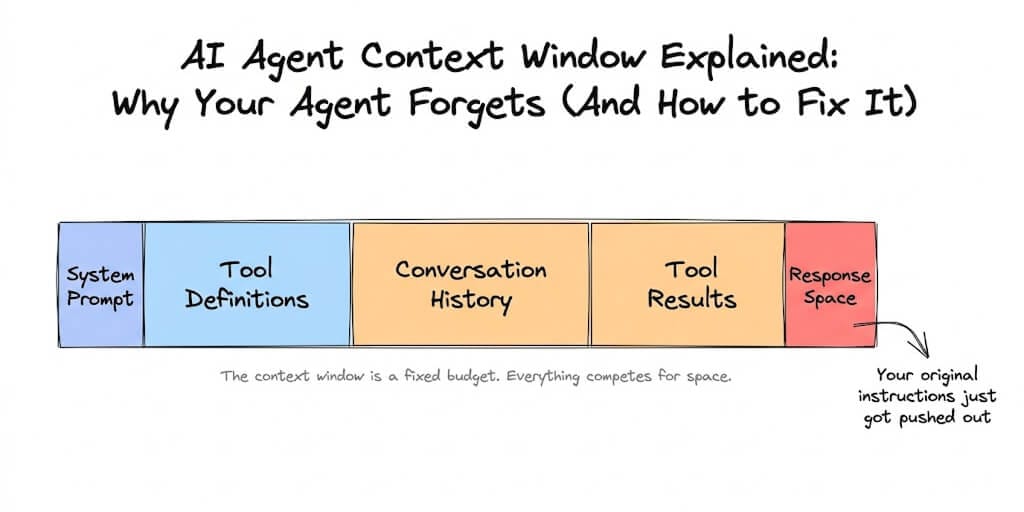
Every time your agent processes a request, the model receives one big bundle of text: the system prompt (your instructions), the conversation history (everything said so far), tool definitions (every tool the agent can use), tool results (data returned from previous tool calls), and the space needed for the response itself.
All of that has to fit inside the context window. If it doesn't fit, something gets dropped or degraded.
In 2026, context window sizes range from 128K tokens on smaller models to 1 million tokens on Claude Opus 4.6, Claude Sonnet 4.6, and Gemini 3.1 Pro. Llama 4 Scout technically supports 10 million tokens. Sounds enormous, right?
Here's where it gets interesting. A token is roughly 3/4 of a word. So 200K tokens is about 150,000 words. That's a full novel. Surely your agent doesn't need a novel's worth of space for a support ticket?
It doesn't. But the agent's context fills up way faster than you'd expect.
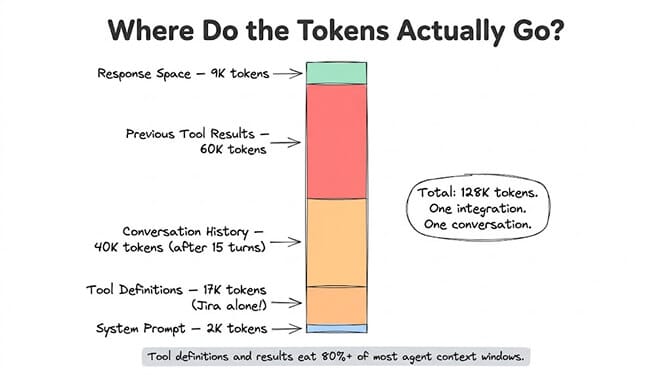
The five things eating your agent's context window
1. Tool definitions (the silent hog)
Every tool your agent can use needs a definition in the context window. The model needs to see the tool name, description, parameters, and schema to know how to call it.
Research from Agenteer found that a single Jira integration adds roughly 17,000 tokens just for the tool definition. Across a typical multi-tool agent setup, 134,000 tokens (67% of a 200K window) get consumed by tool definitions before the agent processes a single message.
If you're loading 15 tools but the agent only uses 3 on any given task, the other 12 are wasting context space and slowing down processing.
2. Conversation history (it grows every turn)
Every message in the conversation, yours and the agent's, stays in the context window. After 10-15 back-and-forth exchanges, conversation history alone can hit 30,000-50,000 tokens. After 30+ exchanges in a complex task, it can exceed 100,000.
This is why agents work great in short conversations but start "forgetting" in longer ones. The early instructions are still technically in the window, but they're buried under mountains of subsequent conversation.
3. Tool results (the biggest surprise)
When your agent calls an API, the response goes into the context. A CRM lookup that returns a full customer record: 2,000-5,000 tokens. A knowledge base search returning 10 results with full text: 10,000-30,000 tokens. Anthropic's research found that a single 2-hour meeting transcript can dump over 50,000 tokens into context when the agent only needed to extract action items.
After 3-4 tool calls, tool results can consume more context than everything else combined.
4. System prompt (small but critical)
Your system prompt (the agent's instructions) typically uses 1,000-3,000 tokens. Small. But here's the problem: as everything else grows, the system prompt's relative importance shrinks. The model pays attention to recent context more than early context. Your carefully written instructions sit at the very beginning while 100,000 tokens of conversation and tool results pile up after them.
5. The response itself
The model's response also needs space in the window. If there's only 2,000 tokens left after everything else, the response gets truncated or degraded. (In Hermes this surfaces as finish_reason='length' — see the 5 causes of Hermes response truncation for the full fix list.)
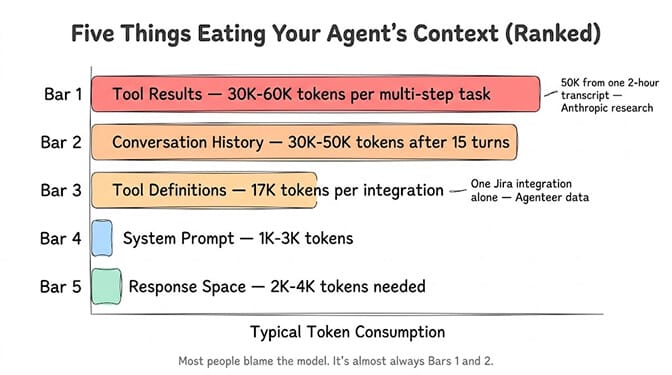
"Lost in the middle" (why bigger windows don't fully solve it)
Here's the part that surprises people. Even if your context window is big enough to hold everything, the model might still ignore information placed in the middle of the context.
This is a documented phenomenon called "lost in the middle." Research from Stanford and subsequent testing by TokenMix.ai in 2026 found that every major model shows 10-25% accuracy degradation for information in the middle of the context compared to information at the beginning or end.
Claude Sonnet 4.6 performs best at 85% middle-position accuracy. Some models drop to 71%.
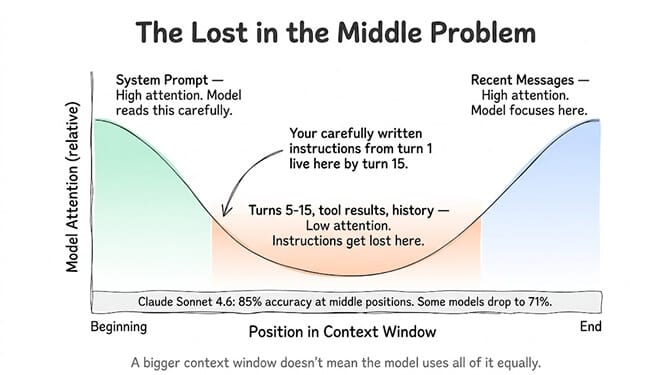
So your original instructions (at the beginning) and the most recent messages (at the end) get the most attention. Everything in between, which is where most of your conversation history and tool results accumulate, gets progressively less attention as the context grows.
A bigger context window doesn't mean the model uses all of it equally. Information in the middle gets less attention. Your instructions at the beginning compete with 100K tokens of noise in between.
This is why an agent that was given clear instructions 15 turns ago starts ignoring them. The instructions are technically still in the window. But they're "in the middle" now, buried under conversation history and tool results, and the model's attention has drifted.
Context window vs. memory (they're not the same thing)
This is the confusion that causes the most frustration. People use "context" and "memory" interchangeably. They're fundamentally different.
Context window: What the model can see right now, in this single request. It resets every turn (the framework re-sends everything). It's RAM.
Memory: What the agent remembers across conversations, sessions, and days. It's stored externally (database, vector store) and selectively retrieved when relevant. It's the hard drive.
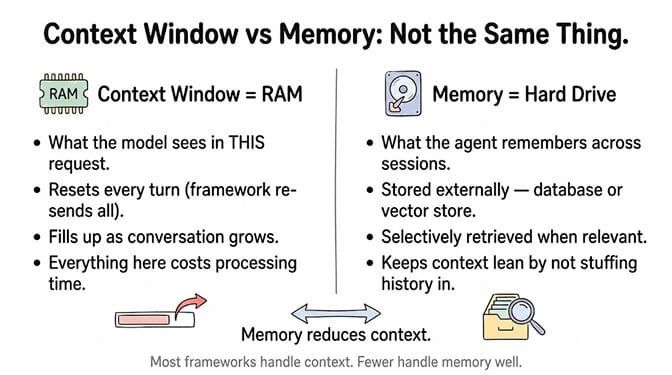
Most AI agent frameworks handle context by default. Fewer handle memory well. And the ones that do handle memory use it to reduce context: instead of stuffing the full conversation history into the window, they store it externally and retrieve only what's relevant for the current request. (If you want the deeper version, here's how AI agent memory works.)
This is the difference between an agent that breaks after 15 messages and one that works reliably across hundreds of conversations over weeks.
Four ways to stop your agent from forgetting
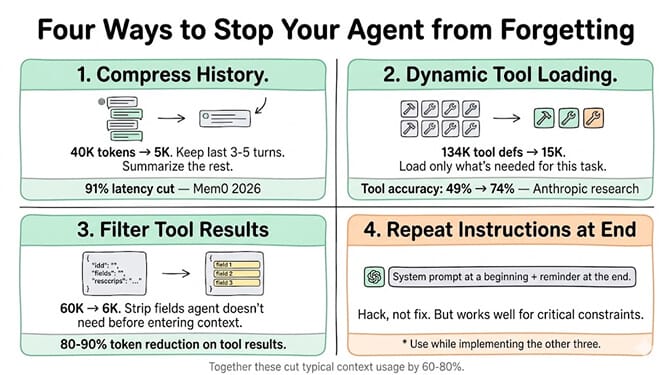
1. Compress conversation history
Instead of keeping every message in full, summarize older turns. Keep the last 3-5 messages verbatim for immediate context, and replace everything older with a condensed summary.
Mem0's 2026 benchmarks proved this works: a two-layer architecture (compressed context plus targeted retrieval) used 4x fewer tokens while cutting latency by 91% and actually improving accuracy by 18.7 percentage points over the full-context approach. Fewer tokens, faster responses, better results.
The summary approach keeps your system prompt close to the recent conversation (reducing the "lost in the middle" effect) while preserving the essential information from earlier turns.
2. Load tools on demand, not all at once
If your agent has access to 20 tools, don't load all 20 tool definitions into every request. Load only the tools relevant to the current task.
Anthropic's own research showed that when Opus 4 searched for relevant tools on demand instead of loading all definitions upfront, tool selection accuracy improved from 49% to 74%. Less noise in the context means the model picks the right tool more often and has more room for actual work.
This is one of the things we obsessed over when building BetterClaw's smart context management. Tool definitions load dynamically based on the task. Your agent sees 3-5 relevant tools per request instead of 20. The context stays lean, the responses stay fast, and the agent doesn't lose track of its instructions. Free plan with 1 agent and 100 credits a month. $49/month for Pro. No context management tuning required on your end.
3. Filter tool results before they enter context
When an API returns 50 fields and you only need 3, strip the extra 47 before putting the result into context. This sounds obvious but almost nobody does it.
A Jira ticket has dozens of fields: audit logs, changelog, schema metadata, internal IDs. Your agent needs the title, description, status, and assignee. The other 40+ fields waste tokens and push important information further into the "lost in the middle" zone.
Build filtering into your tool integration layer. Extract only the fields the agent actually needs. This single change can reduce tool result tokens by 80-90%.
4. Repeat critical instructions at the end
Since models pay the most attention to the beginning and end of context, put your most important instructions in both places. The system prompt (beginning) sets the baseline. A "reminder" at the end of each turn reinforces the key constraints.
This is a hack, not a proper solution. But it works surprisingly well for agents that need to follow specific formatting rules or maintain consistent behavior across long conversations.
What this means for choosing an AI agent platform
If you're building agents on a self-hosted framework (OpenClaw, CrewAI, LangGraph), context management is your responsibility. You write the compression logic. You build the tool filtering. You implement dynamic loading. It's a meaningful engineering investment, and getting it wrong means your agent degrades silently as conversations grow.
If you're using a managed platform, check whether context management is built in or left to you. Most platforms don't mention it in their marketing because it's an infrastructure detail. But it's the infrastructure detail that determines whether your agent works reliably on message 5 or breaks by message 15. It's also the single biggest lever on agent response latency.
Gartner estimates 40% of enterprise applications will embed AI agents by the end of 2026. Most of those agents will need to handle multi-turn conversations, multiple tool integrations, and long-running tasks. Context management isn't a nice-to-have. It's the difference between a demo and a production system.
The context window is the single most misunderstood concept in AI agent building. People blame the model when the agent forgets. They upgrade to bigger models when the real problem is bloated context. They assume longer context windows solve everything when "lost in the middle" means the model ignores half of what's in there anyway.
Understanding how context works doesn't just fix your current agent. It changes how you design every future agent. Fewer tools per task. Compressed history. Filtered results. Instructions at both ends.
If you'd rather not think about any of this, give BetterClaw a look. Context management, tool loading, result filtering, and persistent memory are all built in. Free plan with 1 agent and 100 credits a month. $49/month for Pro on Pro. Your agent remembers what matters and forgets what doesn't. Automatically.
Frequently Asked Questions
What is an AI agent context window?
The context window is the total amount of text an AI model can process in a single request. It includes your system prompt, conversation history, tool definitions, tool results, and the space needed for the model's response. Think of it as working memory (RAM), not long-term storage. In 2026, context windows range from 128K tokens on smaller models to 1 million tokens on Claude Opus 4.6 and Gemini 3.1 Pro.
How does context window compare to agent memory?
Context window is what the model sees in a single request. It resets every turn. Memory is what the agent remembers across sessions, stored externally in databases or vector stores and retrieved when relevant. Context is RAM. Memory is the hard drive. The best agent architectures use memory to reduce context: instead of stuffing full history into the window, they store it externally and retrieve only what's needed.
How do I know if my agent's context window is full?
Common symptoms: the agent ignores earlier instructions, repeats itself, gives contradictory responses, or suddenly changes behavior after working correctly for several turns. Log your input token count for each request. If it's growing significantly with each turn or exceeding 50% of your model's context limit, context bloat is likely the cause.
Does a bigger context window model cost more?
Yes, directly. You pay per token processed, so sending 200K tokens costs 10x more than sending 20K tokens at the same per-token rate. Some providers also charge surcharges for long contexts (Anthropic previously charged 2x above 200K tokens on older models, though Claude 4.6 has no surcharge up to 1M). Optimizing context usage saves both cost and latency.
Can context window problems cause security issues in AI agents?
Yes. When context overflows or gets compacted, critical instructions can be lost. The Meta incident where Summer Yue's OpenClaw agent mass-deleted emails happened partly because context compaction stripped the "confirm before acting" safety instruction. On BetterClaw, safety constraints are enforced at the platform level (trust levels, action approval, kill switch), not just through system prompts that can be lost in context.