Updated October 22, 2026 for Hermes v0.22.4. The three errors people search for most get their own sections first. Everything else is in the index below them: copy the error Hermes printed, find it in the table, and follow the link.
Hermes couldn't start
"Hermes couldn't start" is the Hermes Desktop startup screen. It means the app gave up waiting for its backend or gateway. The screen offers Retry, Repair install, and Use local gateway, plus a link to the logs. The line under the heading names the cause, and it is usually one of these:
- "Timed out connecting to Hermes backend": the backend is slow to boot, or its port is taken. See the backend timeout decoder.
- "The background gateway didn't come up": the gateway process never reported ready. The gateway log says why.
- "Backend exited before it became ready": the backend crashed at boot. Jump to the next section.
If the screen does not say which one, work through these checks in order:
- Kill stale processes. A Hermes process left over from an earlier run can hold the ports or, on Windows, lock files the app needs. Quit Hermes, make sure no
hermesprocesses remain, then relaunch. - Check for a port conflict. Hermes uses 8642 for the gateway API and 9119 for the dashboard:
lsof -i :8642
lsof -i :9119
If something else has the port, stop that process or configure Hermes to use a different port. - Run
hermes doctor --fix. It checks and installs missing dependencies. On v0.21.0 or v0.21.1, stop your gateways first (why). - Use Repair install. If doctor cannot fix it, click Repair install, or uninstall and reinstall cleanly. Your agent configs are stored separately and survive a reinstall.
If the screen blocks the whole app and you cannot reach settings, click Use local gateway. That gets you into the app, where you can reconfigure the gateway. If Hermes starts and then exits immediately, the terminal output usually names the failing component. Search for that string in the error index.
Hermes backend exited before it became ready
Hermes backend exited before it became ready (SIGTERM) means the backend process died during startup, before it could report ready. SIGTERM is not the real error. It is the supervisor stopping a backend that never came up. The real error is the Python traceback printed before it.
The usual cause is a broken virtual environment left by a partial update. The code update succeeded, the dependency install failed, and the venv now has stale or missing packages. That is why running the update again does not fix it.
- Run the backend in the foreground from a terminal and read the traceback. A
ModuleNotFoundError(for exampleyaml) confirms a half-installed venv. - Remove a pinned
HERMES_DASHBOARD_SESSION_TOKENfrom~/.hermes/.envif you set one. It puts Desktop LOCAL mode into a SIGTERM boot loop. - On Windows, quit every Hermes process before updating. Running processes lock
.pydfiles in the venv, so the updater cannot replace it and fails without saying why. - Delete and recreate the virtual environment, then reinstall. If the traceback named a missing module, install it explicitly before you retry.
More variants and the related GitHub issues are in the backend-exited decoder.
Hermes "Chat unavailable: 1"
Chat unavailable: 1 appears in the dashboard's Chat tab. The 1 is an exit code, not a message: the chat terminal the dashboard launches exited with status 1, and the dashboard printed only the code. The real cause is in the dashboard's terminal output or logs. Two causes have been reported on GitHub:
- No usable provider key. The chat process exits because the active provider has no API key, and the log shows
No API key configured for provider '...'. Fix the key in~/.hermes/.envand the provider inconfig.yaml, the same way as provider authentication failed. - The chat UI could not rebuild (Docker). On first run the dashboard rebuilds its terminal UI bundle. In the Docker image,
/opt/hermes/ui-tuiis owned by root while the dashboard runs as thehermesuser, so the build fails with a permission error (issue #20500). Fix the ownership, then restart the container:docker exec -u root <container> chown -R hermes:hermes /opt/hermes/ui-tui
Images built since June 2026 chown/opt/hermes/ui-tuitohermesat build time, so pulling a current image fixes this for good. On a pip or pipx install, a similarChat unavailable: 1came from aui-tuiworkspace check (issue #56665). It was fixed by PR #67116 (July 18, 2026), which tries the bundled TUI first, so update.
If neither matches, run hermes chat in a terminal on the same machine. If the CLI works, the problem is the dashboard's chat launcher and not your agent.
Find your error (index)
| Error string | What it means | 1-line fix | Full fix |
|---|---|---|---|
| Hermes agent not responding (no reply, no error) | Usually a local model hanging on a request with tools, a provider outage or quota, or a gateway that died. | Check the gateway log for a provider status first. On a local Ollama model, turn streaming off: hermes config set model.streaming false. | Ollama hangs with tools, model provider failed, gateway crashes |
| Hermes not working with Ollama | Ollama's /v1 endpoint hangs on streamed requests that include tool definitions (issue #25629, open), or the local model fails the web-backend checks. | hermes config set model.streaming false for the hang. Keep a cloud model configured for web tools. | Ollama hangs with tools, local models can't use web tools |
| Hermes agent not using tools | The model never received the tool schemas, can't call tools, or a malformed tool call broke the loop. | Pass the tool schemas, use a tool-capable model, and retry bad turns on their own. | Empty tool_calls, JSON parse errors, Layer 3 |
Hermes couldn't start (Desktop) | The app gave up waiting for its backend or gateway. | Kill stale Hermes processes, check ports 8642/9119, then Repair install. | Hermes couldn't start |
Hermes backend exited before it became ready (SIGTERM) | The backend crashed during start, usually because of a broken venv after a partial update. | Run the backend in the foreground, read the traceback, recreate the venv. | Backend exited before it became ready |
Chat unavailable: 1 (dashboard) | The dashboard's chat process exited with status 1. | Check the provider key, or fix /opt/hermes/ui-tui ownership in Docker. | Chat unavailable: 1 |
⚠️ Provider authentication failed. Check the configured credentials; raw provider details are in the gateway logs. | The key for the active provider is missing, wrong, or duplicated. Before v0.21.4 it could also be a 429 quota error mislabelled as auth. | Check the key in ~/.hermes/.env and the provider name in config.yaml. On an older build, also check your quota. | Provider authentication failed, decoder |
⚠️ The model provider failed after retries. I kept raw provider details out of chat; check gateway logs for diagnostics. | Your model id was retired or renamed, or the provider returned 503/429 and no fallback fired. | Read the gateway log for the real HTTP status, fix the model id, add fallback_providers. | model provider failed after retries |
API call failed after 3 retries: Connection error. | A catch-all message: network drop, safety block, 402/429, or a dead model id. | Read the logs for the real status code, then fix that. | API call failed after 3 retries |
ERROR: Package 'hermes-agent' requires a different Python: 3.14.x not in '<3.14,>=3.11' | Your Python is 3.14 (the Termux default) and your Hermes build is v0.21.5 or older, or the PyPI package. Those pin 3.11-3.13. | Update to v0.21.6 or later, which runs on 3.14. On an older build, install Python 3.13 and re-run the installer with it. | Python 3.14 install error, decoder |
Non-retryable client error (HTTP 400) | The provider rejected the request: wrong model, bad tool schema, or too much context. | Check the model id and context size against your provider's plan. | every cause of Hermes error 400 |
zsh: command not found: hermes | Your shell hasn't reloaded PATH since install. | source ~/.bashrc (or ~/.zshrc). | hermes: command not found |
hermes update fails, or No module named 'hermes_cli' | The update left the environment half-synced. | hermes update --backup, then re-run. | Update errors |
The lockfile at uv.lock needs to be updated, but --locked was provided | The committed uv.lock had drifted from pyproject.toml for newer uv versions. Fixed in v0.21.4. | Run uv lock in the Hermes install directory, then hermes update again. | Update errors |
session continuation requires API key | Hermes can't find a valid key when it resumes a session (key drift). | Remove stale keys from ~/.hermes/.env and keep only the active provider's key. | Hermes auth error decoder |
response remained truncated after N continuation attempts | Every continuation hit the output-token ceiling. | Raise the output limit on your model server (Hermes stopped reading HERMES_MAX_TOKENS in v0.21.1), or /compress. | Hermes response truncated |
model context length below the 64K minimum | The model's context window is under the Hermes floor. | Pick a 64K+ model or raise the context in your runtime. | context length below minimum |
srv operator(): instance name=<model> exited with status 1 (llama-server) | llama-server's router could not load the local model. This is usually because it ran out of memory. | Read the error in the log just above that line, then set --ctx-size or use a smaller quant. | llama-server instance exited decoder |
409 Conflict on getUpdates (Telegram) | Two processes are polling the same bot token. | Stop the duplicate gateway or webhook. | Telegram 409 conflict |
Timed out connecting to Hermes backend after 15000ms | The gateway isn't running or its port is taken. | Start the gateway and check the port. | backend timeout decoder |
agent initialization timed out (error 5032) | Startup took longer than the init window. | Check the provider and MCP servers load quickly. | initialization timeout decoder |
session not found after a gateway restart | The session store lost the in-flight session. | Start a new session, then update. | session-not-found decoder |
tirith security scanner enabled but not available | Tirith is on in config but not installed. | Update to v0.22.0 or later, which removes Tirith and its config keys. On an older build, install Tirith or disable it in config. | Tirith decoder |
empty stream with no finish_reason (possible upstream error or malformed SSE response) | The provider's stream closed early. | Retry with streaming off. | malformed-SSE decoder |
quota exhausted on Gemini with quota left | Hermes misreads a Gemini rate-limit response. | Check per-minute limits, not just daily quota. | Gemini quota decoder |
Empty tool_calls on every turn | The model never sees your tool schemas. | Pass tools=tools to apply_chat_template. | Tool-calling failures |
| Web search returns nothing | A local model without tool support, or a dead search key. | Test with a cloud model, then check the search key. | Web search not working |
| Dashboard won't load on port 9119 | The port is taken or the dashboard is bound to localhost. | lsof -i :9119, or tunnel over SSH. | Dashboard not working |
Session already has a live owner (cli, pid...) on a cron job | Cron delivery collided with a live session lock. | hermes update (fixed in the v0.21.x patch line). | What changed in v0.21.3 |
state.db corruption after hermes doctor --fix | v0.21.0-0.21.1 bug with a live gateway. | Update to v0.21.2+, stop gateways, then repair. | What changed in v0.21.3 |
Usage limit hit, but chat says Provider authentication failed | A v0.21.3-and-earlier bug: quota 429s were labelled as auth failures. | hermes update to v0.21.4 or later. | What changed in v0.21.4 and v0.21.5 |
| Supervised gateway (systemd, launchd, Docker) won't start after a reboot | After a restart, Linux can hand the old gateway PID to an unrelated process, and Hermes mistook it for a running gateway (issue #133744). | hermes update to v0.22.2 or later. | What changed in v0.22 |
hermes update fails with a 403 behind a firewall or proxy | Before v0.21.7, installs on main fetched a GitHub release record that some regional firewalls block. | Update to v0.21.7, or set GITHUB_TOKEN (or run gh auth login) so the check authenticates. | Update errors |
hermes doctor --fix prints Config migrated to latest version, then asks for --fix again | Doctor reports success for a pre-v12 config it refused to migrate (open issue #123557). | Migrate or recreate the old config.yaml by hand. | What doctor --fix can't repair |
Not your exact string? Paste it into the agent error decoder. If the install itself is what failed, go straight to Hermes installation errors. If you'd rather keep your host clean, you can run Hermes in Docker.
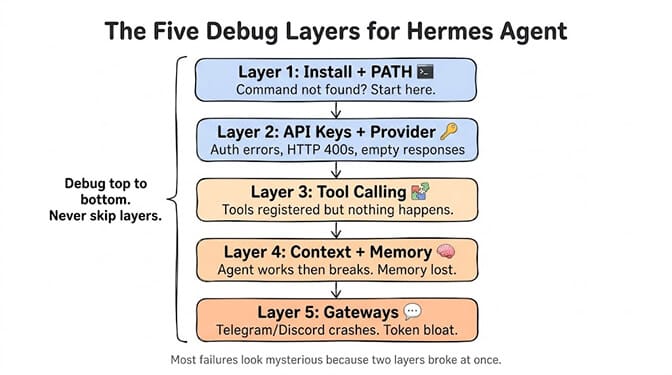
My first Hermes install ran clean, then hermes returned "command not found." Three hours of GitHub issues later, the fix was one line: source ~/.bashrc. The errors are usually simple. The hard part is working out which one you have, because the symptoms overlap.
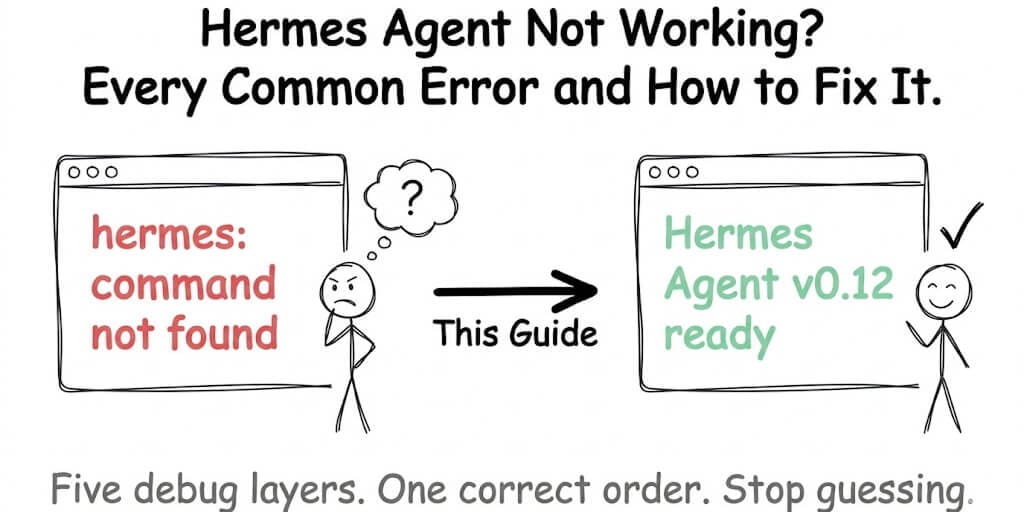
So below the index, this guide is organized by the layer where Hermes actually breaks: install, then provider, then tools, then gateways. Debug in that order.
Start here: hermes doctor --fix
Before digging into individual errors, run this:
hermes doctor --fix
According to Hermes's own documentation, this catches about 80% of common issues. Doctor checks four things:
- Dependencies and Python version. Is the virtualenv intact, and is Python inside the range your build supports (3.11-3.13 up to v0.21.5, 3.11-3.14 from v0.21.6)?
- PATH. Can your shell find the
hermesbinary? - Credentials. Does the active provider have a key in
~/.hermes/.env? - Model availability. Does the configured model answer?
With --fix it also migrates your config to the current schema version and repairs what it safely can.
If hermes doctor --fix solves your problem, you're done. Close this tab.
If it doesn't, or if you can't even run that command, keep reading.
One caveat if you are below v0.21.2: stop your gateways first. On v0.21.0 and v0.21.1, doctor --fix could corrupt a live state.db when a gateway still held it (issue #103339). The repair path had no single-writer enforcement and its preflight guards were fail-open. v0.21.2 fixes this: doctor --fix now refuses a checkpoint it cannot prove is safe. Run hermes update before anything else. The current release is v0.22.4 (October 21, 2026). If you cannot update yet, shut every gateway down before running doctor --fix, sessions prune, or any other maintenance command.
What doctor --fix can't repair
Doctor reports these three problems but leaves them unfixed. Each needs a manual edit.
custom_providerssaved as a dict instead of a list (issue #31780). Older configs wrote custom providers as a map. Doctor flags the structure on every run but never rewrites it. Open~/.hermes/config.yamland turn each entry into a list item:custom_providers: - name: my-local base_url: http://localhost:11434/v1 api_key_env: MY_LOCAL_KEY- A config too old to migrate (issue #123557, open). For a config below schema version 12,
migrate_config()refuses with a warning, butdoctor --fixstill prints "Config migrated to latest version" and counts it as fixed. The file stays on the old version, so the nexthermes doctorasks for--fixagain, in a loop. Back up~/.hermes/config.yamland re-runhermes setup, or runhermes config checkand copy your settings into a fresh config by hand.
The oldercompression.summary_modeltrap (issue #9161) is fixed: config version 17 movescompression.summary_*keys toauxiliary.compression.*automatically on first load. - Non-default profiles. If you run Hermes under a named profile, doctor's suggested commands target the default profile. Run the fix it suggests against your profile explicitly, for example
hermes -p work config set ..., and re-runhermes -p work doctorto confirm.
Layer 1: Install and PATH errors (the "command not found" problems)
"command not found" after install
The install script finishes without errors. You type hermes. Nothing.
The fix: Your shell configuration wasn't reloaded after installation. The Hermes binary lives in ~/.hermes/bin/ but your current terminal session doesn't know about it yet.
source ~/.bashrc
Or for Zsh users:
source ~/.zshrc
If that doesn't work, add the path manually:
export PATH="$HOME/.hermes/bin:$PATH"
echo 'export PATH="$HOME/.hermes/bin:$PATH"' >> ~/.bashrc
source ~/.bashrc
Then verify with hermes --version. This is the single most common Hermes Agent error. It's not broken. Your shell just doesn't know where to find it.
Installation script times out or hangs
The curl | bash install hangs or the script downloads but fails mid-install.
The fix: Network restrictions are blocking GitHub access. This is common in corporate networks and certain regions. Two options:
Use a mirror proxy:
git config --global url."https://mirror.ghproxy.com/https://github.com".insteadOf "https://github.com"
Or download the install script manually, inspect it, and run it locally.
Python 3.14 install error: requires a different Python
ERROR: Package 'hermes-agent' requires a different Python: 3.14.6 not in '<3.14,>=3.11'
Up to v0.21.5, Hermes's pyproject.toml pinned Python to >=3.11,<3.14. Python 3.14 is outside that range, so pip refuses to install it. You'll mostly see this on Termux, where pkg install python now installs 3.14 by default. It also shows up on any desktop distro that has moved to 3.14. Issue #59877 was closed on September 1, 2026 by PR #100574, which makes the Termux installer pick a supported Python and fall back to the Termux User Repository. That PR did not add 3.14 support: pyproject.toml at v0.21.5 still reads >=3.11,<3.14.
Hermes v0.21.6 (October 8, 2026) lifted the cap. Its pyproject.toml reads >=3.11,<3.15, and the installer now bootstraps Python 3.14 by default. So the first fix is to update: re-run the official installer, or hermes update on a git install. You still get this error from older builds: pip install hermes-agent (PyPI still serves 0.19.0, which declares <3.14,>=3.11), anything pinned to v0.21.5 or earlier, and the Desktop app and Termux packages, which the v0.21.6 release notes say stay on their previous build until the next bundled release. On those, install 3.13 next to 3.14 and point the installer at it.
From v0.22.0 (October 13, 2026), Python 3.14 is the runtime for managed installs, and Hermes's package manager installs it for you. The Desktop app is now a signed package that carries its own Python and Node, so on a current Desktop build you never manage Python yourself.
On Linux or macOS, let uv fetch 3.13 without touching your system Python:
uv python install 3.13
uv venv --python 3.13 ~/.hermes/venv
Then re-run the Hermes installer. On Termux, the current installer tries the Termux User Repository for a supported interpreter automatically. If you're installing by hand, install python3.13 from TUR and use python3.13 wherever the docs say python.
Python version conflict (below 3.11)
The same range cuts off the bottom too. If you're running 3.9 or 3.10, the agent won't start or will throw import errors. Check your version:
python3 --version
If you're below 3.11, install the correct version alongside your existing one. Don't replace your system Python. Use pyenv or your distro's package manager to install 3.11+ as a secondary version. Python version pinning is one of the classes of problem that disappears entirely on a managed AI agent platform, where the runtime is not yours to keep current.
Windows? Use WSL2 anyway.
This changed, and the change is easy to misread. Native Windows install is no longer absent. There is a PowerShell install path for Windows 10 and 11 alongside Linux, macOS, and WSL2. Android has a Termux path.
The README for v0.21.5 now calls native Windows "fully supported". It installs under %LOCALAPPDATA%\hermes, and the CLI, gateway, TUI and tools all run without WSL. It is still the younger path. In late September, issue #125350 reported that a fresh native install on a stock Windows 10 box failed at three separate stages (it has since been closed), and Windows-only update bugs are still being filed against current builds. WSL2 gives you the identical environment Mac and Linux users run, which is also the environment every troubleshooting guide on the internet assumes.
One change if you use the Desktop app: from v0.22.0, the Windows desktop app is MSIX-only (App Installer or the Microsoft Store) and needs Windows 11 22H2 or newer. The old NSIS and MSI installers are gone.
So: native Windows works, WSL2 is what you should pick. Install WSL2 first, then run the Hermes install script inside the WSL2 terminal. This adds 10-15 minutes to setup and removes an entire category of bug reports from your future.
Startup hangs or Hermes won't launch
Covered at the top of this page: Hermes couldn't start for the Desktop startup screen and port conflicts, and backend exited before it became ready for crashes at boot.
Layer 2: API key and provider errors
"Provider authentication failed"
⚠️ Provider authentication failed. Check the configured credentials; raw provider details are in the gateway logs.
On v0.21.4 and later the same failure reads differently in chat:
⚠️ Sign-in to the AI model service failed. Use /login to sign in again, or ask whoever runs this bot to run `hermes doctor` on the host.
Chat UIs connected through the API server show ⚠️ Provider authentication failed: <error> instead. All three mean the same thing, and the provider authentication failed decoder covers every wording.
Hermes sends this to chat when the provider rejects your credentials. Check three things in order:
- The key for the active provider is in
~/.hermes/.env. - The provider name in
~/.hermes/config.yamlmatches that key. - There are no duplicate keys for the same provider, where an older one would win.
One trap on older builds: a 429 quota error could show up as this auth message, because the gateway checked for auth patterns before rate-limit patterns (issue #89401). Fixed in v0.21.4 by PR #115799: a quota 429 is now reported as quota exhaustion with the reset time (for example "resets in ~9h"), the /login hint only appears on real 401s, and an exhausted credential pool is checked before Hermes switches to a fallback. If you are on v0.21.3 or earlier and the key is fine, look for a 429 in the gateway log, wait for the quota window to reset, and update. The Hermes auth error decoder and our six auth-error causes cover the rest.
"The model provider failed after retries"
⚠️ The model provider failed after retries. I kept raw provider details out of chat; check gateway logs for diagnostics.
Hermes hides the real error from chat, so start with the gateway log. There are usually three causes:
- A retired or renamed model id. Retrying can never fix this one.
- A rate-limited or overloaded provider (429 or 503).
- A fallback that never triggers, so Hermes retries the same failing provider three times and stops.
Fix the model id first. Then configure fallback_providers so the next failure rolls over to another provider. Step-by-step fix: model provider failed after retries.
"API call failed after 3 retries: Connection error"
This is a catch-all message. Hermes prints the same line for network drops, provider safety blocks, 402 billing errors, 429 rate limits and dead model ids. The real HTTP status is in the logs, and that status tells you which fix applies. Full breakdown: API call failed after 3 retries.
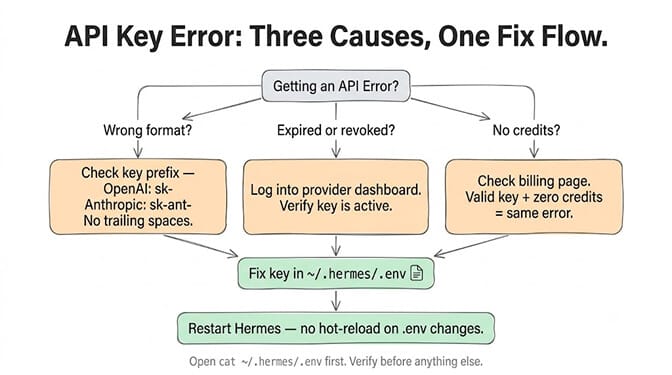
API key not recognized
You've set your key but Hermes returns authentication errors or empty responses.
Check three things:
Wrong key format. OpenAI keys start with sk-. Anthropic keys start with sk-ant-. If you copied the key wrong or have trailing whitespace, it won't work.
Expired or revoked key. Log into your provider dashboard and verify the key is still active.
Exhausted quota. A valid key with no remaining credits produces the same error as an invalid key. Check your billing page.
If the key checks out but Hermes still rejects it, the problem is usually how Hermes resolves credentials, not the key itself. Our Hermes auth error fixes walk through key drift, the wizard skipping the prompt, and four other causes.
Your key lives in ~/.hermes/.env. Open it and verify:
cat ~/.hermes/.env
After fixing the key, restart Hermes. It doesn't hot-reload env changes.
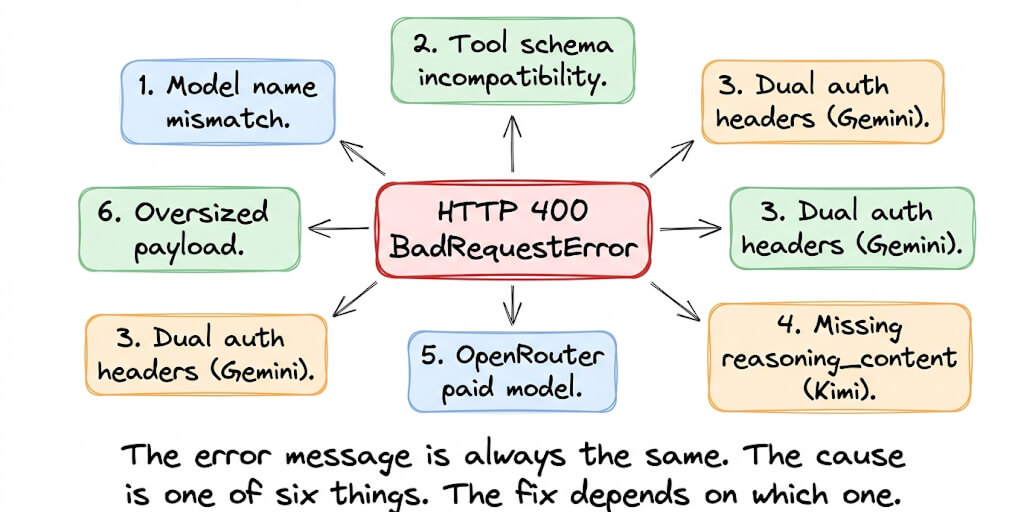
HTTP 400 errors from the model provider
This usually means you're sending a malformed request to the API. Common causes: requesting a model that doesn't exist on your plan, sending tool schemas in a format the provider doesn't support, or exceeding the provider's context length.
For specific Hermes 400 error debugging, we have a dedicated walkthrough that covers each provider's error codes. For Grok-specific connection issues ("user not found," the streaming 400, or silently dropped messages), see our Grok on Hermes setup and fixes guide.
Hermes connection error
A bare "connection error" without the retry message usually means Hermes cannot reach the model provider's API at all. Three things to check, in order:
- Is the provider endpoint correct in your config? A typo in the base URL fails silently as a connection error.
- Is your network blocking outbound HTTPS to that provider? Corporate firewalls and VPNs are the usual culprit. Test with:
curl -I https://api.openai.com/v1/models
Replace the URL with your provider's API endpoint. If curl times out, the problem is network, not Hermes. - Is the provider itself down? Check their status page before debugging further.
If you see API call failed after 3 retries: Connection error. instead, that is a slightly different problem. See the section above.
If Hermes connects but then prints "No response from provider for 180s ... Reconnecting...", the provider accepted the request and went silent. See the no response from provider for 180s decoder. If the line starts with "Auxiliary title generation failed: Connection error.", only the session-title call failed and your chat still works. See the auxiliary title generation failed decoder.
Layer 3: Tool-calling failures
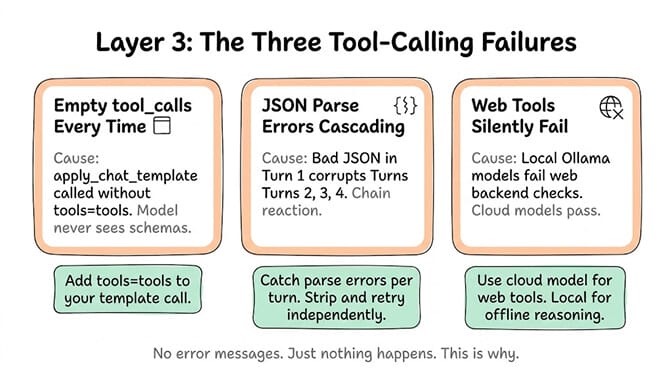
This is where most people waste the most time. The agent starts, connects to the model, but tools don't work. No error messages. Just... nothing happens. If Ollama says outright that your model does not support tools, that's a different problem with a one-line fix: see the does-not-support-tools decoder.
Empty tool_calls every time
Your agent is supposed to call a Python function or use a tool, but the tool_calls array comes back empty. Every single time.
The most likely cause: apply_chat_template was called without tools=tools. The model never sees the tool schema, so it can't emit a structured call. It's not refusing to use tools. It literally doesn't know they exist.
This is a code-level fix. Make sure your template application includes the tool definitions. If you're using someone else's wrapper or tutorial code, check their apply_chat_template call specifically.
JSON parse errors in the agentic loop
The model returns malformed JSON in one tool call, and the error cascades across subsequent turns. Turn 1 has a broken bracket. Turn 2 tries to parse Turn 1's output. Turn 3 is complete nonsense.
The fix: Implement graceful error handling that catches JSON parse failures on each turn independently. Don't let one bad response corrupt the entire conversation history. Strip the malformed turn and retry.
Hard limit: Hermes 3 8B struggles with more than 3 parallel tool schemas. For complex multi-tool agents, use Hermes 3 70B or move to hosted inference.
Local models can't use web tools
Ollama is running. Your local model works fine for reasoning. But web browsing, web search, and other internet-dependent tools silently fail.
This is a known limitation. Web tools only get enabled when the configured web backend passes certain checks that local models often fail. Cloud models (Anthropic, OpenRouter) work fine because they satisfy those backend checks natively.
The workaround: keep a cloud model configured as your "web access" provider and use local models for offline reasoning tasks. You can switch between them per conversation.
Local Ollama models hang forever when tools are defined
You point Hermes at a local Ollama model, ask for something that needs a tool, and nothing comes back. No error. No timeout. Just a cursor.
The cause sits on the Ollama side: its OpenAI-compatible /v1/chat/completions endpoint mishandles requests that combine stream=true with tool definitions, and the call never completes (issue #25629, still open).
Before changing any config, rule out the boring explanation. On CPU-only or low-VRAM machines the model can sit silent for minutes in the prefill phase and then generate at normal speed. That is not a hang. If you are timing out rather than hanging, the docs suggest HERMES_API_TIMEOUT=1800 in ~/.hermes/.env.
If it really is hanging, take streaming out of the equation:
hermes config set model.streaming false
model.streaming false forces non-streaming requests for the whole session, parent and subagents alike, which sidesteps the broken stream-plus-tools path. You lose token-by-token output. You get tool calls that actually arrive.
Two fixes you will find repeated elsewhere do not work: model.api_mode chat and model.skip_provider_detection true. Neither is a Hermes config key. api_mode shows up in #25629 only because the reporter had already set api_mode: chat_completions and the pre-flight provider detection ran anyway, and skip_provider_detection is a change proposed in that thread, not a setting you can apply today. Routing through a LiteLLM proxy handles stream-plus-tools correctly, but it runs into the same pre-flight probing (issue #26489), so it is not a clean escape either.
Layer 4: Context and memory problems
Context overflow (the 2,048 token trap)
This is the sneakiest Hermes Agent error. Hermes 3 8B defaults to 2,048 tokens in Ollama, which fills up in 2-3 tool turns. Your agent works perfectly for the first interaction, then suddenly stops making sense or returns empty responses.
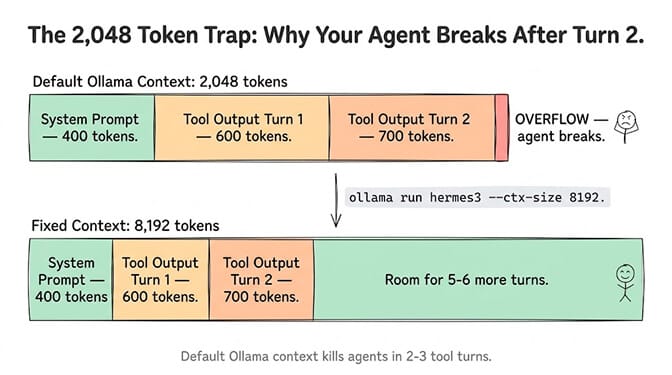
The fix is increasing the context window in your Ollama configuration:
ollama run hermes3 --ctx-size 8192
Or set it in the Modelfile. But be aware: larger context means more VRAM usage. On 8GB cards, you're limited. On 16GB+, 8192 tokens is comfortable for most agent workloads.
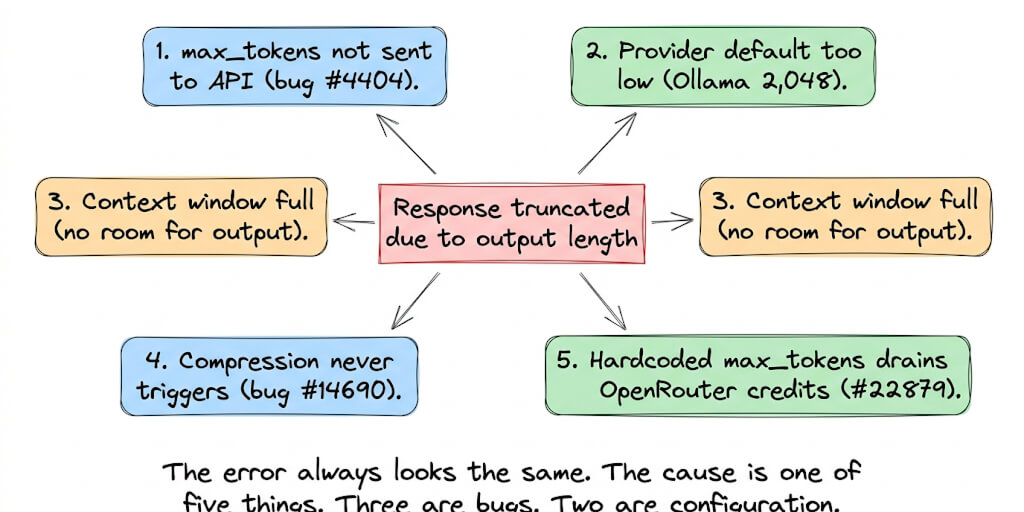
If you're running complex multi-tool chains, this single setting is probably why your agent "randomly" stops working after a few turns. If Hermes refuses the model outright for being under its context floor, see the Hermes context length fix. If the failure shows up specifically as a cut-off reply (finish_reason='length'), see our deep dive on Hermes response truncation and its 5 causes.
Memory not persisting between sessions
You told your Hermes agent something yesterday. Today it has no idea what you're talking about.
This usually means memory checkpointing isn't configured or the working directory changed between sessions. Hermes stores memory files relative to where it starts. If it launched from ~/projects/ yesterday and ~/ today, it's looking at different memory stores.
Fix: Always start Hermes from the same directory, or configure an absolute path for memory storage. And enforce checkpoints: finish one sub-goal, summarize, then continue to the next stage.
This is one of the places where the gap between self-hosted agents and managed platforms becomes real. On BetterClaw, persistent memory uses hybrid vector plus keyword search with automatic context management. No token bloat, no lost memories between sessions, no directory dependency. If you're spending more time debugging memory persistence than actually using your agent, that's a signal worth paying attention to. Free plan available, $49/month for Pro. BYOK with zero markup.
Ghost sessions and a bloated session store
On a long-running install the session list slowly fills with dead entries, state.db grows, and listing sessions gets slower every week. This is housekeeping, not a bug, but it looks like a bug once the store is big enough.
The command is hermes sessions prune. It is not hermes sessions clean. That subcommand does not exist, despite how often it gets quoted. Preview before you delete:
hermes sessions prune --older-than 30 --dry-run
hermes sessions prune --older-than 30 --yes
Prune only removes ended sessions; anything still active is never touched, and with no filters at all the default threshold is 90 days. Pin what you want to keep (hermes sessions pin) before a wide prune, and run hermes sessions optimize afterwards to defragment the database. A weekly cron keeps it from ever becoming a problem:
0 3 * * 0 hermes sessions prune --older-than 30 --yes
One safety rule, and it is the same one from the doctor --fix note at the top of this page: on v0.21.0 and v0.21.1, CLI maintenance running against a live database was one of the documented state.db corruption triggers (issue #103339). Update to v0.21.2 or later before you put this in a crontab, or stop your gateways while it runs.
Layer 5: Gateway, dashboard and platform errors
Telegram or Discord gateway crashes
Your agent works fine in CLI mode. You connect it to Telegram or Discord and it immediately crashes or behaves erratically.
Root cause: The gateway process was spawning inside the hermes-agent source directory, which loads development files like AGENTS.md and other data that shouldn't be in the runtime context. This was adding garbage to the agent's context and inflating token usage by 2-3x.
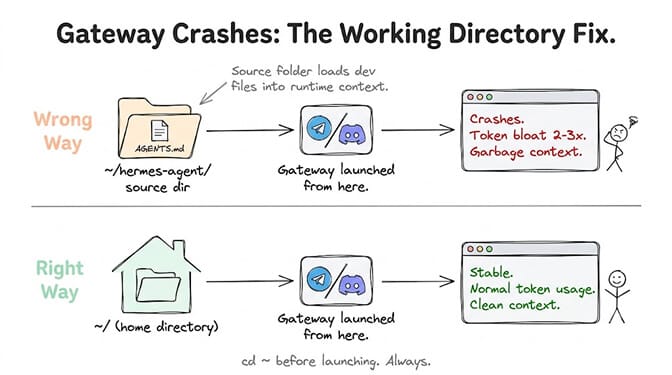
The fix: Make sure your gateway starts from your home directory ($HOME), not from the Hermes source folder. This was patched in a recent update, so update first:
hermes update
If you're still seeing bloat after updating, check your working directory before launching the gateway. cd ~ first.
Token cost explosion on Telegram
You're watching your API costs and notice Telegram conversations are 2-3x more expensive than the same conversation in CLI mode.
Same root cause as above. Telegram's message format, combined with the gateway loading extra context, inflates every message. Update Hermes, ensure you're launching from $HOME, and monitor token usage for a few conversations to confirm the fix.
Tirith security module blocking everything
Removed in v0.22.0. Hermes no longer bundles Tirith (PR #133832). In the maintainers' own test it flagged 12 of 24 everyday agent commands, and in cron or -q deny mode every flag was a hard block. Its two useful checks, credential uploads and invisible Unicode characters, are now built-in approval rules, and the config migration drops the security.tirith_* keys. So the fix is hermes update. The rest of this section applies to older builds.
Up to v0.21.7, Hermes ran a security module called Tirith on every terminal command. It's supposed to catch risky commands and ask for approval before executing them. But some users report it blocking commands outright with no approval prompt.
For example, curl | sh patterns get hard-blocked. No option to proceed. The community has requested an interactive approval flow, but for now the workaround is splitting your commands:
curl https://example.com/script.sh -o script.sh
bash script.sh
Run the download and execution as separate steps, or use the terminal directly for commands Tirith won't approve through the gateway.
Dashboard not working (port 9119)
The web dashboard runs on port 9119. When it won't load, the cause is almost always one of these three:
- Nothing is listening. Check whether the dashboard process is actually running (
lsof -i :9119). In Docker it only starts whenHERMES_DASHBOARD=1is set and port 9119 is published. - It's bound to localhost. By default the dashboard listens on
127.0.0.1, so it can't be reached from another machine. Don't expose it publicly. Tunnel to it instead:ssh -L 9119:127.0.0.1:9119 you@your-server
Then openhttp://localhost:9119on your own machine. - Remote sessions keep logging you out. On builds before v0.21.3, remote dashboard sessions expired during bursts of page refreshes.
hermes updatefixes it.
Web search not working
If your agent's web search returns nothing or errors out, it is almost always one of two things:
- You are running a local model that does not support the web search backend. Web tools require a model with tool-calling support (check the compatibility table in our Ollama tool-calling reference). Switch to a cloud model temporarily to confirm whether it is a model problem or a network problem.
- The web search backend itself is not configured or not reachable. Check your gateway logs for the search provider's response. If it returns a 401 or 403, your search API key is invalid or expired.
If search works with a cloud model but not with your local one, the local model is the issue. If it fails on both, it is configuration.
Update errors (hermes update failed)
Most "Hermes is broken" reports on old builds are fixed by updating. So when the update itself fails, you're stuck. Three rules make updates safe:
Back up first. --backup takes a full pre-pull copy of HERMES_HOME, which covers config, auth, sessions, skills and pairing:
hermes update --check    # see what would change, touch nothing
hermes update --backup
If the dependency sync fails with a lockfile error:
error: The lockfile at uv.lock needs to be updated, but --locked was provided.
The committed uv.lock had drifted from pyproject.toml for the version of uv you have. Newer uv releases treat an unrecorded exclude-newer entry as drift. Run uv lock inside the Hermes install directory, then run hermes update again. The upstream fix landed on September 16, 2026 (PR #112229, which absorbed PR #111419) and shipped in v0.21.4, so once you are past it this error should not come back.
If hermes itself broke after the update (No module named 'hermes_cli'), the environment is only half-synced. Follow the failed-update decoder. If that doesn't help, roll back to the last tagged release:
git checkout v2026.9.21      # or the tag you were on
uv pip install -e ".[all]"
hermes gateway restart
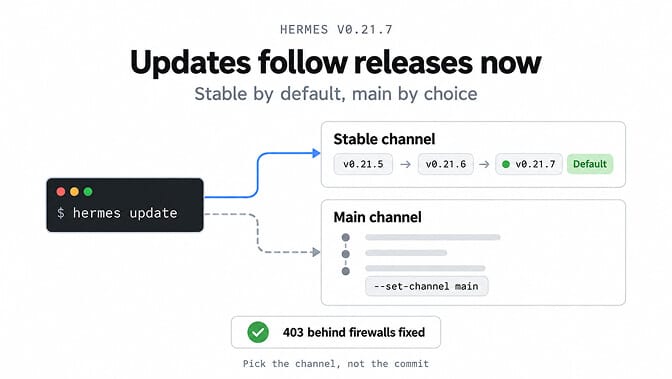
If hermes update fails with a 403 behind a firewall or proxy: that was a real bug, fixed in v0.21.7 (October 11, 2026). Installs on main used to fetch a release record that some regional firewalls answered with a 403. The stable-release check now uses your GitHub token when one is set (GITHUB_TOKEN or gh auth login), and a GitHub rate limit is now reported as a rate limit instead of a vague failure.
If hermes update stopped pulling the newest commits: that's deliberate, also from v0.21.7. A source install of the official repository now updates to the latest published release tag instead of every commit on main. If you want the old behaviour back, opt in:
hermes update --set-channel main
On Desktop, the same switch is under Settings, About, Updates, as "Update channel." Forks and mirrors still follow main.
On Windows, updates can fail with Access Denied because running processes lock the virtualenv. Stop every Hermes process first, then update. For the exact "No module named 'concurrent_log_handler'" message after a Windows update, see the concurrent_log_handler decoder.
What changed in v0.22 (Oct 13 to 21, 2026)
v0.22.4 (October 21, 2026) is the current release. v0.22.0, "The Threshold Release", shipped on October 13 and also documents everything in the v0.21.1 to v0.21.7 patches. v0.22.1 (October 14) was built from the wrong commit, so v0.22.2 (October 15) is the release it was meant to be. v0.22.3 and v0.22.4 both followed on October 21 as patch roll-ups. The changes that touch this page:
- The gateway starts after a reboot again (v0.22.2, PR #138594, fixes issue #133744). After a restart, Linux can hand the old gateway's PID to an unrelated process, and Hermes took it for a gateway that was already running, so a supervised gateway (systemd, launchd or Docker) refused to start. Hermes now records which boot it started in.
- One gateway and one desktop backend per machine. A single gateway and backend now serve every profile, instead of one process per profile. Each profile keeps its own credentials, allowlists, cron jobs and sessions, and
hermes updatefolds per-profile gateways into the shared one when nothing conflicts. - Tirith is gone. The bundled scanner was removed and its two useful checks became built-in rules. See Tirith security module blocking everything.
- Updates can't leave you half-installed. A new package manager (
hermes pm) builds each update in a fresh environment and switches over only after it passes its check. Python 3.14 is the runtime for managed installs, and the Desktop app carries its own Python and Node. - Provider outages no longer end your turn. When a provider returns transient 503 or 529 errors or times out, Hermes now waits in visible, bounded retry cycles instead of giving up. See the model provider failed after retries.
- Windows desktop is MSIX-only and needs Windows 11 22H2 or newer. The macOS app is Apple Silicon only in default builds.
- Session auto-prune changed twice. v0.22.0 turned it on by default (ended sessions inactive for 90 days are deleted at startup). The v0.22.3 notes say it went back to opt-in, with a one-time prompt when disk runs low. Check
sessions.auto_prunein your config if old sessions vanished.
One known issue: sessions that ran under the v0.22.1 gateway can't be deleted in v0.22.2.
How to get it: CLI installs use hermes update or the installer one-liner, the Microsoft Store app updates through the Store, and Docker and Hermes Cloud use the :stable or :latest image. A Desktop app installed from the .exe or .dmg didn't change in v0.22.3 or v0.22.4. It updates with the next bundled release.
None of the v0.22 notes list a fix for gateway memory injection (#96134), the WSL2 gateway restart loop (#95189), the Ollama stream-plus-tools hang (#25629) or doctor --fix reporting a migration it refused to do (#123557). All four issues were still open on October 22, 2026.
What changed in v0.21.7 (Oct 11, 2026)
v0.21.7 (October 11, 2026) was the last v0.21 patch. It's a smaller roll-up than the last few: 204 merged PRs since v0.21.6, with the curated notes again deferred to v0.22.0. Three changes touch this page:
- Updates follow tagged releases. Source installs of the official repo now move to the latest published release, not every commit on
main. Runhermes update --set-channel mainto keep tracking every commit. See update errors. - Updates no longer fail behind some firewalls. The 403 some users hit during
hermes updateis gone, and GitHub rate limits are reported as rate limits. - Reasoning survives a resume. Signed thinking now replays after
hermes chat --resumeand on the next gateway turn, and Bedrock Converse reasoning models are no longer rejected on resumed sessions.
How to get it: the Desktop app updates itself, Microsoft Store installs update through the Store, and CLI installs use hermes update or the installer one-liner. Docker and Hermes Cloud use the :stable or :latest image.
The v0.21.7 notes don't list a fix for gateway memory injection (#96134), the WSL2 gateway restart loop (#95189) or the Ollama stream-plus-tools hang (#25629). Treat all three as unfixed until a release says otherwise. Each one is covered below.
What changed in v0.21.4 and v0.21.5 (Sept 21 and 24, 2026)
v0.21.5 (build v2026.9.24, September 24, 2026) came three days after v0.21.4 (build v2026.9.21). Both are roll-up patch tags: about 1,800 merged PRs went into v0.21.4 and about 460 into v0.21.5. Nous Research deferred the full curated notes to v0.22.0. The fixes that matter for this page:
- Quota errors are no longer reported as auth failures (issue #89401, PR #115799, in v0.21.4). If your provider's usage limit runs out, chat now tells you it is a quota limit and when it resets. It no longer sends you off to check credentials that were never wrong. See provider authentication failed.
hermes updateno longer trips overuv.lockdrift (PR #112229, in v0.21.4). See update errors.- Desktop no longer spawns a second backend. The v0.21.4 notes list a host-wide gateway singleton lock, with Desktop attaching to the backend that is already running instead of starting another one. If you saw port conflicts or "Hermes couldn't start" from duplicate backends, update first.
- Hermes stopped reading output-cap settings (since v0.21.1).
model.max_tokensandHERMES_MAX_TOKENSare now ignored. The docs say to remove them. If replies get cut off, raise the limit on the model server. Our response truncated guide has the current fixes.
v0.21.6 (October 8, 2026) followed. It is another roll-up, about 2,100 merged PRs since v0.21.5, again with the curated notes deferred to v0.22.0. For this page it adds Python 3.14 support (see the 3.14 section) and security fixes for dashboard login, untrusted git filters and email gateway sender checks. Per the v0.21.6 release notes, CLI installs get it with hermes update, Docker via :stable or :latest, and the Desktop and Termux packages stay on their previous build until the next bundled release.
What changed in v0.21.3 (Sept 14, 2026)
Hermes v0.21.0 shipped on August 31, 2026 as build v2026.8.31, the "Pantheon" release: bot mode, agent-to-agent comms, persistent multi-gateway connections, and subagent steering. v0.21.2 followed on September 11, 2026 (build v2026.9.11) and is the reliability patch you want. v0.21.3 (build v2026.9.14, September 14, 2026) stops remote dashboard sessions expiring on refresh bursts, and fixes long-lived processes leaking duplicate state.db writer handles so gateway, dashboard backend and CLI readers share one registry handle. It rolls up roughly 338 PRs since v0.21.2. v0.21.4 through v0.21.7 followed (see above). If you are debugging anything on this page, update first.
Hermes v0.21.x is where most of the current reports come from. Read the version note on each one below. Two are fixed. The other two are older bugs that are still open, and they get filed under "v0.21 broke my setup" constantly because Pantheon is when most people started running gateways full time.
hermes doctor --fix could corrupt state.db while a gateway is running
Reported against v0.21.0. Fixed in v0.21.2. (issue #103339)
hermes update
If you are on v0.21.0 or v0.21.1, update now. This is the one that eats sessions.
The symptom was repeated state.db corruption: b-tree corruption and split-brain writes, with gateways holding deleted WAL file handles while a second process rewrote the WAL underneath them. The cause was that v0.21.0 rewrote the session store's connection handling and left no single-writer enforcement on write paths. Three triggers were documented: hosted_rooms writing from multiple profile gateways into one shared root database, hermes doctor --fix running its repair while a gateway held the database, and CLI operations like sessions prune executing against a live database. The preflight guards meant to catch this were fail-open.
v0.21.2 closes all four of those writing patterns. Hosted rooms now live in their own shared-state.db, the dashboard opens read-only first, the guard goes through a tracked connection registry, and doctor --fix refuses a checkpoint it cannot prove is safe. Two related wins ship with it: healthy WAL databases no longer wedge, and opening state.db no longer takes the write lock when nothing needs writing, which turns a 4-20 second stall behind a busy gateway into roughly 0.01 seconds. Six PRs closed 44 issues in this area.
If you already have a corrupted state.db, update first, then repair, in that order, with gateways stopped.
Gateway mode ignores USER.md and MEMORY.md
Open. (issue #96134)
memory_enabled and user_profile_enabled are both true, and memory still never reaches the system prompt in gateway mode (reported on Weixin and iLink). The identical config works in CLI mode.
The cause is that gateway-created agents initialize on a different path. The memory store loads, but the system prompt builder doesn't incorporate it, so the volatile section is never assembled for agents created through gateway/run.py. The diagnostic tell is that the /memory slash command still works while injection fails, which means the memory toolset is loading fine and only the prompt assembly is broken. If you are debugging this, that distinction saves you from tearing apart a memory system that isn't the problem.
No fix or workaround is published. You can pull the content manually with read_file against the memory files mid-conversation.
WSL2 gateway exits every ~2 minutes
Reported against v0.17.0. Open. (issue #95189)
The gateway restarts on a roughly two-minute cycle, with 122+ restart events documented in the report and heartbeats stopping 80 to 90 seconds after each start. The knock-on effect is the expensive part: the desktop renderer reconnects about 700 times a day, consuming roughly 3.5 MB per minute until it passes 5 GB and gets OOM-killed.
Two causes are suspected. An idle-reaper or refcount disagreement between the relay and the reaper in retireLocalProfileGateways terminating the backend early, and sessions that stay stuck in a busy state after a socket drop remaining exempt from eviction in SessionStateCache, accumulating transcript data that can never be evicted.
The reporter's mitigation was allocating 12 GB to WSL plus a memory watchdog that restarts the renderer above 2.5 GB. That buys you a working day; it does not stop the restart loop.
Cron bot-chat delivery fails against an active session lock
Reported against v0.9.x, labelled P1. Fixed: closed by PR #105442, merged September 7, 2026. (issue #99956)
Scheduled jobs configured with deliver: bot-chat or deliver: bot-chat:<profile> exit 1 whenever the target profile has a live interactive session:
Session already has a live owner (cli, pid...). Only one surface at a time may run a session...
The cause is that _deliver_to_bot_chat in cron/scheduler.py synchronously invokes an uncoordinated subprocess that collides head-on with the single-owner session lock. Other delivery methods route through async queues; this one spawns directly and has no retry logic.
The fix routes delivery through the session owner's notification poller instead of spawning a second writer: idle deliveries start immediately, busy ones wait until the running turn and any queued human prompts have finished, and cron now records delivery_queued in the job record and execution ledger rather than a hard success or failure. Cross-process ingress got stable IDs and ordered admission at the same time, so a restart no longer replays deliveries blind. The same PR closed #101060 (DMs silently lost between local profiles) and #103030 (target_busy refusals behind a background-tab lease).
It landed in the v0.21.x patch line with the rest of the cron scheduling and delivery work, so hermes update to any current release clears it. If you are stuck on an older build, the workaround still holds: don't leave an interactive session open on the profile your cron job targets, or deliver to a different surface.
The cold start tax (and when to care about it)
One more thing that isn't technically an "error" but catches people off guard: Hermes 3 8B on Ollama takes 3-5 seconds to first token on a cold start. If you're used to cloud API response times (sub-second), this feels broken.
It's not broken. It's loading the model into VRAM. After the first response, subsequent queries are fast. If the cold start matters (for real-time applications, customer-facing agents, or high-frequency scheduling), either keep the model warm with periodic pings or use a cloud provider for latency-sensitive workflows.
For comparison, Hermes 3 8B outperforms Llama 3 8B Instruct by roughly 17 percentage points on tool-call success in local testing. The model is good. The infrastructure around it just needs tuning.
Still stuck? When to stop debugging
Every error on this page is fixable. None of them are deal-breakers. But they add up.
PATH configuration. Python version management. Ollama context tuning. Gateway working directories. Memory persistence debugging. Token cost monitoring. WSL2 setup on Windows.
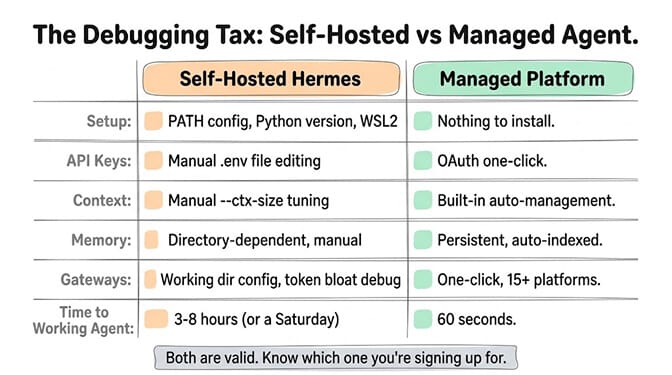
If you're a developer who enjoys tinkering with infrastructure and wants full control over every layer of your agent stack, Hermes is genuinely good. Roughly 250,000 GitHub stars since its February 2026 launch, which makes it the fastest-growing open-source agent framework of the year. Container hardening and namespace isolation on by default. Strong self-learning capabilities. The framework itself is solid, and the v0.21.2 turnaround on the state.db bug (six days from a detailed field report on September 5 to a patch closing 44 issues on September 11) is the kind of signal worth more than a star count. We compared the two head to head in BetterClaw vs Hermes. If you want to see what else is out there, here are the Hermes Agent alternatives worth a look.
But if you're looking at this list and thinking I just want my agent to work, that's a valid reaction. It's why managed platforms exist.
BetterClaw handles all five debug layers out of the box. No PATH issues because there's nothing to install. No API key files because OAuth handles it. No context overflow because smart context management is built in. No gateway configuration because Telegram, Discord and Slack are built in. If that's what you're after, you can run an agent without maintaining one: the free plan gives you 1 agent and 100 credits a month with no card. Pro is $49/month for 5 agents. Deploy in 60 seconds. Your call.
The best tool isn't the one with the most GitHub stars. It's the one that gets out of your way and lets you build the thing you actually care about.
Frequently Asked Questions
What does hermes doctor --fix do?
hermes doctor --fix checks your Python version, dependencies, PATH, provider credentials and model availability. It then migrates your config to the current schema and repairs what it safely can, which covers about 80% of common issues. It won't convert a custom_providers dict into a list, and it leaves a bad compression.summary_model in place. Fix those two by hand. On v0.21.0 and v0.21.1, stop your gateways before running it.
Why won't Hermes Agent install on Python 3.14?
Hermes v0.21.5 and older pin Python to >=3.11,<3.14, so pip rejects 3.14 with requires a different Python: 3.14.x not in '<3.14,>=3.11'. You'll mostly hit this on Termux, which now ships 3.14 by default. Hermes v0.21.6 (October 8, 2026) raised the cap to <3.15 and targets 3.14, so updating fixes it. The PyPI package (0.19.0) and the Desktop and Termux builds have not moved yet; on those, install Python 3.13 alongside it (uv python install 3.13, or python3.13 from the Termux User Repository) and re-run the installer. Since September 1, 2026 the Termux installer tries to pick a supported Python for you (PR #100574).
How do I fix 'provider authentication failed' in Hermes?
Check that the active provider's key is in ~/.hermes/.env. Then check that the provider name in config.yaml matches that key, and that no older duplicate key overrides it. Restart Hermes afterwards, because it doesn't hot-reload .env. If the key is valid and you are on v0.21.3 or earlier, look in the gateway log for a 429. Those builds sometimes reported quota exhaustion as an authentication failure. v0.21.4 fixed that.
Why does Hermes say the model provider failed after retries?
Hermes keeps the raw provider error out of chat, so the real cause is in the gateway log. It's usually a retired or renamed model id, a provider returning 429 or 503, or a fallback provider that never triggered. Fix the model id first, then set fallback_providers so the next failure rolls over instead of retrying the same provider three times.
Where does Hermes store its config and API keys?
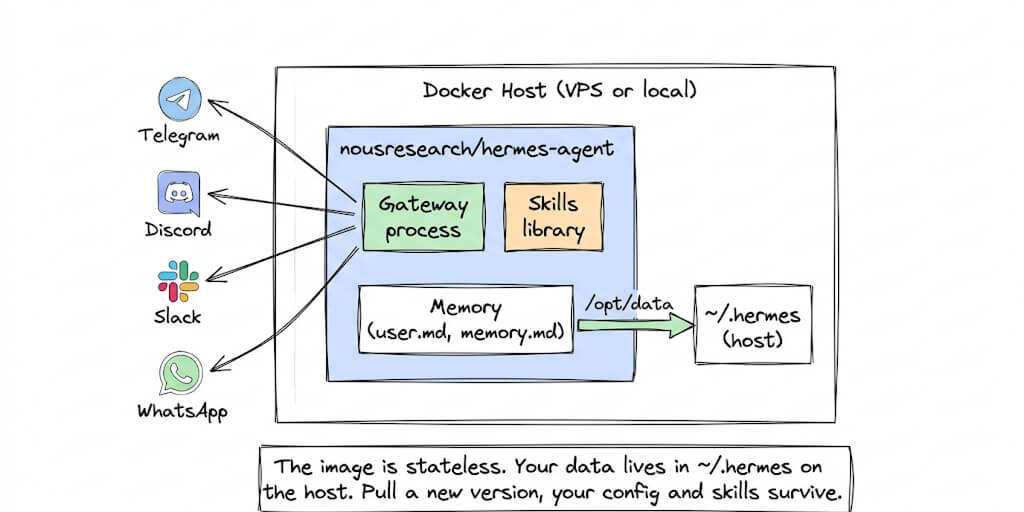
Everything lives in ~/.hermes/. API keys are in ~/.hermes/.env, and settings such as provider, model, compression and terminal backend are in ~/.hermes/config.yaml. Sessions, memories, skills, cron jobs and logs sit alongside them. In Docker the same directory is mounted at /opt/data. Back it up with hermes update --backup before any upgrade.
What does "Hermes Agent not working" usually mean?
The most common cause is a PATH configuration issue after installation. Your shell doesn't know where the Hermes binary is located. Running source ~/.bashrc (or ~/.zshrc for Zsh) fixes this in most cases. If that doesn't work, run hermes doctor --fix which catches about 80% of common issues automatically.
What are the most reported Hermes Agent bugs right now?
On the current release (v0.22.4, October 21, 2026), the release notes list no fix for gateway mode not injecting USER.md and MEMORY.md into the system prompt (issue #96134), the WSL2 gateway exiting every couple of minutes (issue #95189), and doctor --fix reporting a migration it refused to do on very old configs (issue #123557). The older headline bugs are closed. The state.db corruption from doctor --fix running against a live gateway was fixed in v0.21.2. Cron bot-chat delivery failing against a session lock was fixed by PR #105442. Quota 429s showing up as auth failures were fixed in v0.21.4. A supervised gateway refusing to start after a reboot was fixed in v0.22.2. Most "Hermes is broken" reports on old builds resolve with hermes update alone, so check hermes --version before you debug anything.
Is hermes sessions clean a real command?
No. The subcommand is hermes sessions prune (with archive, delete, optimize and pin alongside it). hermes sessions clean appears in a lot of older write-ups and will return a "no such command" error. Use hermes sessions prune --older-than 30 --dry-run to preview, then re-run with --yes, and stop your gateways first if you are on v0.21.1 or earlier.
How does Hermes Agent compare to OpenClaw for reliability?
Both have a CVE history, and any guide claiming otherwise about either one is out of date. Hermes ships container hardening and namespace isolation by default but has had several published advisories in 2026, including a remote code execution issue in its memory tool (CVE-2026-10223) and multiple authentication and session-authorization bypasses (CVE-2026-11461, CVE-2026-10548, CVE-2026-85105). OpenClaw has a far larger ecosystem, with roughly 392,000 GitHub stars and tens of thousands of ClawHub skills, and its own advisories including CVE-2026-25253 (CVSS 8.8), plus a supply-chain surface that a single-vendor framework does not have, since a meaningful share of registry skills have been found to carry prompt injections. The practical read: keep whichever you run patched, pin your skills, and do not treat either as CVE-free. We cover the tradeoffs in detail in OpenClaw vs Hermes.
How do I fix Hermes Agent tool-calling failures?
First, verify apply_chat_template includes tools=tools so the model sees the tool schemas. Second, check that you're not exceeding 3 parallel tool schemas on Hermes 3 8B (use 70B for complex multi-tool setups). Third, implement JSON parse error handling per turn to prevent cascading failures. Run hermes tools list to confirm your tools are properly registered.
Is Hermes Agent free to use?
Hermes itself is free and open-source (MIT license). But running it requires your own hardware or a VPS ($5-50/month), plus API costs for your LLM provider. Total cost depends on usage but typically runs $20-100/month including infrastructure. BetterClaw offers a free plan at $0/month with BYOK, or $49/month for Pro with managed infrastructure and no setup required.
Can Hermes Agent run on Windows?
Yes. As of v0.21.5 the README calls native Windows "fully supported" through a PowerShell one-liner, alongside Linux, macOS and WSL2. WSL2 is still the safer pick, because the native installer is younger and Windows-specific install and update bugs are still being reported. Installing WSL2 (Windows Subsystem for Linux) first and running the Hermes install script inside the WSL2 terminal gives you the same environment Mac and Linux users have, which is what every troubleshooting guide assumes. It adds about 10-15 minutes to initial setup. The Desktop app is a separate case: from v0.22.0 it ships only as an MSIX package and needs Windows 11 22H2 or newer. Android users can use Termux.