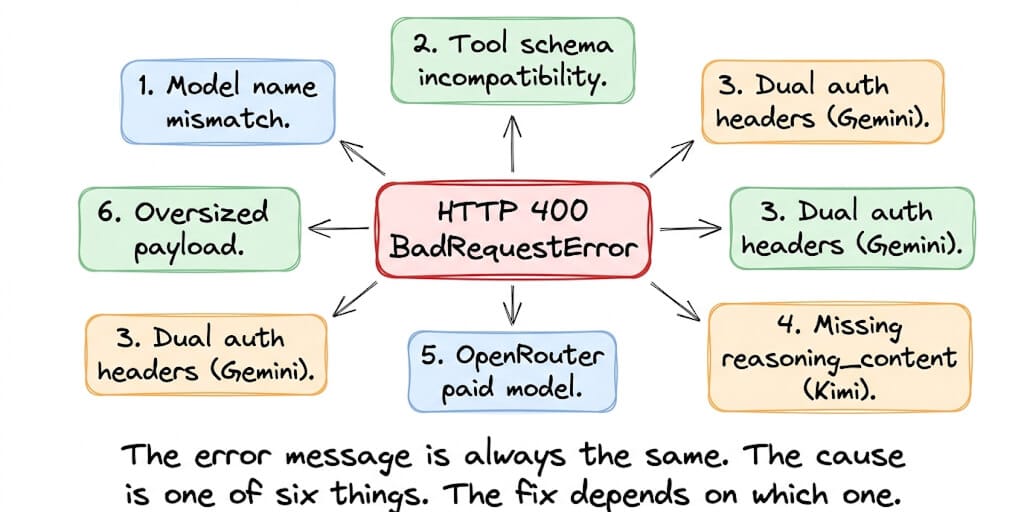
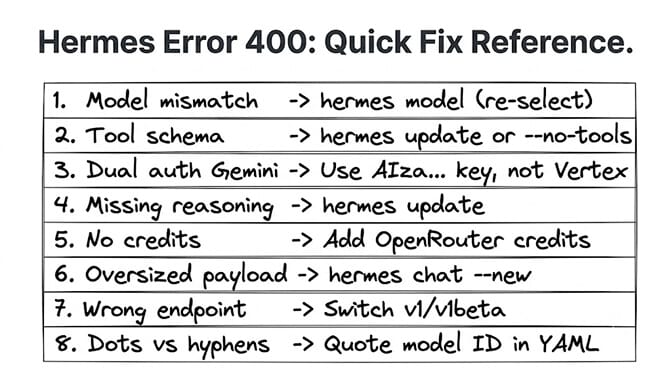
"Non-retryable client error (HTTP 400). Aborting." Six words that tell you nothing about what's wrong. Here are the eight real causes from GitHub issues, ranked by how often they're the problem.
In May a user filed GitHub issue #26161. Hermes v0.13.0. Gemini provider. First message: "hello." Response: GeminiAPIError [HTTP 400] Bad Request.
The model existed. The API key worked. Curl to the endpoint returned a valid response. But Hermes returned 400 on every attempt.
The error message gave zero diagnostic information. Just "HTTP 400" and "Bad Request." The user had to upload debug logs, agent logs, and gateway logs before anyone could help. The cause turned out to be Hermes sending a thinking_config that the unversioned gemini-3-flash-preview model rejects. #26161 was closed as a duplicate of #25123.
This is the most common runtime error in Hermes Agent. The official FAQ confirms it: "Setup completes fine, but the first chat attempt fails with HTTP 400." Here are the eight causes, sourced from real GitHub issues, with the exact fix for each.
Updated September 28, 2026 for Hermes v0.21.5. Every GitHub issue cited below is now closed. Most provider-specific 400s from spring 2026 (Kimi, OpenCode Zen, Gemini auth headers) are fixed in current builds, so updating is step zero. The model-ID and credit causes still bite on any version.
Cause 1: Model name mismatch (the most common, by far)
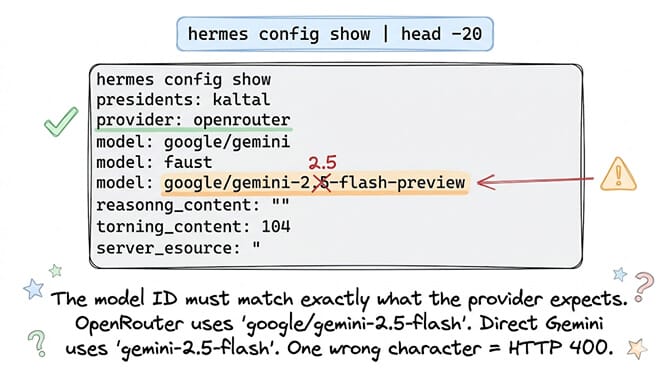
From the official Hermes FAQ: "Usually a model name mismatch. The configured model doesn't exist on your provider, or the API key doesn't have access to it."
The fix:
hermes config show | head -20 ... Check your provider and model ID.
hermes model ... Re-run model selection to pick from the provider's valid list.
hermes chat -q "hello" --oneshot --model anthropic/claude-sonnet-5 ... Test with a known-good model to isolate whether the issue is model-specific. Use any model your provider currently lists. anthropic/claude-opus-4 from earlier versions of this guide is no longer in OpenRouter's model list, so it would 400 too.
The OpenRouter trap: Model IDs on OpenRouter look right but must match exactly. google/gemini-2-flash-preview is different from google/gemini-2.5-flash-preview. One character off = 400 error. And OpenRouter returns 400 (not 404) for invalid model IDs, which is confusing.
The diagnostic shortcut: If hermes chat -q "hello" --oneshot --model anthropic/claude-sonnet-5 works but your configured model doesn't, the problem is almost certainly the model ID. Fix: hermes model and select from the list.
Cause 2: The model or provider route doesn't accept tool calls
GitHub issue #13927: "When running Hermes Agent v0.10.0 with OpenRouter as the provider, all API calls return HTTP 400 regardless of the model selected." The issue is closed. The maintainers' verdict was that it's "just a provider or model that doesn't accept tool calls", not a Hermes schema bug.
What happens: Hermes sends its tool definitions with every request. If the model, or the specific provider route serving it, doesn't support tool calling, the provider rejects the whole request with a 400. The error looks like a model problem but it's a tool-support problem. If instead of a 400 you are getting rejected credentials, that is a different failure mode covered in our Hermes auth error fixes.
How to diagnose: If every model on the same provider returns 400, but the same model works on a different provider (e.g., Anthropic direct works but Anthropic via OpenRouter doesn't), the tool schema is the issue.
The fix: Pick a model that supports tool calling on that provider. On OpenRouter, check the model's supported parameters for tools. To confirm the diagnosis, run once with hermes chat --safe-mode, which disables plugins and MCP servers, or with a smaller -t toolset list. If the 400 goes away, a tool definition is the trigger. Keep Hermes updated as well: provider-specific schema fixes land in almost every release.
For the broader comparison of how different agent frameworks handle provider compatibility, our comparison covers the provider integration differences.
If you're getting 400 errors specifically with xAI Grok, our Grok on Hermes setup guide covers the Grok-specific causes: a tool-schema rejection fixed in Hermes in May (update Hermes), and a 400 after switching an existing session to Grok (start a fresh session).
Cause 3: Dual authentication headers on Gemini (a real bug)
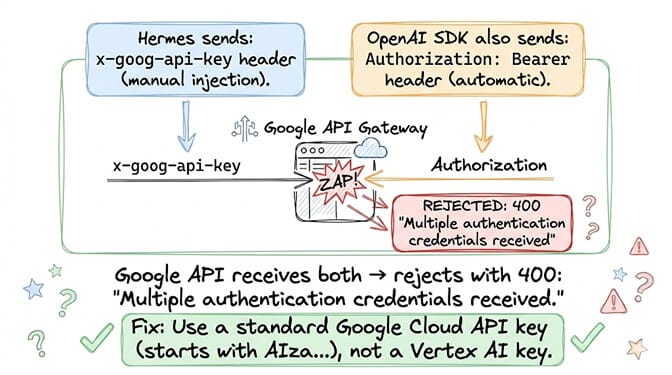
GitHub issue #7893: "HTTP 400 'Multiple authentication credentials received' when using native gemini provider."
What happens: Hermes's gemini provider injects an x-goog-api-key header. Simultaneously, the underlying OpenAI Python SDK injects an Authorization: Bearer header. Google's API rejects requests with both headers as ambiguous credentials.
The fix: Update Hermes first. Issue #7893 is closed, with several fix PRs linked to it. Then use a standard Google AI Studio API key (starts with AIza...): add GEMINI_API_KEY=your_key to ~/.hermes/.env. Reporters hit the dual-header error with keys starting AQ., so if you have one of those, switch to the standard key format.
Cause 4: Missing reasoning_content for Kimi models
GitHub issue #13848: "When using kimi-for-coding with Hermes Agent, any session that triggers tool calls becomes permanently broken."
What happens: Kimi models with thinking enabled require a reasoning_content field in assistant messages containing tool calls. Older Hermes builds dropped that field. The first tool call succeeded, the broken message stayed in conversation history, and every later turn replayed it and got a 400: thinking is enabled but reasoning_content is missing in assistant tool call message.
The fix: Fixed by PR #14018. Run hermes update, then start a new session with /new. Sessions whose history was already corrupted can keep failing, because the bad message is still in them.
If debugging provider-specific auth headers, tool schema incompatibilities, model name formats, and session corruption from missing fields sounds like more API troubleshooting than agent building, BetterClaw handles provider compatibility at the platform level. 28+ providers. Model switching from a dropdown. No schema debugging. No auth header conflicts. Free tier with 1 agent and BYOK. $49/month for Pro.
Cause 5: OpenRouter model requires paid plan or credits
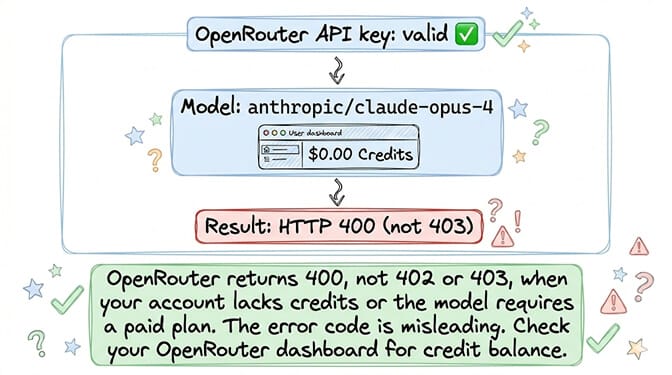
From the official FAQ: "A 400 from OpenRouter often means the model requires a paid plan or the model ID has a typo."
The fix: Log into your OpenRouter dashboard and check your credit balance. Expensive models need enough balance to cover the request. Free-tier OpenRouter accounts can't access all models. Add credits, or switch to one of the models OpenRouter lists with a :free suffix. google/gemini-2.5-flash, which an earlier version of this guide called free, is a paid model on OpenRouter.
Cause 6: Oversized request payload
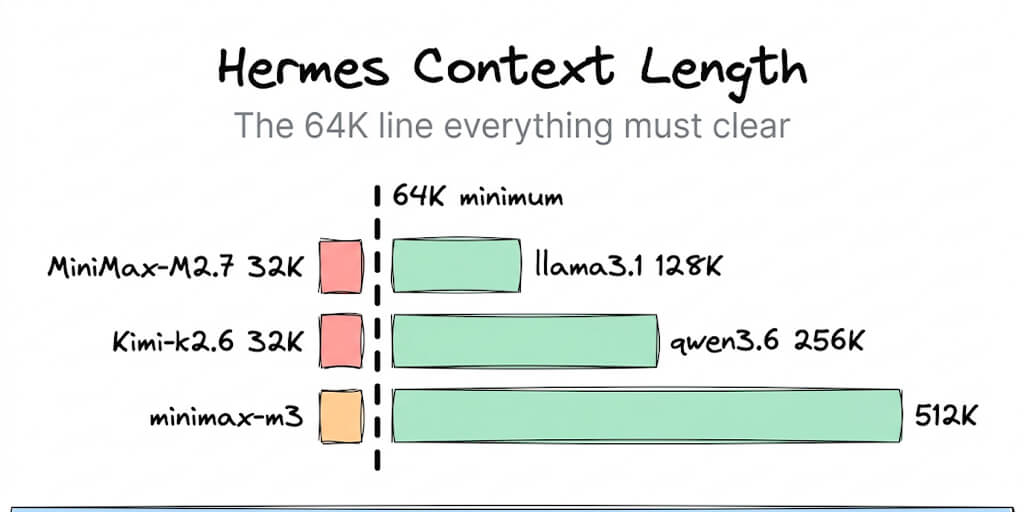
What happens: Your conversation history + system prompt + 28 tool definitions exceeds the provider's maximum request size. The provider returns 400 instead of a context-length error.
The fix: Start a new session to clear accumulated history. Or reduce tool count. Or switch to a model with a larger context window. The Deploy Hermes guide recommends: "shrink the payload if needed, and rerun a minimal request before restoring complexity." A related failure where the response gets cut off mid-stream rather than rejected is covered in our guide to Hermes response truncation.
Cause 7: Wrong Gemini endpoint version
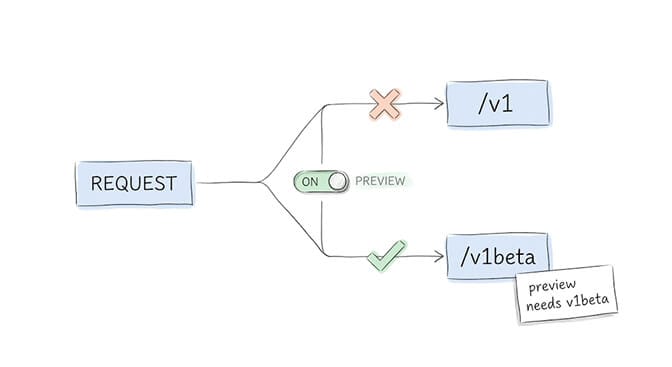
What happens: Hermes sends requests to /v1 but some Gemini models require /v1beta. Or vice versa. The endpoint doesn't recognize the model and returns 400.
How to diagnose: The error includes Error 400 (Bad Request)!!1 (the HTML error page from Google, not a JSON error). This HTML response is distinctive.
The fix: check the base URL override in ~/.hermes/.env. The variable is GEMINI_BASE_URL (not GEMINI_API_BASE, which Hermes doesn't read). Hermes's native Gemini adapter defaults to https://generativelanguage.googleapis.com/v1beta. Preview models like gemini-3-flash-preview need v1beta, so if you pinned a /v1 URL, remove it or point it back at the default:
# In ~/.hermes/.env: remove any custom override, or set the v1beta default explicitly
GEMINI_BASE_URL=https://generativelanguage.googleapis.com/v1beta
If the model is gemini-3-flash-preview and you still get a 400 on the first message, that's the thinking_config rejection from #25123 (the #26161 case in the intro). Update Hermes, or pick a versioned Gemini model.
Cause 8: Model ID format mismatch (dots vs hyphens)
What happens: Some providers use dots in model IDs (minimax-m2.5-free). Older Hermes builds normalized the ID to hyphens (minimax-m2-5-free), and the provider didn't recognize the hyphenated version. GitHub issue #7710 documents this with OpenCode Zen. It's closed, with fix PRs merged.
How to diagnose: Run hermes config get model.default and compare it with the provider's documentation. If dots were converted to hyphens, that's the cause.
The fix: hermes update first. If you set the ID by hand, quote it so YAML keeps it as one string. The key is model.default (not model.id):
# In ~/.hermes/config.yaml, quote the model ID:
model:
  default: "minimax-m2.5-free"
The diagnostic checklist (run this before anything else)
If the checklist clears and the 400 persists, the fault is probably upstream of the request - work through the Hermes Agent troubleshooting guide, which orders every failure by the layer it breaks in.
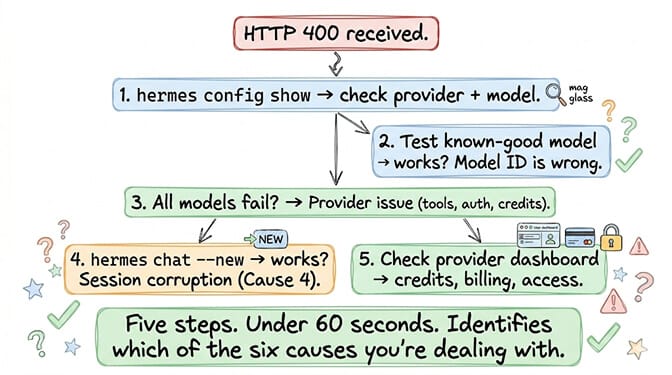
Step 1: hermes config show | head -20 ... What provider and model are configured?
Step 2: hermes chat -q "hello" --oneshot --model anthropic/claude-sonnet-5 ... Does a known-good model work? (Swap in any model your provider currently lists.)
Step 3: Does the error happen on all models or just one? All models = provider/tool issue (Causes 2, 3, 5). One model = model-specific (Causes 1, 4, 6).
Step 4: /new in the chat (there is no hermes chat --new flag) ... Does a fresh session fix it? Yes = corrupted history (Cause 4). No = configuration issue.
Step 5: Check provider dashboard for credits, billing, and model access.
The 400 error is Hermes's most common runtime failure. The log line is always some form of "Non-retryable client error (HTTP 400)." But the cause is one of eight different things, and the fix depends entirely on which one you're dealing with. Diagnose first. Fix second. Don't guess.
If you want an agent platform where provider errors are handled at the platform level and you never see raw HTTP status codes, give BetterClaw a try. Free tier with 1 agent and BYOK. $49/month for Pro with 5 agents. 28+ providers. Smart error handling. The provider compatibility is ours. The agent conversations are yours.
Frequently Asked Questions
What does Hermes Agent Error 400 mean?
HTTP 400 in Hermes means the API provider rejected the request as malformed. The most common causes: model name mismatch (most frequent), a model or route without tool-call support, dual authentication headers on Gemini, missing reasoning_content for Kimi models, insufficient OpenRouter credits, oversized request payload, the wrong Gemini endpoint version, or a model ID format mismatch (dots converted to hyphens). The error message is always the same regardless of cause, so diagnosis requires checking which cause applies.
How do I fix "Non-retryable client error (HTTP 400)" in Hermes?
Run hermes update first (v0.21.5 is current). Then use hermes config show to check your provider and model ID, and test a known-good model: hermes chat -q "hello" --oneshot --model anthropic/claude-sonnet-5 (or any model your provider lists). If that works, your configured model ID is wrong. Run hermes model to pick from the valid list. If all models fail, the issue is provider-level (tool support, auth headers, or credits).
Why does Hermes return 400 on every model with OpenRouter?
Two possible causes. GitHub issue #13927 reported every OpenRouter model failing with tools enabled. Maintainers closed it as a provider or model that doesn't accept tool calls, so pick models that support tools on that route. Second possibility: your OpenRouter account lacks credits. OpenRouter returns 400 (not 402/403) for billing issues. Check your OpenRouter dashboard for credit balance.
Why does Gemini return "Multiple authentication credentials received" in Hermes?
GitHub issue #7893. Hermes's gemini provider injects an x-goog-api-key header while the OpenAI SDK also injects a Bearer token. Google rejects the dual credentials. The issue is now closed. Update Hermes and use a standard Google AI Studio key (starts with AIza...). Reporters hit the error with keys starting AQ..
Does BetterClaw have the same 400 error issues?
No. BetterClaw handles provider compatibility at the platform level. Model switching is a dropdown selection. Provider authentication is managed. Tool schema compatibility is tested before deployment. You don't see raw HTTP status codes or debug API-level errors. Free tier with 1 agent and BYOK. $49/month for Pro with 5 agents.