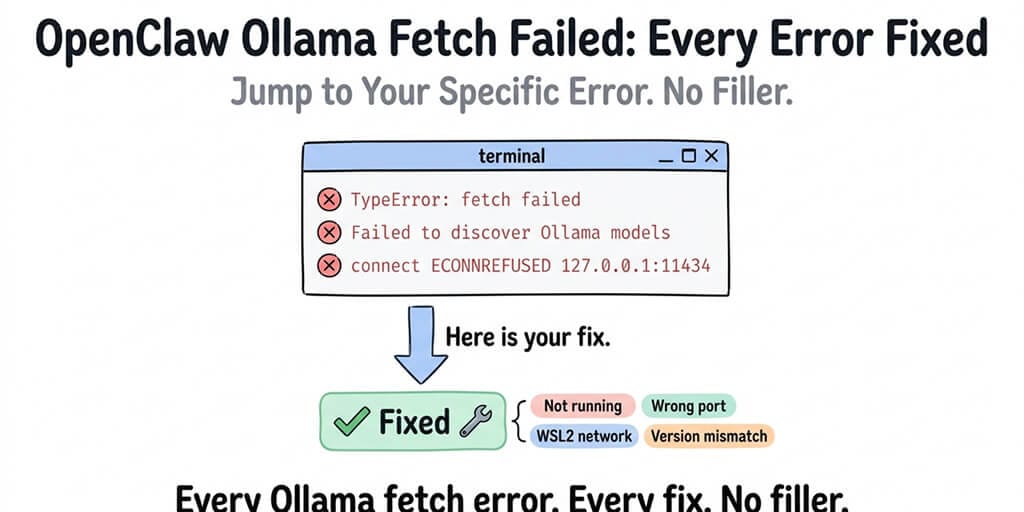
You pasted your error into Google. Here's the fix. Jump to your specific error below.
You ran OpenClaw. You configured Ollama. You got "fetch failed." Now you're here.
Good. This page covers every variant of the OpenClaw Ollama fetch failed error, what each one actually means, and the specific fix. No backstory. No theory. Just the answer you need right now.
Run these first (resolves most fetch-failed errors)
Three commands that diagnose the majority of cases in under a minute:
# 1. Confirm Ollama is running and reachable
curl http://127.0.0.1:11434/api/tags
# 2. Confirm your target model is pulled and ready
ollama list
# 3. Have OpenClaw self-diagnose the provider configuration
openclaw doctor --deep
If curl prints a JSON model list, Ollama is fine. If ollama list shows the model you configured in OpenClaw, the name matches. If openclaw doctor --deep reports the Ollama provider as healthy, your config is wired correctly. If any one of these fails, jump to that error below.
Jump to your error:
- TypeError: fetch failed
- Failed to discover Ollama models
- TimeoutError: fetch failed (model discovery)
- Ollama model not found
- Ollama not responding (ECONNREFUSED)
- TUI fetch failed Ollama
If your error doesn't match any of these exactly, start with the first one. Most Ollama connection failures are variations of the same root cause.
TypeError: fetch failed
What you see: OpenClaw throws "TypeError: fetch failed" when trying to connect to Ollama. No additional context. No helpful message. Just "fetch failed."
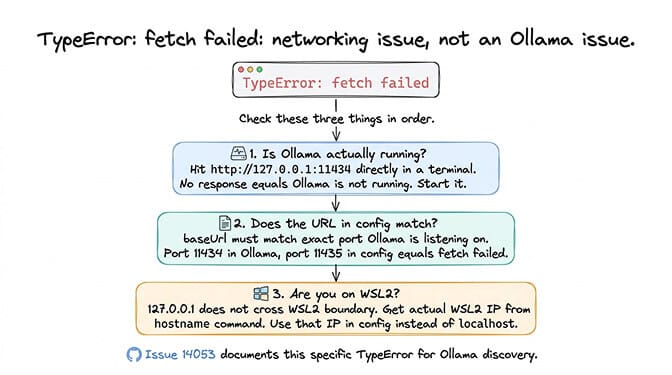
What it means: OpenClaw can't reach the Ollama HTTP API endpoint. The request to Ollama's server never completes. This is almost always a networking issue, not an Ollama issue and not an OpenClaw issue.
The fix: Check four things in this order.
First, verify Ollama is actually running.
curl http://127.0.0.1:11434/api/tags
ollama serve   # start Ollama if curl above fails
If the curl call doesn't return JSON, Ollama isn't running. Start it.
Second, check the URL in your OpenClaw config. The baseUrl for your Ollama provider must match where Ollama is listening and must not end in /v1. The /v1 OpenAI-compatible path technically responds but breaks tool calling downstream — use the native API:
ollama:
  baseUrl: "http://127.0.0.1:11434"      # native /api/chat — correct
  # NOT "http://127.0.0.1:11434/v1"      — breaks tool calling
Third, if you're on WSL2 and OpenClaw and Ollama are on opposite sides of the WSL/Windows boundary, 127.0.0.1 doesn't cross. Two fixes:
# Modern path (Windows 11 22H2+): C:\Users\<you>\.wslconfig
[wsl2]
networkingMode=mirrored
dnsTunneling=true
Then run wsl --shutdown and restart your WSL session — localhost now resolves transparently in both directions.
# Legacy fallback: use the WSL IP in OpenClaw's baseUrl
hostname -I    # prints something like 172.29.144.1
Fourth, run the OpenClaw doctor to confirm the provider config end-to-end:
openclaw doctor --deep
GitHub reference: Issue #14053 documents this specific TypeError for Ollama discovery.
Failed to discover Ollama models
What you see: "Failed to discover Ollama models" appears during OpenClaw startup or when switching to an Ollama provider.
What it means: OpenClaw's auto-discovery tried to query Ollama for available models and the request failed. This is different from "fetch failed" because the connection might partially work but the model list request specifically fails.
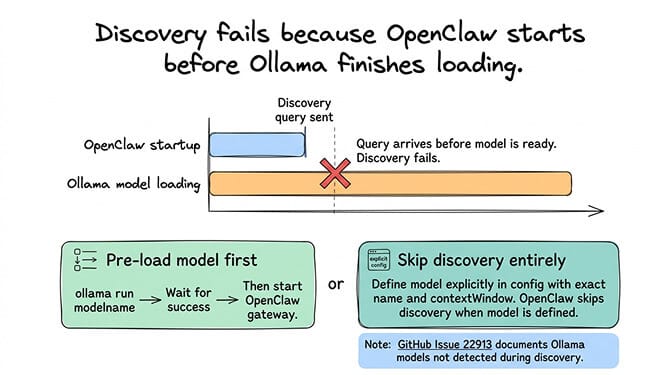
The fix: The most common cause is that Ollama hasn't finished loading a model when OpenClaw tries to discover it. Ollama needs time to load model weights into memory, especially for larger models. If OpenClaw starts before the model is ready, discovery fails.
Pre-load your model before starting OpenClaw:
ollama run qwen3-coder:30b "ready"   # waits for the model to load, then exits
openclaw gateway start
Alternatively, skip auto-discovery entirely by defining your models explicitly in the OpenClaw config:
ollama:
  baseUrl: "http://127.0.0.1:11434"
  models:
    - id: "qwen3-coder:30b"
      contextWindow: 65536
When models are defined explicitly, OpenClaw doesn't need to discover them.
GitHub reference: Issue #22913 documents Ollama models not being detected during discovery.
For the complete Ollama troubleshooting guide covering all five local model failure modes (not just fetch errors), our Ollama guide covers the full picture.
TimeoutError: fetch failed (model discovery)
What you see: "TimeoutError" combined with "fetch failed" during model discovery. Sometimes logged as "failed to discover ollama models timeouterror."
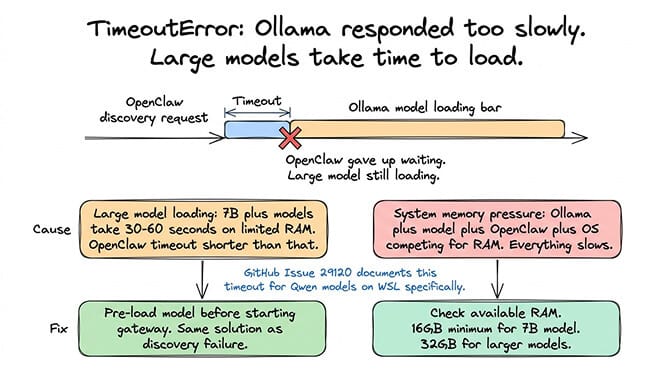
What it means: OpenClaw reached Ollama's API but the response took too long. The discovery request timed out. This typically happens when Ollama is in the process of loading a large model (7B+ parameters) and can't respond to API queries until the load completes.
The fix: Same as above: pre-load the model before starting OpenClaw. Large models (especially 14B+ or quantized 30B models) can take 30–60 seconds to load on machines with limited RAM. OpenClaw's discovery timeout is shorter than that.
If the timeout persists even after the model is loaded, the issue might be system resource pressure. If your machine is running low on RAM (Ollama plus the model plus OpenClaw plus the OS), everything slows down. Check your available memory. For comfortable Ollama operation with OpenClaw, you need at least 16GB total RAM for a 7B model, 32GB for larger models.
GitHub reference: Issue #29120 documents this timeout variant specifically for Qwen models on WSL.
Ollama model not found
What you see: OpenClaw connects to Ollama but reports the specified model as "not found."
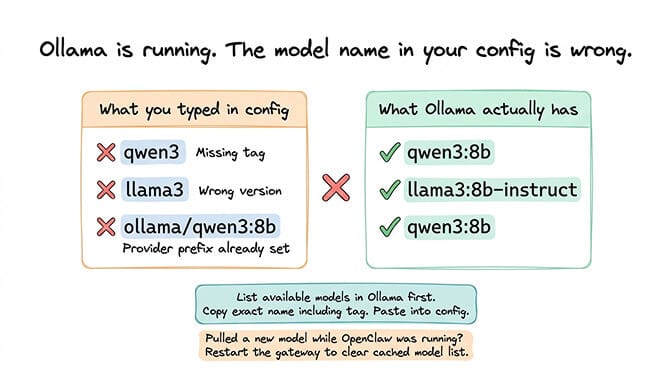
What it means: Ollama is running and responding, but the model name in your OpenClaw config doesn't match any model Ollama has pulled. This is usually a typo or a naming format mismatch.
The fix: Ollama model names include a tag. The model "qwen3" isn't the same as "qwen3:8b" or "qwen3:latest." Check exactly which models Ollama has, then match the exact name (including tag) in your config:
ollama list
# NAME                ID            SIZE      MODIFIED
# qwen3-coder:30b     abc123        18 GB     2 days ago
# glm-4.7-flash       def456        19 GB     1 week ago
Use qwen3-coder:30b (with colon) in your OpenClaw models array — not qwen3-coder-30b (hyphen) and not ollama/qwen3-coder:30b (the provider prefix is already implied).
Common mistakes: using "llama3" when the pulled model is "llama3:8b-instruct," using "mistral" when Ollama has "mistral:7b," or adding the ollama/ prefix when the provider is already declared.
If you recently pulled a new model while OpenClaw was running, restart the gateway so it sees the new model list.
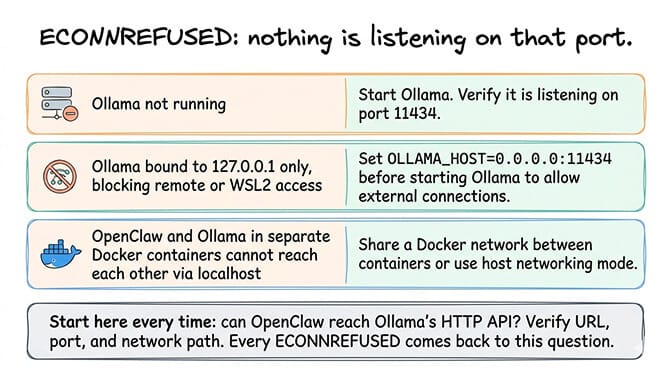
Ollama not responding (ECONNREFUSED)
What you see: "ECONNREFUSED" when OpenClaw tries to reach Ollama, or the connection simply hangs.
What it means: Nothing is listening on the port OpenClaw is trying to connect to. Either Ollama isn't running, it's running on a different port, or a firewall is blocking the connection.
The fix: Verify Ollama is running and listening on the expected port. By default, Ollama serves on port 11434:
# Linux/macOS: confirm something is listening on 11434
ss -tlnp | grep 11434
# or
lsof -iTCP:11434 -sTCP:LISTEN

# Windows PowerShell equivalent
Get-NetTCPConnection -LocalPort 11434
If Ollama is running on a remote machine or a different host, bind Ollama to an accessible address. By default, Ollama only listens on 127.0.0.1, so only the local machine can reach it. To accept connections from other machines or WSL2:
OLLAMA_HOST=0.0.0.0:11434 ollama serve
Firewall and antivirus interference. Windows Defender, corporate firewalls, and some endpoint protection tools (CrowdStrike, SentinelOne) commonly block Ollama's port. If curl works from the same machine but a different machine can't reach Ollama even with 0.0.0.0 binding, the firewall is dropping the connection — add an inbound rule for TCP 11434.
If you're running both OpenClaw and Ollama in Docker containers, they need to share a Docker network or use the host's network. Containers can't reach each other via localhost unless they're on the same network or using host networking mode.
For the broader OpenClaw setup sequence and where Ollama configuration fits in the process, our setup guide walks through each step in the correct order.
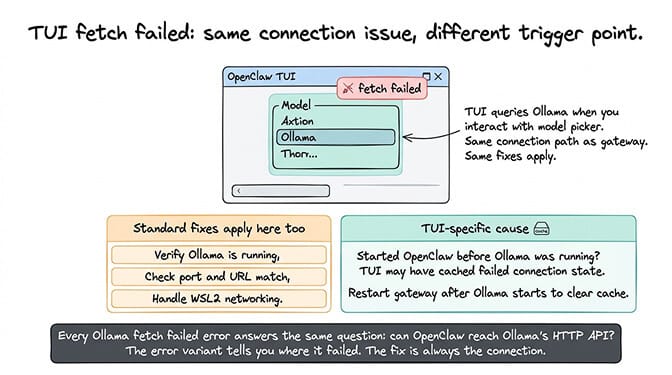
TUI fetch failed Ollama
What you see: The OpenClaw TUI (terminal user interface) shows "fetch failed" when you try to select or switch to an Ollama model.
What it means: This is the same underlying connection issue as the other fetch failed errors, but triggered from the TUI model selection interface instead of during startup. The TUI tries to query Ollama when you interact with the model picker, and the request fails.
The fix: All the same fixes apply: verify Ollama is running, check the port and URL, handle WSL2 networking, and pre-load models. The TUI doesn't have a different connection path. It uses the same provider configuration as the gateway.
One additional cause specific to the TUI: if you started OpenClaw without Ollama running, then started Ollama later, the TUI might have cached the failed connection state. Restart the OpenClaw gateway after starting Ollama to clear the cache.
Every Ollama fetch failed error comes back to the same question: can OpenClaw actually reach Ollama's HTTP API? Verify the URL, verify the port, verify the network path. The specific error variant tells you where in the process it failed, but the fix is always about making the connection work.
Prevention: ollama launch openclaw
If you're setting up fresh, skip the manual provider config entirely. Ollama 0.17+ ships a launch subcommand that auto-installs and configures OpenClaw to use the local Ollama daemon:
ollama launch openclaw --model qwen3-coder:30b
It picks the right native baseUrl, pulls the model if needed, and writes the provider config for you. Most of the errors above don't happen when you start this way.
The root cause behind all of these errors
Every error on this page is a variation of "OpenClaw tried to make an HTTP request to Ollama and it didn't work." The reasons vary (Ollama not running, wrong port, WSL2 boundary, model not loaded, firewall blocking), but the diagnostic approach is the same.
Can you reach Ollama's API from the same machine where OpenClaw is running? If yes, make sure your OpenClaw config points to the same URL. If no, fix the network path first.
OpenClaw's error messages for Ollama failures are frustratingly generic — "fetch failed" can mean any of six different things, and better Ollama-specific messages have been requested in multiple GitHub issues. Until they improve, this page exists so you don't have to guess which "fetch failed" you're dealing with.
For the broader context, our Ollama troubleshooting guide covers the native vs /v1 distinction, recommended models, and whether local inference is worth the effort versus cloud APIs.
When local stops being worth it
Once the connection is fixed and you're on the native Ollama provider, tool calling works locally. The remaining trade-off is model capability: local models under ~30B parameters still struggle with multi-step agent reasoning, and cloud inference is faster per-token. If your use case is privacy or offline operation, fix the fetch errors and stay local. If it's "I want an agent that can actually do things and I don't want to manage hardware," cloud providers (DeepSeek, Gemini, Claude Haiku) run a moderate agent for a few dollars a month — our provider cost guide covers current pricing.
If you'd rather skip Ollama entirely and get an agent running on cloud providers in 60 seconds, BetterClaw supports 28+ providers with zero local model configuration. $49/month for Pro, BYOK. Pick your model from a dropdown — no Ollama, no fetch errors, no port conflicts.
Frequently asked questions
What causes the OpenClaw Ollama "fetch failed" error?
The "fetch failed" error means OpenClaw can't reach Ollama's HTTP API. The most common causes are: Ollama not running, wrong port or URL in the OpenClaw config, WSL2 networking boundary (localhost doesn't cross WSL2/Windows), Ollama not finished loading the model (timeout), or a firewall blocking the connection. The fix is always about verifying the network path between OpenClaw and Ollama's API endpoint (default: http://127.0.0.1:11434).
How does "failed to discover Ollama models" differ from "fetch failed"?
"Fetch failed" means the HTTP connection itself failed. "Failed to discover Ollama models" means the connection might partially work but the model list query specifically fails, usually because Ollama hasn't finished loading a model. The fix for discovery failures: pre-load your model before starting OpenClaw, or define models explicitly in the config to bypass auto-discovery entirely.
How do I fix OpenClaw Ollama connection issues on WSL2?
WSL2 creates a network boundary between the Linux environment and the Windows host. 127.0.0.1 doesn't resolve across this boundary. If OpenClaw runs in WSL2 and Ollama runs on Windows (or vice versa), use the actual WSL2 IP address (from the hostname command) in your OpenClaw config instead of localhost. Also set OLLAMA_HOST to 0.0.0.0:11434 so Ollama accepts connections from outside localhost.
Is fixing Ollama fetch errors worth the effort versus using cloud APIs?
It depends on your use case. If you need data privacy, offline operation, or want local heartbeats, fixing Ollama is worth it — tool calling works once you're on OpenClaw's native Ollama provider (/api/chat, no /v1). If you need top-end reasoning and you'd rather not manage hardware, cloud providers like DeepSeek or Gemini's free tier are cheaper than most people expect.
Will OpenClaw fix the Ollama error messages?
The "fetch failed" wording is a known complaint and better Ollama-specific messages have been requested in multiple GitHub issues. Improvements are landing in the open-source repo on a rolling basis. Until error messages get more specific, this guide maps each generic error to its actual cause — pair it with openclaw doctor --deep for the fastest diagnosis.
Related Reading
- Ollama Connection Refused or Fetch Failed: Every Fix: Non-OpenClaw Ollama errors, including n8n, VS Code, Claude Code, Windows and Python
- OpenClaw Local Model Not Working: Complete Fix Guide — Broader local model troubleshooting beyond Ollama fetch errors
- "Model Does Not Support Tools" Fix — Tool calling failures with Ollama models
- OpenClaw Ollama Guide: Complete Setup — Full Ollama integration setup from scratch
- OpenClaw Local Model Hardware Requirements — RAM, GPU, and storage specs for local inference