A Mac Mini can run a 70B model now. But running a model and running a production agent are very different things. Here's the honest guide.
I spent $2,000 on a Mac Mini M4 Pro with 48GB of unified memory. Installed Ollama. Downloaded Qwen 3.5 9B. Typed a prompt.
Eight seconds later, the response started appearing. Not bad. Twenty-five tokens per second. I could watch it type in real-time.
Then I connected it to my email agent. Read inbox. Classify urgency. Draft responses for low-priority items. The same workflow that takes 2 seconds on Claude Sonnet through the API.
On local hardware? Fourteen seconds for the first step alone. The classification was less accurate. The drafted responses were shorter, vaguer, less useful. And every time I opened Chrome alongside the model, generation speed dropped by 30%.
That's the local LLM agent reality in 2026: the hardware has gotten remarkably capable. The software has matured. But there's a gap between "I can run a model locally" and "I can run a useful agent locally" that most guides never mention.
Here's when local makes sense, when it doesn't, and exactly what hardware you need for each tier.
The hardware that actually works in 2026
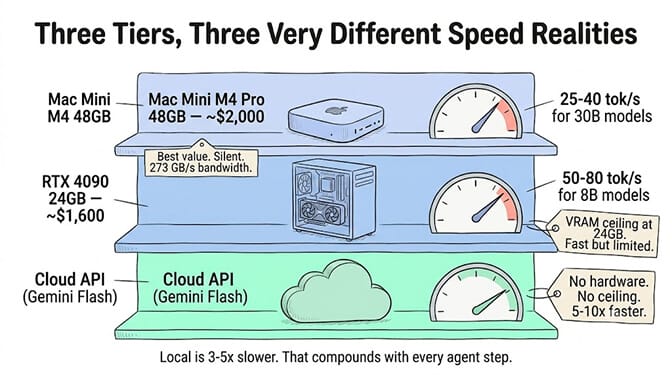
The local LLM ecosystem has standardized around two stacks: Apple Silicon with Ollama/MLX, and NVIDIA GPUs with CUDA. Everything else is a compromise.
Apple Silicon (the accessibility winner)
Apple's unified memory architecture is what makes local LLMs practical on consumer hardware. Unlike discrete GPUs with fixed VRAM (maxing out at 24GB on consumer NVIDIA cards), Mac's GPU can access all system RAM. A Mac Mini with 48GB can load models that would require a $700+ used RTX 3090 on PC.
Best value: Mac Mini M4 Pro 48GB at ~$1,999. It runs 32B-class models comfortably and can handle 70B models in quantized form. Qwen 3.5 Coder 30B runs at 75-80 tokens per second on empty context, dropping to about 40 tok/s in actual chat. Memory bandwidth is 273 GB/s, the same number that defines NVIDIA's DGX Spark and the DGX Spark alternatives competing with it.
Budget entry: Mac Mini M4 base at ~$600. Runs 14B models. Usable for experimentation but too slow for production agent workloads.
High end: M4 Max 128GB at ~$3,500. Runs 70B+ models with room for context. Ollama's MLX backend preview shows 57% faster prefill and 93% faster generation on supported models, making Apple Silicon increasingly competitive.
NVIDIA GPU (the speed winner)
An RTX 4090 pushes 1,008 GB/s of memory bandwidth, roughly 2.5x the M3 Max and 3.7x the M4 Pro. For models that fit in 24GB VRAM, nothing in consumer hardware comes close to NVIDIA's per-token speed. The full speed-versus-capacity tradeoff between the two camps is covered in our Apple Silicon vs NVIDIA guide.
The limitation: 24GB is the ceiling on all consumer RTX 40-series cards. 70B+ models don't fit. You're either quantizing aggressively (which degrades quality) or building a multi-GPU setup (which adds $400-600 in supporting components, 350-450W power draw per card, and enough noise to disrupt a quiet room).
The honest performance numbers
Llama 3 8B on M3 Pro 36GB via Ollama: 25-35 tok/s. Mistral 7B at Q4_K_M performs similarly.
Llama 3 70B at Q4_K_M on M3 Max 96GB: 10-15 tok/s. Right at the threshold of interactive usability.
Qwen 3.6-27B at Q4_K_M on Mac: approximately 25 tok/s (Simon Willison benchmarks).
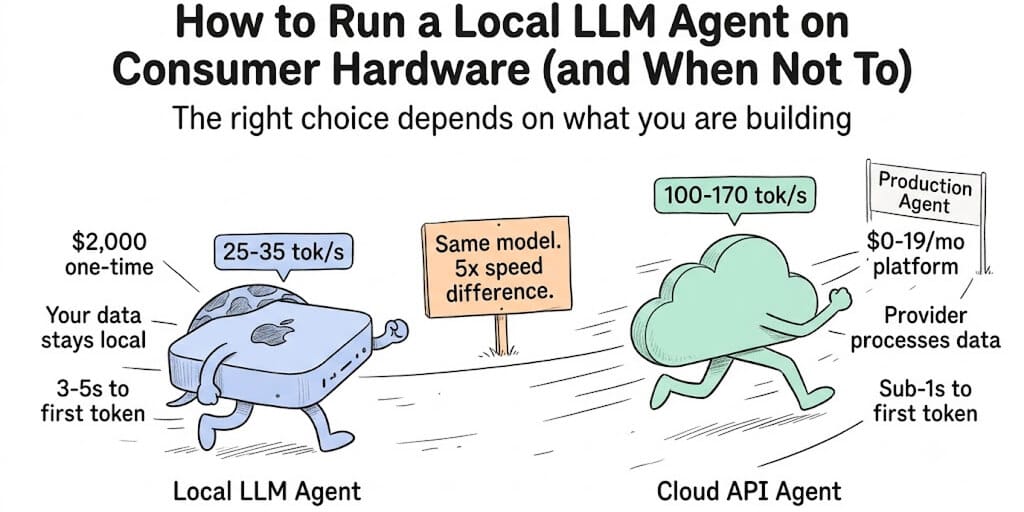
Compare that to cloud APIs: Gemini 2.5 Flash at 173 tok/s. Gemini 3.5 Flash at 284 tok/s. Claude Haiku at 597ms time-to-first-token. Cloud APIs are 5-10x faster for agent workloads. That gap matters.
When running a local LLM agent makes sense
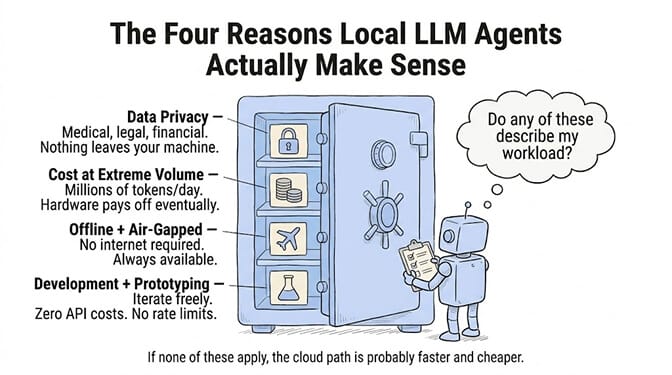
Local isn't always wrong. There are genuine use cases where running your agent on your own hardware is the right call.
Data privacy requirements
If your agent processes medical records, legal documents, financial data, or any information that absolutely cannot leave your premises, local inference is the answer. No API call. No third-party processor. No cross-border data transfer. For GDPR-sensitive workloads, local models eliminate the data processing chain entirely.
Cost at extreme volume
Cloud API costs are per-token. If your agent processes millions of tokens daily, the math eventually favors local hardware. A Mac Mini M4 Pro pays for itself after roughly 6-8 months of heavy usage compared to Claude Sonnet pricing ($3/million input tokens).
But "heavy usage" means really heavy. An agent processing 100 conversations per day at 2,000 tokens each runs about 6 million tokens per month. That's roughly $18/month on Claude Sonnet. Your $2,000 Mac Mini would take 9+ years to break even at that volume. Local only wins on cost when you're processing at genuine enterprise scale.
Offline and air-gapped environments
Military, government, certain financial institutions, field operations. If your agent must work without internet connectivity, local is the only option.
Development and experimentation
Testing prompt strategies, evaluating models, building prototypes. Running locally lets you iterate without API costs and without worrying about rate limits.
When running a local LLM agent doesn't make sense (the honest part)
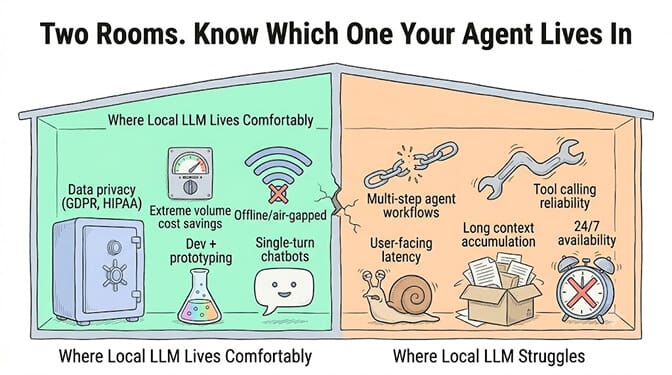
Here's where most "run local LLMs" guides stop being useful. They show you how but never ask whether you should. For production AI agents specifically, local has significant limitations.
Tool calling reliability
Smaller local models (7-14B parameters) have substantially worse tool calling accuracy than frontier cloud models. Claude Sonnet's tool call hallucination rate is 3%. A 7B local model can easily hit 15-25% hallucination rates on tool calls, depending on the schema complexity.
For an agent that reads emails, queries a CRM, and drafts responses, every hallucinated tool call is a failed step. At 15% failure rate, a 5-step agent workflow has a 56% chance of at least one failure. That's not usable.
Latency kills multi-step agents
A cloud API completes a single LLM call in under 1 second. A local 8B model on a Mac Mini takes 3-5 seconds to first token, then generates at 25-35 tok/s. For a single-turn chatbot, this is fine.
For a multi-step agent that makes 5-10 LLM calls per task? Each step takes 5-10 seconds locally versus under 2 seconds on cloud. A 6-step support ticket resolution takes 30-60 seconds locally versus 8-12 seconds on cloud. For user-facing agents, that difference is disqualifying.
Context window limitations
Frontier cloud models offer 128K-1M token context windows. Local models typically run with 4K-8K context by default (you can increase this in Ollama with --ctx-size, but performance drops sharply with larger contexts on consumer hardware).
For agents that accumulate tool results, conversation history, and system instructions, context window management is critical. Local models hit their ceiling much faster.
Your machine becomes a server
When your Mac Mini is running a 32B model at full load, it's not doing anything else well. Memory is consumed. CPU/GPU are saturated. If you're also using that machine for development, browsing, or communication, the experience degrades.
Local LLMs are great for chatbots, coding assistants, and document Q&A. They're not great for multi-step autonomous agents that need fast tool calling, long context, and 24/7 availability.
The practical setup (if you decide local is right)
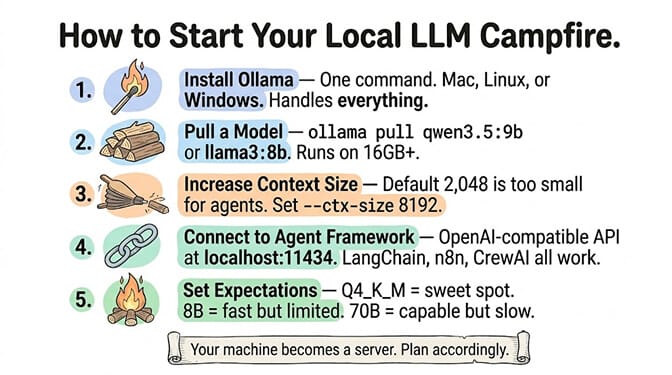
If you've read the tradeoffs and local still makes sense for your use case, here's the fastest path.
Install Ollama. One command on Mac, Linux, or Windows. It handles model downloading, quantization, and the inference server.
Pull a model. ollama pull qwen3.5:9b for a capable 9B model. ollama pull llama3:8b for Meta's Llama 3. Both run well on 16GB+ systems. For RAM and VRAM thresholds by model size, see our OpenClaw local model hardware guide.
Increase context size. Default is often 2,048 tokens. For agents, you need more. Set --ctx-size 8192 or higher, but watch performance drop.
Connect to an agent framework. Ollama exposes an OpenAI-compatible API at localhost:11434. Most frameworks (LangChain, CrewAI, n8n) can connect to it.
If your agent runs in the cloud, the free BetterClaw desktop app connects Ollama, LM Studio or llama.cpp on your computer to BetterClaw agents without opening a port or running a tunnel.
Set expectations. Q4_K_M quantization is the sweet spot between quality and speed. 8B models are fast but limited. 32B models are more capable but 3-4x slower. 70B models require 48GB+ RAM and patience.
McKinsey estimates AI agents represent a $2.6-4.4 trillion addressable market. The question isn't whether local LLMs can run agents. They can. The question is whether local is the right architecture for your specific agent's requirements.
If your agent needs to be always-on, respond in under 3 seconds, call tools reliably, and scale without hardware investment, cloud APIs through a managed platform are the more practical path. On BetterClaw, your agent connects to 28+ model providers including cloud-hosted versions of the same open models you'd run locally (Llama, Mistral, Qwen through providers like Groq, Together, Fireworks). BYOK with zero markup. Free plan with 1 agent and 100 credits a month. $49/month on Pro.
The honest conclusion
Local LLM agents in 2026 are genuinely impressive for what they are. A $2,000 Mac Mini running a 32B model locally would have been science fiction three years ago. The tooling (Ollama, LM Studio, MLX) has matured to the point where setup takes 5 minutes.
But for production autonomous agents that need reliability, speed, and scale, the cloud API gap is still large. Not because local models are bad. Because agent workloads amplify every weakness. Latency compounds over steps. Tool calling errors cascade. Context limitations force premature summarization.
The smart play in 2026: use local for development, privacy-critical tasks, and experimentation. Use cloud APIs for production agents. And choose a platform that lets you switch between them without rebuilding.
Give BetterClaw a look if you want the production path. Free plan with 1 agent and 100 credits a month. $49/month for Pro. 28+ model providers including cloud-hosted Llama, Mistral, and Qwen. Deploy in 60 seconds. We handle the infrastructure that local can't.
Frequently Asked Questions
What is a local LLM agent?
A local LLM agent is an autonomous AI agent that runs on your own hardware (Mac, PC, or local server) using an open-weight language model instead of a cloud API. The model runs locally via tools like Ollama or LM Studio, and the agent connects to it for reasoning, tool calling, and task execution. The main advantages are data privacy (nothing leaves your machine) and zero per-token cost after the initial hardware investment.
How does local LLM performance compare to cloud APIs for agents?
Local models are 3-5x slower for agent workloads. A Mac Mini M4 Pro running an 8B model generates 25-35 tokens per second with 3-5 second time-to-first-token. Cloud APIs like Gemini Flash hit 173 tok/s and Claude Haiku reaches first token in under 600ms. For single-turn tasks, local is usable. For multi-step agents making 5-10 LLM calls per task, the latency compounds to 30-60 seconds locally versus 8-12 seconds on cloud.
What hardware do I need to run a local LLM agent?
For 8B models (basic agents): 16GB RAM minimum, Mac or NVIDIA GPU. For 32B models (capable agents): Mac Mini M4 Pro 48GB (~$2,000) or RTX 4090 (24GB, $1,600). For 70B models (frontier-class): Mac M4 Max 128GB ($3,500) or dual-GPU NVIDIA setup. Apple Silicon is recommended for its unified memory architecture. Q4_K_M quantization is the sweet spot between quality and speed.
Is running a local LLM agent cheaper than using cloud APIs?
Only at extreme volume. An agent processing 100 conversations/day at 2,000 tokens each costs roughly $18/month on Claude Sonnet. A $2,000 Mac Mini would take 9+ years to break even. Local wins on cost only when processing millions of tokens daily. Factor in electricity ($10-30/month for always-on hardware), maintenance time, and the opportunity cost of a machine dedicated to inference.
Can local LLM agents handle tool calling reliably?
Smaller models (7-14B) have significantly higher tool call hallucination rates (15-25%) compared to frontier cloud models (3-7%). For simple agents with 1-2 tool calls, this is manageable. For multi-step workflows with 5+ tool calls, the error rate compounds quickly: a 5-step workflow at 15% failure rate per step has a 56% chance of at least one failure. Use 32B+ models for tool-heavy agents, and always validate tool call arguments before execution.