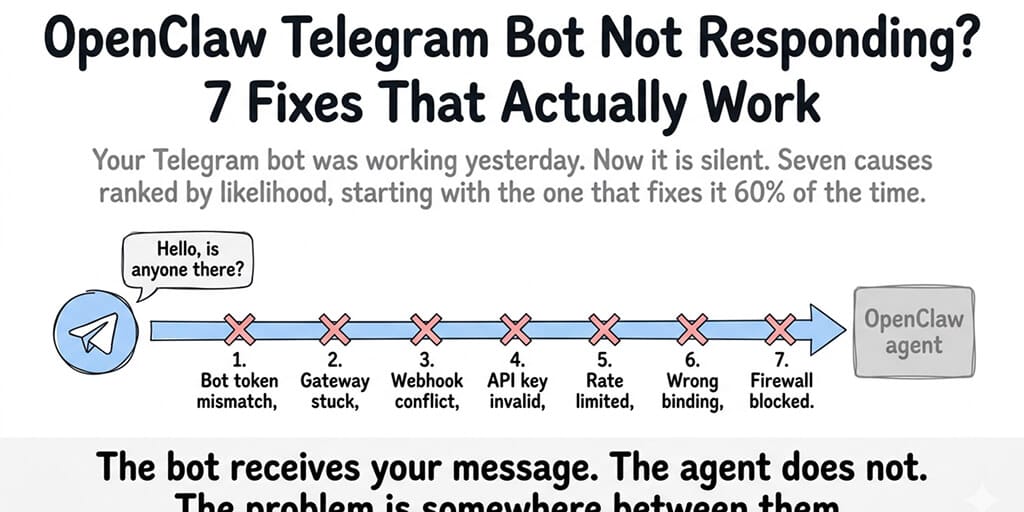
Your Telegram bot was working yesterday. Now it's silent. Here are seven causes ranked by likelihood, starting with the one that fixes it 60% of the time.
My Telegram bot stopped responding at 6:14 PM on a Wednesday. I know the exact time because a client sent a message at 6:14 and never got a reply. I didn't notice until 7:30 when they texted me directly asking if "the AI was broken."
The gateway was running. Docker was running. The VPS was up. Telegram showed the bot as online. But messages went into the bot and nothing came back. No error. No crash. Just silence.
The most frustrating OpenClaw problem isn't the one that crashes with an error message. It's the one that fails silently.
Here are the seven causes of a non-responding OpenClaw Telegram bot, ranked by how often they're the actual problem. Check them in this order.
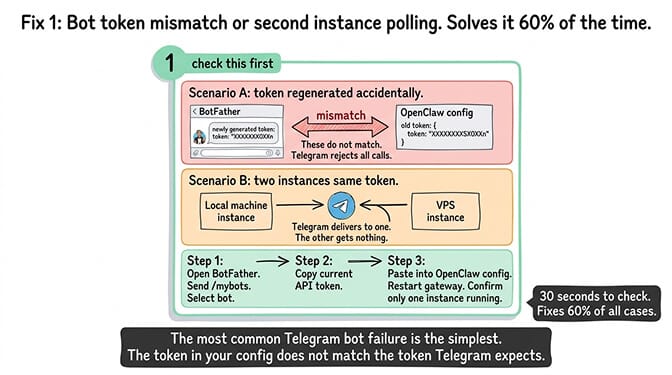
Why your OpenClaw Telegram bot is not responding: Fix 1, bot token revoked or a second instance polling (60% of cases)
This is the cause most people miss because they assume the token is permanent.
What happens: If you created a new bot token via BotFather (even accidentally), the old token is revoked. If you have two instances of OpenClaw running with the same bot token (common when testing locally and on a VPS simultaneously), Telegram delivers messages to one instance and the other gets nothing.
How to check: Open BotFather on Telegram. Send /mybots. Select your bot. Check the API token. Compare it to the token in your OpenClaw config. If they don't match, that's the problem.
The fix: Copy the current token from BotFather. Update your OpenClaw config. Restart the gateway. Make sure only one instance is running with this token. If your local machine and your VPS both have the same bot configured, one of them is stealing messages from the other.
The most common Telegram bot failure is the simplest: the token in your config doesn't match the token Telegram expects. Check this first. It takes 30 seconds and fixes the problem 60% of the time.
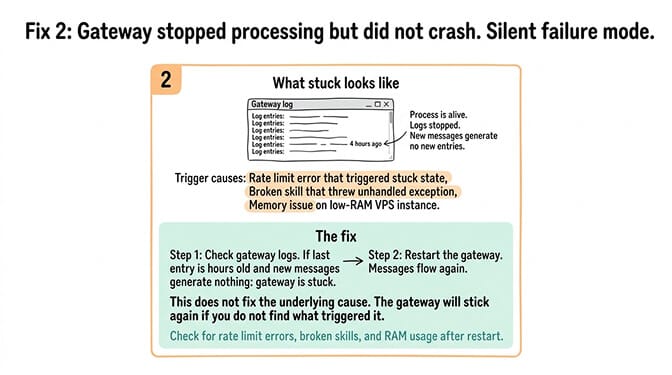
Fix 2: The gateway stopped processing (but didn't crash)
What happens: The OpenClaw gateway enters a state where it's running but not processing incoming messages. This can happen after a rate limit error, a failed API call, or an unhandled exception in a skill. The process is alive. It's just not working.
How to check: Look at your gateway logs. If the last log entry is from hours ago and new messages aren't generating log entries, the gateway is stuck.
The fix: Restart the gateway. If it happens repeatedly, check for the underlying cause: a rate limit error that triggered the stuck state, a broken skill that threw an unhandled exception, or a memory issue (OOM on low-RAM VPS instances).
For the general OpenClaw troubleshooting guide, our not-working diagnosis post covers the broader symptoms when the problem isn't Telegram-specific.
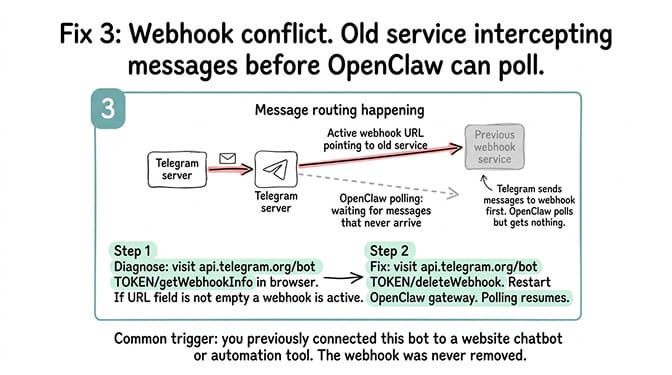
Fix 3: Webhook conflict (two services using the same bot)
What happens: Telegram only delivers messages to one endpoint per bot. If you previously used the bot with a webhook-based service (a website chatbot, a different automation tool) and then switched to OpenClaw's polling mode, the old webhook might still be active. Telegram sends messages to the webhook URL instead of your OpenClaw gateway.
How to check: Open a browser and visit the getWebhookInfo endpoint. If the "url" field is not empty, a webhook is active and intercepting messages before OpenClaw can poll them.
# If "url" is not empty, a webhook is intercepting your messages
curl https://api.telegram.org/bot[YOUR_TOKEN]/getWebhookInfo
The fix: Delete the webhook, then restart your OpenClaw gateway. Messages will flow through polling again.
# Remove the webhook so OpenClaw can poll for messages again
curl https://api.telegram.org/bot[YOUR_TOKEN]/deleteWebhook
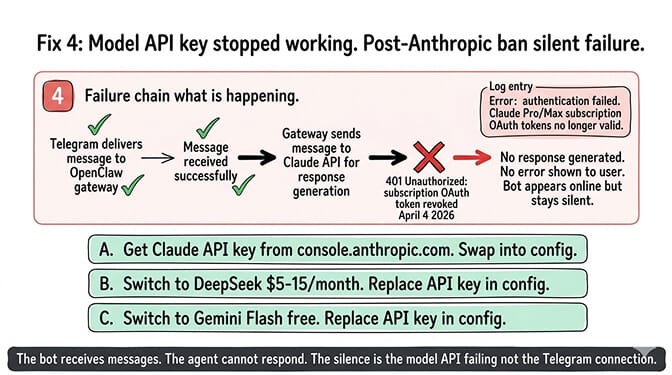
Fix 4: Your model API key stopped working (post-Anthropic ban)
What happens: Your agent receives the Telegram message but can't generate a response because the model API call fails. On April 4, 2026, Anthropic revoked OAuth for all third-party tools including OpenClaw. If your agent was using a Claude Pro/Max subscription token, it silently stopped generating responses. Anthropic reversed that on May 13 and paused its replacement credit plan on June 15, but subscription access for third-party tools is still in flux, and a subscription OAuth token is not an API key.
How to check: Check your gateway logs for API authentication errors. If you see 401 Unauthorized or authentication failed from Anthropic, check whether you're using a subscription OAuth token instead of an API key.
The fix: Get a Claude API key from console.anthropic.com (separate from your subscription, and the most reliable option). Or switch to DeepSeek ($5-15/month) or Gemini Flash (free). For the Telegram setup guide, our Telegram setup post covers the complete configuration including model provider setup.
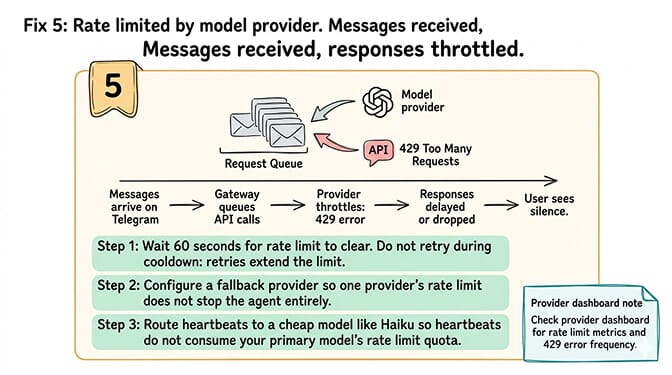
Fix 5: Rate limited by your model provider
What happens: Your model provider (Anthropic, OpenAI, DeepSeek) is throttling requests. The agent receives the Telegram message but the API call to generate a response is queued or rejected. The response never comes back to the user.
How to check: Check your provider's dashboard for rate limit metrics. Check gateway logs for 429 Too Many Requests errors.
The fix: Wait 60 seconds for the rate limit to clear. Configure a fallback provider so rate limits on one model don't stop the agent entirely. Set heartbeat routing to a cheap model (Haiku) so heartbeats don't consume your primary model's rate limit quota. See our rate limit guide for the full mitigation playbook.
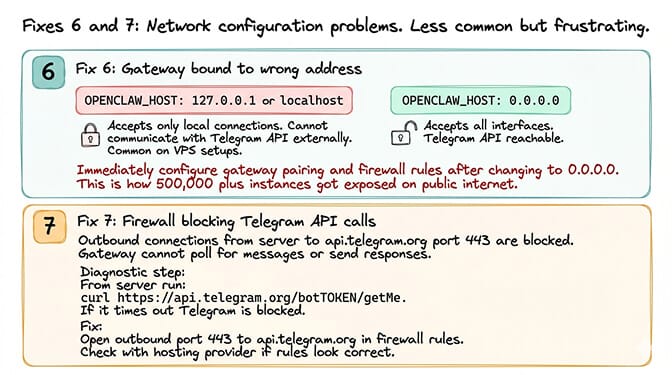
Fix 6: Gateway bound to the wrong address
What happens: The OpenClaw gateway is bound to localhost (127.0.0.1) instead of 0.0.0.0 or the correct network interface. On a VPS, this means the gateway accepts local connections but can't communicate with external services including Telegram's API.
How to check: Check OPENCLAW_HOST in your config. If it's set to 127.0.0.1 or localhost, that's the problem on a VPS.
The fix: Set OPENCLAW_HOST to 0.0.0.0 (accepts all interfaces). But then immediately configure gateway pairing and firewall rules to prevent unauthorized access. 500,000+ OpenClaw instances are exposed on the public internet because they bound to 0.0.0.0 without security. For the gateway security checklist, our security checklist covers the seven hardening steps.
Fix 7: Your firewall is blocking Telegram API calls
What happens: Outbound connections from your server to api.telegram.org (port 443) are blocked by your firewall or hosting provider. The gateway can't reach Telegram's API to poll for messages or send responses.
How to check: From your server, try reaching Telegram's getMe endpoint. If it times out or returns a connection error, outbound access to Telegram is blocked.
# A timeout or connection error here means outbound 443 to Telegram is blocked
curl https://api.telegram.org/bot[YOUR_TOKEN]/getMe
The fix: Open outbound port 443 to api.telegram.org in your firewall. Some corporate networks and certain VPS providers block specific API endpoints. Check with your hosting provider if the firewall rules look correct.
If diagnosing bot tokens, webhook conflicts, gateway binding, and firewall rules is more Telegram infrastructure than you want to manage, BetterClaw handles the Telegram connection automatically. Add your bot token. The platform handles polling, webhooks, gateway binding, and health monitoring. If the connection drops, auto-reconnect handles it without you restarting anything. Free tier with 1 agent and BYOK. $49/month for Pro. 60-second deploy. The Telegram integration just works because the infrastructure is managed.
The pattern behind most Telegram failures
Here's the honest take.
Five of these seven fixes are infrastructure problems, not Telegram problems. Gateway stuck, API key invalid, rate limited, wrong binding, firewall blocked. The Telegram connection itself is usually fine. The layers between Telegram and your agent are where things break.
This is the same pattern across all OpenClaw troubleshooting: the agent logic works. The infrastructure around it fails. Telegram is just the channel where the failure becomes visible because users are waiting for responses that never arrive. (If your bot runs on Discord instead, see our Discord bot not responding walkthrough, which covers the Discord-specific intents trap.)
If you want the Telegram connection monitored with auto-reconnect and health alerts instead of discovering failures when a client texts you asking why "the AI is broken," give BetterClaw a try. Free tier with 1 agent and BYOK. $49/month for Pro. Telegram, WhatsApp, Slack, and 12+ more channels from a single agent. The connections are monitored. The infrastructure is invisible. You handle the conversations, not the connectivity.
Frequently Asked Questions
Why is my OpenClaw Telegram bot not responding?
Seven possible causes in order of likelihood: bot token mismatch or second instance stealing messages (60% of cases), gateway stuck but not crashed, webhook conflict from a previous service, model API key invalid (often a subscription token used in place of an API key), rate limiting from your provider, gateway bound to wrong address, or firewall blocking Telegram API. Check the bot token first. It takes 30 seconds and fixes most cases.
How do I fix OpenClaw Telegram webhook conflicts?
Visit https://api.telegram.org/bot[YOUR_TOKEN]/getWebhookInfo in a browser. If the "url" field is not empty, a webhook is intercepting messages before OpenClaw can poll them. Delete it by visiting https://api.telegram.org/bot[YOUR_TOKEN]/deleteWebhook. Restart your OpenClaw gateway. Messages will flow through polling again.
Can I run two OpenClaw instances with the same Telegram bot?
No. Telegram delivers messages to only one polling connection per bot token. If your laptop and your VPS both run OpenClaw with the same bot token, one instance receives messages and the other gets nothing. Use separate bot tokens for separate instances, or run only one instance per bot.
Does the Anthropic ban affect Telegram bots?
It did, indirectly. When Anthropic revoked subscription OAuth for third-party tools on April 4, 2026, agents using a Claude Pro/Max subscription token kept receiving Telegram messages but couldn't generate responses because the model API call failed silently. Anthropic reversed the ban on May 13 and paused its replacement credit plan on June 15, but the terms may change again. The most reliable fix: switch to a Claude API key from console.anthropic.com, or use DeepSeek ($5-15/month) or Gemini Flash (free).
Does BetterClaw handle Telegram bot issues automatically?
Yes. BetterClaw manages the Telegram connection including polling, webhook configuration, and auto-reconnect on connection drops. Health monitoring detects when the bot stops responding and alerts you. No gateway binding, no firewall configuration, no manual webhook management. Add your bot token and the connection is handled. Free tier with 1 agent and BYOK. $49/month for Pro.