Your agent ignores the bottom of soul.md, drops skills, or goes generic after two turns. Ollama is cutting the front off your prompt and returning HTTP 200 like nothing happened. Here is the fix, and the reason the fix you already tried didn't work.
Why the num_ctx you already set did nothing
Here's the part that sends people in circles, and it's specific to agent frameworks.
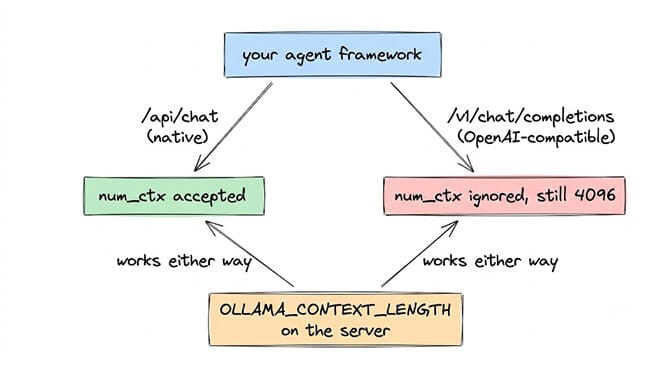
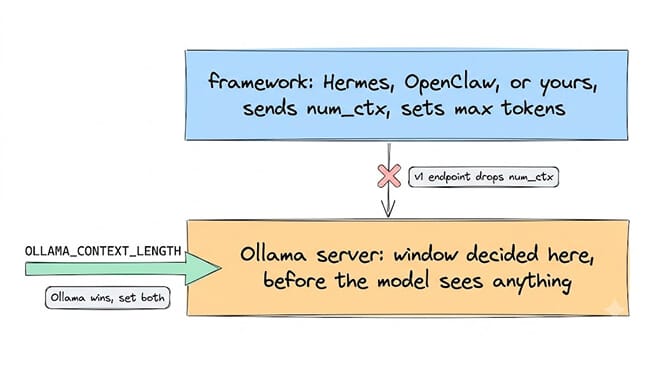
Ollama exposes two API surfaces. The native one (/api/generate, /api/chat) accepts an options object containing num_ctx. The OpenAI-compatible one (/v1/chat/completions) does not. Ollama maps a fixed allowlist of OpenAI sampling parameters to model options, and num_ctx isn't on it, so the endpoint silently ignores it whether you send it nested in options or top-level. This is tracked in Ollama issue #11409 and still reproduces on current builds.
Most agent frameworks talk to Ollama over the OpenAI-compatible endpoint, because that's the thing every SDK already speaks. So you set num_ctx in your framework config, the framework passes it into an OpenAI-shaped request, and Ollama drops it on the floor. Your window stays at 4096 and nothing anywhere reports a problem.
If your framework points at http://localhost:11434/v1, passing num_ctx in the request body does nothing. Set OLLAMA_CONTEXT_LENGTH on the server, or bake num_ctx into a Modelfile, so the value applies before the request arrives.
The same trap catches framework settings named "max tokens" or "context size". Those budget the framework, not Ollama's window. RAGFlow users hit exactly this: 8192 set in RAGFlow, Ollama still truncating at 4096.
What Ollama actually does when the prompt is too long
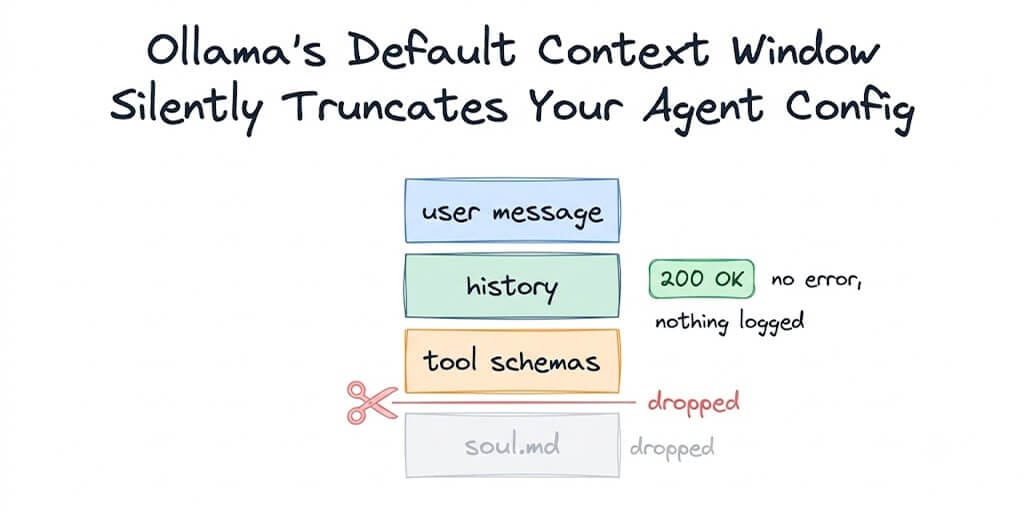
It drops the front and returns 200 OK.
Someone built a reproducible demonstration of this: place a secret at the very start of a 160,000-token prompt, then ask the model to repeat it back. Ollama returned HTTP 200, reported prompt_eval_count: 16387 on a 160,000-token input, and the model confidently invented an answer. No error, no warning, nothing in the logs.
For comparison, llama.cpp returns a hard 400 exceed_context_size_error on the same input. Brutal, but honest.
For an agent, the front is the worst end to cut from, because the front is your system prompt. soul.md sits first, so it goes first. The agent keeps answering, still sounds fluent, and has quietly stopped being your agent. It's a generic model holding your last two messages.
The token math that makes this click
A standard agent, before the user has typed anything:
soul.md / agents.md      ~400 tokens
tool schemas (5 skills)  ~600 tokens
system scaffolding       ~200 tokens
                         ----
                         ~1,200 tokens of fixed overhead
At 4096, you start each conversation with about 70 percent of your window free. That feels fine, which is exactly why this bug hides.
Then every turn adds. Three moderate exchanges is another 1,500 to 2,000 tokens, and a single tool call plus its JSON result can be several hundred more. You cross 4096 around turn three. The front gets cut.
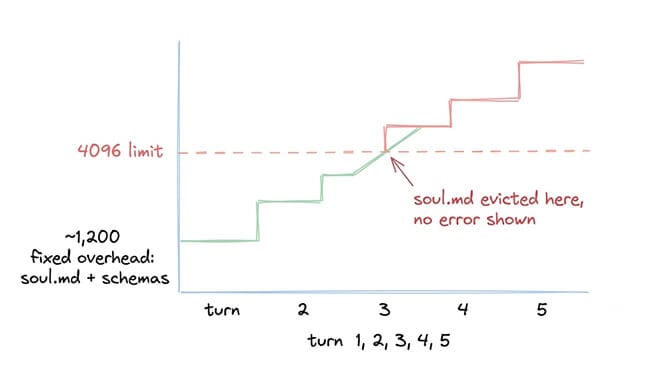
This is also why the symptom is so distinctive: the agent works perfectly at first and then degrades. If your agent were misconfigured, it would be wrong from message one. Degradation on a delay is a context window, nearly every time.
Check what your model actually received
Three checks, fastest first.
ollama pswhile the model is loaded. The CONTEXT column shows the window actually in effect. Most useful command here, because it tells you whether your setting took rather than whether you typed it.prompt_eval_countin the API response. If your prompt is clearly 9,000 tokens and this comes back near your window size, the rest was discarded.- Ask the agent. After a few turns: "What are your rules?" If it can't answer and could on turn one, the front of the context is gone.
Three ways to set it, and which to use
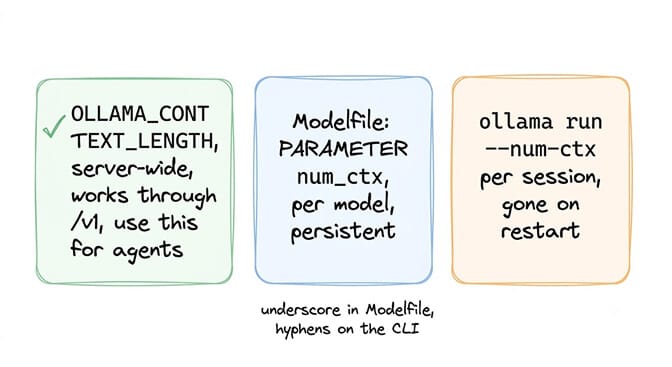
Server-wide, OLLAMA_CONTEXT_LENGTH. The default for every request that doesn't carry its own. This is the one to use for agents, because it survives the OpenAI-compatible endpoint problem above.
Per model, a Modelfile. Good when one agent needs a big window and your chat models don't:
FROM yourmodel
PARAMETER num_ctx 16384
Then ollama create yourmodel-agent -f Modelfile. Note the underscore: the Modelfile parameter is num_ctx, the CLI flag is --num-ctx. Swap them and it fails silently rather than erroring.
Per session, ollama run yourmodel --num-ctx 16384. Fine for testing, gone on restart, and not what your framework is calling anyway.
Don't trust any published "default" for your model, including this page
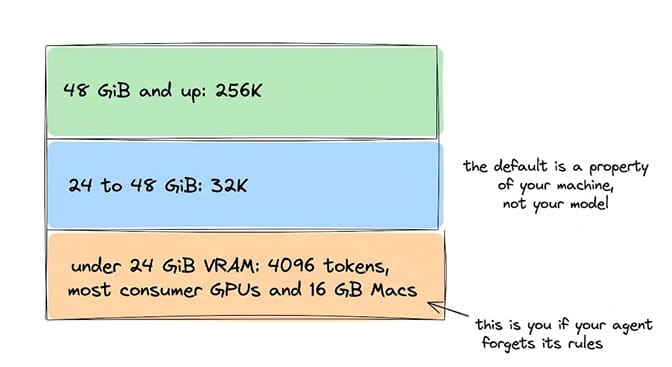
Ollama's own documentation currently disagrees with itself. The FAQ says the default is 4096. The Modelfile reference says num_ctx defaults to 2048. The context length page describes a default derived from available VRAM: 4K below 24 GiB, 32K from 24 to 48 GiB, and 256K above that. Each of those was true of some build, and the VRAM-derived version is what current releases actually do.
That means the honest answer to "what is Ollama's default" is: it depends on your GPU. A 16 GB machine sits at 4096. A 24 GB Mac clears the first tier and gets 32K without touching anything. A 64 GB machine gets 256K. The widely repeated "Ollama defaults to 2048" is out of date on every current install, and "4096" is only right for the bottom tier, which happens to be where most people hitting this bug live. Cloud models (-cloud tags) are set to their maximum by default, so this whole page is about local models.
So skip the lookup tables. The default is a property of your Ollama version and machine, not of the model you pulled, unless that model's own Modelfile sets num_ctx. Run ollama show yourmodel, then ollama ps. Two commands beat any list.
How much headroom, and what it costs
Light agent, short soul.md, two or three tools: 8192 is comfortable. Standard agent with a full config and five to eight skills: 16384. Heavy agent with a long config, ten or more tools, and long tool outputs: 32768. Ollama's own context length page goes further and recommends at least 64000 for agents, web search and coding tools; that's the right target if your VRAM allows it, and the wrong one if it doesn't, because a window the model can't load is a model that won't start.
The cost is KV cache memory, which scales with context length, layer count and attention geometry, so any table of megabytes would mislead you. At 32K and above the cache can outweigh the model weights. Measure instead: note the SIZE column in ollama ps, raise the window, reload, compare. Thirty seconds, and the number is true for your box. On Ollama 0.24 and earlier, a window that doesn't fit could fail with "memory layout cannot be allocated". For that message, see the memory layout cannot be allocated decoder.
One hard ceiling: you cannot exceed the model's trained maximum, which ollama show lists.
Hermes, OpenClaw, and the framework layer
Two different layers, and people fix one while the other is still broken.
The Hermes response truncated fix covers framework-level context settings and output limits. This page covers Ollama's own window, which applies underneath any framework. If you set a framework flag and Ollama is still at 4096, Ollama wins, because truncation happens at the server before the model sees anything. Set both. Layer 4 of the Hermes troubleshooting guide covers the framework side in order.
Hermes specifically is a textbook case of the /v1 problem. Hermes computes a context window for each request and sends num_ctx, but it talks to a local Ollama over the OpenAI-compatible endpoint, so Ollama ignores it and every model loads at the server default. A native /api/chat adapter is in progress upstream (hermes-agent PR #4505), and there's a community stopgap package that reroutes Hermes to the native endpoint until it lands. Until then, OLLAMA_CONTEXT_LENGTH is the fix for Hermes users, full stop.
The same /v1 path has a second cost that looks unrelated: several users report the same local model returning corrupted streamed tool_calls over /v1 and correct ones over native /api/chat. If your agent forgets its rules and its tool calls come back mangled, that's one root cause, not two. And if tool calls never fire at all, that's a different Ollama issue: see Ollama does not support tools.
The fix you should make even after fixing num_ctx
Raising the window buys room. It doesn't stop you filling it.
A 300-line soul.md burns roughly 2,000 tokens on every call, forever, before your agent does any work. Our agents.md best practices guide covers why shorter config files measurably outperform long ones, and skills that reduce token usage covers the schema side.
num_ctx is the bug fix. Config discipline is the solution. Fix the setting today, then go delete half your soul.md this week.
Frequently Asked Questions
What is num_ctx in Ollama?
It's the maximum number of tokens the model can hold in one request: your system prompt, tool schemas, conversation history and current message combined. Current Ollama builds pick the default from VRAM (4096 under roughly 24 GiB, 32K to 48 GiB, 256K above), while the FAQ still says 4096 and the Modelfile reference still says 2048. Check yours with ollama ps rather than trusting any published figure.
I set num_ctx and nothing changed. Why?
Most likely your framework calls Ollama's OpenAI-compatible endpoint at /v1, which ignores num_ctx in the request body because it isn't on the allowlist of OpenAI parameters Ollama maps. Only the native /api/generate and /api/chat endpoints accept it. Set OLLAMA_CONTEXT_LENGTH on the server or bake num_ctx into a Modelfile, then confirm with the CONTEXT column in ollama ps.
My agent works for the first message but goes off-script after two or three turns. Is this it?
Almost certainly. Each turn adds history, and when the total crosses your window Ollama drops tokens from the front, which is where your soul.md lives. The tell is the delay: a misconfigured agent is wrong from message one, while a context overflow works well and then degrades.
Does Hermes Agent have this problem with Ollama?
Yes. Hermes sends num_ctx but talks to local Ollama over /v1, so the value is ignored and the model loads at the server default. A native adapter is in progress upstream. Until it ships, set OLLAMA_CONTEXT_LENGTH on the server; the Hermes-side context setting alone will not fix it.
Does this affect cloud models like Claude or GPT?
No. Hosted providers set their own windows, typically hundreds of thousands of tokens, and return an explicit error rather than silently truncating. Ollama's own -cloud model tags also default to their maximum. If your agent behaves on a hosted model and falls apart on local Ollama, the context window is the first thing to check, not the model's intelligence.