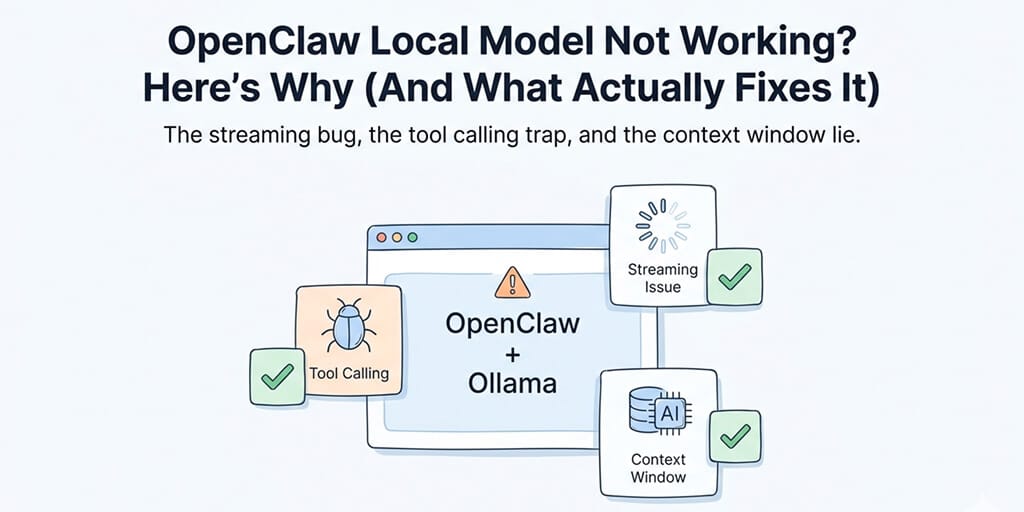
OpenClaw local models fail for five reasons: a streaming protocol bug (GitHub #5769) that drops tool calls, model discovery timeouts, context window mismatches (need 64K+ tokens), WSL2 networking issues, and insufficient model capability (need 30B+ parameters for agent tasks). Each has a different fix. The fastest fix for most users: update OpenClaw, point the Ollama provider at the native /api/chat endpoint (no /v1), and run openclaw doctor to surface the rest.
The streaming bug, the tool calling trap, and the context window lie. Real fixes from community GitHub issues.
The model worked in the terminal. OpenClaw didn't see it. If that's where you are, you're hitting one of five distinct failure modes, each with a different fix. One of them is a fundamental architectural limitation that no config change will solve.
Before you start: check your OpenClaw version and run doctor
Run openclaw --version first. Local model behavior changes a lot between releases — the official Ollama provider now integrates with the native /api/chat endpoint (not the OpenAI-compatible /v1 path), and several of the bugs documented below have patches in flight. If you're more than a few releases behind, update first and retest before working through the fixes.
Then run openclaw doctor (add --deep for full diagnostics). It checks connectivity, provider config, and model availability and prints which failure mode you're hitting. Half the troubleshooting reports we read traced back to outdated installs or things doctor would have caught.
The #1 failure: Tool calling silently breaks with streaming
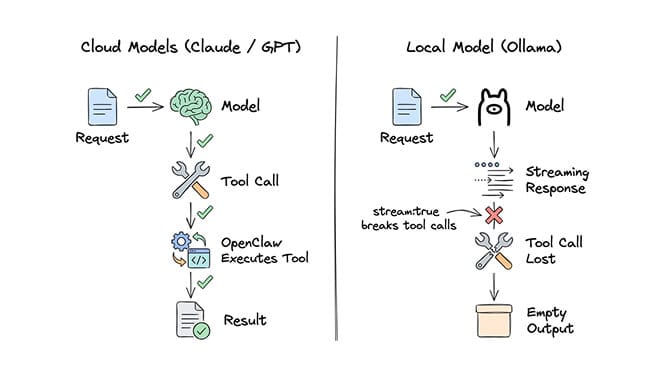
This is the bug that burns the most people. It's documented in GitHub Issue #5769, and it affects every Ollama model configured through OpenClaw.
Here's what happens: OpenClaw always sends stream: true when making model calls. This is fine for cloud providers like Anthropic and OpenAI. But Ollama's streaming implementation doesn't properly emit tool_calls delta chunks. When a local model decides to call a tool (exec, web_search, browser, file read), the streaming response returns empty content with finish_reason: "stop", losing the tool call entirely.
The result: your agent can chat, but it can't do anything. No file reading. No web searches. No shell commands. No skill execution. It just produces narrative text describing what it would do, instead of actually doing it.
This is a known Ollama limitation tracked in their own issues (ollama/ollama#9632 and ollama/ollama#12557). It affects Mistral, Qwen, and most other local models.
If your OpenClaw agent talks about using tools instead of actually using them, you've hit the streaming + tool calling bug. It's not your config. It's an architectural mismatch.
The fix (most users): switch to the native Ollama API
If you configured the Ollama provider against the OpenAI-compatible URL (http://host:11434/v1), switch to the native endpoint. OpenClaw's Ollama provider now integrates directly with Ollama's /api/chat endpoint, which preserves tool calls under streaming. The official Ollama provider docs explicitly warn against the /v1 path because it breaks tool calling.
In your provider config, drop the /v1 suffix from baseUrl:
providers:
  ollama:
    baseUrl: "http://localhost:11434"   # native /api/chat — supports tool calling
    # NOT: "http://localhost:11434/v1"  — breaks tool calling
After updating OpenClaw and switching the base URL, retest with openclaw doctor --deep.
The fallback (older versions): patch out streaming for Ollama
If you're stuck on an older OpenClaw build, the community workaround disables streaming when tools are present for Ollama providers:
const shouldStream = !(context.tools?.length && isOllamaProvider(model))
This requires modifying OpenClaw's source and rebuilding. The proposed config option (stream: false per provider) is tracked in the GitHub thread. Either path beats living with chat-only agents.
The #2 failure: "No response" in the dashboard (but Ollama works fine)
This one shows up in Issues #7791, #29120, and #31577. The pattern is identical every time:
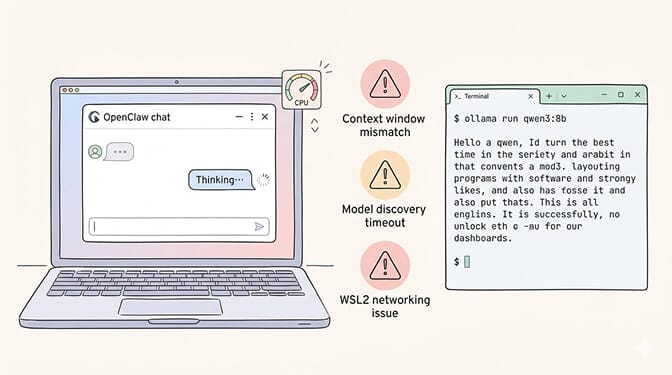
You run ollama run qwen3:8b in the terminal. It responds instantly. You open the OpenClaw dashboard or TUI. You type a message. The typing indicator appears. No response ever comes. CPU usage spikes to 50%. Ollama loads the model into memory. But nothing reaches the UI.
The root cause is usually one of three things.
Model discovery timeout
OpenClaw tries to auto-discover Ollama models on startup. If Ollama is slow to respond (common on Windows WSL2 setups or when the model isn't pre-loaded), discovery times out silently. Your gateway starts, but it can't actually talk to the model. Check your logs for: Failed to discover Ollama models: TimeoutError.
Context window mismatch
OpenClaw recommends at least 64K token context for agent operations. Many local models default to much less. A 3B model like Qwen2.5:3b with 32K context will choke on OpenClaw's system prompts, which are larger than most people realize. The gateway doesn't tell you this. It just hangs.
WSL2 networking
If you're running OpenClaw in WSL2 and Ollama on the Windows host (or vice versa), 127.0.0.1 doesn't always resolve correctly across the boundary. Issue #29120 documents this exact scenario. Two fixes:
Modern (Windows 11 22H2+): enable WSL2 mirrored networking in C:\Users\<you>\.wslconfig, then run wsl --shutdown:
[wsl2]
networkingMode=mirrored
dnsTunneling=true
autoProxy=true
firewall=true
Mirrored mode makes localhost and IPv6 work transparently between WSL2 and Windows. This is the recommended approach if you're on a recent Windows build.
Legacy fallback: use the WSL2 IP from hostname -I instead of localhost in your OpenClaw baseUrl. Works on older Windows versions but the IP can change between reboots.
For more context on how OpenClaw's agent architecture actually works and why it needs such large context windows, our explainer covers the system prompt structure and gateway model.
The #3 failure: Ollama models not detected by OpenClaw
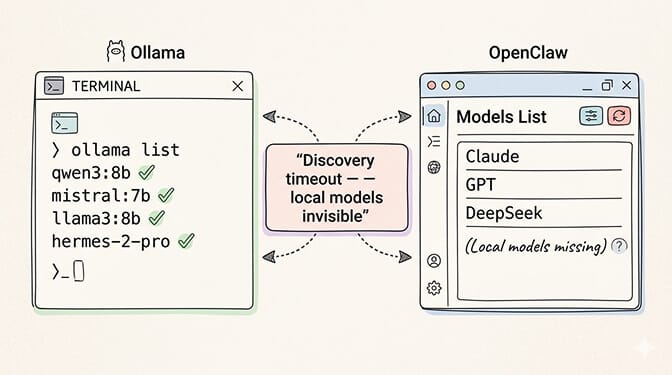
Issue #22913 captures this perfectly. You have five models loaded in Ollama. ollama list shows them all. But openclaw models list only shows your API-based providers. The local models are invisible.
This happens because OpenClaw's model scanning prioritizes API providers. When Ollama model discovery fails (timeout, connection issue, or just a race condition during startup), OpenClaw doesn't retry. It silently falls back to whatever API models are configured.
The fix depends on your setup:
If discovery fails on startup, try pre-loading your model with ollama run model_name in a separate terminal before starting the OpenClaw gateway.
If using a remote Ollama server (different machine), make sure the baseUrl in your config points to the correct IP and port. Issue #14053 documents how http://127.0.0.1:11434 fails when Ollama runs on a different host, even though curl to the same URL works fine. Use the actual network IP.
If on WSL2, bind Ollama to 0.0.0.0 instead of localhost: OLLAMA_HOST=0.0.0.0:11434 ollama serve.
The #4 failure: OpenClaw calls the Ollama CLI instead of the API
This one is genuinely bizarre. Issue #11283 documents it.
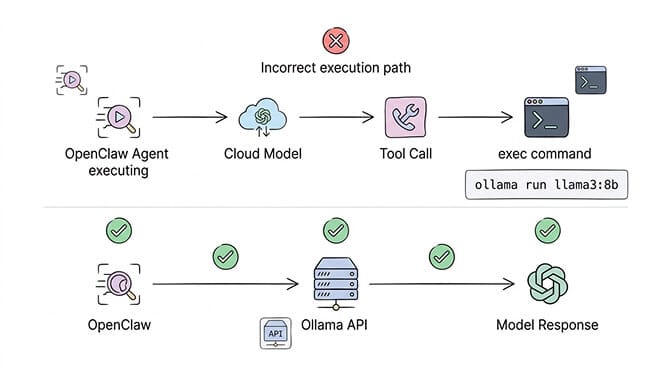
You configure Ollama as a remote provider with a baseUrl pointing to a GPU server. OpenClaw should make API calls to that endpoint. Instead, it tries to execute ollama run model_name as a shell command on the local machine. Since Ollama isn't installed locally, it fails.
The agent log shows it clearly: the model generates a toolCall to exec with the command ollama run llama3:8b "Hello from Llama 3 8B". It's treating Ollama as a CLI tool rather than an API provider.
This happens when OpenClaw's model routing falls back to a cloud model (usually Claude) and that cloud model tries to be "helpful" by executing Ollama commands. The fix: make sure your config explicitly defines the Ollama model in the models.providers section with api: "ollama" and that the model is listed in the models array. Don't rely on auto-discovery for remote Ollama.
The #5 failure: The model just isn't smart enough
Here's the one nobody wants to hear.
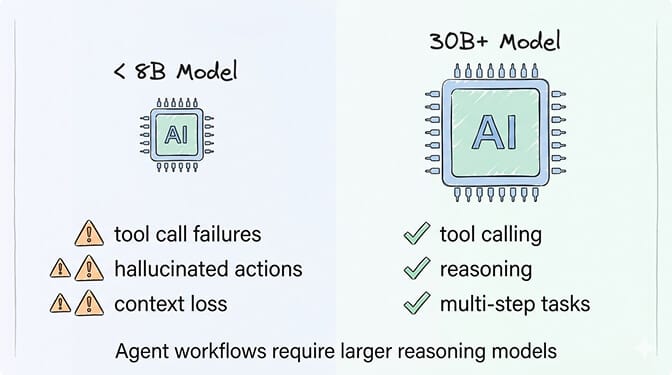
Even if you fix every configuration issue, most local models under 30B parameters can't reliably perform agent tasks. They can chat. They can answer questions. But OpenClaw agents need to make multi-step decisions, call tools with precise syntax, maintain context over long conversations, and follow complex system prompts.
Community benchmarks from OpenClaw's GitHub discussions are consistent: models under 30B context frequently fail on tool use and reasoning. The tool calling format needs to be exact. One misformatted JSON response and the skill execution fails silently.
The models that work best locally (according to community reports):
glm-4.7-flash (30B-A3B MoE, ~19GB at q4 / ~32GB at q8): strong reasoning and code generation. Pull with ollama pull glm-4.7-flash. Requires Ollama 0.14.3 or newer.
qwen3-coder:30b (30.5B params / 3.3B active MoE, 256K native context): good for code-heavy agent workflows. The model listing notes a minimum ~250GB memory to run at full precision, so plan hardware accordingly. Pull with ollama pull qwen3-coder:30b.
hermes3 and mistral:7b: recommended for tool calling, but limited reasoning depth compared to the 30B+ models above.
For anything under 8B parameters, expect frequent tool call failures, context loss, and hallucinated skill executions. These models are fine for simple chat. They're not fine for autonomous agent operations.
Local models work for chat. They mostly don't work for agent actions. That's not a config problem. It's a capability gap.
If you don't want to deal with model compatibility issues, tool calling bugs, or hardware requirements, Better Claw supports 28+ cloud providers with BYOK and zero configuration. $49/month for Pro. Point it at Claude, GPT, DeepSeek, or Gemini and your agent works in 60 seconds. No Ollama debugging required.
The cheap cloud alternative that changes the math
If you came to local models to avoid API costs, the 2026 pricing math is worth a second look. Cheap cloud providers (DeepSeek, Gemini's free tier, Claude Haiku) run a moderate-usage agent for a few dollars a month with reliable tool calling and large context windows, often less than the electricity for 24/7 local inference. Our real costs of running OpenClaw breakdown covers the exact math.
When local models actually make sense
Local models are still the right call for privacy-first deployments (government, healthcare, legal), offline environments, experimentation without API commitment, or supplementary heartbeat/sub-agent roles alongside a cloud primary. Our model routing guide covers the hybrid setup. For everything else, cloud providers offer better reliability, better tool calling, and competitive pricing.
The honest takeaway
OpenClaw with local models is not a "just works" experience in 2026. The tool calling streaming bug alone means your agent can't perform most useful actions. The discovery issues, context window mismatches, and WSL2 networking problems add layers of frustration on top.
The community is working on fixes. The streaming issue has proposed patches. Model capabilities improve every few months. Local-first OpenClaw will get better.
But right now, the fastest path to a working OpenClaw agent is a cheap cloud provider. Or even better, a managed platform that handles provider configuration, model routing, and infrastructure entirely.
If you've been fighting Ollama configs and silent failures, give Better Claw a try. $49/month for Pro, BYOK with any of the 28+ supported providers, and your first agent deploys in 60 seconds. No streaming bugs. No discovery timeouts. No context window mismatches. Just an agent that works.
Frequently Asked Questions
Why is my OpenClaw local model not working?
Most often it's the tool calling streaming bug (GitHub Issue #5769): OpenClaw sends stream: true and Ollama's streaming drops tool call responses, so your agent can chat but can't run tools. Other causes: discovery timeouts, context windows under 64K tokens, and WSL2 networking. Check logs for "Failed to discover Ollama models" or "fetch failed."
How does Ollama compare to cloud providers for OpenClaw?
Ollama is free and private, but local models under 30B parameters struggle with tool calling and multi-step reasoning. Cloud providers like DeepSeek and Claude Haiku give reliable tool calling and large context for a few dollars a month, and Gemini has a free tier. For production agents, cloud is significantly more reliable.
How do I fix OpenClaw Ollama tool calling?
The root cause is OpenClaw's stream: true default dropping Ollama's tool call responses. The community workaround patches OpenClaw's source to disable streaming when tools are present. Until that ships in a release, use Ollama for chat-only tasks and route tool-dependent operations to a cloud provider via your model config.
Is it worth running OpenClaw on local models to save money?
Usually not, unless privacy is the driver. You save a few dollars a month in API costs but spend hours debugging streaming bugs and discovery issues, plus 16GB+ RAM and a GPU for anything larger than 8B. DeepSeek or Gemini's free tier often cost less than the electricity to run a GPU machine 24/7.
Which local models work best with OpenClaw?
Community reports recommend glm-4.7-flash (~19GB at q4, strong reasoning), qwen3-coder:30b (good for code, but needs ~250GB memory at full precision), and hermes3 or mistral:7b for tool calling. Models under 8B parameters fail frequently on agent tasks. Plan for 30B+ with at least 64K context for reliable agent operations.
Related Reading
- OpenClaw Ollama "Fetch Failed" Fix — Specific Ollama connection error troubleshooting
- "Model Does Not Support Tools" Fix — Tool calling failures with local models
- OpenClaw Local Model Hardware Requirements — RAM, GPU, and storage specs for local inference
- OpenClaw Memory Fix Guide — Memory issues that compound with local model limitations
- OpenClaw Not Working: Every Fix in One Guide — Master troubleshooting guide for all common errors