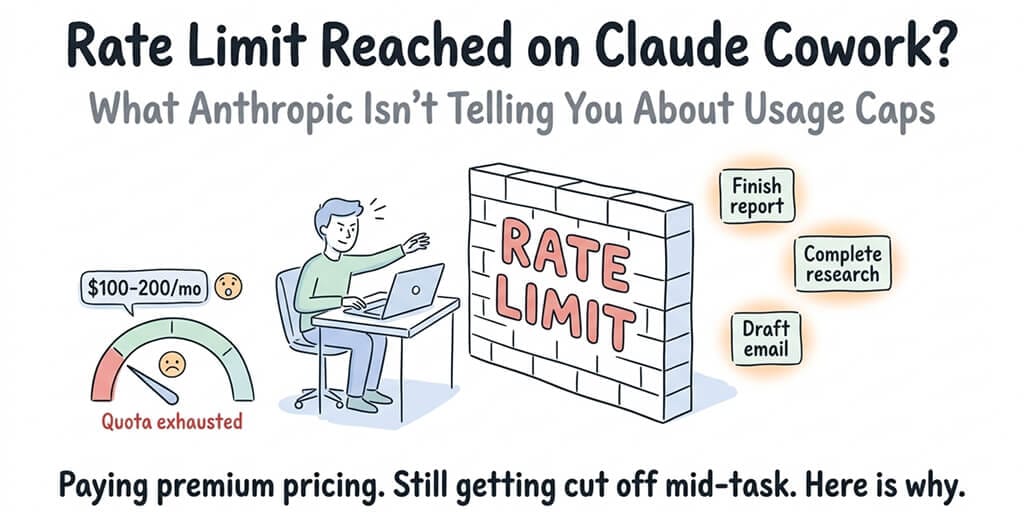
You're paying $100 to $200 a month. You're still getting cut off mid-task. Here's why Cowork eats your quota faster than you think, and what to do about it.
Quick answer: Claude Cowork hits rate limits faster than regular chat because each Cowork task spawns sub-agents, tool calls, and file operations that all consume quota. A single complex Cowork session can use as much quota as dozens of chat messages. The fast path forward: read the exact error string to see which limit you hit (session, weekly, or a single model's bucket), confirm it's not the ghost rate limit bug, and enable Extra Usage pay-as-you-go if you need to keep working past your cap. Note that weekly limits dropped 17% from their boosted summer level on 14 September 2026.
If you've hit the "rate limit reached" wall on Claude Cowork, you probably know the feeling: 40 minutes into a real task, the workspace stops, the error appears, and a 4-hour countdown starts. You're paying for a premium tool. The usage page doesn't add up. Here's what's actually happening — and what's changed since the worst stretch in early 2026.
Update: your weekly limit dropped 17% on 14 September 2026
This is the change to plan around, and it is easy to misread because of how it was announced.
As of 14 September 2026, Anthropic has made a 25% increase to standard weekly limits permanent across Pro, Max, Team, and seat-based Enterprise plans. That sounds like more headroom. It isn't — not for anyone who used Cowork over the summer.
The reason is what it replaced. The temporary 50% weekly boost that ran from May, and that was extended repeatedly (mid-July, then 19 July, then 19 August, then 31 August), expired on 13 September — the day before the permanent increase landed.
So the direction depends entirely on where you measure from:
| Where you're measuring from | Weekly limit | Change on 14 Sep |
|---|---|---|
| Pre-promo standard (before May 2026) | 100 | +25% |
| May to 13 September, with the temporary +50% boost | 150 | −17% |
| From 14 September (permanent +25%) | 125 | — |
If you used Cowork at any point in the four months before, you were working against the 150 line. On 14 September you dropped to 125. That is a 17% cut to the capacity you had, and it is the number that matters for your workflow.
Anthropic's original announcement led with the +25% and did not mention the net reduction. After community pushback the thread was deleted and replaced with a clarification that states the decrease plainly.
Two things this change does not touch:
- The 5-hour rolling window is unchanged. Only the weekly cap moves.
- Extra Usage still works. If the lower weekly cap starts biting mid-task, pay-as-you-go overflow is the release valve (see below).
The other half: OpenAI tightened up first
If you keep a second subscription as your fallback, that door narrowed a few weeks earlier. On 25 August 2026 OpenAI reinstated the 5-hour usage limit on Codex and ChatGPT Work for ChatGPT Plus subscribers, ending a six-week unlimited stretch that began on 13 July. OpenAI's stated reasoning was smoothing server load and stopping casual users from burning a whole week's quota in one sitting.
The 5-hour restriction remains disabled on the Pro $100 and Pro $200 tiers — so the escape hatch exists, it just costs considerably more.
The practical upshot: within three weeks, both of the obvious subscription options got tighter for the people paying the mid-tier price. Planning around one provider's limits by keeping a second subscription is a weaker hedge in September 2026 than it was in July. We ran the numbers on both changes, and on the API-key alternatives that don't reset weekly, in what to do when Claude Code and ChatGPT both rate-limit you.
Earlier changes still in effect
- May 6, 2026: A permanent doubling of the 5-hour rate limits on Claude Code (and by extension Cowork) for Pro, Max, Team, and seat-based Enterprise plans. The peak-hours throttle that used to cut Pro/Max during business hours was removed at the same time. This is still in place.
- Extra Usage (Anthropic's pay-as-you-go overflow at standard API rates) is generally available for Pro, Max 5x, and Max 20x. When you hit your plan cap, you don't have to stop — see the "Extra Usage" section below.
- Cowork went GA in April 2026 (it was a research preview when this post first ran).
The ghost rate limit bug below still happens. The pricing-vs-actual-burn gap still exists. But "you just hit the wall and there's nothing you can do for four hours" is no longer the full story.
Why Cowork Burns Through Your Quota So Fast
The first thing you need to understand about Claude Cowork rate limits is that Cowork tasks are not the same as chat messages.
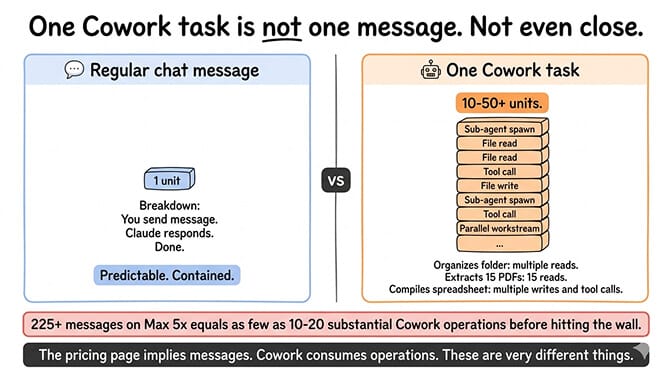
When you send Claude a message in regular chat, that's one message. Simple. Predictable.
When you ask Cowork to organize your Downloads folder, extract data from 15 PDFs, and compile a spreadsheet, that's not one task. Under the hood, Claude is spinning up sub-agents, making multiple tool calls, reading and writing files, and coordinating parallel workstreams. Every single one of those operations consumes tokens from your quota.
Anthropic's own help center says it plainly: "Working on tasks with Cowork consumes more of your usage allocation than chatting with Claude." But they don't tell you how much more.
A single intensive Cowork session doing complex file operations can use as much quota as dozens of regular chat messages. The "225+ messages" on Max 5x translates to as few as 10 to 20 substantial Cowork operations before you hit the wall.
That's the gap between what the pricing page implies and what actually happens in practice.
The Rolling Window Trick Nobody Explains Well
Here's the second thing that catches people off guard.
Claude doesn't use daily limits. It uses rolling 5-hour windows plus weekly caps. The 5-hour window resets 5 hours after you start using it (not at midnight). On Max plans, you also have two weekly limits running on top — one across all models, one specific to Sonnet.
Sounds flexible. In practice, it creates a dynamic where you can burn through your entire 5-hour allowance in a focused 45-minute work session and then sit idle for 4 hours waiting for the reset — and if you're already deep into a weekly cap, even the 5-hour reset doesn't fully unlock your throughput.
The 5-hour gap still kills momentum mid-task, but at least the May 2026 doubling of the 5-hour limits gives you more runway before that gap appears. The weekly caps sitting on top of it are the part that tightened on 14 September. For exactly when each Claude limit resets (session, weekly, and API), see rate limit reached on Claude. Some power users on Reddit still report hitting walls on Max 20x at $200/month during crunch periods, which tells you token consumption on intensive Cowork sessions is genuinely high.
Read the exact error string — it tells you which limit you hit
"Rate limit reached" is the phrase everyone searches, but it is rarely the literal text on screen. Claude Code and Cowork name the specific bucket you exhausted, and each one has a different fix. These are the strings in Anthropic's official error reference:
| What you see | What it means | What actually helps |
|---|---|---|
| "You've hit your session limit" | The 5-hour rolling window is spent. | Wait for the reset shown in the message, or try /limit-reset (below). |
| "You've hit your weekly limit" | The weekly cap is spent — the one that shrank 17% on 14 September. | Only Extra Usage or the weekly reset clears this. Waiting 5 hours will not. |
| "You've hit your Opus limit" | The Opus-specific weekly sub-limit, not your whole quota. | Switch to Sonnet or Haiku and keep working. Your general quota is still there. |
| "You've hit your Sonnet limit" | Same pattern, Sonnet's own bucket. | Switch models, or top up with credits. |
Note the pattern in the last two: a model-specific limit is not the same as being out of quota. This is the single most common misread. If the message names a model, you are not locked out of Cowork — you are locked out of that model, and switching models in Settings gets you moving again immediately.
Anthropic's Fable models have their own bucket layered on top, and it behaves differently by plan:
- Max plans and premium seats: Fable 5 and Fable 5.1 are included, and you can spend up to 50% of your weekly usage limits on Fable models at no extra cost. Past that, you continue on usage credits or switch models.
- Pro plans and standard Team/Enterprise seats: Fable models are not included in your plan limits at all. They run on usage credits from the first token.
That split catches people out, because the Fable bucket can empty while your overall weekly meter still shows headroom. Issue #91623 documents exactly this: a Max 20x plan drained from 0% to 88% of its weekly limit in about 22 hours after sessions pinned to the fable alias silently moved from Fable 5 to Fable 5.1, which emitted roughly twice the output tokens per turn (~783 → ~1,596) on an otherwise unchanged workload. The Fable sub-limit was exhausted well before the general weekly cap.
If your burn rate jumps for no reason you can explain, check whether a model alias moved under you before you assume it's a bug in your own usage.
You may also see billing-side messages, which are a different problem entirely and are not rate limits: Usage credits required for 1M context, Credit balance is too low, spend limit reached, and spend limit unavailable. Those mean a payment or spend-cap setting needs attention, not that you need to wait.
The /limit-reset command
Claude Code added a /limit-reset command on 3 September 2026. Reported behaviour: it clears your 5-hour session limit once a week. It does not touch your weekly cap, and everything you do after the reset still counts against that weekly total.
Two caveats worth knowing before you rely on it:
- It shows up in the
/menu for most users, but running it can return "A session-limit reset isn't available right now." Anthropic has not published the eligibility rules, and there is no documented way to check which outcome you'll get before you try. - It is absent from the official error reference, so treat the behaviour above as community-reported rather than a contract.
It is genuinely useful for rescuing one blocked afternoon. It is not a way around the weekly cap, which is the limit that tightened on 14 September.
The Ghost Rate Limit Bug That Nobody Talks About
But that's not even the real problem.
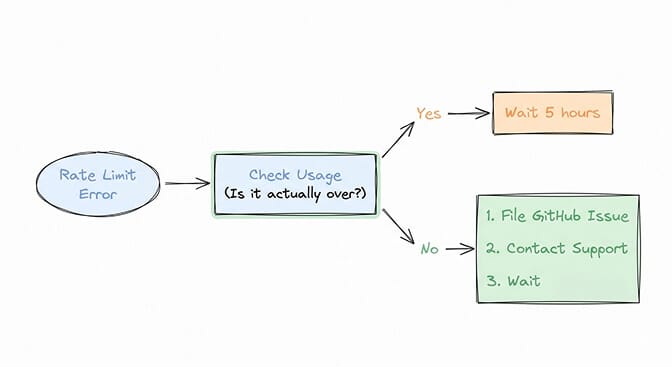
There's a documented bug where Cowork returns "API Error: Rate limit reached" even when your account is nowhere near its quota. Multiple users have filed issues on GitHub about this exact scenario. (If the failure shows up only on Windows, it may not be a quota issue at all — our guide on Claude Cowork not working on Windows covers the VM and service bugs that surface look-alike errors.)
One user on the Max plan reported getting rate limited on every single Cowork action for four consecutive days, despite having $250 in API credits and zero recent usage showing on their dashboard. Claude Chat worked fine. Claude Code worked fine. Only Cowork was broken.
Another user reported the same bug with only 16% of their quota used. Switching to a different account on the same machine immediately fixed it, confirming it was a server-side problem tied to their specific account.
The suspected cause? A corrupted rate limit state on Anthropic's backend. A ghost flag that incorrectly marks your account as rate limited when it shouldn't be.
Both users had to request manual server-side resets from Anthropic support to fix it. There's no self-service option. No "clear my rate limit cache" button. You file an issue and wait.
What Anthropic's Pricing Page Doesn't Make Obvious
Let's lay out the actual numbers so you can make your own judgment.
| Plan | Monthly Cost | Approx Cowork Sessions / 5-hour window | Extra Usage available? |
|---|---|---|---|
| Claude Pro | $20 | A handful before limits kick in | Yes |
| Max 5x | $100 | ~10-20 substantial operations | Yes |
| Max 20x | $200 | 4× the Max 5x ceiling | Yes |
Anthropic warns Pro users will burn through Cowork limits fast and explicitly recommends upgrading for heavy use. Even Max 20x users at $200/month report hitting walls during intensive work sessions, because Cowork token consumption scales with task complexity rather than message count.
Extra Usage is the pay-as-you-go overflow that kicks in after you exceed your plan limits. It bills at standard API rates with optional spending caps and usage alerts. Running complex Cowork tasks in overflow can easily add $50 to $100 on top of your subscription in a busy month — but it does mean you don't have to stop working mid-task. (More on how to enable it below.)
Anthropic also now exposes a real-time usage dashboard at Settings → Usage in Claude. It shows month-to-date consumption broken out by surface (Claude, Claude Code, Cowork) and tracks any Extra Usage spend. It's not a perfect "you're at 80% of your Cowork quota" gauge during a single 5-hour window, but it does close the visibility gap the original version of this post called out — you no longer find out you're capped only when the error appears.
If you're evaluating whether Cowork is the right tool for your workflow, you might want to look at how it compares to OpenClaw for autonomous tasks. The trade-offs are different than you'd expect.
The Real Question: Is Cowork the Right Architecture for Your Work?
Stay with me here. This isn't just a pricing complaint. It's an architecture question.
Cowork now runs on desktop, web (claude.ai), iOS, Android, and Chrome. Cloud sessions continue when your laptop is closed. Desktop sessions still need the app open for local file access. (Until July 7, 2026, Cowork was desktop-only and your computer had to stay awake; if you read that anywhere, it predates the change.)
So the laptop is no longer the question. The question is what Cowork is built around: one person, working on their own files and documents, running Claude only, metered against a subscription allowance. For organizing folders or building a spreadsheet, that model works fine. But if you need an AI agent that handles messages across Slack and WhatsApp and Discord, is shared by a team, and routes cheap work to cheap models so a weekly cap never decides when you're done, Cowork isn't built for that. Our Claude Code vs Cowork comparison lays out exactly which Anthropic tool fits which job, and where both leave a gap.
That's not a criticism. It's a design choice. Cowork is a personal productivity tool, not a multi-channel automation engine.
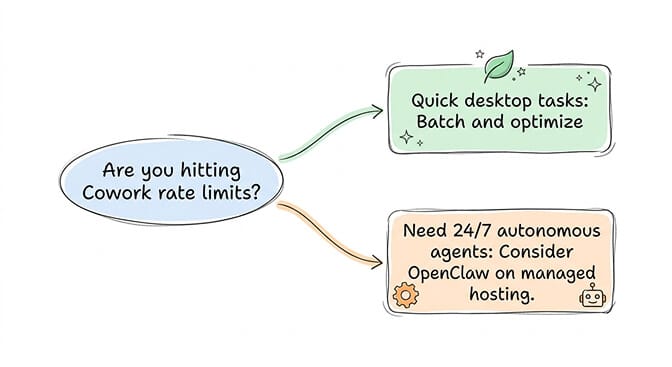
But if you came to Cowork looking for always-on autonomous agents and you're now hitting rate limits that prevent even simple tasks from finishing, the question isn't "how do I get more quota?" The question is "am I using the right tool?"
This is exactly why we built BetterClaw as a no-code AI agent platform. Your agent runs on our infrastructure, 24/7, on the channels your team already uses. No rate limits from a subscription tier. No ghost bugs locking you out of your own workflows. You bring your own API keys, pay for what you actually use, and the agent keeps running. $49 a month for Pro.
What to Do If You're Stuck Right Now
If you're currently hitting Claude Cowork rate limits, here's a practical action plan.
First, read the error string, then check whether it's a real limit or the ghost bug. If the message names a model ("You've hit your Opus limit"), just switch models — you are not out of quota. If it says session or weekly, open Settings → Usage in Claude. If your dashboard shows low consumption but you're still getting rate-limit errors, you're likely hitting the ghost rate limit bug. File an issue on the Claude Code GitHub repo and contact Anthropic support — the fix requires a server-side reset.
Second, enable Extra Usage so you don't get blocked mid-task. Go to Settings → Usage → Extra usage, attach a payment method, and set a monthly spending cap (or leave it unlimited, capped at $2,000/day). When your plan allocation runs out, Claude switches to standard API-rate billing and keeps working. Available for Pro, Max 5x, and Max 20x. Combine this with usage alerts so you know when you've crossed into pay-as-you-go territory.
Third, batch your work to the 5-hour window. Start intensive Cowork sessions right after a reset to maximize your available capacity. Save simple tasks for regular Claude chat instead of wasting Cowork quota on things that don't need sub-agent coordination.
Fourth, reduce per-task token burn. Anthropic's official "Usage limit best practices" article spells out the levers:
- Use Sonnet or Haiku for routine work; reserve Opus for genuinely hard reasoning.
- Toggle off extended thinking on tasks where it doesn't change the output quality.
- Disable unused tools and MCP connectors in the Cowork session — every connected tool adds to the system prompt.
- Store frequently referenced material in project knowledge instead of pasting it into every chat.
- Start fresh chats when switching topics; long sessions carry their entire history forward.
These five changes typically extend a 5-hour window by 30-60% before any other lever moves.
Fifth, consider whether you actually need Cowork's specific capabilities. If your main use case is running OpenClaw best practices style workflows, an always-on managed agent serves you better than a subscription tool with usage caps. And if you're on Pro and hitting limits constantly, the jump to Max 5x at $100/month might help — but if you're already on Max 5x and still hitting walls, throwing another $100 at Max 20x doesn't solve the underlying architecture mismatch. It just delays the same frustration.
The Bigger Picture: Why AI Agent Pricing Is Still Broken
Here's what I think about when I see users paying $200 a month for Cowork and still getting locked out.
The AI agent space hasn't figured out pricing yet. Subscription tiers with vague "message" counts don't map cleanly to agentic workloads. A message in chat and a message in Cowork are wildly different in cost, but they're counted against the same fuzzy quota.
Anthropic has been adjusting the model — limits have moved in both directions over the last few months and Extra Usage now exists as an overflow valve — but the core mismatch between subscription caps and agent workloads remains. Token-based billing with transparent per-request pricing is more honest than caps that hide the true cost. It's less predictable, sure. But at least you know exactly what you're paying for.
Cowork is a genuinely impressive product — the sub-agent coordination, file system access, and polished Excel/PowerPoint outputs are real. But every time you stare at a 5-hour countdown instead of finishing your work, or you can't tell whether the error is a real limit or the ghost bug, it chips away at the trust that makes an AI agent useful. Pick the architecture that matches how you actually work, then build something great with it.
If you're building workflows that need to run reliably without surprise rate limits, ghost bugs, or a weekly cap deciding when you're done, give BetterClaw a try. $49/month for Pro, BYOK, managed infrastructure, no subscription-tier caps. The agent runs whether you're awake or asleep.
Frequently Asked Questions
What does "rate limit reached" mean on Claude Cowork?
It means you've exhausted your usage allocation for the current 5-hour rolling window. Cowork tasks consume significantly more quota than regular Claude chat messages because each task involves multiple sub-agent calls, tool use, and file operations. Depending on your plan tier, this could mean as few as 10 to 20 substantial Cowork operations before the limit kicks in.
How does Claude Cowork compare to OpenClaw for running AI agents?
Claude Cowork is Anthropic's agentic workspace for your own files and documents. It runs on desktop, web (claude.ai), iOS, Android, and Chrome; cloud sessions continue when your laptop is closed, while desktop sessions still need the app open for local file access. It runs Claude only and draws on your subscription's usage limits. OpenClaw is an open-source agent framework that runs 24/7 on a server, connects to 15+ messaging platforms, and supports multiple LLM providers. Cowork is better for file and document tasks, while OpenClaw is better for always-on automation and multi-channel workflows.
How do I fix the Claude Cowork rate limit bug when my usage isn't actually high?
If Settings → Usage shows low consumption but Cowork keeps returning rate limit errors, you're hitting the ghost rate limit bug — corrupted backend state on your account. File a fresh issue on the Claude Code GitHub repo and contact Anthropic support directly. Earlier issue #34068 was closed as "not planned," and no public patch has shipped yet, so the fix is still a manual server-side reset by support. Switching to a different account on the same machine can confirm whether the issue is account-specific.
Is Claude Max worth $100 to $200 a month for Cowork usage?
It depends on your workload. Max 5x at $100/month gives roughly 5 times the Pro quota, which translates to about 10 to 20 intensive Cowork sessions per 5-hour window. If you regularly exhaust that, Max 20x at $200/month provides more headroom. But if you need agents running continuously or across messaging platforms, a no-code AI agent platform at $49/month with BYOK API keys may deliver more value per dollar.
Did Claude Cowork rate limits go up or down in September 2026?
Both, depending on your baseline. As of 14 September 2026 the standard weekly limit is a permanent 25% above the pre-May 2026 baseline. But the temporary 50% weekly boost that had been active since May expired on 13 September, the day before. Measured against the capacity you had over the summer, that is a 17% reduction. The 5-hour rolling window is unchanged.
What does the /limit-reset command do in Claude Code?
Added on 3 September 2026, it clears your 5-hour session limit once per week. It does not reset your weekly cap, and usage after the reset still counts toward that weekly total. It can also return "A session-limit reset isn't available right now" — Anthropic has not published eligibility criteria, and the command is not covered in the official error reference.
Why did my quota drain so fast when my workload didn't change?
Check whether a model alias moved under you. Sessions pinned to the fable alias were silently migrated from Fable 5 to Fable 5.1, which produces roughly twice the output tokens per turn — around 1,596 versus 783 — on identical work. Because Fable models draw on their own sub-limit, that bucket can empty while your general weekly meter still shows headroom.
Is Claude Cowork reliable enough for production workflows?
Cowork went GA in April 2026 and is no longer a research preview, but practical limitations remain: local file access still requires the desktop app to be open (cloud sessions on web and mobile don't), the ghost rate limit bug can still lock accounts out unexpectedly, and rate caps can interrupt longer workflows even on Max 20x. For non-critical file and document tasks it works well; for production workflows that need guaranteed uptime, a server-hosted agent with managed infrastructure is the safer bet.