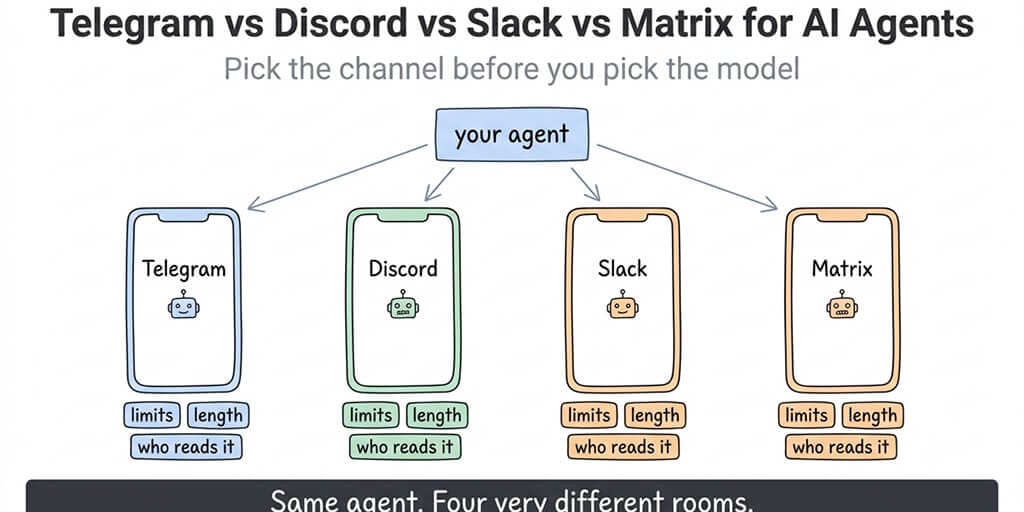
The chat app you wire your agent to decides its rate limits, its message length, whether anyone can read the transcript, and who's allowed to tell it to stop. Here's the comparison with the platform numbers, not the vibes.
Picture the demo. The agent answers in Telegram in under two seconds, formats a table, adds inline buttons for approve and reject. Beautiful. Then you move it to the team Slack, and the same reply arrives a beat late, the table collapses, and the approval buttons need a Block Kit rewrite. Then someone asks if it can run in the community Discord, where the reply gets chopped at 2,000 characters. (If Slack is your pick, see our slack ai agent page.)
Nothing about the agent changed. The room did. We've now written seven single-channel setup guides for this site, and the question people actually ask isn't "how do I set up Slack." It's "which one should I even use." So here's that post.
The numbers that decide it
Everything below is from each platform's own developer documentation as of September 2026, except where marked.
| Telegram (Bot API) | Discord | Slack | Matrix | |
|---|---|---|---|---|
| Send rate, per chat | ~1 msg/sec | 5 msgs per 5 sec per channel | 1 msg/sec per channel | Homeserver-configured |
| Send rate, global | ~30 msg/sec bulk, 20/min per group | 50 requests/sec across the API | Workspace-wide limit on posting | Homeserver-configured |
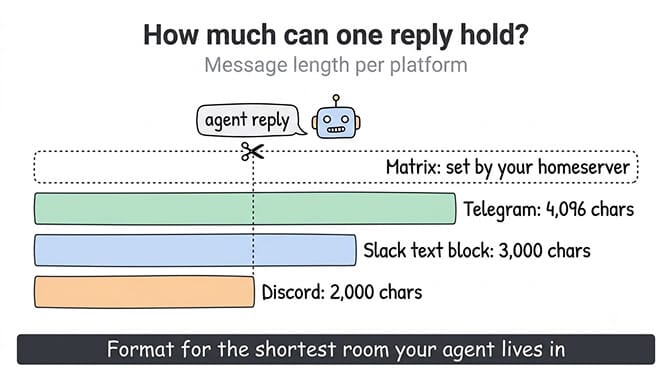
| Max message length | 4,096 characters | 2,000 characters (4,000 with Nitro on the account) | Long messages allowed; a text block caps at 3,000 characters | Set by the homeserver; Synapse default event size 65 KB |
| Rich replies | Inline keyboards, Markdown/HTML | Components, embeds, Markdown | Block Kit | Limited; depends on client |
| Threads | Topics in groups | Native threads | Native threads | Threads supported by spec, client support varies |
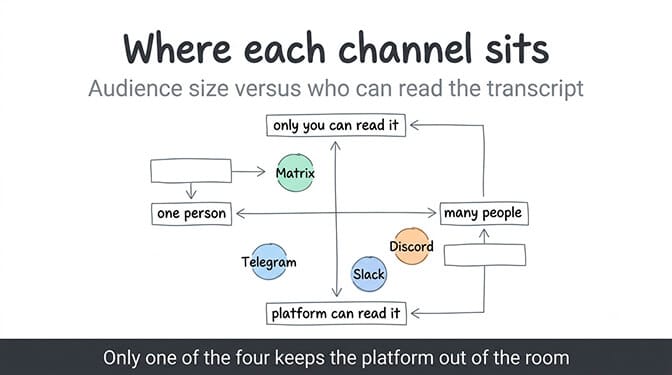
| End-to-end encryption for the bot | No | No | No | Yes, if the bot implements it |
| Who can run it | Anyone, free | Anyone, free | Workspace admin must install; free plan keeps 90 days of history | Anyone; self-host or hosted |
| Where it fits | Personal and small-team agents | Communities | Work teams | Privacy-first and self-hosted setups |
Two things jump out. First, Telegram's per-chat limit is the friendliest for a conversational agent and its message ceiling is the roomiest of the three mainstream apps. Second, only Matrix lets the agent live inside an encrypted room, and that comes with real engineering cost.
Rate limits decide how chatty your agent can be. Message length decides how it formats. Encryption decides who else can read it. Pick the constraint that matters most to you, and the platform picks itself.
Telegram: the default for a reason
If you're building a personal agent, a morning briefing, a research assistant you talk to from your phone, Telegram is where most people start and most people stay.
The Bot API is simple, the token comes from BotFather in thirty seconds, and the limits (about one message a second per chat, 4,096 characters, inline keyboards for approvals) are exactly shaped for a back-and-forth with one human. Markdown and HTML formatting are native. Topics in groups give you cheap threading.
The catches: no end-to-end encryption for bots, so Telegram can read the transcript; a bot can only message someone who has started it (which is a feature, as anyone who's been rate-limited will tell you); and group sends are capped at 20 per minute, which bites if your agent posts status updates into a busy group. The setup is covered in the OpenClaw Telegram setup guide, and if it's throwing errors, that troubleshooting post is separate.
Pick Telegram when the agent is yours, the audience is you or a handful of people, and you want it working today.
Discord: built for crowds, not for one-to-one
Discord's model is servers, channels, and roles, and its bot ecosystem is the deepest of the four. Slash commands, components, embeds, voice. If your agent serves a community (support for a product, a study group, a game), nothing else comes close on the surface area you can build.
The costs are the 2,000-character message ceiling, which forces chunking on anything longer than a short answer, and a per-channel send bucket of five messages per five seconds that punishes the streaming-edit pattern. The global limit of 50 requests per second is rarely the wall; the per-route buckets are. Discord also tells you explicitly not to hardcode any of these and to read the rate-limit headers instead, which is good advice that most agent frameworks ignore.
There's also the moderation question. A community Discord is a public-ish room. Anything the agent says is on the record for everyone in the channel, and anything anyone in the channel says goes into the agent's context. That's an injection surface. The Discord integration guide covers scoping the bot to specific channels, which is the first defence. If you run Hermes Agent, the Hermes Agent Discord bot setup guide covers intents and per-channel config.
Pick Discord when the agent serves many people at once and you want buttons, roles, and threads out of the box.
Slack: where the work already is
If the agent's job is to sit in the room where decisions get made, Slack wins by being that room. It's also the platform with the most explicit rules: one message per second per channel, with short bursts tolerated, and a documented warning that an app which keeps exceeding limits over time can be disabled. Slack's own docs put it plainly: continuing to send after a rate limit risks permanent disabling.
Block Kit is the price of admission. Plain text works, but approvals, tables, and anything you'd want a human to click needs a Block Kit layout, and a text block tops out at 3,000 characters. OpenClaw's September release now steers agents toward supported Block Kit layouts for proactive replies and adds a native Stop button in Slack, which addresses the two most common complaints. The Slack agent setup guide covers the app install and scopes; for a self-hosted Hermes Agent, the Hermes Agent Slack setup guide walks through Socket Mode.
Two constraints people forget. A workspace admin has to approve the app, so "I'll just add it" becomes a ticket at any company over about fifty people. And Slack's free plan only keeps 90 days of message history, which matters if your agent's memory is "scroll back and read what we decided."
Pick Slack when the agent is a coworker, the audience is your team, and someone with admin rights is on your side. On BetterClaw, the Slack integration skill handles the in-workspace work: sending messages, monitoring channels and managing threads.
Matrix: the only one where nobody else can read it
Matrix is an open protocol, not a company. You can run your own homeserver, federate with others, and put the agent in a room with end-to-end encryption on. That last part is the reason to choose it, and it's a real reason: on the other three, the platform can read every message your agent sends and receives.
The cost is that the bot has to implement encryption itself, which means a Matrix SDK with crypto support (matrix-nio, mautrix, or similar), device verification, and key management. Rate limits and message size are whatever your homeserver sets; Synapse's default event ceiling is 65 KB, which is generous. Rich replies and threads exist in the spec but vary by client, so approval buttons are less polished than on Slack or Discord.
Matrix is also the channel where OpenClaw's mobile exec approvals landed first, which tells you who's using it: people who want a self-hosted agent to ask permission on their phone without a third party in the loop. We covered that flow in OpenClaw exec approvals on mobile via Matrix.
Pick Matrix when the transcript itself is sensitive and you're willing to run infrastructure to protect it.
The question that decides it faster than any table
Who is allowed to tell the agent to stop, and how fast can they do it?
On Telegram, that's you, from your phone, with a message. On Slack, it's now a native Stop button, plus whoever has admin rights. On Discord, it's a slash command you have to build and a role you have to assign. On Matrix, it's whatever you wire up in a room only you can read.
If the agent can take actions with consequences (send an email, spend money, run a command), the stop path matters more than the message limit. We built BetterClaw so that every agent has a one-click kill switch and action approvals regardless of which channel it's talking through (Telegram, Slack, Discord or Gmail), because the channel shouldn't decide whether you can pull the plug. Free plan, bring your own keys.
What I'd actually do
Personal agent, one user: Telegram. Get it working in an afternoon, accept that Telegram can read it, put nothing in the transcript you wouldn't put in an email.
Team agent: Slack, with the admin conversation had up front and Block Kit budgeted into the build.
Community agent: Discord, scoped to named channels, with a hard rule that nothing in the channel is treated as an instruction.
Sensitive agent: Matrix, self-hosted, with the encryption work done properly or not at all. Half-encrypted is worse than unencrypted because it feels safe.
And in every case: pick the channel before the model. The model is a config line you can change in a minute. The channel is a set of constraints your whole agent gets designed around. If you switch it later, you'll be rewriting formatting, approvals, and rate handling. Choose the room first, then decide who to put in it.
If any of this resonated, give BetterClaw a try. The free plan gives you one agent and 100 credits a month, bring your own API keys, no inference markup, and it never asks for a card. Pro is $49 a month for five agents, or $39 a month billed annually. Telegram, Discord, Slack and Gmail, plus webhooks and 120+ connectors, each with the same kill switch and cost cap. Start free or see full pricing.
Frequently Asked Questions
What is the best chat platform for an AI agent? It depends on who the agent talks to. Telegram is the easiest for a personal agent: one message per second per chat, 4,096-character messages, inline buttons, no admin approval. Slack fits team agents, Discord fits communities, and Matrix is the only one of the four that can put the agent in an end-to-end encrypted room, at the cost of running the encryption yourself.
How does Telegram compare to Discord for AI agents? Telegram is better for one-to-one and small-group agents: longer messages (4,096 vs 2,000 characters), a simpler bot API, and a per-chat limit shaped for conversation. Discord is better for communities: roles, slash commands, components, and a bot ecosystem built for many users at once, but its per-channel send bucket of five messages per five seconds punishes chatty or streaming agents.
How do I stop my AI agent from hitting rate limits on Slack or Discord? Send each reply once instead of streaming edits, queue outbound messages so a single event can't fan out faster than the platform's per-channel limit (one per second on Slack, five per five seconds on Discord), and read the platform's rate-limit headers or retry values instead of hardcoding numbers. Slack warns that apps which keep exceeding limits can be permanently disabled, so this isn't optional.
Is Slack worth it for an AI agent if my team is on the free plan? Yes for the integration, with one caveat: Slack's free plan keeps only 90 days of message history, so don't design the agent's memory around scrolling back through old channel messages. Give it persistent memory of its own and treat Slack as the interface, not the database. You'll also need a workspace admin to approve the app install.
Is Matrix secure enough to run an AI agent with sensitive data? It can be, and it's the only option of the four where the platform itself can't read the transcript, because rooms can be end-to-end encrypted. The condition is that the bot implements encryption properly, including device verification and key management. A Matrix bot without crypto support is no more private than a Telegram bot, and a half-configured one gives false confidence.