Turn your Hermes agent into a Discord bot. Bot token creation, privileged intents, permissions, channel behavior, and every silent failure mode fixed.
The bot showed up online in the member list. Green dot. Everything looked right. Someone typed a message in the channel, tagged it with @Hermes, and... nothing. No error. No typing indicator. Just the bot sitting there, connected and completely deaf.
The problem? Message Content Intent was disabled. Discord delivered the event but stripped the actual message text. Hermes got an empty payload, had nothing to process, and stayed silent. One toggle in the Developer Portal, and suddenly the bot worked perfectly.
This is the most common failure in Hermes Discord bot setup, and it catches almost everyone the first time. Discord's intent system is well-designed for security, but if you don't know the specific toggles Hermes needs, you'll spend an hour debugging a 5-second fix.
Here's the complete walkthrough. Every step, every config, every error that can silently kill your bot.
Create the Discord application and bot
Open the Discord Developer Portal. Click "New Application." Name it something clear ("Hermes Agent" works fine). This creates the application shell.
Go to the Bot tab in the sidebar. Discord auto-creates a bot user for your application. This is where the most important settings live.
Enable privileged gateway intents
Scroll down to "Privileged Gateway Intents." You need three toggles:
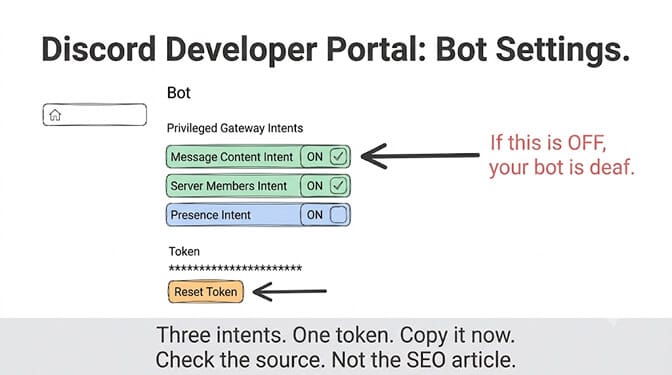
Message Content Intent. This is the critical one. Without it, Discord sends message events but hides the actual text. Hermes receives what amounts to a blank message. Enable it. Save.
Server Members Intent. Required if you use DISCORD_ALLOWED_ROLES to authorize users by role instead of individual user ID.
Presence Intent. Optional for basic setups but needed for some advanced features.
If your bot is in fewer than 100 servers, you can toggle these freely. Above 100 servers, Discord requires a verification application. For personal or team use, this isn't a concern.
Copy the bot token
Still on the Bot page, click "Reset Token" under the Token section. If you have 2FA enabled, enter your code. Copy the token immediately. Discord only shows it once. Store it in a password manager, not in a commit, not in a screenshot, not in a Slack message.
Invite the bot to your server
Go to the Installation tab (or build the OAuth2 URL manually). Set the scopes to bot and applications.commands. For permissions, select:
View Channels, Send Messages, Read Message History, Send Messages in Threads, Embed Links, Attach Files, Add Reactions.
Start with these minimal permissions. You can expand later. Use the generated install link to invite the bot to your server. It will appear in the member list as offline until you start the Hermes gateway.
Start with one private test channel. Not your entire server. Verify the bot responds there before opening it up to community channels or team-wide use.
Configure Hermes for Discord
Hermes stores Discord credentials in ~/.hermes/.env and behavior settings in ~/.hermes/config.yaml. Environment variables in .env always take precedence over config.yaml values.
# ~/.hermes/.env
DISCORD_BOT_TOKEN=your-bot-token-here
DISCORD_ALLOWED_USERS=284102345871466496,583102345871466497
DISCORD_HOME_CHANNEL=1234567890123456789
DISCORD_ALLOWED_USERS is required. Without it (or DISCORD_ALLOWED_ROLES), the gateway denies all incoming messages. This is a security-first default, not a bug.
To find your Discord User ID: open Discord, go to Settings, then Advanced, toggle Developer Mode to ON. Right-click your username anywhere and select "Copy User ID."
To find Channel IDs: with Developer Mode on, right-click any channel name and select "Copy Channel ID." If you would rather not hand-manage IDs and tokens at all, you can deploy an AI agent with Discord connected through OAuth instead.
If you're managing a team, DISCORD_ALLOWED_ROLES is more practical than listing every user ID:
DISCORD_ALLOWED_ROLES=1098765432109876543
Any member with that role is authorized. This uses OR semantics with DISCORD_ALLOWED_USERS, so you can combine both.
Start the gateway and test
Before starting the Discord gateway, verify Hermes works in the CLI using the same profile:
hermes chat -q "reply with discord provider ok"
If this fails with API key, credits, or rate limit errors, fix those first. Discord isn't the broken part yet.
Then start the gateway:
hermes gateway run
The bot should come online in Discord within seconds. Send it a DM or @mention it in your test channel. If it responds, the setup is working. Install it as a persistent service:
hermes gateway install
Check status with hermes gateway status. View logs with journalctl --user -u hermes-gateway -f on Linux.
If you've already set up Hermes with Slack and want to compare the Discord approach, the core difference is that Discord uses a standard bot token instead of Slack's Socket Mode. The gateway abstracts both, so your agent's behavior and memory are identical across platforms.
Per-channel behavior (this is where it gets useful)
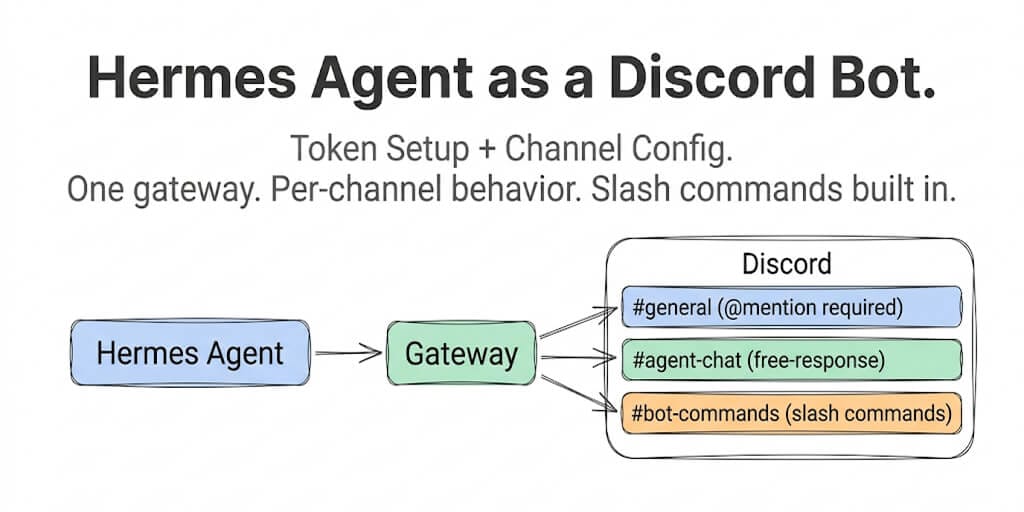
Discord has more permission surfaces than most messaging platforms: server roles, channel overrides, threads, forums, slash commands. Hermes exposes controls for all of them.
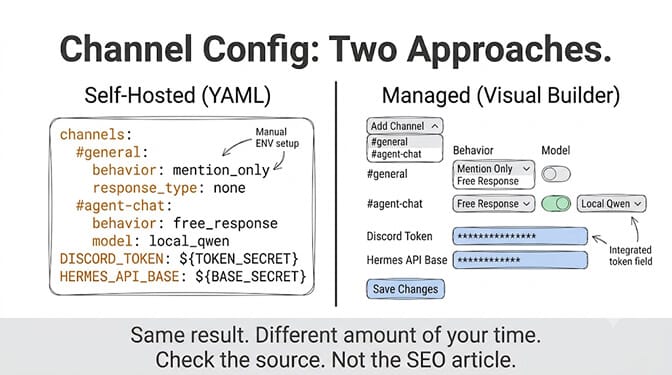
Free-response channels let the bot reply without an @mention. Perfect for a dedicated "#ask-hermes" channel:
# ~/.hermes/.env
DISCORD_FREE_RESPONSE_CHANNELS=1234567890,9876543210
Ignored channels prevent the bot from responding at all, even when mentioned:
DISCORD_IGNORED_CHANNELS=1111111111,2222222222
Session isolation (enabled by default) means that when Alice and Bob both talk to Hermes in #research, they get separate conversation histories. Alice's context doesn't leak into Bob's session, and vice versa. This is a global gateway setting you can toggle in config.yaml:
gateway:
  isolate_sessions: true  # default: per-user sessions
Set to false if you want the entire channel to share one conversation (useful for collaborative research channels where context should accumulate).
Slash commands register automatically. Any skill installed via hermes skills install appears as a native Discord slash command on the next gateway restart. The 100-command limit per bot applies. If you run multiple gateways against the same application (staging + production), set slash_commands: false on the non-primary instance to avoid registration conflicts.
If all this per-channel YAML configuration feels like a lot of overhead for what should be a simple Discord bot, it is. That's the tradeoff with self-hosted frameworks. BetterClaw's Discord integration handles channel routing, permissions, and session management through a visual builder. One click to connect, per-channel behavior configured with dropdowns instead of YAML. Free plan available, $49/month for Pro with all 15+ chat platforms.
The silent failures (and their fixes)
Bot online but never responds
Check Message Content Intent first. This is the cause 90% of the time. Developer Portal, Bot tab, Privileged Gateway Intents, toggle ON, save.
Bot responds in DMs but not in channels
Channel-level permissions override server-level permissions. Right-click the channel, go to "Edit Channel," then "Permissions." Check that the bot's role has View Channel, Send Messages, and Read Message History set to the green checkmark, not grey neutral. Grey means "inherit from server," which usually works, but explicit green is safer.
If nothing else works, the nuclear option: delete the channel, recreate it with the same name. The new channel inherits fresh default permissions cleanly.
Bot creates threads for every reply (and you don't want that)
Hermes defaults to auto-threading in server channels. Override per channel:
discord:
  no_thread_channels:
    - "CHANNEL_ID_HERE"
Gateway runs but bot shows offline
The gateway process is alive but the Discord WebSocket connection failed. Check that your bot token is valid (tokens can be invalidated if you reset them in the Developer Portal without updating .env). Run hermes gateway status and look for connection errors in the output.
Two bots caught in an infinite reply loop
DISCORD_ALLOW_BOTS defaults to "none" for this exact reason. Discord auto-mentions the replied-to author on every reply. If two Hermes instances both have "mentions" set, they'll trigger each other indefinitely. Keep the default.
The question behind the setup
Setting up Hermes as a Discord bot takes about 15 to 30 minutes if you follow this guide. The bot will work. The slash commands will register. Per-channel behavior is genuinely flexible.
But running it in production means maintaining a server, monitoring the gateway process, rotating tokens, managing file persistence (files live on the host filesystem and disappear on container restart), and handling the 500K+ unprotected instances and security concerns that apply to any self-hosted agent framework.
Gartner projects 40% of enterprise applications will embed AI agents by end of 2026. For community Discord servers, personal workspaces, and dev teams comfortable with ops, Hermes is a solid choice. For teams that want the Discord bot without the infrastructure, there are managed alternatives.
If you've read through this guide and thought I just want the bot without all the ops, that's why BetterClaw exists. Free plan with 1 agent and 100 credits a month. $49/month for Pro with Discord, Slack, Telegram, WhatsApp, and 11 more platforms included. 200+ verified skills. 28+ model providers via BYOK. Your first agent deploys in 60 seconds, and the Discord connection is one click.
The part that makes Discord different
Discord is arguably the best platform for running a team-facing AI agent. Multiple people in one channel, threads for separate tasks, slash commands for structured interactions, and the bot is always present. That "always present" part is the catch. The gateway needs to run continuously, which is a hosting problem, not a Discord problem.
If you're going to self-host, do it deliberately. Private test channel first. Minimal permissions. Explicit user or role allowlists. Prove the path works before you invite the bot into your community.
And if the bot ever goes silent, check Message Content Intent. It's always Message Content Intent.
Frequently Asked Questions
What is the Hermes Agent Discord bot setup process?
Hermes connects to Discord through its messaging gateway using a standard bot token. You create a Discord application in the Developer Portal, add a bot, enable Message Content Intent (critical), copy the bot token, invite the bot to your server with minimal permissions, add the token and allowed user IDs to your Hermes config, and run hermes gateway run. Skills automatically register as Discord slash commands. Total setup time is 15 to 30 minutes.
How does the Hermes Discord bot compare to BetterClaw's Discord integration?
Hermes gives you maximum control: per-channel YAML config, session isolation toggles, slash command registration, voice channel support. But it requires a VPS, gateway process management, token rotation, and ongoing ops. BetterClaw's Discord integration connects in one click through a visual builder with no server or gateway to maintain. Hermes is free but self-hosted. BetterClaw starts at $0/month on the free plan with managed infrastructure.
How do I fix my Hermes Discord bot not responding to messages?
The #1 cause is Message Content Intent being disabled in the Discord Developer Portal. Go to your application, Bot tab, Privileged Gateway Intents, and toggle Message Content Intent ON. Other causes: DISCORD_ALLOWED_USERS or DISCORD_ALLOWED_ROLES not configured (Hermes denies all users by default), channel-level permission overrides blocking the bot, or the gateway not running on the same profile as your CLI test. Check hermes gateway status for specific errors.
How much does it cost to run Hermes Agent as a Discord bot?
Hermes is free and open-source (MIT license). You need a server to run the gateway ($5 to $20/month VPS) and model inference tokens (free with DeepSeek V4 via Nous Portal, or pay-per-token with other providers). Total cost is as low as $5/month. BetterClaw's managed alternative includes Discord, hosting, and 15+ chat platforms at $0/month on the free plan or $49/month on Pro with zero infrastructure overhead.
Is the Hermes Discord bot secure for community servers?
Hermes denies all users by default unless you explicitly configure DISCORD_ALLOWED_USERS or DISCORD_ALLOWED_ROLES, which prevents unauthorized access. Bot-to-bot communication is blocked by default to prevent infinite reply loops. For community servers, start with mention-only behavior, restrict the bot to specific channels using DISCORD_IGNORED_CHANNELS, and use minimal OAuth permissions. For additional security, BetterClaw adds AES-256 encryption, secrets auto-purge after 5 minutes, and isolated Docker containers per agent.