We added a Slack bot to our team channel last year. It could answer questions about our docs, summarize long threads, and respond to basic prompts. The team used it for about three weeks. For the version that takes action, see our slack ai agent page.
Then they stopped.
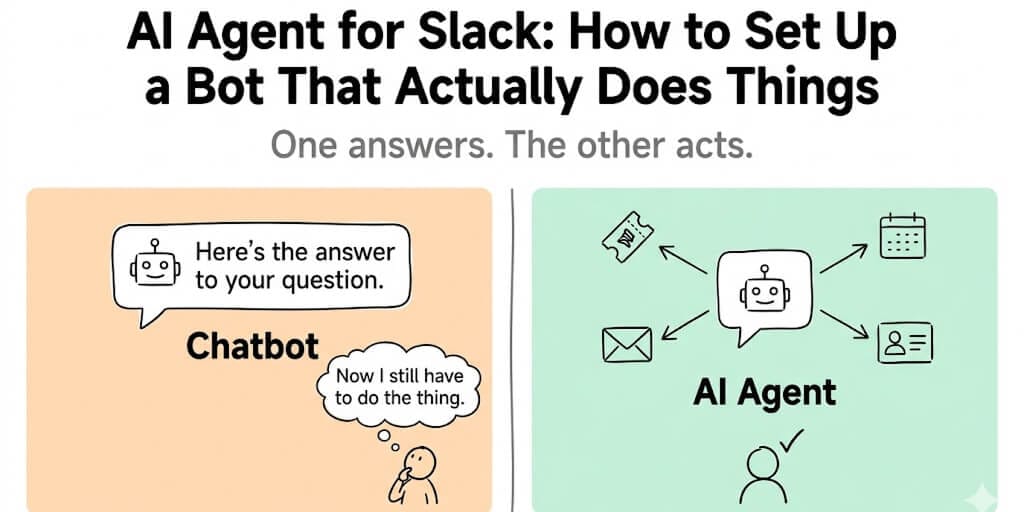
Not because it was bad. It answered questions fine. The problem was that after the bot told you the answer, you still had to do the thing. "The standup notes should go to Sarah." Great. Now I have to open Gmail and send them. "The ticket should be marked as high priority." Thanks. Let me go open Jira. "You have a meeting conflict at 2 PM." Cool. I'll go reschedule it manually.
The bot was a search engine with a personality. It knew things. It just couldn't do things.
That's when we started building something different. Not a Slack bot that answers questions. An AI agent for Slack that takes action. Reads a message, understands what needs to happen, and actually does it. Creates the Jira ticket. Sends the follow-up email. Reschedules the meeting. Updates the CRM. All from inside Slack, without the human in the middle.
The difference between a Slack chatbot and a Slack AI agent is the difference between a search engine and an employee.
Why most Slack bots fail by week three
Here's the pattern we see with every team that installs a basic AI Slack bot:
Week 1: Excitement. Everyone asks it questions. "What's our refund policy?" "Summarize this thread." "When is the next team meeting?" It feels like magic.
Week 2: Novelty fades. The answers are useful but they don't save time. You still have to act on every answer manually. The bot creates information but not outcomes.
Week 3: The channel goes quiet. People go back to doing things themselves because opening the bot, waiting for an answer, and then manually executing the action takes longer than just doing it directly.
The fundamental problem: most Slack AI tools are built around question-answering. But the tasks that eat your team's time aren't questions. They're actions. Creating tickets. Sending follow-ups. Updating records. Scheduling meetings. Routing requests.
Zapier's research shows teams spend an average of 6.4 hours per week on repetitive tasks. Most of those tasks aren't "look up information." They're "take this information and do something with it across three different tools."
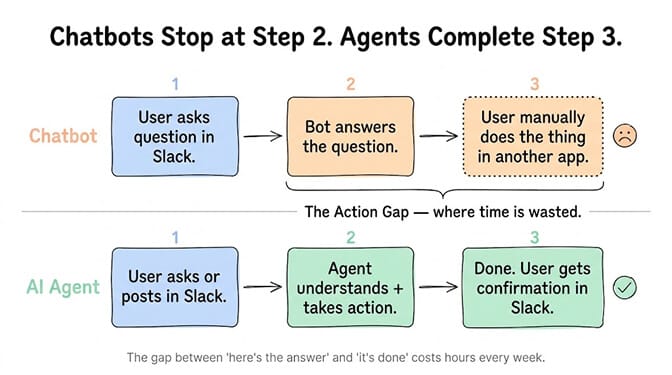
A Slack AI agent closes the gap between "here's the answer" and "it's done." That gap is where teams waste hours every week.
What a real AI agent for Slack can actually do
Let me give you five concrete scenarios. Not hypothetical features. Things that work today.
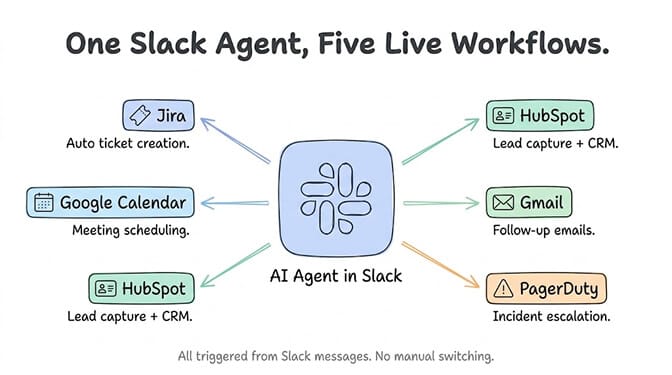
Scenario 1: Automatic ticket creation from Slack messages
Someone posts in your #support channel: "Customer acme-corp says their webhook isn't firing since yesterday. Seems urgent."
A chatbot response: "That sounds like a webhook configuration issue. You might want to check the endpoint URL and retry logic."
An AI agent response: Creates a Jira ticket with title "acme-corp webhook not firing," priority set to High, assigns it to the on-call engineer, posts back in the channel: "Created SUPPORT-2847. Assigned to @dev-oncall. Priority: High."
No human needed to translate the Slack message into a ticket. The agent reads the message, identifies the customer, classifies the urgency, creates the ticket in Jira with the right fields, and confirms back in Slack. All in under 10 seconds. None of that requires code if you build an AI agent on a platform that ships Slack as a first-class channel.
Scenario 2: Meeting scheduling from a thread
Your head of sales writes in #team: "Need to meet with @sarah and @mike about the Q3 forecast. Sometime this week, 30 minutes."
A chatbot: "I don't have access to calendars."
An AI agent: Checks Sarah's and Mike's Google Calendar availability, finds three open slots this week, posts them in the thread, and once someone picks one, creates the calendar event with a Zoom link and sends invitations.
Scenario 3: Lead follow-up automation
A new message arrives in your #leads channel from a form integration: "New lead: James Chen, VP Engineering at DataStack, interested in enterprise plan."
A chatbot: crickets (this isn't a question, so it does nothing).
An AI agent: Creates a contact in HubSpot, enriches it with LinkedIn data if available, drafts a personalized outreach email for your review, creates a follow-up task due in 3 days, and posts a summary in the channel: "Lead captured. HubSpot contact created. Draft outreach ready for your approval."
Scenario 4: Daily standup summaries with action items
Every morning at 9 AM, the agent reads the last 24 hours of messages across your key channels. It identifies action items, blockers, and decisions. Then it posts a structured standup summary in #daily-standup with each person's updates pulled from their actual messages.
No more "what are you working on today" round-robins that take 30 minutes. The agent already knows from what people posted.
Scenario 5: Escalation routing
A customer DMs your support bot on Slack Connect (the same escalation logic applies to a WhatsApp support agent): "We've been down for 2 hours. This is critical."
An AI agent: Classifies as P0, checks if there's already an open incident, creates one if not, pages the on-call engineer via PagerDuty or Slack mention, posts in #incidents, and responds to the customer: "I've escalated this as a critical incident. Your on-call engineer has been paged. Expected first response within 15 minutes."
The difference between a chatbot and an agent (technically)
Stay with me here. This matters for choosing the right tool.
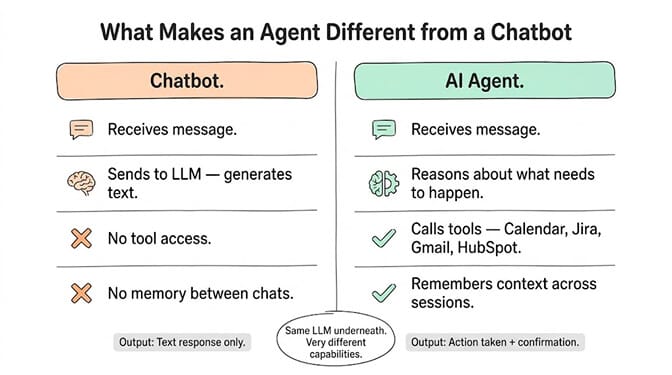
A chatbot receives a message, sends it to an LLM (GPT, Claude, etc.), and returns the response. The LLM generates text. That's it. The chatbot is a thin wrapper around a language model. It has no ability to call APIs, no access to your other tools, and no way to take action outside of the chat interface.
An AI agent receives a message, reasons about what needs to happen, selects tools from its available integrations (Gmail, Calendar, Jira, HubSpot, GitHub, etc.), executes multi-step workflows, and reports back with results. The LLM doesn't just generate a response. It decides which tools to use, in what order, with what parameters.
The technical components that make this possible:
Tool calling: The agent has access to a set of defined tools (APIs, integrations, skills). When the LLM determines an action is needed, it generates a structured tool call instead of plain text.
OAuth integrations: The agent has pre-authorized access to your tools via OAuth tokens. It can read your calendar, create Jira tickets, update HubSpot contacts, and send emails because you've granted it specific permissions for each service.
Persistent memory: The agent remembers context across conversations. It knows that "acme-corp" is a customer because it's seen previous messages about them. A chatbot starts fresh every time.
Trust levels: The agent has configurable autonomy. Some actions it can take automatically (reading, summarizing). Others require your explicit approval (sending emails, deleting records). This is how you prevent the kind of incidents where agents act without permission.
How to set up an AI agent in Slack (the no-code path)
Most guides at this point would tell you to create a Slack app, configure OAuth scopes, set up a bot user, deploy a server, handle WebSocket connections, manage token refresh, and wire up each integration API manually.
That takes a developer 4-8 hours if they've done it before. Longer if they haven't. (If you do want the self-hosted route, our Hermes Agent + Slack setup guide walks through it step by step.) And then you're responsible for keeping the server running, handling rate limits, managing credentials, and debugging when things break at 2 AM.
Here's the alternative.
On BetterClaw, connecting an AI agent to Slack takes about 60 seconds:
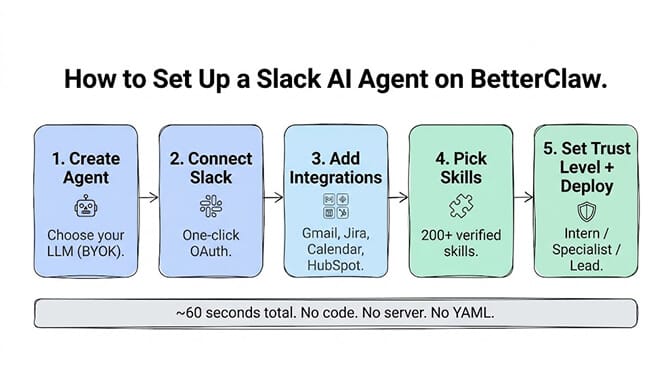
Step 1: Sign up and create an agent. Choose your LLM (BYOK... bring your own API key from OpenAI, Anthropic, or any of 28+ supported providers).
Step 2: Connect Slack via one-click OAuth. BetterClaw handles the Slack app creation, bot user setup, and WebSocket connection. You authorize in the standard Slack consent screen. (Our Slack integration guide walks through the connection step by step.) Once it's connected, the Slack integration skill is what lets the agent send messages, monitor channels and manage threads.
Step 3: Connect additional integrations. Click to add Gmail, Google Calendar, Jira, HubSpot, GitHub, or any of the 120+ connectors. Each one is a single OAuth authorization.
Step 4: Choose skills. Pick from unlimited skills that define what the agent can do: create tickets, schedule meetings, send emails, update CRM records, summarize threads, extract action items. Curated skills have been through a 4-layer security audit (824 malicious skills rejected from the marketplace).
Step 5: Set trust levels and deploy. Choose how much autonomy the agent gets. Intern: approve everything. Specialist: auto-execute reads, approve writes. Lead: auto-execute most actions. Deploy, and the agent starts listening in your configured Slack channels.
That's it. No server to maintain. No WebSocket handler to debug. No credential management. No YAML files. We built BetterClaw specifically because setting up the agent should take minutes, not days. Free plan with 1 agent and 100 credits a month, no credit card. Slack webhooks are on Pro, $49/month, with 5 agents and 12,000 credits a month.
The five workflows every team should automate first
If you're deploying an AI agent in Slack and wondering where to start, here are the five highest-impact workflows in order of quick wins:
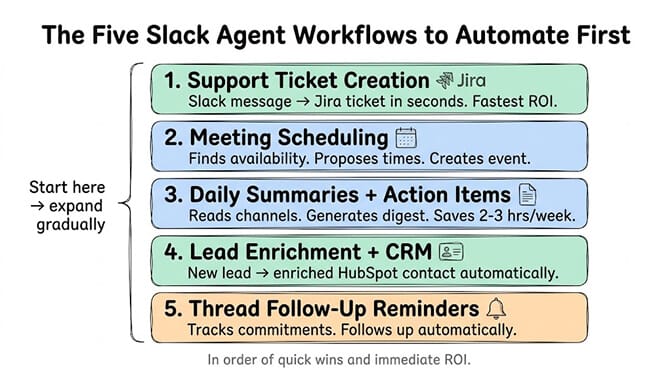
1. Support ticket creation from channel messages. This is the fastest ROI. Every "#support channel message that becomes a Jira ticket" currently requires someone to read the Slack message, open Jira, copy the details, classify the priority, and assign it. The agent does this in seconds.
2. Meeting scheduling from conversations. "Let's find 30 minutes this week" turns into 15 minutes of calendar Tetris between three people. The agent checks availability and proposes times.
3. Daily summaries and action item extraction. Instead of forcing everyone into a standup meeting, the agent reads yesterday's messages and generates a digest. Teams using this report saving 2-3 hours per week on meeting time. Marketing teams run a variant of it: an AI marketing agent posts competitor updates and social drafts to a channel, and nothing goes out until someone approves it.
4. New lead or customer notification enrichment. When a new lead arrives, the agent enriches it with data, creates the CRM record, and notifies the right person. No manual data entry.
5. Thread-based follow-up reminders. Someone says "I'll have the report by Friday" in a thread. The agent notes it and follows up on Friday if no report has been shared.
McKinsey research shows companies using AI workflows report 31% shorter process cycle times. These five agent workflows are where most of that improvement comes from: eliminating the human translation layer between "information received" and "action taken."
What to watch out for (the honest part)
Three real pitfalls to avoid when deploying an AI agent in Slack:
Over-automation too fast. Don't give the agent full autonomy on day one. Start with read-only workflows (summaries, notifications). Graduate to write workflows (ticket creation, email drafts) with approval gates. Only move to auto-execute after you've seen the agent get it right consistently for two weeks.
Channel noise. An agent that responds to every message in a busy channel becomes annoying fast. Configure it to only engage when @mentioned, when keywords trigger, or on a schedule. Not on every message.
Permission scope creep. Start with the minimum integrations. Gmail read-only, Jira create-only, Calendar read-only. Add broader permissions only when a specific workflow requires them. This is the same principle as safe email agent setup: narrow permissions first, expand as needed.
The teams that succeed with Slack AI agents are the ones that start small, validate that the agent gets it right, and gradually expand. The teams that fail are the ones that try to automate 20 workflows on day one.
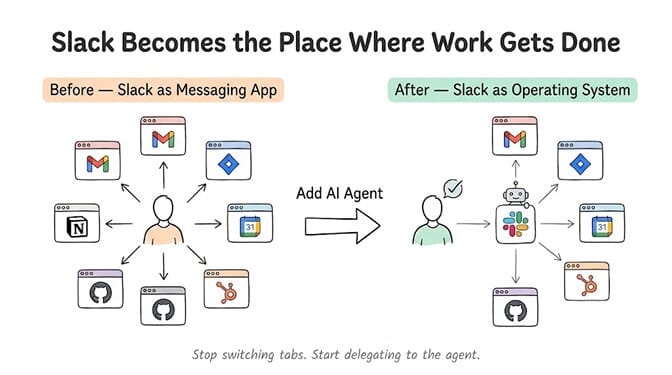
The real shift: from messaging app to operating system
Here's what I think most people miss about putting AI agents in Slack.
Slack was built as a messaging app. Chat. Channels. Threads. But with an AI agent connected to your tools, it becomes something else. It becomes the interface where work gets done, not just discussed.
You stop context-switching between six browser tabs. You stop copying information from one tool to another. You type what you need in Slack, and the agent handles the execution across your entire tool stack.
Gartner predicts 40% of enterprise applications will embed AI agents by end of 2026. Most of those agents won't have their own UI. They'll live inside the tools teams already use. And for most teams, that tool is Slack.
The question isn't whether your team will use an AI agent in Slack. It's whether you'll set it up before or after your competitors do.
If this resonated, give BetterClaw a look. Free plan with 1 agent and 100 credits a month. $49/month for Pro. Slack integration is one click. Gmail, Calendar, Jira, HubSpot, and 20+ more are also one click each. Deploy in 60 seconds. The agent handles your tools. You handle the strategy.
Frequently Asked Questions
What is an AI agent for Slack?
An AI agent for Slack is an autonomous bot that lives in your Slack workspace and can take real actions across your connected tools, not just answer questions. It can create Jira tickets, schedule meetings via Google Calendar, send follow-up emails through Gmail, update CRM records in HubSpot, and more. Unlike a basic chatbot that only generates text responses, an AI agent has tool-calling capabilities, OAuth access to your integrations, and configurable trust levels.
How does a Slack AI agent compare to Slack's built-in AI?
Slack's built-in AI (Slack AI) focuses on search, summarization, and recapping channels and threads within Slack itself. It cannot take actions outside of Slack. An AI agent for Slack connects to external tools (Jira, Gmail, Calendar, HubSpot, GitHub) and can create tickets, send emails, schedule meetings, and execute multi-step workflows. Slack AI tells you what happened. An AI agent does what needs to happen next.
How long does it take to set up an AI agent in Slack?
On a no-code platform like BetterClaw, about 60 seconds. Connect Slack via one-click OAuth, add your other integrations, choose skills, set trust levels, and deploy. No coding, no server setup, no Slack app configuration. On a code-first framework (CrewAI, LangGraph), expect 4-8 hours including Slack app creation, OAuth configuration, WebSocket setup, and tool integration coding.
How much does a Slack AI agent cost?
BetterClaw's free plan includes 1 agent and 100 credits per month at $0/month. Pro is $49/month with 5 agents, 12,000 credits a month, and Slack webhooks. You bring your own LLM key (BYOK) with zero inference markup. Building a custom Slack bot with a developer costs $5,000-15,000 for initial development plus $200-500/month for hosting and maintenance. Most no-code agent platforms charge $20-50/month for comparable functionality.
Is it safe to give an AI agent access to Slack and connected tools?
Yes, with proper configuration. BetterClaw uses three trust levels (Intern, Specialist, Lead) so you control which actions require approval and which auto-execute. OAuth integrations use the narrowest permission scopes possible. Credentials are encrypted with AES-256 and auto-purged from agent memory after 5 minutes. Each agent runs in an isolated Docker container. A one-click kill switch lets you stop any agent instantly from your phone.