My co-founder spent three weekends evaluating AI automation tools last quarter. She tested Zapier, Make, n8n, ChatGPT, three scheduling assistants, and two AI writing platforms.
She came back with a spreadsheet and a headache.
The problem wasn't that the tools didn't work. They all worked. The problem was that every tool claimed to "automate your business" but each one actually solved a completely different problem. The scheduling assistant was great at protecting her calendar but couldn't route a support ticket. The workflow tool connected 6,000 apps but couldn't make a decision without a human telling it exactly what to do. ChatGPT wrote excellent emails but had no idea her HubSpot contacts existed.
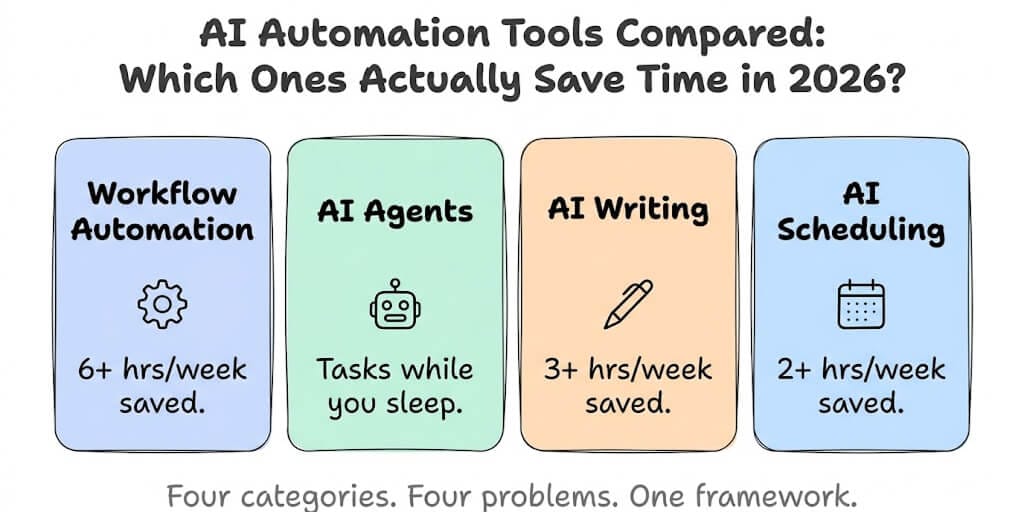
The AI automation tools market in 2026 is not one category. It's at least four, and most people buy from the wrong one because every vendor uses the same buzzwords.
Here's the framework that saved us from wasting another month of evaluation.
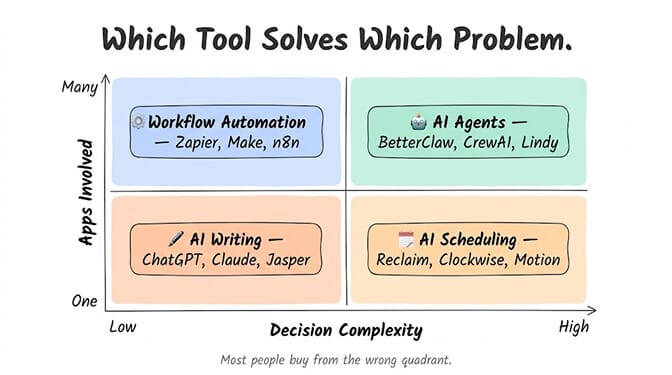
Category 1: Workflow automation (when you need apps talking to each other)
This is the category most people think of when they hear "AI automation." Zapier, Make, n8n, Power Automate. You define a trigger ("when a form is submitted"), connect it to an action ("create a row in Google Sheets and send a Slack message"), and the workflow runs automatically.
Zapier's own data shows teams using workflow automation save an average of 6.4 hours per week per person. For repetitive, predictable tasks that follow the same pattern every time, this is the right tool. Form comes in, data goes to CRM, notification goes to Slack, follow-up email goes out. Done.
Where it falls apart: anything that requires a judgment call. A workflow tool can't read a customer email and decide whether it's a billing question, a feature request, or a churn risk. It can't look at a support ticket and choose between three different response templates based on tone. It routes data. It doesn't think.
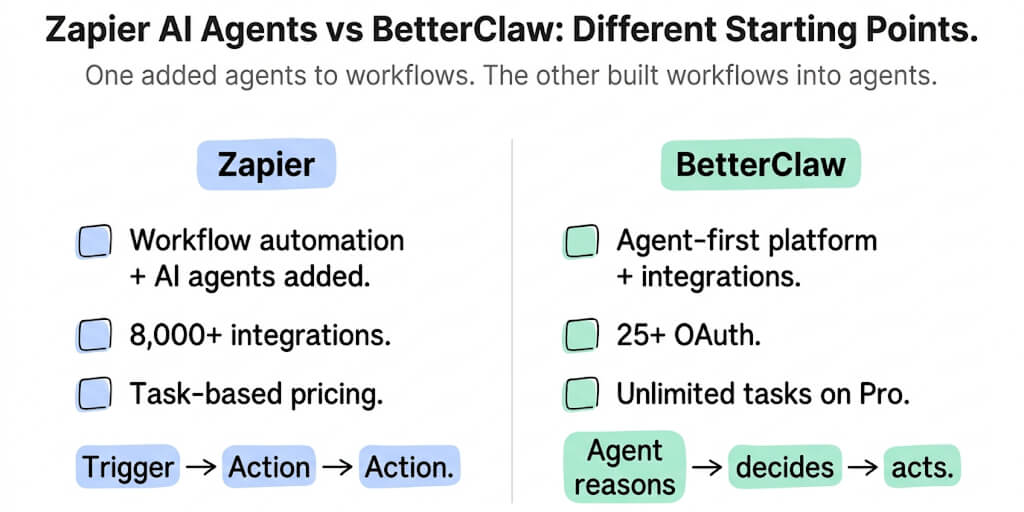
Zapier connects 6,000+ apps. Make offers more sophisticated logic (loops, filters, data transformations) at lower cost. n8n is open-source with 1,200+ connectors. For moving data between apps on a predictable path, all three work well.
Best for: repetitive, rule-based tasks across multiple apps. Invoice processing, lead routing, data sync, notification chains.
Won't help with: anything that requires reading comprehension, judgment, or adaptive responses.
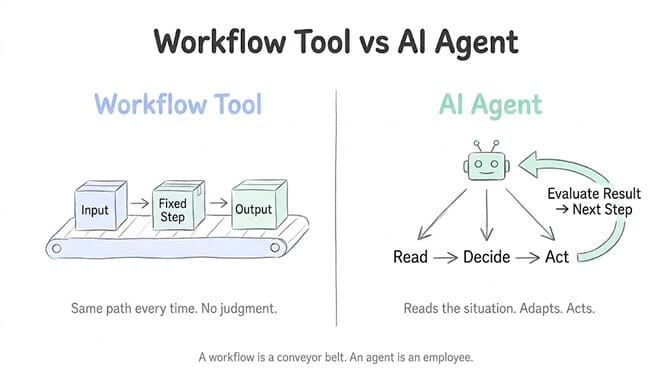
Category 2: AI agents (when you need something that thinks and acts)
Here's where it gets interesting. And where most people get confused.
An AI agent is not a workflow. A workflow follows a pre-built path: IF this, THEN that. An AI agent reads the input, decides what to do, takes action, evaluates the result, and decides the next step. It's the difference between a conveyor belt and an employee.
McKinsey identified $2.6-4.4 trillion in addressable value from AI agents across industries. Gartner predicts 40% of enterprise applications will embed AI agents by end of 2026. This isn't a niche category anymore.
Real example: you get a support email. A workflow tool can forward it to a folder. An AI agent reads the email, classifies it (billing vs. feature request vs. bug report), checks your CRM for the customer's history, drafts a contextual response, and sends it for approval or auto-sends based on its trust level. The agent handles the entire task, not just the routing.
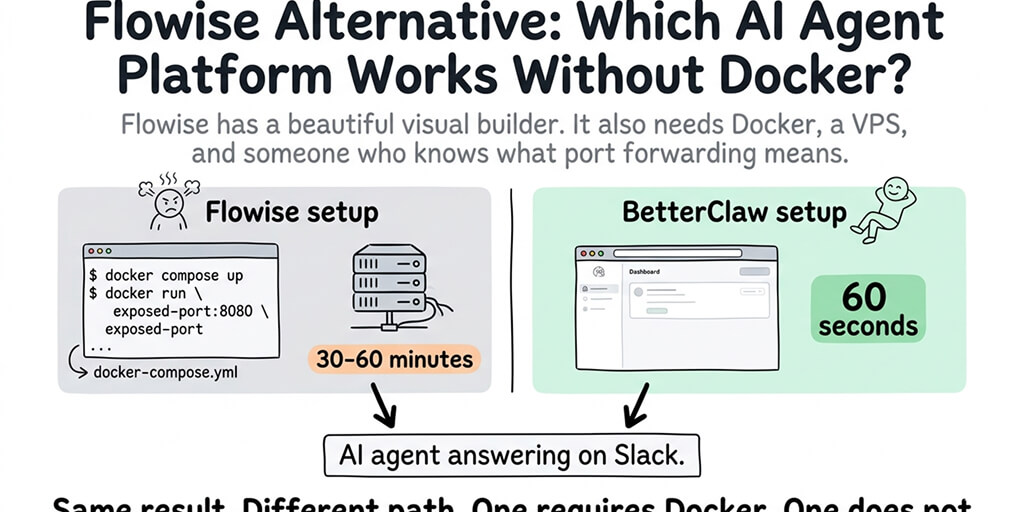
The catch: AI agents are newer, and the setup varies wildly. Code-first frameworks like CrewAI (47K+ GitHub stars) require Python. Enterprise platforms like Vertex AI Agent Builder require GCP expertise. No-code platforms like Lindy and BetterClaw let you build agents with a visual interface.
Best for: tasks that require reading, thinking, and acting across multiple steps. Customer support, email triage, lead qualification, data research, content summarization.
Won't help with: simple point-to-point data transfers (that's a workflow tool's job).
The biggest mistake in AI automation is using a workflow tool when you need an agent, or using an agent when you need a workflow. Workflows are cheaper and simpler for predictable tasks. Agents are the right choice when the task requires judgment.
Category 3: AI writing tools (when you need content faster)
ChatGPT, Claude, Jasper, Notion AI, Grammarly. These tools accelerate content creation: emails, blog posts, social media copy, meeting summaries, documentation.
They save time on a fundamentally different axis than workflow tools or agents. They don't connect to your other apps. They don't take action on your behalf. They make you faster at a specific creative task.
The time savings are real. Teams report 3-5 hours per week saved on content creation tasks. Meeting summarizers like Otter can transcribe and summarize a 60-minute meeting in seconds.
But calling these "automation" is a stretch. They're acceleration tools. You still initiate the task, review the output, and decide what to do with it. An AI writing tool doesn't check your calendar, read your emails, and draft responses while you sleep. It waits for you to give it a prompt.
Best for: content drafting, email writing, meeting notes, documentation, brainstorming.
Won't help with: connecting to your tools, taking action autonomously, or anything that requires accessing your business data.
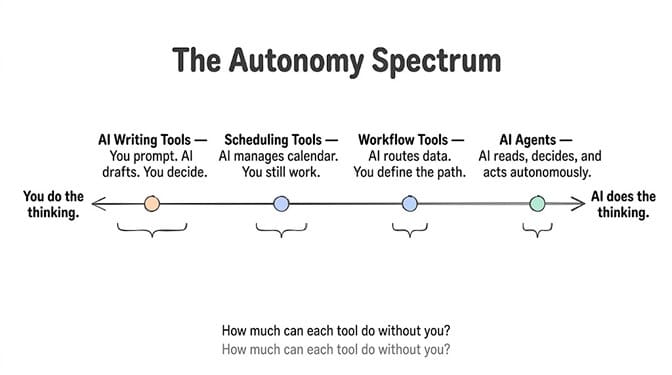
Category 4: AI scheduling tools (when your calendar is the bottleneck)
Reclaim, Clockwise, Motion. These are specialized AI tools that protect your time by intelligently managing your calendar: blocking focus time, auto-scheduling tasks, clustering meetings, and rescheduling when conflicts arise.
They solve a narrow but painful problem. Knowledge workers spend an estimated 2-3 hours per week on "calendar Tetris." A good scheduling tool eliminates most of that.
Motion goes furthest by predicting task duration and auto-rescheduling when deadlines shift. Reclaim focuses on defending your deep work blocks. Clockwise optimizes meeting clusters so your unscheduled hours stay contiguous.
These are useful if calendar management is genuinely your bottleneck. They're not useful if your bottleneck is repetitive data entry, customer communication, or multi-app workflows. Pick the right category first.
Best for: time-blocking, meeting optimization, automatic rescheduling, protecting focus time.
Won't help with: anything outside your calendar.
The decision that actually matters: workflow vs. agent
For most people reading this, the real question is: do I need a workflow tool or an AI agent?
Here's the filter:
Can you draw the exact path the automation should follow on a whiteboard? If yes, every step is predictable, and the same input always produces the same output, use a workflow tool. It's cheaper, simpler, and more reliable for that use case.
Does the task require reading something, understanding context, and making a judgment call? If the input varies, the right response depends on the situation, and a human would normally need to think about it before acting, use an AI agent.
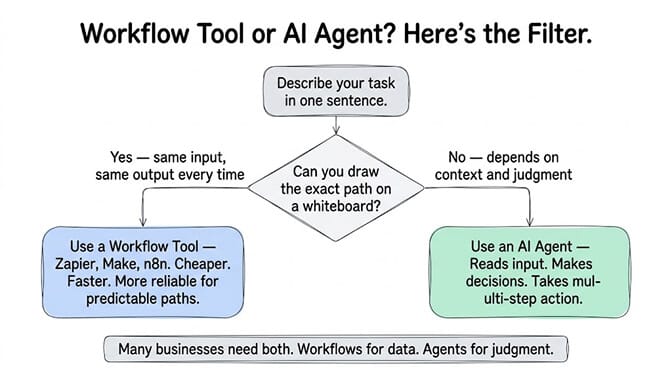
Many businesses need both. A workflow handles the predictable data routing (form submitted, add to CRM, send confirmation email). An AI agent handles the variable tasks (read support tickets, draft contextual responses, escalate complex ones). We unpacked exactly where each tool wins in BetterClaw vs n8n if you want the side-by-side.
We built BetterClaw specifically for that second category. The tasks where a workflow tool isn't enough because the work requires judgment. No-code visual builder, unlimited skills, 120+ connectors, deploy in 60 seconds. Free plan with 1 agent and 100 credits a month. $49/month on Pro. BYOK with zero inference markup. You bring your own LLM keys and pay your provider directly.
The tool-by-task cheat sheet
I'll save you the spreadsheet my co-founder built:
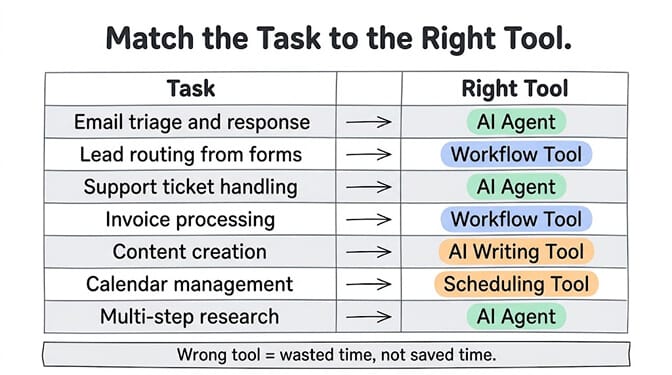
Email triage and response: AI agent. Reads, classifies, drafts contextual replies. Workflow tools can't do the reading/classification part.
Lead routing from forms: Workflow tool. Predictable path: form to CRM to notification. No judgment required.
Support ticket handling: AI agent. Each ticket is different. Response depends on customer history, issue type, urgency.
Invoice processing: Workflow tool. Invoice arrives, data extracted, entered into accounting system, notification sent. Same path every time.
Content creation: AI writing tool. Blog posts, social media, email copy. The AI accelerates your writing; it doesn't replace the thinking. When the work is recurring research and drafting (competitor tracking, content briefs, social drafts that wait for approval), an AI marketing agent fits better.
Calendar management: Scheduling tool. Protect focus time, cluster meetings, auto-reschedule conflicts.
Multi-step research: AI agent. Read data from multiple sources, synthesize findings, produce a summary. The breadth of agent use cases keeps expanding as models improve.
What to check before you buy anything
A Forrester study found companies automating repetitive tasks saved up to 80% on per-transaction costs. But that only happens when you automate the right task with the right tool.
Before signing up for anything, ask these three questions:
What's the actual task? Not "I want to automate my business." What specific task takes the most time? Describe it in one sentence. "I spend 2 hours a day responding to customer emails" is actionable. "I need AI automation" is not.
Does the task require judgment? If every input produces the same output, it's a workflow. If the output depends on context, it's an agent task.
How many apps are involved? If the task lives in one app (writing in Docs, scheduling in Calendar), a specialized tool wins. If it crosses three or more apps (reading email, checking CRM, updating tickets, sending Slack messages), you need something that connects them.
The no-code AI agent builder approach works well when the task crosses multiple apps AND requires judgment. That's the intersection where workflow tools fall short and writing assistants aren't designed to operate.
The honest truth about time savings
Every AI automation vendor claims to save you 10+ hours per week. Some of those claims are real. Some are marketing math.
Here's what we've seen in practice:
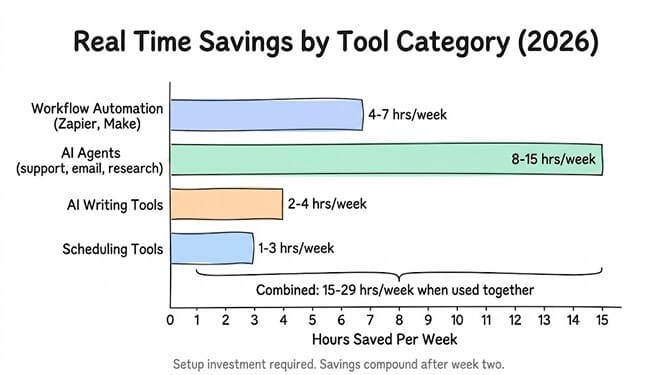
Workflow automation (Zapier, Make): 4-7 hours per week saved on data entry and routing tasks. The savings are immediate and compound as you add more automations. Zapier's reported 6.4 hours/week aligns with what we see.
AI agents (for support, email, research): 8-15 hours per week saved once the agent is trained and running. But there's a setup investment. First week is configuration. Real time savings kick in by week two.
AI writing tools: 2-4 hours per week saved on first drafts. You still edit. You still think. The AI handles the blank page problem.
Scheduling tools: 1-3 hours per week saved on calendar management. Immediate savings, minimal setup.
The compound effect happens when you combine categories. Workflows handle the data plumbing. Agents handle the judgment tasks. Writing tools handle the content. Scheduling tools handle the calendar. You handle the decisions that actually matter.
If this framework helped clarify what you need, give BetterClaw a look for the agent category specifically. Free plan with 1 agent and 100 credits a month. $49/month for Pro. Deploy in 60 seconds. We handle the infrastructure, the security, and the integrations. You handle building the workflow that actually solves your problem.
Frequently Asked Questions
What are AI automation tools and how do they work?
AI automation tools are software that uses artificial intelligence to perform tasks with less human involvement. They range from simple workflow connectors (Zapier, Make) that route data between apps, to AI agents (BetterClaw, CrewAI) that can read, think, and act autonomously, to writing assistants (ChatGPT, Claude) that accelerate content creation. The right tool depends on whether your task requires judgment or just data routing.
How do AI agents compare to workflow automation tools like Zapier?
Workflow tools like Zapier follow pre-built paths: trigger, action, done. AI agents read inputs, understand context, make decisions, and take multi-step action. Use workflow tools for predictable, rule-based tasks (form to CRM to email). Use AI agents for tasks requiring judgment (email triage, support responses, research). Many businesses use both for different task types.
How long does it take to set up AI automation for a small business?
It depends on the category. Workflow tools (Zapier, Make) can be configured in 10-30 minutes for simple automations. AI agents on no-code platforms like BetterClaw deploy in about 60 seconds with pre-built skill templates. Writing tools require no setup beyond creating an account. Scheduling tools typically need 15-30 minutes to sync your calendar and set preferences.
How much do AI automation tools cost in 2026?
Costs vary widely. Zapier starts free (limited) and scales to $29.99-$69.99/month for teams. Make offers more capacity at lower prices. AI agent platforms: BetterClaw is $0/month free plan, $49/month Pro. Writing tools: ChatGPT is $20/month (Plus), Claude Pro is $20/month. Scheduling tools: Reclaim is $8-12/month. Total AI tool spend for a typical small business: $50-150/month for meaningful time savings.
Are AI automation tools reliable enough for customer-facing tasks?
Yes, with guardrails. Modern AI agent platforms include trust levels (auto-approve low-risk actions, require human approval for high-risk ones), kill switches, and monitoring. BetterClaw uses three trust levels (Intern, Specialist, Lead) so you control how much autonomy the agent has. For workflow tools, reliability is very high since they follow deterministic paths. Start with internal tasks before deploying customer-facing automations.