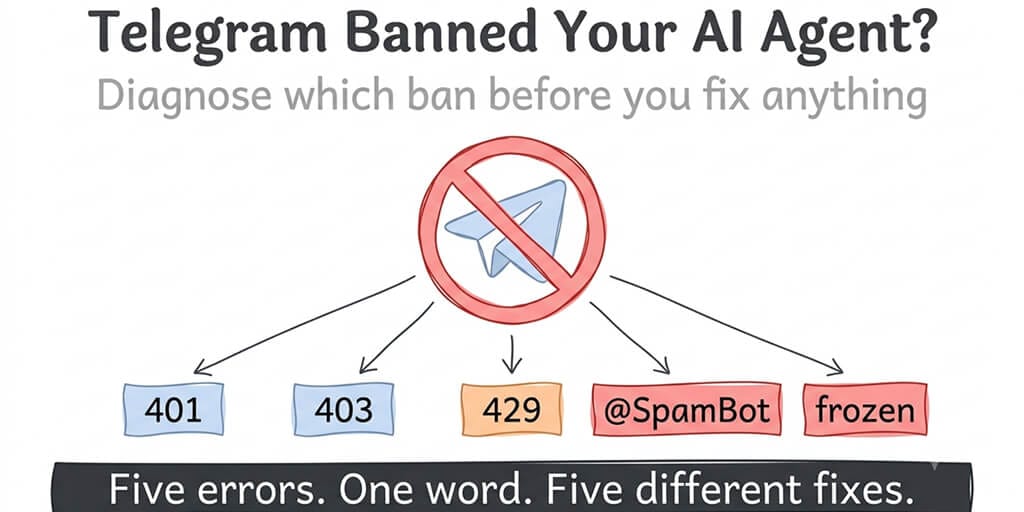
"Banned" covers five different things on Telegram, and only one of them is a real ban. The fix depends entirely on which one your agent tripped. Diagnose first, then act.
It's 7:40 in the morning. Your briefing agent didn't post. You open the Gateway logs and see a wall of 401 Unauthorized, or maybe 429 Too Many Requests: retry after 47, or maybe nothing at all because the messages are going out and nobody is receiving them.
Someone in the community Discord says "Telegram banned you." That word does a lot of work, and most of it is wrong. Telegram has at least five distinct ways to stop an agent from talking, they show up as different errors, and the fix for one makes another worse. So before you touch a config file, let's figure out which one you have.
Step one: read the error, not the forum
Here's what each signature means, in the order you'll most likely see them.
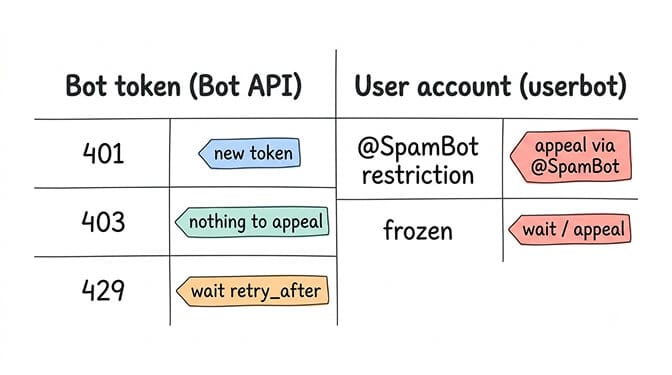
401 Unauthorized. Your bot token is invalid. Either it was revoked in BotFather, you pasted the token from a different bot, or the bot was deleted. This is not a ban on you. It's a dead key. Very occasionally it's Telegram having deleted the bot itself for a Terms of Service violation, and the difference matters, so check BotFather first: if /mybots still lists the bot, it's a token problem.
403 Forbidden. Read the description. bot was blocked by the user means one person blocked your bot and you can't message them; that's their choice, not a platform action. bot was kicked from the group chat or bot is not a member means a group admin removed it. Neither is a ban, and neither can be "appealed."
429 Too Many Requests. The flood limit. Telegram's own Bots FAQ gives the numbers: roughly one message per second to any single chat, at most 20 messages per minute in any one group, and about 30 messages per second across all chats for bulk sends. Go over and you get a retry_after value in seconds. This is the one most agents actually hit, and it is temporary, as long as you respect the wait.
@SpamBot restriction. This only applies if your agent runs on a user account (a userbot via MTProto) rather than a bot token. Telegram's privacy policy says that if recipients report your messages as spam and moderators confirm it, the account can be restricted from contacting non-contacts, temporarily or permanently. You check status and appeal by messaging @SpamBot.
Frozen account. Also user accounts only. Since mid-2025 Telegram places suspected violators in a read-only mode instead of deleting outright. You can read, you can't send, and the app tells you why.
Bot tokens get throttled or revoked. User accounts get restricted or frozen. If your agent talks through a bot token, you almost certainly don't have a ban. You have a 429 or a 401.
That distinction is the whole post. Everything below assumes you've matched your error to a row.
If it's a 401: replace the key, then find out why
Stop the Gateway. Open BotFather, run /mybots, pick the bot, hit API Token, and copy the fresh one. Don't retype it. Update the config and restart. The OpenClaw Telegram bot not working guide walks through the exact file paths, and if you've never generated a token there's a step-by-step for creating one.
Then ask why the old one died. If you revoked it yourself, fine. If you didn't, assume the token leaked (a pasted log, a committed config, a screenshot) and treat it as a credential incident. Rotate anything else that lived in the same file.
If it's a 429: your agent is the spammer, and that's fixable
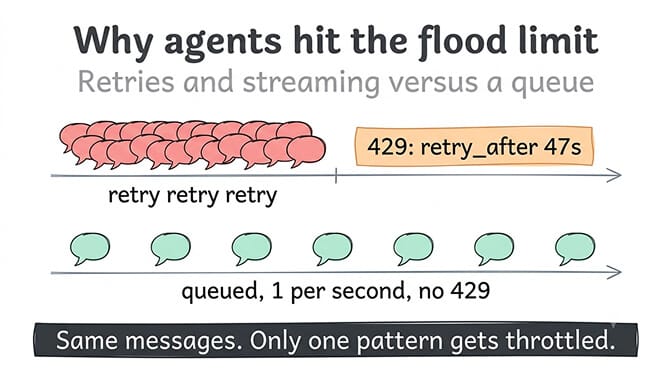
This is the case that gets called a ban most often, and it isn't one. Telegram is telling you, with a number, how long to wait. The only correct response is to wait exactly that long and retry. Not sooner. Hammering during the cooldown is what turns a 5-second wait into a 60-second one, and the retry_after values climb on repeat offenders.
Agents trip this in three predictable ways.
Retries without backoff. A tool call fails, the loop retries immediately, fails again, retries. Four retries in one second to the same chat and you've quadrupled your per-chat rate.
Heartbeats and streaming edits. Some setups edit the same message repeatedly to stream a reply token by token. Each edit is an API call. A 300-token answer streamed in 20-token chunks is 15 edits in a few seconds to one chat.
Fan-out. One event triggers messages to many chats at once. Twenty group chats notified simultaneously is fine once. Twenty group chats notified every time a cron job fires is a broadcast, and broadcasts are the 30-per-second ceiling.
The fixes are the mirror image: honour retry_after literally, send the reply once instead of streaming it, and spread fan-out over a queue. If your agent framework doesn't queue outbound Telegram messages, that's the feature to add before anything else.
If it's an @SpamBot restriction or a freeze: you're on a user account
Some people run agents on a personal Telegram account because it can message anyone, join any group, and read history a bot can't. That flexibility is exactly what Telegram's abuse systems watch for, and an AI agent that initiates conversations with strangers looks like every spam operation they've ever seen.
Message @SpamBot. It will tell you whether a restriction is active and, if so, offer an appeal. Keep the appeal short and human. Say what the account is for. Don't explain your architecture, and don't argue with an automated system, because the appeal path is largely automated and a wall of text doesn't help. Then wait. Restrictions are often lifted in a day or two; repeat offences become permanent restrictions on contacting non-contacts, which is not a full ban but is close enough for an agent.
And then move the agent to a bot token. A bot can only message people who have started it first, which sounds like a limitation and is actually the reason bots don't get spam-restricted. If the reason you chose a user account was "the bot can't see group history," there's a /setprivacy toggle in BotFather for that.
We built BetterClaw's Telegram integration on bot tokens, with outbound queuing and per-agent cost caps on by default, because "my agent got my personal Telegram frozen" is a message we see often. Connecting Telegram is three fields and a paste. Free plan, bring your own keys.
The ban that this post is not about
One more, because search engines will send people here for it. If your agent stopped working on April 4, 2026 and the error came from Anthropic rather than Telegram, that's the Anthropic subscription ban on third-party tools, which cut Claude Pro and Max subscriptions off from tools like OpenClaw. Anthropic reversed that on May 13 and paused its replacement credit plan on June 15, but an API key is still the most reliable fix. Different company, different fix. Telegram had nothing to do with it.
How to not be back here in a month
Five habits, none of them hard.
- Run on a bot token, never a personal account, unless you have a specific reason and accept the risk.
- Treat retry_after as law. If your framework doesn't, wrap the send.
- Send replies once. Streaming edits are nice in a demo and expensive in production.
- Queue proactive sends. One event should never fan out to more than a handful of chats per second.
- Alert on the 429 rate, not just on failures. A rising 429 count is the early warning; the long cooldowns come after.
If you want the full list of production controls, the production agent guardrails post covers rate limiting alongside cost caps and kill switches.
The honest takeaway
Telegram's limits are published, generous, and almost never the thing that actually stops a well-built agent. What stops agents is code that retries in a tight loop, streams edits it doesn't need, and runs on an account type built for humans. "Telegram banned me" is usually "I wrote a loop Telegram was designed to throttle." That's better news than a ban. It means you can fix it this afternoon.
If any of this resonated, give BetterClaw a try. The free plan gives you one agent and 100 credits a month, bring your own API keys, no inference markup, and it never asks for a card. Pro is $49 a month for five agents, or $39 a month billed annually. Telegram, Slack, Discord and Gmail, plus webhooks and 120+ connectors, with outbound queuing already wired in. Start free or see full pricing.
Frequently Asked Questions
What does it mean when Telegram bans an AI agent? Usually it means one of five things, and only two are real restrictions. A 401 is a dead bot token, a 403 is a user or admin blocking the bot, and a 429 is a temporary flood limit with a published wait time. Actual restrictions (via @SpamBot) and account freezes apply to agents running on personal user accounts, not bot tokens, and are triggered by spam reports or automated abuse detection.
How does a Telegram bot restriction compare to the Anthropic subscription ban? They're unrelated. Telegram restrictions come from Telegram's abuse systems and show up as Telegram API errors or @SpamBot notices. The Anthropic ban on April 4, 2026 blocked Claude Pro and Max subscriptions from third-party tools like OpenClaw and showed up as an Anthropic-side error. Anthropic reversed it on May 13, 2026; if you still see Anthropic auth errors, an API key is the most reliable fix.
How do I appeal a Telegram restriction on my agent's account? Message @SpamBot from the affected account. It confirms whether a restriction is active and offers an in-app appeal. Keep it to two or three plain sentences describing the account's legitimate use, then wait, typically a day or two. Bot tokens can't be appealed this way because they aren't restricted this way; for a 401 you generate a new token in BotFather.
How long does a Telegram 429 rate limit last for a bot? Exactly as long as the retry_after value in the error, typically a few seconds to under a minute. Telegram's Bots FAQ sets the limits at about one message per second per chat, 20 per minute per group, and about 30 per second across all chats for bulk sends. Cooldowns grow if you keep sending during the wait, so honour the number literally.
Is it safe to run an AI agent on a personal Telegram account instead of a bot? It's the riskiest option. User accounts can be restricted from contacting non-contacts or frozen into read-only mode after spam reports, and an agent that initiates conversations looks like spam to Telegram's systems. A bot token can only message people who have started it, which is precisely why bots rarely get restricted. Use a bot unless you have a specific, accepted reason not to.