Your agent just stopped responding mid-conversation. The logs say "rate limit reached" or you're seeing HTTP 429 errors. Don't retry. That makes it worse. There are three completely different rate limits that can trigger this error, each with a different cause and a different fix. Knowing which one you hit is the difference between waiting 60 seconds and spending an hour debugging.
What the error actually looks like
Provider rate-limit errors arrive over HTTP with status code 429 Too Many Requests and a JSON body that names the limit and (usually) when to retry. The exact wording varies by provider — these are the strings you'll see in OpenClaw's gateway logs or in the chat UI:
# Anthropic
Error 429: {"type": "error", "error": {"type": "rate_limit_error",
  "message": "Number of request tokens has exceeded your rate limit (https://...)."}}

# OpenAI
HTTP 429: {"error": {"code": "rate_limit_exceeded",
  "message": "Rate limit reached for gpt-... on requests per min (RPM)..."}}

# DeepSeek
HTTP 429: {"error": {"message": "rate_limit_exceeded", "type": "invalid_request_error"}}

# Google Gemini
{"error": {"code": 429, "status": "RESOURCE_EXHAUSTED",
  "message": "Quota exceeded for ... requests per minute."}}
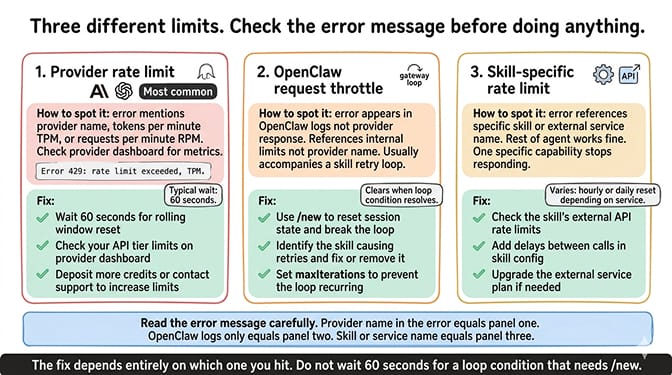
If the error string mentions a provider name or model ID, you're hitting a provider limit (next section). If it references a skill or external service (web_search, gmail, etc.), it's a skill-specific limit. If it's purely OpenClaw text with no provider name, it's OpenClaw's internal throttle protecting you from a runaway loop.
What "rate limit reached" actually means
Your AI model provider (Anthropic, OpenAI, Google, DeepSeek) limits how many requests you can make per minute. When you exceed that limit, they reject the request with a 429 status code and a message telling you to slow down.
OpenClaw agents are especially prone to hitting rate limits because a single user action can generate multiple API calls. You send one message. The agent reads it, thinks about which tools to use, calls a tool, reads the result, thinks again, and generates a response. That's 3-5 API calls from one message. During complex tasks with multiple tool calls, a single request can generate 10+ API calls in rapid succession.
Multiply that by heartbeats (48 per day), cron jobs, and any concurrent conversations, and you can hit your provider's rate limit faster than you'd expect.
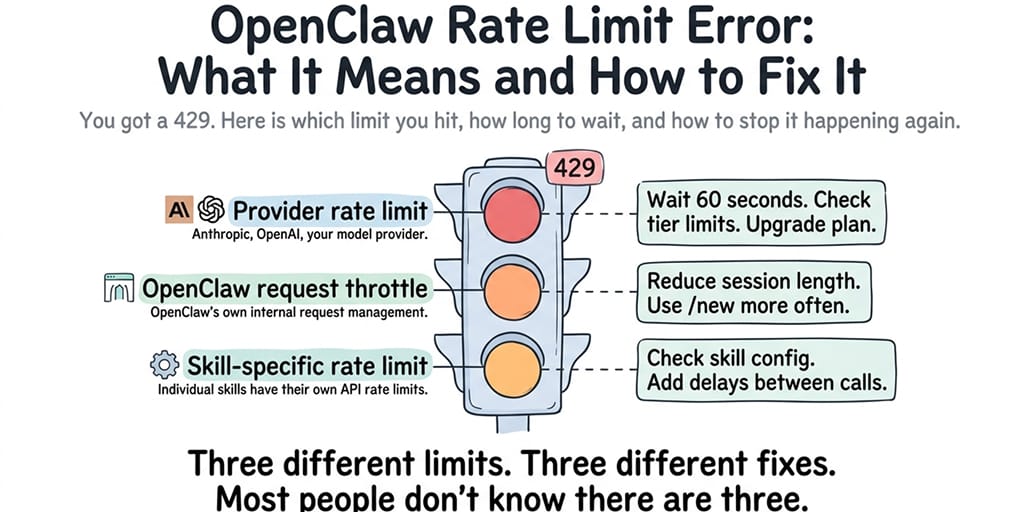
Which rate limit are you hitting? (there are three)
This is where most people get it wrong. They assume all rate limits are the same. They're not.
Provider rate limit (the most common)
This is the limit set by your AI model provider. Anthropic, OpenAI, Google, and DeepSeek each apply different RPM (requests per minute) and TPM (tokens per minute) limits based on your account tier. Free / trial tiers are tight; Tier 1 paid is dramatically wider but still finite.
How to identify it: The error message includes the provider name or mentions RPM/TPM (see the error-strings block above).
Typical wait time: 60 seconds for most providers, on a rolling window.
Current provider rate limits (May 2026)
| Provider | Free / trial tier | Tier 1 paid (typical) | Where to check |
|---|---|---|---|
| Anthropic Claude | $5 trial credits: 5 RPM, 25k ITPM, 5k OTPM | 50 RPM; Sonnet 4.6: 30k ITPM / 8-10k OTPM; Haiku 4.5: 50k ITPM / 10k OTPM | console.anthropic.com → Settings → Limits |
| OpenAI (GPT-5.5) | Discontinued mid-2025; reasoning trials: 3 RPM / 200 RPD | ~500k TPM (RPM not publicly tabulated) | platform.openai.com/settings/organization/limits |
| DeepSeek (V4-Flash) | 5M-token one-time credit; dynamic concurrency, no fixed RPM/TPM published | Dynamic — same model, returns 429 on overload | platform.deepseek.com → Usage |
| Google Gemini | 3 Flash: 15 RPM, 1M TPM, 1,500 RPD · 3.1 Flash-Lite: 30 RPM · 3.1 Pro: 50 RPD | Not publicly published — Google directs to per-project view | aistudio.google.com → API key → quota |
A few caveats: OpenAI no longer publishes a clean per-model RPM at Tier 1 for GPT-5.5 (only TPM tables are explicit). DeepSeek and Google's Tier 1 paid numbers are intentionally absent from public docs — check the linked console for live values. The Anthropic Opus 4.7 OTPM of 8k is the commonly cited Tier 1 ceiling but Anthropic's rate-limits page now uses dynamic per-account values; treat all figures as starting points and verify in your own console.
OpenClaw's own request throttle
OpenClaw has internal throttling to prevent runaway loops from burning through your API credits. If your agent enters a loop (a skill errors, the agent retries, the skill errors again), OpenClaw eventually throttles the requests to protect you.
How to identify it: The error appears in OpenClaw's logs rather than the provider's response. The message references OpenClaw's internal limits rather than the provider name.
Typical wait time: This usually clears once the loop condition is resolved. Use the /new command to reset the session state and break the loop.
Skill-specific rate limits
Some skills (especially those that call external APIs like web search, email, or calendar) have their own rate limits independent of your model provider. A web search skill that calls a search API might be limited to 100 queries per day regardless of how many model API calls you have available.
How to identify it: The error references the specific skill or external service, not your model provider. The rest of your agent works fine, but one specific capability stops working.
Typical wait time: Varies by service. Some reset hourly, some daily.
For the full model provider comparison including rate limit tiers, our guide covers what each provider offers at different pricing levels.
Rate limit errors have three possible sources: your model provider, OpenClaw's internal throttle, and individual skills. The fix depends on which one you hit. Check the error message carefully before doing anything.
How to fix it right now
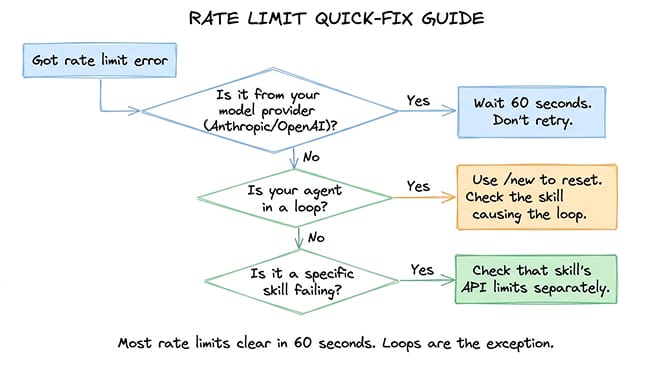
If you're staring at a rate limit error and need your agent working again, work through these in order:
- Wait 60 seconds. Most provider rate limits reset within a minute on a rolling window. Don't send repeated requests during the cooldown — each failed retry counts against the limit and extends it.
- Reset the session with
/new. Type/newdirectly in your agent chat. It clears the conversation buffer (so each new message sends fewer input tokens) without touching your persistent memory inMEMORY.mdor memory-wiki. Especially useful when the rate limit was caused by long-context token volume rather than raw request count. See our API cost guide for the token-accumulation math. - Switch to a fallback provider temporarily. Point your model config at DeepSeek V4-Flash or Gemini 3 Flash while the primary provider's limit resets. If you've already set up model routing, this happens automatically.
- Then run
openclaw doctor --deepto confirm the gateway is healthy and the new provider is responding before you reopen the chat.
What if it comes back after 60 seconds?
If you wait, retry, and the same 429 fires again immediately, you're not waiting it out — something is actively consuming the budget. Two common causes:
- A loop is still running in the background. Check the gateway logs for repeated tool-call errors with the same skill name. The agent is still retrying that skill on every heartbeat or scheduled cron. Kill the session entirely (
openclaw agent stop <name>) and start fresh, or cap retries (see Prevention below). - Heartbeats are still firing during the cooldown. Each heartbeat counts against the limit. If you're on a low-tier free key, even 48 heartbeats/day can keep tripping the limit. Pause the agent for 5 minutes (
openclaw agent pause <name>) so heartbeats don't fire, then resume.
How to prevent rate limits from happening again
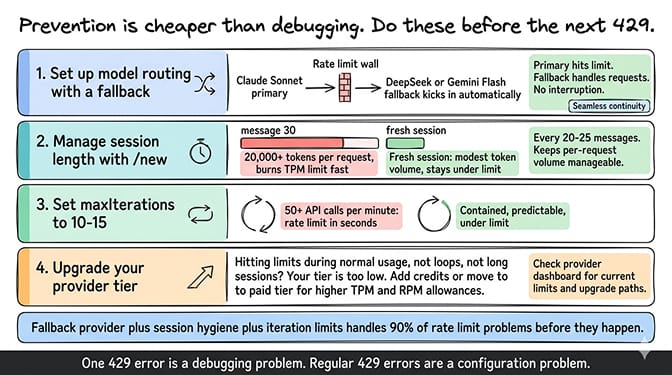
Prevention is cheaper than debugging. Apply these in order of impact:
- Set up model routing with a fallback so one provider's cap doesn't stop the agent. Primary on Claude Sonnet 4.6 (or your model of choice), fallback to DeepSeek V4-Flash or Gemini 3 Flash. The model routing configuration guide covers the YAML.
- Reset the session every 20-25 messages with
/newto keep per-request token volume bounded. By message 30, a default config is sending 20,000+ input tokens per request, which burns TPM (tokens per minute) much faster than RPM (requests per minute). - Cap retry loops with
maxIterationsin your agent config:agent: maxIterations: 12 # 10-15 is the sweet spot; below 10 hurts complex tasks
Without this cap, a single buggy skill can generate 50+ API calls in a minute and trigger even the most generous rate limits. - Route heartbeats to a cheap, generous-limit provider so your primary's budget stays available for real conversations. Pointing the heartbeat model at Haiku 4.5 or DeepSeek V4-Flash typically eliminates the heartbeat tax.
- Upgrade your provider tier if you're hitting limits during legitimate usage with no loops and no bloated sessions. Most providers raise limits dramatically at Tier 1 once you've added credits.
If configuring fallback providers, iteration limits, and rate limit monitoring isn't how you want to spend your time, BetterClaw includes model routing and health monitoring with auto-pause on anomalies. $49/month for Pro, BYOK. Rate-limit errors surface with clear explanations so you know which limit you hit and why.
When rate limits are actually a symptom of something bigger
Sometimes the rate limit isn't the problem — it's the symptom. If your agent is hitting rate limits during normal, light usage, something else is wrong.
Agent stuck in a loop
The most common hidden cause. A skill returns an error. The agent retries. The skill errors again. The agent retries harder. Each retry is an API call. A 10-iteration loop generates 10 API calls in 5 seconds; a loop without iteration limits generates 50+ calls in under a minute. That's enough to trigger rate limits on any provider tier. For the complete guide to diagnosing and fixing agent loops, the loop troubleshooting post covers the specific patterns and fixes.
Heartbeat frequency
OpenClaw sends heartbeat checks (roughly 48 per day by default). Each heartbeat is an API call. On the free tier of some providers, 48 heartbeats plus 20 conversations per day might exceed the daily or hourly limit. Route heartbeats to a cheap, generous-limit provider (Haiku 4.5 or DeepSeek V4-Flash) to keep your primary provider's rate-limit budget available for actual conversations.
The rate limit error is your provider protecting you from excessive usage. The question is whether the usage is legitimate (you're just using the agent a lot) or wasteful (loops, bloated sessions, unoptimized heartbeats). Fix the waste first. Upgrade the tier second.
If you want rate limit monitoring, model routing, and loop detection handled automatically, give Better Claw a try. $49/month for Pro, BYOK with 28+ providers. Health monitoring with auto-pause catches loops before they drain your rate limit budget. The infrastructure handles the edge cases so you don't debug them yourself.
Frequently Asked Questions
What does "rate limit reached" mean in OpenClaw?
It means you've sent more API requests to your model provider than they allow within a given time window. Most providers limit requests per minute (RPM) and tokens per minute (TPM). OpenClaw agents are especially prone to hitting these limits because a single user message can generate 3-10 API calls (reasoning, tool use, response generation). Wait 60 seconds for the limit to reset, then continue.
Which rate limit am I hitting in OpenClaw?
There are three possible sources: your model provider's rate limit (Anthropic, OpenAI, etc.), OpenClaw's internal request throttle (protects against runaway loops), and skill-specific rate limits (external APIs called by individual skills). Check the error message for the provider name or skill reference to identify which one. Provider limits reset in 60 seconds. OpenClaw throttle clears when the loop is resolved. Skill limits vary by service.
How do I fix an OpenClaw 429 error?
Immediate fix: wait 60 seconds and don't retry during the cooldown (retries extend the limit). If it keeps happening: use /new to reset your session (reduces token volume per request), configure a fallback model provider, and set maxIterations to 10-15 to prevent loops. If you're on a free API tier, upgrading to a paid tier significantly increases your rate limit allocation.
How do I prevent OpenClaw rate limits?
Four changes prevent most rate limit issues: configure model routing with a fallback provider so one provider's limit doesn't stop your agent, use /new every 20-25 messages to keep per-request token volume low, set maxIterations to 10-15 to prevent runaway loops, and route heartbeats to a cheap provider with generous rate limits. These changes reduce your API call volume by 40-60% without changing what your agent does.
Are rate limits different on free vs paid API tiers?
Significantly. Free or trial tiers run as low as 5 RPM (Anthropic trial) or 3 RPM (OpenAI reasoning trials). Tier 1 paid jumps to ~50 RPM on Anthropic with much higher TPM. See the provider table above for the current May 2026 numbers. If you're hitting rate limits during normal usage on a Tier 1 paid plan, the issue is usually a loop or bloated session, not the tier itself.
Why does my OpenClaw agent keep hitting rate limits even after waiting?
Three usual suspects: (1) a skill is stuck in a retry loop and is still firing API calls in the background — check the gateway logs for the same skill name repeating, and cap maxIterations to 10-15; (2) heartbeats are still firing during the cooldown — pause the agent (openclaw agent pause) for a few minutes; (3) you're being throttled at the TPM (token) level rather than the RPM (request) level — /new plus a maxContextTokens cap reduces token volume per request without changing how many requests you send.
Related Reading
- OpenClaw Agent Stuck in Loop: How to Fix It — The hidden cause behind most rate limit errors
- OpenClaw Session Length Is Costing You Money — How long sessions burn through your TPM limit
- OpenClaw Model Routing Guide — Set up fallback providers to survive rate limits
- Cheapest OpenClaw AI Providers — Provider comparison including rate limit tiers
- OpenClaw API Costs: What You'll Actually Pay — Full cost and usage breakdown by provider