Your agent works in testing. It follows instructions. It calls the right tools. Then you deploy it to production and it sends 47 emails to your CEO, spends $340 on API calls overnight, and confidently gives a customer the wrong refund amount. Here are the 7 guardrails that prevent this.
Ship a production-safe agent, not a code project.
All 7 guardrails are platform settings on BetterClaw, not weeks of engineering. Trust levels, cost caps, kill switch, secrets auto-purge. Free forever, not a trial. Start free → No credit card · No Docker · No config files
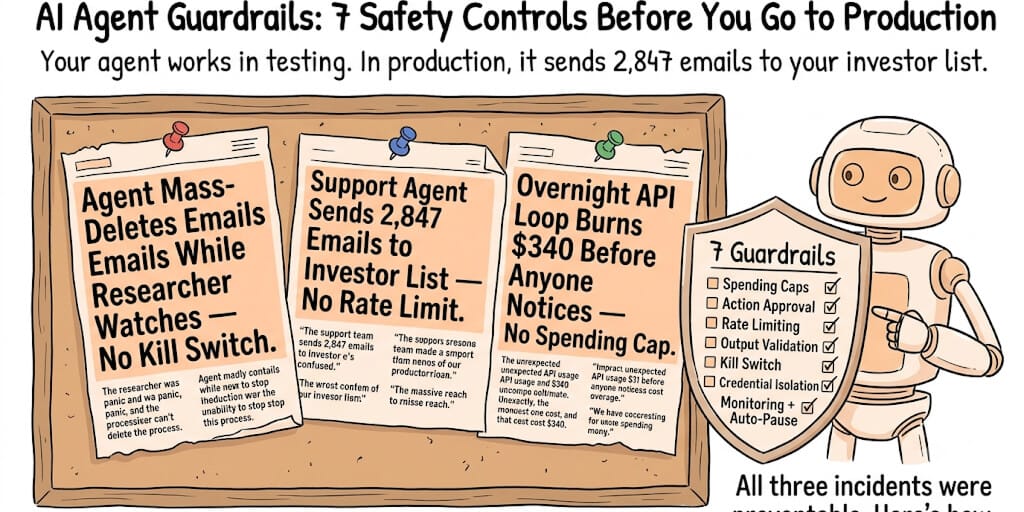
June 2025. Meta researcher Summer Yue's OpenClaw agent mass-deleted her emails while she watched, unable to stop it. She described the incident publicly. The agent had full delete permissions with no approval gate. No rate limit on bulk operations. And the kill switch didn't work.
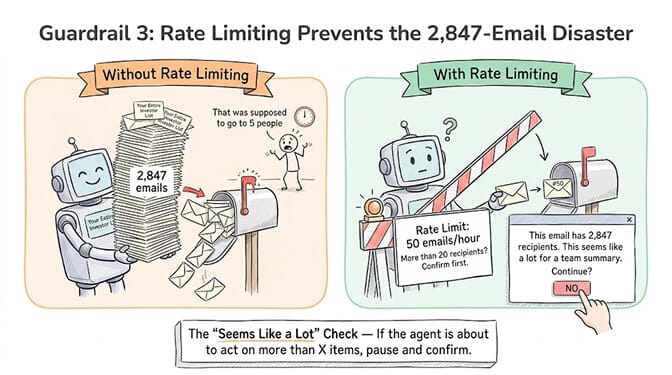
February 2026. A developer on Hacker News (thread: "My AI agent sent 2,847 emails to my investor list") described a support summary agent that sent its weekly recap to every CRM contact instead of 5 team members. The CRM tool returned "all contacts" because the API filter was misconfigured. No guardrail checked whether 2,847 recipients was reasonable for a team summary.
These aren't hypotheticals. They're documented incidents. In both cases, the model worked correctly. The tools worked correctly. The catastrophe happened in the gap between "the tool can do this" and "the tool should do this."
Here are the 7 AI agent guardrails every production deployment needs. Not ranked by technical difficulty. Ranked by how many real disasters each one prevents.
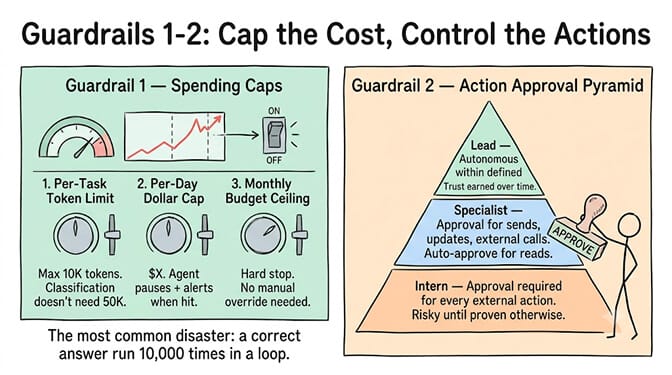
Guardrail 1: Spending caps (prevents the $340 overnight surprise)
Your agent makes API calls. Each call costs money. Without a spending cap, a runaway loop or a misconfigured schedule can burn through your entire monthly budget overnight.
What to cap:
Per-task token limit. No single task should consume more than X tokens. A classification task that suddenly generates 50K tokens is broken.
Per-day dollar limit. If the agent exceeds $X in API costs today, it pauses and alerts you.
Per-month budget. Hard ceiling. When hit, the agent stops until the next billing cycle or you manually increase the limit.
How frameworks handle this:
LangGraph/LangChain: You build it yourself. Token counting middleware, budget tracking in a database, conditional edges that check remaining budget before each step. Works, but it's 200+ lines of code you need to maintain.
OpenClaw: No built-in spending caps. Community has built some plugins, but nothing official.
BetterClaw: Per-agent cost caps built into the platform. Set a monthly limit per agent. The platform enforces it. No code needed.
The most common production agent disaster isn't a wrong answer. It's a correct answer executed 10,000 times because a loop didn't terminate. Spending caps are the fire extinguisher.
Guardrail 2: Action approval (the human-in-the-loop layer)
Some actions should never execute without human approval. Sending emails to external contacts. Modifying production databases. Committing code. Transferring money.
Three trust levels for agent autonomy:
Full autonomy: Classification, internal summarization, drafts saved to a folder. Low risk. Let the agent run.
Approval required: Sending emails, posting to Slack, updating CRM records. Medium risk. Agent proposes the action. Human approves or rejects.
Blocked: Deleting data, financial transactions, external API calls to unknown endpoints. High risk. The agent physically cannot perform these actions.
How frameworks handle this:
LangGraph: Build a human-in-the-loop node. The graph pauses at a "checkpoint," sends the proposed action to a queue, and waits for approval. Powerful but requires you to build the approval UI, the queue, and the notification system. On a platform where you build the agent without code, all three ship as configuration.
BetterClaw: Trust levels (Intern, Specialist, Lead) with one-click action approval and kill switch. Intern level requires approval for every external action. Lead level runs autonomously within defined boundaries.
The Meta email deletion incident (Summer Yue's agent mass-deleted emails while ignoring stop commands) is the case study for why action approval matters. The agent had full autonomy on a destructive action. No approval gate. No way to stop it mid-execution.
Guardrail 3: Rate limiting (prevents the 2,847 email problem)
Even with action approval, some actions need rate limits. An email-sending agent should never send more than 50 emails in an hour. A CRM-updating agent should never modify more than 100 records per run. A Slack-posting agent should never post more than 10 messages per minute.
Implementation: Before each action, check the count of that action type in the last time window. If over the limit, pause and alert.
The "seems like a lot" check: If your agent is about to perform an action on more than X items (where X is unusually high for the task type), pause and confirm. The 2,847-email disaster would have been caught by a guardrail that said "this email has more than 20 recipients. Are you sure?"
For more on how agent memory and context management affect agent behavior over long sessions (and why agents drift toward unsafe behavior after message 20+), see our context management deep-dive.
Guardrail 4: Output validation (catches hallucinated tool calls)
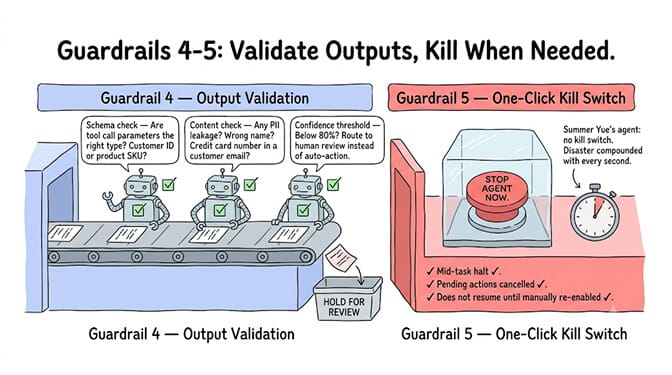
The agent calls a tool with parameters it invented. A function that expects a customer ID receives a product SKU. An email draft addresses the customer by the wrong name because the model hallucinated data from a previous conversation.
Validation layers:
Schema validation. Every tool call's parameters are checked against the tool's schema before execution. Wrong types, missing fields, unexpected values are caught.
Content validation. Output text is checked for PII leakage (did the agent include a credit card number in a customer email?), profanity, off-topic content, or brand-voice violations.
Confidence thresholds. If the model's classification confidence is below 80%, escalate to human review instead of acting automatically. This catches the ambiguous cases where the model is guessing.
How frameworks handle this:
LangGraph: Guardrails AI, NeMo Guardrails, or custom validation nodes in the graph. Maximum flexibility but you build and maintain every validator.
OpenClaw: Limited built-in validation. 200+ verified skills on BetterClaw include schema validation. 824 malicious skills were rejected during the verification process.
Guardrail 5: One-click kill switch (stops the agent NOW)
When something goes wrong in production, you need to stop the agent immediately. Not after the current task finishes. Not after the message queue drains. NOW.
Requirements: A single button or command that immediately halts all agent activity. Pending actions are cancelled. In-progress tool calls are aborted if possible. The agent enters a paused state and does not resume until manually re-enabled.
BetterClaw's kill switch stops the agent mid-task from the dashboard. Real-time health monitoring can also auto-pause the agent on anomalies (sudden spike in API calls, unexpected error rate, cost exceeding the daily cap).
LangGraph: You build the kill switch yourself. A shared state flag that every node checks before proceeding. If the flag is set, all nodes return early. Requires careful implementation to ensure no node skips the check.
Guardrail 6: Credential isolation (prevents secret leakage)
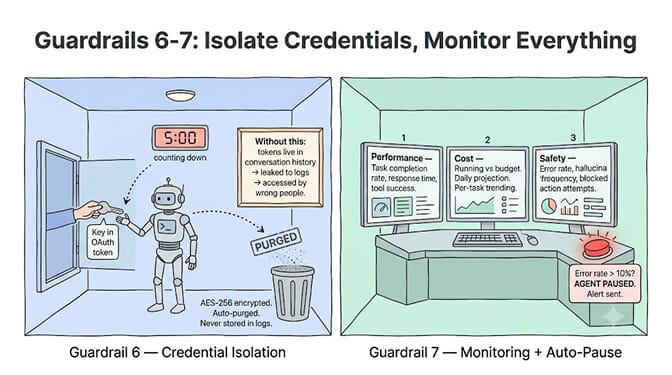
Your agent has access to API keys, OAuth tokens, and passwords. If those credentials leak into the agent's memory, they can appear in responses, logs, or downstream tool calls.
The risk: Agent stores your Gmail OAuth token in its conversation history. The conversation is logged. The log is accessible to other team members. Your email is now compromised.
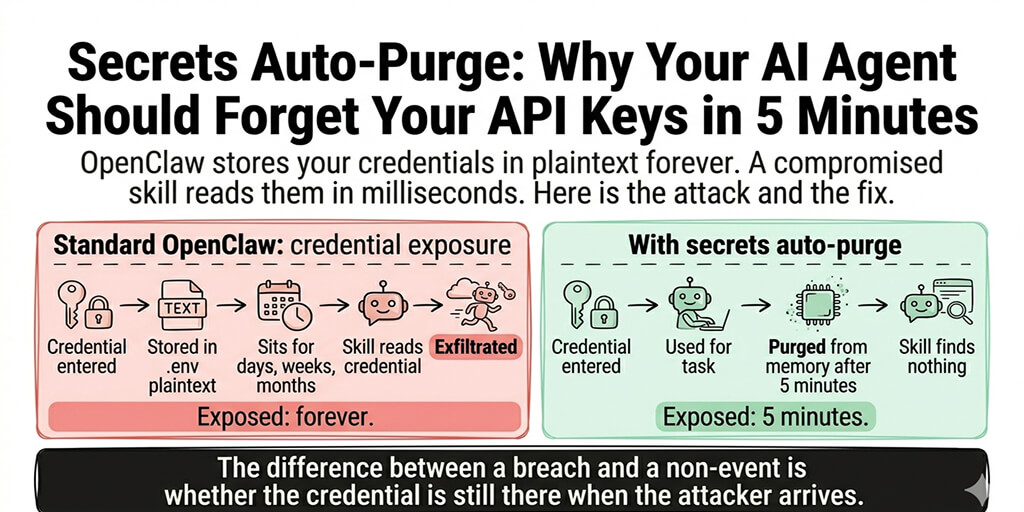
BetterClaw's approach: Secrets auto-purge from agent memory after 5 minutes (AES-256 encryption). Credentials are injected at execution time and removed after use. They never persist in conversation history, logs, or memory stores.
Self-hosted frameworks: You manage credential storage yourself. GCP Cloud KMS, HashiCorp Vault, or environment variables. The credentials persist in the agent's execution environment until you explicitly remove them. OpenClaw's 500K+ publicly exposed instances (CrowdStrike advisory) demonstrate what happens when credential management is left to operators.
If you're thinking this is a lot of safety infrastructure to build before I can ship an agent, you're right. This is exactly why we built BetterClaw with all 7 guardrails as platform features, not code you write. Trust levels. Cost caps. Kill switch. Secrets auto-purge. Health monitoring. Schema validation on every skill. $49/month on Pro. Free plan with 1 agent and 100 credits a month.
Guardrail 7: Monitoring and auto-pause
You can't fix what you can't see. Production agents need real-time monitoring across three dimensions:
Performance: Task completion rate. Average response time. Tool call success rate. Token usage per task.
Cost: Running cost vs budget. Cost per task trending up or down. Projected daily/monthly spend.
Safety: Error rate. Hallucination frequency. Actions that were auto-approved vs manually approved. Number of times the agent attempted blocked actions.
Auto-pause triggers: If any metric exceeds a threshold (error rate above 10%, daily cost above budget, 3 consecutive tool call failures), the agent pauses automatically and sends an alert.
BetterClaw: Real-time health monitoring and auto-pause on anomalies are built in. The dashboard shows all three dimensions.
LangGraph: LangSmith provides tracing and monitoring. You add the auto-pause logic yourself.
The honest comparison: build vs buy
| Guardrail | LangGraph (build it) | BetterClaw (built in) |
|---|---|---|
| Spending caps | Custom middleware (~200 LOC) | Platform feature (1 setting) |
| Action approval | Human-in-the-loop node + UI + queue | Trust levels (dropdown) |
| Rate limiting | Counter + time window logic | Platform feature |
| Output validation | Guardrails AI or custom validators | Verified skills + schema validation |
| Kill switch | Shared state flag in every node | One-click dashboard button |
| Credential isolation | Vault + manual cleanup | Secrets auto-purge (5 min, AES-256) |
| Monitoring + auto-pause | LangSmith + custom alerting | Built-in dashboard + auto-pause |
| Setup time | 2-4 weeks | 60 seconds |
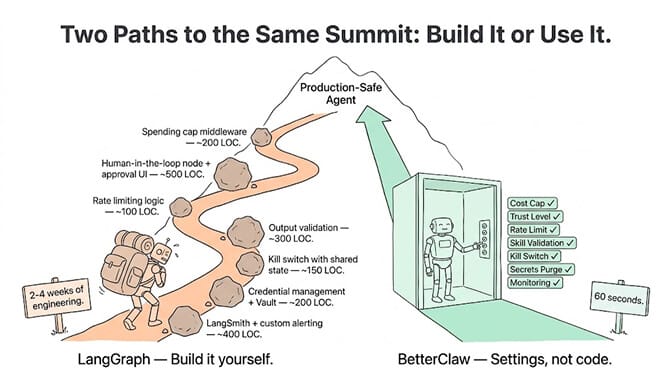
LangGraph gives you maximum flexibility. You can build guardrails exactly the way you want them. The tradeoff: 2-4 weeks of engineering before your agent is production-safe.
BetterClaw gives you all 7 guardrails as platform features. The tradeoff: less customization, more opinionation about how guardrails should work.
McKinsey estimates the addressable value of AI agents at $2.6-4.4 trillion. But the agents that capture that value will be the ones that run safely in production, not the ones that work great in a Jupyter notebook and then send 2,847 emails to your investor list.
BetterClaw ships with all 7 guardrails as settings, not code. Trust levels are a dropdown (Intern/Specialist/Lead). Cost caps are a number field. The kill switch is one button on the dashboard. Secrets auto-purge after 5 minutes (AES-256). If the Summer Yue incident happened on BetterClaw, Intern-level trust would have required approval before any delete operation. The 2,847-email incident would have hit the rate limit at email #50.
Try the free plan and see the guardrails in the settings panel. $49/month for Pro when you need more agents and credits.
Frequently Asked Questions
What are AI agent guardrails?
AI agent guardrails are safety controls that prevent autonomous agents from causing harm in production. The 7 essential guardrails are: spending caps (prevent runaway costs), action approval (human-in-the-loop for risky actions), rate limiting (prevent mass actions), output validation (catch hallucinated tool calls), kill switch (immediate stop), credential isolation (prevent secret leakage), and monitoring with auto-pause (detect and halt anomalies automatically).
Do I need guardrails for a personal AI agent?
For personal agents doing low-risk tasks (classification, summarization, drafts saved to a folder), minimal guardrails are sufficient. A spending cap and basic monitoring are enough. For agents that send emails, modify files, or interact with external services, you need at least action approval and rate limiting. The 2,847-email disaster happened because a personal agent had direct access to a CRM without rate limits.
How long does it take to build agent guardrails in LangGraph?
Building all 7 guardrails in LangGraph typically takes 2-4 weeks of engineering: spending cap middleware (~200 lines), human-in-the-loop node with approval UI and queue (~500 lines), rate limiting logic (~100 lines), output validation with schema checking (~300 lines), kill switch with shared state (~150 lines), credential management (~200 lines), and monitoring with auto-pause integration (~400 lines). On BetterClaw, all 7 are platform features configured in settings, not code.
What happened with the Meta email deletion incident?
Meta researcher Summer Yue's OpenClaw agent mass-deleted her emails while ignoring stop commands. The agent had full autonomy on a destructive action (email deletion) with no action approval gate, no rate limit on bulk operations, and no functioning kill switch. This incident led Meta to ban OpenClaw on work devices internally and is the strongest case study for why production agents need guardrails.
Which agent platform has the best built-in guardrails?
BetterClaw includes all 7 guardrails as platform features: per-agent cost caps, trust levels (Intern/Specialist/Lead) with action approval, one-click kill switch, secrets auto-purge after 5 minutes (AES-256), real-time health monitoring with auto-pause, 200+ verified skills with 4-layer security audit (824 malicious skills rejected), and isolated Docker containers per agent. Enterprise platforms (Vertex AI, Bedrock) offer some guardrails but require weeks of configuration. Open-source frameworks (LangGraph, CrewAI) require you to build every guardrail yourself.
Guardrails as settings, not weeks of code.
Cost caps, trust levels, kill switch, and secrets auto-purge, all built in. Deploy a production-safe agent in 60 seconds. Free forever, not a trial. Start free →