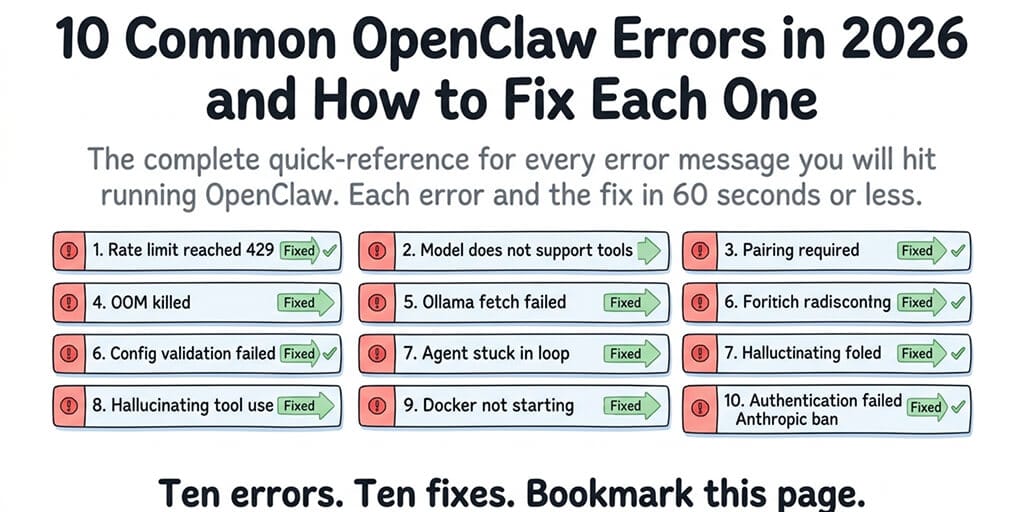
The complete quick-reference for every error message you'll hit running OpenClaw. Each error, what causes it, and the fix in 60 seconds or less.
I keep a text file on my desktop called "openclaw errors I've already fixed." It has 23 entries. Every time I hit an error, spend 30 minutes debugging it, and find the fix, I add it to the file. Because I know I'll hit the same error again in three months and won't remember the solution.
This post is that file, cleaned up, expanded, and published. Ten OpenClaw errors ranked by how often they appear in the community. Each one: what the error message says, what actually causes it, and the fastest fix.
Bookmark this. You'll need it.
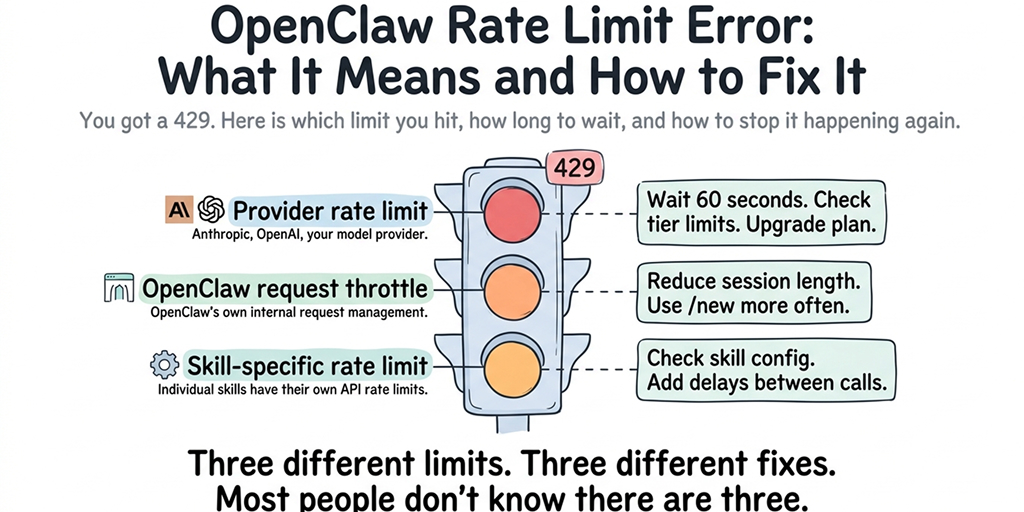
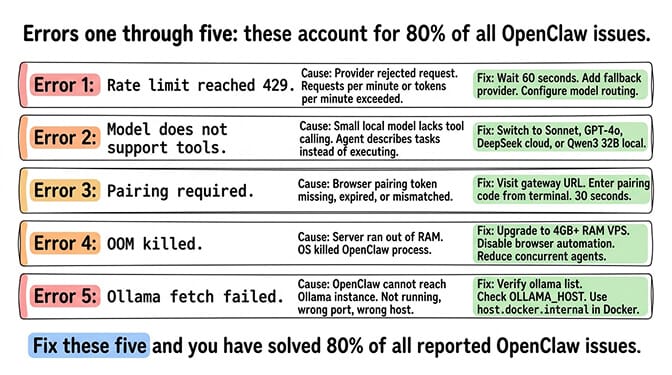
1. "Rate limit reached" / HTTP 429
What it means: Your model provider rejected the request because you've exceeded their requests-per-minute or tokens-per-minute limit.
The fast fix: Wait 60 seconds. Don't retry during cooldown (retries extend the limit). If it keeps happening, configure a fallback provider (DeepSeek or Gemini Flash) so one provider's limit doesn't stop your agent.
The deeper issue: A single OpenClaw message generates 3-10 API calls. 48 daily heartbeats add more. Without model routing, you hit limits faster than expected. For the complete rate limit troubleshooting guide, our deep-dive covers all three types of rate limits.
2. "Model does not support tools"
What it means: Your model can't call tools. The agent describes tasks instead of executing them. This especially affects Ollama users running small local models (phi3:mini, qwen2.5:3b).
The fast fix: Switch to a model with tool calling support. Cloud: Claude Sonnet, GPT-4o, DeepSeek. Local via Ollama: Qwen3 32B+, hermes-2-pro, mistral:7b+.
For the model tool calling compatibility guide, our post covers which models work and which don't.
3. "Pairing required"
What it means: Your browser or client hasn't completed the security handshake with the gateway. The pairing token is missing, expired, or mismatched.
The fast fix: Visit your gateway URL. Enter the pairing code from your terminal output. Takes 30 seconds. Most common cause: you cleared your browser data or are connecting from a new device. See the full pairing required walkthrough for edge cases.
4. OOM (Out of Memory) killed
What it means: Your server ran out of RAM and the operating system killed the OpenClaw process. Common on 1-2GB VPS instances running Docker alongside OpenClaw.
The fast fix: Upgrade to a VPS with 4GB+ RAM. Or reduce memory usage: disable sandboxed execution for trusted skills, reduce the number of concurrent agents, limit browser automation (Chromium alone uses 300-500MB). For the OOM error troubleshooting guide, our post covers the specific memory thresholds.
5. "Ollama fetch failed" / connection refused
What it means: OpenClaw can't connect to your Ollama instance. Either Ollama isn't running, the port is wrong, or the host address is misconfigured.
The fast fix: Verify Ollama is running, then check that OLLAMA_HOST points to the correct address. On Docker setups, use host.docker.internal instead of localhost.
# Verify Ollama is running
ollama list
# Point OpenClaw at the right address (use host.docker.internal on Docker setups, not localhost)
export OLLAMA_HOST=host.docker.internal
For the Ollama connection troubleshooting guide, our post covers the six most common Ollama connection failures.
Errors 1-5 account for roughly 80% of OpenClaw issues reported in the community. If your error isn't in this list, check the gateway logs for the specific error message.
6. "Config validation failed"
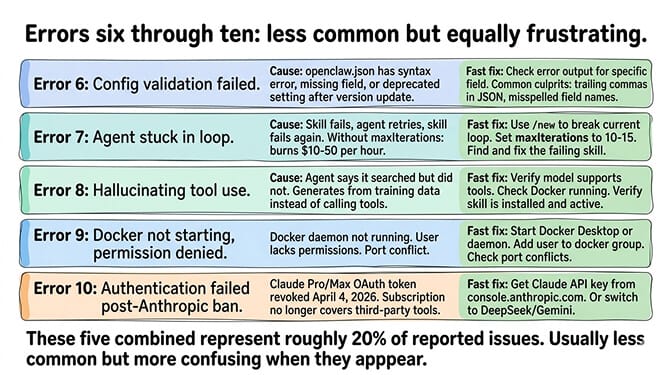
What it means: Your openclaw.json has a syntax error, a missing required field, or a value that doesn't match the expected format. Common after manual config edits or version updates that change config schemas.
The fast fix: Check the error output for the specific field that failed validation. Compare your config against the current schema documentation. Common culprits: trailing commas in JSON, misspelled field names, deprecated settings from older versions. For the config validation troubleshooting guide, our post covers the specific validation errors.
7. Agent stuck in a loop
What it means: The agent calls a tool, the tool fails, the agent retries, the tool fails again, indefinitely. Each retry burns API tokens. OpenClaw's loop detection is off by default, so unless you turn it on, this can cost $10-50 in an hour.
The fast fix: Use /new to break the current loop. Then set tools.loopDetection.enabled: true in your config (it catches repeated no-progress tool calls) and cap each run with agents.defaults.timeoutSeconds to prevent future loops. Identify the failing skill and fix or remove it. For the agent loop diagnostic guide, our post covers the specific loop patterns.
8. Agent hallucinating tool use
What it means: The agent says "I've searched the web" but didn't actually search. It generates plausible responses from training data instead of calling tools. Looks like a normal response but the information is fabricated.
The fast fix: Verify your model supports tool calling (error 2). Check that Docker is running (sandboxed execution fails silently without it). Verify the required skill is installed and active. For the hallucination diagnostic guide, our post covers five specific causes.
If debugging these errors across config files, Docker containers, and gateway logs sounds like more troubleshooting than you signed up for, BetterClaw eliminates most of these errors by design. No gateway pairing (platform login instead). No OOM on your hardware (managed infrastructure). No config validation (no config files). No Docker dependency (sandboxed execution built in). Free tier with 1 agent and BYOK. $49/month for Pro. The errors don't happen because the conditions that cause them don't exist.
9. Docker container not starting / permission denied
What it means: The Docker daemon isn't running, your user doesn't have Docker permissions, or a port conflict is preventing the container from starting.
The fast fix: Start Docker Desktop (Mac/Windows) or the Docker daemon (Linux). Add your user to the docker group if you're getting permission errors. Check for port conflicts with other services. For the Docker troubleshooting guide, our post covers eight Docker-specific errors.
10. Authentication failed (post-Anthropic ban)
What it means: Anthropic rejected your credential. The classic cause: on April 4, 2026, Anthropic revoked Claude Pro/Max subscription OAuth for all third-party tools. It reversed that on May 13 and paused its replacement credit plan on June 15, but subscription access for third-party tools is still in flux, and an OAuth token is not an API key.
The fast fix: Get a Claude API key from console.anthropic.com, the most reliable option. Add it to your config. Or switch to DeepSeek/Gemini (cheaper alternatives). Anthropic offered a $200 credit to affected users at the time. For the complete post-ban migration guide, our migration post covers all four options.
The pattern behind most OpenClaw errors
Here's what nobody tells you about OpenClaw troubleshooting.
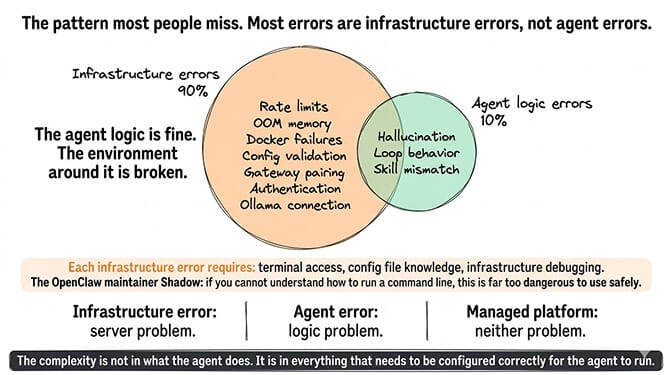
Most errors are infrastructure errors, not agent errors. Rate limits, OOM, Docker permissions, config validation, gateway pairing, authentication failures. These are all infrastructure problems. The agent logic is fine. The environment around it is broken. Even a cryptic-looking crash like the Cannot read properties of undefined (reading 'trim') TypeError is usually a stale sessions.json, not a bug in your agent.
If your errors started immediately after running openclaw update, the cause is usually one of ten post-update failures rather than anything on this list: OpenClaw gateway won't start after updating matches each one to its log line.
OpenClaw has 230,000+ GitHub stars and 7,900+ open issues. The framework is powerful but complex. The complexity isn't in what the agent does. It's in everything that needs to be configured correctly for the agent to run.
The OpenClaw maintainer Shadow put it directly: "if you can't understand how to run a command line, this is far too dangerous of a project for you to use safely." He wasn't exaggerating. Each error on this list requires terminal access, config file knowledge, and infrastructure debugging to fix.
If you want the agent without the infrastructure errors, give BetterClaw a try. Free tier with 1 agent and BYOK. $49/month for Pro. 60-second deploy. Most of the errors on this page don't exist on the platform because the infrastructure that causes them is managed for you. Smart context management, verified skills, secrets auto-purge. You handle the SOUL.md. We handle the error logs.
Frequently Asked Questions
What are the most common OpenClaw errors?
The ten most common in 2026: rate limit reached (429), model does not support tools, pairing required, OOM killed, Ollama fetch failed, config validation failed, agent stuck in loop, hallucinating tool use, Docker not starting, and authentication failed (subscription token instead of API key). The first five account for roughly 80% of reported issues. Most are infrastructure errors, not agent logic errors.
Why does my OpenClaw agent keep crashing?
The most common crash causes are: OOM (out of memory, upgrade to 4GB+ RAM), Docker container failing (restart Docker daemon, check permissions), and agent loops burning through resources (set tools.loopDetection.enabled: true and an agents.defaults.timeoutSeconds run cap). Check your gateway logs for the specific error message. If the agent was working and stopped, look for infrastructure changes (server restart, Docker update, config edit).
How do I fix OpenClaw not connecting?
Three common connection issues: "pairing required" (re-pair by entering the terminal pairing code in your browser), Ollama fetch failed (verify Ollama is running and OLLAMA_HOST is correct), and authentication failed (switch from a subscription OAuth token to an API key). Check gateway logs for the specific connection error to identify which one you're hitting.
Does BetterClaw have fewer errors than self-hosted OpenClaw?
Most OpenClaw errors are infrastructure-related (Docker, gateway, config, OOM, pairing). BetterClaw eliminates these because the infrastructure is managed. No Docker to crash. No gateway to pair. No config to validate. No server to run out of memory. Agent-level issues (hallucination, skill errors) can still occur, but they're caught by health monitoring with auto-pause. Free plan available. $49/month for Pro.
Where do I find OpenClaw error logs?
Gateway logs are displayed in the terminal where your gateway is running. For background/daemon mode, check the log file at ~/.openclaw/logs/ or use the Control UI's log viewer. Docker container logs are accessible through standard Docker logging. For specific error patterns, search the OpenClaw GitHub issues (7,900+ open) or the r/openclaw community (103K+ members).