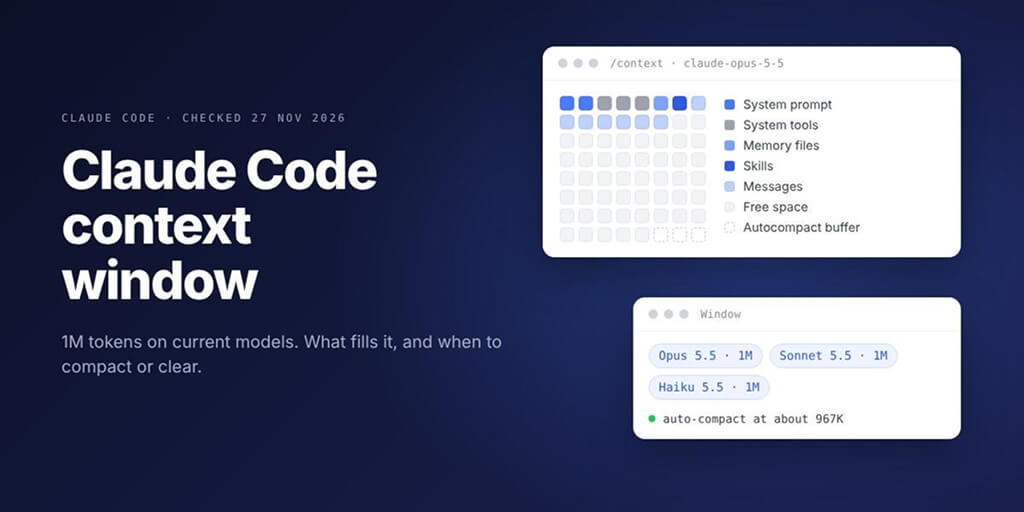
Claude Code's context window is everything the model sees in a session: system prompt, tool definitions, CLAUDE.md and memory, files it reads, tool output, its replies and thinking. On Anthropic's current models it holds 1M tokens; Haiku 4.5 and Sonnet 4.5 have 200K. Run /context to see what fills it. When it fills, Claude Code compacts automatically; /compact earlier with instructions, or /clear when you change task.
| You want to | Do this |
|---|---|
| Know your window | 1M tokens on Opus 5.5, Sonnet 5.5, Haiku 5.5 and Fable 5.2; 200K on Haiku 4.5 and Sonnet 4.5 |
| See what fills it | /context (/context all in fullscreen mode) |
| Change to an unrelated task | /clear: empty context, old chat kept in /resume |
| Keep going on the same task | /compact focus on <what to keep> |
| Undo a wrong turn | /rewind, or press Esc twice |
| Know when it compacts by itself | About 967K tokens on 1M models; before 200,000 on 200K models |
Checked on 27 November 2026 against Claude Code 2.1.332 (released 25 November; the stable channel is on 2.1.326) and Anthropic's docs.
Picture this: you've been in the same session since lunch. /context says 410K of 1M. Plenty of room.
Then Claude puts back the retry wrapper you told it to delete two hours ago.
It's not even half full. What happened?
Room isn't the problem anymore. Claude Code's best-practices page now files "The context window is your main constraint" under advice you can stop following, because "running out is rare." It still says to /clear between tasks, "because a focused context gets you better answers and costs less."
If you came to cut your bill with add-ons, our comparison of skills and plugins that reduce token usage covers them. This guide is about the window itself.
How big is the Claude Code context window?
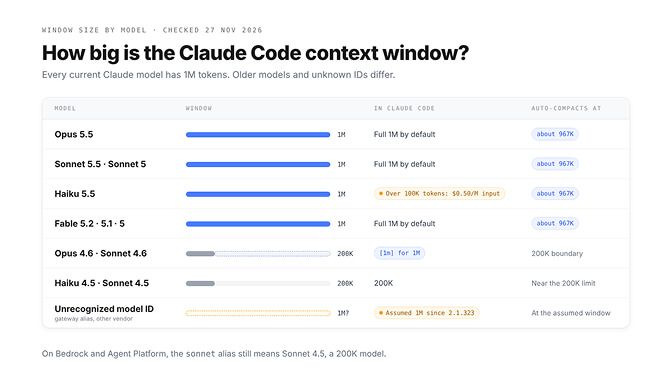
Anthropic's context window docs list the 1M-token models: Fable 5.2, 5.1 and 5, Mythos 5.2, 5.1, 5 and Preview, Opus 5.5, 5, 4.8, 4.7 and 4.6, Sonnet 5.5, 5 and 4.6, and Haiku 5.5. "Other Claude models have a 200k-token context window." Every model in today's lineup is on the 1M list.
Claude Code doesn't use them all alike. Fable, Sonnet 5 and later, Haiku 5.5 and Opus 4.7 and later run at the full 1M, while Opus 4.6 and Sonnet 4.6 stay at 200K unless you pick their [1m] variant:
| Model | Context window | Max output | In Claude Code |
|---|---|---|---|
| Opus 5.5 | 1M | 128K | Full 1M by default |
| Sonnet 5.5, Sonnet 5 | 1M | 128K | Full 1M by default |
| Haiku 5.5 | 1M | 128K | Full 1M on every plan; prompts over 100K cost more |
| Fable 5.2, 5.1, 5 | 1M | 128K | Full 1M by default |
| Opus 5, 4.8, 4.7 | 1M | 128K | Full 1M by default |
| Opus 4.6, Sonnet 4.6 | 1M | 128K | 200K unless you pick [1m] |
| Mythos 5.2, 5.1, 5 (limited availability) | 1M | 128K | Not covered in Claude Code's model docs |
| Opus 4.5, Sonnet 4.5, Haiku 4.5 | 200K | 64K | 200K |
| A model ID Claude Code doesn't recognize | Unknown | Unknown | Assumed 1M since 2.1.323 |
Checked: 27 November 2026. Windows and output limits from Anthropic's context window docs and models overview; Claude Code behaviour from its model configuration docs.
For scale, Anthropic puts 1M tokens at roughly 555,000 words on the current tokenizer.
Your provider's aliases. On the Anthropic API, sonnet and haiku mean Sonnet 5.5 and Haiku 5.5. On Amazon Bedrock and Google Cloud's Agent Platform they still resolve to Sonnet 4.5 and Haiku 4.5, both 200K models, and on Microsoft Foundry opus means Opus 4.6. /status shows which model you're on.
The [1m] variants. Pick one with /model claude-opus-4-6[1m] or its Sonnet 4.6 equivalent. Opus 4.6 at 1M is included on Max, Ultra, Team and Enterprise; Sonnet 4.6 at 1M needs usage credits on every subscription plan.
On the Anthropic API the full 1M window bills at standard rates, except on Haiku 5.5: a prompt over 100,000 tokens pays $0.50 instead of $0.10 per million input tokens, and $2.50 instead of $0.50 for output.
Should you use the 1M window?
Use it as headroom, not as a target. Anthropic's docs: "more context isn't automatically better. As token count grows, accuracy and recall degrade, a phenomenon known as context rot." The Claude Code team's rule of thumb, from Anthropic's "Using Claude Code: session management and 1M context" (15 April 2026): "when you start a new task, you should also start a new session."
You'll also see a "smart zone" given as a number, such as staying under 200K or compacting at 60 to 85%. No Anthropic doc and no named test we found gives either figure; Chroma's Context Rot report (14 July 2025) found performance "grows increasingly unreliable as input length grows" across 18 models, Claude 4 among them, with no cut-off.
A 1M window is room, not attention.
To work inside 200K anyway, set CLAUDE_CODE_DISABLE_1M_CONTEXT=1: native 1M models then compact at the 200K boundary, or stop there with the context-limit error if auto-compaction is off. Our AI agent context window explainer covers the same trade-off for any agent.
What fills the Claude Code context window: before you type and as you work
Everything in a request counts: "all input and output tokens, including thinking tokens, count toward the context window limit," per Anthropic's docs. Before you type, Claude Code loads its system prompt, auto memory, environment info, MCP tool names, skill descriptions and your CLAUDE.md files (an AGENTS.md can load instead). How much that adds up to depends on whose numbers you read:
| Source | What it counted | Tokens before the first prompt |
|---|---|---|
| Anthropic's example session (illustrative) | System prompt, memory, environment, MCP tool names, skills, two CLAUDE.md files | 7,850 (our sum of its rows) |
| systima: Claude Code 2.1.207, Sonnet 4.5, July 2026 | System prompt, tool schemas and scaffolding, measured at the API | About 33,000, about 24,000 of it tool definitions |
XDA: one user's /context, August 2026 | System prompt 10,700, system tools 28,500, plus skills, agents and messages | 51,400 |
Checked: 27 November 2026. XDA's version and model weren't stated.
Anthropic's example has no row for the built-in tool definitions that /context shows as System tools, and in the XDA session that was the biggest row. That user got startup down to about 41,400 by switching off four plugins and auto memory, which alone was worth about 4,000 tokens.
Your setup sets the rest of the floor:
- CLAUDE.md: the memory docs say to target under 200 lines per file, because "Longer files consume more context and reduce adherence." Imports load with the file, so they don't help.
- Auto memory: the first 200 lines or 25KB of
MEMORY.md. - MCP: "MCP tool definitions are deferred by default, so only tool names and server instructions enter context until Claude uses a specific tool." Our guide to agent skills vs MCP compares the two.
- Skills: every description sits in the listing on every turn, within 1% of the window.
As Claude works, every file read, path-scoped rule, hook output, tool result and reply lands in the conversation, and on current models so do earlier thinking blocks. A subagent works in its own window: "Only the summary and a small metadata trailer come back." And because Claude 4.7 and later use a tokenizer that "produces approximately 30% more tokens for the same text," the same file takes more of the window on Opus 5.5 than on Sonnet 4.6.
Compaction shrinks the conversation. It never touches the floor.
In Anthropic's own example, /compact takes the session from 22,225 tokens to 17,095, about 23% (our calculation), because the startup files, four files Claude had read and an invoked skill all come back. Prompt caching doesn't free space either: it changes what you pay, "not whether they count."
How to read /context
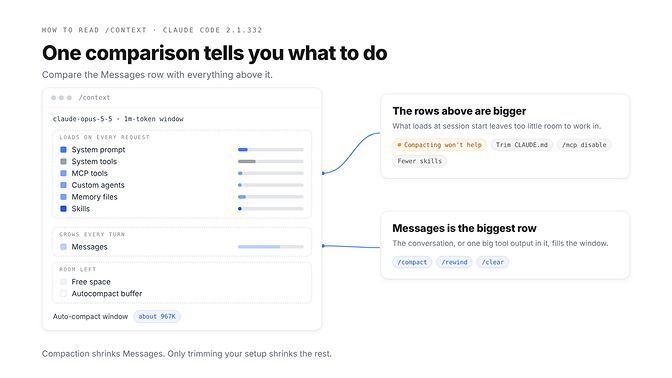
Run /context. Claude Code draws the window as a coloured grid and lists estimated tokens by category, with suggestions for context-heavy tools, memory bloat and capacity warnings. It also shows which CLAUDE.md and auto memory files loaded (/memory opens them), and in fullscreen mode /context all expands the per-item list.
| Row | What it holds | When it's there |
|---|---|---|
| System prompt | Claude Code's core instructions | Every request |
| System tools | Definitions of the built-in tools | Every request |
| MCP tools, MCP server instructions | Each server's instructions, plus the MCP tools Claude has loaded | Every request, once loaded |
| Custom agents | The subagents Claude can call | Every request |
| Memory files | CLAUDE.md files and rules loaded at startup | From startup, reloaded after /clear or /compact |
| Skills | The skill listing, after its size budget | Every request |
| Messages | Your prompts, Claude's replies, tool calls and results | Grows every turn until you compact or clear |
| Free space, Autocompact buffer | Room left, and the room held back for compaction | Shrinks as the rest grows |
Row names as they appear in Claude Code 2.1.332. Checked: 27 November 2026.
Then compare Messages with the rows above it, the same check Claude Code's troubleshooting page uses:
- Messages is the largest row: the conversation, or one big tool output in it, fills the window.
/compact,/rewindor/clearwill help. - The other rows together are larger: what loads at session start leaves too little room to work in. Compacting won't fix that. Trimming your setup will.
If the conversation is already past the limit, /context opens with a warning such as Context exceeds the 200k-token limit by 94k tokens and names the command that frees space. Our decoder for the Claude Code "Prompt is too long" error covers every limit message.
For an always-on figure, put the context percentage in your status line. This is the docs' one-line version for ~/.claude/settings.json:
{
  "statusLine": {
    "type": "command",
    "command": "jq -r '\"[\\(.model.display_name)] \\(.context_window.used_percentage // 0)% context\"'"
  }
}
used_percentage counts input tokens from the last API response against the full window, so it won't show when compaction runs if you've set CLAUDE_CODE_AUTO_COMPACT_WINDOW. Verbose mode adds a token counter with your context size; the count beside the spinner is only the current turn's output.
What happens when the Claude Code context window is full
"Claude Code compacts automatically as you approach the limit, so a full context window doesn't end your session," the docs say. Where it happens depends on the model:
- Native 1M models (Fable, Sonnet 5 and later, Haiku 5.5, Opus 4.7 and later): at about 967K tokens.
- Opus 4.6 and Sonnet 4.6 without
[1m]: at the 200K boundary. - Other 200K-window models: before the conversation reaches 200,000 tokens.
- Cloud sessions: as the conversation approaches the model's limit.
- A model ID Claude Code doesn't recognize: at the window it assumes.
A context or auto-compact warning is "not a usage limit," the cost docs add.
Sessions get stuck at the limit in three documented ways. With auto-compact off, you get Context limit reached · /compact or /clear to continue until you run one; Not enough messages to compact. means one oversized prompt fills the window, so /clear and resend less; and Autocompact is thrashing means one file or tool output refills it after every summary.
The ways out, lightest first: /compact with a focus, /rewind and Summarize up to here, /clear (the old chat stays in /resume), or a bigger window such as an [1m] variant.
Five things to do before it fills
Claude Code's docs list five moves to make before the automatic pass runs:
- Compact with a focus:
/compact focus on the auth bug fix. - Compact part of the conversation:
/rewind, pick a message, then Summarize from here or Summarize up to here. - Compact earlier:
/autocompact 500k. Our guide to Claude Code auto compact settings covers every place to set it. - Clear between tasks: "Old conversation crowds out the files you need next and costs tokens on every message."
- Send large reads to a subagent, so the file contents stay in its window.
Model isn't recognized · context assumed to be 200k tokens
That warning means Claude Code doesn't know your model ID, such as a gateway alias or another vendor's model, so it guesses the window. Up to 2.1.322 it guessed 200K; since 2.1.323 (12 November 2026) it guesses 1M, and the warning reads context assumed to be 1m tokens. A smaller-window model can then fail every turn until /clear once it fills, the changelog warns, so set the real size first:
# Hold sessions to 200K
export CLAUDE_CODE_DISABLE_1M_CONTEXT=1
# Or give an unrecognized model ID its real window (example value)
export CLAUDE_CODE_MAX_CONTEXT_TOKENS=128000
# A gateway that rejects requests over 200K
export CLAUDE_CODE_AUTO_COMPACT_WINDOW=200000
For a gateway's name for a Claude model, a modelOverrides entry that maps it to the Anthropic ID is cleaner. The window variable takes 100K to 1M, with k and M suffixes from 2.1.304.
Compact or clear: when to use which
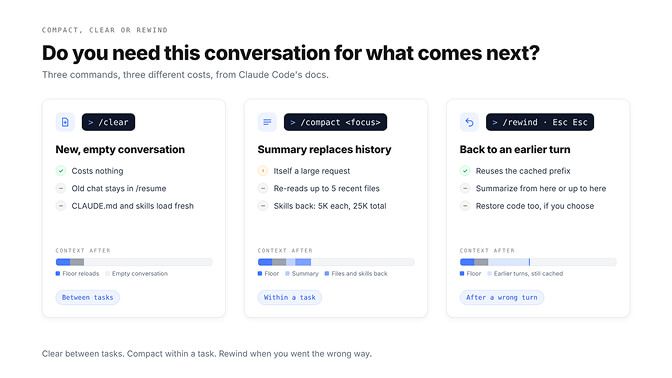
The commands reference draws the line: /clear will "Start a new conversation with empty context," and "To free up context while continuing the same conversation, use /compact instead." Anthropic's own decision table adds three more moves:
| Situation | Use | What you keep | Cache effect | Cost |
|---|---|---|---|---|
| Same task, context still relevant | Keep going | Everything | The prefix keeps hitting the cache | Each turn re-reads the context, mostly at the cache rate |
| Claude went down a wrong path | /rewind, or Esc twice | Turns before that point, and the code too if you restore it | Hits the earlier cache entry | Low |
| Mid-task, bloated with stale exploration | /compact <hint> | A summary plus re-injected files and rules | Conversation layer rebuilt | A summary request over the whole history |
| A new task | /clear | CLAUDE.md, rules, memory, skills; old chat in /resume | A new, short prefix | "costs nothing" |
| Next step makes output you only need the conclusion of | A subagent | Only the subagent's summary | Main conversation keeps its cache | The subagent's own requests still count |
Checked: 27 November 2026. Situations from Anthropic's "Using Claude Code: session management and 1M context"; cache effects and costs from Claude Code's prompt caching and cost docs.
Clear between tasks. Compact within a task. Rewind when you went the wrong way.
What survives /compact
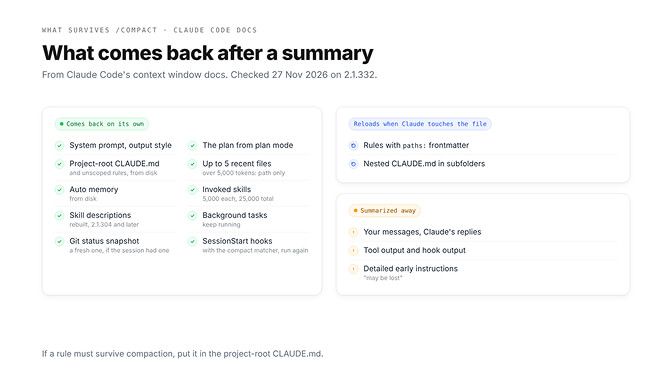
Claude Code's context window docs list what comes back after a summary. Read it before you trust one:
| What | After compaction |
|---|---|
| System prompt and output style | Both still apply |
| Project-root CLAUDE.md and unscoped rules | Re-injected from disk |
| Auto memory | Re-injected from disk |
| Skill descriptions | Rebuilt and re-injected (2.1.304 and later) |
| Git status snapshot | A fresh one, if the session started with one |
| The plan from plan mode | Re-injected from disk |
Rules with paths: frontmatter, nested CLAUDE.md files | Reloaded when Claude touches a matching file |
| Files Claude read or edited | Up to five re-read, most recently modified first |
| Invoked skill bodies | Up to 5,000 tokens each and 25,000 in total, oldest dropped first |
| Background commands and subagents | Keep running |
| Context that hooks added earlier | Summarized with the rest of the conversation |
SessionStart hooks with the compact matcher | Run again, and their output is added |
Checked: 27 November 2026, on Claude Code 2.1.332.
A file over 5,000 tokens comes back as a path reference (Referenced file). And detailed instructions from early in the session "may be lost," so a rule that matters belongs in the project-root CLAUDE.md, not in a message you sent at lunch.
What /compact costs
Per the cost docs, /compact "reads the conversation it summarizes, so compacting a large context is itself a large request," while /clear "costs nothing."
Compaction also invalidates the conversation layer of the prompt cache, while /rewind returns to a prefix that's already cached. After a break longer than the cache lifetime, the summary request reprocesses your history uncached. Our guide to prompt caching for agents explains the layers.
Timing matters too. Anthropic's Claude Code team says "the model is at its least intelligent point when compacting," and that with 1M "you have more time to /compact proactively with a description of what you want to do." Compact at milestones you choose, not at the last moment.
Custom compaction instructions
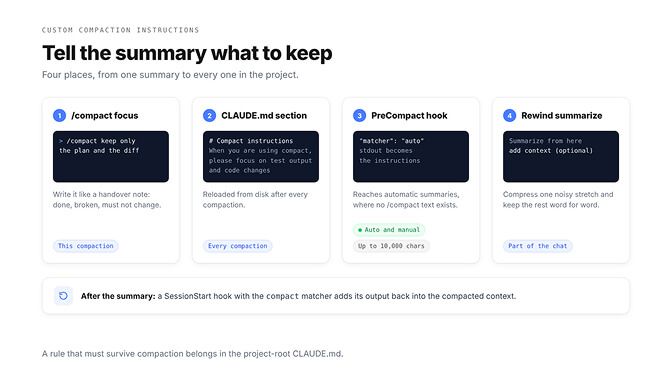
A summary keeps what the summarizer guesses matters, unless you say. The one-off way is a focus, like Anthropic's /compact focus on the auth refactor, drop the test debugging; write it like a handover note. For a standing rule, add this to the project-root CLAUDE.md, exactly as the cost guide shows it:
# Compact instructions

When you are using compact, please focus on test output and code changes
For automatic compactions, where no /compact text exists, a PreCompact hook's output becomes the summary instructions when it exits 0, up to 10,000 characters per hook. This is our example for .claude/settings.json:
{
  "hooks": {
    "PreCompact": [
      {
        "matcher": "auto",
        "hooks": [
          {
            "type": "command",
            "command": "echo 'Keep failing test names, changed files and open decisions. Drop exploration.'"
          }
        ]
      }
    ]
  }
}
Exit code 2 blocks compaction instead, which is rarely what you want. A SessionStart hook with the compact matcher adds context back after a summary, and the rewind menu's Summarize options take instructions in their "add context (optional)" row.
Idle compaction
"If you leave a long conversation idle while it is on the one-hour TTL, Claude Code can compact it." By default that happens in interactive sessions once the context passes 200,000 tokens and about an hour has gone by, with a terminal notice starting Compacted while idle, before the prompt cache expired.
Turn it off with "idleCompaction": false (2.1.290 and later) or in /config. It's one of several things that spend tokens while you're away; our guide to reducing Claude Code token usage covers the rest.
Subagents, agent teams and the window
A subagent runs in its own window and returns a summary, though its requests still count toward your usage. Anthropic's test for when to use one: "will I need this tool output again, or just the conclusion?" To make one subagent compact earlier, set autoCompactWindow in its frontmatter (100,000 or more, 2.1.296 and later).
Agent teams are separate Claude Code instances, and "Agent teams use approximately 7x more tokens than standard sessions when teammates run in plan mode." They're off by default. On paid Claude plans, /usage shows the share of recent usage that subagents take.
The window is five times what Sonnet 4.5 gave you. Your task didn't get five times bigger, and neither did anyone's attention. Give each task a clean desk, and Claude Code takes care of most of the rest.
Want a recurring job out of your coding session?
Some of what people run in Claude Code isn't coding: a morning summary, a weekly report, a sweep of new tickets. Those jobs don't need your repo's context, and it doesn't need them.
BetterClaw runs that kind of work as managed agents, with Claude Sonnet 5 and its native 1M window as the default model. You can bring your own key for any of 28+ providers at zero markup, and on paid plans you choose which of an MCP server's tools are on and which agents get it.
BetterClaw Free, as its page described it on 27 November 2026, gives you 1 agent, 100 credits a month and 3 connectors, with no expiry. Start free
Paid plans start at $19 a month, with MCP on every paid plan. See BetterClaw plans
Frequently Asked Questions
What happens when the context window is 100% in Claude Code?
Claude Code compacts automatically as the conversation nears the limit and carries on from a summary; on 1M models that happens at about 967K tokens by default. With auto-compact off you get "Context limit reached · /compact or /clear to continue", and messages fail until you run one of them.
How do I check my Claude Code context window usage?
Run /context for a breakdown by category, including free space and the room held back for compaction. For an always-on number, add context_window.used_percentage to your status line or turn on verbose mode. The count beside the spinner is only the current turn's output.
What does the 200K context window mean for Claude?
It's the window of older models: Haiku 4.5, Sonnet 4.5 and Opus 4.5 have 200K tokens, and in Claude Code so do Opus 4.6 and Sonnet 4.6 unless you pick their [1m] variants. Anthropic puts 200K tokens at roughly 150,000 words; current models such as Opus 5.5 have 1M.
Can Claude Code clear its own context?
Partly. Auto-compact summarizes the conversation near the limit, and idle compaction summarizes a long conversation you've left for about an hour on the one-hour cache. An empty context only comes from /clear.
How do I get a larger context window in Claude Code?
Use a model with a native 1M window: Opus 5.5, Sonnet 5.5, Haiku 5.5 and the Fable models run at 1M by default. On Opus 4.6 or Sonnet 4.6, pick the [1m] variant, which is included on Max, Ultra, Team and Enterprise for Opus 4.6 and needs usage credits for Sonnet 4.6.
Is 200K tokens a lot in Claude Code?
Less than it sounds. Published measurements put Claude Code's startup context at about 33,000 tokens (systima) to 51,400 (one XDA session), so a 200K window loses a sixth to a quarter of its space before you type (our calculation). A few large files fill the rest.