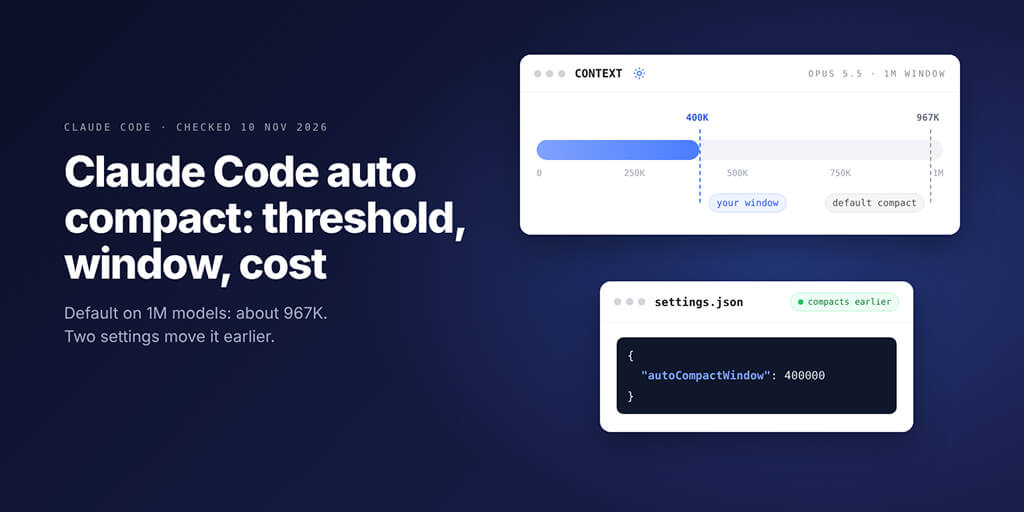
On 1M-context models the default waits until about 967K tokens. Here is what that costs per request, the two settings that move it, and the value we would pick.
Claude Code auto compact summarizes your conversation when the context nears its auto-compact window. On 1M-context models such as Opus 5.5 that happens at about 967K tokens, so every request before it re-sends a huge context. Two settings move the point: autoCompactWindow sets the window in tokens, and CLAUDE_AUTOCOMPACT_PCT_OVERRIDE sets a lower percentage of it.
Picture this: you're three hours into a refactor on Opus 5.5. The context meter says 610K, and every small question ("does it compile now?") sends all 610K back to the model.
Wait. Why does each message cost more than it did this morning?
Because nothing has compacted yet. On a 1M-context model, Claude Code auto compact waits until about 967K tokens, and until then each request carries the whole conversation.
We checked every key below against Claude Code's docs and changelog on 10 November 2026 (latest version 2.1.322).
Claude Code auto compact settings: the quick answer
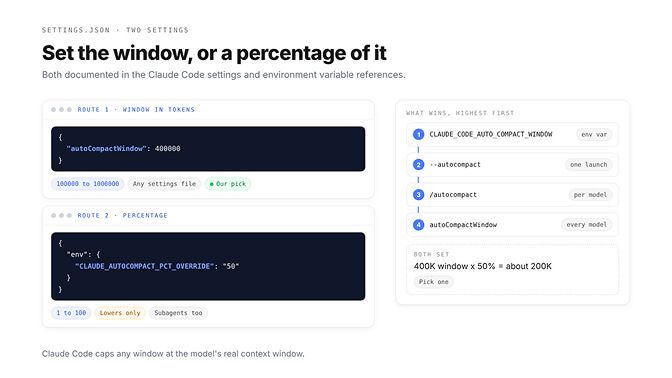
You need one line. This sets the window for every model in your user settings:
{
  "autoCompactWindow": 400000
}
The other route is a percentage, set as an environment variable. You can put it in the same file under env:
{
  "env": {
    "CLAUDE_AUTOCOMPACT_PCT_OVERRIDE": "50"
  }
}
Those are the two settings. There are five ways to apply the window, and they don't all win the same way:
| Where you set it | What it changes | Version |
|---|---|---|
/autocompact 400k | Current model, saved under modelSettings in user settings | v2.1.221+, per model from v2.1.288 |
"autoCompactWindow": 400000 | Every model, from any settings file | Current versions |
claude --autocompact 400k | One launch, saved settings untouched | v2.1.221+ |
CLAUDE_CODE_AUTO_COMPACT_WINDOW=400000 | Beats the command, the flag and the key | 400k suffix needs v2.1.304+ |
CLAUDE_AUTOCOMPACT_PCT_OVERRIDE=50 | A lower percentage of the window | No version stated |
Claude Code caps any window at the model's real context window.
What auto compact does, and when it fires
Compaction replaces your message history with a summary, so the next request carries a small fraction of the old context.
The auto-compact window is how full the context can get before that happens. If you set nothing, the model configuration page lists these defaults:
- Native 1M-context models (the Fable models, Sonnet 5 and later, Haiku 5.5, Opus 4.7 and later): about 967K tokens.
- Sonnet 4.6 and Opus 4.6 without extended context: the 200K boundary.
- Any native 1M model with
CLAUDE_CODE_DISABLE_1M_CONTEXT=1: the 200K boundary. - A model ID Claude Code doesn't recognize, such as a gateway alias: the window it assumes, 200K.
- Cloud sessions: as the conversation approaches the model's limit.
That 967K figure wasn't picked for cost. The v2.1.247 changelog moved Sonnet 5's default window to its full 1M context, "so sessions on the 1M window now auto-compact at about 967K tokens instead of about 934K." It's tuned to stay clear of the wall, not to keep your bill small.
The summary keeps your requests and key code snippets, but Anthropic's docs warn that detailed instructions from early in the conversation may be lost. After compacting, Claude Code reloads your project-root CLAUDE.md and auto memory from disk, re-reads up to five recently modified files, and re-attaches each invoked skill, capped at 5,000 tokens per skill and 25,000 in total.
That's why a session can feel dumber right after a summary. Before you blame the model, run through our checklist in is Opus 5.5 nerfed: a badly timed compaction is one of the look-alike causes.
Why the default is expensive on 1M-context models
Claude Code "sends your full conversation with every request," per its cost docs. Caching makes that cheap, but cheap times 600,000 adds up.
Here's what one request costs on Opus 5.5 at Anthropic's listed rates: $4 per million input tokens, $20 per million output, $0.20 per million for cache hits and $5 per million for 5-minute cache writes. Anthropic bills the full 1M window at standard rates, so there's no long-context surcharge to add.
| Context in the request | Warm cache (read at $0.20/M) | Cold cache (re-written at $5/M) |
|---|---|---|
| 100K | $0.02 | $0.50 |
| 200K | $0.04 | $1.00 |
| 400K | $0.08 | $2.00 |
| 967K | $0.19 | $4.84 |
Calculated from Anthropic's list prices on 10 November 2026, input side only, before new tokens and output.
The cold column is the one that hurts. With an API key, Claude Code gives the main conversation a 5-minute cache by default; a Claude subscription gets one hour. Step away for six minutes at 900K on an API key, and your next one-line message costs dollars, not cents.
On a Pro, Max or Ultra plan you don't see dollars, but the same tokens come out of your usage limits. The cost docs say a one-line question in a session open all day "still draws usage for the whole conversation." If that's how your week keeps running out, our guide to the Claude rate limit reached error shows how to tell which limit you hit.
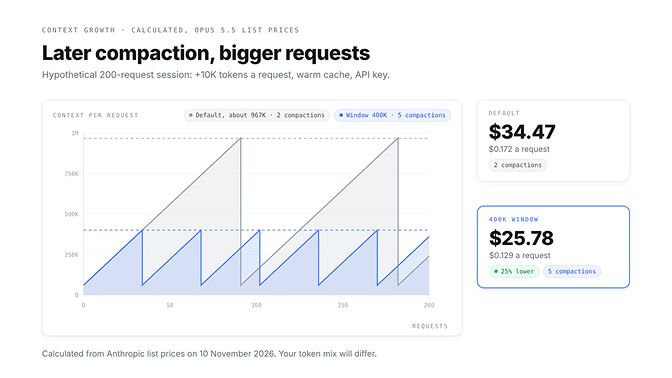
So how much does compacting earlier save? One user reported that compacting at 400K instead of about 967K cut their cost per request by 43%. We can't check their session, so we built our own.
Say a session runs 200 requests on Opus 5.5 with an API key and a warm cache. Each request adds 10,000 new tokens and returns 1,000. After a compaction the context restarts at 60,000 tokens, and the summary itself costs 10,000 output tokens.
| Compaction point | Compactions | Session cost | Per request | vs default |
|---|---|---|---|---|
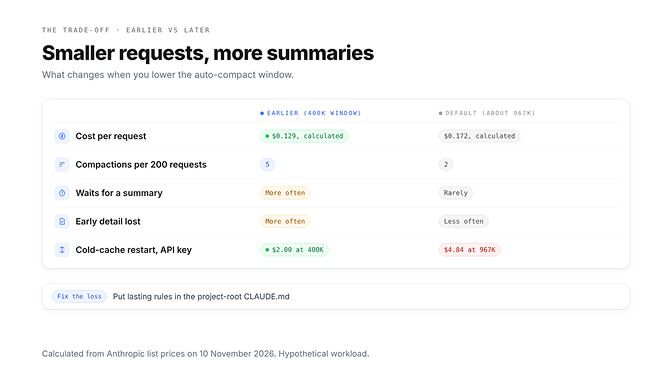
| About 967K (default) | 2 | $34.47 | $0.172 | baseline |
| 600K | 3 | $28.25 | $0.141 | 18% lower |
| 400K | 5 | $25.78 | $0.129 | 25% lower |
| 200K | 14 | $26.52 | $0.133 | 23% lower |
Calculated from Anthropic's list prices on 10 November 2026; compaction modelled at the window. The workload is hypothetical.
Look at the last row: at 200K the session compacts 14 times, and the summaries eat the saving.
Compacting earlier is cheaper until it isn't. Every compaction is a paid request of its own.
On a plan, a smaller window stretches your week the same way. Try it before you upgrade, and if you still need more room, compare Claude Max vs Ultra.
Window or percentage: the two settings side by side
The autoCompactWindow key takes a token count from 100,000 to 1,000,000 and works in any settings file. Left unset, Claude Code picks a window tuned for your model.
A window you save with /autocompact lands under modelSettings for the current model, and that beats the top-level key in the same file. The CLAUDE_CODE_AUTO_COMPACT_WINDOW variable beats everything, which is why the docs suggest it for scripts and cloud environments.
One trap with that variable: a bare number means tokens. CLAUDE_CODE_AUTO_COMPACT_WINDOW=200 is 200 tokens, so Claude Code warns and treats it as the 100K minimum, even though /autocompact 200 means 200,000.
CLAUDE_AUTOCOMPACT_PCT_OVERRIDE works differently. Per the environment variable reference, it sets "the percentage (1-100) of the auto-compact window at which auto-compaction triggers." It can only lower the trigger, and values above the default percentage are ignored.
Anthropic doesn't publish what that default percentage is. The docs also say the variable applies only in sessions that compact before the model's context limit, which includes every native 1M model at its default.
Set both, and the percentage applies to the window you set: a 400K window with 50 compacts around 200K.
We'd pick one. The window is a plain token count, and /autocompact shows it back to you.
The percentage has one real use: it applies to subagents as well as the main conversation. For a single subagent, the cleaner tool is autoCompactWindow in its frontmatter (v2.1.296+). Write it as 200000, because in frontmatter 200k reads as 200 and Claude Code ignores it.
The trade-off: more compactions, and what each one forgets
Every compaction is a pause. One user reported each one taking about 76 seconds on a large session. Hermes Agent users know this wait too, and our Hermes Agent compaction fixes cover its version of the trade-off.
Per the prompt caching docs, compaction is a separate request that repeats your history; with a warm cache it reads it cheaply and "spends most of its time generating the summary."
Then there's what the summary drops: rules with paths: frontmatter and nested CLAUDE.md files drop out until Claude touches a matching file again, and long instructions you typed in hour one can shrink to a line.
If a rule has to survive compaction, it belongs in your project-root CLAUDE.md, not in a message you sent at 9 a.m.
Picking a value for your work
Start from how you work, not from the default. These are our picks, not Anthropic's:
| Your work | Our pick | Why |
|---|---|---|
| Bug fixes and short tasks | /clear between tasks, 300K window | Stale context is pure cost |
| A day of feature work in one repo | 400K to 500K | Big saving, few summaries |
| Long agent runs, big codebase reads | Default, reads pushed to subagents | Keeps the main thread clean |
| A gateway that rejects requests over 200K | CLAUDE_CODE_AUTO_COMPACT_WINDOW=200000 | Anthropic's documented fix |
Scripts and -p runs | The environment variable | Overrides every saved setting |
Our default for most people is /autocompact 400k, saved per model.
Always-on agents have the same problem: they re-send context on every step, all night.
That's why BetterClaw runs agents on your own API key: bring your own key across 28+ providers with zero markup, so your provider bills you directly and the spend limit you set on that key stays the real ceiling. Plans start at $19 a month, and your first workspace starts with a 7-day free trial. See BetterClaw plans
Claude Code auto compact not working? Five causes
Most cases come down to one of these:
| What you see | Likely cause | Fix |
|---|---|---|
| Your window is ignored | A higher settings scope, the environment variable or a per-model /autocompact value wins | Run /status and check Setting sources; run /autocompact to see the window in use |
A warning quoting CLAUDE_CODE_AUTO_COMPACT_WINDOW | The value is out of range, or a bare 200 | Use 200000, or 200k on v2.1.304+ |
Context limit reached · /compact or /clear to continue · auto-compact is off · /config to turn it on | autoCompactEnabled is false, or DISABLE_AUTO_COMPACT is set | Turn Auto-compact back on in /config, or unset the variable |
| A 1M model compacting at 200K | CLAUDE_CODE_DISABLE_1M_CONTEXT, or a model ID Claude Code doesn't recognize | Unset the variable; for a gateway ID, run claude update or add a modelOverrides entry |
Autocompact is thrashing: the context refilled to the limit... | One file or tool output refills the window after each summary | Read the file in chunks, use a subagent, or run /clear |
If /autocompact isn't a known command, you're on a version before v2.1.221.
The manual command: /compact, and when to use it instead
/compact summarizes the conversation on demand, and it takes focus instructions: /compact focus on the auth bug fix. That summary keeps what you chose instead of what the automatic pass guesses matters.
For a standing rule, add a "Compact instructions" section to your project's CLAUDE.md, and run /context to see what fills the window.
We'd compact by hand at three moments:
- Before starting a new task in the same session.
- Before stepping away from a large session on an API key, so the next message doesn't hit a cold cache at full size.
- After a big exploration you only need the conclusions from.
If you don't need continuity at all, /clear is better: the cost docs note it "costs nothing," while /compact is itself a large request. DISABLE_AUTO_COMPACT=1 stops the automatic pass but keeps /compact; DISABLE_COMPACT=1 turns off both.
For more ways to keep context small, from output compression to MCP pruning, see our guide to skills that reduce token usage.
Related settings that touch cost
cleanupPeriodDays keeps session transcripts for 30 days by default, then deletes them silently. It doesn't change what a request costs, but it decides how long /resume can find an old session. The minimum is 1; 0 fails validation.
idleCompaction is on by default. It compacts a conversation of 200,000 tokens or more after about an hour idle, before its one-hour cache expires, so your next message doesn't reprocess everything. It needs the one-hour cache, which a subscription gets by default and an API key doesn't.
promptCacheTtl set to 1h (v2.1.242+) gives an API-key session that longer cache. On Opus 5.5 the hour-long write costs $8 per million tokens instead of $5, so it pays off if you often step away for longer than five minutes.
Effort matters too. Opus 5.5 defaults to medium, and the settings reference notes lower levels are faster and cheaper on straightforward tasks.
The default is a ceiling, not a recommendation
967K was tuned so a session almost never hits the wall. It wasn't tuned for your bill.
Pick the window you'd actually pay for. Then watch /usage for a day and move it once.
Frequently Asked Questions
What is Claude Code auto compact?
Auto compact is Claude Code's automatic summary of a long conversation. When the context nears the auto-compact window, Claude Code replaces the message history with a summary so the session can continue. Your project-root CLAUDE.md, auto memory and up to five recent files are reloaded afterwards.
What is the default auto compact threshold?
On native 1M-context models, including the Fable models, Sonnet 5 and later, Haiku 5.5 and Opus 4.7 and later, Claude Code compacts at about 967K tokens by default. Sonnet 4.6 and Opus 4.6 without extended context compact at 200K. Model IDs Claude Code doesn't recognize compact at an assumed 200K window.
How do I change the auto compact window?
Run /autocompact 400k to save a window for the current model, or add "autoCompactWindow": 400000 to ~/.claude/settings.json for every model. Values run from 100,000 to 1,000,000 tokens. The CLAUDE_CODE_AUTO_COMPACT_WINDOW environment variable overrides both.
Why is auto compact not working?
Usually a higher settings scope or the environment variable overrides your value, auto-compact is turned off in /config or with DISABLE_AUTO_COMPACT, or your version is older than the setting needs. Run /status to see which settings files loaded and /autocompact to see the window in use.
Does compacting reduce cost?
Yes, up to a point. Each request re-sends the whole context, so a smaller context makes every request cheaper; in our calculated example a 400K window cut cost per request by about 25% on Opus 5.5. Compacting too often adds summary requests that eat the saving.
What does CLAUDE_AUTOCOMPACT_PCT_OVERRIDE do?
It sets the percentage, from 1 to 100, of the auto-compact window at which compaction triggers, for both the main conversation and subagents. It can only lower the trigger: values above the default percentage are ignored. Anthropic doesn't publish the default percentage, so the window setting is easier to reason about.