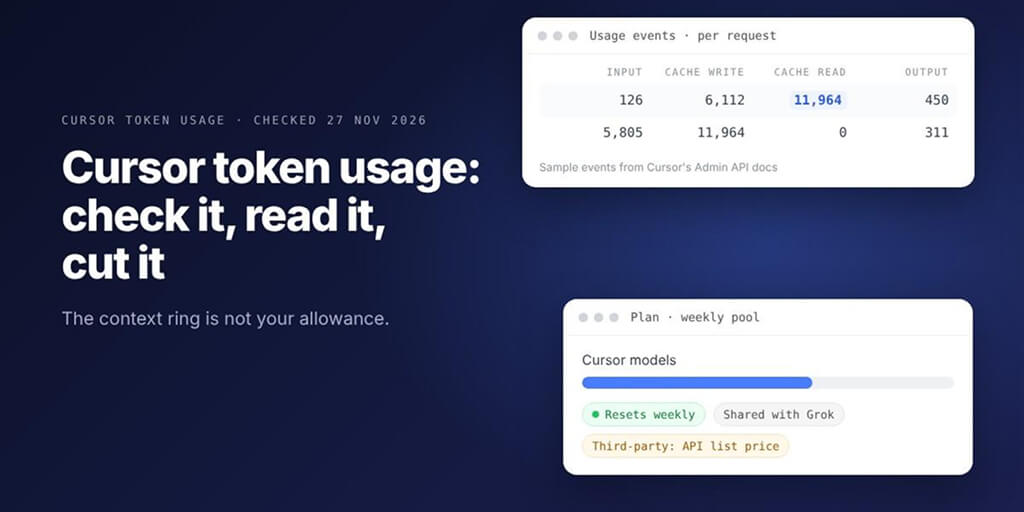
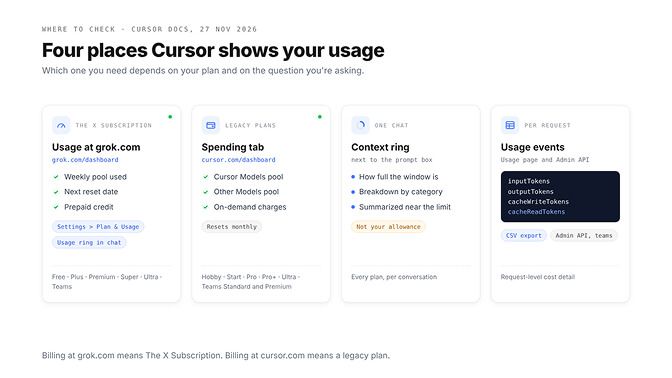
On The X Subscription (Plus, Premium, Super, Ultra), your Cursor token usage is a weekly pool shown under Usage at grok.com/dashboard and in editor settings. On legacy plans (Pro, Pro+, the old Ultra) it's two monthly pools on the Spending tab at cursor.com/dashboard. The context ring in chat shows how full one conversation is, not your allowance.
Cursor prices usage per million tokens, with separate input, cache-write, cache-read and output rates. Below: where to click, what the numbers mean, why usage spikes and what to change.
| You're on | Check here | It shows |
|---|---|---|
| The X Subscription | Usage at grok.com/dashboard | Weekly pool, reset date, credit |
| A legacy plan | Spending tab at cursor.com/dashboard | Monthly pools, on-demand charges |
| One chat | The context ring by the prompt box | That chat's window, not your plan |
Picture this: it's Thursday, a notice says your weekly pool is used up, and the context ring on your chat never passed half.
Half a chat ate my whole week?
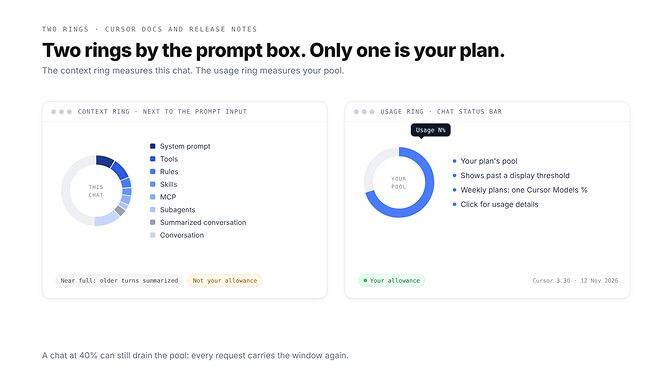
It didn't. Cursor shows two rings near the prompt box, and they measure different things.
This post sticks to Cursor's own meters. For plugins that trim tokens in any agent, see our roundup of skills that reduce token usage.
How to check Cursor token usage
Cursor is now "sold as part of The X Subscription, one subscription for Grok, Cursor, and X", and new customers start there. Hobby, Start, Pro, Pro+, the old Ultra and Teams Standard or Premium seats are legacy plans that keep working.
Your billing page tells you which: grok.com/dashboard/billing means The X Subscription, cursor.com/dashboard/billing a legacy plan.
X Subscription plans (Plus, Premium, Super, Ultra)
Open Usage at grok.com/dashboard. Cursor's help centre says it shows "how much of your weekly pool you've used, the next reset date, and your prepaid credit", and Cursor Settings > Plan & Usage in the editor shows the same remaining usage.
The pool is "shared across everything on your subscription: Agent in the editor, CLI, Cloud Agents, Grok Bot, and the Grok apps" and refreshes weekly. Since the week of 9 November, the meter splits into coloured segments by product, so you can see what Grok took from your coding week.
Claude, GPT and other third-party models never touch that pool: on Premium and above they bill at API list price from prepaid credit, shown under Additional usage credits at grok.com/dashboard/billing.
Legacy plans (Pro, Pro+, Ultra, Start, Teams Standard or Premium)
Open the Spending tab at cursor.com/dashboard. Cursor says it "shows real-time usage for both pools, remaining allowance, and any on-demand charges".
The pools are Cursor Models (Grok and Composer) and Other Models (third-party models at their API price), and both reset monthly; Start and Hobby get only the first. On Pro, Pro+ and Ultra, on-demand usage stays off until you turn it on under Spending.
Request-level detail and CSV export
For single requests, Cursor's help centre says to "check your usage dashboard for request-level cost details". The Usage page has a usage events table with a CSV export, shows Auto requests as Auto or as the routed model, and lists a subagent's requests under the model that actually ran.
Team admins also get the Admin API, where each token-billed event carries inputTokens, outputTokens, cacheWriteTokens, cacheReadTokens and its cost in cents, plus Usage Analytics charts at cursor.com/dashboard/analytics.
If the dashboard shows usage left and Agent still won't run, that's an error rather than a usage question. Our guide to Cursor AI not working maps each notice to its fix.
Why you see percentages and tokens, not dollars
Cursor doesn't publish a dollar value for included usage. Its docs size plans as multiples (Premium is "4x Plus", Ultra "50x Plus") and say "different models draw from the pool at different rates", so a percentage is the honest unit.
Dollars appear where money changes hands per token, in prepaid credit and legacy on-demand charges, and team Usage pages can chart spend as well as tokens. For the pool itself, watch the percentage and the reset date.
The context meter isn't your allowance
Here's the thing. Cursor puts two rings near the prompt box, and only one of them is about your plan.
The context ring sits next to the prompt input, and Cursor's docs say it "shows how full the window is at a glance". Every chat shares a fixed context window with the model; files, tool runs and messages fill it, and a click breaks the total down by category, from system prompt and tools to rules, skills, MCP and the conversation.
The usage ring lives in the chat status bar and appears once your usage passes a display threshold, with a "Usage N%" tooltip. Since Cursor 3.30 (12 November 2026), on weekly plans it shows one Cursor Models percentage whichever model you pick. That ring and the dashboards above are your allowance.
Near the limit, Cursor compresses older turns into a summary, so the context ring drops. The tokens those turns used stay spent.
The context ring measures one chat. The usage ring measures your week. A chat at 40% can still drain the pool, because every request in it carries that 40% again.
Cache-read tokens: why the numbers look huge
Cursor prices every model per million tokens in four columns: input, cache write, cache read and output.
| Model in Cursor | Input | Cache write | Cache read | Output |
|---|---|---|---|---|
| Claude Sonnet 5.5 | $2 | $2.50 | $0.10 | $10 |
| Claude Opus 5.5 | $4 | $5 | $0.20 | $20 |
| GPT-5.6 Terra | $2 | $2.50 | $0.20 | $12 |
| Grok 4.7, beyond the pool | $2 | Not listed | $0.50 | $6 |
| Composer 2.5, beyond the pool | $0.50 | Not listed | $0.20 | $2.50 |
Checked: 27 November 2026. Per million tokens, standard speed, global endpoints, from Cursor's Models & Pricing page. Third-party rates apply from the first request; Cursor-model rates apply beyond the weekly pool.
Why are the counts so big? A Cursor engineering post from 23 September puts it plainly: "Every agent turn resends a long request containing tools, system instructions, setup, and the conversation so far." Prompt caching lets the provider reuse the unchanged start of that request, so most of every turn comes back as cache reads.
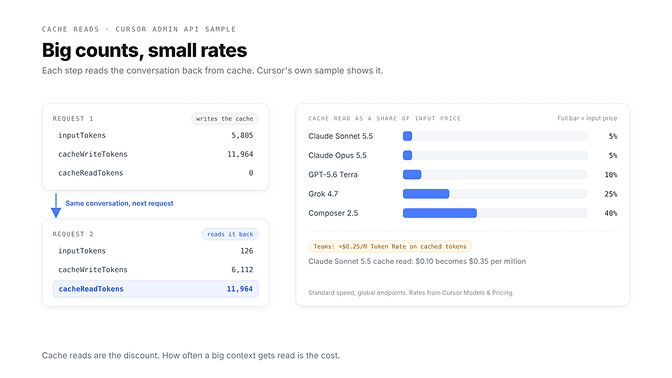
Cursor's Admin API sample shows it: one request writes 11,964 tokens to the cache, and the next one in the same conversation reads those 11,964 back with 126 fresh input tokens.
Say a request reads 60,000 tokens from cache, adds 2,000 fresh input tokens and produces 1,000 output tokens on Claude Sonnet 5.5: cache reads are 95% of its tokens but $0.006 of its $0.02 cost, about 30% (an illustrative calculation).
The discount varies: a Sonnet 5.5 or Opus 5.5 cache read costs a twentieth of fresh input, a Grok 4.7 read a quarter, and a Composer 2.5 read 40%.
Huge cache-read counts aren't the leak. They're the discount. The leak is how many times a big context gets read.
On Teams and Enterprise, eligible third-party requests also carry a Cursor Token Rate of $0.25 per million tokens, on "input tokens, output tokens, and cached tokens", your own API key included; individual plans don't pay it. So a team's Sonnet 5.5 cache read costs $0.35 per million instead of $0.10 (our calculation).
Cursor's own models, Auto's Cost mode and third-party models whose cache-read price is strictly below $0.10 per million on every tier are exempt. For cache prices and lifetimes across providers, see how prompt caching works.
Why Cursor token usage spikes
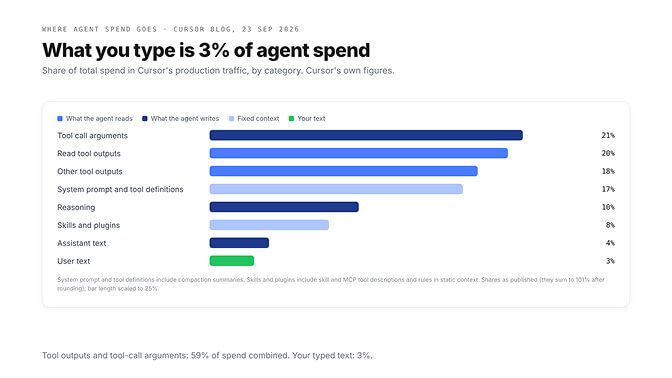
Start with where the money goes. In that 23 September post, Cursor's engineers broke down agent spend in production traffic: tool-call arguments 21%, file-read outputs 20%, other tool outputs 18%, system prompt and tool definitions 17%, reasoning 10%, skills and plugins 8%, assistant text 4% and the text you type 3%.
What the agent reads and writes while it works costs far more than your prompt, and this is how it shows up on your bill:
| Symptom | Likely cause | What to do |
|---|---|---|
| Each message costs more than the last | A long chat: every turn resends the conversation so far | New chat per task, or summarize |
| Big jumps during agent runs | Verbose terminal, test and file output read back on later turns | Scope the task, stop runs that drift, filter output with RTK |
| Credit drops while the picker shows Auto, Grok or Composer | A subagent ran a named third-party model at its list price | Check the subagent card and the usage row |
| Team spend jumped after the router launch | Auto's Balance or Intelligence routed to third-party models, plus the Token Rate | Use Cost mode for routine work |
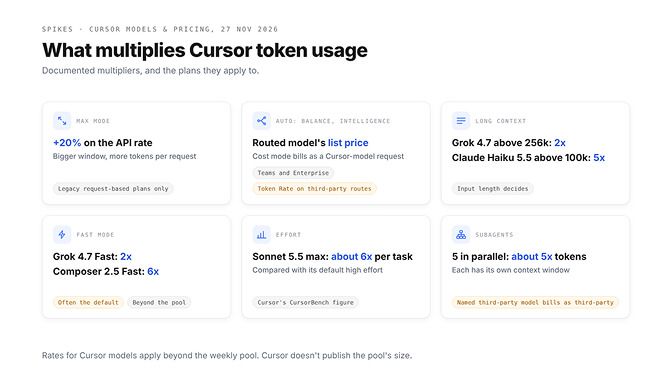
| The pool drains fast on Premium and above | Fast is Grok 4.7's default; beyond the pool it costs 2x (6x for Composer 2.5) | Turn Fast off for routine work |
| One request costs far more than usual | Input past a long-context threshold: Grok 4.7 bills 2x above 256k, Claude Haiku 5.5 5x above 100k | Start a new chat or attach less |
| Every request carries fixed overhead | Rules, skills and MCP server instructions loaded into each chat | Open the ring's breakdown; trim Always Apply rules |
| A legacy request-based plan bills more per request | Max Mode: the model's API rate plus 20%, with a bigger window | Use Max Mode only when you need the window |
Checked: 27 November 2026. Sources: Cursor's Models & Pricing page, model pages, Subagents docs and help centre.
On individual plans, Auto runs only in Cost mode, which "bills as a Cursor-model request and draws from your weekly pool whatever model serves it"; Plus has no Auto. Balance and Intelligence (Teams and Enterprise) "use your usage limits faster than Cost".
Effort and parallel work multiply the rest. On CursorBench, its own benchmark, Cursor says Claude Sonnet 5.5 at max effort costs about 6x more per task than at default high effort, and five parallel subagents use roughly five times the tokens of one agent.
How to reduce Cursor token usage
So what do you do? Habits first, because they cost nothing. The same habits work in Claude Code (2.1.332, checked 27 November), and our guide to reducing Claude Code token usage covers its built-in fixes.
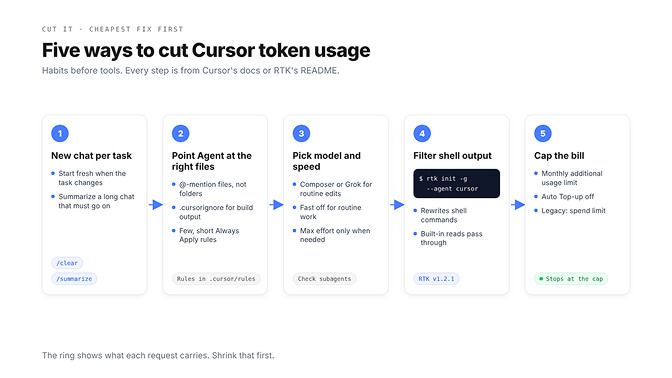
- New chat per task. In the CLI,
/clearopens a fresh session and/summarizecompresses a chat that has to continue; in the editor, Summarize sits in the / menu. - Point Agent at the right files. @-mention the files that matter rather than whole folders, and add generated folders such as
dist/andbuild/to.cursorignore. - Put standing instructions in
.cursor/rules/instead of re-pasting them. Keep Always Apply rules few and short, because they load into every chat. - Stop runs that drift. Cursor's own Learn guide notes you can interrupt a model that goes off track, and every extra step re-reads the whole context.
- Pick the model on purpose: Composer or Grok for routine edits, a named frontier model only when needed, and a look at the subagent card for where delegated work ran.
Then the settings:
- On Premium and above, turn Fast off for routine work and keep max effort for hard problems.
- On a legacy request-based plan, leave Max Mode off unless you need the bigger window.
- Cap the bill: a monthly additional usage limit under Additional usage credits at grok.com/dashboard/billing with Auto Top-up off, or a spend limit in the Spending tab on a legacy plan.
Two tools target the rest. Caveman (v4.2.0, checked 27 November) shortens what the agent writes and installs into Cursor with npx -y github:JuliusBrussee/caveman -- --only cursor; our Caveman deep dive covers what the independent tests found.
RTK (v1.2.1, checked 27 November) trims noisy command output before the agent reads it, and its README lists Cursor support:
brew install rtk                 # Windows: winget install rtk-ai.rtk
rtk init -g --agent cursor       # then restart Cursor
The hook rewrites shell commands, so git status becomes rtk git status. In Cursor it can compress other tool output only for MCP tools, and its README is honest about scale: "a 90% cut in command output is not a 90% cut in cost".
And when the pool runs out, Cursor says requests are "never downgraded in quality or speed": you pay from credit, wait for the reset or upgrade.
The meter worth watching
Everyone watches the context ring because it sits next to the cursor. Watch the usage ring for money and the context ring for habits.
When both climb fast, the fix is rarely a plugin. It's a fresh chat, lighter rules and Fast switched off for work that isn't urgent.
Move the non-coding jobs off your editor's meter
Some of what burns an editor's allowance isn't coding: a morning summary, a weekly report, a triage pass someone reruns by hand. None of it needs an IDE or your coding pool.
BetterClaw is a managed agent platform for those jobs: agents that run on a schedule and connect to your tools. Every plan supports bring-your-own-key with zero markup, so with your own key the model bill goes to your provider at their price.
Start free with 1 agent, 100 credits a month and 3 connectors, with no expiry, as our free plan page puts it. Paid plans start at $19 a month: see plans and pricing.
Frequently Asked Questions
How do I check my Cursor token usage?
On The X Subscription, open Usage at grok.com/dashboard or Cursor Settings > Plan & Usage for your weekly pool, reset date and prepaid credit. On a legacy plan, open the Spending tab at cursor.com/dashboard. Per-request detail is in the Usage page's usage events, and team admins can pull each request's token counts from the Admin API.
Why is my Cursor token usage so high?
Usually long chats, because every turn resends the conversation so far, and agent runs that read a lot of tool and terminal output. Fast mode, the default for Grok 4.7 on Premium and above, costs more too. Auto's Balance and Intelligence modes on teams, and subagents that run third-party models on any plan, add list-price usage.
Does Auto mode use more tokens in Cursor?
Not by itself. In Cost mode, the only Auto mode on individual plans, a request bills as a Cursor-model request from your pool whatever model serves it. On Teams and Enterprise, Balance and Intelligence bill at the routed model's list price and use limits faster; a subagent that names a third-party model bills as third-party usage even under Auto.
What are cache read tokens in Cursor?
They're the part of each request the model reads back from the prompt cache instead of processing as new input. Every agent turn resends the conversation, so cache reads are the biggest count but the cheapest tokens: a Claude Sonnet 5.5 cache read costs $0.10 per million against $2 for fresh input.
Is the context percentage in Cursor my usage limit?
No. The context ring next to the prompt box shows how full the current chat's context window is. Your allowance is the usage ring in the chat status bar, which shows a percentage once usage passes a display threshold, plus the Usage page at grok.com/dashboard or the Spending tab on a legacy plan.
Does Cursor usage reset weekly or monthly?
Weekly on The X Subscription, where the next reset date sits under Usage at grok.com/dashboard, and monthly with your billing cycle on legacy plans. Unused included usage doesn't roll over, and unused prepaid credit currently expires 365 days after purchase. If the pool isn't enough, compare Cursor alternatives that still run Claude and GPT.