Claude Code burns tokens because every turn re-sends the conversation plus a fixed baseline of system prompt and tools, thinking bills as output, and after a break longer than the cache lifetime your next message reprocesses everything.
To cut Claude Code token usage without installing anything, check /context and /usage, /clear between tasks, lower /effort, keep CLAUDE.md under 200 lines, trim MCP servers and watch background spend.
Checked against Claude Code 2.1.332 (25 Nov 2026) and its docs. For add-ons, see our skills and plugins that reduce token usage guide.
Why does Claude Code use so many tokens?
Because you pay for what gets re-sent, not for what you type. Every request carries a fixed baseline of system prompt and tool definitions, the whole conversation so far and every tool result in it. Thinking is billed as output on top, and a break longer than the cache lifetime makes the next request reprocess all of it.
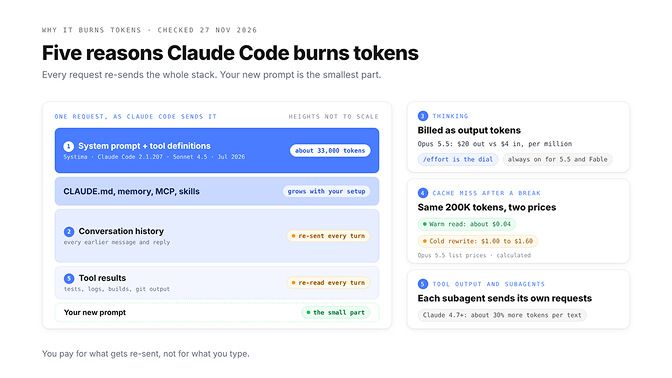
A fixed baseline before you type
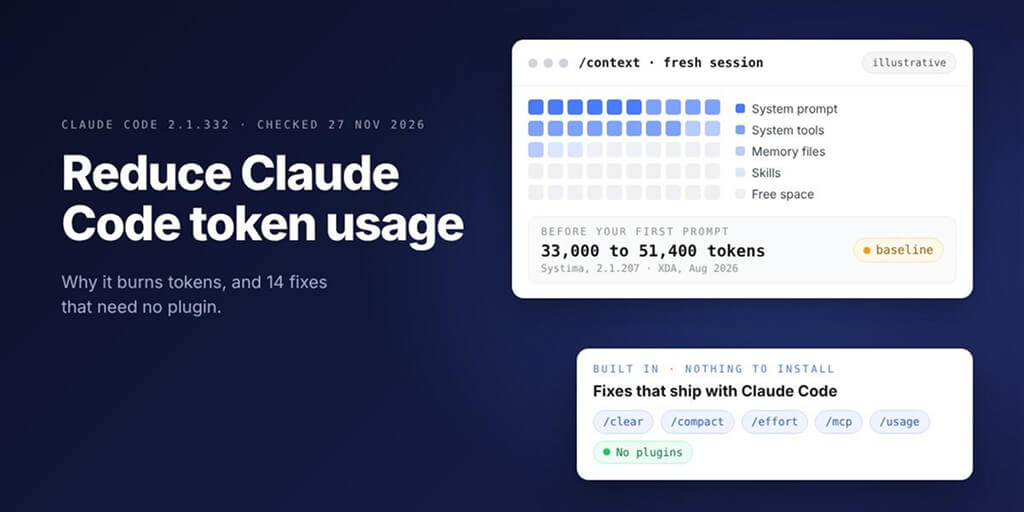
Before your first prompt, "CLAUDE.md, auto memory, MCP tool names, and skill descriptions all load into context," on top of the system prompt and tools. Systima measured "roughly 33,000 tokens of system prompt, tool schemas, and injected scaffolding before the prompt even arrived" (Claude Code 2.1.207, Sonnet 4.5, July 2026).
An XDA Developers writer's fresh session showed 51,400 tokens in /context (10,700 system prompt, 28,500 system tools, August 2026), and cutting four plugins and auto memory took it to about 41,400. Yours depends on your setup, so run /context in a fresh session.
History is re-sent every turn
"Claude Code sends your full conversation with every request," says the cost guide, and each tool call sends another request carrying its results. Caching makes those re-reads cheaper, not free, so "a one-line question in a session that has been open all day still draws usage for the whole conversation."
Thinking is billed as output
The cost guide: "Thinking tokens are billed as output tokens, and the default budget can be tens of thousands of tokens per request depending on the model." On Opus 5.5, output costs $20 per million tokens against $4 for input. You can't turn thinking off on Opus 5.5, Sonnet 5.5, Haiku 5.5 or the Fable models, so effort (fix 3) is the dial.
Cache misses after a break
The cache lasts five minutes on an API key, cloud provider or usage credits, and an hour for the main conversation on a subscription. After that, "your first message after a break longer than the cache lifetime misses the cache and reprocesses your full context."
On Opus 5.5, re-reading a 200,000-token conversation from a warm cache costs about $0.04, while re-caching it cold costs $1.00 to $1.60 (calculated from list prices). Our guide to how prompt caching works and what breaks it covers the rules.
Tool output and subagents
Test runs, builds, logs and git output land in the conversation and get re-read on every later turn. Subagents keep that bulk out of your main context, but "The subagent's own requests still draw on your usage."
Usage jumped after a model upgrade? Claude 4.7 and later models use a tokenizer that "produces approximately 30% more tokens for the same text," per Anthropic's pricing page.
Check your Claude Code token usage first: /usage, /context and ccusage
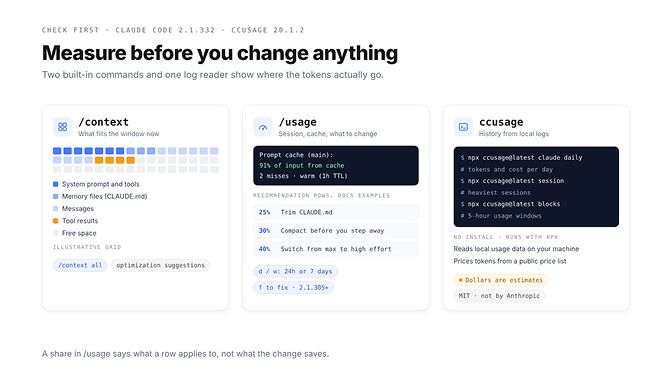
Measure before you change anything. Two of these tools are built in; the third reads Claude Code's local logs.
/usage (alias /cost)
/usage (also /cost or /stats) shows the session's tokens by model, split into input, output, cache read and cache write, with an estimated cost at list price. On 2.1.251 or later it adds a Prompt cache (main) line, like this docs example:
Prompt cache (main): 14 requests · 91% of input tokens from cache · 2 misses (last 6m 10s ago, 310.2k tokens re-cached) · 1 expected rebuild (compaction or tool-result clearing) · warm (1h TTL, last activity 40s ago)
On paid Claude plans, /usage also attributes recent usage to skills, subagents, plugins and MCP servers, with recommendation rows such as 25% Trim ~/code/api/CLAUDE.md · 49k tokens per request. A row's share "tells you how much of your usage the row applies to, not how much the change saves," and on 2.1.305 or later pressing f applies the ones it can.
On a subscription, the dollar figure "isn't relevant for billing purposes"; the plan bars are what count.
/context
The commands reference: "Visualize current context usage as a colored grid. Shows optimization suggestions for context-heavy tools, memory bloat, and capacity warnings." It also lists which CLAUDE.md and auto memory files loaded, and /context all expands the list.
A healthy grid at the start of a task is mostly free space; a thick memory band, unused MCP tools or leftovers from an earlier task each map to a fix below.
Outside the session
/insights writes a report on how you work (not a token count) to ~/.claude/usage-data/report.html, and its run counts against your usage. The status line can show context usage all the time, and it "runs locally and does not consume API tokens."
For history across days, ccusage (20.1.2, 25 Nov 2026, MIT, not by Anthropic) reads Claude Code's local logs in ~/.config/claude/projects/ or ~/.claude/projects/:
npx ccusage@latest claude daily   # Claude Code tokens and estimated cost per day
npx ccusage@latest session        # usage by session, all detected agents
npx ccusage@latest blocks         # Claude Code 5-hour billing windows
Its dollars are estimates, and it sends at most one usage ping per UTC day (DO_NOT_TRACK=1 stops it). CodeBurn (npx codeburn, 0.9.28) reads the same kind of files and splits spend by task, tool, model and project. Real spend lives in the Claude Console for API users and in the plan bars for subscribers.
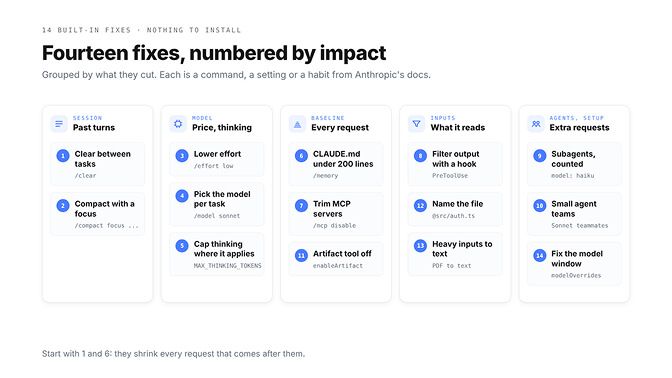
14 built-in fixes for Claude Code token usage, in order of impact
Each fix ships with Claude Code and quotes the docs line behind it. The order is our judgement of impact, so if you only optimize one thing, make it the first.
1. /clear between unrelated tasks
Start fresh when you switch to unrelated work, because "Old conversation crowds out the files you need next and costs tokens on every message."
/clear auth-refactor
The name labels the old conversation in /resume, so nothing is lost. If the next task needs that history, compact instead.
2. /compact with a focus before a long new task
/compact swaps the history for a summary, and focus instructions decide what the summary keeps:
/compact focus on the auth bug fix
Afterwards Claude Code re-injects the root CLAUDE.md, auto memory and the plan, re-reads up to five recently edited files and restores invoked skills (up to 5,000 tokens each, 25,000 total). Don't spam it: /compact "reads the conversation it summarizes, so compacting a large context is itself a large request," and it resets the cached conversation. Thresholds live in our Claude Code auto-compact settings guide.
3. Lower /effort for routine work
Opus 5.5, Sonnet 5.5, Haiku 5.5 and Fable 5.2 default to medium on a scale from low to xhigh, plus max and auto. Use /effort low for quick back-and-forth, and don't leave max on: it "may show diminishing returns and is prone to overthinking."
Set it at the start: "Pick your model and effort level at the top of a session," says the caching guide, because on most models an effort change re-reads the whole conversation with no cache hits. Opus 5.5, Sonnet 5.5, Haiku 5.5 and Fable 5.1+ keep the cache through an effort change on an API key or subscription (Fable 5.1 only since v2.1.260). For one hard question, use ultrathink in that prompt.
4. Pick the model per task
Opus 5.5 is the default model on paid plans and the API. The cost guide's advice: "Sonnet handles most coding tasks well and costs less than Opus." Switch with /model sonnet, and give simple subagents model: haiku.
| Model | Input | Output | Cache read | 5-minute cache write |
|---|---|---|---|---|
| Claude Opus 5.5 | $4 | $20 | $0.20 | $5 |
| Claude Sonnet 5.5 | $2 | $10 | $0.10 | $2.50 |
| Claude Haiku 5.5 (prompts up to 100K tokens) | $0.10 | $0.50 | $0.01 | $0.125 |
Anthropic list price per million tokens, 27 Nov 2026.
Keep Opus for architecture and multi-step reasoning, and leave /fast off unless speed matters: on Opus 5.5 it costs $8 input and $40 output per million.
5. Cap thinking where you can
On a model with a fixed thinking budget, such as Opus 4.6 or Sonnet 4.6 with CLAUDE_CODE_DISABLE_ADAPTIVE_THINKING=1, set MAX_THINKING_TOKENS=8000. On current models, "Adaptive-reasoning models ignore nonzero budgets, so use effort levels there instead," which makes fix 3 the lever on Fable, Sonnet 5+, Haiku 5.5 and Opus 4.7+.
6. Keep CLAUDE.md under 200 lines and move workflows to skills
CLAUDE.md rides along on every request. The cost guide: "Skills load on-demand only when invoked, so moving specialized instructions into skills keeps your base context smaller. Aim to keep CLAUDE.md under 200 lines by including only essentials."
Open the files with /memory; on a paid plan, /usage recommendations can name an oversized file. Splitting the file with @ imports doesn't help, because imported files "load together with the CLAUDE.md that imports them."
7. Trim MCP servers and rely on tool deferral
Claude Code already defers MCP tools: "MCP tool definitions are deferred by default, so only tool names and server instructions enter context until Claude uses a specific tool." Names still load for every connected server, so disconnect what you don't use:
/mcp disable <server-name>
For heavy data, a CLI is lighter still: gh, aws, gcloud and sentry-cli "are still more context-efficient than MCP servers because they don't add any per-tool listing." Our comparison of MCP, skills and CLIs covers when each one wins.
8. Filter noisy command output with a PreToolUse hook
From the docs section "Offload processing to hooks and skills": "Instead of Claude reading a 10,000-line log file to find errors, a hook can grep for ERROR and return only matching lines, reducing context from tens of thousands of tokens to hundreds." Anthropic's example keeps the last 100 lines of test output. Add this to settings.json:
{
  "hooks": {
    "PreToolUse": [
      {
        "matcher": "Bash",
        "hooks": [
          {
            "type": "command",
            "command": "~/.claude/hooks/filter-test-output.sh"
          }
        ]
      }
    ]
  }
}
Save the script as ~/.claude/hooks/filter-test-output.sh (after mkdir -p ~/.claude/hooks) and chmod +x it:
#!/bin/bash
input=$(cat)
cmd=$(echo "$input" | jq -r '.tool_input.command')

# If running tests, keep only the last 100 lines
pattern='^(npm test|pytest|go test)( [^;&|<>`$#\\[:cntrl:]]*)?$'
if [[ "$cmd" =~ $pattern ]]; then
  filtered_cmd="$cmd 2>&1 | tail -n 100"
  echo "$input" | jq --arg filtered "$filtered_cmd" \
    '{hookSpecificOutput: {hookEventName: "PreToolUse", updatedInput: (.tool_input + {command: $filtered})}}'
else
  echo "{}"
fi
Check that /hooks lists it under PreToolUse, and skip it when you need full output to debug. RTK, a third-party CLI filter, automates the same idea for many commands; the guide linked at the top covers how it tested.
9. Delegate verbose work to subagents, but count their cost
The cost guide suggests handing test runs and log processing to a subagent "so the verbose output stays in the subagent's context while only a summary returns to your main conversation." The catch: subagents make their own requests, and Systima measured one small task at about 121,000 tokens done directly versus 513,000 fanned out to two subagents (Claude Code 2.1.207, Sonnet 4.5). Give simple subagents model: haiku.
10. Keep agent teams small
Agent teams are experimental and off by default, and the cost guide's warning is stark: "Agent teams use approximately 7x more tokens than standard sessions when teammates run in plan mode."
Use Sonnet for teammates and keep spawn prompts short, because "everything in the spawn prompt adds to their context from the start." Shut each teammate down when its work is done.
11. Turn off the Artifact tool if you never publish artifacts
On paid Claude plans, the Artifact tool publishes session output as a private web page. If you never use it, set "enableArtifact": false, turn Artifacts off in /config or set CLAUDE_CODE_DISABLE_ARTIFACT=1.
The docs don't publish the tool's token size, so compare /context with it on and off. They do note that "a styled page is more token-intensive than the same content as terminal text."
12. Use @file and specific prompts
From the docs section "Write specific prompts": "Vague requests like 'improve this codebase' trigger broad scanning." An @ mention such as @src/auth.ts puts that file in context directly (up to the Read tool's 25,000-token default), so Claude skips the search. Leave it out when you don't know the file yet.
13. Convert heavy inputs to text
Images and PDFs cost more than their text. Claude Code's tools reference says "Claude reads short .pdf files whole," and Anthropic's PDF guide puts each page at 1,500 to 3,000 text tokens plus a page image of up to 1,568 visual tokens. Through the API, a 1920x1080 screenshot costs 2,691 visual tokens on Claude 4.7 and later.
When you only need the words, convert first (pdftotext report.pdf report.txt ships with poppler-utils, which Claude Code needs for page ranges anyway), paste error text instead of screenshots and trim logs to the failure. Keep images when the layout or a chart is the point.
14. Correct the window for gateway or custom model IDs
Behind an LLM gateway, a warning such as ⚠ Model "my-gateway-opus" isn't recognized · context assumed to be 1m tokens means Claude Code is guessing the window and compacting to fit it. If the guess is right, "there is nothing to correct"; otherwise run claude update, map the ID with modelOverrides or set CLAUDE_CODE_MAX_CONTEXT_TOKENS. A gateway that rejects requests above 200K needs CLAUDE_CODE_AUTO_COMPACT_WINDOW=200000 (see the auto-compact guide in fix 2).
Background token usage: what Claude Code spends while you're idle
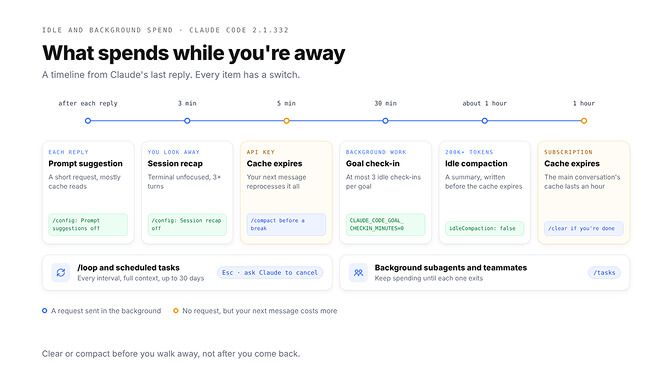
The cost guide's section of that name warns: "A session that has been open for hours can use far more of your plan limits than your activity suggests."
| What runs while you're idle | When | How to turn it off |
|---|---|---|
| Session recap | 3 minutes after the last turn, terminal unfocused, 3+ turns | /config |
| Idle compaction | About an hour idle, one-hour cache, 200,000+ tokens | "idleCompaction": false (v2.1.290+) |
| Prompt suggestions | A short request after each reply, mostly cache reads | /config, or CLAUDE_CODE_ENABLE_PROMPT_SUGGESTION=false |
Scheduled tasks, including /loop | Every interval, full context, up to 30 days | Esc stops a self-paced loop; ask Claude to cancel others |
| Cross-session messages | A new turn when another session messages this one | "crossSessionInbound": "hold" |
| Goal check-ins | After 30 minutes of background work, 3 at most per goal | CLAUDE_CODE_GOAL_CHECKIN_MINUTES=0 |
| Background subagents and workflows | Until each one exits | /tasks to see and stop them |
Checked on 2.1.332.
Idle compaction is usually worth keeping, since "Your next message then sends a summary instead of the whole conversation." Goal check-ins were capped only in v2.1.246, and since 2.1.330 (20 Nov 2026) recurring tasks last 30 days, not 7; the Loops rows in /usage rank the heaviest.
The biggest idle cost sends no request at all: once the cache expires, your next message reprocesses everything, so clear or compact before you walk away. On Pro, Max or Ultra, the "Resume this conversation?" dialog estimates "the share of your 5-hour usage limit that the saved conversation alone would use."
Subagents and agent teams: when they cost more
Subagents pay off when the output is verbose and you only need the summary, or when the work is truly independent. The docs' levers: isolate high-volume work, pick a smaller model per subagent, or put them all on one model with CLAUDE_CODE_SUBAGENT_MODEL plus CLAUDE_CODE_SUBAGENT_MODEL_FORCE=1.
Watch the default. Since Claude Code 2.1.198 (1 July 2026), the built-in Explore subagent runs on your session's model instead of Haiku, and a project subagent named Explore with model: haiku takes its place. Systima's follow-up found fan-outs using 2.6x to 5.9x the input tokens of sequential work across three model families, and they weren't faster on any task it timed (through a local gateway, on small samples).
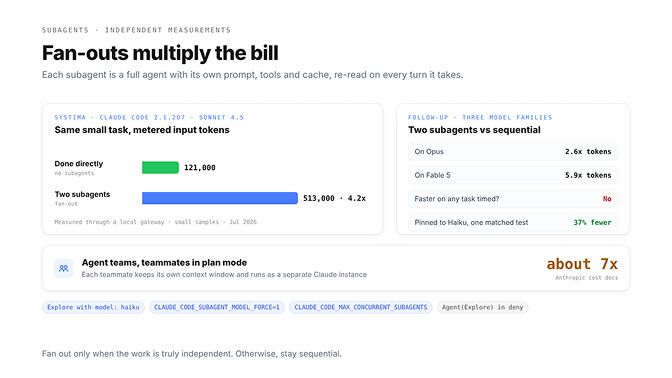
Agent teams sit at about 7x in plan mode (fix 10), and on a paid Claude plan the /usage attribution breakdown shows the subagent share.
API billing vs subscription: what "usage" means for you
"Claude Code charges by API token consumption," the cost guide begins, but where that lands depends on how you sign in. On paid Claude plans, tokens count against limits that reset over a rolling five-hour window and a weekly one, shown as bars in /usage. Past them, usage credits keep you working, and /usage-credits manages them.
On an API key, the Claude Console's Cost page shows real spend, and organizations can set workspace spend limits; if you pay contracted rates, an admin can set the modelPricing managed setting (v2.1.242+) so /usage and the status line match your bill. Comparing agents on price? Our Codex vs Claude Code comparison puts usage limits and plans side by side.
Every BetterClaw plan is bring-your-own-key with zero markup on model inference, so for agents you run there, you pay your provider's token prices directly. See plans.
When a plugin or skill is worth adding
Add one only when /context and /usage still show one layer dominating after the built-ins. Anthropic recommends one kind itself, code intelligence plugins for typed languages, because "A single 'go to definition' call replaces what might otherwise be a grep followed by reading multiple candidate files." For the rest, such as Caveman (4.2.0) for shorter replies or RTK (1.2.1) for filtered command output, see what independent tests found in the guide linked at the top.
Not every job needs a Claude Code session, though. If your tokens go on recurring work such as a morning report or inbox triage, BetterClaw runs it as a hosted agent on a schedule you set. Start free with 1 agent and 100 credits a month.
Frequently Asked Questions
How do I check how many tokens Claude Code is using?
Run /usage (alias /cost) for the session's tokens by model and cache, plus attribution and recommendations on paid Claude plans. Run /context to see what fills the window right now, and add context usage to your status line. For daily history from local logs, run npx ccusage@latest; its dollar figures are estimates.
Why is Claude Code burning through tokens so fast?
Five drivers: a fixed baseline of system prompt and tool definitions (about 33,000 tokens in Systima's test), the whole conversation re-sent every turn, thinking billed as output, cache misses after a break, and tool output plus subagents that send their own requests. Background work such as /loop tasks can also spend while you're idle.
Does /compact or /clear save more tokens?
/clear saves more: it costs nothing, and the next task starts from the baseline alone. /compact keeps a summary so you can carry on, but writing it means reading the whole conversation, one large request plus a cache rebuild. Use /clear between unrelated tasks and /compact with a focus when you need the thread.
Does Claude Code charge per token?
On an API key or a cloud provider, yes: you pay each model's per-token price, such as $4 input and $20 output per million tokens on Opus 5.5. On paid Claude plans, the same tokens count against your plan's five-hour and weekly limits instead, and usage credits cover work beyond them.
Is 200k tokens a lot for Claude Code?
It's the whole window on models such as Haiku 4.5, while Opus 4.7+, Sonnet 5+, Haiku 5.5 and Fable run with 1M tokens by default. A fresh session spends tens of thousands on its baseline, and Anthropic says accuracy degrades as context grows. On Opus 5.5, re-reading 200K tokens costs about $0.04 warm and $1.00 to $1.60 to re-cache (calculated).
Do Claude Code skills reduce token usage?
Three kinds can: workflow skills that replace long CLAUDE.md sections, since skills load only when invoked; a codebase-overview skill that saves Claude from exploring; and output-trimming skills such as Caveman, which independent tests found save less than claimed. Every other skill costs tokens, because each one in the skill listing adds to your context on every turn.