Every few weeks someone declares MCP dead. Then more MCP servers ship.
Both things are true at once, and that's the confusing part. The people saying "just use the CLI" are describing something real: on a laptop, with git and gh already installed and logged in, a coding agent doesn't need a protocol layer to run a command it has seen countless times in training. The people shipping MCP servers are describing something real too: the moment your agent needs to reach a SaaS tool behind OAuth, on behalf of someone who isn't you, there's no CLI to fall back on. Our notion mcp server page is one example of that setup.
We spent three days building a custom MCP server for our CRM integration once. It worked. The agent could read contacts, create deals, update fields, query pipelines. Then we asked it for a weekly pipeline review, and it dumped 47 deals into Slack as raw JSON. The agent knew how to reach the CRM. It didn't know what to do once it got there.
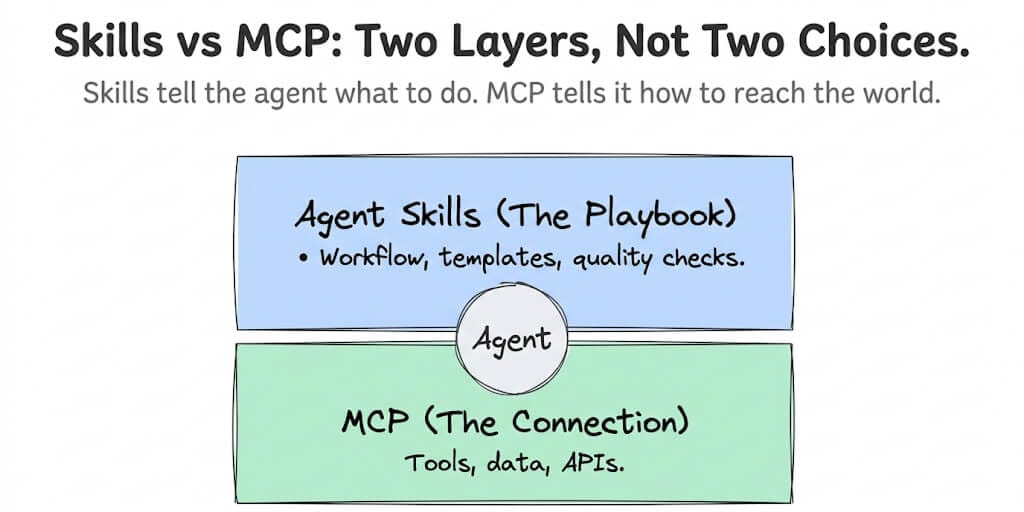
That's the real shape of this debate. MCP, skills and the CLI aren't three answers to one question. They answer three different questions: how does the agent reach a system, how does it know what to do, and what's the cheapest way to run a command it already understands?
This post covers where "MCP is dead" came from, what a real eval found, what changed in MCP in 2026, and a decision table by tool type. If your question is narrower ("does my agent need MCP at all, or can it call the API directly?"), our MCP vs direct API calls guide covers that.
Where "MCP is dead" came from
The argument didn't come out of nowhere. Three things fed it.
Context cost. In a classic MCP setup, every tool a server exposes is described to the model on every request: name, description, input schema. Connect a few feature-rich servers and a meaningful slice of the context window is gone before the conversation starts, spent on tools the agent won't touch this turn. Clients have started to fix this. Claude Code, for example, now defers MCP tool definitions by default and loads only tool names at session start, fetching the full definitions through tool search when Claude needs them. But not every client does this, and the reputation stuck.
Coding agents proved the CLI works. Coding agents run in a terminal, and the terminal already has git, gh, npm, docker and kubectl. Models have seen enormous amounts of these commands in training. They can pipe one into another, filter with grep and jq, and get exactly the output they need. For many developers, wrapping those tools in an MCP server felt like adding a layer that did less than the shell already did.
Skills arrived. Agent Skills, a SKILL.md file plus optional scripts and references, gave agents a way to learn a workflow or a CLI without loading anything until it's needed. For a lot of local tasks, "a skill that teaches the agent the CLI" turned out to be lighter than "an MCP server that wraps the CLI."
Add a run of MCP security disclosures in early 2026 (more on that below) and you get the "MCP is dead" take. It's a fair critique of MCP used in the wrong place. It's not a description of where MCP is actually heading.
What the data says: Arize's MCP vs CLI skills eval
The most useful test we've seen comes from Arize, published in May 2026: MCP vs. CLI Skills for agents: what our eval found. We didn't run it. We're reporting their numbers because they measured the thing everyone else argues about.
The setup: one model (Claude Opus 4.6), 25 GitHub tasks run through the Claude Agent SDK, four arms, each task run five times per arm. That's 500 trials. The only thing that changed between arms was how the agent learned its tools:
- Baseline: Claude with no MCP server and no skill
- MCP: the GitHub MCP server
- Two CLI skills: LobeHub and Vault, both teaching the agent to work through the command line
Accuracy was a wash. Correctness landed in a tight band:
| Arm | Correctness (all tiers) |
|---|---|
| Baseline (no MCP, no skill) | 0.845 |
| MCP | 0.834 |
| Vault skill | 0.833 |
| LobeHub skill | 0.826 |
Arize notes that part of the baseline's small edge came from the Vault skill telling the agent to pause before destructive commands. The point stands: none of these approaches made the agent meaningfully smarter or dumber on GitHub tasks.
Cost and speed were not a wash. On the hardest tier of tasks, Arize found that MCP cost more than six times what the skills cost and took five times longer. MCP averaged about twelve tool calls per hardest-tier task. The skills averaged five.
The reasons are structural, not a bug. The GitHub MCP server exposes a fixed API, so it can't compose operations the way a shell pipeline can. A task that needs grouping or aggregation turns into many separate calls. Each MCP response is verbose JSON. And every extra turn carries the previous context forward, so the cost compounds.
But MCP won some tasks outright. On creating a branch and opening a pull request, MCP averaged eight tool calls in 33 seconds for about 16 cents. The LobeHub skill took 22 calls, nearly a minute and a half, and about 50 cents. When the task maps cleanly onto the operations the server exposes, the server's structured tools are faster than the agent figuring out a CLI sequence.
Arize's summary line is the one to remember: "The shape of the task determines the winner." Their recommendation splits along the same line we use below. Use the CLI for local work, especially when the tool has plenty of training data and auth is already configured. Use MCP when the tool is remote, proprietary and not in the training data, when you need OAuth or state across steps, and when you're shipping an agent to customers. Real agents use both.
One caveat worth stating plainly: this is one model, one tool domain (GitHub, which has an excellent and well-known CLI) and 25 tasks. GitHub is close to the best case for the CLI. A proprietary internal API with no CLI and no training data is close to the best case for MCP.
What changed in MCP in 2026
If MCP were dying, 2026 would look quiet. It didn't.
Adoption is holding at scale. SerpApi's State of MCP: Everything That Changed in H1 2026 (3 June 2026) puts MCP at about 97 million monthly SDK downloads, up from about 2 million at launch. The MCP project itself was already citing 97 million when it joined the Linux Foundation in December 2025, so that's a plateau at a very high level, not a decline.
Governance moved to a neutral home. On 9 December 2025, Anthropic donated MCP to the Agentic AI Foundation, a directed fund under the Linux Foundation. Day-to-day technical decisions stay with the existing MCP maintainers. That matters for the "is MCP still relevant" question: it's no longer one vendor's protocol.
MCP Apps shipped (26 January 2026). The first official extension, MCP Apps, lets a server bring interactive UI into the chat instead of returning only text and JSON.
Security got real attention. SerpApi reports that more than thirty MCP-related CVEs were filed in January and February 2026 alone, including a remote-code-execution flaw rated 9.6 on the CVSS scale. Tool poisoning, where a malicious server ships tool descriptions that steer the model, became a mainstream concern.
The 2026-07-28 spec made MCP stateless. The 2026-07-28 revision is now the current protocol version, and it's the biggest change since launch:
- The
initializehandshake is gone. Every request carries its own protocol version and client capabilities. - Protocol-level sessions and the
Mcp-Session-Idheader are removed from Streamable HTTP. Servers that need state across calls pass explicit handles as ordinary tool arguments. - A new
server/discovercall lets a client learn a server's versions and capabilities in one request. - Servers should return tools in a deterministic order, which helps prompt caching.
Stateless servers are much easier to run behind a load balancer, which is exactly the remote, multi-user deployment where MCP earns its keep.
Some features were deprecated. The same revision deprecates Roots, Sampling and Logging, along with OAuth Dynamic Client Registration (in favour of Client ID Metadata Documents). The old HTTP+SSE transport, deprecated since 2025, is formally reclassified as deprecated in favour of Streamable HTTP. Roots, Sampling, Logging and Dynamic Client Registration can't be removed before the first revision released on or after 28 July 2027. The HTTP+SSE transport has its own timeline: three months after SEP-2596 reaches Final.
The direction is clear: MCP is getting thinner, more stateless and more focused on remote servers. That's the opposite of dead. It's MCP narrowing toward the job it's actually good at.
MCP vs skills vs CLI: a decision table by tool type
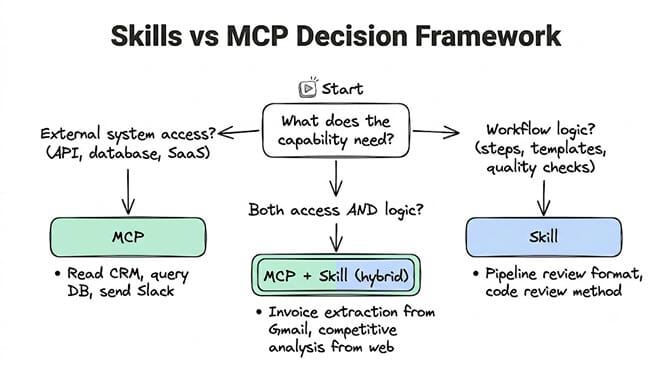
Here's how we'd choose, by the kind of tool the agent needs to reach.
| Tool type | Best fit | Why |
|---|---|---|
Local CLI tool (git, gh, docker, kubectl) | CLI, plus a skill if the workflow is specific | The model already knows the commands, auth is already on the machine, and pipes compose cheaply. Arize's eval found MCP several times more expensive on the hardest tasks of this kind. |
| Internal API (your own service, no public CLI) | MCP if several agents or people need it; a direct tool or a skill with a script if it's one agent | There's no training data to lean on. A typed MCP tool gives the model a schema instead of guesswork. For a single agent, a direct API tool is often simpler; see MCP vs direct API calls. |
| SaaS behind OAuth (CRM, ticketing, docs, email) | MCP | Someone has to sign in, tokens have to refresh, and the agent shouldn't hold raw credentials. This is what MCP's authorization flow is for. |
| Multi-step stateful workflow (create branch, commit, open PR) | MCP if the server's tools match the steps; skill if the steps need composing | Arize's branch-and-PR task went to MCP: eight calls and about 16 cents versus 22 calls and about 50 cents. When the server's operations line up with the task, structured calls win. |
| Customer-facing product (an agent your users connect their own accounts to) | MCP | Your users won't install a CLI or hand you a terminal. Remote servers, OAuth per user and no local process are the whole point. |
And across every row: if the agent needs to know how to do the work well (what to pull, how to format it, when to escalate), that's a skill, regardless of how it reaches the system.
How many MCP servers do you need?
Fewer than you think. Every server you connect adds its tools, and in most clients every tool you enable is described to the model on every message. More servers means more input tokens per run and more similar-looking tools for the model to choose between. Clients with deferred tool loading soften the token cost, but they don't remove the choice problem.
Our rule of thumb (advice, not a benchmark):
- Start with zero. If the tool has a good CLI the agent can already use, or a single API call does the job, you may not need a server at all.
- Add one server per remote system that needs it. OAuth, a proprietary API, or several agents sharing one connection are good reasons. "It exists" isn't.
- Enable only the tools the agent uses. A server with 40 tools where the agent needs 4 should have 36 switched off.
- If one agent needs more than a handful of servers, split the agent. A support agent and a reporting agent rarely need the same tools. Two focused agents are cheaper and easier to debug than one agent carrying everything.
- Review regularly. Disconnect servers no one has called in a while. Each one is also an attack surface.
Skills vs MCP: what each one actually does
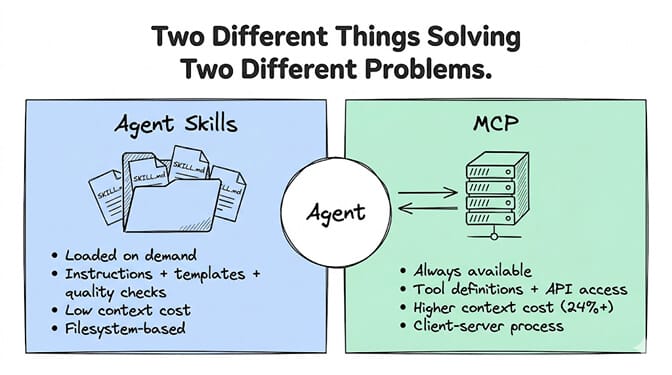
Even with the CLI in the picture, the original skills-vs-MCP distinction still holds. They solve different problems at different layers.
What skills are
Agent Skills are an open format, originally developed by Anthropic and now supported by Claude Code, OpenAI Codex, Gemini CLI, Cursor, GitHub Copilot and many other agents. A skill is a folder with a SKILL.md file (a name, a description and instructions), plus optional scripts, references and templates.
A skill for "weekly pipeline review" might say which CRM fields to pull, how to bucket deals (at risk, healthy, closing soon), what the output looks like, and what counts as done.
The design advantage is progressive disclosure. At startup the agent loads only each skill's name and description. The full instructions load only when a task matches. So you can keep dozens of skills on hand with a small context footprint.
One correction to how this is often described: skills aren't only prompts. They can bundle scripts that the agent runs. That's what makes "a skill that teaches the agent a CLI" work so well, and it's also why skills need reviewing before you install them.
What MCP is
MCP (Model Context Protocol) is an open protocol for connecting an agent to external tools and data. A server exposes tools (actions), resources (data) and prompts (templates), and any MCP client can use them. It solves the N x M problem: one server works with every compatible agent. (For how MCP sits next to agent-to-agent protocols, see A2A vs MCP vs ACP.)
MCP gives you access, not method. It tells the agent "here's how to reach Slack and what you can do there." It doesn't tell it "for a status update, pull from these three channels, summarize in this format, flag blockers."
The hybrid approach
Production agents usually use both.
A support triage agent:
- Access layer (MCP or connectors): read tickets from the help desk, look up the customer's tier in the CRM, post in Slack.
- Skill layer: "When a P1 ticket arrives, check the customer tier. Enterprise goes straight to the on-call channel. Everything else gets classified as billing, technical or feature request, gets a drafted reply from the right template, and gets flagged for a human if the sentiment is negative."
The access layer gives the agent hands. The skill gives it judgment. Without the first, it can't see the tickets. Without the second, it sees them and has no idea what to do.
The security trade-off
Every MCP server is a running service with network access and the ability to read and write external data. That's a wide attack surface, and the early-2026 CVE wave made it concrete. Tool poisoning means even a server's tool descriptions deserve scrutiny.
Skills have a narrower surface, but it isn't zero. A skill's instructions can steer the agent badly, and a skill that bundles scripts runs code. Treat a skill from an unknown author the way you'd treat any script you found online.
The practical rules are the same for both:
- Prefer servers and skills from authors you can identify.
- Read tool descriptions and skill files before enabling them.
- Give each agent only the servers and tools it needs.
- If a capability is just workflow logic, make it a skill and skip the server entirely.
How BetterClaw handles MCP
BetterClaw is a no-code AI agent platform, and on the MCP side it's an MCP client. You can attach any MCP server that's reachable over the web to an agent, and its tools appear next to your 500+ built-in connectors.
How it works, per our MCP page:
- Paste the URL. Open Connectors, choose "Add MCP server" and paste the server's URL. BetterClaw detects whether it uses Streamable HTTP or SSE.
- Sign in once. If the server uses OAuth, you sign in from the dashboard and BetterClaw handles the callback and token refresh, so nothing runs on your machine. Servers that use an API key take a header name and value instead, stored encrypted.
- Pick the tools. Every tool the server exposes is listed with a checkbox, and you choose which agents get the server. You can change both later without reconnecting.
There's no hard limit on the number of servers, but the same advice from above applies: every tool you enable is described to the model on each message, so enable only what each agent needs. MCP is available on paid plans, and MCP tool calls use credits the same way built-in tools do. Stdio servers, which run as a local process, aren't supported yet.
Skills sit alongside that. You configure agent behavior, output formats and escalation rules in the visual builder, so the "judgment" layer and the "access" layer live in one place. If you want both without deploying a server or managing SKILL.md files, that's what an AI agent builder like BetterClaw is for. Plans are on the pricing page, and if you're coming from a self-hosted setup, the migration guide walks through moving over.
So, is MCP dead?
No. "MCP is dead" is really "MCP was the wrong tool for local coding tasks," and the data mostly agrees with that narrower claim. For a well-known CLI on your own machine, a skill or the shell is cheaper and just as accurate.
For everything remote, everything behind OAuth and everything you ship to customers, MCP is still the standard, it's growing, and the 2026 spec makes it a better fit for exactly those jobs.
Use the CLI where the CLI is good. Use MCP where you need access. Use skills for judgment everywhere. Then keep the server list short.
Frequently Asked Questions
Is MCP dead?
No. MCP has about 97 million monthly SDK downloads (per SerpApi's June 2026 report), moved to the Agentic AI Foundation under the Linux Foundation in December 2025, and shipped a major stateless spec revision dated 2026-07-28. What's true is that MCP is the wrong tool for some jobs. For local, well-known CLIs like git and gh, skills and the command line are usually cheaper. For remote, OAuth-gated and customer-facing tools, MCP is still the right choice.
MCP vs skills: which uses fewer tokens?
Usually skills. Skills use progressive disclosure: only each skill's name and description load at startup, and the full instructions load when a task matches. In clients that load MCP tool definitions upfront, every enabled tool is described on every message. In Arize's eval on GitHub tasks, MCP cost more than six times what CLI skills cost on the hardest tasks, mostly because it made more tool calls with verbose JSON responses. MCP did win some tasks, such as creating a branch and opening a pull request, so it depends on the task.
Do I need an MCP server?
Only if your agent needs to reach a system that has no good CLI, needs OAuth, or has to be shared across several agents or users. If the tool is local and the model already knows its commands, the CLI or a skill is often enough. If a single direct API call does the job, see our guide to MCP vs direct API calls.
Is MCP secure?
It can be, but it needs active management. More than thirty MCP-related CVEs were filed in January and February 2026, including a remote-code-execution flaw rated 9.6 on the CVSS scale, and tool poisoning is a known attack. Use servers from authors you trust, read tool descriptions before enabling them, give each agent only the tools it needs, and remove servers you no longer use.
What is MCP vs CLI?
The CLI is the agent running ordinary command-line tools (git, gh, docker) in a shell, relying on what the model already knows about them. MCP is a protocol where a server exposes typed tools that any MCP client can call, with authorization built in. The CLI wins for local tools with lots of training data because commands compose cheaply. MCP wins for remote and proprietary systems, OAuth, and products where your users connect their own accounts.