You're sending the same system prompt, tool definitions, and context with every single request. That's 62% of your bill. Here's how to stop paying for it.
I checked our Anthropic bill last Tuesday. Our support agent was processing 200 conversations per day. Solid. Useful. Doing its job.
But when I looked at the token breakdown, something jumped out. 62% of our input tokens were identical across every single request. The same system prompt. The same tool definitions. The same base context. Sent 200 times a day. Processed from scratch every time.
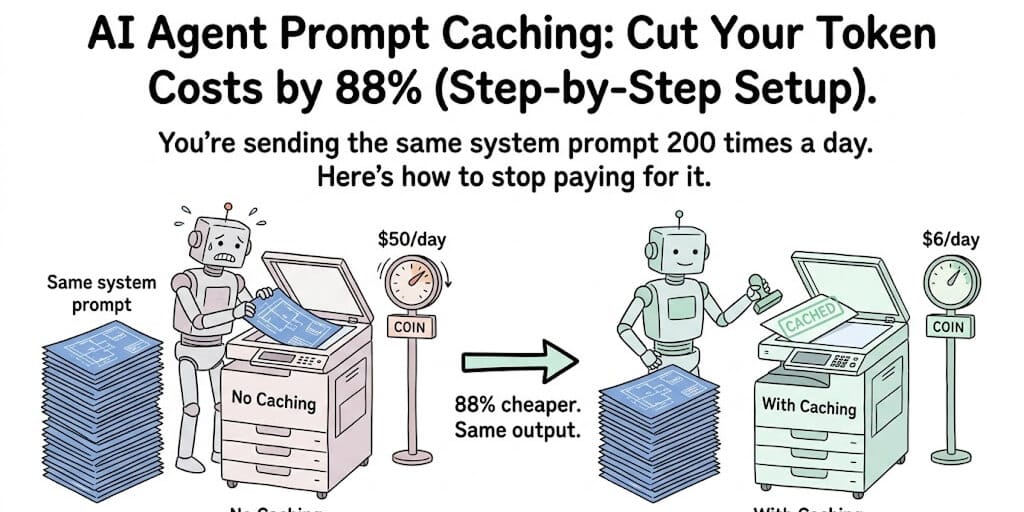
We were paying full price to read the same instructions 200 times a day. Like handing a contractor the same blueprint every morning and charging yourself for the printing.
That was a $50/day problem. After implementing AI agent prompt caching, it became a $6/day problem. Same agent. Same quality. Same responses. Eighty-eight percent cheaper.
Here's exactly how to set it up on every major provider.
Why agents waste more tokens than chatbots
A chatbot sends a system prompt and a user message. Maybe 2,000 tokens total. Caching barely matters.
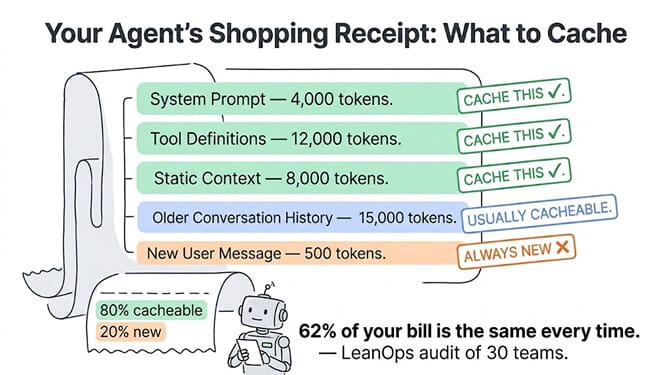
An agent sends a system prompt (2-5K tokens), tool definitions (5-15K tokens), conversation history (10-50K tokens), previous tool results (5-20K tokens), and the current user message (200-500 tokens). That's 22,000 to 90,000 tokens per request, and 80%+ of those tokens are repeated from the previous request.
LeanOps audited 30 engineering teams running AI agents in production between March and May 2026. Their finding: re-sent context accounts for 62% of the total agent bill. For enterprises running 5,000 agent loops per day, that's over $2,000 per day in wasted re-processing.
Prompt caching is the single highest-ROI cost optimization for AI agents in 2026. It cuts input costs by 50-90% with no quality change. If you're not using it, you're overpaying by at least 2x.
The discount is steeper on the budget tier than the headline percentages suggest. DeepSeek V4-Flash drops from $0.14 to $0.003 per million on a cache hit, roughly 47x, and Kimi K2.7 Code from $0.95 to $0.19. See cheapest AI models for agents for the published cache-hit rate on each.
How caching works on each provider
The concept is the same everywhere: the provider saves the processed state of tokens it's seen before and reuses that state on subsequent requests. You pay less for the cached portion because the provider isn't doing the work twice.
The implementation differs significantly.
Anthropic (Claude): 90% discount, explicit control
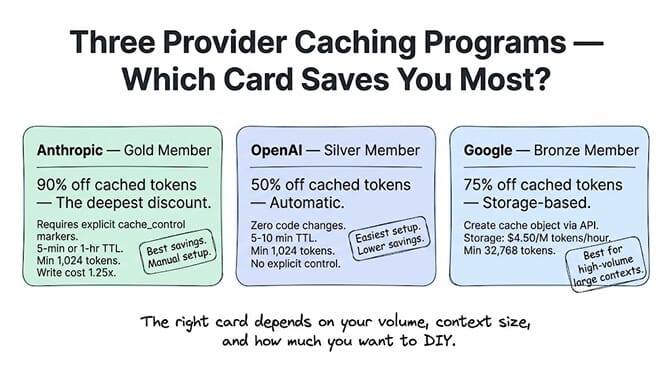
Anthropic gives you the deepest discount: cached input costs 10% of normal input price (90% off). But you have to opt in explicitly.
You add cache_control markers to your message content, telling Claude which blocks to cache. The cache has a 5-minute TTL by default (each request resets the timer) or a 1-hour TTL at a higher write cost.
Cache write cost: 1.25x the normal input rate for 5-minute cache. 2x for 1-hour cache. Minimum cacheable: 1,024 tokens.
In practice: a 15,000-token system prompt + tool definitions costs $0.045 to write to cache (at Claude Sonnet's $3/M rate). Every subsequent request reads those 15,000 tokens at $0.0045 instead of $0.045. The cache write pays for itself after the second request.
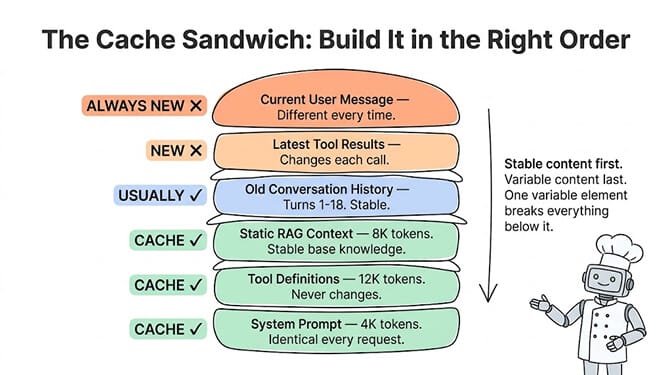
The key: order matters. Put stable content first, variable content last. System prompt first. Tool definitions second. Static context third. Conversation history fourth. New user message last. Anything placed after a variable element cannot be cached.
OpenAI (GPT): 50% discount, automatic
OpenAI handles caching automatically. No code changes. If the first 1,024+ tokens of your request match a recent request (within 5-10 minutes), the cached portion is billed at 50% of normal input rate.
Advantages: zero implementation effort. Your existing agent code already benefits if your prompts have stable prefixes.
Disadvantages: 50% discount is significantly less than Anthropic's 90%. You have no explicit control over what gets cached. And the auto-detection can "silently do nothing" if your prefix varies unexpectedly (like injecting a timestamp at the start of your system prompt).
Google (Gemini): 75% discount, storage-based
Google's context caching is different. You create an explicit cache object via API, store your context, and reference it in subsequent requests. Cached content costs 75% less on input.
The catch: Google charges $4.50 per million tokens per hour for cache storage. If your cached context is large and your requests are infrequent, the storage fee can offset the savings. Minimum cacheable: 32,768 tokens (much higher than Anthropic or OpenAI).
Best for: high-volume, large-context workloads where the storage cost is amortized across thousands of requests per hour.
What to cache (the priority order that maximizes hit rate)
Not everything in your agent's context is worth caching. And the order you place content directly affects your cache hit rate.
Always cache (highest priority):
Your system prompt. It's identical across every request. On a 4,000-token system prompt sent 1,000 times per day, caching on Anthropic saves $10.80/day ($0.012 per read vs $0.012 per full process, times 999 cached reads). On a busy agent, this alone saves $300+/month.
Your tool definitions. If your agent has 10 tools with JSON schemas, that's easily 8,000-15,000 tokens of definitions. Identical across every request. Cache them.
Cache when stable:
Common RAG context. If your agent pulls from a knowledge base and the same documents appear in 60%+ of requests, caching the retrieval results is worthwhile.
Older conversation history. Turns from earlier in the conversation don't change. In a 20-turn conversation, turns 1-18 are stable while turns 19-20 are new.
Never cache (always variable):
The current user message. This changes every request by definition.
Real-time data. Tool results from live API calls. Timestamps.
The golden rule of prompt caching: stable content first, variable content last. A single variable element in the wrong position invalidates everything after it in the cache.
The cost math (before and after)
Let's run the numbers on a real agent workload. An email triage agent processing 200 conversations per day on Claude Sonnet 4.6.
Per-request token breakdown (typical):
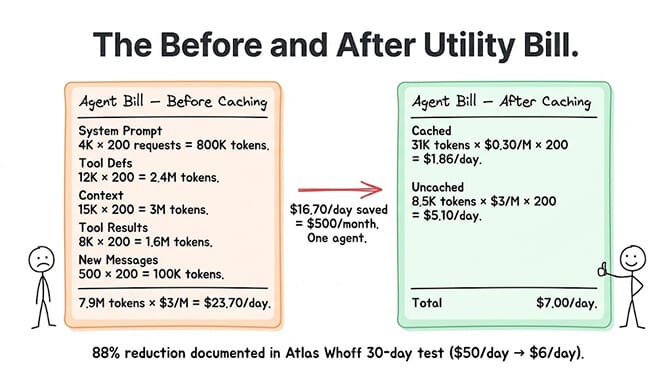
System prompt: 4,000 tokens. Tool definitions: 12,000 tokens. Conversation context: 15,000 tokens. Tool results: 8,000 tokens. New user message: 500 tokens.
Total input: 39,500 tokens per request. Average output: 2,000 tokens.
Without caching:
Daily input cost: 39,500 tokens x 200 requests x $3/M = $23.70/day
With Anthropic caching (90% off on 31,000 cacheable tokens):
Cached reads: 31,000 tokens x $0.30/M = $0.0093 per request. New tokens: 8,500 tokens x $3/M = $0.0255 per request. Total per request: ~$0.035. Daily input cost: $0.035 x 200 = $7.00/day.
Savings: $16.70/day = $500/month. On one agent.
The Atlas Whoff 30-day test showed even more dramatic results: caching reduced orchestration costs from $50/day to $6/day for agents with 200K-token contexts. That's 88% savings.
Scale this to 5 agents, 10 agents, 25 agents, and the savings become the difference between a viable product and an unsustainable one.
This is exactly the kind of optimization that managed agent platforms should handle for you. On BetterClaw, smart context management applies caching and compression automatically. You don't configure cache markers. You don't worry about TTL. You don't debug why your cache hit rate dropped. Free plan with 1 agent and 100 credits a month. $49/month on Pro. BYOK with zero markup.
The five gotchas that silently kill your cache savings
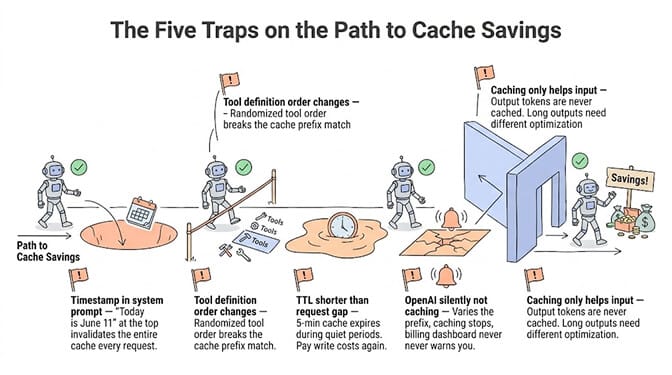
1. Timestamps in the system prompt
If you inject a timestamp or date at the start of your system prompt ("Today is June 11, 2026"), the entire cache invalidates on every request. Move timestamps to the end of the context or inject them as a separate message after the cached blocks.
2. Tool definition ordering changes
If your tool definitions arrive in a different order between requests (some frameworks randomize tool order), the cache prefix doesn't match. Pin your tool definition order explicitly.
3. TTL mismatches with request frequency
Anthropic's 5-minute cache expires if no request hits it within 5 minutes. If your agent handles bursty traffic (10 requests in 1 minute, then nothing for 10 minutes), you'll pay cache write costs repeatedly. Consider the 1-hour TTL for bursty workloads even though the write cost is higher.
4. OpenAI's silent non-caching
OpenAI caches automatically, which means it also doesn't cache automatically when your prefix varies. And it doesn't tell you. Check your billing dashboard for "cached tokens" vs "uncached tokens" to verify caching is actually working.
5. Caching only reduces input costs
Output tokens are never cached. If your agent generates long outputs (detailed reports, long emails), caching has minimal impact on that portion of the bill. For agents where output tokens dominate the bill, look at reducing output length through prompt engineering instead of caching.
The setup that takes 10 minutes
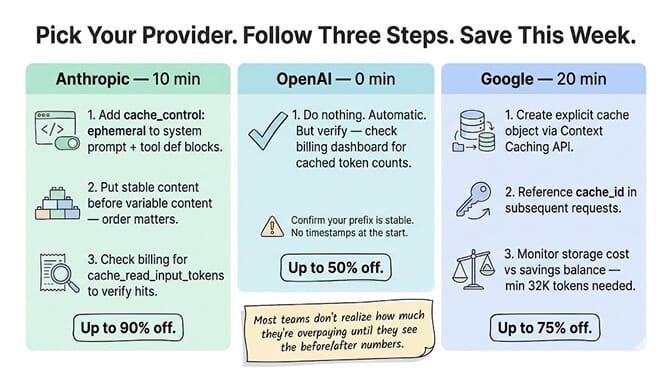
If you're using Claude (Anthropic), here's the quickest path:
Identify your system prompt and tool definitions. These are your cache candidates. Mark them with cache_control: {"type": "ephemeral"} in your API request. Keep them in the same order on every request. Put variable content (user message, latest tool results) after the cached blocks. Monitor your billing dashboard for cache_read_input_tokens to verify hits.
If you're using OpenAI, do nothing to your code. Just verify your system prompt is stable (no injected timestamps or randomized content) and check your billing for cached token counts.
If you're using Google Gemini, create an explicit cache object via the Context Caching API and reference it in subsequent requests. Best for workloads with 32K+ tokens of stable context and high request frequency.
The biggest insight from implementing caching across 50+ companies using BetterClaw: most teams don't realize how much they're overpaying until they see the before/after numbers. The system prompt alone, sent unchanged on every request, is often 10-20% of the total bill. Multiplied by thousands of requests, that's real money.
Give BetterClaw a look if you'd rather skip the caching configuration entirely. Smart context management handles caching, compression, and token optimization automatically. Free plan with 1 agent and 100 credits a month. $49/month for Pro. We handle the cost optimization. You handle the agent logic.
Frequently Asked Questions
What is AI agent prompt caching?
Prompt caching stores the processed state of repeated token sequences (system prompts, tool definitions, common context) so the LLM provider doesn't recompute them on every request. For AI agents that send 80%+ identical context with each request, this reduces input token costs by 50-90% depending on provider. Anthropic offers a 90% discount on cached tokens, OpenAI offers 50% (automatic), and Google offers 75% with storage-based pricing.
How does Anthropic's prompt caching compare to OpenAI's?
Anthropic offers deeper savings (90% vs 50%) but requires explicit implementation. You add cache_control markers to your messages and manage TTL (5-minute or 1-hour). OpenAI caches automatically for any stable prefix over 1,024 tokens with zero code changes, but the discount is smaller and you have no control over what gets cached. For agents with stable, structured prompts, Anthropic's explicit caching typically delivers 2x more savings than OpenAI's automatic approach.
How do I implement prompt caching for my AI agent?
For Anthropic: add cache_control: {"type": "ephemeral"} to your system prompt and tool definition blocks in the API request. Keep stable content first, variable content last. For OpenAI: ensure your system prompt is stable (no timestamps, no randomized elements) and verify cached tokens in your billing dashboard. For Google: create a cache object via the Context Caching API for 32K+ token contexts. Total setup time: 10-30 minutes per provider.
How much does prompt caching save on AI agent costs?
For a typical agent sending 35-40K tokens per request (80% stable), Anthropic caching reduces daily input costs by 70-88%. In a documented 30-day test, caching reduced orchestration costs from $50/day to $6/day for 200K-token contexts. Monthly savings range from $300 (single agent, 200 conversations/day) to $60,000+ (enterprise with 5,000 agent loops/day). The exact savings depend on cache hit rate, request frequency, and what percentage of tokens are stable.
Does prompt caching affect response quality?
No. Cached tokens are processed identically to fresh tokens from the model's perspective. The provider is reusing a computed state, not a stored response. The model still processes the full context, generates fresh reasoning, and produces a new response. Output quality is unchanged. The savings come from computational reuse on the provider's infrastructure, not from shortcuts in the model's processing.