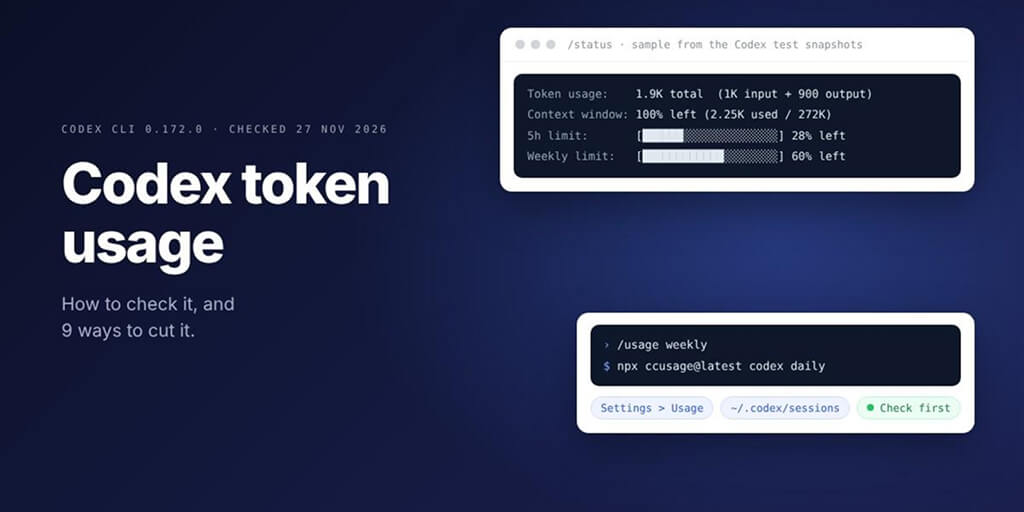
To see Codex token usage, type /status in the CLI for context left and your limits, /usage weekly for token activity, or open Settings > Usage in ChatGPT; session logs sit in ~/.codex/sessions. To use fewer tokens, keep AGENTS.md small (32 KiB cap), lower model_reasoning_effort, start new chats, compact long ones and filter build output. Checked on Codex CLI 0.172.0.
| If you see this | Do this |
|---|---|
| Context fills up mid-task | /compact, or /new for the next task |
| Every chat starts heavy | Trim ~/.codex/AGENTS.md |
| Small tasks eat your allowance | Lower reasoning; leave /fast off |
| Build logs flood the chat | rtk init -g --codex; xcsift for Xcode |
/status and the usage page disagree | Rerun /status after a message; trust the usage page |
Picture this: you ask Codex to fix one failing test. It reads the suite, runs it twice and changes nine lines. Then /status says a third of your five-hour window is gone.
Nine lines. Where did it all go?
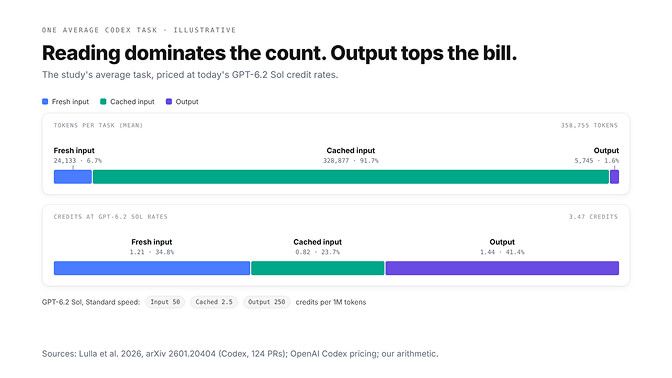
Into reading, mostly. A January 2026 study ran Codex on 124 real pull requests, and the average task read about 353,000 input tokens to write 5,700 output tokens (Lulla and colleagues, arXiv 2601.20404).
This is the Codex chapter of our roundup of skills and plugins that reduce token usage, and it starts with checking: you can't cut what you can't see.
How to see Codex token usage (CLI, IDE and app)
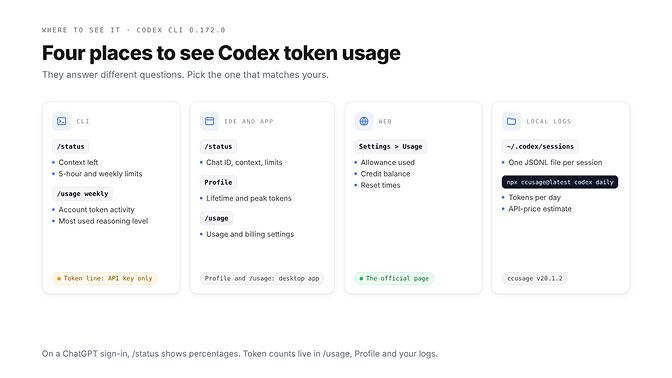
Four places, and each answers a different question.
In the CLI: /status and /usage
OpenAI's CLI reference describes /status as: "Display session configuration and token usage. Confirm the active model, approval policy, writable roots, and remaining context capacity." In 0.172.0 the card also shows your 5-hour and weekly limits as percent left, with reset times.
One catch the reference skips: on a ChatGPT sign-in, the 0.172.0 card hides its "Token usage" line, so you get context and limits but no token total (API-key sessions still see it).
For totals, /usage daily, /usage weekly or /usage cumulative will "Inspect daily, weekly, or cumulative ChatGPT token activity from inside the TUI": lifetime and peak tokens, Fast mode use and your most used reasoning level. It needs a ChatGPT sign-in.
/statusline pins context, limits or token counters to the footer.
In the IDE extension and desktop app
In the VS Code extension and the desktop app, /status shows "the chat ID, context usage, and rate limits". The app adds Profile, with lifetime tokens, peak tokens and token activity, and /usage, which opens usage and billing settings on a ChatGPT sign-in.
On the web dashboard
OpenAI's Help Center gives the official route: "open Settings or your usage dashboard. Check which allowance is exhausted, your credit balance, and any reset time shown." In ChatGPT that's Settings > Usage, the page the CLI's /status card links as chatgpt.com/settings/usage.
From local logs
OpenAI's troubleshooting docs put session transcripts in $CODEX_HOME/sessions (default ~/.codex/sessions) and archived ones in ~/.codex/archived_sessions, as JSONL. In scripts, codex exec --json reports input, cached, output and reasoning tokens for each finished turn.
The quickest reader is ccusage (v20.1.2, 25 November 2026):
npx ccusage@latest codex daily # also: weekly, monthly, session
Its docs call Codex support "experimental" and the cost column an API-price estimate, "not a ChatGPT credit balance". The older npx @ccusage/codex@latest now runs a deprecated package that tells you to use npx ccusage.
history.persistence and history.max_bytes don't help here: they only manage Codex's local history file, not what the model reads.
Why the quota and the dashboard disagree
Windows and resets are in our guide to Codex usage limits by plan. OpenAI hasn't documented why the numbers differ, so here is only what it says: "Usage depends on the model, where the task runs, task complexity, context, reasoning, speed, and tools."
On plans with shared allowances, Codex draws on "a shared allowance and credit pool" with ChatGPT Work, ChatGPT for Excel and Workspace Agents, and auto-review safety checks are free on a ChatGPT sign-in. The Help Center also separates "Codex Local", which "covers the CLI, IDE extension, and desktop workflows", from Codex Cloud for "delegated cloud tasks".
ccusage counts only the session files on your machine, so ChatGPT Work and the rest of that pool never show up in it.
The /status card itself points to the usage page "for up-to-date information on rate limits and credits" and flags its limits as possibly stale after 15 minutes. If the gap looks like a counting error, the Help Center says to "contact Support so we can investigate."
A percentage of a window and a raw token count are different units. Use the usage page for the meter, and
/usageor your logs for the tokens.
Why Codex burns tokens
Five causes, from OpenAI's docs and the 0.172.0 source. They stack.
History is re-sent on every turn. Each call carries the chat so far, every file opened and log printed included, and every enabled MCP server, OpenAI says, "adds more context to your messages" (see our MCP vs skills breakdown). About 93% of the study's average input was cache hits, yet output took about 41% of the credits at GPT-6.2 Sol rates: 250 credits per million tokens against 2.5 for cached input (our arithmetic, illustrative).
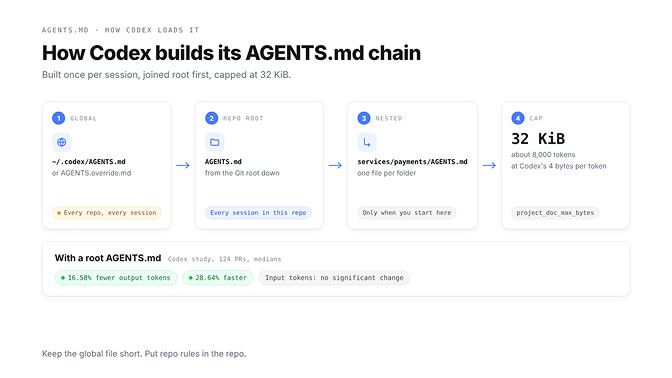
The AGENTS.md chain rides along. Built once per session, it sits in every turn's context: up to 32 KiB by default, about 8,000 tokens at Codex's estimate of 4 bytes per token.
Reasoning adds hidden output. In OpenAI's words: "Higher reasoning effort increases response time and token usage, but it can improve quality for complex work."
Tool and command output piles up. OpenAI documents tool_output_token_limit ("Token budget for storing individual tool/function outputs in history") without publishing its default, and the 0.172.0 source trims long outputs from the middle.
Subagents copy the parent. If you don't set a subagent model or effort, OpenAI's docs say "the subagent inherits the parent agent's model and reasoning effort", and subagent workflows "consume more tokens than comparable single-agent runs".
What happened in June 2026: Business Insider reported on 30 June that some users hit Codex limits "faster than normal" and that OpenAI set up a Sunday "warroom". Codex engineering lead Thibault Sottiaux said auto-review and subagents sometimes ran more often than they should, and the dashboard showed activity that hadn't been charged. OpenAI deployed fixes and "fully reset" usage limits for all users.
AGENTS.md hygiene: global vs per-repo
OpenAI's AGENTS.md guide sets the order, and Codex builds the chain "once per run; in the TUI this usually means once per launched session":
- Global: in your Codex home (
~/.codexunless you setCODEX_HOME), "Codex reads AGENTS.override.md if it exists. Otherwise, Codex reads AGENTS.md", using "only the first non-empty file". - Project: from the project root, "typically the Git root", down to your current directory; "Codex includes at most one file per directory."
- Merge: "Codex concatenates files from the root down", so the file closest to you comes last and wins.
- Cap: Codex "stops adding files once the combined size reaches the limit defined by
project_doc_max_bytes(32 KiB by default)."
| File | Loads | Put in it |
|---|---|---|
~/.codex/AGENTS.md | Every session, in every repo | A few universal habits |
Repo root AGENTS.md | Every session in that repo | Build, test and lint commands; what done means |
services/payments/AGENTS.md | Only when you start Codex at or below that folder | Rules for that one service |
The global file is the expensive one, because it rides along in every repo. At the cap, OpenAI says to "Raise the limit or split instructions across nested directories"; split, since a bigger cap means more context on every turn, and list any other file name in project_doc_fallback_filenames.
Your global AGENTS.md is charged to every chat in every repo. Keep only the rules you'd want enforced in all of them.
Don't delete it, though: in the Codex study, a root AGENTS.md cut median output tokens by 16.58% and runtime by 28.64%, with no significant change in input. To see which files loaded, read the Agents.md line in /status or run OpenAI's audit command:
codex --cd subdir --ask-for-approval never "Show which instruction files are active."
For what to put in the file, our AGENTS.md best practices guide has a commands-first template.
Reasoning effort, model_verbosity and plan mode
These decide how much Codex thinks and writes per turn, and output is the priciest token on the rate card. Their defaults live in ~/.codex/config.toml, shared by the CLI, IDE extension and desktop app.
model_reasoning_effort
The config reference lists levels "such as low, medium, high, xhigh, max, or ultra. Available levels depend on the model and client." The 0.172.0 catalog starts GPT-6.2 Sol and Astra at low, so the waste comes from raising effort for one hard bug and never lowering it. Switch with /model --reasoning=low (/reasoning in the IDE and app) and check your habit in /usage.
model_verbosity and hide_agent_reasoning
model_verbosity is an "Optional GPT-5 Responses API verbosity override; when unset, the selected model/preset default is used." The same catalog already sets low verbosity on every model in the picker, so setting it pins a default rather than adding a saving.
hide_agent_reasoning is the common mistake: it will "Suppress reasoning events in both the TUI and codex exec output", hiding reasoning from you without making the model reason less. It saves no tokens.
Plan mode and Fast mode
/plan asks Codex "to propose an execution plan before implementation work starts." OpenAI publishes no token figure for it, and it isn't free: the 0.172.0 source runs the Plan preset at medium reasoning (plan_mode_reasoning_effort changes that) and tells the model to explore the repo first.
It pays off when it stops a wrong build, and most at the hand-off: choose "Yes, clear context and implement" and the build starts in a fresh chat with only the plan.
/fast buys speed, not savings: OpenAI's pricing page says Fast uses included usage at twice the Standard rate on GPT-6.2 models. A lean default:
# ~/.codex/config.toml
model_reasoning_effort = "low"          # raise per task: /model --reasoning=high
plan_mode_reasoning_effort = "medium"   # the built-in Plan default, made explicit
model_verbosity = "low"                 # already the default on every listed model
Compaction: /compact, /new and the auto settings
/compact will "Summarize the visible chat to free tokens", /new will "Reset the chat context without leaving the CLI", and /clear does the same after clearing the terminal. /recap writes a summary for you and frees nothing: "Use /compact when you want to free context space."
If Codex repeatedly shows "Context automatically compacted" without making progress, the Help Center says to "stop the affected task and start a new Codex chat with a short summary of your goal and the work already completed." A new chat "does not reset your usage limits", though.
| Key | What OpenAI's config reference says |
|---|---|
model_context_window | "Context window tokens available to the active model." |
model_auto_compact_token_limit | "Token threshold that triggers automatic history compaction (unset uses model defaults)." |
model_auto_compact_token_limit_scope | total (default) or body_after_prefix, which counts "only growth after the carried compaction-window prefix". |
model_post_turn_compact_threshold_percent | Compacts "after a final response when active context reaches this percentage of the usable context window"; omit or set 0 to turn it off. |
compact_prompt | "Inline override for the history compaction prompt." |
OpenAI doesn't publish the default numbers. For long chats, a lower model_auto_compact_token_limit compacts sooner, and the PreCompact and PostCompact hooks run your own script around each compaction.
One catch from the 0.172.0 source: with OpenAI as the provider, compaction runs remotely, and compact_prompt is only read when Codex compacts locally, so there it has no effect.
Running Claude Code too? Our guide to reducing Claude Code token usage covers its version of these settings.
Filter command output: RTK and xcsift
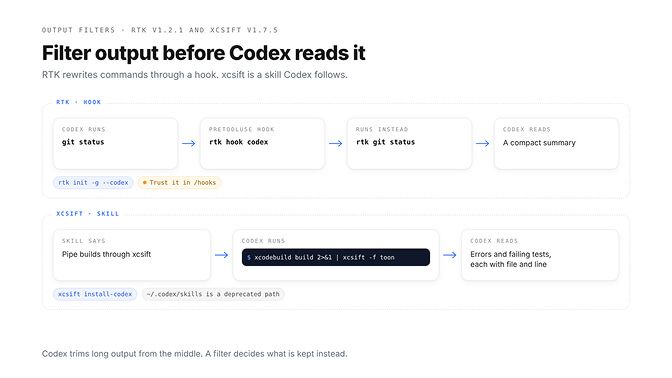
A failing build lands in history and stays until the chat compacts. The built-in fix is a lower tool_output_token_limit, or per MCP tool mcp_servers.<id>.tools.<tool>.output_token_limit; two tools go further and filter before Codex sees anything.
RTK: rtk init -g --codex
RTK (rtk-ai/rtk, v1.2.1, 19 November 2026) rewrites common commands so they print compact output: git status becomes rtk git status, and a test run shows failures instead of every pass.
brew install rtk       # or: winget install rtk-ai.rtk
rtk init -g --codex    # global hook in $CODEX_HOME/hooks.json (default ~/.codex)
Restart Codex and trust the hook in /hooks; Codex skips new hooks until you do. In Codex, RTK only rewrites commands before they run, and its notes warn that Codex's safety classifier may ask approval for safe wrapped commands.
RTK claims "up to 90% less command output" (author-claimed), with its own caveat: "a 90% cut in command output is not a 90% cut in cost." Quesma's independent test of RTK 0.45.0 (on Claude Code and OpenCode, not Codex) found costs fell 5% on one agent and rose 5% on the other, so judge it by /usage; rtk gain is RTK's own estimate.
xcsift for Xcode builds
xcsift (ldomaradzki/xcsift, v1.7.5, 11 November 2026, MIT licence) "transforms verbose Xcode build output into concise, structured formats that coding agents and LLMs can efficiently parse and act upon." Its TOON format claims "30-60% fewer tokens" than its default JSON (author-claimed).
brew install xcsift
xcsift install-codex                     # writes ~/.codex/skills/xcsift/SKILL.md
xcodebuild build 2>&1 | xcsift -f toon   # the form the skill tells Codex to use
It's a skill, not a hook, so it works when the model follows it. Codex 0.172.0 still reads ~/.codex/skills but marks that folder deprecated (OpenAI's docs list ~/.agents/skills). RTK also filters xcodebuild, so pick one tool per command.
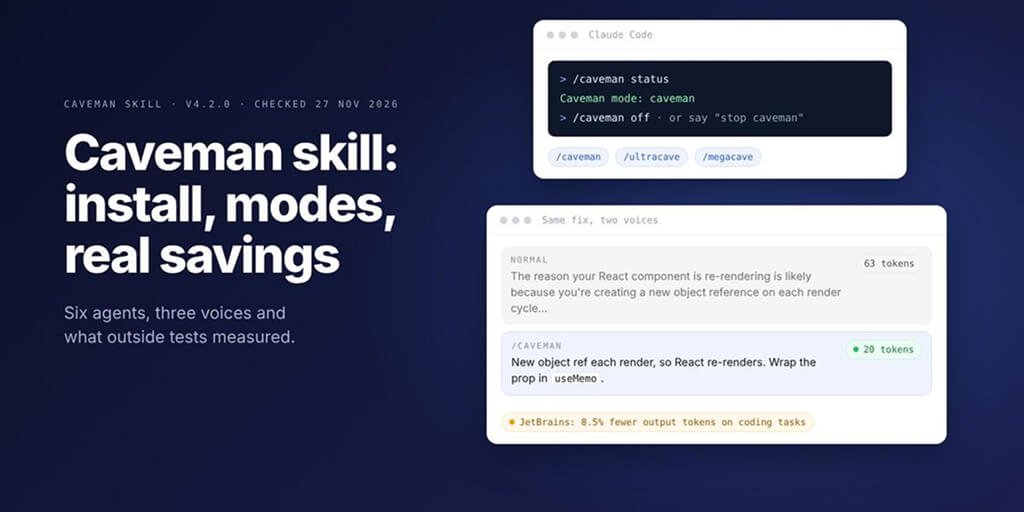
For shorter replies rather than shorter logs, Caveman runs in Codex too ($caveman); see our Caveman skill guide.
9 fixes for Codex token usage, ranked
The whole post in one table, biggest cut first, in our judgement.
| # | Fix | How |
|---|---|---|
| 1 | One chat per task | /new or /clear when the task changes; history is re-sent every turn. |
| 2 | Lower reasoning for routine edits | /model --reasoning=low (CLI) or /reasoning (IDE, app); raise it for hard tasks only. |
| 3 | Trim AGENTS.md | Universal rules global, repo rules in the repo; split by folder, don't raise the cap. |
| 4 | Switch off idle MCP servers | Check /mcp, then enabled = false or an enabled_tools allow list. |
| 5 | Compact before long runs | /compact, or model_post_turn_compact_threshold_percent. |
| 6 | Filter command output | RTK, xcsift for Xcode, or a lower tool_output_token_limit. |
| 7 | Attach less | "Provide only relevant files", as OpenAI's pricing page puts it. |
| 8 | Plan, then hand off clean | /plan, then "Yes, clear context and implement". |
| 9 | Pin model_verbosity | model_verbosity = "low", already the default on current models. |
The cheapest token is the one Codex never has to read again. Check first, cut second, and let /usage tell you whether it worked.
Keep your always-on jobs off your Codex allowance
Codex is at its best on code, with you watching. Recurring jobs like a morning report, inbox triage or a weekly digest don't need your coding allowance.
That's what BetterClaw is for: a managed agent platform where those jobs run on a schedule, connected to 500+ apps. The free plan gives you 1 agent, 100 credits a month and 3 connectors, with no expiry. Start free
Need more runs than that? Starter is $19 a month with 2,000 credits. See plans and pricing
Frequently Asked Questions
How do you see your Codex token usage?
Type /usage weekly (or daily, cumulative) in the Codex CLI for token activity and /status for context and limits. The desktop app shows lifetime and peak tokens under Profile, ChatGPT shows limits under Settings > Usage, and npx ccusage@latest codex daily totals your local logs.
Where can I find the official Codex usage page?
In ChatGPT, open Settings > Usage (chatgpt.com/settings/usage), the page the Codex CLI's /status card links to. OpenAI's Help Center article "Using Codex with your ChatGPT plan" says to check there which allowance is exhausted, your credit balance and any reset time.
How does Codex token usage work?
Each call re-sends the chat so far, and the model adds output and hidden reasoning. OpenAI says usage depends on the model, where the task runs, task complexity, context, reasoning, speed and tools; on a ChatGPT plan it counts against 5-hour and weekly windows, pooled with ChatGPT Work on plans with shared allowances.
Why is Codex using so many tokens suddenly?
Usually a long chat, higher reasoning, a growing AGENTS.md, more MCP servers or subagents. In late June 2026 it was OpenAI's side: Business Insider reported that auto-review and subagents sometimes ran more often than they should, and OpenAI deployed fixes and reset limits for all users.
Does plan mode use more tokens?
It can, up front: in the 0.172.0 source, plan mode explores the repo first and runs at medium reasoning. OpenAI publishes no token figure, and it pays off when it prevents a wrong build, most of all if you pick "Yes, clear context and implement".
Does Codex or Claude Code use fewer tokens?
We know of no independent, current benchmark that runs both on the same tasks. Run the same task in each and compare their own usage views; our Codex vs Claude Code comparison covers plans and limits.