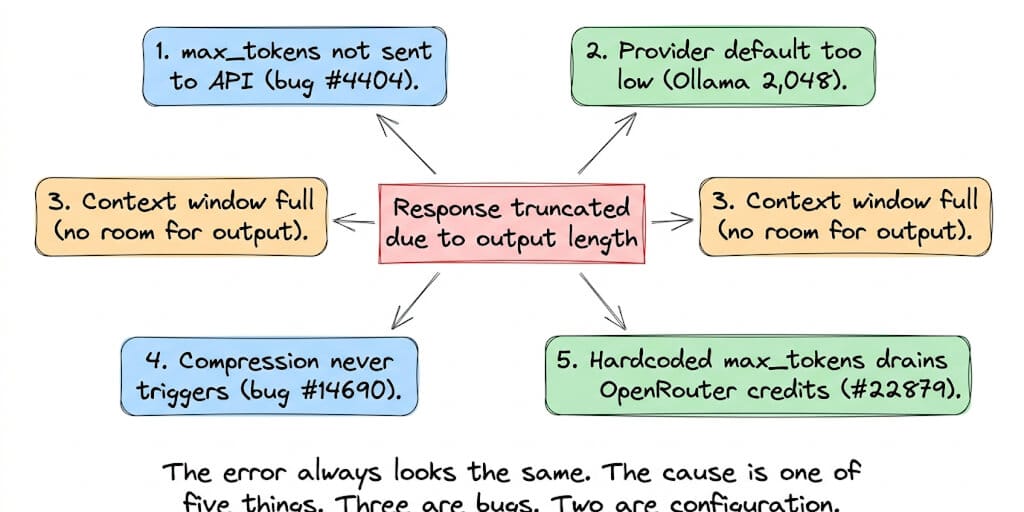
The agent starts generating. Mid-sentence, it stops. Response truncated (finish_reason='length'): the model hit its output ceiling. The output is useless and the conversation is broken. Below are five causes from real GitHub issues and the Hermes docs, with a fix for each. If you want to paste your exact error string and see what it means first, try our response-truncated error decoder.
This is the same error whether you see it as finish_reason='length', "response truncated due to output length limit," or "model hit max output tokens." Hermes and the underlying provider just phrase it differently.
Updated September 28, 2026 for Hermes v0.21.5. A lot changed since the May version of this post. The biggest change: the max_tokens workaround everyone copied no longer exists. The Hermes provider docs now say: "Hermes no longer reads model.max_tokens, HERMES_MAX_TOKENS, provider output-cap settings, or model_overrides.*.*.max_output_tokens. Remove these legacy settings." That change first appears in the v0.21.1 docs (September 7, 2026). Two of the old causes are fixed:
- The compression math bug (#14690) was fixed by PR #49998 (merged June 21, 2026, shipped in v0.18.0). When the 64K floor would meet the window, auto-compression now triggers at 85% of it.
- Network drops misreported as truncation (#26425) were fixed by PR #36705 (merged June 1, 2026, shipped in v0.16.0).
If you are on anything older than v0.21.5, run hermes update first.
A Chinese user posted on X during Labor Day weekend: "My Hermes keeps throwing 'Response truncated due to output length limit.' I've given up on it. Let it starve."
That's the vibe. The error is maddening because it looks like a simple limit you should be able to raise. On current Hermes you can, just not from Hermes. GitHub issue #7237 documents the core complaint: "This truncates the output mid-stream, breaks the conversation flow, and prevents users from receiving complete, usable answers."
Here are the five causes, ranked by how often they're the actual problem on current builds.
Cause 1: Your model server's output default is too low
What happens: Hermes does not send its own output cap on OpenAI-compatible endpoints. The docs say custom endpoints "receive no automatic catalog-sized output cap. Their server defaults apply; these can be lower than the model maximum." When the server's default is small, every long reply stops at that default.
This is by design. When issue #4404 ("model.max_tokens in config.yaml has no effect") was closed, a maintainer explained that Hermes deliberately leaves max_tokens out so the inference server can use its full budget: "let the inference server use its full output budget unless Hermes has a specific per-provider reason to cap it." Native Anthropic Messages is the exception, because that API requires max_tokens, so Hermes supplies an internal value there.
The fix: Raise the limit on the server, not in Hermes:
- SGLang:
--default-max-tokens. The Hermes docs warn that SGLang's default is only 128 tokens per response. - llama.cpp (
llama-server):--n-predict. The default is -1, which means no cap, so check that nothing lowered it. - vLLM: the output default follows
--max-model-len, which leaves whatever room the prompt did not use. - Ollama: see Cause 2.
Delete the legacy settings. If model.max_tokens is still in ~/.hermes/config.yaml or HERMES_MAX_TOKENS is still in ~/.hermes/.env, remove them. They're ignored, and leaving them there makes you think you have a limit set. If you run Hermes in a container, that .env lives in the host folder you mounted at /opt/data. Our Hermes Docker installation guide covers where the container reads its config from.
One confusing message. When a truncated tool call gives up, Hermes v0.21.5 still ends with "Send continue, ask for the work in smaller steps, or raise max_tokens for this model." Read "raise max_tokens" as "raise the server-side output limit." No Hermes setting does it any more.
Cause 2: Ollama's context window is too small
What happens with Ollama: Ollama's context default now depends on VRAM. Per Ollama's docs it is 4K below 24 GiB of VRAM, 32K between 24 and 48 GiB, and 256K at 48 GiB and above. Hermes needs at least 64,000 tokens for agent use with tools. On a typical consumer GPU, the 4K default leaves almost no room for output once the system prompt and tool schemas are loaded.
The fix for Ollama: Raise the context on the server. The Hermes docs recommend any one of these:
# Server-wide (recommended)
OLLAMA_CONTEXT_LENGTH=64000 ollama serve

# Or bake it into a model
echo -e "FROM qwen2.5-coder:32b\nPARAMETER num_ctx 64000" > Modelfile
ollama create qwen2.5-coder-64k -f Modelfile
You cannot set Ollama's context through the OpenAI-compatible /v1/chat/completions API. It has to be set on the server or in a Modelfile. Check what you're actually getting with ollama ps (the CONTEXT column).
Watch num_predict too. Ollama's own default is -1 (no cap). If an old Modelfile sets it low, for example the num_predict 1024 we suggested in an earlier version of this post, every reply stops there. Remove it or raise it.
Cause 3: Context window full (no room left for output)
Here's where most people get it wrong.
The context window is shared between input and output. If your model has a 64K window and your history, system prompt and tool definitions use 60K tokens, only 4K remain for the response. The model starts generating, hits the ceiling at 4K, and truncates.
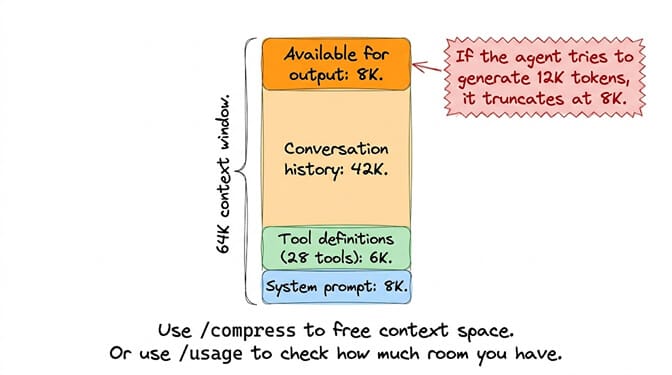
Current Hermes reports this case separately. Since v0.21.2, "length continuation stops when the prompt filled the window" (#106571). Instead of burning four continuation attempts, you get:
⚠️ Context window full. The prompt used 61,000 of this model's 64,000-token context window, leaving no room to answer in. This is a context-window limit, not an output-length limit.
The fix: Run /usage or /context to see how much context is used. Then run /compress to summarize the history and free space. /compress here 2 keeps the last two exchanges verbatim and summarizes the rest. Or start a fresh session with /new. (hermes chat --new from earlier versions of this post is not a real flag.) For local models, raise the server's context as described in Cause 2.
Cause 4: A reasoning model spent the whole budget thinking
What happens: Reasoning models write their thinking out of the same output budget. If the thinking fills it, you get a truncation with no answer. When every continuation fails this way, Hermes v0.21.5 ends the turn with:
⚠️ No visible answer was produced. The model hit its output-token limit on every continuation attempt — its reasoning consumed the entire budget each time.
Hermes already switches reasoning off for the continuation after a thinking-only truncation, but it can't make the first attempt fit.
The fix: Lower reasoning effort with /reasoning low or /reasoning none, and add --global to keep it. Or pick a non-reasoning or larger-output model for that task. When #4404 was closed, the maintainer gave the same advice: "the correct remediation for reasoning exhaustion is lowering reasoning effort or switching to a larger/non-reasoning model, not increasing an output cap."
Cause 5: The stream dropped mid-reply (older builds) or OpenRouter pre-reserved credits
Stream drops. Before v0.16.0, a stream that died mid-response was turned into a synthetic finish_reason="length". Hermes then reported "Response truncated due to output length limit" even on models that never hit a cap (issue #26425). PR #36705 fixed it. A network stall now shows Stream interrupted mid tool-call — retrying (n/4) and is kept separate from a real truncation. If you still see the old wording, you are on an old build. Update.
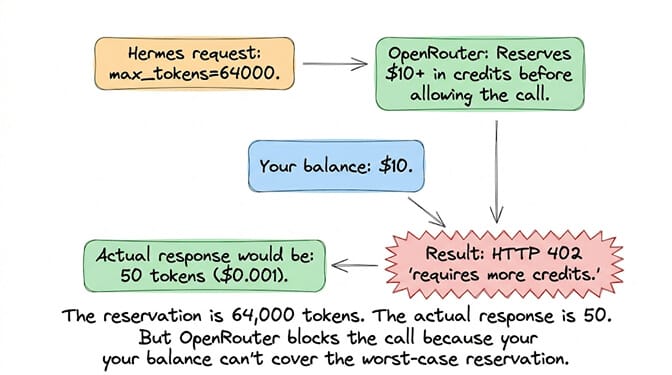
OpenRouter credits. Issue #22879 reported Hermes sending each model's maximum output (64,000 for Claude 4.5 models) to OpenRouter. OpenRouter reserves credits for the full max_tokens before the call. On a low balance you then get HTTP 402 ("requires more credits, or fewer max_tokens") and no reply at all. The issue was closed on the grounds that model.max_tokens could cap it, but v0.21.1 removed that setting. If you hit the 402 on a current build, add credits or use the provider directly. (If the reservation turns into a 400 instead, our Hermes Agent error 400 guide covers the credit and payload causes.)
"Response Remained Truncated After 4 Continuation Attempts"
If you see Response remained truncated after 4 continuation attempts (older builds said 3), this is the follow-up error, not a separate problem. When a text reply hits the output limit, Hermes asks the model to continue where it stopped, up to four times in v0.21.5. If every attempt hits the same ceiling, Hermes gives up. It keeps whatever partial text it got and prints Response still truncated after 4 continuation attempts — keeping the partial response received so far. The number only tells you how many continuations were tried.
The underlying cause is one of the five above: the model keeps running out of room. The retries fail because they hit the same server limit (Cause 1 or 2), or because each attempt adds partial output back into the context (Cause 3).
The fix: Don't chase the "continuation attempts" message. Fix the root limit: raise the server's output or context setting (Causes 1 and 2), run /compress (Cause 3), or lower /reasoning (Cause 4). Once the per-call ceiling is right, the first attempt completes and the message goes away.
What Response truncated (finish_reason='length') and its variants mean
Hermes, your model and your provider all describe this failure differently. If you searched any of the strings below, you're in the right place:
response truncated (finish_reason='length'): the raw provider signal. The model hit an output ceiling. Start with Causes 1 and 2.response truncated due to output length limit: Hermes's older wrapper for the same signal. Before v0.16.0 it also appeared on dropped streams (Cause 5), so update first.The model's reply was cut off before it finished (it hit its output length limit): the v0.21 wording when a truncated tool call is abandoned. Hermes did not run the incomplete action. Causes 1 to 4.max_tokens=none truncation requested:max_tokenswasn't sent. On current Hermes that's intentional (Cause 1). Raise the server default. Don't look for a Hermes setting.response remained truncated after 3 continuation attempts(nowafter 4 continuation attempts): the retry-exhausted follow-up covered above. Quick lookup: continuation-attempts decoder entry.Context window full: the prompt filled the window (Cause 3).No visible answer was produced: reasoning used the whole budget (Cause 4).
Pi agent: "Response was truncated before completion."
Pi is a different tool: the open-source terminal coding agent from the earendil-works/pi repository (formerly badlogic/pi-mono), installed from npm as @earendil-works/pi-coding-agent (0.87.1 at the time of writing). People search both errors together, so here is how Pi's version works, taken from its source and changelog.
What it means: Pi prints Response was truncated before completion. under an assistant message whenever the provider stopped with a length reason: finish_reason: "length" on OpenAI-compatible APIs, or the output-token stop on Anthropic, Google, Bedrock and Mistral. As with Hermes, the model ran out of output room. Pi shows the message even when the cut-off content was a half-written tool call.
What Pi already does about it: Since Pi 0.84.0 (August 6, 2026), a response that stops on length below the model's intended output limit is treated as context pressure or provider-side truncation. Pi compacts the session and retries once (PR #7540). If that retry also fails, you get Truncated response recovery failed after one compact-and-retry attempt. Pi 0.84.3 fixed a case where this was mislabelled as context overflow (#8130).
The fixes:
- Set the model's real output limit. Pi sends the model's
maxTokenswith the request. For any model you add yourself in~/.pi/agent/models.json, that defaults to 16,384 if you don't set it, and the context window defaults to 128,000. Long file writes can exceed 16K. Set both explicitly, either on the model entry or throughmodelOverridesfor a built-in model:{ "providers": { "ollama": { "baseUrl": "http://localhost:11434/v1", "api": "openai-completions", "apiKey": "ollama", "models": [ { "id": "qwen2.5-coder:32b", "contextWindow": 64000, "maxTokens": 32768 } ] } } }
Opening/modelreloads the file. - Free context. Run
/compact(optionally with instructions), or/newfor a fresh session. - Lower thinking. On Anthropic models Pi fits the thinking budget inside the same
maxTokens(the budget is capped atmaxTokensminus 1,024), so a high/thinkinglevel leaves less room for the answer. - Raise the server's context for local models. The Ollama advice in Cause 2 applies to Pi too. Pi can't set Ollama's context through the OpenAI-compatible API either.
On Bedrock, Pi 0.75.5 started sending the model's output cap by default, which avoids Bedrock's 4,096-token default truncation (#4848). If you're on an older Pi, update with pi update --self.
The diagnostic checklist
Truncation that survives all four steps below is usually a context or gateway problem rather than a token limit. The full list of Hermes Agent errors covers both.
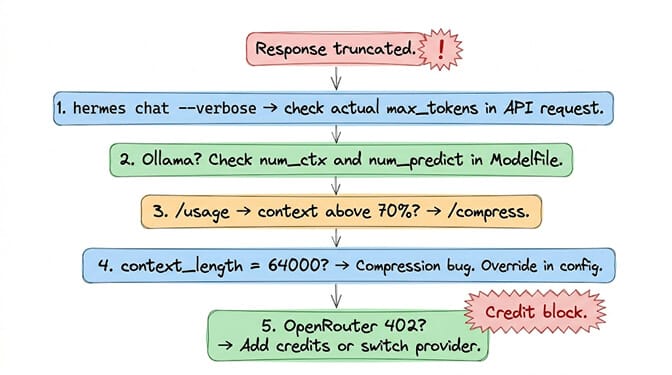
Step 1: Check your version and watch the request:
hermes --version     # v0.21.5 is current
hermes chat -q "write a 500-word essay" --verbose
Step 2: Run /usage (or /context) in an active chat to see how much context is used. If it's high, run /compress:
/usage
Step 3: Check your model server's limits. For Ollama, ollama ps shows the real context, and your Modelfile shouldn't set a low num_predict. For SGLang, check --default-max-tokens. For llama.cpp, check --n-predict and -c.
Step 4: Check model.context_length in config.yaml. It's a pin that overrides auto-detection. If it doesn't match what the server really serves, fix it or remove it. Remove any leftover model.max_tokens and HERMES_MAX_TOKENS while you're there.
The truncation error is Hermes's way of saying "the model ran out of room." But "ran out of room" has several causes, and the message doesn't tell you which one: a server default that's too low, a context window that's too small or already full, reasoning that eats the budget, or, on old builds, a dropped stream wearing a truncation label.
If you want an agent where context management is handled automatically and you never see "response truncated," give BetterClaw a try. Free tier with 1 agent and BYOK. $49/month for Pro with 5 agents. Smart context management. No truncation. No compression commands. The agent speaks. The response completes.
Frequently Asked Questions
What does "Response truncated due to output length limit" mean in Hermes?
It means the model's reply was cut off before it finished because it hit an output ceiling. On v0.21.5 the usual causes are a low output default on your model server, an Ollama context window that's too small, a context window already full of history, or a reasoning model spending the whole budget thinking. On builds older than v0.16.0, a dropped network stream was also reported this way (issue #26425).
What does finish_reason 'length' mean in Hermes?
finish_reason='length' means the model stopped because it hit its maximum output length, not because it finished its answer. Fix the underlying limit rather than the message. Raise the server's generation default or context, /compress the conversation, or lower /reasoning. Since v0.21.1, Hermes ignores model.max_tokens and HERMES_MAX_TOKENS, so changing those won't help.
Why does Hermes response remain truncated after 4 continuation attempts?
When a reply hits the output limit, Hermes asks the model to continue, up to four times on v0.21.5 (three on some older builds). If every attempt hits the same ceiling, it stops and keeps the partial text. The retries fail because they run into the same server limit, and each attempt adds partial output back into the context. If the prompt itself filled the window, current Hermes skips the retries and says "Context window full" instead.
Does HERMES_MAX_TOKENS still work?
No. From v0.21.1 onward, the Hermes docs say it no longer reads model.max_tokens, HERMES_MAX_TOKENS, provider output-cap settings, or model_overrides.*.*.max_output_tokens, and tell you to remove them. OpenAI-compatible endpoints get no automatic output cap from Hermes. The server's own default applies, so that is where you raise it. Native Anthropic Messages still gets an internal max_tokens from Hermes, because that API requires one.
How do I increase the output length in Hermes Agent?
Raise it on the model server. For Ollama, raise the context (OLLAMA_CONTEXT_LENGTH=64000) and don't set a low num_predict. For SGLang, use --default-max-tokens. For llama.cpp, use --n-predict. Then use /compress regularly in long sessions, and lower /reasoning if a reasoning model is using up the budget.
Why does /compress not work in Hermes?
On builds before v0.18.0, auto-compression never fired when a model's context_length was exactly 64,000 (issue #14690), because the trigger worked out to 100% of the window. PR #49998 fixed it: when the 64K floor would meet the window, compression now triggers at 85%. Update Hermes. If manual /compress stalls, check auxiliary.compression in config.yaml. The summary model is configured there now, and old compression.summary_* keys are migrated automatically.
What does "Response was truncated before completion" mean in Pi?
It's the Pi coding agent's message for a length stop: the provider ended the reply because it hit the output limit. Pi requests the model's maxTokens, which defaults to 16,384 for models you add in ~/.pi/agent/models.json. Set maxTokens and contextWindow explicitly, run /compact, or lower /thinking. Since Pi 0.84.0, a length stop below the model's limit triggers one automatic compact-and-retry.
Why does Hermes use all my OpenRouter credits on one message?
OpenRouter reserves credits for the full max_tokens a request asks for. Issue #22879 reported Hermes asking for each model's maximum output (64,000 for Claude 4.5 models), which fails with HTTP 402 on a low balance. The model.max_tokens setting that closed that issue was removed in v0.21.1. If you still hit the 402, add credits or call the provider directly.
Does BetterClaw have the same truncation problems?
No. BetterClaw's smart context management handles output limits, context compression and provider-specific settings at the platform level. There's no max_tokens to configure and no server default to find. The platform manages the context window so responses complete. Free tier with 1 agent and BYOK. $49/month for Pro with 5 agents.