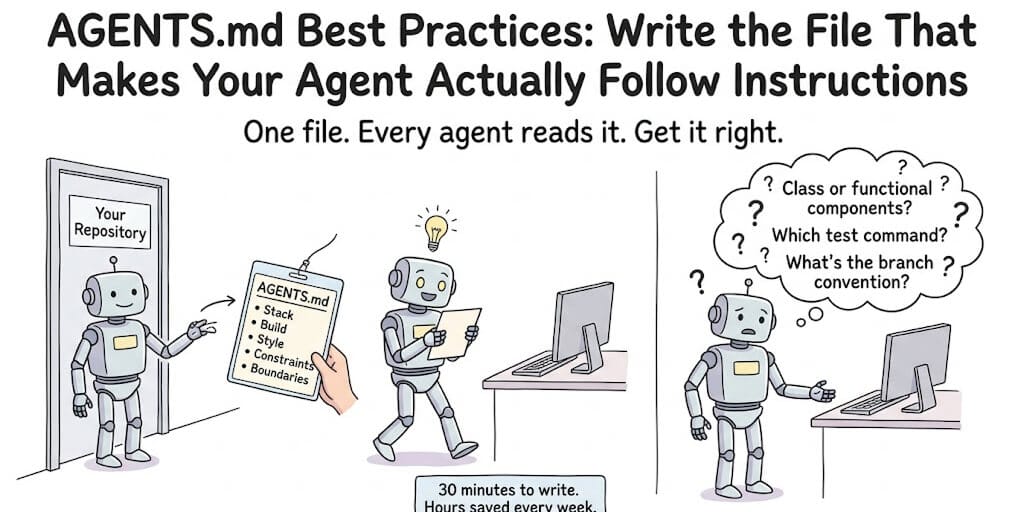
AGENTS.md is a Markdown file at the root of a code repository that tells AI coding agents how to work in that project: the stack, build and test commands, code style, architecture constraints and boundaries. The agents.md site lists more than 20 tools that read it, including OpenAI Codex, GitHub Copilot, Cursor, Gemini CLI, Jules, Zed, Windsurf, Devin, Aider and opencode. Claude Code reads it too, but by default only when the project has no CLAUDE.md.
Minimal AGENTS.md template (copy this)
# AGENTS.md

## Project overview
Next.js 15 App Router, React 19, TypeScript, Tailwind CSS, Drizzle ORM.

## Setup
Install: `pnpm install`  ·  Env: copy `.env.example` to `.env.local`

## Build and test
Build: `pnpm build`  ·  Test: `pnpm test`  ·  Lint: `pnpm lint --fix`

## Code style
Functional components with hooks only. Named exports only.

## Boundaries
Never edit files in /generated/. Never commit .env or secrets.
Swap in your own stack and commands, keep it short, and add sections only when an agent gets something wrong. The annotated version further down explains what each section should contain.
The format is defined at agents.md and maintained on GitHub (agentsmd/agents.md). More than 60,000 open-source projects use it, and it is now stewarded by the Agentic AI Foundation under the Linux Foundation. But most AGENTS.md files are too long, too vague, or generated by an LLM, which makes the agent worse. Here's how to write one that works, and how to keep it working.
Our coding agent kept generating class components. The entire codebase was functional React with hooks. The README said "React 19, functional components." The contributing guide explained it in detail.
The agent didn't read the README. It doesn't know to.
Then we added an AGENTS.md file with one line in the style section: Always use functional components with hooks. Never use class components. Plus one code example showing the right way.
The problem disappeared instantly.
Running more than one agent? See how to organise AGENTS.md across multiple agents without conflicts or drift.
How long should AGENTS.md be?
Short answer: under 100 lines is the target, 150 is the warning sign, and 200 is the hard ceiling Anthropic sets for its own equivalent file. In our experience, most good files are 30 to 80 lines.
Here's where each number comes from, because they measure different things (checked on October 23, 2026):
| Source | What it says | What it measures |
|---|---|---|
| Anthropic's Claude Code memory docs | "Target under 200 lines per CLAUDE.md file. Longer files consume more context and reduce adherence." Claude Code shows a warning at startup when a file is over the recommended length. | Official guidance for CLAUDE.md, which plays the same role as AGENTS.md |
| OpenAI Codex | Stops adding instruction files once the combined size reaches project_doc_max_bytes, 32 KiB by default | A hard loading limit for the whole chain of files, not a quality target |
| ETH Zurich study (arXiv:2602.11988) | Context files "do not generally improve task success rates, while increasing inference cost by over 20% on average" | Cost and success of context files in general, not length specifically |
| Developer forums (October 2026) | Files that grow to hundreds of lines get mostly ignored; the working consensus is under 100 lines | Field experience, not a controlled study |
So why do we say under 100 when Anthropic says 200? Because every line loads into every session, every line costs tokens on every run, and almost every line past the first 50 is a rule the model would follow anyway. The ETH Zurich team found that repository overviews, the thing model vendors most often tell you to include, did essentially nothing, because agents read the codebase themselves. Cut those and most files land well under 100 lines.
Two honest caveats. First, a controlled 2026 study by Damon McMillan (arXiv:2605.10039, 1,650 Claude Code sessions, 16,050 observations) found that for a single, simple code-style rule, file size, where the rule sat in the file, splitting the file, and a contradicting file next door made no detectable difference to compliance. What did matter was the task and how far into the session the agent was: each extra function it wrote was linked to about 5.6% lower odds of following the rule. So length isn't magic. Second, that study tested one trivial rule on Claude models. Real files hold dozens of rules that compete for attention, which is exactly where Anthropic's adherence warning applies.
The practical reading: a short file won't fix a bad task, but a long file makes every task more expensive and gives the agent more chances to miss the one rule that matters.
Signs your AGENTS.md is too long:
- It explains why you chose your stack, or describes the project's history.
- It has a directory tree or a dependency list the agent could read from the repo itself.
- It contains a multi-step procedure (a release checklist, a migration runbook). Those belong in a skill that loads only when needed.
- You can find two rules that say different things about the same behaviour.
- Claude Code warns you at startup, or Codex silently drops files past 32 KiB.
- You can't remember why half the rules are there.
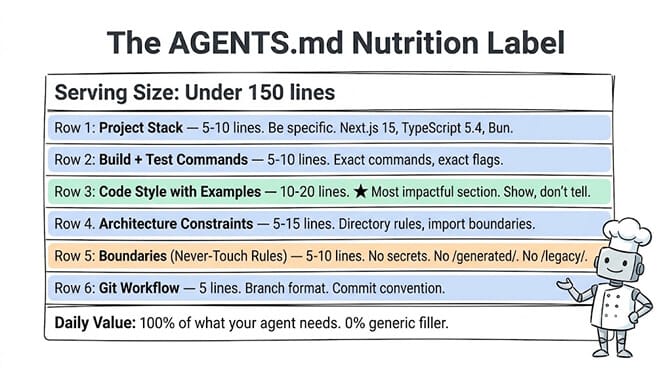
What goes in an AGENTS.md (and what doesn't)
The common mistake is treating AGENTS.md like documentation. Long explanations. Architecture philosophy. Design rationale. History of the project.
Your agent doesn't need to know why you chose Next.js over Remix. It needs to know that you use Next.js 15 with App Router, and the test command is pnpm test, not npm test.
Here are the sections that matter, in the order they should appear:
Project stack (5 to 10 lines)
Language, framework, major dependencies, runtime. Be specific.
Good: Next.js 15 App Router, React 19, TypeScript 5.4, Tailwind CSS, Drizzle ORM, Bun
Bad: This is a modern web application built with React and various supporting libraries.
Build and test commands (5 to 10 lines)
Exact commands with exact flags. Package manager matters. Build targets matter.
Good: Build: bun run build. Test: bun test. Lint: bun run lint --fix. Deploy: bun run deploy:staging
Bad: Run the standard build and test commands as described in package.json.
Code style conventions (10 to 20 lines, with examples)
One code example per convention beats three paragraphs describing it. This is the single most important lesson from effective AGENTS.md files. Show, don't tell.
Architecture constraints (5 to 15 lines)
Directory structure rules. Module boundaries. Import restrictions. Data flow direction.
Boundaries (5 to 10 lines)
What the agent should never touch. "Never commit secrets" was the most common helpful constraint in GitHub's analysis of more than 2,500 agents.md files. Add: generated files, legacy modules, configuration files that shouldn't change, directories managed by other tools.
Git workflow (5 lines)
Branch naming, commit message format, PR conventions. Squash merge only. Conventional commits: feat:, fix:, chore:, docs:.
What to leave out
Multi-step procedures (a release checklist, a migration runbook) don't belong in a file that loads into every session. Anthropic's memory docs say the same about CLAUDE.md: move them into a skill, which the agent loads only when the task calls for it. Our agent skills vs MCP guide covers where that line sits, and loading on demand is a big part of why skills can reduce token usage.
Tool connections don't belong in AGENTS.md either. Those are MCP servers, configured in the tool itself (see what MCP is). AGENTS.md can say when to use a tool, not how to connect to it.
Rules that must never be broken don't belong there either. AGENTS.md is guidance, not enforcement. If something must always happen before a commit, or must never happen at all, use a pre-commit hook, a Claude Code hook or a permission rule. The file can explain the rule; the hook enforces it.
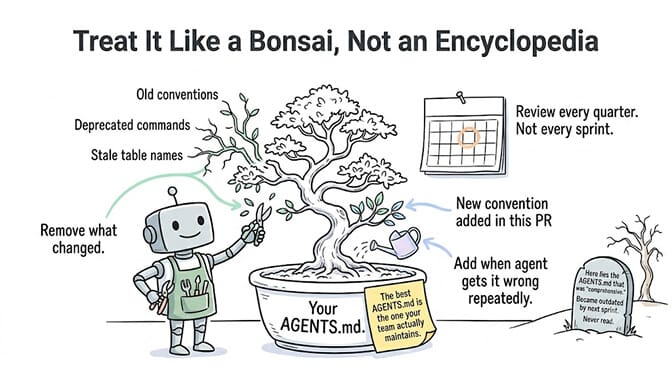
The rule lifecycle: add when it breaks, delete when it's learned
This is the habit that keeps an AGENTS.md short for years instead of weeks.
- Start with 30 to 50 lines: stack, commands, code style with one example each, boundaries.
- Add a rule only when an agent gets something wrong, and gets it wrong more than once. One mistake might be the task; two is a gap in the file.
- Write the rule as a constraint with an example, not an explanation. "Money is Decimal, never float" beats a paragraph about precision.
- Re-test without it after a few weeks or a model upgrade. Delete the line and run the same kind of task. If the agent does it right without being told, the rule is dead weight. Newer models follow many conventions on their own that older ones needed spelled out.
- Review the whole file every quarter, and in the same PR whenever a convention changes.
A useful test for any line: would a competent developer who had never seen this repo get this wrong? If no, delete it. It's costing you tokens to restate the model's defaults back to itself.
Contradictory rules do more damage than duplicates
A duplicated rule wastes a few tokens. A contradiction makes the agent's behaviour unpredictable, because it has to pick one and you don't control which.
Anthropic says this directly in its memory docs: "if two instructions contradict each other, Claude may pick one arbitrarily." It applies across files too: your root file, a subdirectory file, a personal global file and any rules files all land in the same context.
Where contradictions usually hide:
- A root file says "use Jest" and a package's file says "use Vitest" without saying it only applies to that package.
- Your personal global file (
~/.codex/AGENTS.mdor~/.claude/CLAUDE.md) has a project-specific rule that's wrong in other repos. - An old rule no one deleted after a migration ("use the v1 API client").
- A rule and its exception live in different sections.
How to find them:
- In Claude Code, run
/doctor prompt-audit(v2.1.283 or later). Anthropic's docs describe it as a check that finds "instructions written for older models, references to files or commands that don't exist, and files that contradict each other," and it proposes edits without changing anything until you approve. By default it covers your CLAUDE.md, CLAUDE.local.md and AGENTS.md files. - In any tool, ask the agent: "List every instruction you've been given about testing, and flag any two that conflict."
- Write subdirectory rules as specialisations ("this package uses Vitest"), never as reversals of the root file.
One nuance for accuracy: the McMillan study mentioned above found a contradicting file in the next directory had no detectable effect on a single trivial rule. That doesn't make contradictions safe. It means the damage shows up on rules that compete, which is exactly the situation a growing file creates.
The three mistakes that make AGENTS.md useless
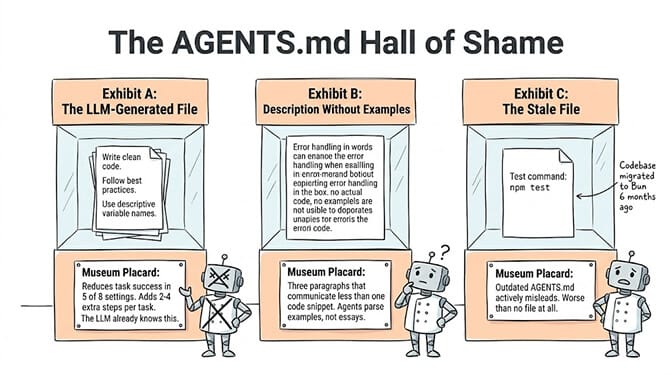
Mistake 1: Letting an LLM generate it
This is the most common mistake and the most damaging. In the ETH Zurich study, LLM-generated files cut success by 0.5% on SWE-bench Lite and 2% on AGENTbench, lost in 5 of 8 settings, and added 2.45 to 3.92 extra steps per task. Developer-written files did better (about +4% on AGENTbench) but still cost up to 19% more.
Why? LLMs generate generic, verbose instructions that state the obvious. "Follow best practices for error handling." "Write clean, maintainable code." "Use descriptive variable names." Your agent already knows this.
Write your AGENTS.md by hand. If you use an agent to draft it, treat the draft like a first PR from a new hire: delete everything generic and keep only what's specific to your project.
Mistake 2: Describing conventions instead of showing them
Bad:
Use our custom error handling approach where errors bubble up through
the service layer and are caught by the global error handler rather
than being caught at individual function level.
Good:
// Error handling: Let errors propagate. Do not wrap individual calls
// in try/catch. The global handler catches everything.

// CORRECT
async function getUser(id) {
  const user = await db.users.findById(id);
  return user;
}

// WRONG
async function getUser(id) {
  try {
    const user = await db.users.findById(id);
    return user;
  } catch (e) {
    logger.error(e);
    throw e;
  }
}
The code example communicates instantly what three paragraphs of description fail to convey.
Mistake 3: Not updating it
An AGENTS.md with stale table names, deprecated commands or outdated architecture constraints is worse than no AGENTS.md. It actively misleads the agent.
Update it in the same PR where conventions change, and follow the rule lifecycle above. When an agent repeatedly produces the same wrong output, that's a gap in your file. When it produces the right output without the rule, that's a line to delete.
Does AGENTS.md actually work?
Yes, but only the hand-written, specific kind.
The skepticism is earned. If you asked an agent to write your AGENTS.md, ran it, and saw no improvement, that's exactly what the research predicts. The ETH Zurich authors found that agents do follow the instructions in these files well. The problem is that most files are full of instructions that don't change anything.
What works is narrow: instructions that tell the agent something it could not have inferred from the codebase. Your package manager. Your test command with its exact flags. The one directory it must never touch. The convention your codebase follows that looks unusual to a model trained on everyone else's code.
AGENTS.md vs CLAUDE.md vs .cursorrules (which do you need?)
Start with AGENTS.md, and add tool-specific files only if you need their unique features.
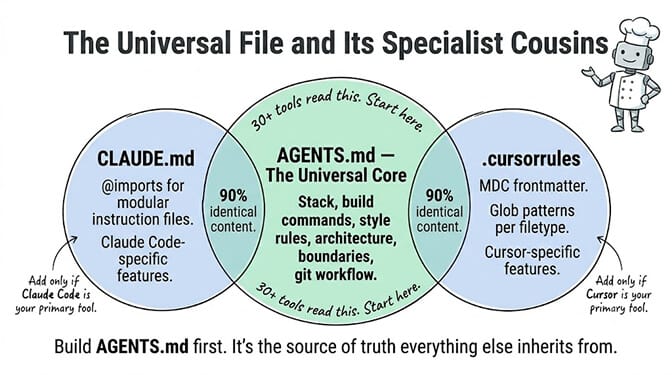
AGENTS.md has the broadest compatibility. More than 20 tools read it natively. It's the universal format.
CLAUDE.md is Claude Code's own file. It adds features AGENTS.md doesn't have, like @path imports and .claude/rules/ files scoped to file types. You no longer need one just to make Claude Code see your AGENTS.md (see How Claude Code reads AGENTS.md below), but the moment a CLAUDE.md exists, Claude Code stops reading AGENTS.md by default. So if you keep both, make the CLAUDE.md import the shared file:
@AGENTS.md
Keep AGENTS.md as the single source of truth for every tool, and let CLAUDE.md hold that import plus whatever Claude-specific overrides you really need. Note that imports organise a file but don't shrink it: Anthropic's docs point out imported files load together with the CLAUDE.md that imports them, so they count toward the same context. A symlink from CLAUDE.md to AGENTS.md also works, but Anthropic recommends the import if anyone on the team uses Windows, where Git can check a symlink out as a plain text file.
.cursorrules is Cursor-specific. Its unique feature is frontmatter with file globs that activate different instructions for different file types. If your team uses Cursor and needs per-filetype rules, add it.
Most of the content across all three files is identical. Build commands, architecture rules, testing conventions and boundaries don't change per tool. A converter tool called rule-porter can translate between formats if needed.
How Claude Code reads AGENTS.md
Claude Code reads AGENTS.md since v2.1.277 (released September 18, 2026), with one big condition: by default it reads AGENTS.md only when there is no CLAUDE.md. This comes straight from Anthropic's memory documentation:
| Your repository has | Claude Code reads |
|---|---|
| An AGENTS.md, and no CLAUDE.md or CLAUDE.local.md in your working directory or above it | Your AGENTS.md |
| An AGENTS.md and a CLAUDE.md or CLAUDE.local.md in your working directory or above it | Your CLAUDE.md files only |
A CLAUDE.md that imports AGENTS.md with @AGENTS.md | Your CLAUDE.md, with AGENTS.md included through the import |
The details that trip people up:
- What counts as "a CLAUDE.md": a
CLAUDE.md,.claude/CLAUDE.mdorCLAUDE.local.mdin your working directory or any directory above it. Your personal~/.claude/CLAUDE.md, your organization's managed CLAUDE.md and.claude/rules/files don't count, and keep loading alongside AGENTS.md. - The CLAUDE.local.md trap: adding a CLAUDE.local.md for your own uncommitted notes silently switches Claude Code off your team's AGENTS.md.
- What it loads: every
AGENTS.mdand.claude/AGENTS.mdfrom your working directory upward at session start, plus a subdirectory's AGENTS.md when Claude opens a file there. In an interactive session you'll see a line likeno CLAUDE.md found; AGENTS.md loaded: .... - What it ignores:
AGENTS.local.md,AGENTS.override.mdand anything under a.agents/directory. The override file is a Codex convention, not a Claude Code one. - Changing the default: type
/configand set Project instructions toclaude-md-or-agents-md(the default),claude-md-and-agents-md(read both, each directory's CLAUDE.md first),claude-md(ignore AGENTS.md) ormanaged-only. - Size warnings: Claude Code warns at startup and in
/statuswhen a file is over the recommended length, and when several files that are each fine add up past a combined limit.
Two version caveats. Before v2.1.281 (September 23, 2026), sessions on Amazon Bedrock, Google Vertex AI, Microsoft Foundry, LLM gateways or with telemetry disabled still read CLAUDE.md only. And the first session after upgrading from v2.1.276 or earlier may not pick AGENTS.md up yet; it loads from the next session. If you're on an older version, the @AGENTS.md import in a CLAUDE.md still works everywhere and never causes the file to be read twice.
If you previously wired this up by hand, Anthropic's advice is: keep a CLAUDE.md that only contains @AGENTS.md (harmless) or delete it; replace a CLAUDE.md that tells Claude in words to read AGENTS.md with a real import; and remove any SessionStart hook that prints AGENTS.md, because it now adds a second copy to the context.
Claude Code not reading AGENTS.md? The four causes
If Claude Code ignores your AGENTS.md, one of four things is almost always the reason. Check them in this order. Everything here comes from Anthropic's memory docs and the Claude Code changelog, checked on October 23, 2026.
1. The file is in the wrong place, or has the wrong name. At session start Claude Code loads AGENTS.md and .claude/AGENTS.md from your working directory and every directory above it. If you launch Claude in a parent folder above the repo, the repo's AGENTS.md is a subdirectory file and doesn't load at startup. Launch from the repo root and keep the file named exactly AGENTS.md.
2. A CLAUDE.md is taking precedence. A forgotten CLAUDE.local.md is the usual culprit. Add @AGENTS.md to the CLAUDE.md, or set Project instructions to claude-md-and-agents-md in /config. Check the setting isn't claude-md or managed-only, which skip AGENTS.md entirely.
3. You're on a version with a bug that has since been fixed. Run claude --version. Before v2.1.281, Bedrock, Vertex, Foundry, gateway and no-telemetry sessions read CLAUDE.md only. v2.1.290 (October 5, 2026) fixed a subdirectory's AGENTS.md not being attached when you @-mentioned a file under it. Update Claude Code and start a new session.
4. It's a nested file that hasn't loaded yet. A subdirectory's AGENTS.md isn't read at startup. Claude Code loads it when Claude opens a file in that directory, and only if that directory has no CLAUDE.md of its own. Put rules that must always apply in the root file.
To confirm what loaded, run /memory and look for your AGENTS.md path.
Does AGENTS.md work with OpenAI Codex?
Yes. Codex reads AGENTS.md natively, and the same file works across Codex, Cursor, Gemini CLI and Claude Code without changes.
Codex's resolution rules are more layered than most tools. Per OpenAI's Codex AGENTS.md guide, it builds an instruction chain once per run:
- Global: in your Codex home (
~/.codex, or whereverCODEX_HOMEpoints), Codex readsAGENTS.override.mdif it exists, otherwiseAGENTS.md. Only one file is used at this level. - Project: starting at the project root (usually the Git root), it walks down to your current working directory. In each directory it checks
AGENTS.override.md, thenAGENTS.md, then any names you listed inproject_doc_fallback_filenames, and takes at most one file per directory. - Merge: the files are concatenated root-down, so the ones closest to where you're working appear last and override earlier guidance.
Size limit. Codex skips empty files and stops adding files once the combined size hits project_doc_max_bytes, which defaults to 32 KiB. That's the combined chain, not per file. You can raise it, but if you're near it, the better fix is deleting lines:
# ~/.codex/config.toml
project_doc_fallback_filenames = ["TEAM_GUIDE.md", ".agents.md"]
project_doc_max_bytes = 65536
Checking what loaded. Run codex --ask-for-approval never "Summarize the current instructions." from the repo root. Codex rebuilds the chain on every run (in the interactive TUI, once per session), so there's no cache to clear when you edit a file; just restart it. If that test run dies with stream disconnected before completion, that's a connection error, not an instruction-file problem; our decoder entry for Codex "stream disconnected before completion" covers the fix.
One practical warning. Codex runs the build and test commands from your AGENTS.md in its sandbox. A wrong command doesn't produce a helpful error; the agent runs it, watches it fail, and works around it. Before you rely on any command in your AGENTS.md, run it verbatim in a fresh terminal.
Claude Code reads neither AGENTS.override.md nor Codex's fallback filenames, so if one repo serves both agents, keep the shared rules in plain AGENTS.md files.
Global vs directory-level AGENTS.md
There are three scopes, and mixing them up is a common source of "why is the agent ignoring my instructions."
Global (personal). A file in your tool's config directory, such as ~/.codex/AGENTS.md. It applies to every project you open. Use it for preferences that are about you, not the project. It isn't committed, so teammates never see it.
Repository root. The file most people mean by "AGENTS.md." Committed to the repo, shared by the whole team. Use it for rules that apply everywhere in the project.
Subdirectory. Extends the root file for one directory. Use it when a directory really has different rules: a package with its own build command, a /mobile directory on a different framework.
Most projects need only the root file. If your root AGENTS.md is too long, the fix is deleting lines, not spreading them across directories.
Nested and global AGENTS.md: which one wins
The short answer: the file closest to the code being edited wins, and whatever you type in the chat beats every file. That's the rule in the agents.md FAQ: "The closest AGENTS.md to the edited file wins; explicit user chat prompts override everything."
| Global (personal) file | How nested files combine | Override file | |
|---|---|---|---|
| agents.md spec | Not defined | Nearest file in the directory tree takes precedence | Not defined |
| OpenAI Codex | ~/.codex/AGENTS.md (or AGENTS.override.md there), read first | One file per directory from the project root down, concatenated so closer files come last; 32 KiB combined default cap | AGENTS.override.md replaces that directory's AGENTS.md |
| Claude Code | No global AGENTS.md; your personal file is ~/.claude/CLAUDE.md, which loads alongside AGENTS.md | Files from your working directory and above load at start; a subdirectory's file loads when Claude opens a file there | Not read |
For Claude Code, Anthropic's docs describe instruction files as concatenated rather than overriding each other, and warn that when two files contradict each other, Claude may pick one arbitrarily. So in Claude Code "closest wins" is a tendency, not a guarantee. The rules that hold everywhere:
- Don't contradict, specialise. A subdirectory file should add rules for that directory, not reverse the root file's rules.
- Keep personal preferences global, project rules in the repo.
- Say it in the prompt when it matters. A one-off exception belongs in the prompt, not in an edit to AGENTS.md.
Should AGENTS.md be committed to git?
Yes. AGENTS.md belongs in version control alongside the code it describes, at the repo root. Every contributor and every AI tool reads it from there, and changes get reviewed in the same PR as the convention change that prompted them.
Two exceptions. Personal preferences belong in your global file, not the repo. And never inline secrets or internal URLs; reference them from .env or a gitignored file.
Security: AGENTS.md is a prompt-injection surface
NVIDIA's AI Red Team demonstrated an indirect AGENTS.md injection against OpenAI Codex, in which a malicious dependency hijacks the agent's behaviour by abusing instruction precedence. The attack needs an already-compromised dependency, so it's not a reason to panic about every repo you clone. But it shows that agent instruction files are executable context, and they widen the supply-chain attack surface.
The practical defences:
- Read the AGENTS.md in any repo you clone before you point an agent at it.
- Treat AGENTS.md like a Makefile or a postinstall script. It influences commands that run on your machine.
- Review changes to AGENTS.md with the same attention as changes to CI config.
- Run agents in a sandbox where you can, so an instruction you missed has a smaller blast radius.
Beyond coding: AGENTS.md for business agents
The AGENTS.md idea was born in code repositories, but the principle applies to any AI agent: give it short, specific context at the start, and it performs better. The same length lesson applies too. A business agent with a two-page role description follows it worse than one with ten clear lines.
For business agents (support, sales, operations), the equivalent configuration covers:
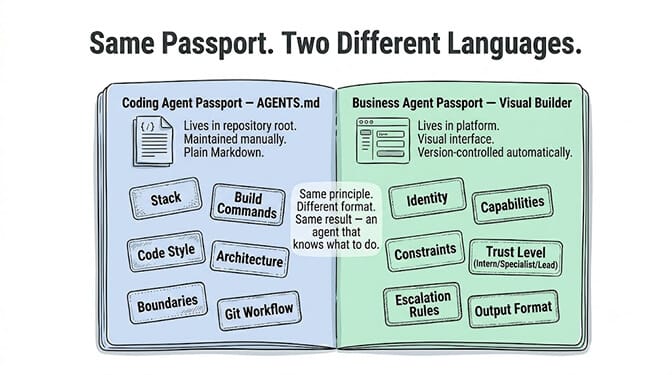
- Identity: who the agent is, its role and tone of voice.
- Capabilities: which tools and apps it can use.
- Constraints: what it can't do, and which actions need human approval.
- Trust level: draft-only, act with approval, or act alone within limits.
- Escalation rules: when to hand off to a person.
- Output format: how it should respond.
For coding agents, AGENTS.md is a file you write and maintain. For business agents, this configuration is easier to manage in a visual builder. That's how BetterClaw's agent builder works: identity, capabilities, constraints, trust levels (Intern, Specialist, Lead), escalation rules and output format are fields in the builder, versioned for you, with no file to forget to update. Every agent can use your own model key with zero markup. There's a free plan with 1 agent and 100 credits a month, Basic at $19/month, and Pro at $49/month for 5 agents.
The annotated template (copy and adapt)
Here's a minimal, effective AGENTS.md. Delete sections that don't apply. A shorter, accurate file beats a comprehensive, generic one.
# Project Name

Next.js 15 App Router, React 19, TypeScript 5.4, Tailwind CSS, Drizzle ORM, Bun.

## Commands

Build: `bun run build`
Test: `bun test`
Lint: `bun run lint --fix`
Single test: `bun test path/to/file.test.ts`

## Code Style

Functional components only. Never class components.
Use `const` exclusively. Never `var`, never `let` unless reassignment is needed.
Named exports only. Never default exports.

// Component example:
export const UserCard = ({ name, email }: UserCardProps) => {
  return <div className="p-4">{name}</div>;
};

## Error Handling

Let errors propagate. Do not wrap individual calls in try/catch.
The global error handler in middleware.ts catches everything.

## Architecture

/app         -> Routes and page components
/components  -> Shared UI components
/lib         -> Business logic and utilities
/db          -> Database schema and migrations

Never import from /app into /lib. Data flows one direction.

## Boundaries

Never modify files in /generated/.
Never commit .env or any file containing secrets.
The /legacy/ module uses sync code. Do not convert to async.

## Git

Squash merge only.
Conventional commits: feat:, fix:, chore:, docs:.
Branch format: type/short-description (e.g., feat/user-auth).
That's under 50 lines, and every line is specific. If yours grows past 100, go back to the rule lifecycle and start deleting.
AGENTS.md examples: three files for three project types
Real files are shorter and stranger than templates, because they only contain the things that project's agents kept getting wrong. These three are representative examples written to show that range, not copies of any named repository's file.
Example 1: a Next.js web app (12 lines)
# Storefront

Next.js 15 App Router, TypeScript, Tailwind, Bun.

Build: `bun run build` | Test: `bun test` | Lint: `bun run lint --fix`

Server Components by default. Add `'use client'` only for event handlers or hooks.
Never fetch in a Client Component. Fetch in the page, pass data down as props.
Named exports only.

Never edit `/app/generated/`. It is regenerated on every build.
Never add a dependency without asking. This bundle is size-budgeted.
What it gets right: the 'use client' rule is the one thing an agent reliably gets wrong in App Router projects, stated as a rule with its exception, in one line.
Example 2: a Python FastAPI backend (16 lines)
# Billing API

Python 3.12, FastAPI, SQLAlchemy 2.0 (async), Alembic, uv.

Install: `uv sync` | Run: `uv run uvicorn app.main:app --reload`
Test: `uv run pytest -x` | Single test: `uv run pytest tests/test_invoices.py::test_name`

All DB access is async. Never use the sync Session. Never call `.commit()` in a
route handler; the dependency in `app/deps.py` handles the transaction boundary.

Pydantic models live in `app/schemas/`. SQLAlchemy models live in `app/models/`.
Never import a SQLAlchemy model into a route signature.

Schema changes require a migration: `uv run alembic revision --autogenerate -m "..."`.
Never edit an existing migration that has been merged.

Money is `Decimal`, never `float`. Amounts are stored in minor units (cents).
What it gets right: the money rule. One unambiguous line that prevents a class of bug that's expensive to find later.
Example 3: a monorepo (22 lines)
# Platform monorepo

pnpm workspaces + Turborepo. Node 22.

apps/web    -> Next.js 15 storefront
apps/admin  -> Vite + React admin panel
packages/ui -> Shared component library
packages/db -> Drizzle schema and client

Always run commands from the repo root: `pnpm turbo build --filter=web`.
Never `cd` into a package and run `pnpm install` there.

Test: `pnpm turbo test` | Single app: `pnpm turbo test --filter=admin`

apps/* may import from packages/*. packages/* must never import from apps/*.
packages/ui must never import from packages/db. UI takes data as props.

Adding a dependency to a package: `pnpm add <pkg> --filter=<package-name>`.

Each app has its own AGENTS.md with framework-specific rules. This file covers
the workspace-level rules only.
What it gets right: the import direction rules, and the last line, which tells the agent more specific instructions exist further down the tree.
The common thread: every line is a rule an agent would break without being told, written as a constraint rather than an explanation. None of them describe what the project is for, and none is anywhere near 100 lines.
The short version
The best AGENTS.md is the one your team actually maintains. Start with 30 lines. Add a rule when an agent gets something wrong twice. Delete it when the agent gets it right without being told. Keep it under 100 lines, look for contradictions every quarter, and enforce anything critical with a hook instead of a sentence.
And if your agents are business agents, not coding agents, this whole configuration belongs in a visual builder rather than a Markdown file. Build your agent in BetterClaw, or start on the free plan with 1 agent and 100 credits a month.
Frequently Asked Questions
How long should an AGENTS.md file be?
Aim for under 100 lines, and start deleting once it passes 150. Anthropic recommends keeping CLAUDE.md, the equivalent file, under 200 lines because "longer files consume more context and reduce adherence," and Codex stops loading instruction files at 32 KiB combined by default. An ETH Zurich study found context files raise inference cost by over 20% on average without generally improving success, so every extra line has a cost. In our experience, most good files are 30 to 80 lines.
Is my AGENTS.md too long?
Probably, if it explains your stack choices, includes a directory tree or dependency list, contains step-by-step procedures, has two rules that disagree, or you can't remember why half the rules are there. Claude Code also warns at startup when a file is over the recommended length. Delete anything the agent could read from the code itself, and move procedures into skills.
What is an AGENTS.md file?
AGENTS.md is a Markdown file at the root of a code repository that gives AI coding agents project-specific instructions: build commands, code style, architecture constraints, testing and boundaries. More than 20 tools read it natively, including OpenAI Codex, GitHub Copilot, Cursor, Gemini CLI, Jules, Zed, Windsurf and Devin. Claude Code reads it when the project has no CLAUDE.md. More than 60,000 open-source projects use it, and it's stewarded by the Agentic AI Foundation under the Linux Foundation.
What should I do when my agent ignores a rule?
First check the file actually loaded (/memory in Claude Code, or ask Codex to summarise its instructions). Then make the rule more specific and add an example. Then look for a second rule that contradicts it. If the rule must never be broken, don't rely on the file: use a hook or a permission setting, which apply whatever the agent decides.
Does Claude Code read AGENTS.md?
Yes, since Claude Code v2.1.277 (September 18, 2026). By default it reads AGENTS.md only when there is no CLAUDE.md, .claude/CLAUDE.md or CLAUDE.local.md in your working directory or above it. To have it read both, set Project instructions to claude-md-and-agents-md in /config, or put @AGENTS.md in your CLAUDE.md. It doesn't read AGENTS.override.md or AGENTS.local.md.
How does AGENTS.md compare to CLAUDE.md and .cursorrules?
AGENTS.md has the broadest compatibility. CLAUDE.md is Claude Code's own file and adds @imports and path-scoped rules. .cursorrules adds Cursor-specific glob-based rules. Most of the content is identical across all three. Start with AGENTS.md as the single source of truth, and if you add a CLAUDE.md, start it with an @AGENTS.md import.
Should I use an LLM to generate my AGENTS.md?
No. In the ETH Zurich study, LLM-generated context files reduced task success in 5 of 8 settings and added 2.45 to 3.92 extra steps per task. LLMs write generic advice the agent already follows. Write it by hand, or treat an AI draft as something to cut down, not something to commit.
Can I use the same AGENTS.md for Codex and Claude Code?
Yes. Codex reads it natively; Claude Code reads it as long as the project has no CLAUDE.md, and otherwise needs an @AGENTS.md import in the CLAUDE.md. Remember Claude Code ignores Codex's AGENTS.override.md, so keep shared rules in plain AGENTS.md files, and run every command in the file in a fresh terminal before relying on it.
Do I commit AGENTS.md or add it to .gitignore?
Commit it. It's project documentation and belongs at the repo root so every contributor and every tool reads the same instructions. Keep personal preferences in your tool's global file, and never put secrets in it.
Can AGENTS.md principles apply to business agents?
Yes. The same idea (short, specific context about identity, capabilities, constraints and boundaries) applies to any AI agent. For business agents the sections are identity, capabilities, constraints, trust levels, escalation rules and output format, and they're easier to manage in a visual builder like BetterClaw than in a Markdown file.