The full tool calling compatibility table, verified against the registry, plus the exact fix for gemma3, llama3, and every vision model that throws this error.
I have watched this error kill more local agent setups than any config bug. Someone spends an evening wiring up a local model, the agent loads, the first tool call fires, and the terminal spits back a sentence that sounds like Ollama's fault. It isn't.
The full Ollama tool calling compatibility table
Verified in September 2026 by pulling each model's manifest from the Ollama registry and reading its template directly. Not copied from a blog post. Not guessed.
| Model | Tool calling | Ollama version needed | Pull command |
|---|---|---|---|
| gemma2 (2b, 9b, 27b) | No | n/a | ollama pull gemma2:9b |
| gemma3 (4b, 12b, 27b, latest) | No, vision only | 0.6.0+ | ollama pull gemma3:12b |
| gemma3n | No | 0.6.0+ | ollama pull gemma3n:e4b |
| gemma4 | Yes | 0.20.0+ | ollama pull gemma4 |
| functiongemma | Yes | 0.13.5+ | ollama pull functiongemma |
| llama3 (8b, 70b, latest) | No | n/a | ollama pull llama3:8b |
| llama3.1 (8b, 70b) | Yes | 0.3.0+ | ollama pull llama3.1:8b |
| llama3.2 (1b, 3b) | Yes | 0.3.12+ | ollama pull llama3.2:3b |
| llama3.2-vision | No | 0.4.0+ | ollama pull llama3.2-vision |
| llama3.3 (70b) | Yes | 0.5.0+ | ollama pull llama3.3:70b |
| llama4 (scout, maverick) | Yes | 0.6.7+ | ollama pull llama4:scout |
| qwen2.5 (all sizes) | Yes | 0.3.11+ | ollama pull qwen2.5:7b |
| qwen2.5-coder | Yes | 0.3.11+ | ollama pull qwen2.5-coder:7b |
| qwen2.5vl (7b, 32b, 72b) | No, vision only | 0.7.1+ | ollama pull qwen2.5vl:7b |
| qwen3 (0.6b to 235b) | Yes | 0.6.7+ | ollama pull qwen3:8b |
| qwen3-coder | Yes | 0.12.1+ | ollama pull qwen3-coder |
| qwen3-vl | Yes | 0.12.0+ | ollama pull qwen3-vl |
| qwen3.5 | Yes | 0.17.5+ | ollama pull qwen3.5 |
| qwen3.6 | Yes | 0.32.10+ | ollama pull qwen3.6 |
| qwen3.8 (27b) | Yes, plus vision and thinking | see model page | ollama pull qwen3.8:27b |
| mistral (7b) | Yes | 0.3.0+ | ollama pull mistral |
| mistral-nemo | Yes | 0.3.0+ | ollama pull mistral-nemo |
| mistral-small3.2 | Yes | 0.9.0+ | ollama pull mistral-small3.2 |
| dolphin3 | No | n/a | ollama pull dolphin3 |
| dolphin-llama3 | No | n/a | ollama pull dolphin-llama3 |
| deepseek-r1 distills (7b, 8b, 14b, 32b, 70b) | No | 0.5.9+ | ollama pull deepseek-r1:8b |
| deepseek-r1:671b | Yes | 0.5.9+ | ollama pull deepseek-r1:671b |
| deepseek-coder | No | n/a | ollama pull deepseek-coder:6.7b |
| deepseek-v3.1 | Yes | 0.11.0+ | ollama pull deepseek-v3.1 |
| phi3 | No | n/a | ollama pull phi3 |
| phi4 | No | 0.5.5+ | ollama pull phi4 |
| phi4-mini | Yes | 0.5.5+ | ollama pull phi4-mini |
| command-r, command-r7b, command-a | Yes | 0.1.30+ | ollama pull command-r7b |
| gpt-oss (20b, 120b) | Yes | 0.11.0+ | ollama pull gpt-oss:20b |
| granite3.3, granite4.1 | Yes | 0.5.0+ | ollama pull granite3.3:8b |
| smollm2 | Yes | 0.4.0+ | ollama pull smollm2:1.7b |
| hermes3 | Yes | 0.3.0+ | ollama pull hermes3:8b |
| llava, minicpm-v, moondream | No, vision only | n/a | ollama pull llava:7b |
| glm-5.2 | Yes | see model page | ollama pull glm-5.2 |
| glm-5.3, glm-5.3-flash | Yes | see model page | ollama pull glm-5.3-flash |
| deepseek-v4-flash, deepseek-v4-pro | Yes | see model page | ollama pull deepseek-v4-flash |
| minimax-m3, kimi-k3, nemotron3 | Yes | see model page | ollama pull minimax-m3 |
Two rules fall out of that table. Anything from the llama3.1 line forward supports tools, and anything with "vl", "vision", or "llava" in the name almost certainly does not.
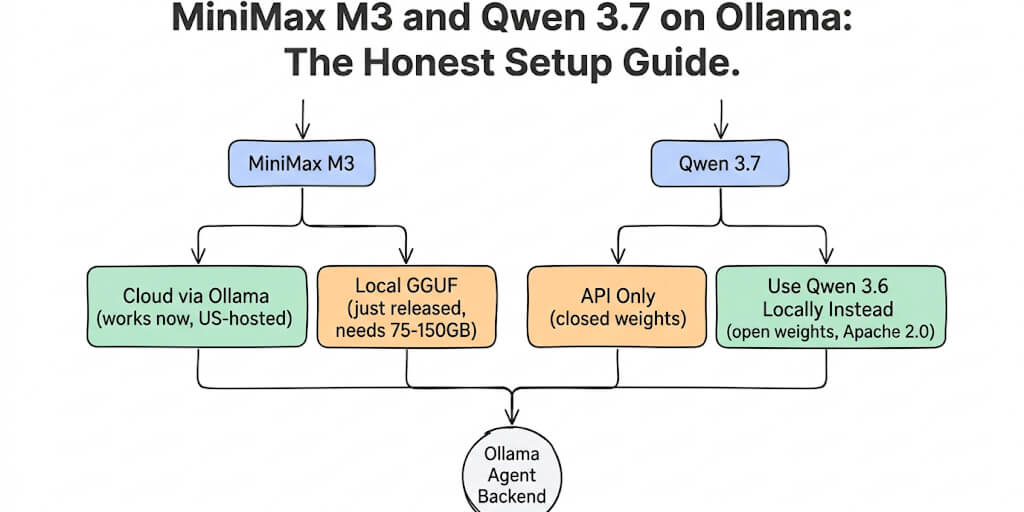
One absence is deliberate. There is no qwen3.7 row because Qwen 3.7 never shipped in the Ollama library. The line went 3.6, then straight to 3.8. If your config points at qwen3.7, the pull fails long before tool calling is the question - use qwen3.8:27b.
Two more that people go looking for and will not find: granite4.2 is not in the registry (granite4.1 is the current Granite tag), and Gemma 5 is not there either, having so far only appeared in arena testing.
What the error actually means
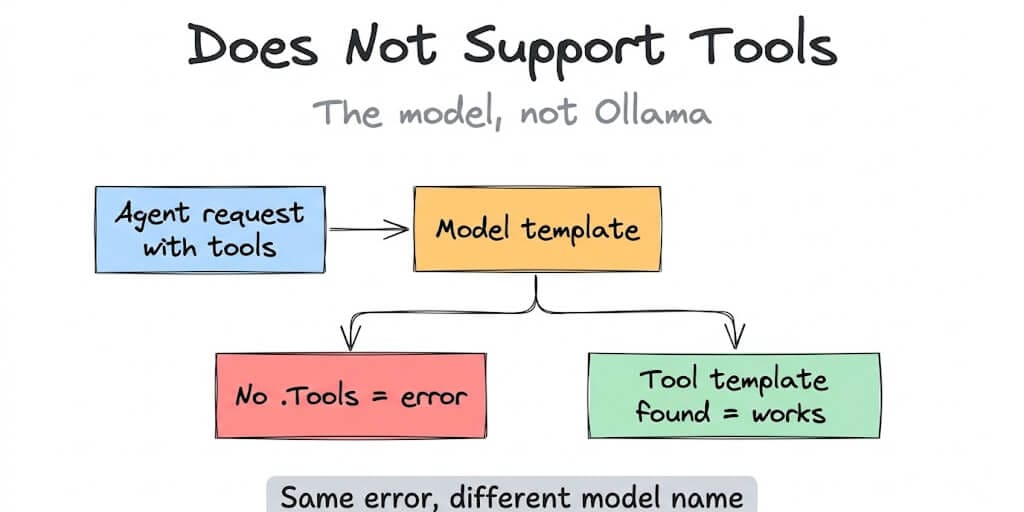
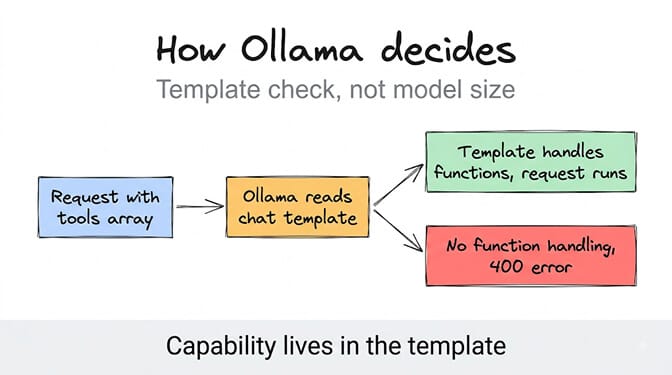
Tool calling is not a property of intelligence. It is a property of the chat template.
When your agent sends a request with a tools array, Ollama checks whether the model's template knows what to do with function definitions. In the older Go templates that means a literal .Tools block. In newer models the template rides inside the GGUF file instead. Either way, if Ollama cannot find tool handling, it returns the error rather than silently dropping your tools and letting the model hallucinate a JSON blob.
The error is a capability check, not a quality judgment. A 70B model with no tool template loses to a 1.7B model that has one.
That distinction matters when you are debugging a whole agent stack, which is why we wrote a companion piece on why OpenClaw says your model does not support tools at the framework level.
If you are seeing this with gemma3
Bad news first. No gemma3 tag supports tool calling. Not 4b, not 12b, not 27b, not latest, and not gemma3n. The gemma3 family shipped with vision and a strong instruction template, and Google left function calling out of it.
This is the single most common version of the error, and most people waste an hour pulling a different gemma3 size hoping the 27b behaves differently. It doesn't. Same template, same rejection.
You have three real options. Pull gemma4, which does support tools alongside vision and thinking. Pull functiongemma, a Gemma variant built specifically for function calling. Or step sideways to qwen3:4b or llama3.2:3b if you want to keep roughly the same memory footprint.
If you are running gemma3 because you liked its writing quality, keep it for drafting and give the agent loop to a tool-capable model. Splitting those two jobs is normal, and our guide to model routing for agents covers how to wire that up without doubling your VRAM.
If you are seeing this with qwen2.5vl or another vision model
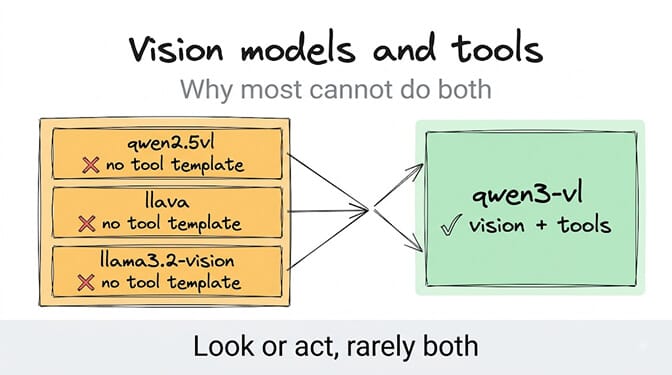
Vision models fail this check almost across the board. qwen2.5vl, llava, llava-llama3, llama3.2-vision, minicpm-v, moondream. None of them accept tools.
Here's the reason nobody spells out. Multimodal templates are built to interleave image tokens with text turns, and adding function definitions on top means maintaining a second template path that most vision releases skip.
The exception worth knowing is qwen3-vl, which carries vision and tools in the same model. If you need an agent that can both look at a screenshot and call a function, that is currently the cleanest single-model answer.
The trap that wastes the most time: the family page lies
Look up deepseek-r1 on the Ollama library and you will see a tools badge. Pull deepseek-r1:8b and you will get the error anyway.
That badge describes the family, and inside that family only the full 671b weights ship the tool template. Every distilled tag, 7b through 70b, is built on Qwen and Llama bases that were converted without it.
Same trap with llama3 versus llama3.1. One character in the tag decides whether your agent runs.
The newer trap: GGUF models imported from Hugging Face
The llama3 version of this error is fading, simply because most people have moved off llama3. The complaint that replaced it comes from GGUF files pulled straight from Hugging Face - ollama run hf.co/<user>/<repo> - and it is more confusing, because the model card usually advertises tool calling.
The model genuinely does support tools. Ollama rejects it anyway.
The cause is the import path, not the weights. When Ollama builds a model from a bare GGUF, it generates a Modelfile with a detected template, and that detection routinely drops the tool-handling branch. Ollama needs a template that references .ToolCalls; the auto-detected one frequently has no such block, so the capability check fails exactly as it would for gemma3. This has been on Ollama's tracker for a while - #13768 covers Hugging Face models specifically, while #6371 and #8982 cover the underlying template detection on GGUF import. Tool-calling-specific repos are not exempt: the discussion threads on LiquidAI's LFM2-Tool, Hammer2.1 and even functiongemma GGUF builds all report the same rejection.
The fix is to supply the template yourself instead of trusting detection:
# 1. Take a working template from a model that does support tools
ollama show qwen3.8:27b --modelfile > tools.modelfile

# 2. Edit tools.modelfile: point the FROM line at your GGUF,
#    keep the TEMPLATE block intact
#    FROM /path/to/your-model.gguf

# 3. Rebuild under a new name
ollama create my-model-tools -f tools.modelfile
The rule worth internalising: a tools badge on a Hugging Face model card describes the weights; a tools badge on the Ollama library describes the packaged template. Only the second is what Ollama actually checks. If you want tool calling to work without any of this, pull from the Ollama library rather than importing a GGUF.
How to check whether your model supports tools
Fastest check, one command:
ollama show qwen3:8b
Look at the Capabilities section in the output. If tools is listed, you are fine. If you only see completion and maybe vision, that model will throw the error every time.
To see the actual template:
ollama show qwen3:8b --modelfile
Search the TEMPLATE block for .Tools. Present means supported, absent means not. On newer models the modelfile may look thin because the template lives inside the GGUF, so treat the Capabilities output as the answer and the modelfile as the explanation.
Over the API:
curl http://localhost:11434/api/show -d '{"model":"gemma3"}'
The capabilities array in the response tells you the same thing, which is handy if you want to check twenty models in a loop instead of by hand.
What to do when your model does not support tools
Option one, switch models using the table above. Cheapest fix, ten seconds, usually the right call.
Option two, upgrade Ollama. If you pulled a recent model on an old binary, the capability may exist while your runtime cannot see it. Tool calling itself landed in Ollama v0.3.0 back in July 2024, and current releases are on the 0.32.x line, so anything older than 0.3.0 fails on every model.
Option three, split the work. Keep the model you like for text and hand tool execution to a small tool-capable model. smollm2:1.7b, llama3.2:3b, and qwen3:4b all fit alongside a larger model on modest hardware.
If you have hit three of these errors in a week and you are starting to wonder why local model plumbing is your problem at all, that is roughly the thought that produced BetterClaw. We support 28+ model providers including your local Ollama endpoint, and the platform checks tool capability before your agent runs instead of after it fails. Free plan, bring your own keys, no credit card.
Why the error says registry.ollama.ai/library/
Because that is the model's full name, not a URL you need to visit.
Ollama resolves gemma3:4b to registry.ollama.ai/library/gemma3:4b, since registry.ollama.ai is the default registry and library is the namespace for official models. When the capability check fails, Ollama prints the fully qualified name, which is why the error looks like a broken link.
Nothing to fix there. If you are chasing a stranger error string from an agent framework, our agent error decoder has the plain-English version of most of them.
One last thing worth internalizing
Model capability is now a spec sheet problem, not a hardware problem. You can have a 4090, 64GB of RAM, and a model that scores brilliantly on benchmarks, and still be unable to run a three-step agent because a template file skipped one block.
Check the capability first. Then pick for quality. That order saves entire evenings.
If you would rather skip the plumbing, BetterClaw runs your agents on managed infrastructure with 200+ verified skills and 25+ one-click integrations. Free plan includes 1 agent and every feature. Pro is $49 per month for 5 agents with unlimited tasks, and you can see full pricing before you decide. If you are new to agent building entirely, start with the no-code AI agent builder instead.
Frequently Asked Questions
What does "does not support tools" mean in Ollama?
It means the model you pulled has no chat template capable of accepting function definitions, so Ollama rejects any request containing a tools array. It is a capability check that happens before inference. The model itself never sees the request.
How do gemma3 and llama3 compare to models that support tool calling?
Neither gemma3 nor the original llama3 supports tool calling at any size, while llama3.1 onward, qwen2.5 onward, mistral, and gemma4 all do. Capability comes from the release, not the parameter count. A 3B llama3.2 will run agent tools that a 70B llama3 cannot.
How do I check if an Ollama model supports tools?
Run ollama show <model> and look for tools in the Capabilities section. For more detail, run ollama show <model> --modelfile and search the TEMPLATE block for .Tools. You can also hit /api/show and read the capabilities array.
Is it worth upgrading Ollama to fix this error?
Usually yes, and it is free. Tool calling arrived in v0.3.0 and newer models require newer runtimes, so an outdated binary can hide a capability your model already has. Upgrade first, then switch models if the error persists.
Are small tool-capable models reliable enough for real agents?
For simple, well-defined tool calls, models like llama3.2:3b and qwen3:4b are dependable. Multi-step chains with branching logic are where small models drift, so pair them with a larger reasoning model or a managed platform that handles retries and validation for you.