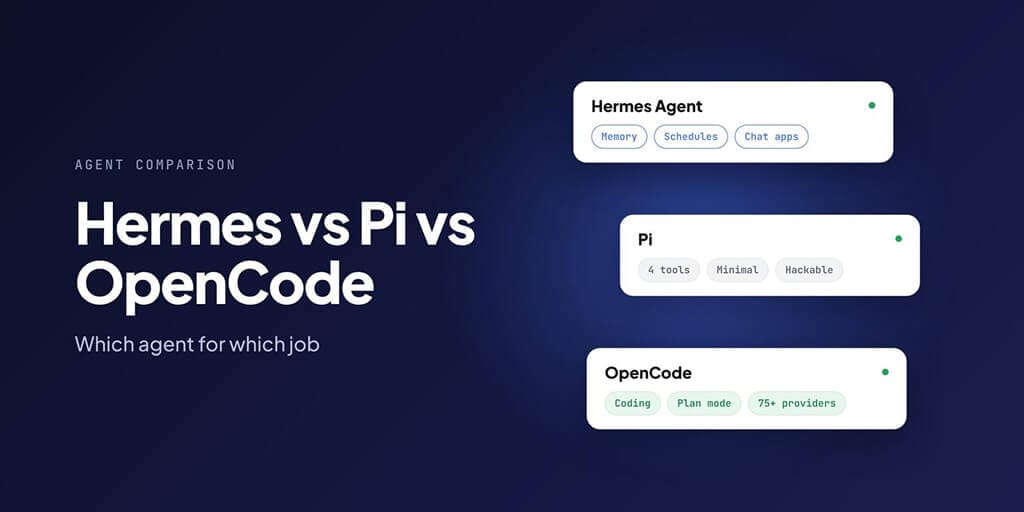
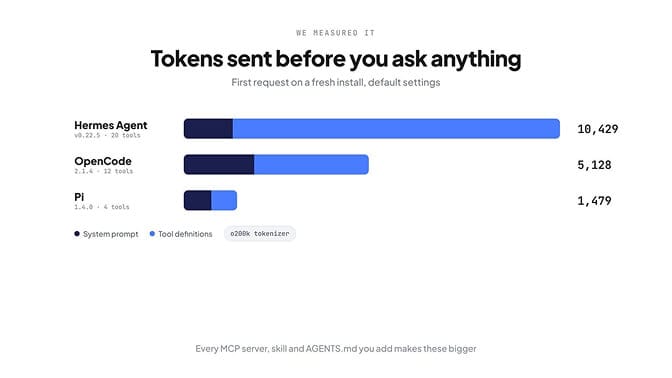
Use Pi or OpenCode for writing code, and Hermes Agent for research, automation and personal-agent work. That's what each tool was built for, and it's what our measurements below point to: before you type anything, Hermes sends the model about 10,400 tokens, OpenCode about 5,100 and Pi about 1,500. On a local model with a 64K window, Hermes has used a sixth of it on turn one.
They're all free, open source and MIT-licensed, and they all run on the models you choose. The difference is scope. Hermes tries to do everything for you. Pi does almost nothing until you extend it. OpenCode does one job, coding, with a full set of tools for it.
Based on what each was built for, and on what we measured below:
| If you want… | Use |
|---|---|
| A coding agent in the terminal with plan mode and editor support | OpenCode |
| A minimal, hackable coding agent you shape yourself | Pi |
| Automation, memory, schedules and chat apps | Hermes Agent |
| All three jobs from one place | Hermes, handing coding work to a coding tool |
All facts below were checked against each project's repo, docs and release notes on 25 October 2026.
What each one is built for
Hermes Agent: the do-everything agent
Hermes Agent, from Nous Research, is a personal agent and orchestrator. It remembers you across sessions, writes and improves its own skills, runs jobs on a schedule, delegates to subagents, and talks to you on Telegram, Discord, Slack, WhatsApp, Signal, Teams and around two dozen other platforms. It has a CLI, a terminal UI, and a desktop app that first shipped in v0.16 in June 2026. The current release is v0.22.5 (23 October 2026).
Strengths: memory, skills, schedules, messaging, subagents and a large plugin catalog. Since v0.22, it can also install and run local models through llama.cpp for you.
Weakness for coding: every turn carries skills, tools and memory that a coding task doesn't need. That's context the model has to read, and tokens you pay for.
Pi: the four-tool coding agent
Pi was started by Mario Zechner and moved with him to Earendil in April 2026. His announcement was clear: "pi is MIT licensed. It will stay MIT licensed." The current version is 1.4.0 (21 October 2026).
Pi gives the model four tools by default (read, write, edit and bash) and very little else. When Zechner introduced it in November 2025, he wrote that the system prompt and tool definitions together "come in below 1000 tokens". It has grown a little since: in our measurement of version 1.4.0, it was about 1,500 tokens, still the smallest of the three by far. It runs in five modes: interactive, print, JSON, RPC and as an SDK.
Strengths: a tiny prompt, speed, tree-shaped sessions you can branch, and TypeScript extensions for anything you want to add. The package catalog at pi.dev lists 5,353 packages.
Weakness: you build what you need. Pi's README says it "skips features like sub-agents and plan mode", and it "does not include a built-in permission system", so it doesn't ask before running commands. Its docs recommend running it in a container or sandbox.
OpenCode: the coding IDE in your terminal
OpenCode comes from Anomaly, the team behind SST, and has passed 220,000 GitHub stars. It's a full coding agent with a terminal UI, a desktop app in beta, and a web interface. It has an extension for VS Code and its forks (Cursor, Windsurf, VSCodium), and works with JetBrains IDEs, Zed and Neovim through the Agent Client Protocol. OpenCode V2 is at v2.1.4 (23 October 2026).
Strengths: two built-in agents, Build for making changes and Plan for thinking without editing files, support for 75+ model providers including local models through Ollama, and editor integration out of the box. It can also feed language-server diagnostics back to the model, though that's off by default; you turn it on with "lsp": true.
Weakness: it's a coding tool and nothing else. No memory across projects, no schedules, no chat apps.
Side-by-side comparison
| Hermes Agent | Pi | OpenCode | |
|---|---|---|---|
| Made by | Nous Research | Mario Zechner, now Earendil | Anomaly (team behind SST) |
| License | MIT | MIT | MIT |
| What it is | Personal agent and orchestrator | Minimal terminal coding agent | Full terminal coding agent |
| Interfaces | CLI, terminal UI, desktop app, 30+ chat platforms | Terminal (interactive, print, JSON, RPC, SDK) | Terminal UI, desktop (beta), web, VS Code extension; JetBrains, Zed and Neovim via ACP |
| Models | Many providers, plus local models through llama.cpp | 30+ providers; local via llama.cpp, Ollama, LM Studio, vLLM | 75+ providers; local via Ollama |
| MCP | Yes, plus a reviewed plugin catalog (600 at launch, now over 800 entries) | Yes, since 0.99 (29 Sep 2026); MCP tools run inside a sandboxed "codemode" by default | Yes, configured in opencode.json |
| Coding helpers | Subagents; bundled skills that hand work to Claude Code, Codex or OpenCode | None built in; add your own with TypeScript extensions | Build and Plan agents; optional LSP diagnostics |
| Safety default | Approval modes (smart by default); desktop plugins aren't sandboxed | No permission prompts; docs recommend a container | Most permissions default to allow; a few ask |
| Reads AGENTS.md | Yes | Yes (and CLAUDE.md) | Yes |
| Cost | Free software; you pay your model provider | Free software; you pay your model provider | Free software; optional Zen or Go plans |
What each agent sends before you've asked anything (we measured)
Every turn, an agent sends the model its system prompt and the definitions of every tool it can use, on top of your message. That fixed overhead decides how much of a model's context window is left for your code, and how many tokens you pay for on every turn.
So we measured it. On 25 October 2026 we installed each agent fresh with default settings, pointed it at a stand-in OpenAI-compatible endpoint that records requests, opened an empty git repository, and asked "Say OK". Then we counted the first real request with OpenAI's o200k tokenizer.
| Hermes Agent v0.22.5 | Pi 1.4.0 | OpenCode 2.1.4 | |
|---|---|---|---|
| System prompt | 1,356 tokens | 765 tokens | 1,947 tokens |
| Tools offered | 20 | 4 | 12 |
| Tool definitions | 9,073 tokens | 714 tokens | 3,181 tokens |
| Fixed overhead per turn | about 10,400 tokens | about 1,500 tokens | about 5,100 tokens |
| Share of a 64K context window | about 16% | about 2% | about 8% |
Here's what fills those tool definitions:
- Hermes: terminal, file read, write, patch and search, code execution, browser, web search and extract, vision, text-to-speech, memory, skills (two tools), subagent delegation, clarifying questions, connections, and three tools for finding and calling more tools.
- Pi: read, bash, edit, write. That's all.
- OpenCode: read, write, edit, glob, grep, shell, execute, web search and fetch, skills, subagents, and a tool for asking you a question.
Hermes and OpenCode also made a second, small call to name the session (about 350 and 500 tokens). Pi didn't.
Treat these as starting points, not fixed sizes. Every MCP server, skill and AGENTS.md file you add increases them, and Hermes offers more tools once you connect more services. The tokenizer matters too: Claude and Gemini count text slightly differently. But the gap is real. Before you've typed anything, Hermes is carrying about seven times Pi's overhead, and OpenCode about three and a half times. On a big cloud model with prompt caching, that's mostly a cost question. On a local model with a 64K window, it's a sixth of your context gone on turn one.
Why developers say Hermes is bloated for coding (and what Nous changed)
The complaint is fair. A coding task needs the repo, the error and a few tools. Hermes, by design, also brings its memory, its skills and a long list of tools into every turn. That costs tokens, and it spreads the model's attention across things the task doesn't need. Our post on skills that reduce token usage explains why loading less up front matters so much.
Nous has been answering it. The v0.22.0 release notes say memory providers "now live with their makers" (Honcho, Supermemory, Mem0 and others) as plugins, along with integrations like Home Assistant and Spotify, leaving "a codebase a third smaller", about 1.06M lines down to 698K.
If you want to stay on Hermes for coding anyway:
- Load fewer skills and tools for coding sessions.
- Keep a separate, coding-specific profile.
- Or let Hermes hand coding to a worker tool, which is the next section.
Pi vs OpenCode for coding
Pick Pi if you want control. You get a tiny prompt, four tools, and an extension system for building exactly the workflow you want. It's the tool for developers who like to know everything the agent sees, and who are comfortable running it in a container because it won't ask before acting.
Pick OpenCode if you want it ready to use. Plan mode, editor integration, a desktop app and 75+ providers work without building anything. Most permissions are allowed by default, so review its permission settings before you point it at anything important.
On token usage: in our measurement above, OpenCode's fixed overhead was about 5,100 tokens a turn against Pi's 1,500. That gap is the price of OpenCode's extra tools (search, web, subagents, questions). Whether it's worth paying depends on whether you'd otherwise build those tools into Pi yourself.
Using them together
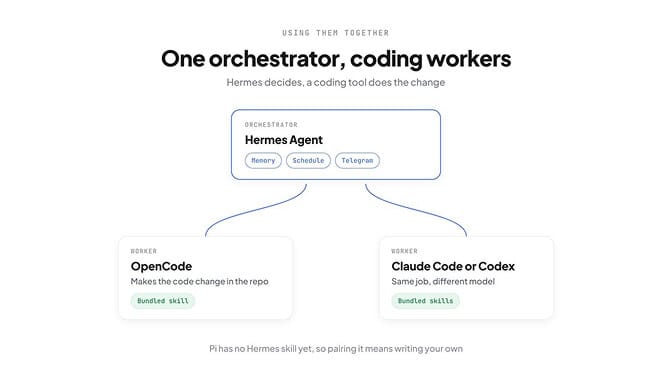
A useful way to think about this stack, borrowed from Michael Tuszynski's piece on the two layers of coding agents: coding tools are workers, and Hermes is an orchestrator that can use them as workers.
In practice, Hermes ships bundled skills that delegate coding to Claude Code, Codex and OpenCode, and its delegate tool can drive agents that speak the Agent Client Protocol. There's no Pi skill in Hermes's catalog today, so pairing Hermes with Pi means writing your own.
The split that works for most people:
- Hermes keeps the memory, the schedule and the chat channel. It decides what needs doing.
- OpenCode (or another coding tool) does the code change in the repo.
- You review the result.
Getting started with each one
All three install in one line. These commands are from each project's README and docs, checked on 25 October 2026.
Hermes Agent
curl -fsSL https://hermes-agent.nousresearch.com/install.sh | bash
hermes model        # pick a provider and model
MCP servers go in ~/.hermes/config.yaml:
mcp_servers:
  filesystem:
    command: "npx"
    args: ["-y", "@modelcontextprotocol/server-filesystem", "/home/user/projects"]
Pi
curl -fsSL https://pi.dev/install.sh | sh
pi                  # then /login to add a provider, /model to pick one
MCP servers go in ~/.pi/agent/mcp.json (or .pi/mcp.json for one project):
{
  "mcpServers": {
    "filesystem": {
      "command": "npx",
      "args": ["-y", "@modelcontextprotocol/server-filesystem", "."]
    }
  }
}
OpenCode
curl -fsSL https://opencode.ai/v2/install | bash
# or: npm i -g @opencode/cli@latest
MCP servers go in opencode.json at your project root:
{
  "$schema": "https://opencode.ai/config.json",
  "mcp": {
    "filesystem": {
      "type": "local",
      "command": ["npx", "-y", "@modelcontextprotocol/server-filesystem", "."],
      "enabled": true
    }
  }
}
One thing to do on day one with OpenCode: turn on LSP if your language has a server ("lsp": true in the same file), and review the permission settings, since most actions are allowed by default. With Pi, run it in a container or a throwaway VM until you trust your setup, because it won't ask before running commands.
Which one should you pick? Five common situations
You want a coding agent in the terminal tomorrow
Start with OpenCode. Plan mode lets you see what it intends before it edits anything, the VS Code extension keeps it close to your editor, and you can point it at whatever model you already pay for. Check its permission settings first, since most actions are allowed by default.
You want to control everything the agent does
Pick Pi. You'll spend an afternoon adding the extensions you need, but you'll know exactly what's in the prompt. Run it in a container, because it won't stop to ask before running a command.
You want an assistant with memory, schedules and chat apps
That's Hermes. Neither Pi nor OpenCode tries to do this.
You want one assistant that also writes code sometimes
Keep Hermes as the front door and let it hand coding tasks to OpenCode, Claude Code or Codex through its bundled skills. You get the memory and scheduling without paying for them on every coding turn.
Your "agent" is really for email, leads and reports
None of the three is the obvious fit, because each expects someone to install, update and secure it. That's the gap a managed platform fills, which is the last section below.
Whichever you pick
Start with one narrow job, give it a clear definition of done, and widen its scope only after it's run cleanly for a week.
Cost: what you actually pay
All three are free and open source. What you pay for is the model.
- Hermes: your model provider, or a Nous Portal subscription if you want its bundled models and tools.
- Pi: your model provider. One warning from Pi's own changelog: if you sign in with a Claude subscription, "Anthropic third-party usage draws from extra usage and is billed per token", not from your plan's included usage.
- OpenCode: your model provider, or one of its optional plans. Zen is pay as you go, sold at cost, with a card processing fee of 4.6% + $0.31 on top-ups. Go is $10 a month, and Go Plus is $40 a month.
Whichever you choose, bringing your own key keeps the model bill at list price. Our explainers on BYOK and OpenRouter vs direct API pricing show how much that's worth.
When you don't want to run any of them yourself
If the work you need is business automation (your inbox, leads, reports, follow-ups) rather than code, you may not want to run an agent at all. BetterClaw runs the agent for you, on any model with your own key and zero markup, with 120+ connectors and approvals before anything sends. If you're weighing it against Hermes specifically, see our Hermes vs BetterClaw comparison, or set up your first agent.
Already running Hermes and something's broken? Our Hermes Agent troubleshooting guide covers the common failures. And whichever coding agent you pick, all three read AGENTS.md; our AGENTS.md best practices guide covers how to write one they'll follow.
Build your agent in BetterClaw. Plans start at $19 a month with a 7-day money-back guarantee.
Frequently Asked Questions
Is Hermes or Pi better for coding?
Pi or OpenCode, rather than Hermes. Pick Pi if you want control and the smallest prompt, OpenCode if you want plan mode and editor support ready to use. Hermes can code, but every turn carries memory, skills and tools a coding task doesn't need. Hermes is better at automation, schedules and chat-based work.
What is the difference between Pi and OpenCode?
Pi is minimal: four tools, no plan mode, no subagents and no permission prompts, with TypeScript extensions to add what you need. OpenCode is ready to use: Build and Plan agents, a desktop app, editor integration and 75+ model providers out of the box.
Which agent uses the fewest tokens per turn?
Pi, by a wide margin. In our measurement of fresh installs with default settings, Pi 1.4.0 sent about 1,500 tokens of system prompt and tool definitions per turn, OpenCode 2.1.4 about 5,100, and Hermes Agent v0.22.5 about 10,400. MCP servers, skills and AGENTS.md files add to all three.
Is Hermes Agent bloated?
For coding, many developers think so, because it brings memory, skills and many tools into every turn. Nous has trimmed it: v0.22.0 moved memory providers and several integrations into plugins and cut the codebase by about a third.
Does Pi support MCP?
Yes, since version 0.99 (29 September 2026). By default, MCP tools are called from a sandboxed "codemode" script environment rather than loaded into the prompt, which keeps their schemas out of the model's context.
Is OpenCode free?
Yes. OpenCode is free, MIT-licensed software, and you can use it with your own model keys. Its optional Zen plan sells model usage at cost plus a card fee, and its Go plan costs $10 a month.
Can I use Hermes and OpenCode together?
Yes. Hermes ships a bundled skill that delegates coding tasks to the OpenCode CLI, so Hermes can keep the memory and schedule while OpenCode makes the code changes.