Quick start
docker pull nousresearch/hermes-agent:latest
mkdir -p ~/.hermes
docker run -it --rm -v ~/.hermes:/opt/data nousresearch/hermes-agent setup
docker run -d --name hermes --restart unless-stopped \
  -v ~/.hermes:/opt/data \
  -e HERMES_UID=$(id -u) -e HERMES_GID=$(id -g) \
  -p 8642:8642 -p 9119:9119 -e HERMES_DASHBOARD=1 \
  nousresearch/hermes-agent gateway run
This pulls the official image, runs the one-time setup wizard, then starts the gateway in the background with your data mounted and the dashboard on port 9119. There is no :stable tag, whatever other guides say. Use :latest, or pin a dated release such as v2026.9.21. For a long-running setup, the Docker Compose file below is the better route.
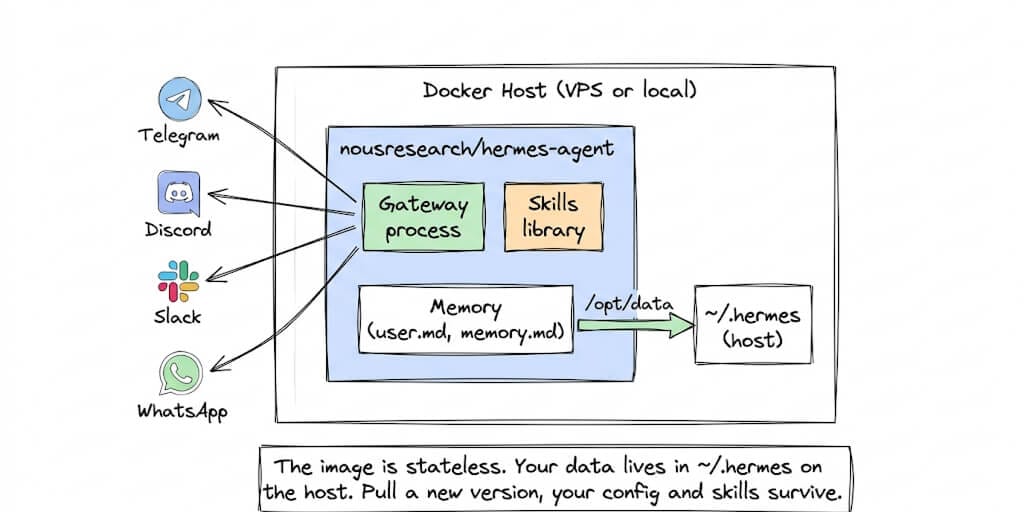
Hermes Agent runs in Docker using the official nousresearch/hermes-agent image. All of its data persists in one volume: host ~/.hermes mounted at /opt/data. Port 9119 serves the web dashboard when HERMES_DASHBOARD=1 is set, and port 8642 serves the optional OpenAI-compatible API server. The container runs as UID 10000, and Docker Compose is the recommended way to run it long term.
Hermes Agent ships an official Docker image. Three commands to set up, one to run 24/7. But there are two Docker modes that most guides conflate, two ports that do different jobs, and one data persistence mistake that wipes your skills. Here's the guide that covers all of it.
A developer on MindStudio wrote: "You will forget which container holds which agent within two weeks."
He was running four Hermes instances. Different models. Different Telegram bots. Different skill libraries. All in separate Docker containers. All with nearly identical names. And no labeling system.
That's the Docker experience in one sentence. It works. You just have to manage it.
Hermes Agent (245,000+ GitHub stars at the time of writing) ships an official Docker image from Nous Research. If you are still deciding whether to run it at all, our overview of what Hermes Agent is covers the learning loop, memory model, and where it fits. The install is genuinely simple: three commands to setup, one to run. But the Docker deployment has two distinct modes that most guides conflate, and one data persistence mistake that silently wipes your accumulated skills on the next docker pull.
Here's the complete guide.
The setup (three commands, five minutes)
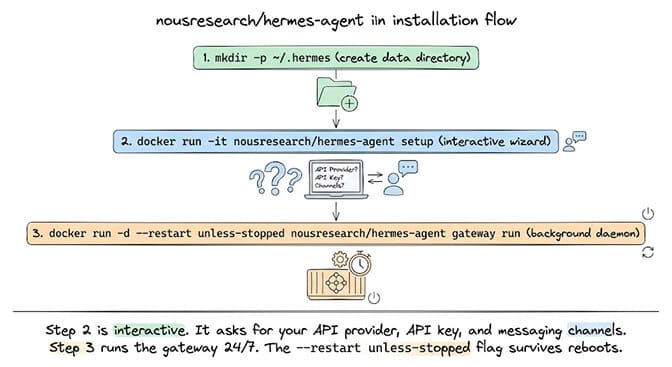
Step 1: Create the data directory.
mkdir -p ~/.hermes
This is where your config, API keys, sessions, skills, and memories live on the host machine.
Step 2: Run the setup wizard.
docker run -it --rm -v ~/.hermes:/opt/data nousresearch/hermes-agent setup
This drops you into the interactive wizard. It asks for your LLM provider (Anthropic, OpenAI, DeepSeek, OpenRouter, etc.), your API key, and which messaging channels to connect (Telegram, Discord, Slack, WhatsApp).
Step 3: Run the gateway in the background.
docker run -d --name hermes --restart unless-stopped \
  -v ~/.hermes:/opt/data \
  -p 8642:8642 \
  -p 9119:9119 -e HERMES_DASHBOARD=1 \
  nousresearch/hermes-agent gateway run
Your agent is now running 24/7.
The critical detail: The -v ~/.hermes:/opt/data volume mount is what keeps your data safe. Without it, your config, skills, and memories live inside the container and vanish on the next docker pull. Always mount /opt/data to a host directory. The image declares VOLUME [ "/opt/data" ] and sets HERMES_HOME=/opt/data, so that one path is the whole persistence story.
The two ports (and why one of them does nothing by default)
This trips people up constantly, because the two ports are unrelated and only one of them is what most people actually want.
Port 9119 — the web dashboard. This is the browser control plane: sessions, API keys, config editing, logs, scheduled tasks. It is off unless you set HERMES_DASHBOARD=1, and it defaults to binding 127.0.0.1. That default is deliberate — the dashboard stores API keys, so exposing it on a LAN without authentication is unsafe. For remote access, tunnel it: ssh -L 9119:localhost:9119 you@your-vps. The port is configurable via HERMES_DASHBOARD_PORT, and if you must bind it beyond loopback, the image supports basic auth (HERMES_DASHBOARD_BASIC_AUTH_USERNAME / ..._PASSWORD), Nous Portal OAuth, or self-hosted OIDC.
Port 8642 — the OpenAI-compatible API server. This is for pointing other tools (Open WebUI, LobeChat, an OpenAI SDK client) at your agent. It is disabled by default: API_SERVER_ENABLED is false, and even once enabled it binds 127.0.0.1 unless you change API_SERVER_HOST. Turning it on takes two variables:
API_SERVER_ENABLED=true
API_SERVER_KEY=some-long-random-string
API_SERVER_KEY is mandatory — it is the bearer token for the endpoint, and there is no unauthenticated mode. The health check lives at GET /health, mirrored at GET /v1/health for clients that expect the /v1/ prefix. The default port is 8642 via API_SERVER_PORT.
If you only talk to your agent through Telegram or Discord, you need neither port. Publish 9119 if you want the dashboard; publish 8642 only if you deliberately enabled the API server.
The two Docker modes (this is where most guides get confusing)
Here's what nobody tells you about Hermes and Docker.
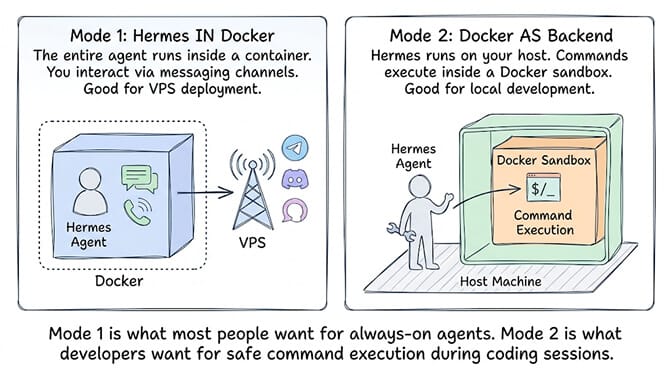
Mode 1: Hermes running inside Docker. This is the standard deployment. The entire agent (gateway, skills, memory, messaging) runs inside the container. You interact through Telegram, Discord, or other channels. The container is your server. This is what the setup above configures.
Mode 2: Docker as a terminal backend. Hermes runs on your host machine (not in Docker). But every command the agent executes runs inside a Docker sandbox container. The sandbox survives across tool calls, new sessions, and subagents. Docker is one of seven terminal backends Hermes supports — the others are local, SSH, Singularity, Modal, Daytona, and Vercel Sandbox. This is for developers who want the agent on their machine but want command execution isolated.
The confusion: Most guides mix these two modes. "Install Hermes with Docker" could mean either. If you want a 24/7 agent on a VPS, you want Mode 1. If you want safe local development with isolated execution, you want Mode 2.
Setting the terminal backend to Docker
This is Mode 2 in practice. By default Hermes runs the agent's commands in your local shell. To run every command inside a Docker sandbox instead, with Hermes installed on the host, run:
hermes config set terminal.backend docker
That writes terminal.backend: docker to ~/.hermes/config.yaml. From then on, every command the agent runs (file operations, scripts, system commands) happens inside one persistent sandbox container rather than on your machine. The agent can't touch your host filesystem, .env or system files unless you mount them. Docker Desktop or Docker Engine has to be installed and running on the host, and Podman works if you set HERMES_DOCKER_BINARY=podman.
The settings you are most likely to touch live under the same key:
terminal:
  backend: docker
  docker_image: "nikolaik/python-nodejs:python3.11-nodejs20"
  docker_volumes:
    - "/home/user/projects:/workspace/projects"
    - "/home/user/data:/data:ro"
  docker_run_as_host_user: true
  docker_persist_across_processes: true
docker_volumes shares host folders with the sandbox (add :ro for read-only). docker_run_as_host_user makes files the agent creates in those folders belong to you rather than root. docker_persist_across_processes keeps one long-lived sandbox across Hermes restarts. Set it to false if you want a fresh one each time.
Use the Docker backend when you're running untrusted skills or tools, the agent executes arbitrary code, or host isolation matters. Keep the local backend when you're developing and testing, the agent needs broad access to host files, or speed matters more than isolation.
Running Hermes itself in Docker (Mode 1) and wanting the Docker backend? Mount the host's Docker socket into the Hermes container (-v /var/run/docker.sock:/var/run/docker.sock) so it can start sibling sandbox containers. Be aware that the socket gives the container control of the host's Docker daemon.
Docker Compose setup (recommended)
For anything you plan to leave running, use Compose. This is the example from the official Hermes Docker docs. It pulls the published image, publishes both ports, and caps resources:
services:
  hermes:
    image: nousresearch/hermes-agent:latest
    container_name: hermes
    restart: unless-stopped
    command: gateway run
    ports:
      - "8642:8642"   # gateway API
      - "9119:9119"   # dashboard (only reached when HERMES_DASHBOARD=1)
    volumes:
      - ~/.hermes:/opt/data
    environment:
      - HERMES_DASHBOARD=1
    deploy:
      resources:
        limits:
          memory: 4G
          cpus: "2.0"
Save it as docker-compose.yml, run the setup wizard once if you haven't already (the setup command in the quick start), then start it:
docker compose up -d
If ~/.hermes is owned by your host user, add - HERMES_UID=${HERMES_UID:-10000} and - HERMES_GID=${HERMES_GID:-10000} under environment, then start it with HERMES_UID=$(id -u) HERMES_GID=$(id -g) docker compose up -d. Port 8642 only answers once you enable the API server (see the two ports above). If you don't need it, delete that line.
The compose file in the repo (builds from source)
The repo also ships a docker-compose.yml at the root. It is a different shape from the docs example, and worth reading before you copy it. Two services, both on network_mode: host, both mounting the same data directory, with the dashboard deliberately pinned to loopback:
services:
  gateway:
    build: .
    image: hermes-agent
    container_name: hermes
    restart: unless-stopped
    network_mode: host
    volumes:
      - ~/.hermes:/opt/data
    environment:
      - HERMES_UID=${HERMES_UID:-10000}
      - HERMES_GID=${HERMES_GID:-10000}
      # To expose the OpenAI-compatible API server beyond localhost,
      # uncomment BOTH lines (API_SERVER_KEY is mandatory for auth):
      # - API_SERVER_HOST=0.0.0.0
      # - API_SERVER_KEY=${API_SERVER_KEY}
    command: ["gateway", "run"]

  dashboard:
    image: hermes-agent
    container_name: hermes-dashboard
    restart: unless-stopped
    network_mode: host
    depends_on:
      - gateway
    volumes:
      - ~/.hermes:/opt/data
    environment:
      - HERMES_UID=${HERMES_UID:-10000}
      - HERMES_GID=${HERMES_GID:-10000}
    # Localhost-only. For remote access, tunnel via `ssh -L 9119:localhost:9119`.
    command: ["dashboard", "--host", "127.0.0.1", "--no-open"]
(The upstream file also carries commented blocks for the Microsoft Teams and Google Chat gateways; they're omitted here for length.)
Run it the way the file's own header tells you to:
HERMES_UID=$(id -u) HERMES_GID=$(id -g) docker compose up -d
Two things to notice. First, the compose file builds from source (build: .) rather than pulling — if you'd rather pull the published image, swap build: . for image: nousresearch/hermes-agent:latest and drop the build context. Second, the file's own security note is blunt about the dashboard: "It stores API keys; exposing it on LAN without auth is unsafe. If you want remote access, use an SSH tunnel or put it behind a reverse proxy that adds authentication — do NOT pass --insecure --host 0.0.0.0."
One more warning from the same header, worth repeating because it produces a container that starts and then behaves strangely: if you override the entrypoint, keep /init first in the chain. /init is s6-overlay's PID 1, and it runs the cont-init.d scripts — chown, profile reconcile, dashboard toggle — before any service starts. Bypass it and none of that setup happens.
Permissions: the container is UID 10000, not 1000
This is the single most common Docker-specific failure, and most guides (including an earlier version of this one) get the number wrong.
The image creates a non-root user hermes with UID 10000, home directory /opt/data, and every supervised service drops to it via s6-setuidgid hermes. So chown -R 1000:1000 ~/.hermes — the reflex from most container images — points at the wrong user entirely and leaves the data directory unwritable.
The supported fix is not to chown at all. Tell the container which host user owns the directory:
docker run -d --name hermes \
  -e HERMES_UID=$(id -u) -e HERMES_GID=$(id -g) \
  -v ~/.hermes:/opt/data \
  nousresearch/hermes-agent gateway run
The s6-overlay stage-2 hook remaps the internal hermes user to those values with usermod/groupmod before services start, so files created inside the container stay readable and writable on the host. PUID/PGID work as aliases, for parity with LinuxServer.io and NAS images. On a Synology or other shared mount, set them to whatever owns the share.
The production checklist (what breaks after day one)
Problem 1: Volume mount missing. You ran docker run without -v ~/.hermes:/opt/data. The agent works. Skills accumulate. Memory grows. Then you update with docker pull and restart. Everything is gone. The container was the only copy.
The fix: Always use the volume mount. Always verify with docker inspect hermes | grep Mounts.
Problem 2: Runtime installs inside the container. The official image sets HERMES_DISABLE_LAZY_INSTALLS=1, so optional backend SDKs are not fetched into the image at runtime. If a backend needs one, point HERMES_LAZY_INSTALL_TARGET at a path under the mounted volume (it defaults to /opt/data/lazy-packages) so the install survives a container rebuild.
The fix: Use only the official nousresearch/hermes-agent image. Community images may lag behind or use incompatible base images.
Problem 3: Wrong ownership on the mounted volume. Covered above — set HERMES_UID/HERMES_GID rather than guessing at a chown.
Problem 4: Port conflicts. A port clash is also the most common reason Hermes Agent not working shows up as a silent startup failure rather than a Docker error. If you're running multiple Hermes instances, each needs its own host port mapping: -p 8643:8642 and -p 9120:9119 for the second instance, and so on. Note that the upstream compose file uses network_mode: host, which does no port mapping at all — for multiple instances on one box, switch to explicit -p mappings or per-service port publishing.
Problem 5: Browser tools crashing. If your agent uses Playwright or Chromium, add --shm-size=1g to the run command. The image sets PLAYWRIGHT_BROWSERS_PATH=/opt/hermes/.playwright, but the default 64MB /dev/shm will still take down a browser session.
One thing not to do: if an older guide tells you to mount a writable volume over /opt/hermes/web to make the dashboard start, skip it. That bug (issue #12243) is closed, and the current image ships a prebuilt dashboard. For the container pitfalls that are still live, see the Hermes error index.
If managing Docker volumes, port mappings, UID remapping, and multi-container orchestration for an AI agent sounds like more DevOps than agent building, BetterClaw eliminates the Docker layer entirely. No containers. No volume mounts. No port mapping. Deploy in 60 seconds from a browser. Free tier with 1 agent and BYOK. $49/month for Pro.
How to update Hermes Agent in Docker
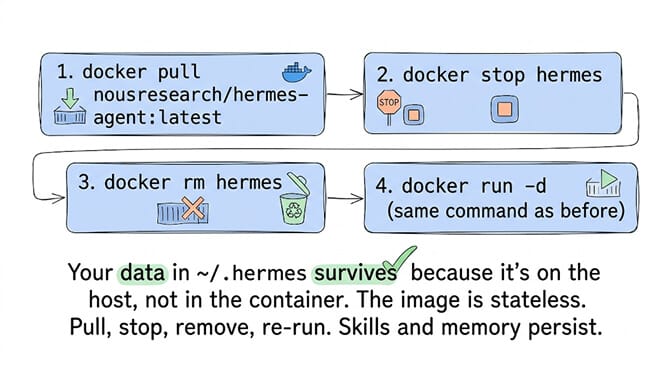
With Docker Compose, it is two commands:
docker compose pull
docker compose up -d
Compose recreates the container on the new image and keeps your volume.
With plain docker run:
docker pull nousresearch/hermes-agent:latest
docker rm -f hermes
docker run -d --name hermes --restart unless-stopped \
  -v ~/.hermes:/opt/data \
  -p 8642:8642 -p 9119:9119 -e HERMES_DASHBOARD=1 \
  nousresearch/hermes-agent gateway run
Reuse exactly the flags you started with, including any HERMES_UID/HERMES_GID. If you'd rather choose when upgrades happen, pin a dated tag (nousresearch/hermes-agent:v2026.9.21) instead of :latest, and bump it deliberately after reading the release notes.
Your data survives because it lives in ~/.hermes on the host. The container is disposable. The data directory is permanent. This is the correct Docker pattern for stateful applications. Config migrations run automatically on container start, and the image writes a timestamped backup when it needs to change anything.
The mistake to avoid: Using docker compose up -d with a build step instead of pull. If your compose file builds from source instead of pulling the official image, updates require rebuilding, which takes longer and can introduce build failures. (The upstream compose file does exactly this by default — see the swap above.)
Running Hermes Agent on Portainer, Synology, or Unraid
All three run the same image. The only real differences are where the data folder lives and which user owns it. Two rules apply everywhere. Use an absolute host path (NAS UIs don't expand ~). And set PUID/PGID to the user that owns that folder (run id over SSH to check), because the container's default UID 10000 almost never matches a NAS user. Run the setup wizard once first over SSH, pointing at the same folder:
docker run -it --rm -v /volume1/docker/hermes:/opt/data nousresearch/hermes-agent setup
Portainer
- Go to Stacks → Add stack and choose the Web editor.
- Paste the Compose file above, changing
~/.hermesto an absolute path such as/srv/hermes, and addingPUID/PGIDunderenvironment. - Click Deploy the stack.
Synology (Container Manager)
- Create a folder such as
/volume1/docker/hermesin File Station. - Open Container Manager → Project → Create, pick that folder as the project path, and choose to create a
docker-compose.yml. - Paste the Compose file, set the volume to
/volume1/docker/hermes:/opt/data, and add the owner's IDs. The official docs' NAS example usesPUID=1000andPGID=10, but use whateveridreports for your user. - Finish the wizard to build and start the project.
Container Manager runs Compose v2, so the file works unchanged.
Unraid
- Open the Docker tab → Add Container.
- Repository:
nousresearch/hermes-agent:latest. - Add port mappings
8642→8642and9119→9119, and a path mapping from/mnt/user/appdata/hermesto/opt/data. - Add the variables
HERMES_DASHBOARD=1,PUID=99andPGID=100(Unraid's standardnobody:usersowner for appdata). - In the advanced view, set Post Arguments to
gateway run, then Apply.
Menu names shift a little between DSM, Portainer and Unraid releases, but the four values that matter never change: the image, the /opt/data mount, the owner IDs, and the gateway run command.
Running multiple agents
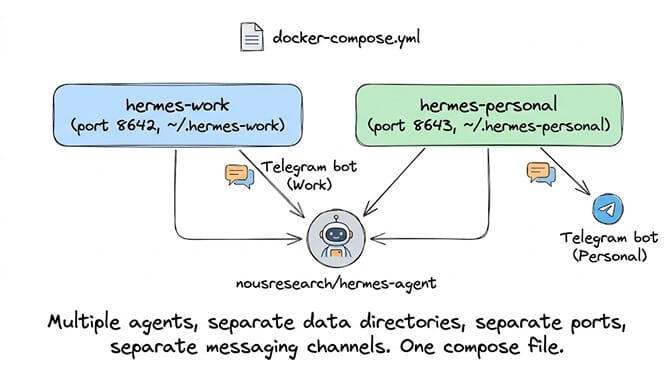
Duplicate the service block with different container names, different data directories, and different published ports. hermes-work with ~/.hermes-work:/opt/data, hermes-personal with ~/.hermes-personal:/opt/data. Each agent then has isolated skills, memory, and messaging channels.
If you publish the dashboard for more than one of them, give each its own host port (-p 9119:9119, -p 9120:9119) and drop network_mode: host, which cannot map ports.
For the comparison between managed and self-hosted agent deployment, our comparison covers what you manage yourself versus what a platform handles.
The honest assessment (Docker for Hermes vs managed alternatives)
Here's the take.
Docker is the right choice for Hermes if you want full control, you're comfortable with container management, and you're running on a VPS you already have. The official image is well-maintained — s6-overlay supervision, automatic config migrations, a prebuilt dashboard, and a single well-defined data volume. The volume mount pattern is clean. Updates are pull-stop-remove-restart.
Docker is the wrong choice if you don't want to manage containers, you're not comfortable with port mapping and volume permissions, or you need the agent running without thinking about infrastructure.
The image itself is in good shape. The remaining friction is the surface around it: which port does what, which user owns the volume, and which of the two Docker modes a given tutorial is actually describing. For the broader set of pitfalls beyond the container, our guide on Hermes Agent installation errors covers the pip, Python version, and gateway problems you may hit alongside the Docker ones.
If you want an always-on agent without Docker, volume mounts, port mapping, and container lifecycle management, give BetterClaw a try. Free tier with 1 agent and BYOK. $49/month for Pro. 15+ messaging channels. Persistent memory. No Docker required. The agent runs. The infrastructure is ours.
Frequently Asked Questions
How do I install Hermes Agent with Docker?
Three commands: create a data directory (mkdir -p ~/.hermes), run the setup wizard (docker run -it --rm -v ~/.hermes:/opt/data nousresearch/hermes-agent setup), then start the gateway (docker run -d --name hermes --restart unless-stopped -v ~/.hermes:/opt/data -p 9119:9119 -e HERMES_DASHBOARD=1 nousresearch/hermes-agent gateway run). Total time: about 5 minutes. The setup wizard asks for your API provider and messaging channels.
What port does the Hermes Agent dashboard use in Docker?
Port 9119. Run the container with -e HERMES_DASHBOARD=1 -p 9119:9119, then open http://127.0.0.1:9119. It binds to loopback by default because it stores API keys — for remote access use an SSH tunnel (ssh -L 9119:localhost:9119 you@host) or an authenticated reverse proxy, not --insecure --host 0.0.0.0. Port 8642 is a different thing: the OpenAI-compatible API server, which is disabled unless you set API_SERVER_ENABLED=true and API_SERVER_KEY.
Why does Hermes Agent get permission errors on the mounted Docker volume?
Because the container runs as user hermes with UID 10000, not the usual 1000. Don't chown the host directory to 1000; instead pass the host owner's IDs into the container with -e HERMES_UID=$(id -u) -e HERMES_GID=$(id -g) (or the PUID/PGID aliases). The s6-overlay init hook remaps the internal user to those IDs before any service starts, so files created in the container stay writable on the host.
How do I update Hermes Agent in Docker without losing data?
With Compose, run docker compose pull then docker compose up -d. With plain Docker, pull the new image (docker pull nousresearch/hermes-agent:latest), remove the old container (docker rm -f hermes), then start a new one with the same volume mount and flags. Your data in ~/.hermes survives because it's on the host, not inside the container. Config migrations run automatically on start, with a timestamped backup when the format changes.
Is there a Docker Compose file for Hermes Agent?
Yes. The official Hermes docs publish one that pulls nousresearch/hermes-agent:latest, runs gateway run, publishes ports 8642 and 9119, mounts ~/.hermes:/opt/data, and sets HERMES_DASHBOARD=1. Save it as docker-compose.yml and run docker compose up -d. The repo's own docker-compose.yml is different: it builds from source and uses host networking. Full file above.
How do I set the Hermes terminal backend to Docker?
Run hermes config set terminal.backend docker, or set terminal.backend: docker in ~/.hermes/config.yaml. Every command the agent runs then executes inside a persistent Docker sandbox instead of your local shell. Docker must be installed and running on the host. Use docker_volumes to share folders with the sandbox, and docker_run_as_host_user: true so files it creates belong to you.
What is the Hermes Agent Docker image name?
nousresearch/hermes-agent on Docker Hub. Pull it with docker pull nousresearch/hermes-agent:latest, or pin a dated release tag such as v2026.9.21. There is no :stable tag.
How much does it cost to run Hermes Agent with Docker?
The Docker image and Hermes software are free (MIT license). You need a VPS ($5-10/month for Hetzner, DigitalOcean, or Contabo with 2+ CPU cores and 8GB RAM) plus your AI model API costs (varies by provider and usage). Total: $5-50/month depending on model choice and usage volume. BetterClaw offers managed deployment at $0 (free tier) or $49/month (Pro) without Docker.