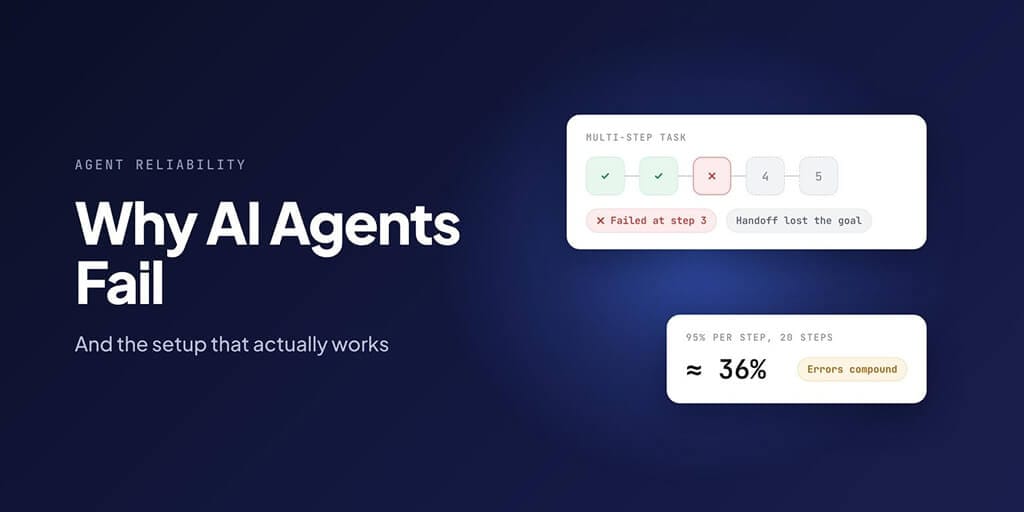
AI agents usually fail for boring reasons. They repeat steps, lose track of the goal across handoffs, and check their own work badly. When UC Berkeley researchers studied 1,642 runs of multi-agent systems, almost a quarter of the failures came down to verification alone. And the arithmetic of long tasks is brutal: an agent that gets each step right 95% of the time finishes a 20-step task only about 36% of the time.
The setup that works is just as unglamorous: fixed steps for the parts that should never change, the agent only where judgment is needed, a definition of "done" a machine can check, and a separate checker.
How often do AI agents actually fail?
The clearest recent test is UC Berkeley RDI's Agents' Last Exam, built with more than 250 industry experts from 55 sub-fields across 13 industry clusters. It turns real work assignments into 1,490 task instances and grades them pass or fail, with no partial credit for getting most of the way.
In the current version of the paper (October 2026, checked 25 Oct 2026), the best system, Codex running GPT-5.5, fully passed 24.0% of the tasks. On the hardest tier, the average full pass rate across all systems was below 1%. In the first version of the paper (June 2026), the figures were 26.2% and 2.6%; the harder test set in later versions pushed them down.
Why does that feel worse than the demos? Because a demo is the best run, and your workload is every run. It's also because benchmarks don't cover most real work. Mercor's Benchmark Map estimates that 90% of American working hours go to tasks with little or no coverage from existing benchmarks. Mercor calls those results provisional, but the point stands: a high benchmark score says little about your inbox.
Here's why long tasks are so much harder than short ones. This is arithmetic, not data from any study: if every step must succeed and each one works a fixed share of the time, the whole task succeeds that share to the power of the number of steps.
| Each step works | 5 steps | 10 steps | 20 steps | 50 steps |
|---|---|---|---|---|
| 90% of the time | 59% | 35% | 12% | 1% |
| 95% | 77% | 60% | 36% | 8% |
| 98% | 90% | 82% | 67% | 36% |
| 99% | 95% | 90% | 82% | 61% |
| 99.5% | 98% | 95% | 90% | 78% |
Small per-step errors compound. Read the table two ways. Going from 95% to 99% per step more than doubles the success rate of a 20-step task, from 36% to 82%. But cutting a 20-step task down to 5 steps does almost as much, taking a 95%-per-step agent from 36% to 77%. Shorter tasks are the cheapest reliability upgrade there is.
Real steps aren't independent, and agents can sometimes recover from a bad step, so treat these as a direction, not a forecast.
In June 2025, Gartner predicted that "over 40% of agentic AI projects will be canceled by the end of 2027, due to escalating costs, unclear business value or inadequate risk controls."
The 14 ways multi-agent systems break (in plain English)
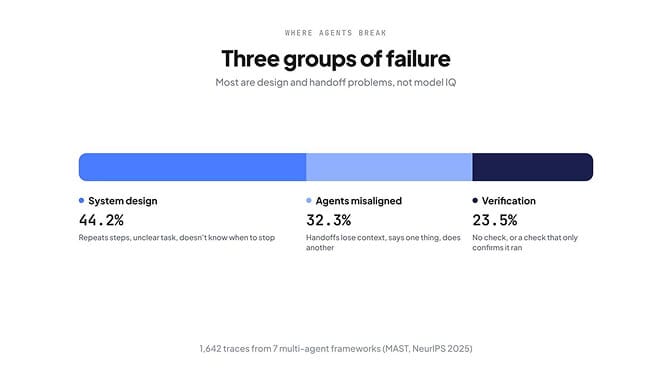
The most useful map of agent failure comes from Berkeley's MAST study (Cemri et al., NeurIPS 2025). The team annotated 1,642 traces from seven popular multi-agent frameworks and sorted what went wrong into 14 failure modes in three groups.
| Group | Share of failures | Failure mode | Share | What it looks like day to day |
|---|---|---|---|---|
| System design | 44.2% | Step repetition | 15.7% | The agent re-sends the same email draft four times |
| Unaware of termination conditions | 12.4% | It keeps working after the job is done | ||
| Disobey task specification | 11.8% | Asked for a summary, it writes a report | ||
| Loss of conversation history | 2.8% | It forgets what you said ten messages ago | ||
| Disobey role specification | 1.5% | The reviewer starts rewriting the work | ||
| Agents misaligned with each other | 32.3% | Reasoning-action mismatch | 13.2% | It says it will check the date, then doesn't |
| Task derailment | 7.4% | It drifts into a side quest | ||
| Fail to ask for clarification | 6.8% | It guesses instead of asking | ||
| Conversation reset | 2.2% | A handoff starts from scratch | ||
| Ignored other agent's input | 1.9% | It overrules a teammate's correct finding | ||
| Information withholding | 0.8% | It knows the answer but doesn't pass it on | ||
| Verification | 23.5% | Incorrect verification | 9.1% | The checker approves broken work |
| No or incomplete verification | 8.2% | Nothing checks the output at all | ||
| Premature termination | 6.2% | It stops before the task is finished |
The takeaway: most failures are design and handoff problems, not "the model isn't smart enough". A smarter model still repeats steps if nothing tells it the task is done.
What each failure looks like in your logs
Knowing the names helps less than recognising them in a real run. Here are the most common ones, and what to change:
| Failure mode | What you see in the run log | The fix |
|---|---|---|
| Step repetition (15.7%) | The same tool call with the same arguments, three or more times in a row | Cap retries per step, and record what's done in a progress file the agent reads first |
| Reasoning-action mismatch (13.2%) | The agent writes "I'll check X", then the next tool call does something else | Make the check a fixed step the agent can't skip |
| Unaware of termination (12.4%) | The run keeps going after the output exists, or stops at the step limit | Give it a done condition a script can test, and stop the run when it passes |
| Disobey task specification (11.8%) | The output is the wrong shape: a report instead of a summary, 2,000 words instead of 200 | Put the output format in the task as a template, and check it in code |
| Incorrect verification (9.1%) | A "review" step that approves everything | Use a separate checker with its own instructions, or a person |
Failure 1: the agent does too much at once
When Anthropic's engineers built agents that work across many sessions, they hit this first. In their write-up on long-running agents, the agent "tended to try to do too much at once", essentially trying to one-shot a whole app, and a later session would "look around, see that progress had been made, and declare the job done."
Their fix was to ask the agent to "work on only one feature at a time."
The same rule works for business agents. Compare:
- Too big: "Handle my inbox this week."
- Right size: "Every hour, label new emails as urgent, routine or ignore, and draft replies to routine ones. Don't send anything."
The second one has a clear start, a clear end, and an output you can check in a minute.
Failure 2: it loses the goal between steps (handoffs)
MAST's misalignment group is mostly agents saying one thing and doing another (13.2%), drifting off task (7.4%) and guessing instead of asking (6.8%). Handoff losses, like conversation resets and ignored input, are a smaller share, but they're the easiest to fix: every time work passes from one agent, or one session, to the next, details fall off.
Chat summaries are where they fall off. Summaries paraphrase. Files don't.
So pass work through a file: a progress log, a JSON task list, a ticket. Anthropic's long-running agents keep a claude-progress.txt log plus git commits, and track features in a JSON file because "the model is less likely to inappropriately change or overwrite JSON files compared to Markdown files."
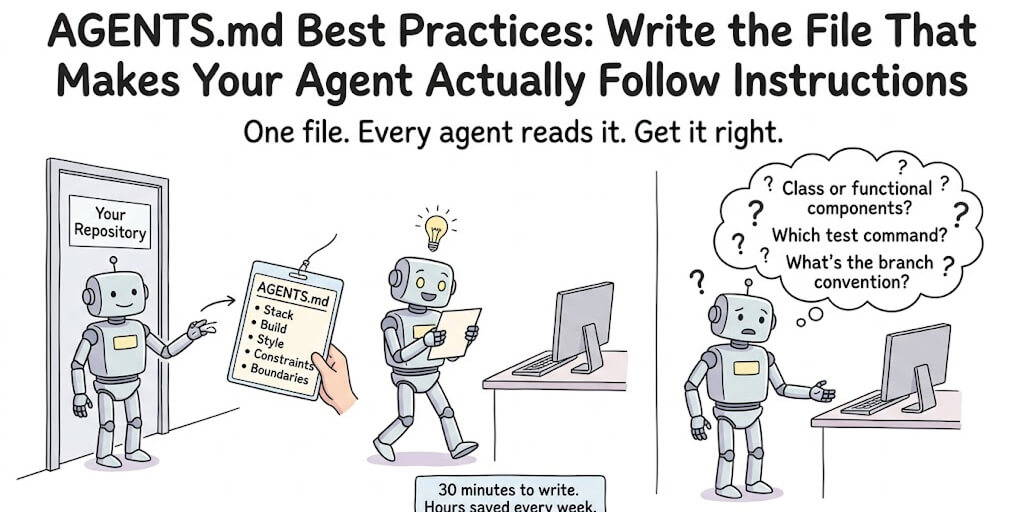
Keeping instructions short helps too, because long instruction files are the first thing to get lost in a long session. Our AGENTS.md best practices guide covers how short is short enough, and the multi-agent version covers keeping several agents' instructions from drifting apart.
Failure 3: it grades its own homework
Verification accounts for about 24% of MAST's failures, and the paper is blunt about why: "many existing verifiers perform only superficial checks, despite being prompted to perform thorough verification, such as checking if the code compiles or if there are leftover TODO comments."
The fix has two parts.
A definition of done a machine can check
Not "the summary is good", but something a script can confirm:
- Tests pass.
- The row exists in the sheet with every column filled.
- The draft reply exists in the right email thread.
- The report file was written and is under 500 words.
Some examples, by job:
| Job | A done-check a machine can run |
|---|---|
| Add tests to a file | npm test passes and coverage for that file is above a set number |
| Inbox triage | Every unread email has exactly one label, and every "routine" one has a draft in its thread |
| Lead research | Every row in the sheet has a company, a source URL and a filled "reason" column |
| Weekly report | The file exists, has the five required headings, and is under 600 words |
| Invoice follow-up | Every overdue invoice is either marked paid in the billing system or has a reminder logged |
A separate checker for judgment calls
Where "done" needs judgment, use a separate checker agent with its own instructions, or a person. In MAST's experiments, adding a high-level objective check to ChatDev raised task success by 15.6%, as the paper reports it. Clearer role definitions, including giving one agent the final say, were worth 9.4%.
Failure 4: the agent is doing work a script should do
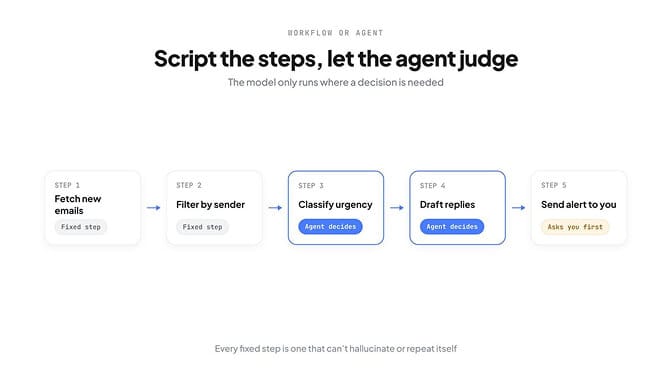
Anthropic's guide to building effective agents draws a line worth memorising. Workflows "are systems where LLMs and tools are orchestrated through predefined code paths." Agents "are systems where LLMs dynamically direct their own processes and tool usage." Its advice is to find "the simplest solution possible, and only increasing complexity when needed."
In practice that means: have the agent write the deterministic steps once (or use a fixed workflow), and call the model only for the steps that need judgment.
| Script it (fixed steps) | Let the agent decide |
|---|---|
| Fetch new emails or rows | Classify what each one is |
| Filter by date, sender or status | Decide what's urgent |
| Format a table or a report | Summarise a long thread |
| Send to a fixed list of people | Draft a reply in your voice |
| Retry on errors, log every run | Choose which lead is worth a follow-up |
Every step you move to the left column is a step that can't hallucinate, repeat itself or wander off.
Failure 5: instructions fade as the session gets longer
Agents also drift within a single session. In a controlled study of 1,650 Claude Code sessions, Damon McMillan (arXiv:2605.10039) found that each additional function the agent wrote was associated with about 5.6% lower odds of following a simple rule. The author notes the effect isn't a neat straight line, and it was found during analysis rather than planned, but the direction is clear: the longer the session, the looser the grip of your instructions.
Three fixes:
- Start a fresh session for each task instead of one marathon session.
- Keep instruction files short, so the rules that matter aren't buried.
- Restate the goal at every handoff, in the file the next step reads.
A worked example: the same agent, built twice
To make this concrete, here's one job designed two ways. It's an illustration, not a measured experiment: an agent that chases overdue invoices.
Version 1: one prompt does everything
"Every morning, check our billing system for overdue invoices, email each customer a polite reminder, and update the spreadsheet."
Walk it through the failure modes above and it breaks in predictable places:
- Too much at once. One run has to fetch, decide, write, send and record. A hiccup anywhere means a partial run, and the next run can't tell what was finished.
- No done-check. "Update the spreadsheet" has no finish line, so it either stops early or keeps tinkering.
- Grading its own homework. It decides on its own that each email is fine, and sends it.
- Work a script should do. Fetching invoices and comparing dates is arithmetic. Asking a model to do it adds a chance of error to every row.
- No safe failure. If the billing system is down, it might treat every invoice as unpaid and email customers who already paid.
Version 2: fixed steps, one judgment point, a checker
- Fetch overdue invoices from the billing system. (Fixed step. If the system can't be reached, stop and don't email anyone that day.)
- Drop any invoice that was paid or already reminded in the last 7 days. (Fixed step, plain date logic.)
- Draft a reminder for each remaining invoice, in the right tone for how late it is. (The agent's only judgment step.)
- Check each draft: correct amount, correct invoice number, correct customer name. (Fixed step comparing the draft to the record.)
- Send, or hold for approval for anything over a set amount. (A person approves the risky ones.)
- Log every action to the sheet. (Fixed step. The log is the handoff to tomorrow's run.)
Version 2 has more steps on paper, but only one of them can hallucinate, and its output is checked against the source record before anything leaves. That's the whole idea of this post in six lines.
The setup that works (a checklist)
Copy this and check your agent against it:
- One narrow job per agent. "Triage the inbox", not "run my operations".
- Fixed steps where nothing should change. Fetching, filtering, formatting and sending are code, not prompts.
- The agent only at judgment points. Classify, draft, summarise, prioritise.
- A done-check a machine can run. Tests, a row count, a file that exists.
- A separate checker. Another agent with its own instructions, or a person.
- Handoffs in a file. A progress log or JSON task list, never a chat summary.
- Draft, don't send, until trust is earned. Drafts are free to throw away.
- A person approves anything irreversible. Payments, deletions, messages to customers.
- Logs you actually read. At least until you've had a week of clean runs.
- Start small, widen later. Expand scope only after a week of clean runs.
If you're coordinating several agents, our guide to AI agent orchestration goes deeper on how to split the work. Or skip the plumbing and start with a workflow that already follows these rules.
Workflow or agent: which should you use?
"Agentic workflow vs AI agent" sounds like a vocabulary question. It's really a design question, and the answer for most business jobs is "mostly workflow".
Ask five questions about the job:
- Are the steps the same every time? If yes, they belong in a workflow.
- Is there a point where something has to be read, judged or written? That's where the agent goes.
- Can a machine tell when the job is done? If not, define that first, before choosing anything.
- What happens if it goes wrong? If the answer is "a customer gets a bad email" or "money moves", put a person in front of that step.
- How often does it run? Something that runs hourly needs to be boring and predictable. Something that runs once a quarter can afford to be clever.
A useful way to picture it: a workflow is the conveyor belt, and the agent is the one station where something needs a decision. The more of the job you can put on the belt, the fewer places it can go wrong.
Fully autonomous agents still have a place: open-ended research, exploring a codebase, drafting a first version of something new. Those are jobs where the path really can't be known in advance, and where a person reviews the result anyway. For anything that runs on a schedule and touches customers, money or data, start with the belt and add judgment only where it's needed.
What this looks like in BetterClaw
BetterClaw's AI agent builder is built around the same idea: fixed steps you can read, with the agent doing the judgment work in between. Here's what's true today.
- Every step is visible. Workflows are written as fixed, numbered steps you can read before you run them. Each page says it plainly: "Nothing hidden. This is the full list of what it does each run."
- Steps can wait for a person. When a run reaches a step marked to ask first, it stops. Nothing is sent until someone decides.
- Drafts by default where it matters. Email Triage labels your inbox and drafts replies in your style. It never sends replies for you; the only email it sends is the urgent alert, to you.
- It fails safe. Failed Payment Recovery sends reminders to customers whose payments failed, but if it can't reach Stripe, it doesn't email anyone that day, because it can't tell who has paid.
- Tools can be locked down. Each MCP tool is marked Read, Write or Destructive, and Read-only mode turns off everything that isn't Read. You can see 30 days of activity for every MCP server you connect.
Build your agent in BetterClaw. Plans start at $19 a month with a 7-day money-back guarantee, and every agent runs on your own model key with zero markup.
Frequently Asked Questions
Why do AI agents fail?
Mostly for design and process reasons, not raw intelligence. Berkeley's MAST study of 1,642 multi-agent runs found 44.2% of failures came from system design (repeated steps, unclear tasks, not knowing when to stop), 32.3% from agents misaligned with each other, and 23.5% from weak or missing verification.
What is the failure rate of AI agents?
It depends on the task, but on real professional work it's high. In the current version of UC Berkeley's Agents' Last Exam, the best system fully passed 24.0% of tasks, and the average on the hardest tier was below 1%. Simple, narrow tasks succeed far more often.
Why do AI agents fail in production?
Production means every run, not the best run. Small per-step errors compound across long tasks, handoffs lose context, and many checks only confirm that something ran, not that it's right. Gartner predicts over 40% of agentic AI projects will be canceled by the end of 2027 over cost, value or risk.
How do I make AI agents more reliable?
Give each agent one narrow job, script the steps that never change, use the model only where judgment is needed, define "done" so a machine can check it, add a separate checker, pass work between steps in files, and keep a person in the loop for anything irreversible.
What's the difference between an agentic workflow and an AI agent?
In Anthropic's definition, a workflow orchestrates the model and tools through predefined code paths, while an agent directs its own process and tool use. Most reliable systems are mostly workflow, with the agent making decisions only at specific steps.
Should an AI agent check its own work?
Not on its own. Self-checks tend to be shallow; MAST found many verifiers only confirm that code compiles. Use a machine-checkable definition of done, plus a separate checker agent or a person for anything that needs judgment.