An AI employee is a marketing term for AI software configured to carry out recurring or multi-step work in connected business tools, like a weekly report or inbox triage. It still needs instructions, access limits and human oversight.
| What is an AI employee? | The short answer |
|---|---|
| The software underneath | An AI agent, or a few, with a model, tools and memory |
| What the label adds | A job framing: one recurring outcome, described like a role |
| What it does on its own | The steps you allowed, in the apps you connected |
| Where it stops | Any step you marked for review, like an email to a client |
| What stays with you | The brief, the access, the sign-off and the result |
Picture this: a vendor demo ends on a slide that says "Hire your first AI employee." Your ops lead leans over. "So it does the Monday client report now?"
Does it? And who presses send?
Both questions have real answers, and the slide gives you neither.
This guide is for owners and operators deciding whether AI can do connected work in their business. It isn't about jobs in AI, or about software for managing your human staff. We checked every product claim on each vendor's own pages on 17 November 2026.
What is an AI employee? One job, from request to result
Definitions are cheap, so start with a job.
What follows is an illustrative walkthrough, not a customer case study. We built it only from steps BetterClaw's docs describe (connectors, workflows, schedules and approvals), and the sheet, the doc and the client are made up.
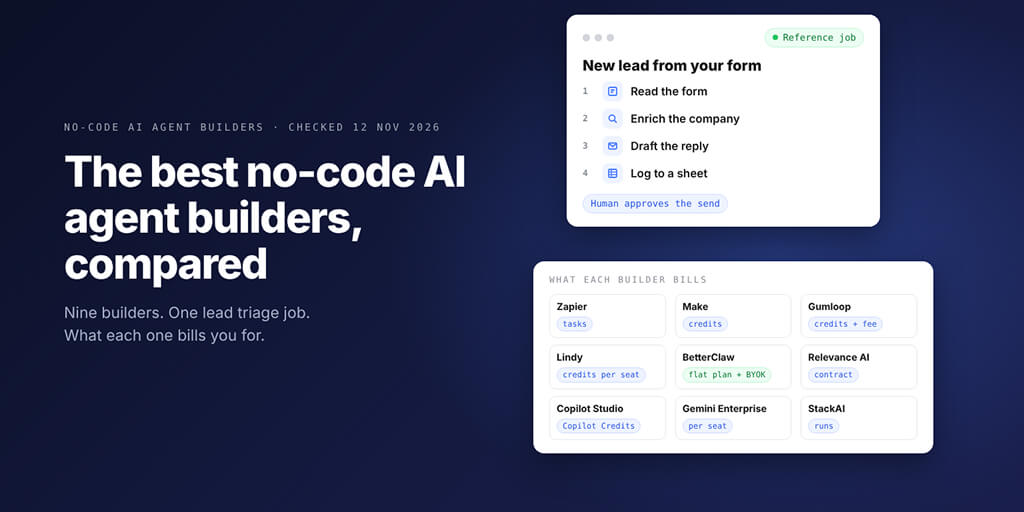
Our no-code AI agent builder page walks through three agents built end to end, if you'd rather see briefs written for real jobs. This walkthrough is about the shape of one job.
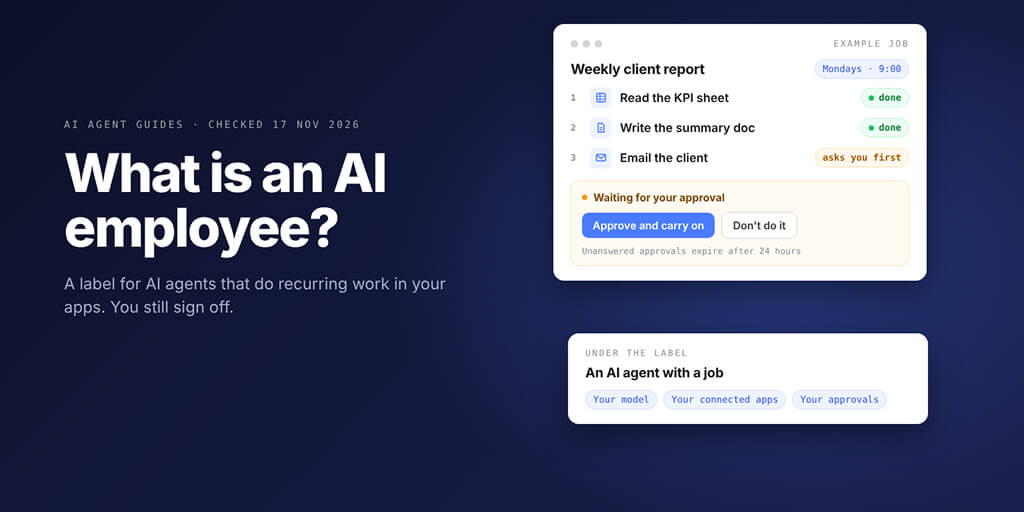
The job, in plain English: "Every Monday at 9 am, read last week's numbers from our KPI sheet, write a one-page summary in a Google Doc and email it to the client. Ask me before the email goes out."
Set it up once
- Describe the job. Open Workflows (BetterClaw still labels it Beta), choose New workflow and write the job the way you'd explain it to a colleague, in up to 4,000 characters. BetterClaw drafts it and saves nothing until you choose Use this workflow.
- Read the draft like a job description. Each step becomes a section with a contract line listing what it reads, what it writes and which connectors or secrets it uses. For this job you'd expect three sections: read the sheet, write the doc, email the client.
- Connect the three apps. Google Sheets, Google Docs and Gmail connect from Connectors, where the connect window adapts to how each service signs in. Publish stays disabled until every connector the workflow needs is connected, and our integrations catalog lists 500+ more apps.
- Make the email step ask first. Click "asks you first" on that section before you test, because Run now carries the workflow out for real: anything it says it sends is sent.
- Schedule it and publish. Choose Once a week, Monday, 9:00 and your timezone, then Publish, which also turns the workflow on.
What happens every Monday
At 9:00 the run reads the sheet and writes the doc on its own. Then it reaches the email section and stops, and nothing is sent until someone decides.
The waiting run sits at the top of your Workflows list under Needs you, with three choices: Approve and carry on, Don't do it, or See everything first. Approving continues from that section, and declining stops the run there.
Two safety nets come with it. An approval that no one answers expires after 24 hours, and three failed runs in a row pause the schedule until you fix what broke.
Afterwards, Run view shows each section with the values it wrote and the calls it made. That's the whole loop: a request, a result, a visible pause and a record you can check.
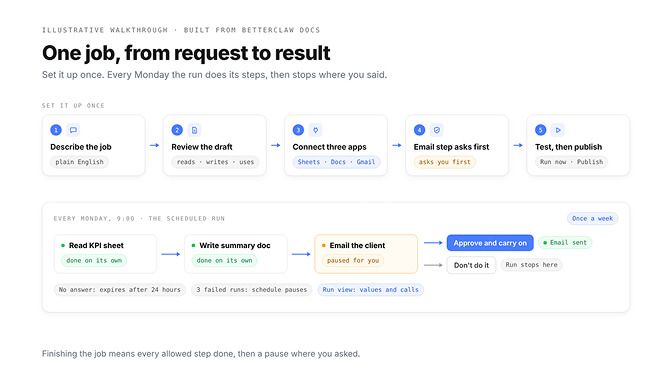
"Finishes the job" should mean it did every step it was allowed to do, then stopped where you told it to. It should never mean that no one checked.
AI employee vs AI agent, assistant and automation
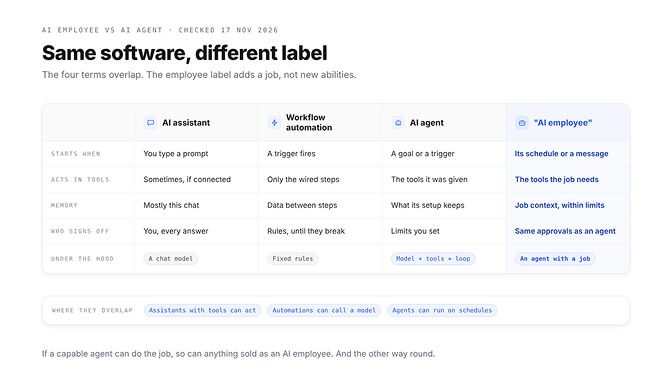
The short answer to "AI employee vs AI agent": under the label, an AI employee is an AI agent, usually one, set up to own a recurring job. "Employee" doesn't mean a different model, and it's no guarantee of more capability.
For the mechanics (the model, the tools, memory and the loop that ties them together), see our guide to what an AI agent is. Here's how the four terms line up in practice.
| AI assistant | Workflow automation | AI agent | "AI employee" | |
|---|---|---|---|---|
| What it is | A chat tool that answers prompts | Steps someone defined in advance | Software that uses a model and tools to work toward a goal | A label for an agent set up to own one recurring job |
| Starts when | You type a prompt | A trigger or schedule fires | You give it a goal, or a trigger fires | Its schedule, a message or an event |
| Acts in your tools | Sometimes, if tools are connected | Yes, only the steps you wired | Yes, with the tools it was given | Yes, with the tools that job needs |
| Memory | Mostly the current chat | Data passed between steps | Whatever its setup keeps | Job context kept between runs, within limits |
| Who signs off | You, on every answer | Rules, until a case breaks them | Limits and approvals you set | The same approvals as any agent |
Checked: 17 November 2026
The columns overlap more than vendor pages admit. An assistant with tools can act, an automation can hand one step to a model, and a capable agent can do the same end-to-end work as anything sold as an AI employee.
An AI employee doesn't need a team of agents behind it, either. The walkthrough above and the three jobs below each run on one agent.
The label isn't used one way. Here's how four companies use it on their own sites today:
- Sintra sells "AI employees for business owners": 12 role-based helpers, from an SEO specialist to a support specialist, with a shared business memory and approval levels you set.
- Ema offers "AI Employees for HR, IT, and Finance" for work like recruiting, onboarding and benefits, and its page title calls Ema a "Universal AI Employee".
- Viktor describes itself as an AI employee that lives in Slack, Microsoft Teams and email.
- BetterClaw's docs call an agent "an AI worker" and never say employee, and our Projects page talks about "AI teammates".
So one phrase covers role-based helpers for business owners, an enterprise HR and IT product, and an agent in your team chat. Search suggestions add AI worker, AI coworker and digital worker to the pile. Judge the job it does, not the noun on the box.
The behaviour underneath all of them has a name of its own, and our explainer on agentic AI separates that quality from the products that have it.
AI employee software: what to check before you connect your tools
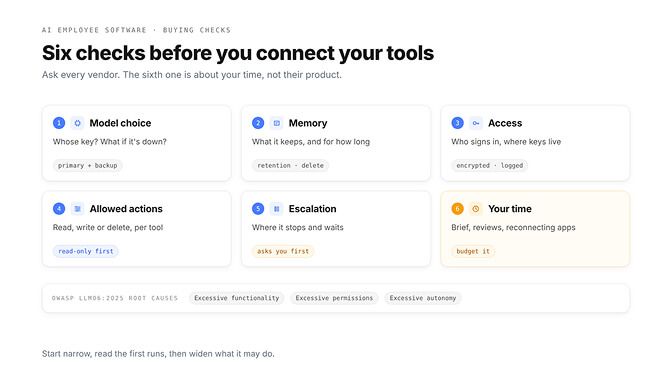
Most buying checklists start with features. Ours starts with what the software can touch, and what happens when it gets something wrong.
OWASP's Top 10 for LLM applications calls this risk Excessive Agency (LLM06:2025) and traces it to three root causes: excessive functionality, excessive permissions and excessive autonomy. Most checks below shrink one of those three. The rest tell you what it takes to keep the thing running week after week.
| Check | Ask every vendor | What BetterClaw documents |
|---|---|---|
| Model choice | Whose key, which models, and what happens when one is down? | 28+ providers with your own key at zero markup; a primary model plus up to 10 backups on paid plans |
| Memory | What does it keep, for how long, and can you delete it? | Per-agent memory you can switch off, search, compact or purge; kept 7 days on Starter, 90 on Pro, unlimited on Business |
| Access | Who signs in to each app, and where do the credentials live? | Encrypted secrets that agents read by reference without seeing the raw value, with every read logged |
| Allowed actions | Can you limit it to reading, per tool and per agent? | Connected accounts granted per agent; MCP tools marked Read, Write or Destructive, with a read-only mode |
| Escalation | Where does it stop and wait, and what if no one answers? | Workflow steps that ask you first; unanswered approvals expire after 24 hours; a kill switch on every plan |
| Your time | Who writes the brief, reviews runs and fixes broken sign-ins? | Not a product feature. Budget for it |
Checked: 17 November 2026
Credentials deserve their own read. Our security page explains how keys are encrypted, granted per agent and logged; put your other vendors' equivalents next to it.
Two BetterClaw defaults are worth knowing before your first connection. A newly connected account is assigned to all your agents automatically, and an MCP server added from Connectors goes to every agent you have at that moment, so switch access off for the agents that don't need it.
Agents can also book their own follow-up runs. Those appear in Scheduled tasks, marked as scheduled by the agent, and the docs say that if you'd rather it only suggested them, you write that into the agent's personality file.
The last row is the one demos skip. Someone writes the brief, reads the first runs and reconnects an app when a password changes, so put a name next to that work before you start.
When one agent is enough, and when a team helps
Most first jobs need one agent: one brief, one set of tools, one place where it stops for approval. The Monday report above is one agent, and agent teams are a design choice, not part of the definition. If you're building a team in code, our AI agent orchestration guide compares the frameworks and when each design fits.
A team earns its place when the work splits by skill, tools or permission. A researcher that browses the web doesn't need your Gmail, and a writer that emails clients doesn't need to browse.
In BetterClaw, the no-code team option is Projects. Its page describes a Project as "a shared channel where your AI teammates and your people work on one goal".
You @mention an agent with a task. In the page's words, "when one agent finishes its part, it wakes the next one and passes the work on", every hand-off is visible, and drafts, emails and changes that matter wait for your OK.
Context stays put, too: the page says the brief, the files and the decisions live in the Project, "so no one starts from zero".
Its example reporting team is two agents, an Analyst and a Report writer, that pull Search Console, analytics and ad data every week and post a client-ready summary in the Project.
Read that for what it is: handoffs between agents you add and set up, with your people in the same channel. The page doesn't describe a supervisor that plans every job by itself, so you still pick the agents, give each one its job and decide which steps wait for you. The Projects page walks through all five steps, from creating a Project to approving the work.
The page's FAQ adds that teammates you invite can see the work, step in and approve anything risky before it goes out.
If you test a team, keep it small: two agents and one approval. One gathers, one writes, and the step that leaves the building waits for a person. Give each agent its own short brief, so you can tell which one got a step wrong when you read the thread back.
A team also costs you something. Every extra agent is another brief to keep current and another handoff that can drop context, so add the second one only when you can name the boundary it protects.
Team size follows the plan. Starter includes 1 agent and no team seats, Pro includes 5 agents and 2 seats, and Business includes 25 agents and 5 seats; the Projects page calls Pro "enough for a small AI agent team".
Every plan lets you bring your own key from 28+ model providers, so model usage goes to your provider at their price, with zero markup. On top of that, plans start at $19 a month for Starter, with Pro at $49 and Business at $149. See BetterClaw plans
Three practical jobs and where each one stops
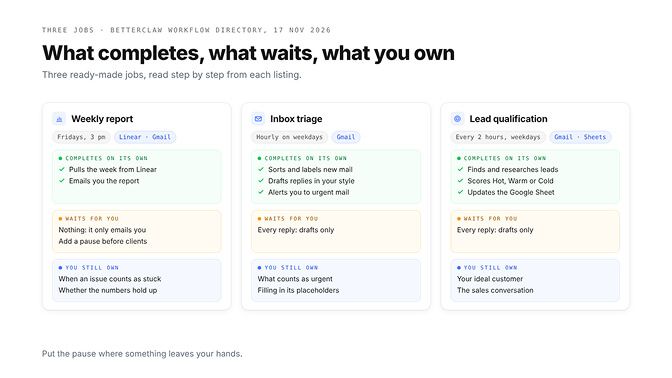
Here are three jobs that make good first handoffs, each with a ready-made listing in BetterClaw's workflow directory. We read every step of each listing and sorted them three ways: what completes on its own, what waits for you, and what you still own.
| Job (directory listing) | Completes on its own | Waits for you | You still own |
|---|---|---|---|
| Weekly report (Weekly Team Report, Fridays 3 pm) | Pulls the week from Linear and emails you a short report | Nothing by default, because the only person it emails is you | Which teams count, when an issue counts as stuck, whether the numbers hold up |
| Inbox triage (Email Triage, hourly on weekdays) | Sorts and labels new Gmail, drafts replies in your style, alerts you to urgent mail | Every reply, because it only creates drafts | What counts as urgent, who always matters, the gaps it marks as placeholders |
| Lead qualification (Lead Qualification, every 2 hours on weekdays) | Finds lead emails, researches and scores each one, updates a Google Sheet, drafts replies to hot leads | Every reply to a lead, because it never sends them | Your ideal customer, whether a score is right, the sales conversation |
Checked: 17 November 2026
The weekly report is the cleanest case. Its two steps pull the week from Linear and email the report to you, both automatic, and the listing's FAQ says it only reads your Linear data. The moment the same report goes to a client or a board, add a section that asks you first, like the walkthrough above.
Inbox triage shows a different kind of boundary: drafts instead of sends. Our AI email triage agent page covers the setup; the directory's Email Triage listing sorts each new thread into urgent, needs reply, FYI, newsletter or noise, applies a Gmail label, drafts replies in your style and emails you one alert when something is urgent.
It never deletes email, archives only if you switch that on, and leaves a [placeholder] where a reply needs a date or price it doesn't know. That last habit is worth copying into any brief you write, for any job: tell it to mark a gap rather than fill it.
The safest setups don't need an approval button for most of the work, because most of what they produce is a draft. Put the pause where something leaves your hands.
Lead qualification adds research and judgement. The listing finds lead emails, looks up each person and company on the web, scores them Hot, Warm or Cold with a one-line reason, keeps a Google Sheet current and drafts a reply in each hot lead's thread.
It never sends those replies; it emails you the list of hot leads instead. Its only required setting is your ideal customer, which tells you exactly where the judgement comes from.
If your leads also arrive through forms or chat, our page on the AI lead qualification agent goes further.
Where an AI employee fails, and what you still own
Every failure below is ordinary. That's the point: plan for them on day one, not after the first bad Monday.
| What goes wrong | What it looks like | What to do |
|---|---|---|
| Missing permissions | It can't open a sheet or send from an account it was never granted | Grant access per agent, and only what the job needs |
| Expired connections | A revoked app password or a lapsed sign-in stops the work | Watch connection status, reconnect, then run it again |
| Incomplete instructions | It fills gaps with guesses | Say what to do when data is missing or unclear |
| Wrong outputs | A summary misreads a number, or a lead gets the wrong score | Compare a sample of runs with the source every week |
| Cost and retention limits | Credits run low, memory expires, a schedule hits the plan's limit | Match the plan to the job before you build |
| Sensitive actions | Payments, deletions, anything a customer sees | Keep a person on every one of them |
BetterClaw catches some of this early. Publish stays disabled while a connector is missing, a workflow checks that every MCP server it needs is connected before the run starts, and an email account whose login is rejected shows Login rejected and agents stop using it.
For the cost row, know how the meter works. Credits measure agent runtime at 1 credit per minute of machine time, plus model usage if you run on BetterClaw's managed keys; usage on your own key is billed by your provider and doesn't draw credits.
Limits differ by plan, too. Memory is kept for 7 days on Starter, and scheduled tasks on Starter run at most once a day.
No setting moves accountability to software. You own the brief, the access you granted, every approval and the result the client receives.
That's also why this page has no salary comparison or ROI number. The value depends on how well the job is defined and reviewed, and that part stays with you.
What is an AI employee for a small business?
For a small business, the useful version is small: one job you already do every week, one or two apps, and one person who reads the output. Inbox triage, lead follow-up and the weekly report are sensible first picks.
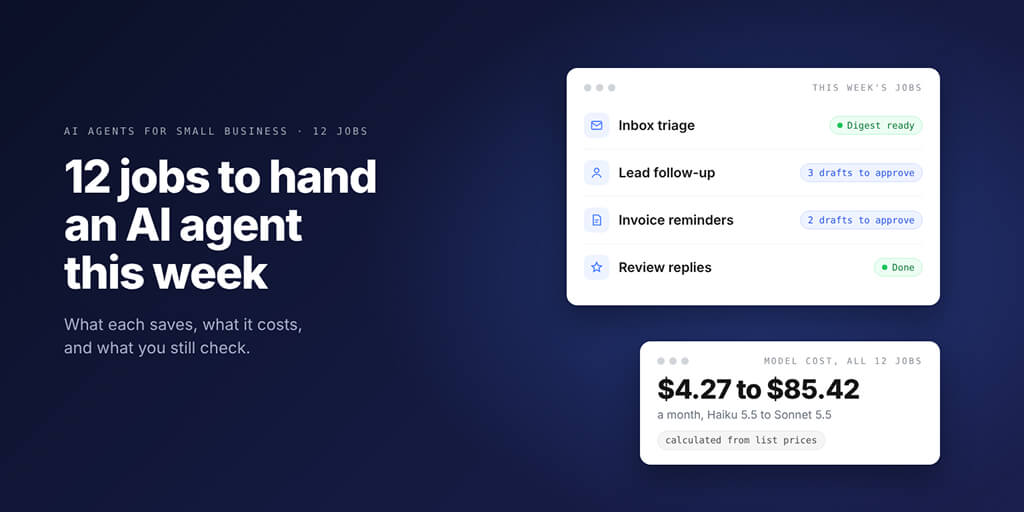
We won't repeat the full list here. Our guide to AI agents for small business covers 12 jobs in the order we'd hand them over, what they cost to run and the guardrails to set first.
How to evaluate BetterClaw for your first AI employee job
Run the trial the way you'd trial a new hire on one task: a narrow brief, limited access and a review before anything leaves the building.
- One brief. Write it like a job description: who it works for, what it produces, what good looks like and what it must never do. BetterClaw's docs give the same advice for an agent's personality file.
- One connection. Connect only the apps this job touches, and check your plan first: Starter allows 3 connectors with one account each.
- One observable output. Pick something you can check in a minute, like a Google Doc, a draft reply, a labelled thread or a row in a sheet.
- One approval. Mark the step that leaves your hands "asks you first", or keep the whole job to drafts.
- One review. After the first week, compare a sample of runs with the source data, then decide what to widen.
If a directory listing fits the job, start there. Installing one copies it into your workspace as a draft, with nothing scheduled and nothing run, so you can read every step before it does anything.
If the first runs need heavy fixing, treat that as information, not failure. The job wasn't defined clearly enough yet, and it would have tripped up a human new hire too.
The label is the least important part
Call it an AI employee, an agent or a teammate. The word on the vendor's homepage changes nothing about what happens at 9:00 on Monday.
What matters is whether you can point at four things: the job, the apps it touches, the step where it stops and the person who signs off. If you can, you're ready to try one. If you can't, no label will fix that.
Frequently Asked Questions
Does an AI employee replace a person?
No. It can take over defined, repeatable steps of a job, like sorting email or compiling a weekly report, but someone still writes its instructions, grants its access, approves sensitive actions and answers for the result. Treat any vendor's salary comparison as marketing, not a forecast.
Is an AI employee different from an AI agent?
Not technically. "AI employee" is a marketing label for an AI agent, or a small set of agents, set up to own a recurring job. It doesn't mean a different model or more capability, and the same agent can be described either way.
Can an AI employee remember previous work?
Usually, within limits. In BetterClaw each agent keeps its own memory of facts, preferences and project context, which you can search, compact or purge, and retention depends on the plan: 7 days on Starter, 90 days on Pro and unlimited on Business. Ask any vendor what it keeps, for how long and whether you can delete it.
Can an AI employee send messages or change records?
Yes, if you connect the app and allow the action. Whether it should do so without asking is your call: in BetterClaw you grant connected accounts per agent, can switch MCP tools to read-only, and can mark a workflow step to ask you first, so a client email waits for your approval. Many ready-made jobs only create drafts.
Can several AI agents work together?
Yes, on platforms built for it. BetterClaw's Projects page describes agents and people in one channel, where you @mention an agent with a task and it hands the next step to another agent when its part is done, with risky steps waiting for approval. Most first jobs only need one agent.
Do AI employees actually work?
They work for jobs that are defined, repeatable and checkable, such as triage, lead scoring or a weekly report. They struggle when instructions are vague or the right answer depends on context no one wrote down. Judge one by its first week of runs against the source data, not by its demo.
How much does an AI employee cost?
Two bills, plus your time. There's the platform fee (BetterClaw plans start at $19 a month, with Pro at $49 and Business at $149) and model usage, which on your own key is billed by your provider at their price. Add the hours someone spends writing the brief and reviewing runs.