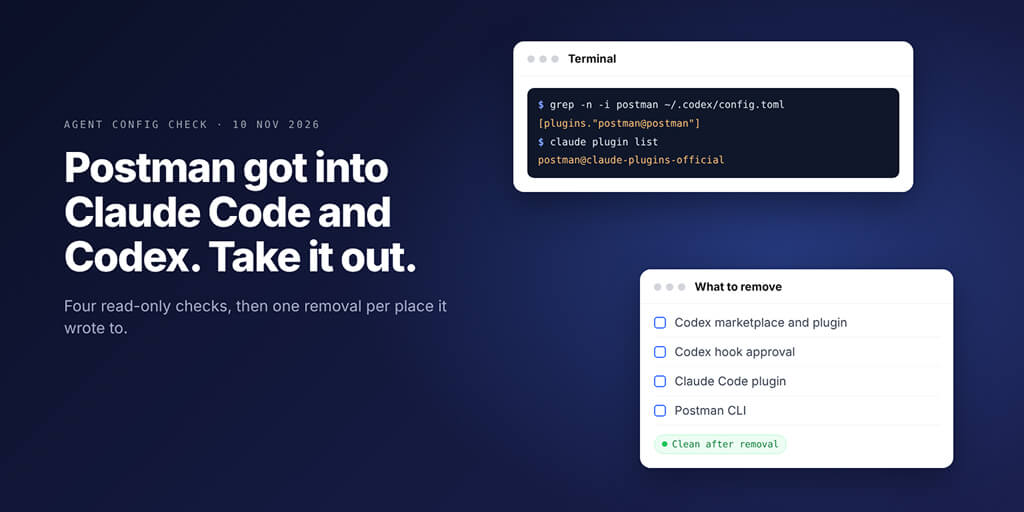
A Postman desktop update wrote itself into your coding agents without asking. Here is what it added, four read-only checks, and the commands that take each piece out.
Postman's desktop app installed the Postman plugin in Claude Code and Codex for existing users without a prompt, says a GitHub report filed on Postman 12.33.4. It enabled postman@claude-plugins-official in ~/.claude/settings.json, added a marketplace, plugin and hook approval to ~/.codex/config.toml, bundled a remote MCP and dropped a CLI in ~/.local/bin.
Here's the quick answer as one table:
| Where | What to look for | How to remove it |
|---|---|---|
| Codex | postman@postman and [marketplaces.postman] in ~/.codex/config.toml | codex plugin remove postman@postman, then codex plugin marketplace remove postman |
| Codex hooks | hooks.state entry starting postman@postman: | Delete that table, then review with /hooks |
| Claude Code | postman@claude-plugins-official | claude plugin uninstall postman@claude-plugins-official |
| Your PATH | ~/.local/bin/postman | Help > Postman CLI and Plugins > Uninstall Postman CLI |
Picture this: you open Postman to test one endpoint. The next morning Codex starts nagging about MCP sign-in, and every API question you ask gets routed through skills you never installed.
When did I add Postman to my agent?
You didn't. That's the whole story, and it's why this check is worth five minutes even if you like Postman.
How to check if the Postman plugin is in Claude Code or Codex
All four commands only read files. Nothing changes until you run the removal steps further down.
# 1. Postman's own log (macOS path, as reported)
grep -E "auto-existing-upgrade|autoInstall" "$HOME/Library/Application Support/Postman/logs/main.log"

# 2. Codex config
grep -n -i "postman" "${CODEX_HOME:-$HOME/.codex}/config.toml"

# 3. Claude Code settings and plugin records
grep -n -i "postman" ~/.claude/settings.json ~/.claude/plugins/installed_plugins.json ~/.claude/plugins/known_marketplaces.json

# 4. The Postman CLI on your PATH
command -v postman; ls -la ~/.local/bin/postman 2>/dev/null
What each one tells you:
- The reporter found
"source":"auto-existing-upgrade"with the resultsclaude-code:installedandcodex:installed. That string comes from the report, not Postman's docs, so a match is strong evidence and no match on Windows or Linux means look elsewhere. - Any hit means Codex has Postman's marketplace, plugin or hook approval.
- Claude Code records the enabled plugin in
settings.jsonand the install ininstalled_plugins.json, per Anthropic's plugin docs. - Postman's docs say the app installs
postmanin/usr/local/binwhen that folder is writable without sudo, otherwise in$HOME/.local/bin. A CLI you installed on purpose looks the same.
Grep finds the text. You decide whether you put it there. A plugin you installed deliberately is not a problem; one you can't remember installing is.
What was added and what each piece does
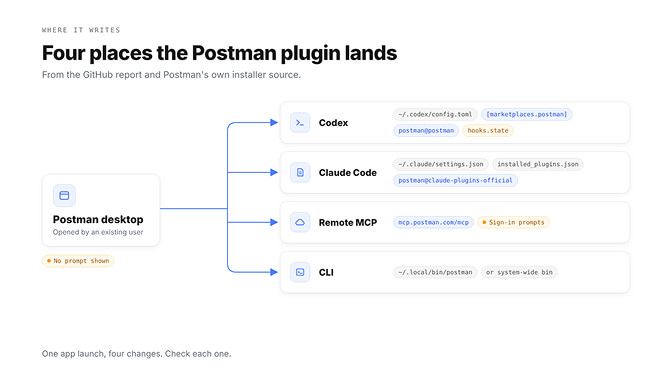
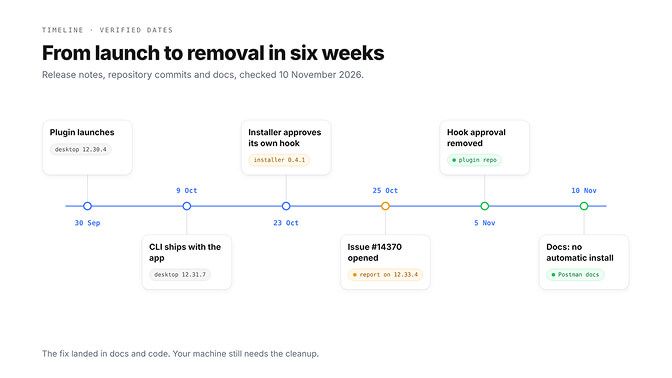
Postman launched the plugin on 30 September in desktop 12.30.4, and from 12.31.7 on 9 October its release notes say the Postman CLI installs with the app. Neither note says the app would wire itself into your agents.
| Piece | Where | What it does |
|---|---|---|
| Marketplace | Codex: [marketplaces.postman], from the postmanlabs/postman-plugin repository | Lets Codex fetch and refresh the plugin |
| Plugin | Codex: postman@postman. Claude Code: postman@claude-plugins-official | Adds Postman's skills, such as postman:api-engineer |
| Session-start hook | Codex hook approval in hooks.state | Tells the agent to load postman:api-engineer before most API tasks |
| Remote MCP | Bundled in the plugin: https://mcp.postman.com/mcp | Postman's hosted MCP server; asks you to sign in |
| CLI | ~/.local/bin/postman or /usr/local/bin/postman | The tool the plugin routes most tasks to |
The hook is the part that matters most. Codex refuses to run a new hook until you review and trust it, and records that trust against the hook's hash.
Postman's open-source installer had a function that wrote that trust for its own hook. Its source says installs from version 0.4.1 to 0.7.1 wrote the approval, and a commit on 5 November removed it: "The user must make that choice."
Injected instructions are how agent extensions go wrong. When we tested 1,024 ClawHub skills, prompt injection was one of the reasons we rejected 824.
How to remove the Postman plugin from Codex
Back up first: cp ~/.codex/config.toml ~/.codex/config.toml.bak. Then:
codex plugin list --json            # confirm postman@postman is there
codex plugin remove postman@postman
codex plugin marketplace list       # find the "postman" marketplace
codex plugin marketplace remove postman
Now the hook approval. Open ~/.codex/config.toml and delete this table if it's still there:
[hooks.state."postman@postman:hooks/codex-hooks.json:session_start:0:0"]
trusted_hash = "..."
That key comes from Postman's installer source, which tells users to remove it by hand when its own cleanup fails. If it was the only entry, delete the empty [hooks.state] header too. Then start codex, run /hooks, and check nothing from Postman is trusted.
Prefer one click? Postman's docs list Help > Postman CLI and Plugins > Uninstall Postman Coding Agent Plugin, for Claude Code, Codex and Cursor. Run the grep checks afterwards anyway.
Why? The npm remover that also clears the marketplace and hook approval is version 0.8.0 in Postman's repository, but npm's latest tag was still 0.7.1 on 10 November.
How to remove the Postman plugin from Claude Code
claude plugin list
claude plugin uninstall postman@claude-plugins-official
Inside a session, /plugin and the Installed tab do the same. Then run /reload-plugins or restart, and open /mcp: Claude Code names plugin servers plugin:<plugin>:<server>, so plugin:postman:postman should be gone.
One warning. Don't remove the claude-plugins-official marketplace to get rid of Postman. Anthropic's docs say removing a marketplace uninstalls every plugin you installed from it.
Don't hand-edit installed_plugins.json either. The uninstall updates it; grep confirms it. Cached files stay 14 days, or delete ~/.claude/plugins/cache/claude-plugins-official/postman/ yourself.
Copy at project scope? claude plugin list shows it. Add --scope project to the uninstall, from inside that repo.
Last, the CLI. If you never meant to install it, use Help > Postman CLI and Plugins > Uninstall Postman CLI, which also removes the PATH line it added.
Stop it coming back
- Update Postman. Its docs, checked on 10 November, say: "The Postman desktop app doesn't install the plugin automatically." The newest desktop build is 12.36.0 from 9 November, though Postman hasn't said which build reverted the change.
- Skip the Help menu installer unless you want the plugin.
- In Codex, never trust a hook you didn't add. The "Hooks need review" prompt is the guard that self-approval skipped.
- On a team, block it centrally. Claude Code's managed settings can set a plugin to
falseinenabledPlugins, which blocks installation at every scope. - Re-run the four checks after the next few Postman updates.
If you also run OpenClaw, our OpenClaw security checklist covers the same habits for a self-hosted gateway.
The bigger question is who decides what your agent loads. BetterClaw gives you managed agents with permissions you control, 500+ connectors, and your own model keys across 28+ providers at zero markup.
We're ISO 27001 certified, with a SOC 2 Type II audit in progress. Plans start from $19 a month, and your first workspace starts with a 7-day free trial. See BetterClaw plans
What Postman has said
Here's what we could check ourselves:
- Postman's install docs now say the app installs the plugin only when you pick it from the Help menu, and that "If the app installed the plugin for you automatically before, you can remove the plugin." The CLI page has matching wording.
- The plugin repository dropped the Codex hook and its auto-approval on 5 and 6 November.
- The report, issue #14370 in Postman's postman-app-support repository on GitHub, opened on 25 October. We found no matching item in the release notes for desktop 12.33 to 12.35.
Two statements are reported but we couldn't read them at the source. On 3 November, Postman's head of product told the press it would make the opt-in clearer for existing users. On 5 November, a Postman staff member reportedly replied on the issue that it is reverting the change and redesigning it with more user control.
A general check for unexpected plugins and MCPs
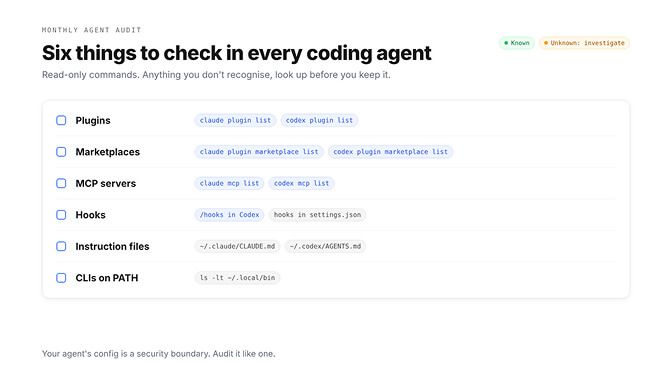
Postman won't be the last desktop app to write into an agent's config. Run this once a month:
claude plugin list && claude plugin marketplace list && claude mcp list
codex plugin list && codex plugin marketplace list && codex mcp list
grep -n "^\[" "${CODEX_HOME:-$HOME/.codex}/config.toml"      # every table Codex reads
grep -n "<!--" ~/.claude/CLAUDE.md ~/.codex/AGENTS.md ~/.codex/AGENTS.override.md 2>/dev/null
ls -lt ~/.local/bin | head
The <!-- search finds marked blocks that tools add to your global instruction files. Postman's CLI install script, for example, adds a note between postman-cli:installation markers.
Cursor users: Postman's docs say the app puts its copy in the plugins/local/postman folder inside ~/.cursor. Across several agents, keep one rules file instead of five; our guide to which agent reads CLAUDE.md or AGENTS.md shows the layout.
While you're in there, look for flags like Claude Code's --dangerously-skip-permissions in your aliases and scripts. Injected instructions plus no approval step is the worst mix.
The fix shipped in Postman's docs and code. It didn't ship to your laptop. That part is still yours.
Frequently Asked Questions
Did Postman install a plugin in Claude Code?
Yes, according to issue #14370 on GitHub. The reporter found postman@claude-plugins-official enabled in ~/.claude/settings.json and a record in ~/.claude/plugins/installed_plugins.json after opening Postman 12.33.4 on macOS. Run claude plugin list to see whether it happened to you.
How do I remove the Postman plugin from Codex?
Run codex plugin remove postman@postman, then codex plugin marketplace remove postman. Then delete the [hooks.state."postman@postman:hooks/codex-hooks.json:session_start:0:0"] table from ~/.codex/config.toml if it's there, and check /hooks in Codex. Back up the file first.
How do I see which plugins Claude Code has installed?
Run claude plugin list in your shell, or /plugin inside a session and open the Installed tab. claude plugin list --json adds the scope, version and install path of each plugin. Use /mcp to see MCP servers, including those a plugin brings.
Is the Postman MCP safe?
It's Postman's official hosted server at https://mcp.postman.com/mcp, and it needs you to sign in before it can touch your Postman workspaces. The problem in this case was consent, not the server itself. If you want it, install the plugin deliberately and review what it can reach.
Which Postman versions were affected?
The one detailed report is on desktop 12.33.4 for macOS. Postman's release notes for 12.33 to 12.35 don't mention the change, and Postman hasn't named the affected builds or the one that reverted it, so run the four checks whatever version you're on.
Should I remove the Postman CLI too?
Only if you didn't install it on purpose. Postman's docs say the app can remove it under Help > Postman CLI and Plugins > Uninstall Postman CLI, including the PATH line it added. The app's built-in terminal keeps its own copy either way.