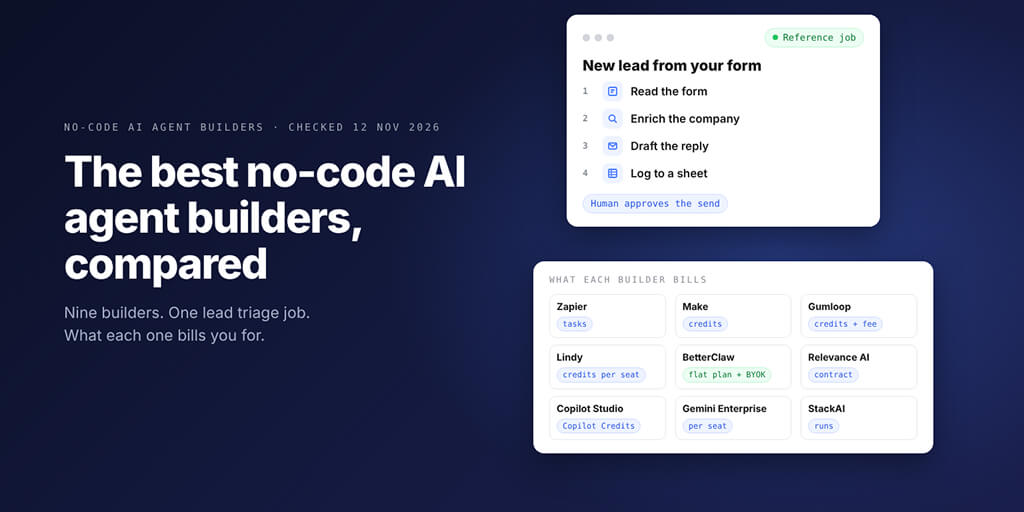
Nine builders, one real job (triage a lead, enrich it, draft the reply, log it), walked through from each vendor's own pricing pages and docs. Where each one fits, what it bills you for, and where it breaks.
The best no-code AI agent builders in 2026 are AI by Zapier for teams already on Zapier, Make for visual control, Gumloop and Lindy for ops and inbox work, BetterClaw for any model on your own keys, and Copilot Studio or Gemini Enterprise inside Microsoft or Google. Choose by how each one bills a busy month.
| If you... | Start with |
|---|---|
| Already run your automations on Zapier | AI by Zapier (the new home of Zapier Agents) |
| Want to see every step on a canvas | Make AI Agents or Gumloop |
| Mostly need an inbox, meeting and follow-up assistant | Lindy |
| Want any model, your own keys and a flat plan | BetterClaw |
| Live in Microsoft 365 or Google Workspace | Copilot Studio or Gemini Enterprise |
Picture this: it's Monday morning, and your website form collected 43 leads over the weekend. Two are real buyers.
One of them already booked a call with a competitor on Sunday night.
If something had read them on Saturday, we'd have that deal.
That's the job most teams hire a no-code agent for. So that's the job we used to compare these nine builders.
How we compared nine no-code AI agent builders (and what we did not do)
We did not run nine accounts side by side, so this isn't a hands-on test. It's a documentation-based walkthrough: for each builder, we read its own pricing page, help centre and product docs on 12 November 2026, then mapped how it would run one fixed job.
That keeps the comparison honest. Every price, limit and feature below is what the vendor published on that date, and anything we couldn't confirm is marked.
This is the buyer's guide for people who don't want to write code. If you're also weighing frameworks, low-code canvases and enterprise clouds, our roundup of the 16 best AI agent platforms and builders covers the wider field.
The reference job: one inbound lead, five steps
Here's the job every builder gets walked through:
- Trigger: a new submission arrives from your website form.
- Enrich: look up the company (website, size, what they sell).
- Score: compare it against your ideal customer profile.
- Draft: write a reply email, held for a human to approve.
- Log: add a row to a Google Sheet and ping the team about hot leads.
It's small enough to build in an afternoon, but it touches everything that separates these tools: triggers, tool calls, model choice, approvals and billing.
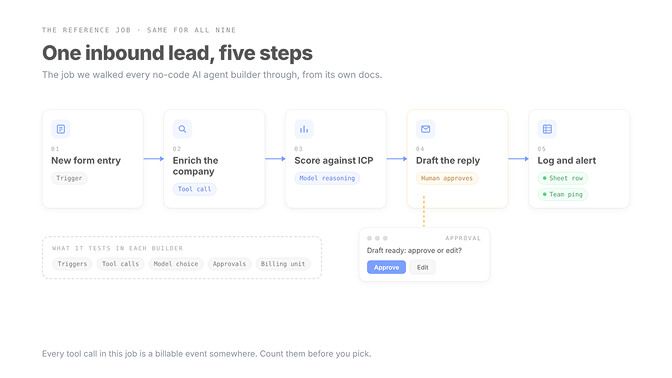
Count the tool calls in that job: an enrichment lookup, a draft, a sheet row, a team alert. Four calls per lead. Keep that number in mind, because several of these builders bill per call.
No-code AI agent builders compared at a glance
| Builder | Starts at (as published) | Before you pay | Integrations (vendor count) | Model choice | Billing unit |
|---|---|---|---|---|---|
| AI by Zapier | Professional from $19.99 a month | $0 plan, 100 tasks a month | 9,000+ apps | Tiers or a named model; BYOK | Tasks |
| Make AI Agents | Paid prices not confirmed (see note) | $0 plan, 1,000 credits a month | 3,000+ apps | Make's AI Provider; own key on paid plans | Credits |
| Gumloop | Pro from $37 a month | 14-day trial | 400+ connectors | 35+ models; BYOK | Credits plus 8% fee |
| Lindy | $49.99 per active user a month | $50 in credits for 7 days | 3,000+ plus MCP | Per task, most major models | Credits per seat |
| BetterClaw | $19 a month; Pro $49 ($39 yearly) | 7-day free trial on your first workspace | 500+ connectors | 28+ providers, BYOK, zero markup | Flat plan plus your model bill |
| Relevance AI | Talk to sales | No self-serve plan | 2,000+ | Not published | Contract and vendor credits |
| Copilot Studio | $200 a month per 25,000 Copilot Credits | Trial via Microsoft | Power Platform connectors | GPT and Claude models | Copilot Credits |
| Gemini Enterprise | $21 per seat a month (Business) | 30-day trial | Workspace, Microsoft 365, HubSpot, Jira, Slack and more | Google models such as Gemini 3 | Per seat |
| StackAI | $0, then Enterprise (custom) | $0 plan, 500 runs a month | 500+ enterprise integrations | Not itemised on the plan page | Runs |
Make's pricing page loads its plan prices behind a bot check that we couldn't pass, so we left its paid prices out rather than guess.
The nine no-code AI agent builders, walked through the same job
1. AI by Zapier (formerly Zapier Agents)
Big change first. Zapier's own blog says Zapier Agents is now AI by Zapier: the agent lives as one AI step inside a regular Zap, with a prompt, tools and per-tool approval.
Zapier hasn't set a shutdown date for the old Agents app, and its pricing page still lists Agents plans: $0 with 400 activities a month, and Pro at $33.33 a month billed yearly with 1,500. Our Zapier AI agents vs BetterClaw comparison goes deeper on the two approaches.
How it runs the job: your form app triggers the Zap, the AI step researches the company, then calls tools to create a Gmail draft, add a sheet row and post the alert. You can switch on "Require approval before running" for just the email tool, so lookups run freely and the send waits for you.
Where it breaks: cost. AI steps bill as tasks, Premium models carry a 5x multiplier and Premium is the default for new steps. On the $0 plan you can only preview with the Standard tier, which has no tools.
2. Make AI Agents
Make rebuilt its agent app on 2 February 2026, and the new version is still in open beta. Agents live inside scenarios on the same visual canvas, and a Reasoning panel shows why the agent picked each step.
How it runs the job: a form module starts the scenario, the agent uses modules, other scenarios or MCP tools as its tools, and you add a manual approval before the send. Every decision is visible on the canvas, which is the best debugging view in this group.
Where it breaks: two things. The beta label means Make says functionality and pricing may change, and bringing your own OpenAI or Claude connection is a paid-plan feature (on the $0 plan you use Make's AI Provider and pay tokens in credits).
Scheduled scenarios default to every 15 minutes, with the minimum interval set by your plan.
3. Gumloop
Gumloop now leads with agents, and its old canvas is labelled "Workflows (Legacy)" on the pricing page. Pro starts at $37 a month with 20,000 credits, unlimited seats and 35+ models.
How it runs the job: an app trigger catches the form, the agent researches through its 400+ connectors (it can also open a real browser), drafts the email and logs the row. Unlimited seats make it easy to hand the agent to a whole sales team.
Where it breaks: the fee on top. Gumloop adds an 8% orchestration fee on the full list cost of every task, and if you bring your own model key, the fee rises to 16%.
Want a canvas you can self-host instead? That's n8n territory, which is low-code; our BetterClaw vs n8n breakdown covers that trade.
4. Lindy
Lindy now sells itself as an AI teammate more than a builder. You teach it skills, set routines on a schedule and talk to it in Slack, email or iMessage.
How it runs the job: a scheduled routine checks for new leads, Lindy researches and drafts, and here's its strongest point. Lindy's pricing page says anything with outside impact, like sending an email or updating a ticket, waits for approval, while read-only lookups don't.
Where it breaks: every active user is billed, from $49.99 a month for 5,000 pooled credits each. Lindy rates everyday asks at 2 to 250 credits and deep work at 250 to 1,000, so a lead with real web research can land at the expensive end.
5. BetterClaw
We built BetterClaw, so weigh this entry accordingly. You pick a model from 28+ providers, connect your apps from 500+ connectors, and run on your own API key with zero markup.
How it runs the job: connect your form tool, an enrichment source, Gmail and Google Sheets, describe the job, and choose a cheap model for scoring. Hot leads can go to your team chat, with Telegram on Pro and above. If an agency runs this for several clients, Projects and Clients keeps each one separate.
Where it breaks, honestly:
- There's no $0 plan for new workspaces. The cheapest plan is $19 a month, and your first workspace gets a 7-day free trial.
- BYOK means a second bill from your model provider. Cheaper per token, but you watch two invoices.
- It isn't a visual canvas. If you want to draw a 40-branch flow, Make or Gumloop will feel better.
- WhatsApp isn't live, and our SOC 2 Type II audit is still in progress (we're ISO 27001 certified).
If you go the BYOK route, our list of the cheapest AI models for agents shows which ones hold up on routine scoring work like this.
6. Relevance AI
Relevance AI is now enterprise only. Its pricing page lists one plan, Enterprise, with unlimited agents and users, 2,000+ integrations, enterprise triggers, calling and meeting agents, and SSO, RBAC and audit logs.
How it runs the job: an enterprise trigger catches the lead, and because Relevance pitches teams of specialist agents built in plain language, you'd split research and drafting between two agents. The lead job fits that shape well.
Where it breaks: you can't try it without a sales call, and there's no public price to budget against. Its homepage says 1,000+ integrations while the pricing page says 2,000+, so confirm the connector you need on the demo.
7. Microsoft Copilot Studio
If your leads land in Outlook or SharePoint, Copilot Studio is the natural home. Makers can pick GPT models or Claude models (Sonnet 4.6, Opus 4.6, 4.7 and 4.8 are listed as generally available).
How it runs the job: an event trigger or a Recurrence trigger starts the agent, Power Platform connectors do the lookups and the logging, and the agent drafts the reply. Event triggers need generative orchestration turned on.
Where it breaks: billing and permissions. Microsoft says each trigger payload is processed like a user message and billed in Copilot Credits, so a 10-minute recurrence fires 144 times a day whether leads arrived or not. Which triggers you see also depends on data policies your admin sets.
8. Google Gemini Enterprise (Workflow Builder)
Google's no-code option is Workflow Builder inside Gemini Enterprise. The Business edition starts at $21 per seat a month with a 30-day trial, and Google's docs say you can build agents from a prompt or a visual editor.
How it runs the job: Gemini Enterprise's event triggers poll connected sources such as Gmail, Outlook, Google Drive and Jira Cloud. If your form emails each submission to you, a "When an email is received" trigger starts the workflow, and a human approval step holds the draft.
Where it breaks: Google's own docs list limits worth reading. Failed sessions can't be retried by hand, tools are limited to what your admin provisions, and the trigger docs are written for the Standard and Plus editions, so check what Business includes.
9. StackAI
StackAI is built for IT teams, and its homepage now carries the news that Asana acquired it. The $0 plan gives 500 runs a month, 2 projects and 1 seat; everything else is Enterprise, with on-premise and VPC deployment, SSO, and SOC 2, HIPAA and GDPR compliance.
How it runs the job: the form posts to the agent's REST API, a web scraping loader reads the company site, and the agent writes the draft back through its 500+ enterprise integrations. Slack bot and Chrome extension interfaces are listed too.
Where it breaks: there's no self-serve step between one seat and an enterprise contract. For a five-person sales team, that gap matters.
What the same lead job costs on each billing model
Prices on a plan page don't tell you what a busy month costs. The billing unit does, and these nine builders use six different ones.
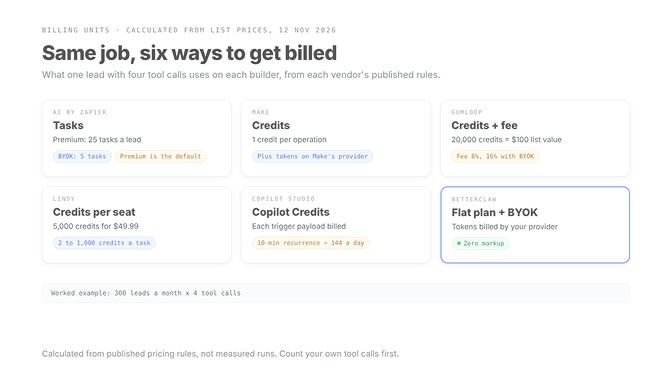
Here's the reference job priced on each builder's published rules, at a hypothetical 300 leads a month with four tool calls each. These are calculated from list prices on 12 November 2026, not measured.
| Builder | Rule the vendor publishes | One lead | 300 leads a month |
|---|---|---|---|
| AI by Zapier, Premium tier | (1 + tool calls) x 5 tasks | 25 tasks | 7,500 tasks |
| AI by Zapier, your own key | (1 + tool calls) x 1 task | 5 tasks | 1,500 tasks |
| Gumloop Pro | Credits at $0.005, plus 8% fee (16% with BYOK) | Depends on list cost | 20,000 credits ($100 list value) included for $37 |
| Lindy Team | 2 to 250 credits for everyday asks | 50 credits (assumed) | 15,000 credits, a listed $99.99 tier |
| Copilot Studio, 10-minute recurrence | Each payload billed like a message | n/a | About 4,320 payloads in 30 days |
Two lessons jump out of that table.
The default model choice is a pricing decision. On AI by Zapier, the same lead costs five times more tasks on Premium than on your own key.
The second lesson: polling costs money even on quiet days. An event trigger that fires only when a lead arrives beats a recurrence that wakes up 144 times a day.
That's also why we lean on bringing your own key. When the provider bills you directly, you can send scoring to a cheap model and keep the strong one for the draft.
A flat platform fee plus your own model bill is the only setup on this list where a busy month changes one number, not three.
That's the bet BetterClaw makes. You pay for the platform, your model provider bills you at its own price with zero markup, and you can pick from 28+ providers per agent. Plans start at $19 a month, Pro is $49 a month or $39 billed yearly, and your first workspace gets a 7-day free trial. See BetterClaw plans
How to choose a no-code AI agent builder for your team
Feature lists all look the same by now. Five questions separate these builders faster.
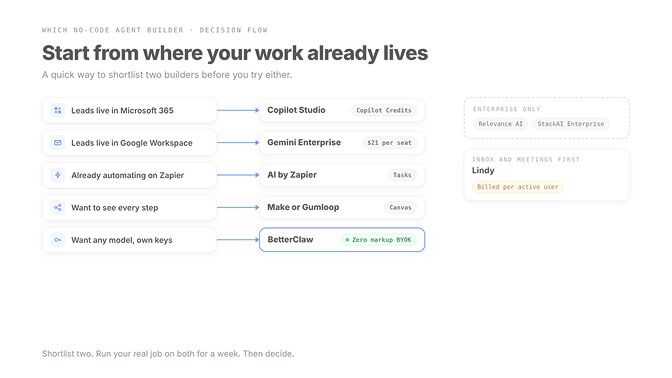
- Where do your leads already live? Microsoft shops get the most from Copilot Studio, Google shops from Gemini Enterprise, Zapier shops from AI by Zapier.
- Who pays for tokens? Bundled credits are simple to start. Your own key is cheaper once volume grows.
- How does a busy month bill? Price 300 runs of your real job, not the entry plan.
- Can a human approve before anything leaves? Lindy, AI by Zapier and Make all let you gate the send.
- What happens when a step fails? Look for run history you can read, and retries you can trigger.
Here's the thing about question 5. Most demos show the happy path. Ask each vendor to show you a failed run, and watch how long it takes to find out why.
Our honest shortlist by team type:
- Solo founder or small team on Zapier already: AI by Zapier, with your own key on tool-heavy steps.
- Ops or marketing team that wants to see the flow: Make or Gumloop.
- Sales team living in the inbox: Lindy, if the per-seat cost fits.
- Team that wants model freedom and predictable platform cost: BetterClaw.
- Microsoft or Google enterprise: the platform you already pay for.
The best builder is the one whose billing unit matches how your job grows. Leads grow by volume, so avoid units that multiply per call.
The builder matters less than the job description
Every tool on this list can triage a lead. The difference shows up three months later, when volume doubles and someone asks why the bill tripled.
So write the job down first: the trigger, the four tool calls, the step a human must approve. Then hold each builder up against that page, not against its demo.
Do that, and you'll pick the builder that's still running your Monday morning a year from now.
Frequently Asked Questions
What is a no-code AI agent builder?
A no-code AI agent builder lets you create an agent that reasons and takes actions in your apps without writing code. You describe the job, connect tools like Gmail or a CRM, set a trigger, and the agent decides which steps to take. Make, Gumloop, Lindy, AI by Zapier and BetterClaw are examples.
Did you test all nine no-code AI agent builders?
No. This comparison is a documentation-based walkthrough: we read each vendor's pricing page and docs on 12 November 2026 and mapped how each would run the same lead triage job. Cost examples are calculated from published pricing rules, not measured runs.
Is Zapier Agents still available?
Zapier says Zapier Agents is now AI by Zapier, an AI step inside the Zap editor billed in tasks. Its help centre says no shutdown date has been set for the old Agents app yet, and eligible agents show a migration banner.
Can I use my own API key in a no-code AI agent builder?
Often, yes, with different rules. AI by Zapier bills your own key at a 1x task multiplier, Make allows custom AI provider connections on paid plans, Gumloop supports it but raises its orchestration fee from 8% to 16%, and BetterClaw is bring-your-own-key across 28+ providers with zero markup.
Which no-code AI agent builder is cheapest for a small team?
It depends on volume. For low volume, the $0 plans from Zapier, Make and StackAI let you start, though Zapier's $0 plan only previews AI steps on a tier without tools. As volume grows, builders that bill per tool call get expensive, so price 300 runs of your real job before you commit.
Can a no-code agent send emails without my approval?
Only if you let it. Lindy holds anything with outside impact for approval, AI by Zapier lets you require approval per tool, and Make lets you add manual approvals. For a lead reply, keep the send gated until you trust the drafts.