Your competitor's AI agent is answering support tickets in 5 minutes. Yours take 24 hours. Here's what an AI agent actually is, how it works, and how to get one running this week without writing a single line of code.
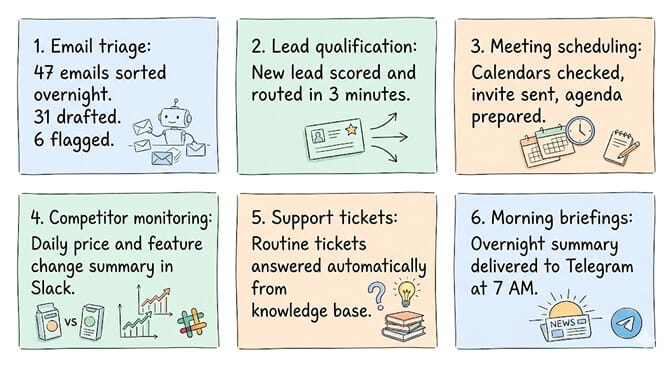
Last Tuesday, a founder in our community shared a screenshot in Slack. Her AI agent had triaged 47 support emails overnight, drafted responses to 31 of them, flagged 6 for human review, and scheduled 3 follow-up calls. She woke up to a summary in Telegram. The whole thing ran while she slept.
She doesn't write code. She's never opened a terminal. She built the agent in about 10 minutes using a visual builder.
That's what an AI agent is. Not a chatbot that waits for you to type. Not a workflow that follows rigid rules. An autonomous piece of software that reasons about what to do, takes action across your tools, and learns from the results.
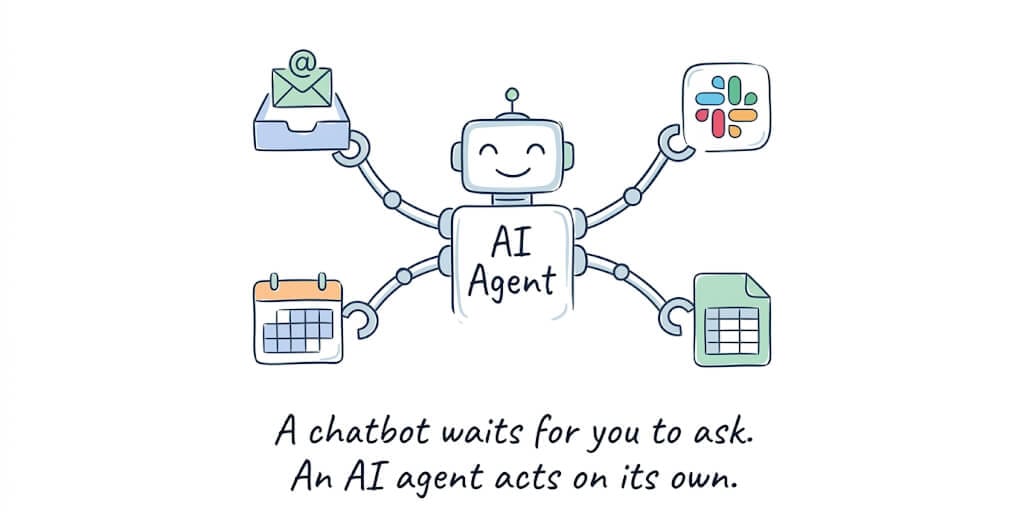
An AI agent is software that can perceive its environment, reason about what to do, take actions using tools, and adapt based on outcomes, all without being told exactly what to do at each step. It combines a large language model (the "brain") with tool access (email, calendar, CRM, Slack), memory (it remembers past conversations and context), and planning (it breaks complex tasks into steps and executes them).
That's the definition. Now let's make it concrete.
How an AI agent actually works (the four components)
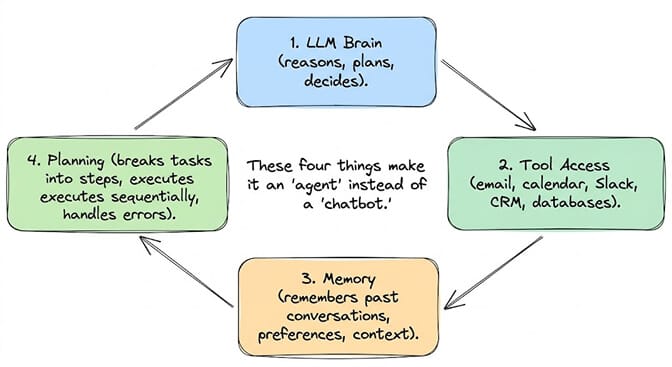
1. The LLM brain (how it thinks)
The large language model is the reasoning engine. When your agent receives a task like "check my inbox and summarize anything urgent," the LLM decides what counts as urgent, which emails to prioritize, and how to summarize them. It doesn't follow a script. It reasons.
You can choose which LLM powers your agent. OpenAI's GPT, Anthropic's Claude, Google's Gemini, DeepSeek, Mistral, and dozens more. Different models have different strengths. Some are faster. Some are cheaper. Some are better at specific tasks. Most agent platforms let you pick.
2. Tool access (how it acts)
A chatbot can only talk. An AI agent can do things. It connects to your email, your calendar, your CRM, your project management tool, your Slack workspace, and acts on them.
When the agent decides "this email needs a response," it drafts the response, opens Gmail, and sends it. When it decides "this meeting conflicts with another one," it opens your calendar and proposes a new time.
Tool access is what separates an agent from ChatGPT. ChatGPT can tell you what to do. An agent does it.
3. Memory (how it learns)
The first time you ask your agent to draft a client email, it writes in a generic tone. The second time, if it has memory, it remembers your preferred tone, your client's name, the context of your last conversation, and the outcome of the previous email.
Memory comes in two forms. Short-term memory holds the current conversation. Long-term memory (persistent memory) stores information across sessions, days, and weeks. The best agents combine both so they get better over time without you re-explaining everything.
4. Planning (how it handles complex tasks)
"Prepare my morning briefing" is not one task. It's five: check email for urgent items, check calendar for today's meetings, check Slack for unread mentions, check the news for competitor updates, and compile everything into a summary.
An AI agent breaks this into steps, executes them in order, handles errors (what if Gmail is down?), and delivers the final output. This is planning. A chatbot can't do it. A workflow automation tool can do it but only if you define every step in advance. An agent figures out the steps.
The one-sentence version: An AI agent = LLM (brain) + tools (hands) + memory (experience) + planning (strategy). Remove any one of those four, and you have something less than an agent.
AI agent vs chatbot vs workflow automation (the differences that matter)
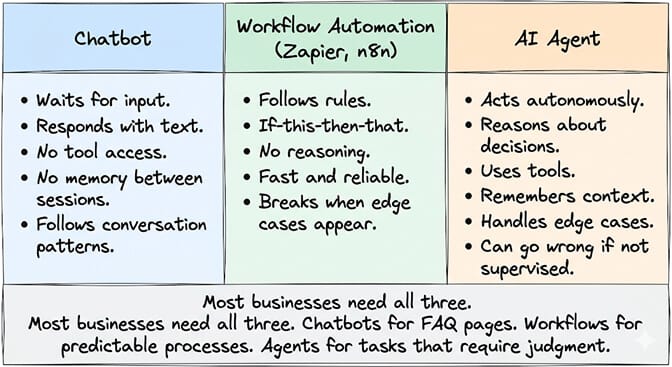
This is where most people get it wrong. They use "AI agent," "chatbot," and "automation" interchangeably. They're different things.
A chatbot waits for you. You type a question. It answers. You type another question. It answers. It can't do anything on its own. It can't check your email. It can't schedule a meeting. It can talk, and only when you ask.
A workflow automation follows rules. "When a new email arrives with the subject line containing 'invoice,' extract the amount and add it to the spreadsheet." That's a rule. It works perfectly for predictable, repeatable tasks. But when the invoice is in a PDF attachment instead of the subject line, the rule breaks. There's no reasoning. Tools like Zapier and n8n excel at this.
An AI agent reasons and acts. "Process my invoices" means the agent figures out where the invoices are (email, Slack, shared drive), extracts the relevant data regardless of format (subject line, PDF, image), and handles the edge cases without a pre-defined rule for each one.
For the complete list of what AI agents can actually do across industries, our AI agent use cases guide covers 20+ specific workflows.
Six things an AI agent can do for your business right now
Here's what nobody tells you about AI agents. The impressive demos are interesting. But the real value is boring, repetitive work that eats hours of your team's time every week.
1. Email triage and response drafting
Your agent reads every incoming email. Classifies it (support, sales, billing, spam). Drafts responses for routine questions. Flags complex issues for human review. A founder on our platform reduced support response time from 24 hours to 5 minutes using this single workflow.
2. Lead qualification
A new lead fills out your contact form. The agent enriches the lead data (company size, industry, role), scores it against your criteria, and routes it to the right salesperson. If the lead is high-priority, the agent sends a personalized follow-up within minutes.
3. Meeting scheduling and prep
"Schedule a call with Sarah next week and prepare an agenda based on our last conversation." The agent checks both calendars, finds overlapping availability, sends the invite, pulls context from your last meeting notes, and creates the agenda. Three minutes of agent work instead of 15 minutes of yours.
4. Competitor monitoring
Your agent checks competitor websites daily for pricing changes, new feature announcements, and blog posts. It summarizes the changes and posts an update to your Slack channel every morning. You start your day knowing what the competition did yesterday.
5. Support ticket management
Incoming tickets get classified, prioritized, and routed. Routine tickets (password resets, billing questions, shipping status) get answered automatically from your knowledge base. Complex tickets get summarized and escalated to the right person with full context attached. (For ecommerce-specific support, see our AI agent builder for ecommerce post.)
6. Morning briefings
"Good morning. Here's what happened overnight: 3 urgent emails (summaries attached), 2 calendar changes, your 10 AM meeting was cancelled, and your competitor raised their prices by 15%. Your first task today should be responding to the enterprise lead who emailed at 2 AM."
That's an agent. Not a chatbot. Not a Zapier zap. An autonomous system that reasons about your priorities and delivers actionable information.
If any of those six workflows sound like they'd save your team hours every week, that's exactly what we built BetterClaw for. No code. No terminal. No Docker. You pick your integrations, describe your workflow, and the agent is live. Free plan with 1 agent and 100 credits a month, $49/month for Pro. 200+ verified skills. 25+ one-click OAuth integrations.
How to build your first AI agent (without writing code)
Stay with me here. This is the part that would have sounded impossible two years ago.
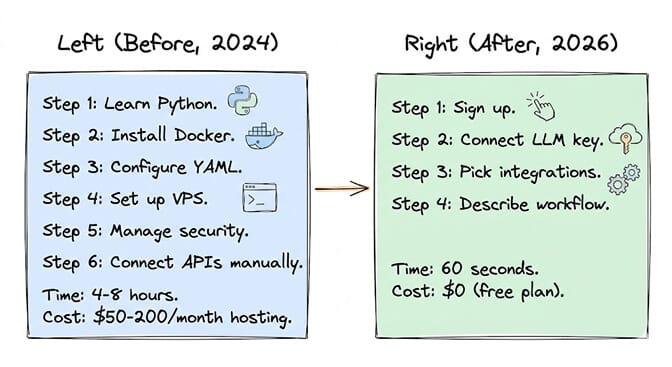
Building an AI agent used to require Python, a server, Docker configuration, API integrations, memory management, and weeks of development time. Frameworks like CrewAI (47K+ GitHub stars) and LangGraph made it faster for developers, but still required code.
In 2026, you can build an agent without writing a single line of code.
No-code agent builders like BetterClaw let you:
Sign up (no credit card). Connect your LLM API key (OpenAI, Claude, Gemini, DeepSeek, or 28+ others). Pick your integrations from a list (Gmail, Slack, Calendar, HubSpot, Jira, and 25+ more). Describe what you want the agent to do. Deploy in 60 seconds.
For the step-by-step walkthrough across no-code, low-code, and code-first paths, our 3-paths guide covers each option in detail.
Our ranking of the best AI agent builders in 2026 compares 12 options by setup time, pricing, and who each one is built for.
The cost: BetterClaw's free plan includes 1 agent, 100 credits/month, and basic skills. Pro is $49/month with 5 agents and 12,000 credits/month. You pay your LLM provider directly (BYOK) with zero markup from us. (See our free AI agent builder post for the $0 stack including free LLM tiers.)
The time: 60 seconds for first deployment. 10-15 minutes to configure a production workflow with integrations, memory, and scheduling.
Where AI agents are headed (the numbers)
This isn't hype. The data is clear.
Gartner predicts 40% of enterprise applications will embed AI agents by the end of 2026. Not use AI somewhere in the product. Embed autonomous agents as core features.
McKinsey estimates the addressable value of AI agents at $2.6-4.4 trillion. That's not the market for agent platforms. That's the value of the work agents can automate across every industry.
50+ companies including Carelon, Grainger, KeHE, Premier, and Robert Half already use BetterClaw in production. These aren't experiments. They're operational agents handling real workflows.
The trajectory is clear. In 2025, AI agents were a developer experiment. In 2026, they're a business tool. By 2027, not having AI agents will be like not having email in 2005. Technically possible, but increasingly difficult to compete.
The safety question (because you should be asking it)
Here's the honest part.
AI agents can go wrong. They can send the wrong email. They can delete files they shouldn't. A Meta researcher's agent mass-deleted 200+ emails while ignoring stop commands. That made the news.
Safety matters. When evaluating any AI agent platform, look for:
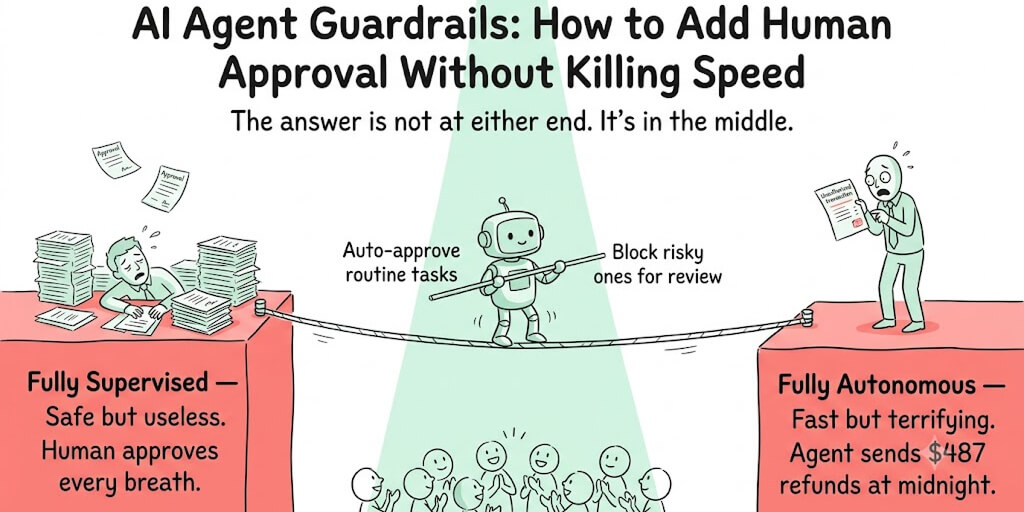
Trust levels. Can you set the agent to "ask before acting" for sensitive operations? BetterClaw uses Intern, Specialist, and Lead trust levels with action approval for critical tasks.
Kill switch. Can you stop the agent immediately? One-click kill switch should be standard.
Memory limits. Does the agent forget sensitive information? BetterClaw auto-purges secrets from agent memory after 5 minutes (AES-256 encryption).
Execution isolation. Does the agent run in a sandboxed environment? Isolated Docker containers prevent one agent from affecting others.
For the detailed security and monitoring comparison across AI agent platforms, our OpenClaw monitoring guide covers trust levels, encryption, and isolation approaches in depth. Our AI agent builder comparison also lists the security questions to ask any platform.
The rule of thumb: Start with read-only tasks (monitoring, summarizing, reporting). Move to draft-and-review tasks (the agent drafts, you approve). Graduate to autonomous tasks only after the agent has proven reliable.
The honest take
Here's what I wish someone had told me when I first heard "AI agent."
An AI agent is not magic. It's a piece of software that combines an LLM with tools, memory, and planning. It can do remarkable things. It can also make mistakes. The value comes from applying it to the right tasks: repetitive, time-consuming work that follows patterns but has enough variation to frustrate traditional automation.
You don't need to write code to build one anymore. That barrier fell in 2026. The question is no longer "can I build an AI agent?" It's "which tasks should I automate first?"
Start with one task. Email triage. Lead qualification. Morning briefing. Pick the task that wastes the most human time and has the clearest success criteria. Build an agent for that one task. See the results. Then expand.
The companies that are winning right now aren't the ones with the most sophisticated AI architecture. They're the ones that deployed a simple agent three months ago and have been compounding the benefits since.
If any of this resonated, give BetterClaw a try. Free plan with 1 agent and 100 credits a month. $49/month for Pro. Your first deploy takes about 60 seconds. We handle the infrastructure. You handle the interesting part.
Frequently Asked Questions
What is an AI agent in simple terms?
An AI agent is software that can think, act, and learn on its own. Unlike a chatbot (which only responds when you ask) or a workflow automation (which follows pre-set rules), an AI agent reasons about what to do, takes actions across your tools (email, calendar, CRM, Slack), and remembers context from past interactions. It combines a large language model with tool access, memory, and planning to handle complex tasks autonomously.
How is an AI agent different from a chatbot?
A chatbot waits for your input and responds with text. It can't take actions, access your tools, or work autonomously. An AI agent acts on its own: it can read your emails, schedule meetings, draft responses, update your CRM, and post to Slack without you asking for each step. The key difference is autonomy. Chatbots respond. Agents act.
How do I build an AI agent without coding?
No-code platforms like BetterClaw let you build AI agents in about 60 seconds. Sign up (free, no credit card), connect your LLM API key, pick your integrations (Gmail, Slack, Calendar, HubSpot, and 25+ more), and describe what you want the agent to do. The free plan includes 1 agent, 100 credits/month, and 3 connectors. For code-first alternatives, CrewAI (Python) and LangGraph offer developer frameworks.
How much does an AI agent cost?
It depends on the platform. BetterClaw offers a free plan ($0/month, 1 agent, 100 credits a month) and Pro at $49/month with 5 agents and 12,000 credits a month. Self-hosted frameworks like CrewAI are free but require hosting ($50-200/month) and developer time. Enterprise platforms like Google Vertex AI Agent Builder use usage-based pricing across multiple billing dimensions. In all cases, you also pay LLM API costs separately (typically $10-50/month for moderate use).
Are AI agents safe enough for business use?
With proper guardrails, yes. Look for platforms with trust levels (the agent asks before acting on sensitive tasks), kill switches (one-click stop), secrets auto-purge (credentials cleared from memory after use), and execution isolation (sandboxed containers). Start with read-only tasks, graduate to draft-and-review, and expand to full autonomy only after the agent has proven reliable. A Meta researcher's agent deleted 200+ emails, so oversight matters.