Buy the memory, not the storage. Here is what each configuration costs on apple.com today, which models fit, and how to put your models on an external drive.
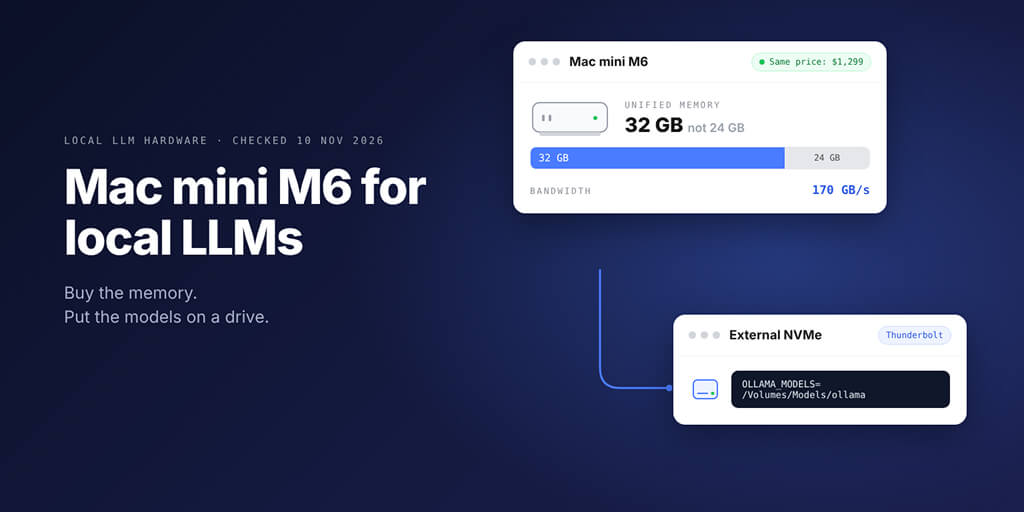
For a Mac mini M6 local LLM box, buy 32 GB of memory. On apple.com today, the M6 with 32 GB and 256 GB storage costs $1,299, exactly the same as 24 GB with 512 GB. Memory is fixed for life and decides which models fit; storage can be a Thunderbolt drive with OLLAMA_MODELS pointed at it.
| If you want | Buy | Price on apple.com (US, 10 Nov) |
|---|---|---|
| The best value for 20B to 27B models | Mac mini M6, 32 GB, 256 GB | $1,299 |
| The same models, generated faster | Mac mini M5 Pro, 24 GB or 48 GB | $1,699 or $2,299 |
| Room for much bigger models | Mac Studio M5 Max, 36 GB and up | from $2,499 |
Picture this: you're on Apple's configurator with two tabs open. Same Mac mini, same $1,299.
One has 24 GB and 512 GB. The other has 32 GB and 256 GB.
Surely the one with double the storage is the safer pick?
For local models it's the other way round. Models are big files, but files can live anywhere. The memory they run in can only ever be what you buy today.
The configurations that matter for a Mac mini M6 local LLM setup
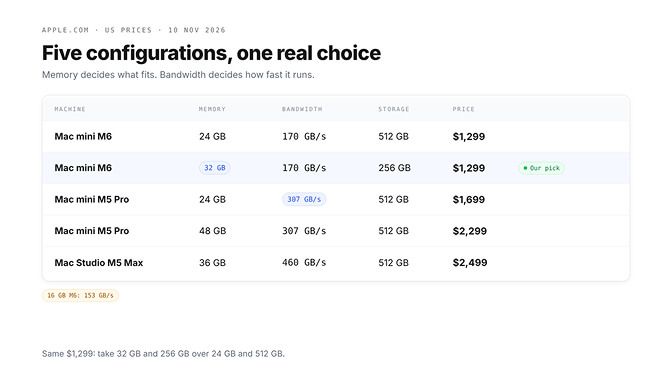
We read every price and bandwidth figure below from Apple's Mac mini and Mac Studio tech specs and store configurator on 10 November 2026. US prices, before tax.
| Machine | Memory | Bandwidth | Storage | Price |
|---|---|---|---|---|
| Mac mini M6 | 16 GB | 153 GB/s | 256 GB | $899 |
| Mac mini M6 | 24 GB | 170 GB/s | 512 GB | $1,299 |
| Mac mini M6 (built to order) | 32 GB | 170 GB/s | 256 GB | $1,299 |
| Mac mini M6 | 32 GB | 170 GB/s | 1 TB | $1,799 |
| Mac mini M5 Pro, 16-core GPU | 24 GB | 307 GB/s | 512 GB | $1,699 |
| Mac mini M5 Pro (built to order) | 48 GB | 307 GB/s | 512 GB | $2,299 |
| Mac Studio M5 Max, 32-core GPU | 36 GB | 460 GB/s | 512 GB | $2,499 |
Two details hide in Apple's spec sheet. The 16 GB M6 runs at 153 GB/s, while the 24 and 32 GB versions run at 170 GB/s, so the base model is slower as well as smaller. And the M6 tops out at 32 GB, while the M5 Pro Mac mini goes to 64 GB.
The configurator prices tell the rest. Going from 16 to 24 GB costs $200, to 32 GB costs $400, and 256 to 512 GB of storage costs $200. That's why the two $1,299 machines exist.
If you want the wider view across GPUs, mini PCs and laptops, our guide to running a local LLM agent on consumer hardware covers the other boxes people shortlist.
Why unified memory decides everything
On a Mac, the CPU and GPU share one pool of memory. There's no separate graphics card with its own VRAM, so the model, its context and macOS all come out of the same 24 or 32 GB.
Here's the catch. macOS doesn't hand the GPU all of it. Apple's Metal documentation describes a recommendedMaxWorkingSetSize for each GPU: roughly how much memory it can use "without affecting its runtime performance." Apple doesn't publish a fixed percentage, so check your own machine.
Two ways to see it:
- llama.cpp prints a
recommendedMaxWorkingSetSizeline in its startup log, in MB. - In Ollama, load a model and run
ollama ps. The PROCESSOR column should say100% GPU. A split like48%/52% CPU/GPUmeans part of the model spilled to the CPU, and it will be slower.
You can raise the limit. Apple's MLX team documents this in the mlx-lm README for macOS 15 and later:
sudo sysctl iogpu.wired_limit_mb=N
They say N should be larger than the model's size in megabytes but smaller than the machine's memory. We treat it as a last resort, not a plan: re-apply it after a restart, and leave macOS enough room to breathe.
On a Mac, "fits" means fits in what the GPU may use, after macOS and your apps, with room left for context. Not "file size is smaller than the RAM sticker."
Mac mini M6 for local LLMs: 32GB vs 24GB, model by model
Ollama lists each model's size on its library page. These are the default 4-bit downloads we checked on 10 November.
| Model (Ollama tag) | Download size | 24 GB M6 | 32 GB M6 |
|---|---|---|---|
gpt-oss:20b | 14 GB | Comfortable | Comfortable |
devstral:24b | 14 GB | Comfortable | Comfortable |
gemma4:26b (26b-a4b) | 16 to 19 GB | Tight | Comfortable |
qwen3.8:27b | 18 GB | Tight | Comfortable |
qwen3.6:27b | 18 to 19 GB | Tight | Comfortable |
gemma4:31b | 19 to 20 GB | Tight, short context | Comfortable |
qwen3.6:35b (35b-a3b) | 23 GB | No | Tight |
gpt-oss:120b | 65 GB | No | No |
"Comfortable" and "tight" are our rule of thumb, not a benchmark. Comfortable means the download is about 60% of total memory or less; tight means up to about 80%. Past that, macOS, your browser and the context window have nowhere to go.
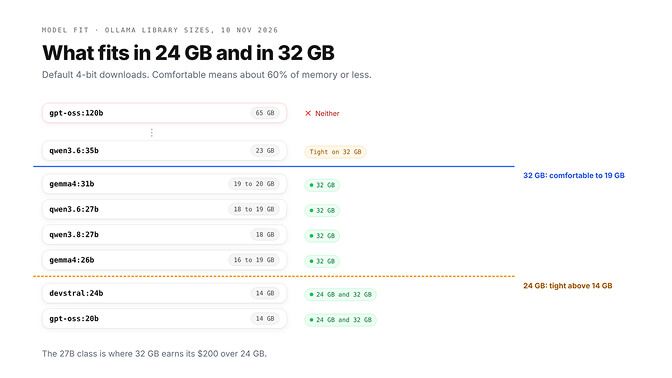
Read the table this way. The 24 GB machine runs the 14 GB tier well and the 27B tier only just. The 32 GB machine runs the 27B tier with room for a long context.
That matters more for agents than for chat. Every tool result, file and message sits in the context, and the context costs memory on top of the model. Ollama's FAQ says it starts at 4,096 tokens by default, and an agent will want far more.
One correction to a claim we keep seeing: Qwen 3.8 Flash Next is not a "32 GB and up" model. Ollama lists it as 125b-a6b, at 105 GB in MLX and 120 GB in Q4_K_M. No Mac mini runs it.
The 16 GB and 32 GB question looks different on a PC with a graphics card, and our guide to the best local LLM for 16 GB of VRAM and 32 GB of RAM covers that split.
Mac mini M6 vs M5 Pro: bandwidth vs capacity
Here's the simplest way to think about it. Memory size decides which model loads. Memory bandwidth decides how fast it writes.
Generating each token means reading the model's active weights out of memory. So on the same model, the M5 Pro's 307 GB/s against the M6's 170 GB/s gives it up to about 1.8 times the generation speed. Expect less in practice; that ratio is a ceiling, not a measurement.
That makes the choice fairly clean:
- M6 32 GB at $1,299: the most model for the money. Same models as an M5 Pro 24 GB, and more of them.
- M5 Pro 24 GB at $1,699: faster on what fits, but it holds less than the cheaper M6 32 GB. Hard to justify for LLMs.
- M5 Pro 48 GB at $2,299: the real step up. Faster and bigger, and the 35B tier becomes comfortable.
The M5 Pro also brings Thunderbolt 5 at up to 120 Gb/s against the M6's Thunderbolt 4 at 40 Gb/s. Apple's own page says Thunderbolt 5 lets you link several Mac minis into a cluster for larger models.
A word on Apple's AI numbers. The Mac mini page quotes faster "time to first token" in LM Studio, tested with an 8K-token prompt on a 14-billion-parameter 4-bit model.
That's prompt processing, the wait before the first word. It's real, and it helps agents with long prompts, but it's not the same as how fast the answer streams.
The M5 Pro 24 GB is the trap in this lineup. It costs $400 more than the M6 32 GB and holds less.
If you're tempted to go further, a Mac Studio M5 Max starts at 36 GB and 460 GB/s for $2,499, and Apple lists 614 GB/s on the 40-core GPU version. Our DGX Spark alternatives piece compares that class of machine with NVIDIA's 128 GB boxes.
Keep your models on an external NVMe drive
This is the part that makes 256 GB fine. Ollama's FAQ says models live in ~/.ollama/models on macOS, and that you set the OLLAMA_MODELS environment variable to use a different directory.
A Thunderbolt NVMe enclosure is the sensible home. The drive only affects how long a model takes to load; once it's in memory, the drive doesn't touch generation speed.
The steps, with the Ollama Mac app:
- Format the drive as APFS in Disk Utility and name it, for example,
Models. - Quit Ollama, then move your existing models:
mv ~/.ollama/models /Volumes/Models/ollama - Point Ollama at the new folder (command below).
- Start the Ollama app again and run
ollama listto confirm your models are still there.
launchctl setenv OLLAMA_MODELS "/Volumes/Models/ollama"
launchctl getenv OLLAMA_MODELS    # should print the path
That launchctl setenv route is the one Ollama's docs give for the Mac app, followed by a restart of the app. If you run the server from a terminal instead, set it inline: OLLAMA_MODELS=/Volumes/Models/ollama ollama serve.
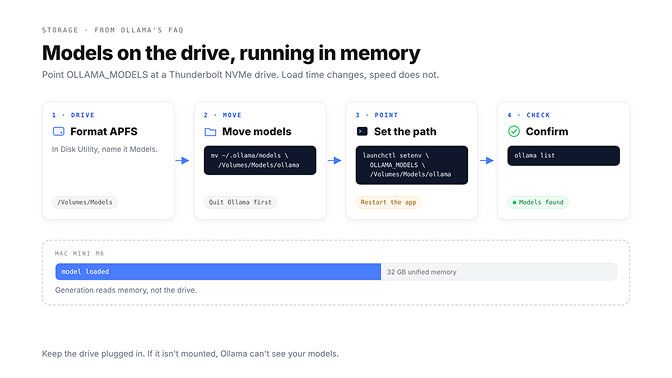
Two habits save you a confused evening. After a restart, run launchctl getenv OLLAMA_MODELS again, and set it again if it comes back empty. And keep the drive connected: if it isn't mounted, Ollama has nothing to load.
LM Studio has the same idea built in. Its docs say you can change the models directory from the My Models tab.
Ollama vs LM Studio vs MLX on a Mac mini
You don't have to pick one forever, and the three overlap more than they used to.
| Runtime | What it runs on a Mac | Best for |
|---|---|---|
| Ollama | GGUF models, plus MLX models (the MLX engine is on by default on Apple silicon) | A local API for agents and scripts |
| LM Studio | llama.cpp (GGUF) and Apple's MLX | A desktop app to try models fast |
| mlx-lm | MLX models, from Python or the command line | Fine control and experiments |
Ollama's library now tags MLX builds next to GGUF ones, such as qwen3.8:27b-mlx beside qwen3.8:27b-q4_K_M. Try both on your own machine and keep the faster one. Run ollama run <model> --verbose and Ollama prints a prompt eval rate and an eval rate in tokens per second after each answer.
We went deeper on the trade-offs in Ollama vs LM Studio, including which one behaves better as a server for agents.
Running an always-on agent on the Mac mini
A Mac mini is a good little server. It's small, quiet, and Apple's page even names Ollama and LM Studio among the apps it's built for. The hard part is keeping it awake and reachable.
Start in System Settings, then Energy. Apple's Mac User Guide lists the options that matter for a desktop Mac:
- "Prevent automatic sleeping when the display is off"
- "Start up automatically after a power failure"
- "Wake for network access"
Then keep the model loaded. Ollama's FAQ says models unload after 5 minutes by default; set OLLAMA_KEEP_ALIVE (for example to 24h, or -1 to keep it loaded) so your agent doesn't wait for a reload on every job.
Picture the next problem. Your agent lives in the cloud and answers you on Telegram, but your model lives on a Mac mini behind your router. The usual fixes are opening port 11434, running a tunnel, or joining a private network, and each one is something you maintain.
That's the gap BetterClaw Desktop fills. It connects the models running in Ollama, LM Studio or llama.cpp on your Mac to your BetterClaw agents in the cloud, with no open ports, no tunnels and no API key.
It flags how well each model handles agent tools and keeps your computer awake while it's answering an agent. Its activity log shows each request's model, time and token count, never the prompt or answer, and it runs on macOS 13 or later on Apple silicon. Get BetterClaw Desktop
Mac mini M6 vs an RTX 5090 PC
NVIDIA's GeForce RTX 5090 has 32 GB of GDDR7 and, by NVIDIA's own spec sheet, 1,792 GB/s of memory bandwidth. That's more than ten times the M6's 170 GB/s.
So the same 32 GB of model space gives you two very different machines. The 5090 PC generates far faster on anything that fits in its 32 GB. The Mac mini is a $1,299 whole computer that sits silently on a shelf and runs all day.
Pick the 5090 if speed on 27B-class models is the job. Pick the Mac mini if you want an always-on box that runs those same models well enough for an agent that works while you sleep. The full comparison, including the M5 Max and M5 Ultra, is in our Apple silicon vs NVIDIA for AI agents breakdown.
The short version
Most people shopping for a local LLM Mac buy it like a laptop: a bit more storage, the default memory, done. Then they find out their favourite model wants 18 GB and macOS wants its share.
Flip the order. Buy the memory you'll need in two years, put a fast drive on the back, and let the models live there. The cheapest good Mac mini for this job costs exactly what the wrong one does.
Frequently Asked Questions
Is the Mac mini M6 good for local LLMs?
Yes, in the 32 GB configuration. It runs 20B to 27B models such as gpt-oss 20B, Qwen 3.8 27B and Gemma 4 26B from the Ollama library with room for context, quietly and all day. Its 170 GB/s bandwidth makes it slower per token than an M5 Pro or a gaming GPU.
Mac mini M6 32GB or 24GB for AI?
32 GB. On apple.com on 10 November 2026, the M6 with 32 GB and 256 GB costs $1,299, the same as 24 GB with 512 GB. Memory can't be upgraded later and decides which models fit, while storage can be added with an external drive.
M6 or M5 Pro for local LLM?
The M6 with 32 GB is the better value at $1,299, because the M5 Pro with 24 GB costs $1,699 and holds less. The M5 Pro has 307 GB/s of bandwidth against 170 GB/s, so it generates faster, which makes the 48 GB M5 Pro at $2,299 the real upgrade.
Can I store Ollama models on an external drive?
Yes. Ollama's FAQ says to set the OLLAMA_MODELS environment variable to the folder you want, and on the Mac app you set it with launchctl setenv and restart Ollama. Use a fast Thunderbolt NVMe drive and keep it connected, since Ollama can't load models from a drive that isn't mounted.
What models run on a Mac mini with 32GB?
Comfortably, the 4-bit downloads up to about 19 GB: gpt-oss 20B (14 GB), Devstral 24B (14 GB), Gemma 4 26B (16 to 19 GB), Qwen 3.8 27B (18 GB), Qwen 3.6 27B and Gemma 4 31B. Qwen 3.6 35B at 23 GB fits but is tight. gpt-oss 120B at 65 GB does not fit.
How much of the Mac mini's memory can the GPU use?
Less than the total, and Apple doesn't publish a fixed share. Metal reports a recommended maximum working set per GPU, which llama.cpp prints at startup, and ollama ps shows whether a model loaded fully on the GPU. Apple's mlx-lm README documents sudo sysctl iogpu.wired_limit_mb=N to raise the limit on macOS 15 and later.