I ordered a Mac Mini M4 Pro specifically to run local AI agents. The pitch was irresistible: 64GB of unified memory, dead silent, 30 watts of power draw, fits on a shelf. Load a 70B model, chat with it locally, pay zero API costs forever.
The first model loaded fine. Llama 3.3 70B, quantized to Q4_K_M. A 43GB file, and it fit entirely in memory. No swapping, no drama. I typed a prompt.
Five tokens per second.
For a single chat message, five tokens per second is tolerable. You can almost read along. But for an AI agent chaining 10-15 inference calls per task, each generating 300-500 tokens, the math gets brutal. A 10-step agent workflow at 5 tok/s takes over 16 minutes. The same workflow on a fast cloud API takes about 10 seconds.
I didn't return the Mac. It's genuinely great for certain workloads. And since then the hardware has moved: Apple shipped the M5 Max and M5 Ultra Mac Studio in September, NVIDIA's RTX 5090 now sells for more than double its launch price, and NVIDIA's RTX Spark has launched: preorders opened on 7 October, laptops ship from 16 October and compact desktops follow in November. But the Apple Silicon vs NVIDIA question for AI agent builders is still more nuanced than "which is faster" or "which has more memory." The answer depends on what you're actually trying to do.
Let me break down the real tradeoffs with October 2026 hardware and prices.
The fundamental tradeoff: capacity vs. speed
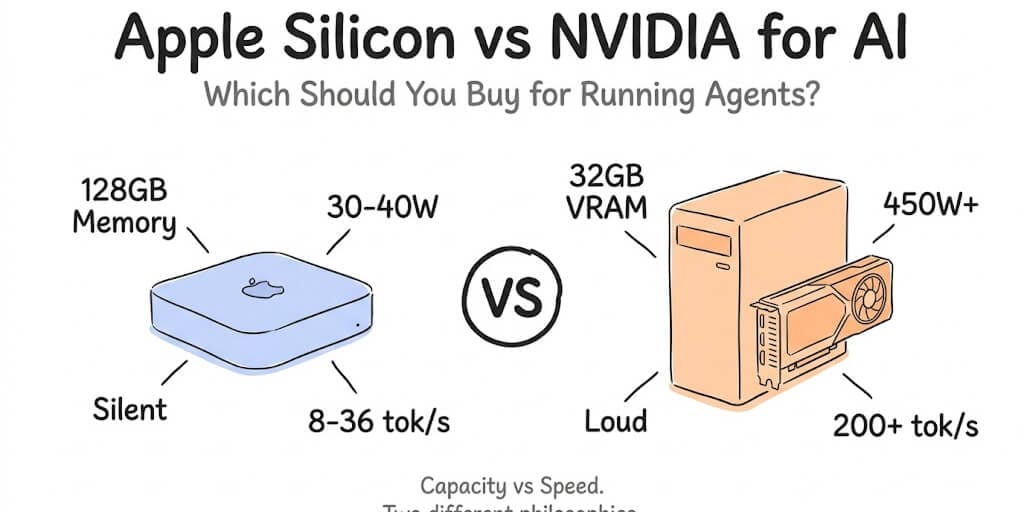
Apple Silicon and NVIDIA GPUs solve the same problem (running AI models locally) in opposite ways.
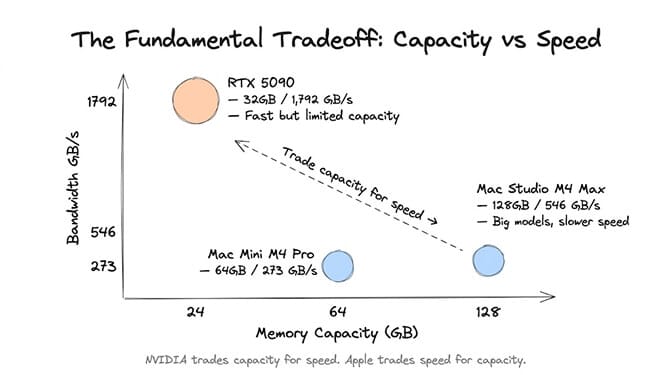
Apple Silicon gives you massive memory. A Mac Studio M5 Max goes up to 128GB of unified memory, and the M5 Ultra goes to 256GB today and 512GB when that configuration arrives in late October. That means you can load models that simply won't fit on any consumer NVIDIA GPU. A 70B model quantized to Q4_K_M is a 43GB download. A Mac handles that on a single machine. An RTX 5090 with 32GB of VRAM cannot.
NVIDIA gives you raw speed. An RTX 5090 delivers 1,792 GB/s of memory bandwidth. The M5 Max delivers 460 or 614 GB/s depending on the GPU, and the M5 Ultra 1.2 TB/s. Memory bandwidth is the number that decides how fast a model generates tokens, because every token requires reading the whole model out of memory once.
Apple Silicon lets you load the bigger model. NVIDIA lets you run the smaller model faster. For AI agents, speed usually matters more than model size.
The hardware on the table in October 2026
Here is what you can actually buy, with prices from Apple's store and current NVIDIA street pricing.
| Machine | Memory | Bandwidth | Price (Oct 2026) |
|---|---|---|---|
| Mac mini M6 | 16GB (up to 32GB) | 153 GB/s (170 GB/s with 24-32GB) | from $899; 32GB $1,799 |
| Mac mini M5 Pro | 24GB (up to 64GB) | 307 GB/s | from $1,699; 64GB from $2,699 |
| Mac Studio M5 Max | 36GB (up to 128GB) | 460 GB/s, or 614 GB/s with the 40-core GPU | from $2,499; 128GB $5,399 |
| Mac Studio M5 Ultra | 96GB (256GB now, 512GB late Oct) | 1.2 TB/s | from $5,499; 256GB $11,299 |
| RTX 5090 (desktop card) | 32GB GDDR7 | 1,792 GB/s | $1,999 MSRP, roughly $5,000-$6,000+ new (October average about $6,173) |
| RTX 4090 (used) | 24GB GDDR6X | 1,008 GB/s | about $2,600 on eBay |
| NVIDIA DGX Spark | 128GB unified | 273 GB/s | $6,950 since 2 Oct 2026 (64 GB model $4,999) |
| NVIDIA RTX Spark laptops and compact desktops | up to 128GB unified (lower tier up to 64GB) | 300 GB/s | laptops from $2,599 (ship from 16 Oct); Surface RTX Spark Dev Box desktop $5,999 (November) |
Two things jump out. First, the RTX 5090 is no longer the cheap option. At street prices, the card alone costs about as much as a 128GB Mac Studio M5 Max. Second, NVIDIA's own answers to Apple's unified memory, the DGX Spark and RTX Spark, have 128GB but only 273 GB/s and 300 GB/s, less than half the 40-core M5 Max's 614 GB/s. If you're shopping unified-memory machines, our DGX Spark alternatives guide compares it against Mac Studio, Strix Halo and the GB10 clones.
About RTX Spark. This is the most direct Apple Silicon competitor NVIDIA has made. NVIDIA and Microsoft announced it in May as a Windows on Arm chip for laptops and compact desktops: the top tier pairs a 20-core Grace CPU with a 6,144-core Blackwell RTX GPU and up to 128GB of unified memory, rated at up to 1 petaflop of FP4. Memory bandwidth is 300 GB/s on a 256-bit bus (the 600 GB/s figure you may see is the CPU-to-GPU link, not memory bandwidth). Preorders opened on 7 October, laptops ship from 16 October, and compact desktops go on sale in November, from ASUS, Dell, HP, Lenovo, Microsoft Surface and MSI, with Acer and GIGABYTE later. The Surface Laptop Ultra starts at $2,599, and 128GB configurations are reported at around $5,900. It's the first machine to pair CUDA with 128GB of unified memory in a laptop. On speed, 300 GB/s puts it level with a DGX Spark and well behind an M5 Max or M5 Ultra, so it competes with the Mac on capacity and portability, not on tokens per second.
The numbers that matter for agents
For generating tokens, the ceiling is simple arithmetic: memory bandwidth divided by the size of the model. Real-world results usually land at about two-thirds of that ceiling once you add software overhead and context. That lets you compare machines honestly without trusting anyone's benchmark screenshot.
Llama 3.1 8B at Q4_K_M (4.9GB, the everyday workhorse)
- RTX 5090: ceiling ~366 tok/s. Published benchmarks land around 240. Instantaneous for chat, classification, and simple tool calls.
- RTX 4090: ceiling ~206 tok/s. Still very fast.
- Mac Studio M5 Ultra: ceiling ~245 tok/s. Close to a 5090 for the first time on a Mac.
- Mac Studio M5 Max (40-core GPU): ceiling ~125 tok/s.
- Mac mini M5 Pro: ceiling ~63 tok/s. Comfortable for interactive use.
A 27B model: Qwen3.8 27B at Q4_K_M (18GB)
This is the tier that changed the most in 2026. Qwen3.8 27B is an 18GB download in Ollama and fits on a single 32GB card, and it's a far more capable agent model than an 8B.
- RTX 5090: ceiling ~100 tok/s. The fastest local way to run it.
- Mac Studio M5 Ultra: ceiling ~67 tok/s.
- Mac Studio M5 Max (40-core GPU): ceiling ~34 tok/s.
- RTX Spark: ceiling ~17 tok/s.
- DGX Spark: ceiling ~15 tok/s.
Llama 3.3 70B at Q4_K_M (43GB, the capacity test)
- RTX 5090: can't fit it. 32GB of VRAM is not enough for a 43GB model. You'd need extreme quantization (Q2) or CPU offloading, and both kill quality or speed.
- Mac Studio M5 Ultra: ceiling ~28 tok/s. Slow but genuinely usable.
- Mac Studio M5 Max (128GB): ceiling ~14 tok/s, so expect around 9-10 in practice.
- Mac mini M5 Pro (64GB): ceiling ~7 tok/s. It loads, but you'll wait. This is the setup from my intro.
- RTX Spark (64GB or 128GB): ceiling ~7 tok/s.
- DGX Spark: ceiling ~6 tok/s.
This is the core tension. The biggest open models only run on a single consumer machine if that machine is a Mac (or a unified-memory box like the DGX Spark or a Strix Halo mini PC). NVIDIA's consumer GPUs top out at 32GB of VRAM, which caps you at roughly 30B-class models at useful quantization. The good news is that 30B-class models got much better this year, which narrows how much the 70B ceiling actually matters.
A note on Mac speed: Ollama v0.40 (6 October 2026) made MLX the default runtime on Apple Silicon for the model architectures MLX supports, including Qwen3.8 and Gemma 4. The ceilings above are bandwidth math and don't change, but any measured Mac speeds on this page, like the five tokens per second in my intro, were taken before 6 October and may understate what current Ollama gets on a Mac.
For the full breakdown of what runs at each hardware tier, the VRAM ceiling is still the single biggest constraint.
Why speed matters more than you think for agents
Here's where most hardware comparisons miss the point for AI agent builders specifically.
A chatbot makes one inference call per user message. Speed is nice but not critical. You're waiting anyway.
An AI agent makes 5-15 inference calls per task. It reads the input, reasons about it, picks a tool, formats parameters, processes the tool response, reasons again, picks the next tool, and repeats. Each step is a separate model call.
Here's a 10-step task at 500 tokens per step, using realistic speeds of about two-thirds of the ceiling:
- Mac Studio M5 Max, 70B (~9.5 tok/s): 10 x 53 seconds = about 9 minutes per task.
- Mac Studio M5 Ultra, 70B (~19 tok/s): 10 x 27 seconds = about 4.5 minutes per task.
- RTX 5090, Qwen3.8 27B (~66 tok/s): 10 x 7.6 seconds = about 76 seconds per task.
- RTX 5090, 8B (~240 tok/s): 10 x 2.1 seconds = about 21 seconds per task.
- Groq cloud, GPT-OSS 120B (~500 tok/s listed): 10 x 1 second = about 10 seconds per task.
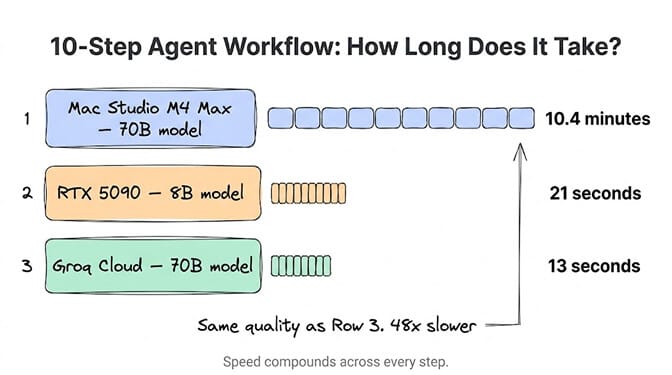
The 70B model on even the fastest Mac gives better quality per step than an 8B on NVIDIA, but it takes 13-26x longer per task. And a cloud provider like Groq runs a larger open model than either of them in about 10 seconds. (Groq still lists Llama 3.3 70B at about 280 tok/s, but only on its enterprise tier.)
For a customer-facing agent where someone is waiting for a response, several minutes is not viable regardless of quality. For a background research agent that runs overnight, it's fine.
The cost comparison nobody does honestly
Hardware cost is one number. Total cost of ownership over 12 months tells the real story. Prices below are from October 2026 (the used RTX 4090 figure is from late September), and several have moved sharply this year because of the DRAM shortage.
Mac mini M5 Pro (64GB)
Hardware: from $2,699. Electricity: roughly $15/year at a 30W average. Noise: essentially none. Space: fits in a drawer. Runs 27B-class models comfortably and loads 70B models at single-digit speeds. No CUDA. Inference first; training on Apple's MPS backend is still not where CUDA is.
RTX 5090 build
GPU: $1,999 MSRP, but roughly $5,000-$6,000+ new in October 2026. The rest of the system (CPU, RAM, PSU, case) adds another $1,000 or more at 2026 memory prices. Electricity: roughly $160-210/year (the card alone is rated at 575W). Noise: significant. Space: full tower case. Runs 8B-30B models faster than anything else on a desk. Full CUDA ecosystem. Training capable. Cannot load 70B models.
Used RTX 4090 build (the value play)
GPU: about $2,600 used on eBay in late September 2026. It's out of production, so used is the market. Rest of system: $1,000 or more. Electricity: roughly $130-180/year (450W card). Runs 8B-30B models at a bit more than half the 5090's speed, with 24GB instead of 32GB. CUDA and training capable.
Mac Studio M5 Max (128GB)
Hardware: $5,399 with a 1TB SSD. Electricity: roughly $25/year. Runs 70B models entirely in memory at about 9-10 tok/s. Silent.
Mac Studio M5 Ultra (96GB to 256GB)
Hardware: from $5,499 for 96GB, $11,299 for 256GB, with 512GB arriving in late October. At 1.2 TB/s it roughly doubles the M5 Max's speed on the same model, and the 256GB configuration holds 200B-class models at Q4 with room left for context. Nothing else on a desk combines that much memory with that much bandwidth short of a DGX Station.
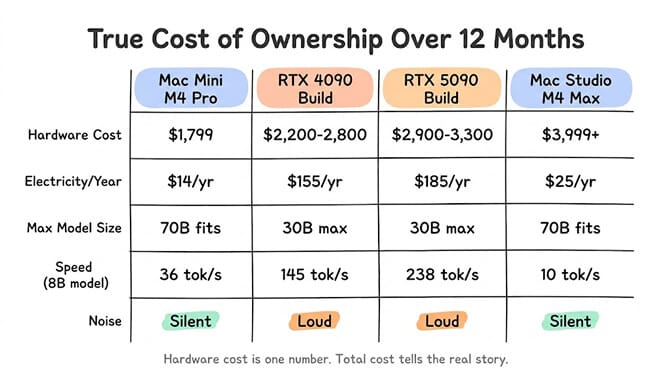
Here's the part that doesn't make the spreadsheet: the Mac is an investment in silence and simplicity. No driver updates. No PSU calculations. No thermal management. No fan noise. For someone running local AI in a home office, bedroom, or shared workspace, the experiential difference is enormous.
For someone running a production inference server on 30B-class models, an NVIDIA card still gives you the most tokens per second on a desk. Just stop assuming it's the cheap option. In 2026 it isn't.
The third option nobody talks about (and why it might be best)
This is the honest part.
While researching Apple Silicon vs NVIDIA for our own AI agent infrastructure, we kept running into the same conclusion: for production agent workloads, cloud APIs beat both.
A Mac mini M5 Pro: about 60 tok/s at best on an 8B model, $1,699 and up. An RTX 5090 build: about 240 tok/s on 8B, $6,000 or more at today's prices. Groq running GPT-OSS 120B, a much bigger model: about 500 tok/s, $0 upfront, $0.15 per million input tokens and $0.60 per million output tokens.
For an AI agent handling customer-facing tasks where latency matters, the cloud wins on speed and on model quality at the same time.
Where local hardware wins: privacy-sensitive work, offline access, unlimited inference with no per-token cost, and the satisfaction of owning your compute. These are real advantages. But for most production agent workloads, connecting a cloud API key to a managed agent platform is faster, cheaper at moderate volume, and dramatically easier to maintain.
We built BetterClaw, a no-code AI agent platform, to be hardware-agnostic. Connect a Groq key for speed. Connect an OpenAI or Anthropic key for frontier quality. Connect a local Ollama endpoint if you want to route through your own Mac or GPU rig. The Free plan gives you 1 agent and 100 credits a month with your own keys, and Pro is $49/month for 5 agents. 28+ model providers, unlimited skills, zero inference markup. You choose where the compute happens. We handle the agent infrastructure, the integrations, the memory, and the security.
The decision framework
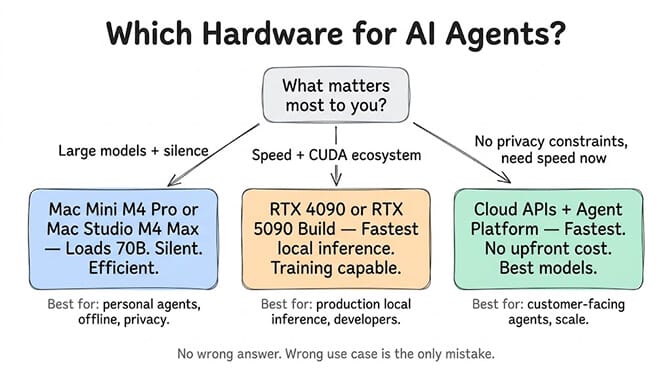
Buy a Mac mini M5 Pro (from $1,699, 64GB from $2,699) if: you want silent local AI for personal use, privacy matters, you work offline frequently, and you mostly run 8B-30B models. Great for development, prototyping, and personal agents. It will load a 70B model, but slowly.
Buy a used RTX 4090 build (about $2,600 for the card) if: you want the best CUDA speed-per-dollar, you also train or fine-tune, and you're comfortable with fan noise and power draw. At today's prices it's the value route into CUDA.
Buy an RTX 5090 build (card roughly $5,000-$6,000+) if: you need maximum local inference speed on 8B-30B models in production and you need CUDA. Check the price the week you buy, because it has swung by thousands of dollars in a month.
Buy a Mac Studio M5 Max 128GB ($5,399) if: you need 70B models locally, silence is essential, and you can live with around 10 tok/s.
Buy a Mac Studio M5 Ultra (from $5,499) if: you need 70B-200B models at usable speed on one desk. It's the first Mac that gets close to NVIDIA speeds on mid-sized models while keeping Apple's capacity lead.
Buy an RTX Spark laptop (from $2,599) if: you specifically want CUDA, Windows and up to 128GB of unified memory in a laptop. Laptops ship from 16 October and desktops in November. Expect DGX Spark-class speed (300 GB/s), and judge it on real benchmarks once they exist.
Skip local hardware entirely if: you're building production agents that need speed, you don't have privacy constraints preventing cloud API use, and you'd rather spend $0 upfront and $20-100/month on inference. A BYOK agent platform with cloud APIs gets you faster inference, better models, and zero hardware maintenance. Our guide to running a local LLM agent on consumer hardware covers exactly where that line falls, and our local model hardware guide sizes RAM and VRAM by model.
What's coming next
The M5 Ultra already arrived, and it did what everyone hoped: 1.2 TB/s and a 512GB ceiling. That closed a lot of the speed gap on mid-sized models while keeping Apple's capacity advantage.
On the NVIDIA side, RTX Spark has now launched, with prices from $2,599 and 300 GB/s of memory bandwidth. It matches the Mac on "big model, one machine" capacity at 128GB, but at 300 GB/s it doesn't challenge an M5 Max or M5 Ultra on speed. If you're looking at the bigger NVIDIA boxes instead, our NVIDIA DGX alternatives guide covers the Spark and the Station, and the DGX Station price breakdown covers the $90,000-plus tier.
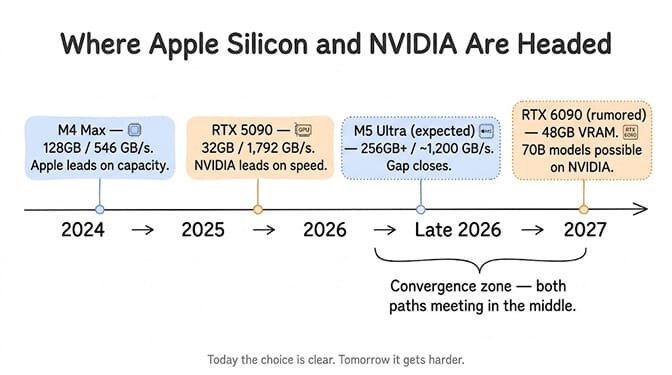
Both paths are converging. But today, in October 2026, the choice is still clear: Apple for capacity and silence, NVIDIA for speed and CUDA, cloud for everything production.
If you're building AI agents and don't want to wait for hardware convergence, give BetterClaw a look. The Free plan includes 1 agent and 100 credits a month, and Pro is $49/month for 5 agents. Connect local hardware, cloud APIs, or both. Deploy in 60 seconds. The model and the hardware are your choice. The agent infrastructure is ours.
Frequently Asked Questions
Is Apple Silicon or NVIDIA better for running AI agents locally?
It depends on your priority. NVIDIA GPUs are faster per token on models that fit: an RTX 5090 has 1,792 GB/s of memory bandwidth against 614 GB/s for an M5 Max and 1.2 TB/s for an M5 Ultra. Apple Silicon has far more memory (up to 128GB on the M5 Max and 512GB on the M5 Ultra), so it can load 70B+ models that won't fit in the RTX 5090's 32GB. For agents where speed matters, NVIDIA wins on 8B-30B models. For large model capacity and silent operation, Apple wins.
Is the Mac Studio M5 Ultra good for local AI?
Yes. It's the best Mac yet for it. The M5 Ultra has 1.2 TB/s of memory bandwidth and ships with 96GB or 256GB of unified memory, with a 512GB configuration due in late October. Prices start at $5,499. That's enough bandwidth for roughly 28 tok/s as a theoretical ceiling on a 70B model at Q4, about double an M5 Max, while holding models no consumer NVIDIA card can.
How fast is the RTX 5090 for local AI inference?
The RTX 5090 has 1,792 GB/s of memory bandwidth, which puts its ceiling at about 366 tok/s on Llama 3.1 8B at Q4_K_M, and published benchmarks land around 240. On an 18GB model like Qwen3.8 27B the ceiling is about 100 tok/s. The limitation is 32GB of VRAM, which caps you at roughly 30B-class models at useful quantization. Its launch price was $1,999, but new cards sell for roughly $5,000-$6,000+ in October 2026.
Is local AI cheaper than using cloud APIs?
For heavy daily use, local hardware can pay for itself, but 2026 prices have stretched the payback period. A Mac mini costs roughly $15/year in electricity, but the hardware itself has gone up, and an RTX 5090 now costs two to three times its launch price. Cloud inference is faster and gives access to proprietary models (Claude, GPT and Gemini) that can't run locally. At moderate usage ($20-100/month in API costs), cloud is usually the better value once you factor in depreciation.
Can I use local hardware with an AI agent platform like BetterClaw?
Yes. BetterClaw supports BYOK (Bring Your Own Key) across 28+ model providers, including local Ollama endpoints. You can run Ollama on your Mac or NVIDIA rig, point BetterClaw at your local API, and get managed agent features (persistent memory, OAuth integrations, trust levels, scheduling) while keeping inference on your own hardware. You can also mix local and cloud providers within the same agent.