Sixteen gigabytes is the tier where a mixture-of-experts model fits whole on the card. Here's what to run for each job, with the memory worked out and only the speeds someone actually published.
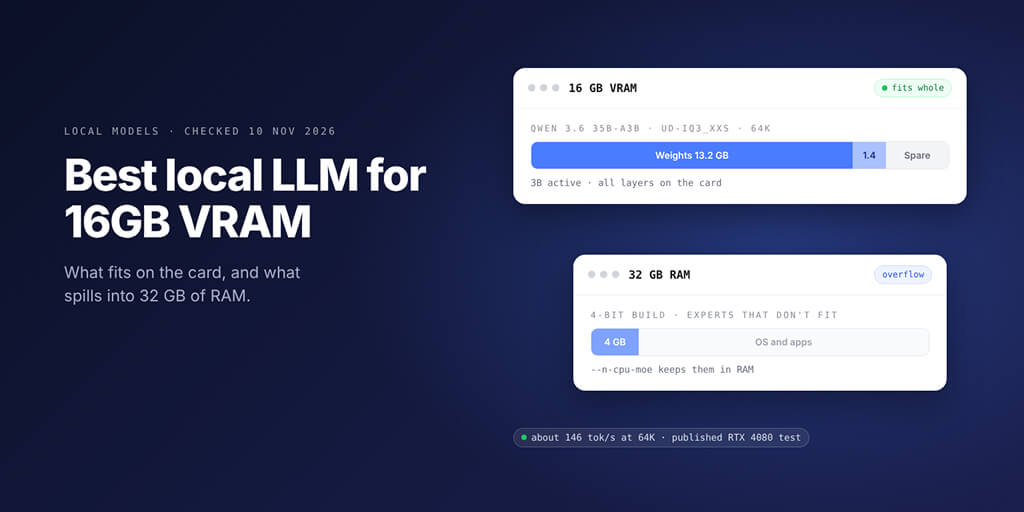
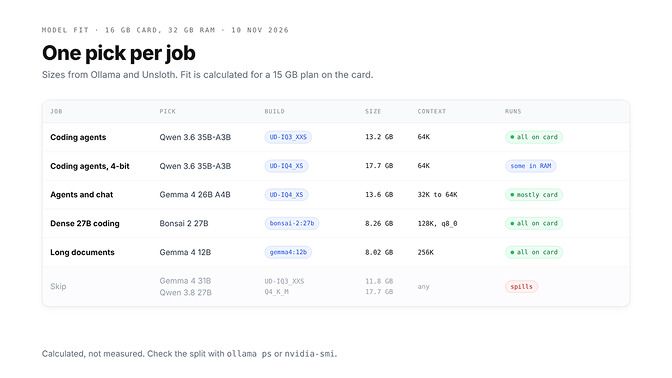
The best local LLM for 16GB VRAM and 32GB RAM is Qwen 3.6 35B-A3B for coding agents: its 3-bit build (13.2 GB) runs entirely on the card, and a published RTX 4080 test measured about 146 tokens per second at a 64K context. Pick Gemma 4 26B A4B for general agents and Gemma 4 12B for long documents.
| Job | Pick | Build and size | Context | Where it runs | Published speed, RTX 4080 16 GB |
|---|---|---|---|---|---|
| Coding agents | Qwen 3.6 35B-A3B | Unsloth UD-IQ3_XXS, 13.2 GB | 65536 | All on the card | about 146 tok/s at 64K |
| Coding agents, 4-bit | Qwen 3.6 35B-A3B | UD-IQ4_XS, 17.7 GB | 65536 | A few GB in system RAM | about 86 tok/s at 64K |
| General agents and chat | Gemma 4 26B A4B | UD-IQ4_XS, 13.6 GB | 32768 to 65536 | Mostly on the card | 122 tok/s at 19K, 96 at 64K |
| Dense 27B coding | Bonsai 2 27B | bonsai-2:27b, 8.26 GB | 131072 with a q8_0 cache | All on the card | none published |
| Long documents | Gemma 4 12B | gemma4:12b, 8.02 GB | 262144 | All on the card | none published |
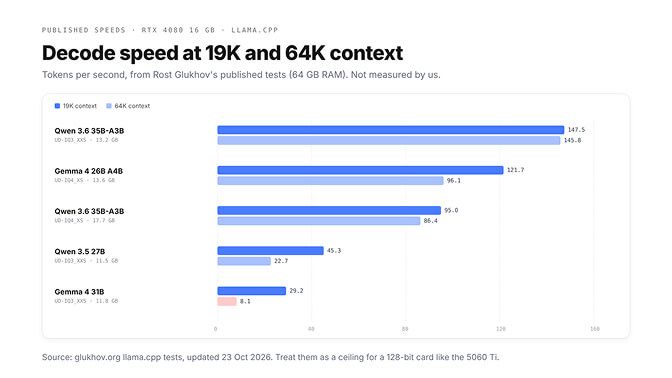
The speeds come from Rost Glukhov's published llama.cpp tests on an RTX 4080 16 GB with 64 GB of RAM, last updated 23 October 2026. We haven't reproduced them. If you're still deciding whether a local agent is worth it at all, our guide to running a local LLM agent on consumer hardware is honest about when it isn't.
Picture this: you've just bought a 16 GB card, pulled the newest Qwen 3.8 from Ollama and pointed your coding agent at it.
ollama ps shows part of the model on the CPU. Your agent types like it's on dial-up.
Sixteen gigabytes and it still doesn't fit?
Right. Qwen 3.8 27B at Q4_K_M is a 17.74 GB download before a single token of context. On 16 GB the win is picking models shaped for the tier, not squeezing ones built for 24 GB.
We checked every tag and file size on Ollama and Hugging Face on 10 November 2026 and worked out memory from each model's config.
The best local LLM for 16GB VRAM is decided by one budget
A 16 GB card has 16 GiB, about 17.2 GB. We plan on 15 GB for weights plus context and keep about 2.2 GB for the driver, compute buffers and your desktop. That margin is our choice, not a spec.
The weights are the file size. The context is the KV cache, and it's simple to work out:
KV cache (bytes) = 2 x attention layers x KV heads x head size x bytes per value x tokens
The 2 is one key plus one value; bytes per value is 2 at the default f16 cache. Only layers that keep a full cache count. Here's the working from each model's config on Hugging Face:
| Model | Layers with a full cache | KV heads x head size | Per token | 64K tokens |
|---|---|---|---|---|
| Qwen 3.6 35B-A3B | 10 of 40 | 2 x 256 | 20 KiB | 1.3 GB |
| Gemma 4 26B A4B | 5 of 30 (25 sliding layers, about 0.21 GB fixed) | 2 x 512 | 20 KiB | 1.3 GB |
| Qwen 3.8 27B and Bonsai 2 27B | 16 of 64 | 4 x 256 | 64 KiB | 4.3 GB |
| Gemma 4 31B | 10 of 60 (50 sliding layers, about 0.84 GB fixed) | 4 x 512 | 80 KiB | 5.4 GB |
A cross-check keeps us honest. Our sums put Qwen 3.6 35B-A3B at UD-IQ3_XXS with a 64K context at 14.6 GB. Glukhov's test measured 14.7 GB on the card for that exact setup.
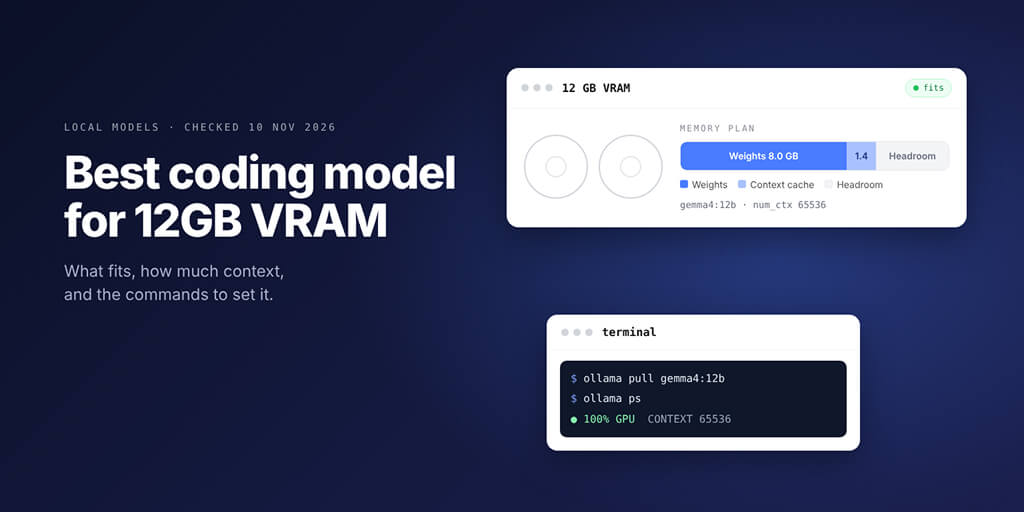
If your card has 12 GB, our guide to the best coding model for 12GB VRAM runs the same sums for that tier.
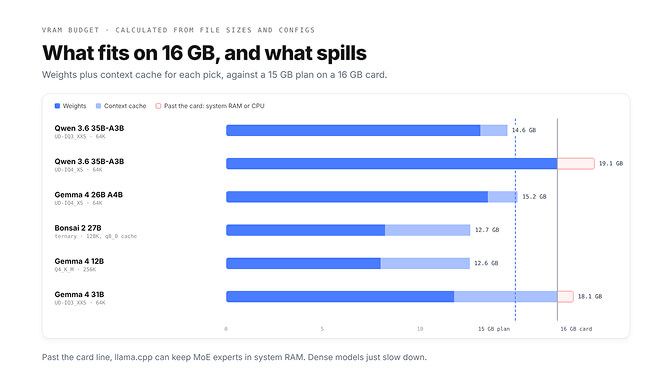
On 16 GB, a model with 3B active parameters that fits whole beats a 27B dense model that half fits.
Best for coding: why the 27B plan needs a rethink
The usual advice for 16 GB is "run Qwen 3.8 27B or Gemma 4 31B at Q4". Neither fits: Ollama's Q4_K_M tags are 17.74 GB and 20.39 GB before context. You have three real routes to a 27B-class coder.
Route one: Bonsai 2 27B
Prism ML rebuilt Qwen 3.8 27B with ternary weights (each one is minus one, zero or plus one), and Ollama's tag is 8.26 GB. Prism reports an average of 84.78 across 14 thinking-mode benchmarks against 86.32 for full precision, with LiveCodeBench at 90.07. Those are the maker's own numbers on a model released three weeks ago.
On 16 GB it has room to breathe: about 100K tokens at f16, or a full 128K with a q8_0 cache at about 12.7 GB. Ollama's default context on cards under 24 GiB is 4K, and its docs ask for at least 64000 for agents, so set it:
FROM bonsai-2:27b
PARAMETER num_ctx 131072
ollama create bonsai-128k -f Modelfile
OLLAMA_FLASH_ATTENTION=1 OLLAMA_KV_CACHE_TYPE=q8_0 ollama serve
The cache setting applies to every model the server runs, and Ollama's FAQ says q8_0 uses about half the memory of f16 with very little quality loss.
Route two: a 3-bit Qwen 3.8 27B
Unsloth's UD-IQ3_XXS is 10.93 GB, so 32K fits at f16 and 64K with a q8_0 cache:
ollama run hf.co/unsloth/Qwen3.8-27B-GGUF:UD-IQ3_XXS
We found no published quality figure for that quant. The closest speed number is Qwen 3.5 27B at the same quant on Glukhov's 4080: 45.3 tokens per second at 19K, dropping to 22.7 at 64K once it spilled onto the CPU. On a 24 GB card the full Q4_K_M fits, as our Gemma 4 31B vs Qwen 3.8 27B comparison shows.
Route three: Gemma 4 31B at 3-bit
Don't. Its cache costs 80 KiB per token plus 0.84 GB fixed, and Glukhov measured 29.2 tokens per second at 19K falling to 8.1 at 64K. Gemma 4 31B belongs on a 24 GB card.
Is the best local LLM for 16GB VRAM good enough for agentic coding?
Yes, if you pick for tool calls over test scores. For an agent, the model that calls tools cleanly at 64K beats a smarter one that can't hold the context, and on 16 GB that points at mixture-of-experts models.
Qwen 3.6 35B-A3B has 35B parameters, 3B active per token and an Apache 2.0 licence. Qwen's card reports 73.4 on SWE-bench Verified and 51.5 on Terminal-Bench 2.0; in the same table Gemma 4 26B A4B scores 17.4 and 34.2. Those are Qwen's runs at full precision, and a 3-bit build will give some of that back.
llama-server -hf unsloth/Qwen3.6-35B-A3B-GGUF:UD-IQ3_XXS -c 65536
Or in Ollama: ollama run hf.co/unsloth/Qwen3.6-35B-A3B-GGUF:UD-IQ3_XXS, then set num_ctx as above. Ollama's launchers (ollama launch claude, ollama launch opencode, ollama launch codex) each ask for 64K or more, and this model clears it with room to spare. Our Gemma 4 vs Qwen 3.8 comparison explains why Qwen's thinking settings matter in long agent loops.
Recursive's Flint is the newest model in the same shape: 39.8B total, about 2.5B active, Apache 2.0, built for coding agents. Recursive reports 74.2% on SWE-bench Verified. Its smallest sensible build (Unsloth UD-IQ3_XXS, 14.54 GB) leaves only about 16K of context on the card, so it's a model for the RAM section, and we found no published 16 GB speed.
Gemma 4 26B A4B is the generalist: Google's card lists 68.2% on Tau2 and 77.1% on LiveCodeBench v6, and Glukhov measured 121.7 tokens per second at 19K.
MoE models that use the 32 GB of RAM
A mixture-of-experts model runs only a few experts per token, so llama.cpp can keep experts in system RAM while attention and the cache stay on the card. --cpu-moe keeps every expert on the CPU; --n-cpu-moe N keeps only the experts of the first N layers there.
llama-server -hf unsloth/Qwen3.6-35B-A3B-GGUF:UD-IQ4_XS -c 65536 --n-cpu-moe 10
Ten is a starting guess: lower N while nvidia-smi shows spare VRAM, and raise it if the model fails to load. The trade is clear in Glukhov's numbers: the 4-bit build (17.7 GB) ran at 95 tokens per second at 19K and 86.4 at 64K with part of it on the CPU, against about 146 for the 3-bit build that fits whole. That's 4-bit weights at the cost of roughly 40% of the speed.
Once a model like this runs, the question becomes how an agent that lives somewhere else reaches it. BetterClaw Desktop connects the models on your computer, through Ollama, LM Studio, llama.cpp or any OpenAI-compatible address, to your BetterClaw agents in the cloud, with no open ports and no tunnels. It shows each model's context size and how well it handles agent tools before you assign it, on Apple Silicon Macs, 64-bit Windows 10 and 11, and Linux. Get BetterClaw Desktop
What 32 GB can't do is the next class up. Glukhov ran Qwen 3.5 122B-A10B at 3-bit (44.7 GB) at about 22 tokens per second, but on 64 GB of RAM.
Strata's docs say Qwen 3.8 Flash Next's Coder build runs on a 32 GB PC with a 12 to 16 GB card only by reading most experts from the SSD, which is much slower.
On 16 GB, the best big model is a MoE that barely touches your RAM, not a dense one that lives in it.
What to skip on a 16 GB card
| Skip | Why |
|---|---|
| Qwen 3.8 27B at Q4_K_M | 17.74 GB before any context |
| Gemma 4 31B at any quant | Spills to the CPU: 8.1 tok/s at 64K in Glukhov's test |
| Ollama's default Gemma 4 26B tags | 15.63 to 18.73 GB; Unsloth's UD-IQ4_XS is 13.6 GB |
| 122B-class MoE models | Need about 64 GB of system RAM |
| Qwen 2.5 Coder 14B for agents | Its 32K window can't reach the 64K agents want |
Hardware notes: RTX 5060 Ti 16 GB or a used 3090?
Not every 16 GB card is the same 16 GB. NVIDIA's spec pages list a 128-bit memory bus for the RTX 5060 Ti 16 GB and RTX 4060 Ti 16 GB, and 256-bit for the RTX 4080, 5070 Ti and 5080. If you'd skip the GPU entirely, our guide to DGX Spark alternatives compares 128 GB unified-memory boxes.
Prism ML's notes call token generation the memory-bandwidth-bound phase. So treat the RTX 4080 speeds on this page as a ceiling for a 5060 Ti, not a promise, and measure your own.
A used RTX 3090 is the other path: 24 GB of GDDR6X on a 384-bit bus. That's enough for Qwen 3.8 27B at Q4_K_M with a 64K cache, about 22.2 GB by our sums. We haven't quoted prices: NVIDIA's pages show none today, and we didn't check used listings.
For 32 GB of RAM, the rule is simple: it's plenty for MoE spill, and 64 GB is what opens the 122B class.
Buy the tier, then pick the shape
The mistake on 16 GB is shopping by parameter count. In Glukhov's tests a 27B that half fit ran at 22.7 tokens per second at 64K, while a 35B MoE that fit whole ran at 145.8, because the half on the CPU sets the pace.
Pick the shape the card was made for, set the context yourself, and let ollama ps tell you the truth.
Frequently Asked Questions
What is the best local LLM for 16GB VRAM?
For coding agents, Qwen 3.6 35B-A3B at Unsloth's UD-IQ3_XXS (13.2 GB), which fits whole on the card with a 64K context and measured about 146 tokens per second on an RTX 4080 in Glukhov's published tests. For general agents and chat, Gemma 4 26B A4B at UD-IQ4_XS (13.6 GB). For long documents, Gemma 4 12B with its full 256K window.
Can I run a 27B model on 16GB VRAM?
Not at Q4_K_M: Qwen 3.8 27B is 17.74 GB and Gemma 4 31B is 20.39 GB before context. You can run Bonsai 2 27B, a ternary build of Qwen 3.8 27B at 8.26 GB, with a 128K context, or a 3-bit Qwen 3.8 27B (10.93 GB) with 32K to 64K. Gemma 4 31B spills to the CPU and slows to about 8 tokens per second at 64K.
How much RAM do I need alongside 16GB VRAM?
32 GB is enough for everything on this page, including a 4-bit Qwen 3.6 35B-A3B with a few gigabytes of experts in RAM. Step up to 64 GB only if you want 122B-class MoE models or Qwen 3.8 Flash Next. Below 32 GB, stick to models that fit entirely on the card.
Is 16GB VRAM enough for agentic coding?
Yes, if you pick a mixture-of-experts model and set the context yourself. Qwen 3.6 35B-A3B fits with 64K on the card, which is what Ollama's docs ask for with Claude Code, OpenCode and Codex. Long multi-repo refactors are still where cloud models pull ahead.
What quant should I use?
Use the largest quant that leaves room for your context on the card. On 16 GB that means 3-bit or ternary for 27B to 35B models, 4-bit for Gemma 4 26B A4B, and Q4_K_M or even Q8 for 9B to 12B models. If a 4-bit build only fits with part of it in RAM, try the 3-bit build that fits whole and compare on your own tasks.
Is a used RTX 3090 better than a new 16GB card?
For local models, the 3090's 24 GB is the bigger advantage: it runs Qwen 3.8 27B at Q4_K_M with a 64K context, which no 16 GB card can. A new 16 GB card comes with a warranty, and on 16 GB the MoE models above are the better fit.