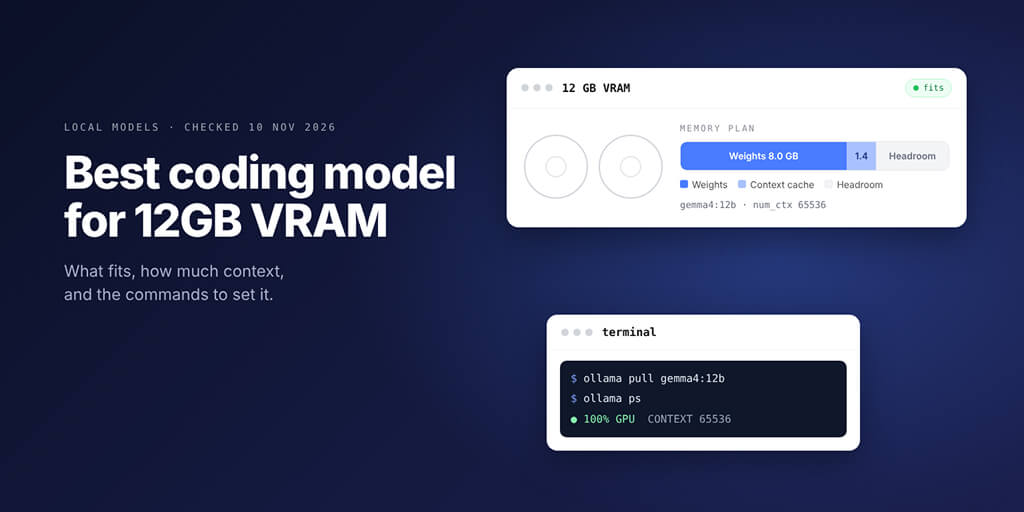
A 12 GB card runs good coding models now. What it can't survive is Ollama's default 4K context, so here is what fits, with the memory worked out and the commands to set it.
| Pick | Ollama tag | Download | Context we set | Memory at that context (calculated) | Best for |
|---|---|---|---|---|---|
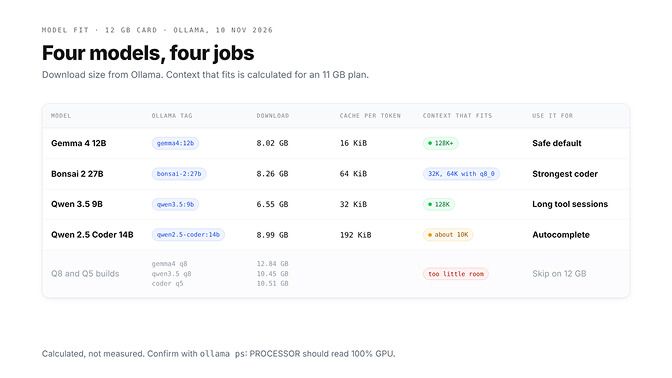
| Gemma 4 12B | gemma4:12b | 8.02 GB | 65536 | about 9.4 GB | Safe all-round coding pick |
| Bonsai 2 27B | bonsai-2:27b | 8.26 GB | 32768, or 65536 with a q8_0 cache | about 10.6 GB | Strongest code scores that fit |
| Qwen 3.5 9B | qwen3.5:9b | 6.55 GB | 65536, up to 131072 | about 8.8 GB | Long tool-calling sessions |
| Qwen 2.5 Coder 14B | qwen2.5-coder:14b | 8.99 GB | 8192 | about 10.6 GB | Editor autocomplete |
| Qwen 3.6 35B-A3B | llama.cpp, experts in RAM | 22.4 GB file | 65536 | 12 GB card plus 32 GB of RAM | The step up |
We found no published tokens-per-second figure for the first four under Ollama on a named 12 GB card, so the table shows calculated memory. The last row has one, below.
Picture this: you pull a 12B coding model, point OpenCode at it, and ask it to fix a failing test that touches three files.
It reads the first file, loses track of the second, and edits the wrong function.
Is the model really this bad?
Usually not. On any card under 24 GiB, Ollama's default context is 4K tokens, and your agent ran out of room halfway through the job.
We checked every tag and file size on Ollama and Hugging Face on 10 November 2026, and worked out the memory from each model's config. Whether a local agent is worth it at all is a separate question, and our guide to running a local LLM agent on consumer hardware is blunt about it.
Why 12 GB is the awkward tier for local coding
The models that lead local coding are 27B to 31B. At Q4_K_M, Qwen 3.8 27B is a 17.7 GB download and Gemma 4 31B is 20.4 GB, so neither loads on a 12 GB card.
What fits is the 9B to 14B class, plus one 2-bit 27B. And here's the thing: at that size the weights aren't what decides the winner. The context cache is.
Every token in the context stores a key and a value in every attention layer that keeps a full cache:
KV cache (bytes) = 2 x attention layers x KV heads x head size x bytes per value x tokens
The 2 is one key plus one value, and bytes per value is 2 at Ollama's default f16 cache. Here's the working from each model's config file on Hugging Face:
| Model | Layers that keep a full cache | KV heads x head size | Per token | 64K tokens |
|---|---|---|---|---|
| Qwen 2.5 Coder 14B | 48 of 48 | 8 x 128 | 2 x 48 x 8 x 128 x 2 = 192 KiB | 12.9 GB |
| Bonsai 2 27B | 16 of 64 (the rest linear, about 0.15 GB fixed) | 4 x 256 | 2 x 16 x 4 x 256 x 2 = 64 KiB | 4.3 GB |
| Qwen 3.5 9B | 8 of 32 (the rest linear, about 0.05 GB fixed) | 4 x 256 | 2 x 8 x 4 x 256 x 2 = 32 KiB | 2.1 GB |
| Gemma 4 12B | 8 of 48 (40 sliding layers keep 1,024 tokens, about 0.34 GB fixed) | 1 x 512 | 2 x 8 x 1 x 512 x 2 = 16 KiB | 1.1 GB |
Same card, a twelve-fold difference in what context costs.
For the budget: a 12 GB card has 12 GiB, about 12.9 GB. We plan on 11 GB for weights plus cache and leave about 1.9 GB for the driver, compute buffers and your desktop.
That margin is our planning choice, not a spec, so confirm with ollama ps: the PROCESSOR column should say 100% GPU. If you're still choosing a card, price out what four more gigabytes buys before you settle on 12.
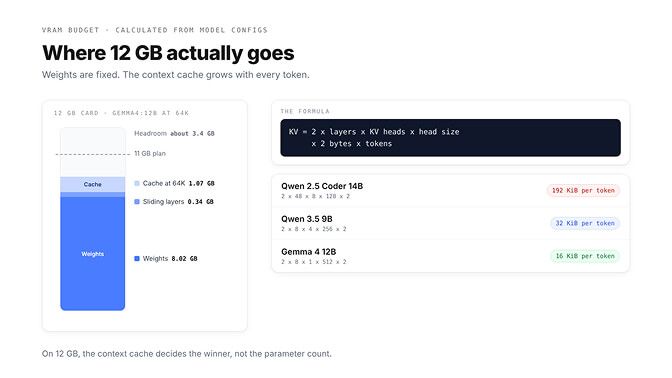
On a 12 GB card, the context cache, not the parameter count, decides which coding model wins.
Picking the best coding model for 12GB VRAM, model by model
Ollama's context docs say the default is 4K on cards under 24 GiB, and that agents and coding tools need at least 64000 tokens. Set it per model with a two-line Modelfile:
FROM gemma4:12b
PARAMETER num_ctx 65536
ollama create gemma4-12b-64k -f Modelfile
Or set it for every model the server loads with OLLAMA_CONTEXT_LENGTH=65536 ollama serve.
Gemma 4 12B: the safe default
ollama pull gemma4:12b
The default tag is Q4_K_M, 8.02 GB including a 0.47 GB draft layer for faster generation. Google's card lists 72.0% on LiveCodeBench v6, 69.0% on Tau2, native function calling and a 256K window, and Ollama tags it for tools, thinking, vision and audio.
At 65536 it needs about 9.4 GB by our working, and 131072 still fits at about 10.5 GB. gemma4:12b-it-qat (7.15 GB) gives more headroom; the Q8 build (12.84 GB) doesn't fit.
Bonsai 2 27B: the 27B that fits
ollama pull bonsai-2:27b
Prism ML's Bonsai 2 27B is Qwen 3.8 27B rebuilt with ternary weights (each one is minus one, zero or plus one), released three weeks ago under Apache 2.0. Ollama's tag is 8.26 GB, including a 0.63 GB vision file.
Prism reports an average of 84.78 across 14 thinking-mode benchmarks against 86.32 for full-precision Qwen 3.8 27B, with LiveCodeBench at 90.07 and BFCL v3 tool calling at 74.92. Those are the maker's own numbers, and the model thinks at its highest effort by default, which eats context.
At 64 KiB per token, plan on 32768 at f16, or 65536 with the q8_0 cache shown below (about 10.6 GB either way). If you test one model this week, test this one against Gemma on your own repo.
Qwen 3.5 9B, or its MiMo fine-tune: the long-session pick
ollama pull qwen3.5:9b
Our Gemma 4 vs Qwen 3.8 comparison covers both families in depth. This one is 6.55 GB, 0.92 GB of it the vision projector. Qwen reports 65.6 on LiveCodeBench v6 and 79.1 on TAU2-Bench, and its card advises at least 128K of context to preserve thinking: about 10.9 GB by our working, tight but inside the plan.
Xiaomi's MiMo V2.6 9B (mimo-v2.6:9b, same size, MIT licence) is a fine-tune of it for code and agents. Xiaomi reports 61.1 on SWE-bench Verified against 60.0, and 37.1 on Terminal Bench 2.1 against 27.0, and calls it a research checkpoint.
Every score on this page is self-reported on different setups, so read them as direction.
Qwen 2.5 Coder 14B: autocomplete, not agents
ollama pull qwen2.5-coder:14b
It's 8.99 GB, Ollama lists a 32K window, and the model dates from November 2024. At 192 KiB per token, about 10K tokens fit at f16.
Ollama's FAQ says a q8_0 cache uses about half the memory of f16 with very little quality loss. It needs Flash Attention and applies to every model the server runs:
OLLAMA_FLASH_ATTENTION=1 OLLAMA_KV_CACHE_TYPE=q8_0 ollama serve
That gets this model to about 20K, still short of 64K. Its real job is fill-in-the-middle: its Ollama template handles a prompt plus a suffix, which is what editor autocomplete sends. Give it num_ctx 8192, and skip Q5_K_M (10.51 GB).
Is the best coding model for 12GB VRAM good enough for coding agents?
For one file or one bug, yes. Every model here carries Ollama's tools tag; whether one calls your tools well is a separate question, and our list of which Ollama models support tool calling covers how Ollama decides.
The bigger filter is context. Ollama's one-line launchers for coding agents each ask for a big window:
| Agent | Launch command | Context Ollama's docs ask for |
|---|---|---|
| Claude Code | ollama launch claude | 64K or more for larger repos |
| OpenCode | ollama launch opencode | 64K or more, required |
| Codex CLI | ollama launch codex | at least 64K |
Gemma 4 12B and the 9B models clear 64K easily, Bonsai 2 27B clears it with a q8_0 cache, and Qwen 2.5 Coder 14B can't. When an agent starts dropping tool calls, check the CONTEXT column in ollama ps before you blame the model.
Using system RAM to go bigger
With 32 GB of system RAM, a mixture-of-experts model can use it: only a few experts run per token, so they can sit in RAM while attention and the cache stay on the card.
The best fit for 12 GB plus 32 GB is Qwen 3.6 35B-A3B: 35B parameters in total, 3B active per token, Apache 2.0. Qwen's card reports 73.4 on SWE-bench Verified and 51.5 on Terminal-Bench 2.0, and only 10 of its 40 layers keep a full cache, so 64K costs about 1.3 GB.
With llama.cpp you choose where the experts live:
llama-server -hf unsloth/Qwen3.6-35B-A3B-GGUF:UD-Q4_K_XL --cpu-moe -c 65536
--cpu-moe keeps every expert on the CPU. If VRAM is left over, swap it for --n-cpu-moe N, which keeps only the experts of the first N layers on the CPU, and lower N until the card is nearly full. If you'd rather click than type flags, our Ollama vs LM Studio comparison covers the trade-offs.
Speed is the part people ask about. The Strata project, an open-source local engine, publishes 59.7 tokens per second of decode for this model at UD-Q4_K_XL on an RTX 3060 12 GB with most experts on the CPU, and plans for 32 GB of RAM. That's Strata's own engine and measurement; we haven't reproduced it.
Recursive's Flint (flint:40b, 22.86 GB, Apache 2.0) is the newest model in the same shape: 39.8B total, about 2.5B active, built for coding agents, with Recursive reporting 74.2% on SWE-bench Verified. We found no published speed for it on a 12 GB card.
What about Qwen 3.8 Flash Next? Strata's docs say its Coder build runs on a 32 GB PC with a 12 to 16 GB card only by reading most experts from the SSD, which is much slower. With 64 GB of RAM, Strata's older RTX 5070 12 GB measurement shows 55 tokens per second on a short chat.
With 32 GB of RAM, run Qwen 3.6 35B-A3B or Flint. With 64 GB, Flash Next's Coder build is worth a weekend.
Once one of these runs, the next question is how an agent that lives somewhere else reaches it. That's what BetterClaw Desktop does: it connects the models on your computer, through Ollama, LM Studio, llama.cpp or any OpenAI-compatible address, to your BetterClaw agents in the cloud, with no open ports and no tunnels. It shows each model's context size and how well it handles agent tools before you assign it, on Apple Silicon Macs, 64-bit Windows 10 and 11, and Linux. Get BetterClaw Desktop
What does not fit on 12 GB
None of these loads fully on a 12 GB card at Q4:
| Model | Ollama tag | Download | What happens on 12 GB |
|---|---|---|---|
| Gemma 4 26B A4B (MoE) | gemma4:26b-a4b-it-qat | 15.63 GB | Runs only with part of it in system RAM |
| Qwen 3.8 27B | qwen3.8:27b | 17.74 GB | Doesn't fit; Bonsai 2 27B is the way in |
| Qwen 3.6 27B coding | qwen3.6:27b-coding | 17.77 GB | Doesn't fit |
| Gemma 4 31B | gemma4:31b | 20.39 GB | Doesn't fit |
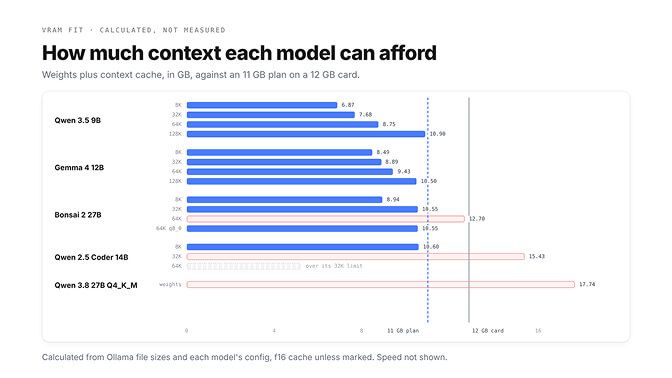
Twelve gigabytes is enough, if you spend it on context
The old advice for a 12 GB card was to load the biggest coder that fits. That advice now quietly breaks agents, because a model with no room for context forgets the file it just read.
Pick the model that leaves space to think, and set num_ctx yourself. The card you own is probably fine. The default setting isn't.
Frequently Asked Questions
What is the best coding model for 12GB VRAM?
Gemma 4 12B at Q4_K_M (gemma4:12b, 8.02 GB) is the safe pick, and Bonsai 2 27B (bonsai-2:27b, 8.26 GB) is the one to test, since its maker reports near full-precision Qwen 3.8 27B coding scores. Both fit a useful context on a 12 GB card by our calculation. Set num_ctx yourself, because Ollama defaults to 4K on cards under 24 GiB.
Can I run a 14B model on 12GB?
Yes, but with little context. Qwen 2.5 Coder 14B at Q4_K_M is 8.99 GB, and its cache costs 192 KiB per token, so about 10K tokens fit at the default f16 cache, or about 20K with a q8_0 cache. That works for autocomplete, not for coding agents that want 64K.
Can I run a 27B model on 12GB?
Only a 2-bit one. Qwen 3.8 27B at Q4_K_M is 17.74 GB, but Bonsai 2 27B, a ternary build of the same model, is 8.26 GB on Ollama. By our working it fits a 32K context at f16, or 64K with a q8_0 cache.
Does Gemma 4 12B fit on 12GB?
Yes. The default Q4_K_M build is 8.02 GB, and by our working it needs about 9.4 GB at a 64K context and about 10.5 GB at 128K. The QAT build is 7.15 GB, while the Q8 build at 12.84 GB doesn't fit.
What context length can I use?
Ollama uses 4K by default on cards under 24 GiB, and its docs recommend at least 64000 for agents and coding tools. Set PARAMETER num_ctx 65536 in a Modelfile or start the server with OLLAMA_CONTEXT_LENGTH=65536. Gemma 4 12B and Qwen 3.5 9B reach about 128K on 12 GB on paper; Qwen 2.5 Coder 14B tops out near 10K to 20K.
Is an RTX 3060 12GB enough for local coding agents?
For single-file fixes and short tasks, yes: Gemma 4 12B and Qwen 3.5 9B both fit with a 64K context. With 32 GB of RAM it can also run Qwen 3.6 35B-A3B with experts on the CPU, which the Strata project measured at 59.7 tokens per second on a 3060.