Hermes enforces a hard 64K context minimum, which means models that worked last week now refuse to start. Here is which models clear the bar, how to check yours, and the config line that fixes it.
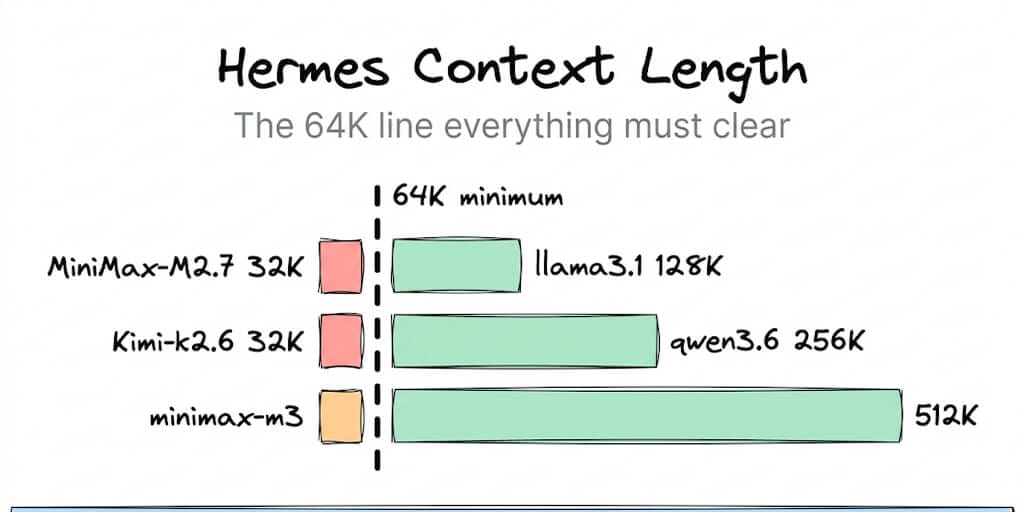
Recent Hermes Agent builds enforce a hard 64K context length minimum. Your model either clears it or the agent refuses to start, which is why a setup that ran fine last week can fail this morning without you changing a line. The fix is one of two things: set model.context_length in your config, or move to a model with a 64K or larger window.
Here's the part that makes it feel like a haunting. The Telegram bot goes fully down. Not degraded, not slow. Down. Because the check happens at startup, before anything gets a chance to work.
The model compatibility table
Context windows verified August 20, 2026. The only column that decides whether Hermes starts is the last one.
| Model | Context window | Clears the 64K minimum |
|---|---|---|
| MiniMax-M2.7 | 32K | No |
| Kimi-k2.6 | 32K | No |
| mistral | 32K | No |
| gemma3 (1b and small variants) | 32K | No |
| qwen3 | 40K | No |
| llama3.1 | 128K | Yes |
| llama4 | 128K | Yes |
| gpt-oss | 128K | Yes |
| gemma3 (12b, 27b) | 128K | Yes |
| gemma4 | 128K to 262K | Yes |
| nemotron3 | 128K | Yes |
| qwen3.5 | 256K | Yes |
| qwen3.6 | 256K | Yes |
| mistral-medium-3.5 | 256K | Yes |
| minimax-m3 | 512K | Yes |
| granite4.1 | up to 512K | Yes |
| glm-5.2 | 976K | Yes |
Note what happened to qwen3. At 40K it sits above every 32K model and still fails, because 64K is a hard floor rather than a suggestion. "Bigger than the one that broke" is not the test.
Context windows vary by tag and quantization within the same model family, so check the specific tag you are pulling rather than trusting the family name.
Why there is a minimum at all
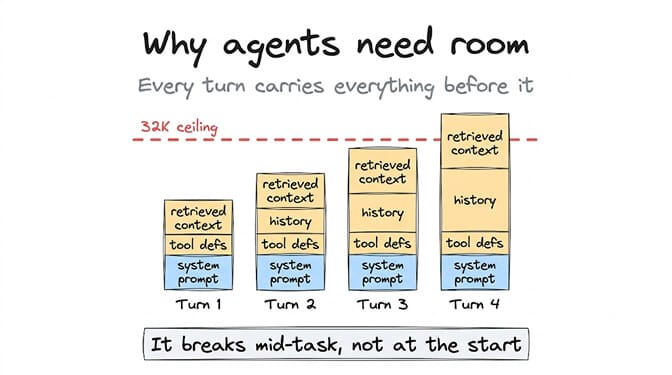
A chat request sends your message and gets a reply. An agent request sends the system prompt, every tool definition, the conversation history, and the retrieved context, on every single turn.
That payload does not shrink as the conversation goes. It grows.
A 32K window does not fail on turn one. It fails on turn four, halfway through a task, with a half-finished action already taken.
That is the failure Hermes is trying to prevent. A model that runs out of room mid-loop does not stop cleanly, it truncates its own instructions and keeps going, which is how you end up with an agent that forgot it already sent the email.
Refusing to start is ugly. It is also honest. Every agent framework eventually learns this lesson, and most learn it after a user reports something worse than a startup error.
How to check what you actually have configured
Open your Hermes config and look at the model block:
model:
  provider: <your provider>
  name: <your model>
  context_length: <value or unset>
If context_length is unset, Hermes uses the value it detects from the provider. That detection is where most of these failures start, because a provider that reports a conservative default can put you under the floor on a model that supports far more.
The trap that catches the most people is provider: auto. The auto resolver picks a model without checking the 64K minimum, so it can hand you a 32K model that then gets rejected at startup. It is doing exactly what you asked and exactly what you did not want.
Fixing "model context length below the 64K minimum"
Three steps, in order.
Set the value explicitly in config.yaml:
context_length: 64000
If you are on provider: auto, pin a specific 64K or larger model instead, and pin auxiliary.vision.provider too. The vision auxiliary is the one people forget, and it will fail the check on its own.
Then restart the agent. Not reload. Restart, because the check runs at startup.
Our Hermes context length error decoder entry has the condensed version of this if you just want the config snippet, and the full Hermes bugs and fixes roundup covers the other nine failures that show up alongside this one.
This is also the point worth being honest about. Debugging a config value to stop your Telegram bot from dying is the tax on running your own runtime, and it is a real cost that nobody quotes when they say self-hosting is free. We built BetterClaw so that context windows, retries, and model compatibility are validated before your agent runs rather than after it fails. Free plan, no credit card, your own model keys across 28+ providers with no markup on inference.
The opposite mistake: setting it too high
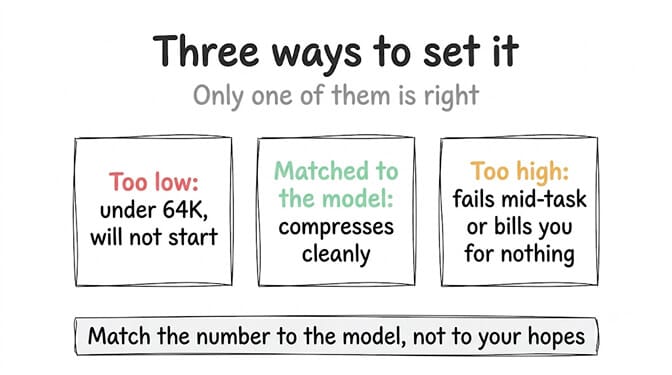
Here's what nobody tells you about the fix. context_length is a ceiling you are agreeing to pay for, not a capability you are switching on.
Set it to 64000 when your model supports 32K and you have not fixed anything. You have told Hermes to send requests the model will reject, moving the failure from startup to runtime, which is strictly worse because now it fails mid-task.
Set it to 500000 on a model that genuinely supports it and you have a different problem. Every turn now has room to carry half a novel of history, and you pay for those tokens on every single call. On a model at $2 per million input tokens, an agent running a hundred turns a day with a bloated window costs real money to remember things it does not need.
Match the number to what the model actually supports, then let the framework compress. Correctly set, Hermes compresses before it hits the wall instead of refusing to start.
Bigger is not better. Bigger is more expensive and slower, and the only thing you needed was to clear 64,000.
What to do if your favourite model is under the floor
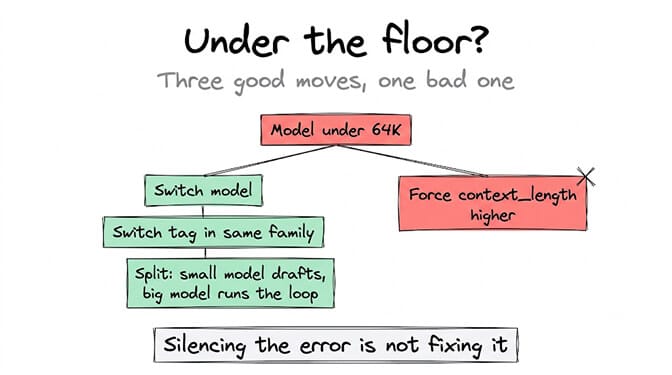
You have three honest options and one bad one.
Switch models. llama3.1 at 128K and gpt-oss at 128K are the low-friction moves, both well above the floor and widely available.
Switch tags within the same family. Several families ship a small variant at 32K and larger variants at 128K, so gemma3:12b clears a bar that gemma3:1b does not. Same name, different answer.
Split the work. Keep the small model for drafting and give the agent loop to something with room. Two models on one machine is normal and cheaper than it sounds.
The bad option is overriding context_length upward on a model that cannot support it, which converts a clean startup failure into a messy runtime one. People do this because it makes the error go away. It does not make the problem go away.
The thing worth remembering
This error is a framework enforcing a floor that the rest of the ecosystem discovered the hard way. Agent loops need room, and models that fit a chatbot do not fit an agent.
So the number to check before you pull a model is not the benchmark score. It is the context window, and whether it clears 64,000 with enough headroom that your agent has space to think on turn four.
Check the window first. Then pick for quality. That order saves the evening.
If you would rather not maintain a config file that can take your bot offline for a value you did not set, start free on BetterClaw. One agent, every feature, no credit card, and smart context management that keeps token bloat down without you tuning a ceiling. Pro is $49 per month for 5 agents when you need more, and full pricing fits on one page. If you are weighing frameworks rather than debugging one, our Hermes Agent alternatives comparison covers the wider set.
Frequently Asked Questions
What is the minimum context length for Hermes Agent?
Recent Hermes builds enforce a hard 64K minimum, so any model with a smaller window is rejected at startup rather than at runtime. Previously working 32K models like MiniMax-M2.7 and Kimi-k2.6 now fail this check. You can set model.context_length in config.yaml to override the detected value, or move to a 64K or larger model.
How does the Hermes context minimum compare to other agent frameworks?
Most frameworks let you run any context size and fail mid-task when the window runs out, which is harder to diagnose. Hermes checks at startup instead, which looks stricter but tells you the problem before your agent takes half an action. The trade is a startup error you can fix in one line versus a truncated agent loop you find out about from a user.
How do I fix "model context length below the 64K minimum"?
Set context_length: 64000 in your config, or switch to a model whose real window is 64K or larger. If you use provider: auto, pin a specific model for both your main provider and auxiliary.vision.provider, since the auto resolver does not check the minimum. Then restart the agent, because the check only runs at startup.
Does a bigger context window cost more to run?
Yes, and this is the part people miss. Agent loops re-send the system prompt, tool definitions, and history on every turn, so a larger ceiling means more input tokens on every call. Match context_length to what your model genuinely supports rather than setting it as high as possible, since you pay for the room whether you use it or not.
Is overriding context_length safe?
Only downward or to the model's true window. Setting it above what the model supports moves the failure from startup into the middle of a task, which is the worse of the two outcomes. Set it correctly and the framework compresses context before hitting the limit instead of refusing to start.