These Hermes Agent use cases aren't hypothetical. Every one below comes from a real user running Hermes in production, documented on Twitter, GitHub, or community forums. Some of them are better served by Hermes. Some are better served by something else. Here's the honest list.
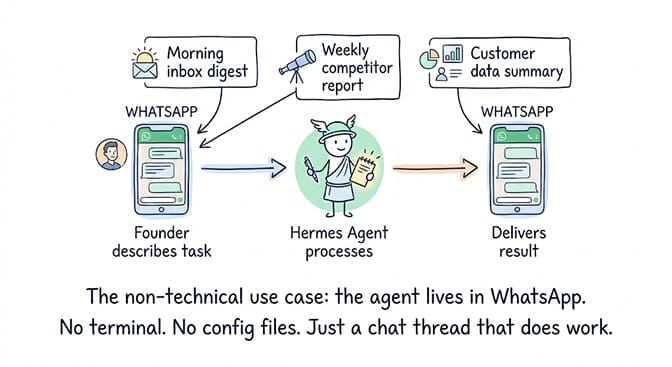
@EXM7777 posted this on April 30: "3 weeks ago I decided to setup a Hermes agent for my family (3 members), they all use it for different use cases, one $200 ChatGPT sub is more than enough. It opened a whole new world for them, just because it lives inside WhatsApp and has magic proactive behaviors."
A family of three sharing one AI agent on WhatsApp. Not a developer tool. Not an enterprise deployment. A family assistant. (If you're new to the framework, our overview of what Hermes Agent is explains the learning loop and memory that make these always-on deployments work.)
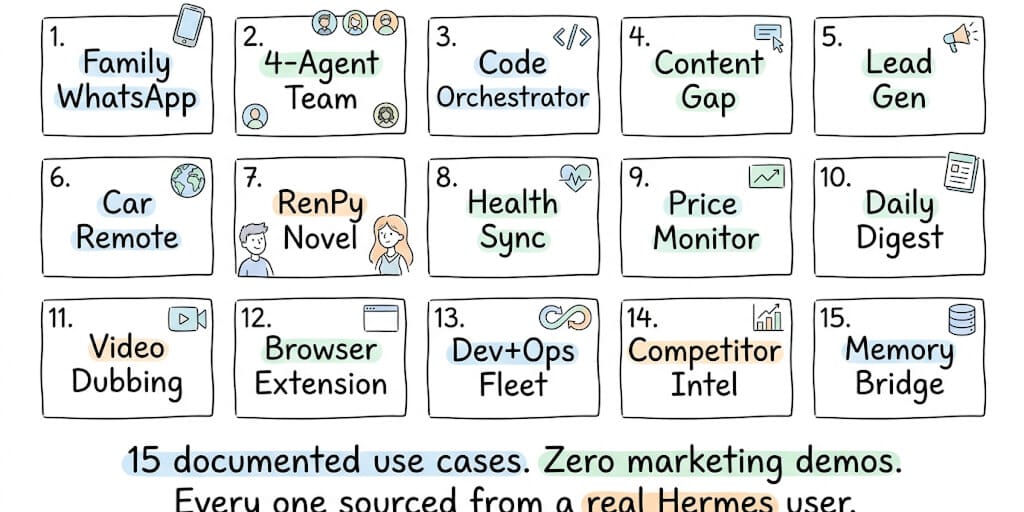
That's the use case nobody expected from Hermes. And it's one of fifteen real, documented deployments running right now. Here's the complete list, sourced from the Nous Research user stories page, community Twitter posts, and production deployment reports.
Updated October 13, 2026: Hermes has shipped eight feature releases since this list was written, from v0.14.0 in May to v0.21.0 on August 31, with patch releases up to v0.21.7 (published October 12; the release notes are dated October 11). v0.21.6 followed on October 8. Neither patch adds a new use case; v0.21.7 is the first bundled desktop, Microsoft Store and Hermes Cloud build since v0.21.5. We added six use cases those releases make possible (16-21), and each use case now comes with the command or config to set it up and the model it needs. Unlike the first fifteen, use cases 16-21 are sourced from the official release notes and docs, not from user reports.
All 21 Hermes Agent use cases at a glance
Use cases 1-15 come from real users; 16-21 come from the v0.14-v0.21 release notes. Setup effort is our estimate for someone who already has Hermes running.
| # | Use case | Who it's for | Channel | Setup effort |
|---|---|---|---|---|
| 1 | Claude Code orchestrator and reviewer | Developers | Terminal (SSH) | High |
| 2 | Cross-agent memory bridge | Developers | Plugin shared with Claude Code and Cursor | High |
| 3 | Local model inference tuning | ML developers on Apple Silicon | Terminal | High |
| 4 | Weekly content gap analysis | Creators and marketers | Telegram | Medium |
| 5 | Automated lead generation | Founders and agencies | Any chat, e.g. Slack | Medium |
| 6 | 4-agent fleet on one laptop | Sysadmins | Feishu | High |
| 7 | Car remote start and EV monitoring | Tinkerers | Any chat (custom skill) | High |
| 8 | Health data sync | Privacy-minded users | Local tool (Health Connect) | High |
| 9 | Price monitoring with alerts | Deal hunters, e-commerce | Telegram | Medium |
| 10 | Daily inbox digest | Anyone with a busy inbox | Gmail in, WhatsApp or Telegram out | Low |
| 11 | Family WhatsApp assistant | Families, non-technical users | Low | |
| 12 | RenPy visual novel generator | Hobbyists | Desktop | Medium |
| 13 | Video production handoff | Creators | Any chat + HeyGen | Medium |
| 14 | Browser translation extension | Readers and writers | Browser extension | High |
| 15 | Scheduled competitor intelligence | Founders | Slack or Discord | Medium |
| 16 | Team of named bots in one group chat | Multi-agent users | Hermes desktop app | Medium |
| 17 | Monitors that remember past alerts | Anyone running cron jobs | Telegram, Slack or any chat | Low |
| 18 | Parallel research you can steer | Analysts and founders | Discord, Slack or CLI | Medium |
| 19 | Hands-free voice assistant | Families, hands-busy users | WhatsApp voice notes, desktop | Medium |
| 20 | Logged-in errands via credential vault | Power users | Any chat | High |
| 21 | Meeting summaries in Teams | Microsoft 365 teams | Microsoft Teams | High |
Running Hermes for a whole team rather than one person? Nous now sells that as Hermes for Businesses. It is a product rather than something users have documented, so we cover it separately after use case 21 instead of numbering it.
How to read the commands below
Every command and config key below is checked against the Hermes docs (hermes-agent.nousresearch.com and the docs folder of the NousResearch/hermes-agent repo, current as of v0.21.7). Where a use case has no dedicated command, we show the config or the in-chat instruction instead and say so. Prompts in angle brackets are placeholders.
On models: every use case needs a model with tool calling and at least 64,000 tokens of context. Hermes rejects smaller windows at startup, and most hosted Claude, GPT, Gemini, Qwen and DeepSeek models clear that easily. Nous says every automation blueprint works with any model, so the "Model" line under each use case only flags where a use case needs something more. Run hermes model in your terminal to add a provider or switch the default.
The 21 Hermes Agent use cases

1. Claude Code orchestrator and reviewer
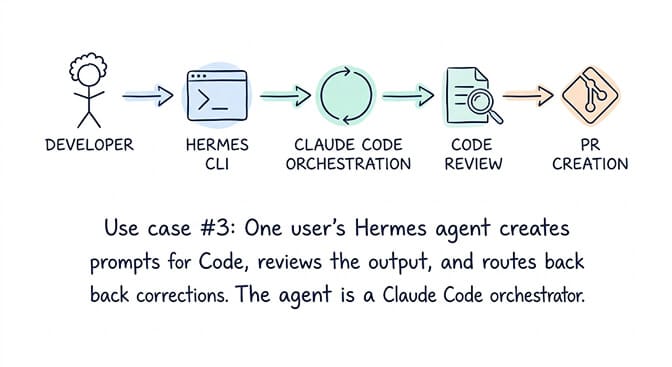
@luminousix built a bridge where Hermes creates prompts for Claude Code via SSH, reviews the output, and routes corrections back. "My Hermes agent is a Claude Code orchestrator and reviewer." One agent managing another. The meta-agent pattern.
Config: Hermes ships a bundled claude-code skill that drives the Claude Code CLI in print mode (claude -p). To run it on a remote box, point Hermes's terminal at that machine over SSH:
# ~/.hermes/config.yaml: terminal: { backend: ssh }
# ~/.hermes/.env
TERMINAL_SSH_HOST=dev-box.example.com
TERMINAL_SSH_USER=ubuntu
Then ask in chat: "Use the claude-code skill to add error handling to src/api, then review the diff and send it back with corrections."
Model: any tool-calling model for Hermes itself. Claude Code runs on its own login, separately from Hermes's model.
2. Cross-agent memory bridge
@rohitg00 built a memory provider plugin connecting agent memory to Hermes. It covers cross-agent memory between Hermes, Claude Code, and Cursor with hybrid BM25 + vector + knowledge-graph search. Your coding agent and your messaging agent share the same knowledge base.
Config: @rohitg00's plugin is community-built, so there is no official command for it. The documented route is Hermes's external memory slot, which takes one provider at a time on top of the built-in MEMORY.md and USER.md:
hermes memory setup # pick a provider: retaindb, byterover, or a catalog plugin
hermes memory status # confirm which provider is active
Model: no special requirement. The memory provider does the retrieval.
3. Local model inference tuning
@alexcovo_eth used Hermes TurboQuant skills to optimize Qwen3.5-9B-MLX on Apple Silicon. The agent applied, tested, documented, and packaged the optimization path. A repeatable ML workflow managed by the agent itself. If running models locally is your goal, our pick for the best free OpenClaw model covers the trade-offs across local options.
Config: the TurboQuant skills are community skills. Pointing Hermes at a local MLX server is documented, using the omlx server's default port from the Hermes Mac guide:
model:
provider: custom
default: Qwen3.5-9B-mlx-lm-mxfp4
base_url: http://127.0.0.1:8000/v1
context_length: 65536
Model: a local model served with at least a 64K context window. The Hermes Mac guide benchmarks Qwen3.5-9B on both llama.cpp and MLX.
4. Content gap analysis (automated weekly)
MindStudio documented this: Hermes scraped a YouTube channel, compared recent uploads to industry news, and identified five content gaps. Set as a cron job, it delivers a weekly competitive intelligence report to Telegram without manual intervention.
Command: a weekly cron job (9:00 every Monday) with the bundled youtube-content skill attached:
hermes cron create "0 9 * * 1" \
"Compare the last 10 uploads on <channel URL> with this week's industry news and list 5 content gaps." \
--skill youtube-content \
--name "Weekly content gaps" \
--deliver telegram
Model: any tool-calling model. The news half uses Hermes's web search tool, which defaults to Firecrawl.
5. Automated lead generation
Same MindStudio demo: "Scrape the internet for Northwest London plumbing businesses, find leads that don't have a website, return three qualified leads so I can pitch them an AI-built website." Hermes found the businesses, verified they lacked websites, and generated personalized pitch angles. Running on a $0.24/hour CPU instance.
In-chat instruction (there is no dedicated command; this is a plain prompt in any connected chat, such as Slack):
Search for plumbing businesses in Northwest London, keep only the ones with no website,
and give me three qualified leads with a one-line pitch angle for each.
Model: any hosted tool-calling model. With the model hosted elsewhere, the machine only runs Hermes, which is why a CPU instance is enough.
For the comparison between Hermes and OpenClaw's approach to automation, our comparison page covers the architectural differences.
6. 4-agent fleet on one laptop
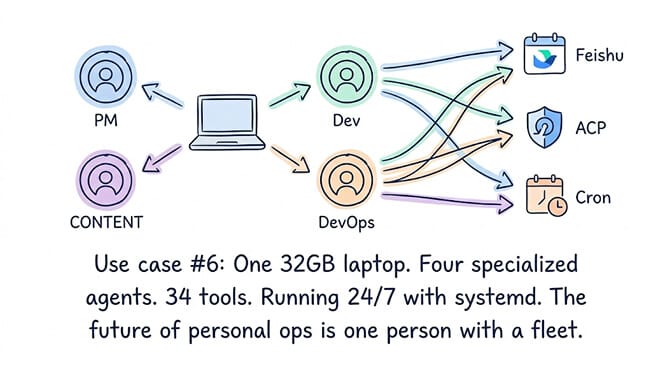
@ones_07389 runs a 4-agent Hermes system 24/7 on a 32GB Ubuntu laptop managed by systemd + custom watchdog. Default agent (PM) on Feishu WebSocket. Dev agent, DevOps agent, and content agent delegated via ACP. 5 MCP servers. 34 tools. Self-learning distillation cron at 04:30 daily. This is a production multi-agent deployment on consumer hardware.
Command: the setup above used ACP. Today the documented way to run named agents side by side is one profile per agent, with the kanban board to hand work between them and a systemd service to keep it up:
hermes profile create dev
hermes profile create devops
hermes profile create content
hermes kanban create "Draft this week's release notes" --assignee content
hermes gateway install # systemd (Linux) or launchd (macOS) service
Feishu runs over WebSocket with FEISHU_CONNECTION_MODE=websocket in ~/.hermes/.env. If you'd rather contain the fleet, our Hermes Docker install guide covers the official image.
Model: each profile has its own config, so each agent can run a different model. A cheap model for content and a stronger one for dev is a common split.

7. Car remote start and EV monitoring
@gwyntel built a skill to remote start their car, check EV battery level, and monitor charging status from Hermes. "I noticed nobody else had made a skill for it, so here's mine." IoT meets AI agent.
Config: there is no official car skill, so this is a custom skill. Any folder under ~/.hermes/skills/ with a SKILL.md is picked up automatically, no registration needed:
---
name: car-remote
description: Remote start the car and report EV battery and charging status
version: 1.0.0
---
Save it as ~/.hermes/skills/smart-home/car-remote/SKILL.md, then add the steps that call your car maker's API below the frontmatter.
Model: any tool-calling model. The skill does the device work.
8. Health data sync
@wysie_ built a standalone tool designed to work with Hermes. Connect HC Webhook (a Play Store app) and sync Health Connect data locally. The agent processes health metrics without sending personal data to cloud APIs. Privacy-first health monitoring.
Command: @wysie_'s tool does its own sync. If you want Hermes itself to receive pushed data, the documented route is a webhook subscription (the webhook platform must be enabled first with hermes gateway setup):
hermes webhook subscribe health-sync \
--prompt "New Health Connect data: {__raw__}. Log it and flag anything unusual." \
--deliver log \
--description "Health Connect sync"
Model: a local model (use case 3 shows the config) if the point is keeping health data off cloud APIs. A hosted model would see the data.
9. Price monitoring with alerts
MindStudio tested this: Hermes monitored Autotrader listings and flagged mispriced supercars. Scheduled as a cron job, it delivers deal alerts to Telegram. The same pattern works for competitor pricing, stock alerts, or real estate listings.
Command: Hermes now bundles a product-price-monitor skill. Run its setup once in chat (define the exact listing and alert rule), then schedule the check. --continuity stops it re-alerting on the same listing (see use case 17):
hermes cron create "every 6h" \
"Check my Autotrader watch and alert on any listing priced well under market." \
--skill product-price-monitor \
--continuity \
--deliver telegram
Model: any tool-calling model.
10. Daily inbox digest
Multiple users run this: Hermes summarizes email every morning, extracts action items, and delivers a clean briefing to WhatsApp or Telegram before you open your laptop. The most common Hermes cron job after heartbeat.
Command: the bundled email-inbox-triage skill does the prioritizing and defaults to read and draft, never send or delete. Pair it with the google-workspace skill for Gmail:
hermes cron create "every 1d at 07:00" \
"Triage the last 24 hours of email: urgent threads, action items, drafts for anything that needs a reply." \
--skill email-inbox-triage \
--skill google-workspace \
--deliver whatsapp
Our Hermes Gmail triage guide covers the Gmail side step by step.
Model: any tool-calling model.
If the daily digest, inbox triage, and messaging automation use cases are what you need but setting up Hermes on your own hardware sounds like more infrastructure work than you want, BetterClaw handles always-on messaging agents with zero setup. Same Telegram/Slack/Discord automation. No laptop running 24/7. No systemd. No custom watchdog. Free tier with 1 agent and BYOK. $49/month for Pro.
If it's Hermes itself rather than the use case that isn't working for you, our ranked list of Hermes Agent alternatives compares six options by how long each takes to get a working agent.

11. Family WhatsApp assistant
@EXM7777's setup. Three family members sharing one Hermes agent on WhatsApp. The agent handles different use cases for each person and has "magic proactive behaviors" that surface relevant information before being asked. Cost: one ChatGPT subscription ($200/month for the model access). The agent lives inside WhatsApp, which is why non-technical family members actually use it.
Command: pair WhatsApp, allow each family member's number (country code, no +), then install the gateway as a service:
hermes whatsapp # mode selection and QR-code pairing
# then in ~/.hermes/.env:
# WHATSAPP_ALLOWED_USERS=15551234567,15557654321
hermes gateway install # keep it running in the background
Model: @EXM7777 used a ChatGPT subscription. In Hermes that's hermes model → "ChatGPT or Codex Subscription", which signs in with ChatGPT and uses Codex models. The Hermes docs don't yet say how that usage counts against your plan's limits.
12. RenPy visual novel generator
@ExileAI_0: "It found ComfyUI, figured out how to generate images locally with LM Studio, then asked me to turn on the internet to install RenPy. About 10 minutes later there popped up a small but complete RenPy novel with 10 images and a little story." The agent autonomously discovered tools, installed software, generated assets, and assembled a complete creative project.
Command: the agent found ComfyUI on its own here. Hermes now has an official optional ComfyUI skill, so you can install it up front and then ask in chat:
hermes skills install official/creative/comfyui
# then in chat: "Make a short RenPy visual novel with 10 locally generated images."
Model: any tool-calling model. The images come from ComfyUI on your own machine, not from the LLM.
13. Video production handoff
@vicky_dyor gave Hermes a screen recording and asked for a setup tutorial. The agent produced a HeyGen video with her avatar and kept preferences in memory for follow-up work. Creative production initiated from a prompt and delivered as a finished video.
Command: neither Hermes's bundled skills nor its official optional catalog include a HeyGen skill, so this one is an in-chat instruction to an agent that can reach HeyGen. The closest documented route is the official AI presenter video skill (script plus image to presenter video), which is not HeyGen:
hermes skills install official/creative/ai-presenter-video
Model: any tool-calling model. The avatar video is rendered by HeyGen or the skill's own pipeline, not by the LLM.

14. Browser translation extension
@misswuhanliang developed HermesAI Translator, an open-source browser extension for translation, reading assistance, text polishing, and summarization powered by the Hermes-4-70B model. A consumer product built on top of the Hermes ecosystem.
Config: an extension like this can call the model directly. To put Hermes Agent itself behind a browser extension, turn on its OpenAI-compatible API server, which serves /v1/chat/completions on port 8642 once you run hermes gateway:
# ~/.hermes/.env
API_SERVER_ENABLED=true
API_SERVER_KEY=<long-random-key>
API_SERVER_CORS_ORIGINS=<your extension's origin>
Keep the CORS list narrow: the API server exposes Hermes's full toolset, including terminal commands.
Model: HermesAI Translator runs on Nous's Hermes-4-70B. Through the API server, any model you've configured works.
15. Competitor intelligence (scheduled)
Hermes scrapes competitor websites on a schedule and delivers a formatted report every Monday. MindStudio confirmed: "The difference between a task you run once and a task that runs every week without you touching it is the difference between a tool and a system."
Command: Hermes now bundles a competitor-news-monitor skill. Freeze the watchlist once in chat, then schedule it:
hermes cron create "every monday 9am" \
"Check <competitor list> for pricing changes, launches, funding and incidents." \
--skill competitor-news-monitor \
--continuity \
--deliver slack
Swap --deliver slack for discord to post there instead. Our Slack and Discord setup guides cover connecting each one.
Model: any tool-calling model.
16. A team of named bots in one group chat
v0.21.0 ("Pantheon", August 31, 2026) built Bot Mode into the desktop app. Every agent profile gets a name and an avatar. You can create Discord-style group chats where several bots and you talk in one room, and @-mention any bot from the composer. The same release added hermes peer, which lets a bot message a bot on another machine. The release notes' example: ask your research bot to hand its findings to your coding bot and get the reply back where you can read it. It's the 4-agent fleet from use case 6, without the ACP plumbing.
Command: a Bot is a Hermes profile, so create the bots from the CLI. Group chats themselves are made in the desktop app's Bots tab; there's no CLI command for them:
hermes profile create researcher --description "Reads sources, writes findings."
hermes profile create coder
hermes -p researcher chat # the same agent as the Bot in the desktop app
hermes peer add spark --url http://spark.lan:8377 --key <API_SERVER_KEY> # a bot on another machine
Model: each Bot has its own model, so the researcher and the coder can run different ones.
17. Monitors that remember what they already told you
Also in v0.21.0, cron jobs load and update persistent memory like any other agent. continuity=true feeds each run its own previous output, so a price watcher (use case 9) or a news scout stops re-alerting on the same thing. Monitor-mode jobs skip the LLM entirely when nothing changed, and every job gets a durable notepad. In the release notes' words: "Your 9am briefing job now knows what it told you yesterday."
Command:
hermes cron create "every 6h" "Scan for news" --continuity --deliver telegram
hermes cron edit <job_id> --continuity # turn it on for an existing job
Model: any tool-calling model. Quiet monitor ticks make no LLM call at all.
18. Parallel research you can steer mid-flight
delegate_task grew in three steps. v0.17.0 added background subagents that don't block your chat. v0.18.0 added background fan-out, where several subagents' results come back as one consolidated turn ("research these five competitors in parallel"). v0.21.0 made them steerable while they run: list the children, send one a course correction, or stop it early and keep the partial result. Since v0.19.0, each child also writes a live transcript you can tail -f. Use cases 4 and 15 become one fan-out job.
Config plus in-chat instruction: there's no CLI command; you ask in chat ("Research these five competitors in parallel and give me one comparison"). In the classic CLI, Ctrl+T opens the live roster where you can steer or stop a child; in the TUI it's /agents. To run the workers on a cheaper model:
delegation:
model: "<cheaper-model>" # every delegate_task child runs on this
provider: "openrouter" # optional: route children to a different provider
Model: a strong main model to plan and merge, and optionally a cheaper delegation.model for the workers. Children inherit the main model if you leave it unset.
19. A hands-free voice assistant
v0.20.0 (August 3, 2026) added streaming conversational voice with barge-in, so you can interrupt mid-sentence. It also added on-device wake words ("hey Hermes", or a phrase you choose), with no audio leaving your machine while it waits. You can send a voice note on WhatsApp, Feishu, DingTalk, LINE, QQ, Photon or Weixin and get a transcribed, spoken answer back. The family WhatsApp assistant (use case 11) no longer needs anyone to type.
Config:
stt:
provider: "local" # free local transcription; or groq, openai, mistral, xai, elevenlabs
wake_word:
enabled: true
phrase: "hey hermes"
In the CLI, /voice on turns voice mode on; in Telegram and Discord, /voice on makes the bot answer voice messages with voice.
Model: any chat model. Speech-to-text and text-to-speech are separate providers, and local transcription costs nothing.
20. Errands that need a login, without handing over the password
v0.21.2 (September 11, 2026) added a password-blind credential vault. The agent can sign in, pay, and fill in addresses from 1Password, Bitwarden or the local Hermes vault without ever seeing the secret. Two-factor codes come from a saved authenticator key or are asked for in your UI. v0.19.0 had already let Hermes pull API keys from Bitwarden and 1Password instead of a plaintext .env. Treat this as the riskiest item on the list: an agent that can pay can also pay for the wrong thing, so keep approvals on.
Config: per the docs there is nothing to set up. Say "log into GitHub" and Hermes asks for the login in a masked prompt the first time. The vault block only matters if you want to pick a password manager account or opt one out:
vault:
onepassword:
account: "" # `op --account` shorthand; empty = default
bitwarden:
enabled: false # opt out of a detected manager
Model: any model. The password is filled straight into the page and never reaches the model's context.
21. Meeting summaries posted into Microsoft Teams
v0.14.0 (May 16, 2026) shipped Teams end to end, including a meeting pipeline. It fetches transcripts through Microsoft Graph, summarizes them, and posts the summary into a Teams chat or channel. The catch is operational: Graph subscriptions expire within 72 hours, so you have to schedule hermes teams-pipeline maintain-subscriptions. Our Hermes Teams setup guide walks through it.
Command: enable the pipeline plugin, check it, then renew subscriptions every 12 hours with a script-only cron job (the script just runs hermes teams-pipeline maintain-subscriptions and lives in ~/.hermes/scripts/):
hermes plugins enable teams_pipeline
hermes teams-pipeline validate
hermes cron create "0 */12 * * *" --name "teams-pipeline-maintain-subscriptions" \
--no-agent --script maintain-teams-subscriptions.sh --deliver local
Model: any tool-calling model for the summaries. The renewal job runs no LLM at all.
One more that's easy to miss: since v0.20.0, Hermes can push signed events (session activity, turn completions, tool events) to any HTTP endpoint you register. That turns "the agent finished" into a trigger for your CI, dashboards or home automation.
Team use case: Hermes for Businesses
This one is different from the 21 above. It is not something users have documented running, or a feature in the open-source release notes. It is Nous Research's paid team product, sold through the Nous Portal.
On October 7, 2026, Nous published "A Note on Our Fundraise", announcing $90 million from NVIDIA, M12, Samsung, USV, YC, Menlo and others. The post says Nous "will build and deliver Hermes for Businesses", in the future tense. The Hermes Business page on the Nous Portal (the navigation also calls it "Hermes Teams") now has a "Create your team" button, but it shows no price.
What the page describes:
- One central team balance. "One central balance funds the team" instead of each person topping up their own account.
- Per-member spend caps. Members draw from that balance "with per-member spend caps you set", and owners and admins see every dollar in the portal.
- A shared team skill library. Skills any member builds are published to the team library and become available to everyone's agent. This is the "gets smarter over time" pattern from below, applied to a team instead of one person.
- Team Gateway. One gateway for the team's Discord, Telegram, Slack and WhatsApp, plus the terminal, desktop apps and the cloud.
- Roles. You invite members by email from the Team page. Owners and admins manage roles, spend caps and API keys; members just sign in and use their agents.
- A separate Enterprise tier. Business runs on Nous infrastructure with self-serve setup; Enterprise runs on infrastructure you control, with SSO, SLAs and white-glove onboarding.
Setup: the Hermes docs have no CLI command for teams. You set it up in the Portal: create the team, set a cap per member, invite people by email.
The obvious fits are the shared use cases already on this list: a team version of the competitor report (use case 15), the lead generation job (use case 5), or a shared assistant in your team's Slack or Discord. Until Nous publishes pricing, budget a pilot with a small balance and tight per-member caps, or keep running the open-source gateway.
The pattern across all 15 (what actually matters)
Here's what nobody tells you about these use cases.
The common thread isn't AI capability. It's persistence. Every use case above works because Hermes runs continuously, remembers across sessions, and operates through messaging channels the user already uses. The AI model does the thinking. The infrastructure does the living. If you would rather not own that infrastructure, a hosted AI agent builder supplies the persistence layer for you.
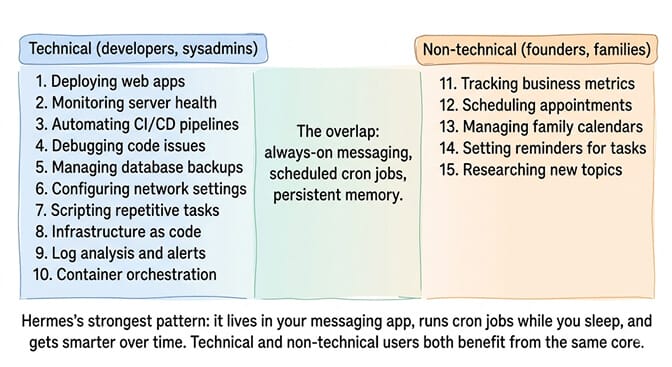
Three patterns repeat across all 15:
Pattern 1: Lives in messaging. WhatsApp, Telegram, Discord, Feishu. The agent is where the user already is. Not a separate app. Not a browser tab. A chat thread.
Pattern 2: Runs on schedule. Cron jobs for daily digests, weekly reports, price monitoring, content analysis. The agent works while the user sleeps. Since v0.21.0, those jobs also remember their previous runs.
Pattern 3: Gets smarter over time. Persistent memory (MEMORY.md, USER.md) and self-created skills. The agent learns the user's preferences and builds reusable playbooks from experience.
These three patterns are exactly what BetterClaw provides as a managed platform. If you want the messaging integration, scheduled automation, and persistent memory without managing your own Hermes or OpenClaw infrastructure, give BetterClaw a try. Free tier with 1 agent and BYOK. $49/month for Pro with 5 agents. Telegram, Slack, Discord and Gmail, plus webhooks and 500+ connectors. Persistent hybrid memory. Scheduled tasks. 60-second deploy. The patterns are the same. The infrastructure management is ours.
Frequently Asked Questions
What is Hermes Agent used for?
Hermes Agent is used for always-on AI automation across messaging platforms. The 15 most common use cases include daily inbox digests, multi-agent team coordination, code review orchestration, competitive intelligence, lead generation, price monitoring, and family WhatsApp assistants. It differentiates from chatbots through persistent memory, cron scheduling, and self-improving skills. Newer releases added bot group chats and bot-to-bot messaging (v0.21.0), cron jobs with memory (v0.21.0), steerable parallel subagents, voice with wake words (v0.20.0), and a password-blind credential vault (v0.21.2).
What can Hermes Agent do?
Hermes Agent can orchestrate and review Claude Code, share memory with other coding agents, tune local models, run weekly content gap reports, generate sales leads, run a multi-agent fleet on one laptop, control a car through a custom skill, process health data locally, watch prices, send a daily inbox digest, act as a family WhatsApp assistant, build a RenPy visual novel, hand off video production, power a browser translation extension, deliver scheduled competitor intelligence, run named bots in one group chat, keep monitors that remember past alerts, fan out parallel research you can steer, work as a hands-free voice assistant, run logged-in errands through a password-blind vault, and post meeting summaries into Microsoft Teams.
How does Hermes Agent compare to OpenClaw for these use cases?
Both handle similar automation patterns. Hermes has stronger goal persistence (/goal, Kanban), self-maintaining skills (Curator), and tighter security defaults (redaction on by default). OpenClaw has the larger ecosystem: roughly 390,000 GitHub stars to Hermes's roughly 250,000 as of October 2026. BetterClaw provides the same patterns as a managed platform without self-hosting either framework; see how Hermes Agent compares with BetterClaw.
Can non-technical users set up Hermes Agent?
For basic use cases (WhatsApp assistant, daily digests), yes. The hermes setup wizard handles most configuration. For advanced use cases (multi-agent fleets, custom skills, MCP integration), technical knowledge is needed. BetterClaw offers a no-code alternative with similar always-on messaging capabilities. Free tier available.
How much does it cost to run Hermes Agent?
Hermes itself is free (open-source). Costs come from model API access (per-token prices vary widely by model) and infrastructure (your own hardware or a VPS at $5-10/month). Nous also hosts it as Hermes Cloud: Standard is $0.51/day while running (2 vCPU, 2 GB RAM) and Pro is $0.99/day (4 vCPU, 4 GB), both $0.03/day when stopped, billed daily with inference and tool usage on top. One user runs a 4-agent fleet on a consumer laptop. Another runs on a $0.24/hour CPU instance. BetterClaw offers managed deployment at $0 (Free plan: 1 agent, 100 credits/month, BYOK) or $49/month (Pro, 5 agents).
Is Hermes Agent reliable enough for production use cases?
For the use cases documented here, yes. Multiple users report weeks of continuous uptime with systemd. However, releases move fast and each one brings fixes and regressions. v0.21.0 (August 31) shipped a session-store rewrite that corrupted state.db on some installs until v0.21.2 fixed it on September 11. Native Windows is now installable with a PowerShell one-liner, and the Hermes docs now call WSL2 an alternative rather than a requirement. Pin a release tag for anything you depend on, and back up with hermes update --backup before upgrading. When something does break, our roundup of Hermes Agent bugs and fixes covers the most reported failures on the current release. For production reliability without infrastructure management, BetterClaw offers managed deployment with health monitoring and auto-pause on anomalies.