
An "auth handler error authenticating" in Hermes Agent means the provider refused the credential Hermes sent. That is usually not the same as a bad key. On older builds it is often a rate limit (HTTP 429) wearing an auth label, or a stale .env value sent in place of your real secret. On current builds it is most often an xAI OAuth token or tier problem, a provider-side 401, or a plan or region mismatch.
Not an auth error? Find yours in the Hermes error lookup table.
Checked against Hermes v0.23.1 (9 November 2026), the Hermes docs and source on GitHub, and each issue's status on 10 November 2026. Two of the five causes below are fixed in current releases but still hit anyone on an older install, so they stay on the list with the version that fixed them.
If you are not sure auth is even the layer that is broken, our Hermes Agent not working guide sorts every failure by where it happens.
Cause 1: A 429 reported as an auth failure (fixed, update to clear it)
GitHub issue #89401, "Quota exhaustion (429) is reported to chat as 'Provider authentication failed'", was opened on 18 August 2026 and closed as fixed on 19 September 2026.
What happened: your provider ran out of quota and returned HTTP 429. The gateway log recorded it correctly, but the message that landed in Telegram or Discord told you to check your credentials, because the gateway tested for auth errors before rate-limit errors. So people rotated keys that were never the problem.
The fix is in v0.21.7 and every later release. The gateway now checks for rate limits first, and the source says why: "re-auth can never fix a quota". On a current build a quota error reads "The AI model service is rate-limiting requests. Wait a moment, then use /retry." and a real auth failure reads "Sign-in to the AI model service failed."
What to do:
- Run
hermes update. - Until you can update, trust the log over the chat message:
hermes logs gateway -n 100(logs live in~/.hermes/logs/, andhermes logs listshows every file, including rotated ones). - If you see 429, quota or rate limit near the failure, stop debugging your key. Wait out the window, add a fallback provider or top up the account.
Cause 2: A stale .env value overwrites the secret you resolved (fixed, update to clear it)
This one hit people who keep secrets in Bitwarden Secrets Manager or another external source and leave placeholder lines like TELEGRAM_BOT_TOKEN=__BITWARDEN_MANAGED__ in ~/.hermes/.env.
What happened: the gateway resolved the real secret on its first pass, then loaded .env again during startup with override switched on, and the placeholder string won. The adapter then authenticated with the literal text __BITWARDEN_MANAGED__, and the platform rejected it on every reconnect.
The symptom is an auth rejection that quotes a value you never set as a key, for example "The token __BITWARDEN_MANAGED__ was rejected by the server."
The fix: Hermes's environment loader now re-applies the values your secret source resolved after every .env load. The source code comment cites the original issue, #74265, and the fix ships in v0.21.7 and later. (The issue page itself no longer loads on GitHub.) Run hermes update. If you cannot update yet, comment out every KEY=__BITWARDEN_MANAGED__ line so there is nothing to overwrite, then restart the gateway:
sed -i 's/^\(.*=__BITWARDEN_MANAGED__\)$/# \1/' ~/.hermes/.env
The general lesson survives beyond Bitwarden: if an auth error quotes a credential value that is not your key, something in the load order is winning over the credential you configured.
Cause 3: HTTP 403 on xAI Grok after a successful login (stale OAuth token)
GitHub issue #108122 was opened on 11 September 2026 and is still open (P2). You sign in with hermes auth add xai-oauth, it succeeds, inference works, and then hours later every request returns 403 unauthenticated:bad-credentials.
Why it happens: when another Hermes process sharing the grant rotates the xAI token, a long-running gateway keeps sending the old one. Hermes's automatic refresh-and-retry fires on HTTP 401, and xAI signals a stale token with 403, so the recovery path never runs. OpenAI Codex sign-ins have a similar rotation problem: for the exact "Codex token refresh failed with status 401" message, see the Codex token refresh failed decoder.
The fix: restart the gateway. Re-running the login does not help.
We cover the full diagnosis, the exact error strings and the workarounds in the Grok on Hermes Agent guide.
Cause 4: HTTP 403 on xAI Grok because your subscription tier is gated
GitHub issue #26847 was opened on 16 May 2026 and closed as not planned. OAuth login and token storage both succeed, but every inference call returns 403 saying the caller "does not have permission" or has "no active Grok subscription", even with a live SuperGrok subscription.
Why it happens: xAI enforces its own allowlist on OAuth API access. The issue was closed as not planned because it is xAI's gate, not a Hermes bug, which is why it can still hit you.
The fix: stop using OAuth for this account. Get a key from console.x.ai and add it with hermes auth add xai --api-key <your key> (or set XAI_API_KEY), then switch to provider: xai. The Grok on Hermes Agent guide has the full decision tree for which of the two 403s you are looking at. If you pay for SuperGrok mainly to run agents, our Grok Bot vs BetterClaw comparison covers xAI's own agent and its usage limits.
Cause 5: Intermittent 401 on a valid key (MiniMax, GLM)

GitHub issue #8283, "Intermittent HTTP 401 authentication_error on valid API keys (MiniMax M2.7, GLM)", was opened on 12 April 2026 and closed as not planned. The reporter's summary: most requests succeed, some randomly fail with 401, the key is valid, and reinstalling Hermes three times changed nothing.
What happens: the failure is provider-side, from load balancer state, regional key propagation delay, or rate limiting returned as 401 instead of 429. Closing it as not planned is the maintainers saying it is not a Hermes bug, which also means the behaviour is still there when you hit it.
The fix: configure a fallback provider so a random 401 on the primary is caught rather than surfaced, add a second key to the same provider's credential pool with hermes auth add, or move to an aggregator such as OpenRouter that retries across backends. If every request fails with "Error: Invalid API key", not just some, see the Hermes invalid API key decoder.
If debugging rate limits, dotenv load order, OAuth token rotation, subscription tier allowlists and provider-side flakiness sounds like more authentication plumbing than agent building, BetterClaw handles provider authentication at the platform level. Paste one API key. Select a model. The platform handles the rest. No .env files. No OAuth routing. Free tier with 1 agent and BYOK. $49/month for Pro.
How to use hermes auth add (Anthropic, OpenAI, xAI)
hermes auth add saves a credential to Hermes's credential pool in ~/.hermes/auth.json. The basic form is hermes auth add <provider>, plus --type api-key --api-key <key> for a key or --type oauth for a browser sign-in. Run it without flags and Hermes prompts you, defaulting to sign-in for providers that support it. These commands match the Hermes CLI reference and credential pool docs for v0.23:
# Anthropic: API key from console.anthropic.com
hermes auth add anthropic --type api-key --api-key sk-ant-...

# Anthropic: sign in with your Claude account (Claude Max plus extra usage credits only)
hermes auth add anthropic --type oauth

# OpenAI: API key
hermes auth add openai-api --api-key sk-...

# OpenAI: sign in with a ChatGPT or Codex subscription (device code by default)
hermes auth add openai-codex
hermes auth add openai-codex --browser    # browser sign-in on localhost:1455 instead

# xAI: API key from console.x.ai
hermes auth add xai --api-key xai-...

# xAI: sign in with SuperGrok or X Premium+
hermes auth add xai-oauth
Useful flags and companions:
--label <name>names the credential, and--priority 0puts it first in the rotation order.hermes auth listshows every saved credential, andhermes auth status anthropicshows one provider's state.hermes auth remove <provider> <number>deletes one, andhermes auth logout <provider>clears a sign-in.hermes -p <profile> auth add <provider>adds the credential to one profile only. If one profile gets a 401 while another works, check that the key was added to that profile.
The same command covers other providers too, for example hermes auth add openrouter --api-key sk-or-... or hermes auth add nous for a Nous Portal sign-in. An unknown provider name fails with a "did you mean" hint; hermes auth on its own opens an interactive wizard with the full list.
Provider-specific 401s: Anthropic and Qwen
Two providers produce 401s that look like a bad key but are really a setup mismatch.
Anthropic: OAuth on the wrong Claude plan
Per the Hermes docs, Anthropic OAuth only works on Claude Max with purchased extra usage credits, and it bills only those extra credits, never the base Max allowance. Claude Pro is not enough for OAuth, so Pro users should use an API key from console.anthropic.com instead, either with hermes auth add anthropic --type api-key --api-key sk-ant-... or by setting ANTHROPIC_API_KEY in ~/.hermes/.env. A setup-token in ANTHROPIC_TOKEN also works. hermes model, then picking Anthropic, walks through the same choices.
Qwen: your DashScope key is for the other region
The Hermes docs don't name a cause for Qwen 401s, but the GitHub issues point to the same one: region mismatch. Alibaba Cloud DashScope keys only work in the region they were issued in. Hermes has two providers for it, alibaba (international) and alibaba-cn (mainland China), and both read the same DASHSCOPE_API_KEY. Put an international key behind alibaba-cn, or a mainland key behind alibaba, and every request returns 401 even though the key is valid.
The fix: run hermes model and pick the provider that matches the region your key came from.
Three related traps:
- Coding Plan and Token Plan keys are separate. They have their own key variables (and their own China variants). A regular DashScope key in a plan variable, or the other way round, also 401s.
hermes doctorcan show a false ✗. It can point at the wrong key for Qwen (#136791, still open on 10 November 2026). If your requests work, ignore that line.- Qwen OAuth is a different provider. Signing in at portal.qwen.ai uses the
qwen-oauthprovider, notalibaba. Don't mix its login with a DashScope key.
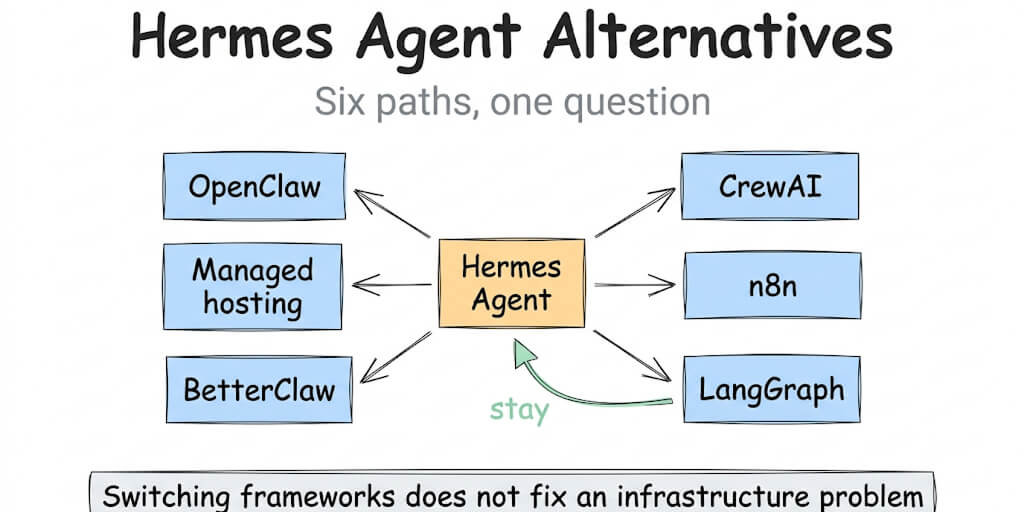
Weighing a move off Hermes altogether? Our Hermes Agent alternatives guide compares six options on setup time, hosting and cost.
Fixed since April: check your version before you debug

These were the headline auth bugs in spring 2026. All of them are now closed, so if you are running a current build you should not see them, and if you are seeing them, the fix is hermes update, not more .env surgery.
API key drift on provider switch: #14134, closed (P1). _model_flow_api_key_provider() failed to clear the previous provider's key, so switching from OpenRouter to MiniMax left the old key in play.
OpenRouter "User not found" 401: #14637, closed (P1). The widely-cited report where the key, the credits, and a direct curl all checked out but Hermes still returned AuthenticationError [HTTP 401] User not found. Closed.

Setup wizard silently skipping the key prompt: #16394, closed, merged via PR #20162. hermes setup used to skip the API-key prompt whenever any value already existed in ~/.hermes/.env. The merged change adds a keep / replace / clear choice. This same quirk used to trip people during a fresh install, as covered in our Hermes Agent installation errors guide.
Anthropic OAuth misrouting: #12905, closed. A single report of six interlocking bugs in the v0.10.0 Anthropic OAuth path, including requests dispatched with a stringified Authorization: Bearer None header and tokens concatenated into .env without an idempotency check. The one finding worth carrying forward is a billing fact rather than a code bug: third-party OAuth clients were billed separately instead of drawing on the subscription quota. A direct API key from console.anthropic.com still avoids the whole question.
Dual Gemini auth headers: #7893, closed. Hermes injected x-goog-api-key while the OpenAI SDK injected Authorization: Bearer, and Google rejected the request with 400 "Multiple authentication credentials received." It overlapped with the Hermes Agent error 400 guide, which covers the same bug from the 400 side.

One correction to an earlier version of this post: we previously listed an Ubuntu paste bug in the setup wizard, where hermes setup prompted for "Paste your API key:" and the terminal accepted no input. The issue number we cited no longer resolves on GitHub, and we could not re-confirm the report from any primary source, so treat it as unverified rather than as a known bug. If a prompt does freeze on you, the workaround is unchanged and harmless: skip the wizard, put the key straight into ~/.hermes/.env (for example OPENROUTER_API_KEY=sk-or-...), and run hermes model to pick the provider and model.
For the broader comparison of agent authentication approaches, our comparison covers how different platforms handle credential management.
If you want authentication that works without debugging log classifiers, dotenv load order and OAuth rotation windows, give BetterClaw a try. Free tier with 1 agent and BYOK. $49/month for Pro. Paste one key. Pick a model. The auth is handled.
Frequently Asked Questions
What does auth handler error authenticating mean in Hermes?
It means the model provider refused the credential Hermes sent. On builds older than v0.21.7 that is often a 429 quota error shown as an auth failure, or a .env placeholder sent in place of your real secret. On current builds the usual causes are a stale xAI OAuth token, an xAI subscription gate, provider-side 401s, or an Anthropic plan or Qwen region mismatch. Check hermes logs gateway first.
How do I run hermes auth add?
Run hermes auth add <provider> and follow the prompt, or pass everything at once: hermes auth add anthropic --type api-key --api-key sk-ant-... for a key, or hermes auth add anthropic --type oauth for a browser sign-in. Provider names include anthropic, openai-api, openai-codex, xai, xai-oauth, openrouter and nous. Check the result with hermes auth list.
Why does xAI return 403 in Hermes?
There are two unrelated causes, and the error text tells them apart. "Does not have permission" or "no active Grok subscription" means xAI is gating OAuth API access by subscription tier, so switch to an xAI API key. "unauthenticated:bad-credentials" on a gateway that has been up for hours means the OAuth token rotated underneath it, so restart the gateway. Re-running the login does not fix the second one.
Why does a valid key get 401 in Hermes?
Usually because the key does not match the route Hermes uses. Anthropic OAuth needs Claude Max with extra usage credits, Qwen DashScope keys only work in their own region, and each profile keeps its own credentials. If the same key fails only some of the time, the provider is returning 401s from its own side, so add a fallback provider or a second pooled key.
How do I verify my Hermes API key is correct?
Three checks. Run hermes auth list to confirm the key is saved for the provider you expect, and grep -i key ~/.hermes/.env to make sure no secret-manager placeholder sits there instead. Then test the key outside Hermes with a curl call to the provider's models endpoint. If curl works and Hermes does not, the problem is in Hermes's resolution path or version, not your key.
Does BetterClaw have the same auth issues?
No. BetterClaw manages provider authentication at the platform level. You paste one API key per provider in the dashboard, and the platform handles endpoint routing, header formatting and credential storage. There are no .env files to keep in sync, no OAuth token rotation to babysit and no key drift between providers. Free tier with 1 agent and BYOK, and $49 a month for Pro.